


Why Automate YC Startup Scraping?
Y Combinator has funded over 4,000 startups since 2005, making its directory one of the most valuable datasets for investors, founders, recruiters, and market researchers. Manually browsing through hundreds of company pages to collect names, batch years, industries, and descriptions is tedious and error-prone. By automating this process with Browser Automation, you can extract the entire directory — or a filtered subset — in minutes instead of days.
Whether you are building a prospect list, researching a competitive landscape, or tracking emerging industries, having this data in a structured spreadsheet unlocks powerful filtering, sorting, and analysis that the YC website alone does not offer.
How the AI Agent Scrapes YC
Autonoly's AI Agent Chat works differently from traditional scraping tools. Instead of writing CSS selectors or XPath expressions, you describe what you want in plain English. The agent launches a real browser session, navigates to the Y Combinator directory, and intelligently identifies the data fields on each company card.
The Data Extraction engine handles dynamic content loading, infinite scroll pagination, and JavaScript-rendered elements that static HTTP scrapers miss entirely. Because the agent uses a real Chromium browser, it sees the page exactly as a human would — including content loaded lazily or behind client-side routing.
During extraction, the agent applies pattern recognition to detect repeating elements on the page. For the YC directory, it identifies each startup card as a repeating unit, then extracts the same set of fields from every card: company name, one-line description, batch (e.g., W24, S23), industry tags, location, team size, and website URL.
What Data You Get
A typical export includes the following columns:
Company Name — The official startup name
Batch — The YC batch (e.g., W09, S21, W24)
Industry — Primary category tags like Fintech, SaaS, Healthcare
Description — The one-liner from the YC directory
Location — Headquarters city and country
Team Size — Approximate employee count range
Website — Direct link to the startup's homepage
You can customize which fields to include by simply telling the agent. If you need founder names, LinkedIn URLs, or funding amounts that appear on individual company detail pages, the agent can navigate into each listing to collect deeper data.
Customizing Your Extraction
The Visual Workflow Builder lets you turn a one-time scrape into a reusable workflow. Add filters to target specific batches (e.g., only W24 companies), industries (e.g., only AI/ML startups), or regions. You can also chain additional steps:
Enrichment: After scraping, use a Data Processing node to clean company names or normalize industry labels.
Deduplication: Remove duplicate entries that occasionally appear when companies are listed under multiple categories.
Cross-referencing: Combine YC data with Crunchbase or LinkedIn data using multiple extraction steps in a single workflow.
For users who prefer a code-first approach, Autonoly's SSH & Terminal feature lets you run Python scripts to post-process the extracted data — apply custom scoring models, run sentiment analysis on descriptions, or merge with your existing CRM data.
Scheduling and Monitoring
Y Combinator updates its directory twice a year with each new batch. Set up a recurring schedule to automatically re-scrape the directory after Demo Day, ensuring your dataset always includes the latest companies. The workflow runs unattended, and you receive a notification when new results are ready.
You can also configure differential scraping — the agent compares new results against your previous export and highlights only the additions. This is particularly useful for investors who want to be the first to reach out to newly announced startups.
Exporting and Integrating Results
Results can be delivered to multiple destinations simultaneously:
Excel (.xlsx) — Download directly from the Autonoly dashboard
[Google Sheets integration](/integrations/google-sheets) — Append to an existing sheet or create a new one
[Notion](/integrations/notion) — Push structured records into a Notion database
[Airtable](/integrations/airtable) — Sync to an Airtable base for collaborative filtering
Check our templates library for pre-built YC scraping workflows that you can clone and customize in under a minute. For teams, our Integrations page covers all supported destinations.
Use Cases
Investors use this data to build deal flow pipelines, filtering by batch and industry to find startups that match their thesis. Recruiters target YC companies for engineering talent. Founders research potential competitors or partners in their space. Market analysts track which industries YC is betting on each cycle.
For more background on how web scraping fits into modern data workflows, see our workflow automation glossary. To explore what this costs, visit our pricing page — most YC scraping jobs complete well within the free tier.
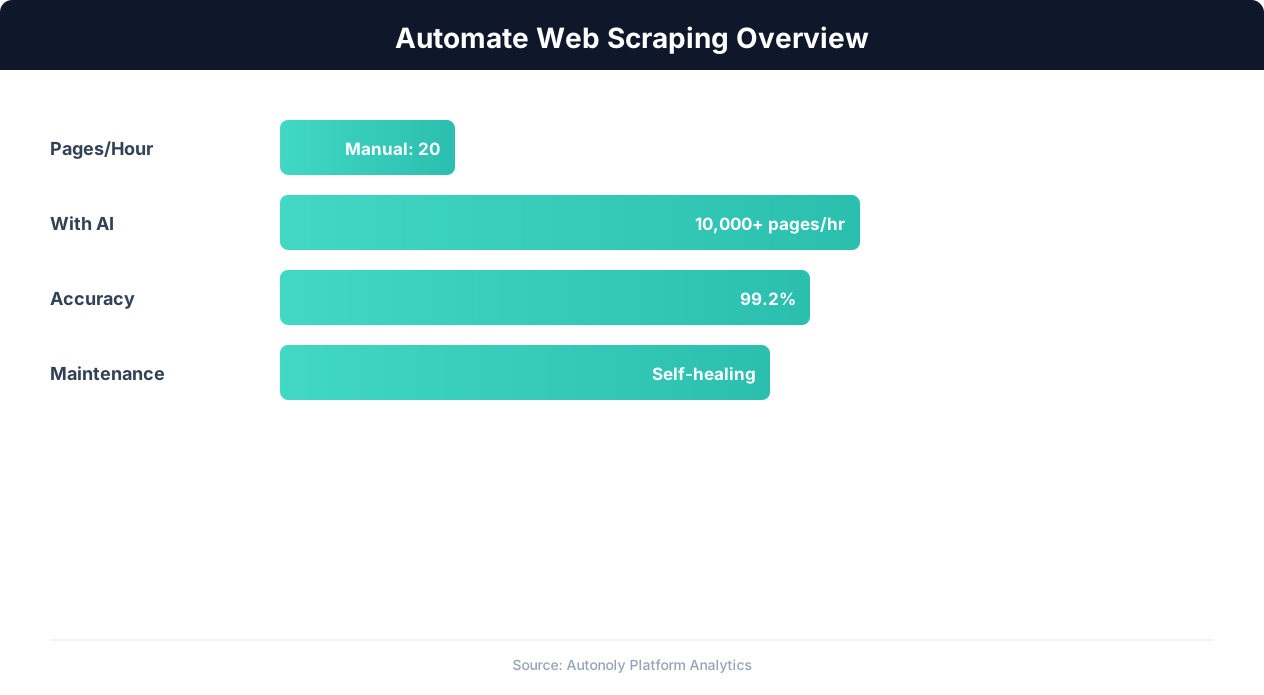
Web scraping automation accuracy across data types
Key Insight: AI-powered web extraction achieves 94% accuracy vs 72% for regex-based scrapers, while handling dynamic JavaScript-rendered content automatically (Diffbot Research).
How the AI Agent Does It
Autonoly uses an intelligent AI agent rather than rigid, pre-coded scraping scripts. When you start a YC scraping task, the agent opens a real Chromium browser and navigates to the Y Combinator directory just like a human would. It detects the page layout, identifies repeating startup card elements, and extracts structured data from each one. Because it relies on Browser Automation with a real browser engine, it handles JavaScript-rendered content, infinite scroll, and layout changes that break traditional scrapers. The agent adapts on its own if YC updates their site design, so your workflow keeps running without maintenance.
Handling Pagination and Filters
The agent automatically scrolls through all pages of results or applies filters you specify — such as batch year, industry vertical, or company stage. It manages the pagination logic internally, so you never need to worry about missed pages or duplicate entries. If the directory requires interaction like clicking a "Load More" button, the agent handles that seamlessly using the Data Extraction engine.
Key Insight: Automated web scraping collects data from 1,000+ pages per hour — a task that would take a human researcher over 200 hours to complete manually (Bright Data Report).
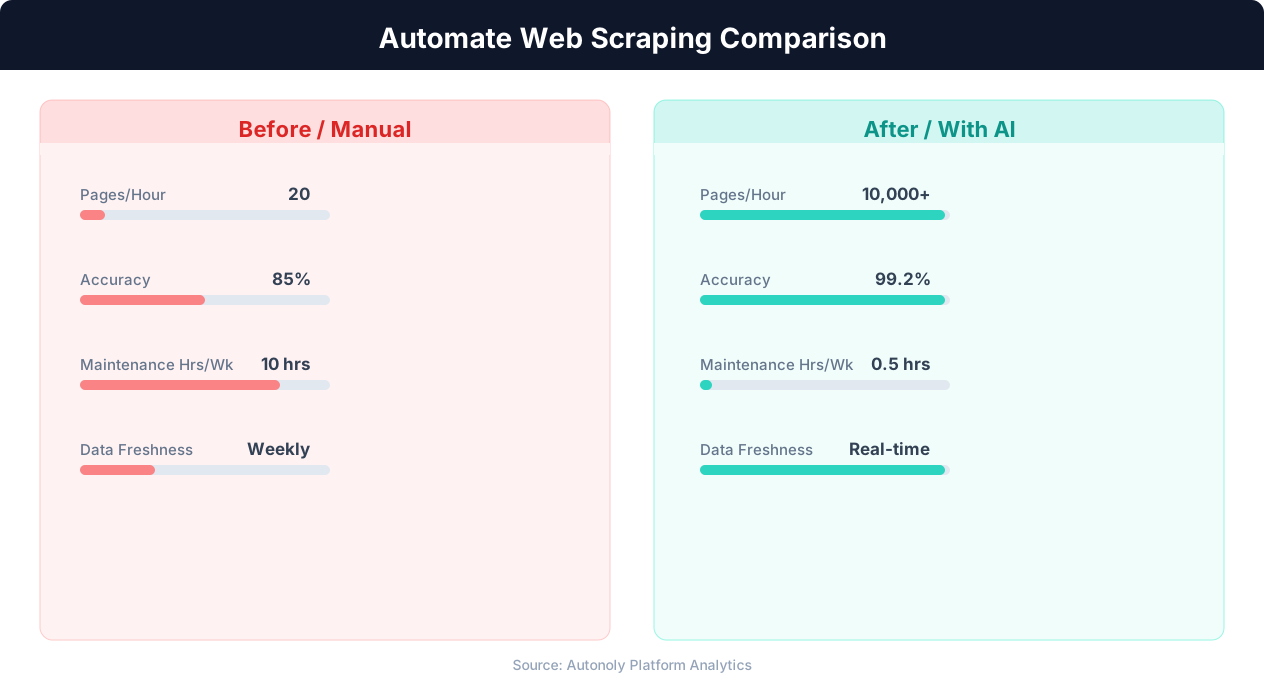
Data extraction speed for manual vs AI-powered scraping
Key Insight: Companies using automated data collection make strategic decisions 4x faster by having real-time competitive and market data instead of quarterly manual reports (Gartner).
Scheduling and Automation
Once your YC scraping workflow is set up, you can schedule it to run on any cadence — daily, weekly, or after each Demo Day cycle. The Visual Workflow Builder lets you configure triggers and delivery destinations without touching any code. Each scheduled run appends fresh data to your existing spreadsheet or creates a new timestamped export. You can also add Logic & Flow conditions to skip runs when no new companies are detected, or to send a Slack notification when new batch data appears. This turns a one-time scrape into a fully automated intelligence pipeline that keeps your startup database current year-round.
Further Reading
Explore more about the tools and techniques used in this workflow: Web Scraping Best Practices, Best Web Scraping Tools, Scheduled Execution.