The Problem with Traditional Workflow Builders
Workflow automation platforms have been around for over a decade. Zapier launched in 2012. IFTTT even earlier. The promise was simple: connect your apps, automate your work, no coding required. And they delivered on that promise, to a point. Millions of people use these platforms to automate simple app-to-app connections: when a form is submitted, add a row to a spreadsheet; when an email arrives with an attachment, save it to Dropbox; when a deal closes in the CRM, send a Slack notification.
But traditional workflow builders hit a wall when tasks get complex. The visual drag-and-drop builder that feels intuitive for a 3-step workflow becomes a tangled mess at 15 steps. Conditional logic (if this, then that, unless the other thing) requires nesting branches that are difficult to visualize and harder to debug. Data transformation between steps (reformatting dates, splitting strings, calculating values) requires arcane formula syntax that undermines the "no-code" premise. And connecting to platforms without pre-built integrations is simply impossible.
The deeper problem is that traditional builders require you to think like a programmer even though you are not writing code. You must decompose your process into discrete steps, define the data flow between steps, handle every edge case, and debug invisible failures in data transformation. The visual interface hides the code but not the complexity. Many users start building a workflow with enthusiasm, get stuck on a conditional branch or data transformation, and abandon the effort.
The statistics confirm this. Industry surveys consistently find that 60-70% of automation platform users have built fewer than 5 workflows, and the majority of those are simple 2-3 step connections. The long tail of complex, high-value automation remains unrealized because the tools require too much technical thinking for business users and too little flexibility for developers.
AI workflow automation represents a fundamentally different approach. Instead of translating your process into a visual workflow diagram, you describe what you want in plain language. Instead of configuring each step manually, an AI agent figures out the steps, the connections, and the data flow. Instead of debugging silent failures, you watch the agent work in real time and correct course through conversation. The interface shifts from a visual programming environment to a conversation, which is something every human already knows how to do. It is the natural next step beyond no-code automation, where you still assemble each step by hand.
This is not a marginal improvement to the existing paradigm. It is a paradigm shift from "human builds workflow with tools" to "human describes intent and AI builds workflow." The implications for who can automate, what can be automated, and how quickly automation is deployed are profound.
How AI Workflow Automation Works: From Conversation to Running Workflow
AI workflow automation replaces the drag-and-drop builder with a conversational interface backed by an autonomous AI agent. Understanding how this works under the hood reveals why it is so much more accessible than traditional approaches.
Step 1: You Describe the Task
The process starts with a plain-language description of what you want automated. This can be as simple as "Every morning, check our competitor's pricing page and email me if any prices changed" or as detailed as "Go to LinkedIn, search for marketing directors at SaaS companies with 50-200 employees in the US, extract their name, title, company, and profile URL, put the results in a Google Sheet, and send me a Slack message when it is done."
The description does not need to be technically precise. You do not need to know which APIs to use, what the CSS selectors are, or how the data should be formatted. The AI agent interprets your intent and fills in the technical details. If your description is ambiguous, the agent asks clarifying questions before proceeding, just as a human assistant would.
Step 2: The Agent Explores
Unlike traditional builders that require you to specify every step, the AI agent explores the task autonomously. For a web-based task, this means actually navigating to the relevant websites, observing the page structure, identifying the data you want, and understanding the interaction patterns needed to access it. The agent opens a real browser, navigates to LinkedIn, experiments with the search interface, identifies how results are structured, and determines the best approach for extracting the data you described.
This exploration phase is what makes AI workflow automation fundamentally different from template-based automation. The agent is not applying a pre-built LinkedIn template. It is interacting with the actual, current version of LinkedIn and building an approach that works with whatever interface it finds. If LinkedIn has changed its layout since the last time someone built a scraping template, the AI agent adapts because it is working from the live site, not a cached template.
Step 3: The Agent Builds the Workflow
Based on its exploration, the agent constructs a structured workflow. Each step in the workflow is a discrete node: navigate to a URL, click a search button, apply filters, extract data from elements, write to a spreadsheet, send a notification. The agent determines the sequence, the data flow between steps, and the configuration for each step. The resulting workflow is a visual, inspectable automation in the workflow builder that you can review, modify, and understand.
The workflow is not a black box. You can see every step, examine the selectors and configurations, and modify any part of it. The AI builds the workflow, but you own it and can adjust it as needed. This transparency distinguishes AI-built workflows from fully autonomous agents that operate opaquely.
Step 4: Review and Refinement
The agent presents the workflow for your review. You can watch it execute in real time through the live browser view, verifying that each step performs correctly. If something is not right (the agent extracted company names but you also wanted email domains), you tell it in natural language: "Also extract the email domain from each company's website." The agent modifies the workflow accordingly.
This conversational refinement loop is far more natural than debugging a visual workflow builder. Instead of clicking into node configurations, finding the right setting, and adjusting parameters, you simply describe what needs to change.
Step 5: Schedule and Run
Once the workflow is correct, you can run it on demand or set it to run on a schedule. The workflow executes independently of the AI agent: it is a standalone automation that runs reliably without needing the agent's reasoning for each execution. The agent built it; now it runs on its own.
What You Can Build: Real Examples of AI-Created Workflows
The range of workflows an AI agent can build is limited primarily by what you can describe, not by what templates exist. Here are real examples that illustrate the breadth of possibilities.
Cross-Platform Data Aggregation
"Every Monday, pull our social media stats from LinkedIn, Twitter, and Instagram, our website traffic from Google Analytics, and our lead count from HubSpot. Put it all in a Google Sheet with a new tab for each week, and send the sheet link to the marketing Slack channel."
This workflow touches five different platforms, each with a different interface. A traditional builder would require pre-built integrations for each platform (which may or may not exist), manual configuration of each connection, and careful data mapping between steps. The AI agent navigates each platform, extracts the relevant metrics, structures them consistently, and handles the Google Sheets and Slack outputs. It builds the entire workflow from a single description.
Competitive Price Monitoring with Alerts
"Check our three main competitors' pricing pages daily. If any of them change a price by more than 5%, send me an email with the old price, new price, and percentage change."
This workflow requires the agent to: navigate to each competitor's pricing page, extract current prices, compare them against previously stored prices, calculate percentage changes, evaluate whether the threshold is exceeded, and conditionally send an email. The conditional logic (only alert on significant changes) is expressed naturally in the description and translated by the agent into workflow logic.
Content Research and Brief Generation
"Search Google for 'AI automation trends,' extract the titles and URLs of the top 20 results, visit each page and extract a one-paragraph summary of the key points, compile everything into a research brief document, and save it to Google Drive."
This workflow involves search, multi-page navigation, content extraction, synthesis, document creation, and cloud storage. Each step involves different interactions and data formats. The AI agent handles the entire chain, adapting its extraction approach for each different website it visits (news sites, blogs, research papers all have different layouts).
Lead Qualification Pipeline
"When a new row is added to our 'Leads' Google Sheet, go to the company's website and find their employee count and industry. Check LinkedIn for the person's current title. If the company has more than 50 employees and is in SaaS or fintech, move the row to the 'Qualified' tab and add a note with the company details. Otherwise, move it to the 'Nurture' tab."
This event-triggered workflow demonstrates that AI-built workflows are not limited to scheduled execution. The trigger (new row in Google Sheet) initiates a multi-step enrichment and qualification process that involves web research, data extraction, conditional evaluation, and data routing. Lead-sourcing variants like scraping Google Maps leads into a sheet follow the same build-once, run-on-a-trigger pattern.
The Pattern
Across all these examples, notice the pattern: the user describes the outcome they want, not the technical implementation. They do not specify CSS selectors, API endpoints, data formats, or error handling. They describe what data they need, where it comes from, what to do with it, and where to put the results. The AI agent handles the technical implementation. This shift from "how" to "what" is what makes AI workflow automation accessible to people who could never build these workflows with traditional tools.
AI Workflow Builders vs. Traditional Platforms: A Detailed Comparison
AI workflow automation and traditional platforms are not mutually exclusive, but understanding their respective strengths helps you choose the right approach for each automation need.
Ease of Use
Traditional builders (Zapier, Make, n8n) require understanding their visual interface, learning how triggers and actions work, configuring each node, and handling data transformation between steps. The learning curve varies from moderate (Zapier) to steep (n8n, for complex workflows). Users must think in terms of the platform's abstractions: triggers, actions, filters, iterators, routers.
AI builders require only the ability to describe what you want in plain language. The learning curve is essentially zero for the interface itself, though learning to write effective descriptions (specific enough for the agent to execute, without unnecessary constraints) takes some practice. The mental model is delegation to an assistant, not programming a machine.
Flexibility
Traditional builders are constrained by their integration catalog. If a platform does not have a pre-built integration with your target application, you cannot automate interactions with it (without custom code). This limitation is the most common reason users abandon automation projects: the specific app or website they need is not supported.
AI builders with browser automation can interact with any website or web application, regardless of whether a pre-built integration exists. The AI agent navigates the actual web interface, just as a human would. This means you can automate workflows involving niche industry software, internal company tools, government portals, or any other web application that a traditional platform does not support.
Maintenance
Traditional workflows break when the connected applications change their APIs, update their data formats, or modify their interfaces. Maintaining workflows across dozens of integrations requires ongoing attention. Platforms like Zapier mitigate this by maintaining their integrations, but custom configurations and edge cases still require manual updates.
AI-built workflows that interact with websites through browser automation are more resilient to interface changes because the AI interprets pages semantically. A button that moves from the left side to the right side of the page still gets clicked because the agent identifies it by its text and purpose, not by its exact position. However, major site redesigns may still require workflow adjustments, and the AI agent can be used to rebuild the affected steps conversationally.
Debugging and Transparency
Traditional builders show the workflow structure clearly (nodes and connections) but debugging data flow issues requires clicking into each node and inspecting inputs and outputs. Error messages are often technical and opaque. Finding where a workflow fails in a 20-step chain can be time-consuming.
AI builders provide live browser views where you watch the agent work in real time. If something goes wrong, you see exactly what happened in the browser. The conversational interface lets you ask the agent what it did and why. For the resulting workflow, you can inspect each node just as with traditional builders, but the additional context from the agent's exploration makes the workflow's logic more understandable.
Cost
Traditional platforms charge per workflow execution (Zapier: $0.01-0.03 per task), per operation (Make: ~$0.003 per operation), or through flat monthly plans. Costs scale with usage volume. For high-volume simple workflows, traditional platforms are very cost-effective.
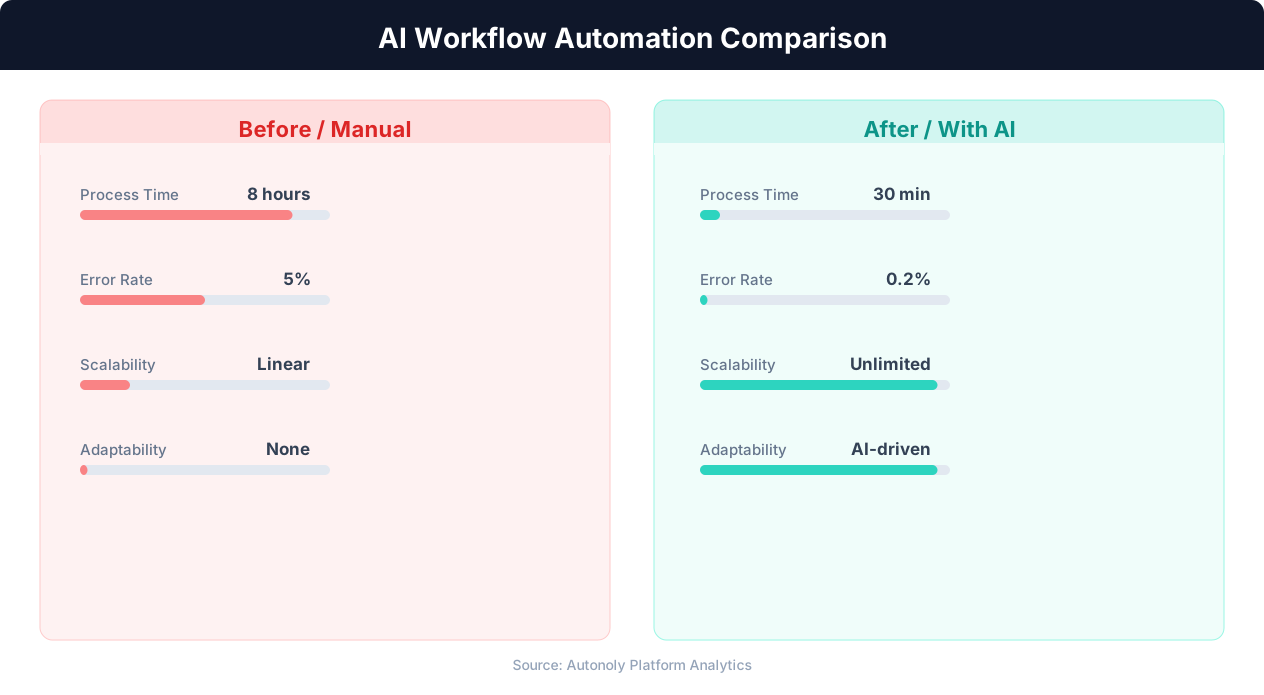
AI workflow builders consume LLM tokens during the building phase and browser automation resources during execution. The building phase (where the AI reasons and explores) is typically the most expensive part. Once the workflow is built, running it is comparable to traditional platforms. For complex workflows that would take hours to build manually in a traditional platform, the AI builder often delivers faster ROI because the reduced building time offsets higher per-execution costs.
Best Practices for AI Workflow Automation
Getting the most out of AI workflow automation requires a different set of best practices than traditional builder optimization. Here is what works.
Writing Effective Task Descriptions
The quality of the workflow depends heavily on the quality of your description. The golden rule is: be specific about the outcome, flexible about the method. Tell the agent exactly what data you need, where it should end up, and what format it should be in. Do not tell it which buttons to click or which APIs to use (unless you have a specific reason to constrain the method).
Weak description: "Get data from LinkedIn." This is too vague. What data? For whom? How many results? Where should the output go?
Strong description: "Go to LinkedIn, search for people with the title 'Product Manager' at companies with 100-500 employees in San Francisco. Extract the first 30 results with name, title, company name, and profile URL. Put the results in a new Google Sheet called 'PM Leads - [today's date]'."
Include success criteria when relevant: "The output should have at least 25 rows" or "Each row must have a non-empty email field." These criteria help the agent validate its own work and retry if needed.
💡 Key Insight
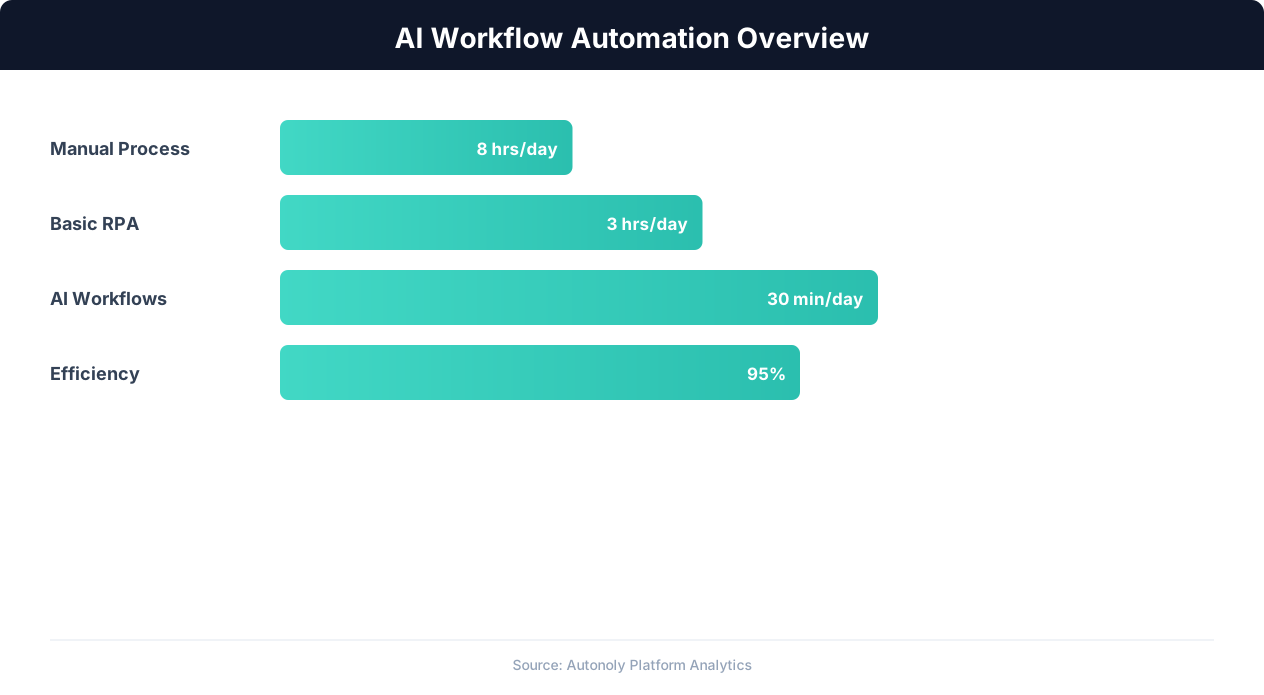
Companies implementing AI workflow automation see an average 3.5x ROI within the first 12 months of deployment.
Start Simple, Then Expand
Build complex workflows incrementally. Start with the core extraction or action, verify it works, then add enrichment, conditional logic, output formatting, and notifications. A 15-step workflow built in one shot is harder to debug than one built in three iterations of increasing complexity.
This iterative approach also helps you discover what the agent handles well and where it needs guidance. You might find that the agent extracts data perfectly but structures the output differently than you expected. A quick refinement ("Actually, put each company in its own column, not as a comma-separated list") fixes this before you add more complexity.
Use the Live Browser View
When the AI agent is exploring and building, watch the live browser view. This serves two purposes: you can verify that the agent is interacting with the correct elements and pages, and you learn how the agent approaches the task, which helps you write better descriptions in the future. If you see the agent struggling with a particular step, you can provide guidance in real time ("The search button is in the top-right corner" or "You need to click 'Advanced Search' first").
Review Before Scheduling
Before setting a workflow to run on a recurring schedule, run it manually 3-5 times. Verify the output is correct and consistent. Check edge cases: what happens if the target site is slow? What if search results return fewer items than expected? What if a page element is not found? Catching these issues during manual review prevents scheduled failures that produce bad data or no data without anyone noticing.
Combine AI-Built and Traditional Workflows
AI workflow automation does not replace traditional platforms entirely. For simple, stable app-to-app connections (new Stripe payment triggers a Slack notification), traditional platforms like Zapier are simpler and cheaper. Use AI workflow automation for the complex, web-interactive, and multi-source workflows that traditional platforms cannot handle. Many teams use both: Zapier for standard integrations and Autonoly for complex automations that involve web scraping, multi-platform data collection, or interactions with applications that Zapier does not support.
Document Your Workflows
Even though AI-built workflows are more understandable than hand-coded scripts, documentation remains important. Record what each workflow does, why it exists, who relies on its output, and any known limitations. When the team grows or you revisit a workflow months later, this context saves significant time.
The Future: Where AI Workflow Automation Is Heading
AI workflow automation is in its early stages. The current capabilities, while impressive compared to traditional builders, represent the floor of what will be possible. Here is where the technology is heading.
Proactive Workflow Suggestions
Today, you tell the AI agent what to automate. Tomorrow, the agent will identify automation opportunities itself. By observing your regular work patterns (the sites you visit repeatedly, the data you copy between applications, the reports you build manually), an AI agent will suggest workflows before you think to ask for them. "I noticed you check these three competitor websites every Monday morning. Want me to automate that and deliver the results to your inbox?"
This proactive approach addresses a fundamental barrier to automation adoption: many people do not think to automate their repetitive tasks because they have done them manually for so long that the work feels like a given rather than a choice. An observant AI that identifies patterns and proposes automations will surface opportunities that users would never have articulated.
Self-Healing Workflows
When a website changes its layout and a workflow breaks, current systems require human intervention to fix the issue. Future AI-built workflows will detect failures, analyze what changed, and repair themselves automatically. The AI agent that built the workflow understands its intent and can rebuild the affected steps using the same exploration and adaptation capabilities it used during initial construction.
💡 Key Insight
AI-automated workflows reduce human error rates by up to 90% in data processing and transfer tasks.
Self-healing dramatically improves reliability for web-based workflows, which are inherently fragile because the websites they interact with change without notice. Instead of a broken workflow sitting silently until someone notices, the workflow detects its own failure, repairs itself, and notifies you that it encountered and resolved an issue.
Multi-Agent Workflow Construction
Complex business processes involve multiple departments, tools, and data sources. Building a complete end-to-end automation for a process like "lead-to-customer onboarding" is beyond what a single AI agent can realistically build in one session. Multi-agent workflow construction will address this by coordinating specialized agents: one that understands CRM workflows, another that handles email automation, a third that manages document generation, each building their portion and a coordinator agent connecting them into a cohesive end-to-end workflow.
Natural Language Monitoring and Modification
Beyond building workflows conversationally, future AI systems will let you monitor and modify them conversationally. "How did the competitor pricing workflow perform last week?" "Show me the results from the last 5 runs." "Change the schedule from daily to every 6 hours." "Add a new competitor to the monitoring list." Each of these modifications happens through conversation rather than navigating configuration interfaces.
Domain-Specific Workflow Intelligence
As AI agents accumulate experience building workflows for specific industries and use cases, they will develop domain expertise. An agent that has built 1,000 recruiting automation workflows will know the best approaches for LinkedIn sourcing, the common pitfalls in resume parsing, and the optimal outreach timing for different industries, applying this knowledge to build better workflows faster for each new recruiting automation request. This cross-session learning transforms the agent from a general-purpose builder into an industry-specific automation expert.
The trajectory is clear: AI workflow automation will become the primary way people create automations, not because visual builders disappear, but because conversation is a more natural and capable interface for describing complex work. The teams that start building workflows with AI today will be fluent in this paradigm by the time it becomes the industry standard.
Getting Started: Build Your First AI-Powered Workflow
Ready to try AI workflow automation? Here is a practical guide to building your first workflow with an AI agent.
Choose Your First Task
Pick a task you do regularly that involves multiple steps across multiple tools or websites. Good first tasks include: collecting data from a website and putting it in a spreadsheet, monitoring a page for changes and sending a notification, or aggregating information from multiple sources into a single view. Avoid choosing your most complex workflow first. Start with something that takes you 15-30 minutes manually so you can easily verify the results and appreciate the time savings.
Prepare Your Description
Write out what you want in plain language. Include: what data or action you need, where the data comes from (specific URLs if possible), where the output should go (Google Sheet, email, Slack), and any conditions or formatting requirements. For example:
"Go to news.ycombinator.com, extract the title and URL of the top 30 stories on the front page, and put them in a Google Sheet with columns for rank, title, URL, and point count. Name the sheet 'HN Top Stories - [today's date]'."
Start the Conversation
Open Autonoly's AI agent and enter your description. Watch as the agent processes your request. It may ask clarifying questions: "Should I include stories from just the first page, or scroll to load more?" Answer naturally. The agent then begins exploring, navigating to the target site, identifying the data elements, and testing extraction approaches.
Watch and Guide
As the agent works, watch the live browser view. You will see it navigate to the site, identify elements, and extract data. If it takes a wrong turn (clicks the wrong section, extracts the wrong field), guide it: "That is the comment count, not the point count. The points are shown next to the upvote arrow." The agent adjusts and continues.
Review the Results
When the agent completes the workflow, review the output. Check that the data is correct, complete, and formatted as expected. If adjustments are needed, describe them: "Can you also add the username of whoever posted each story?" The agent modifies the workflow and re-runs it.
Save and Schedule
Once the workflow produces the right results, save it. If you want it to run on a recurring schedule, set the schedule (daily, weekly, etc.). The workflow now runs independently, delivering fresh results on your schedule without any manual intervention.
Build Your Second Workflow
With one workflow running, you now understand how the process works. Your second workflow will go faster because you know how to write effective descriptions, when to guide the agent, and what to check in the results. By your third or fourth workflow, you will be automating tasks in minutes that previously took hours.
The barrier to automation has shifted from "can I build this?" to "what should I build next?" With AI workflow automation, the limiting factor is no longer technical skill or tool complexity. It is identifying which of your repetitive tasks would benefit most from automation and describing them clearly. Both of those are skills every knowledge worker already has.