
Why Automate Follow-Up Emails?
Studies consistently show that 80% of deals require at least five follow-ups, yet most professionals give up after one or two attempts. The problem is rarely a lack of intent — it is the mental overhead of tracking dozens of open threads and remembering to circle back at the right time. Every hour spent scanning your sent folder, checking whether someone replied, and drafting yet another "just checking in" message is an hour stolen from high-value work like closing deals, building relationships, and developing strategy. For a sales rep managing 50 active prospects, the follow-up burden alone can consume 6-8 hours per week — time that should be spent in conversations, not chasing them.
By automating follow-ups with Browser Automation and Gmail integration, you reclaim those hours while ensuring every important conversation gets the attention it deserves. The compounding effect is significant: a single missed follow-up with a prospect who was about to say yes can cost thousands in lost revenue. Multiply that across dozens of open threads, and the cost of manual tracking becomes staggering. Automation eliminates the risk entirely — no thread is ever forgotten, no matter how busy your week gets. Your outreach pipeline becomes deterministic rather than dependent on memory and willpower.
Whether you are in sales, recruiting, partnerships, or client services, automated follow-ups dramatically improve response rates without making you look like a robot — while staying within commercial-email rules such as the CAN-SPAM Act. Autonoly's AI agent crafts contextual messages that reference the original email, making each follow-up feel personal and timely. Recipients cannot tell the difference between an agent-drafted follow-up and one you wrote yourself, because the agent mirrors your tone, references specific details from the original conversation, and varies the phrasing across sequence steps. The agent avoids canned language and never repeats the same opening line across steps, ensuring each touch feels intentional and human.
The impact on conversion rates is immediate. Teams that implement automated follow-up sequences typically see a 30-50% increase in reply rates compared to manual follow-up efforts, simply because every email gets the persistence it deserves without any thread slipping through the cracks. For recruiting teams, automated follow-ups reduce candidate ghosting by keeping the conversation alive during long hiring cycles. For partnership teams, persistent but polite follow-ups demonstrate professionalism and keep your proposal top-of-mind during lengthy evaluation periods.
How the AI Agent Handles Follow-Ups
Autonoly's AI Agent Chat connects to your Gmail account and scans your sent folder for emails that have not received a reply within your defined time window — for example, 48 hours or 5 business days. The agent cross-references each sent email with your inbox to determine whether a reply exists anywhere in the thread, including replies that may have been sent to other participants in the conversation. It also detects auto-replies and out-of-office messages, treating them differently from genuine responses so your sequences are not prematurely cancelled by a vacation autoresponder.
When an unanswered email is detected, the agent reads the original message and drafts a follow-up that matches your communication style. Using Data Extraction, it pulls key context like the recipient's name, the subject matter, and any specific asks from the original email. The follow-up is not a generic nudge — it references what you previously discussed and adds a clear call to action. For example, if your original email proposed a partnership meeting, the follow-up might reference the specific initiative you mentioned and suggest concrete time slots. If your original email shared a proposal, the follow-up might ask whether they had questions about a specific section.
You can configure multi-step sequences: a gentle reminder after 3 days, a value-add message after 7 days that shares a relevant resource or case study, and a final check-in after 14 days that offers an easy out ("If now is not the right time, no worries — just let me know"). The agent stops the sequence automatically when a reply is received at any stage. Each step in the sequence can have a different tone and purpose, escalating from casual to direct as the sequence progresses. Advanced users can branch their sequences — if the recipient opens the email but does not reply, the agent can send a different follow-up than if the email was not opened at all.
What Data You Get
Every follow-up action is tracked and reported. Your dashboard shows the complete lifecycle of each thread: when the original email was sent, when each follow-up went out, whether the recipient opened or replied, and the current sequence stage. Export this data to Google Sheets for deeper analysis — identify which follow-up step gets the most replies, which recipients tend to respond after the second touch, and which subject lines drive the highest engagement. Over time, this data reveals patterns that help you optimize your messaging strategy: you may discover that follow-ups sent on Tuesday mornings outperform those sent on Friday afternoons, or that the third touch consistently outperforms the second.
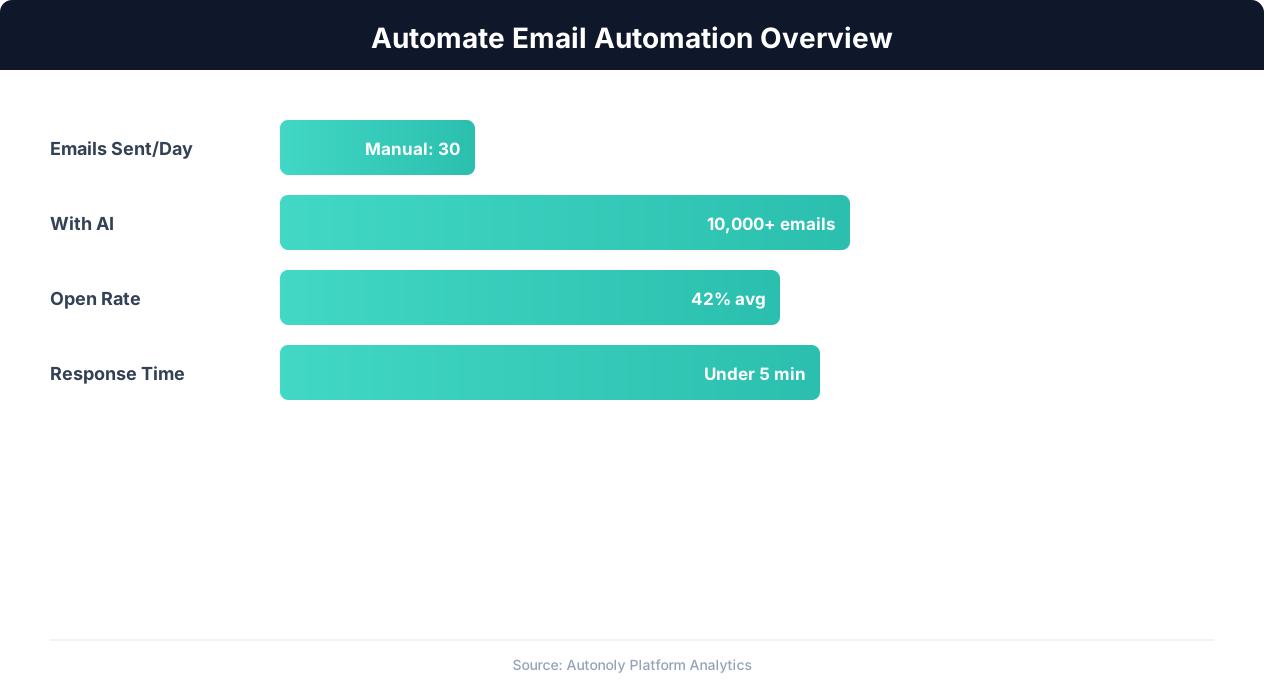
Email automation impact on engagement metrics
Key Insight: Automated email sequences generate 320% more revenue per email than one-off manual campaigns (Campaign Monitor).
Customizing Your Follow-Up Strategy
The Visual Workflow Builder gives you full control over your follow-up logic. Add conditions with Logic & Flow to exclude certain recipients (like internal colleagues), skip weekends and holidays, or vary the tone based on the recipient's role or seniority. You can also integrate with Google Sheets to maintain a tracking spreadsheet that logs every follow-up sent, the recipient, and whether they eventually replied. The builder supports drag-and-drop sequence design, letting you visualize your entire follow-up strategy as a flowchart before activating it.
For sales teams, combine this with lead data from your CRM. The agent can prioritize follow-ups for high-value prospects and delay messages to lower-priority contacts. Add a Slack notification step to alert your team when a key prospect finally responds. Browse the templates library for pre-built follow-up sequences tailored to sales, recruiting, and client management scenarios. Each template is fully customizable — adjust timing, tone, and messaging to match your brand voice and outreach strategy.
Integration Options
Chain this workflow with other Autonoly automations for a complete outreach pipeline. Pair it with the cold email outreach task to automatically follow up on initial prospecting emails. Connect to Google Sheets to feed CRM data into your follow-up rules. Use SSH & Terminal to query your database for customer status before deciding whether to follow up. Use Data Processing to segment your contacts by engagement level and apply different follow-up cadences to each segment. See our pricing page for details on plan limits.
Scheduling and Frequency
This workflow runs on a daily schedule by default, checking for unanswered emails every morning and queuing follow-ups for delivery throughout the day. You can adjust the cadence to run twice daily or on specific days of the week using cron-style scheduling. The agent respects Gmail sending limits to keep your account in good standing and spaces out messages with natural timing delays to avoid triggering spam filters. Follow-ups are sent during business hours in the recipient's time zone when possible, maximizing the chance they see your message at the top of their inbox. The scheduling engine also avoids sending follow-ups on public holidays in the recipient's locale, preventing your message from arriving at a time when it is unlikely to be read.
Each run produces a summary report showing how many follow-ups were sent, which contacts are in active sequences, and which threads received replies since the last run. Access these reports from the Autonoly dashboard or have them delivered to your inbox via Gmail. The agent maintains differential processing — only new unanswered emails and active sequences are evaluated on each run, keeping processing time fast even as your email volume grows. A notification chain confirms each run's completion and highlights any anomalies, like a sudden spike in bounced follow-ups that might indicate a deliverability issue — often traceable to authentication standards like SPF, DKIM, and DMARC on your sending domain.
For teams managing shared inboxes, Autonoly supports multiple Gmail accounts in a single workflow. Configure different follow-up rules for sales@, support@, and partnerships@ addresses, each with their own timing, messaging templates, and notification chains. When a follow-up triggers a reply, the relevant team member is notified instantly via Slack so they can jump into the conversation while it is fresh.
Further Reading
Explore more about the tools and techniques used in this workflow: Automate Email Reports, Automate Lead Generation, Email Campaigns, Scheduled Execution.