The API Gap: Why Most Websites Cannot Be Automated With Traditional Tools
Automation has a coverage problem. Tools like Zapier, Make, and Workato connect applications through their APIs, and they do it brilliantly — when an API exists. But the uncomfortable truth that most automation guides skip over is this: only about 35% of the websites and web applications businesses interact with offer API access. Understanding what automation is and how a strong workflow automation approach covers the other 65% is what this guide is about.
The other 65% — government portals, legacy CRMs, vendor management systems, insurance carrier portals, banking interfaces, municipal permit systems, old ERPs, and thousands of niche industry tools — are accessible only through a browser UI. They were built for humans clicking buttons and filling forms. There is no endpoint to call, no webhook to configure, no pre-built connector in any integration marketplace.
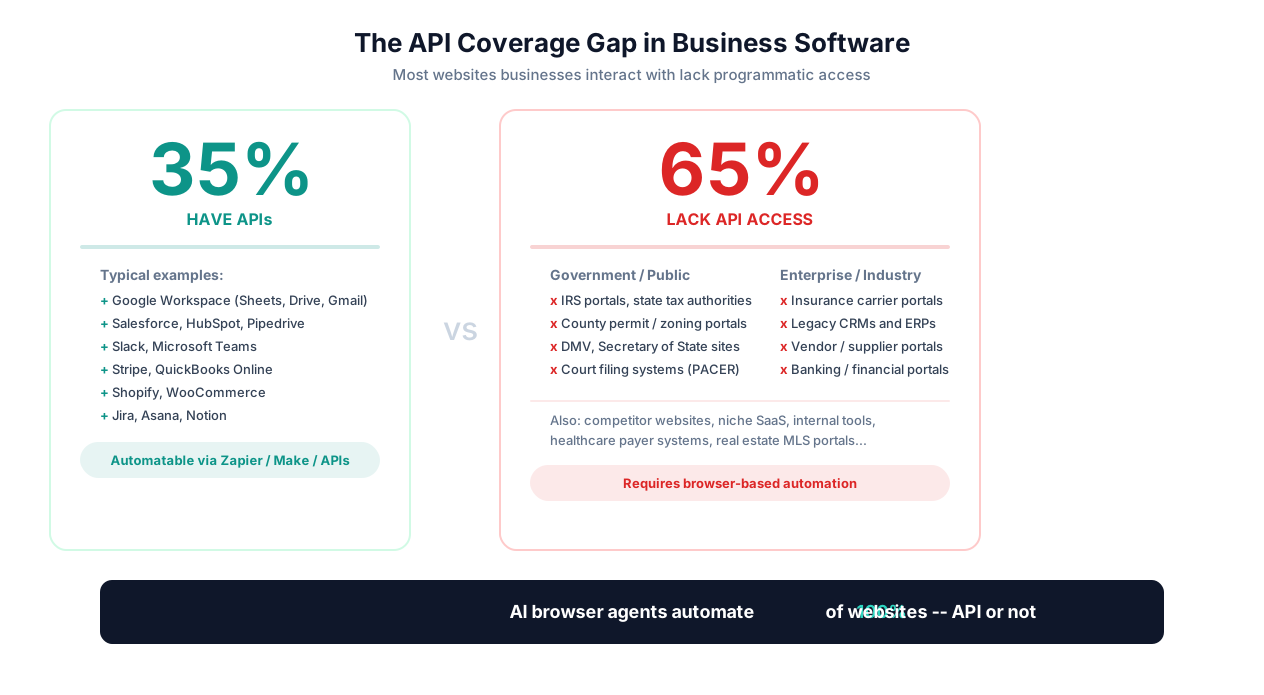
This is not a fringe problem. It is the central bottleneck in business automation. A Forrester survey found that 43% of enterprise automation initiatives stall because the target application lacks an API. McKinsey estimates that knowledge workers spend 19% of their workweek on data collection and entry tasks — and a significant portion of that time goes to websites that refuse to be automated through conventional means.
Who Feels This the Most?
The API gap hits certain roles and industries disproportionately hard:
| Role / Industry | API-Less Systems They Touch | Weekly Hours Lost |
|---|---|---|
| Insurance agencies | Carrier quoting portals (each carrier has its own), rating engines, state DOI filing systems | 15-25 hours |
| Construction firms | County/city permit portals, inspection scheduling, contractor licensing databases | 8-15 hours |
| Law firms | Court filing systems (PACER, state e-filing), Secretary of State business registries, public records | 10-20 hours |
| Accounting firms | State tax authority portals, IRS systems, client bank portals for statement downloads | 12-18 hours |
| Operations teams | Vendor portals for invoice/PO management, legacy ERP web interfaces, supplier catalogs | 10-20 hours |
| Healthcare practices | Insurance prior auth portals, payer eligibility systems, pharmacy benefit managers | 15-30 hours |
The Core Insight
The question is not "how do I connect this API?" The question is: "How do I automate a website that has no API, was never designed for automation, and whose owners have no plans to add programmatic access?" This guide answers that question comprehensively.
The good news: three distinct approaches have emerged to solve this problem, each with different tradeoffs in cost, complexity, flexibility, and reliability. Understanding all three — not just the one being sold to you — is essential for making the right choice. We will cover each honestly, including where Autonoly fits and where alternatives might be better suited.
Three Approaches to Automating Without APIs
When a website has no API, you have three fundamental approaches to automate interactions with it. Each represents a different philosophy about who (or what) controls the browser, and each comes with genuine advantages and limitations.
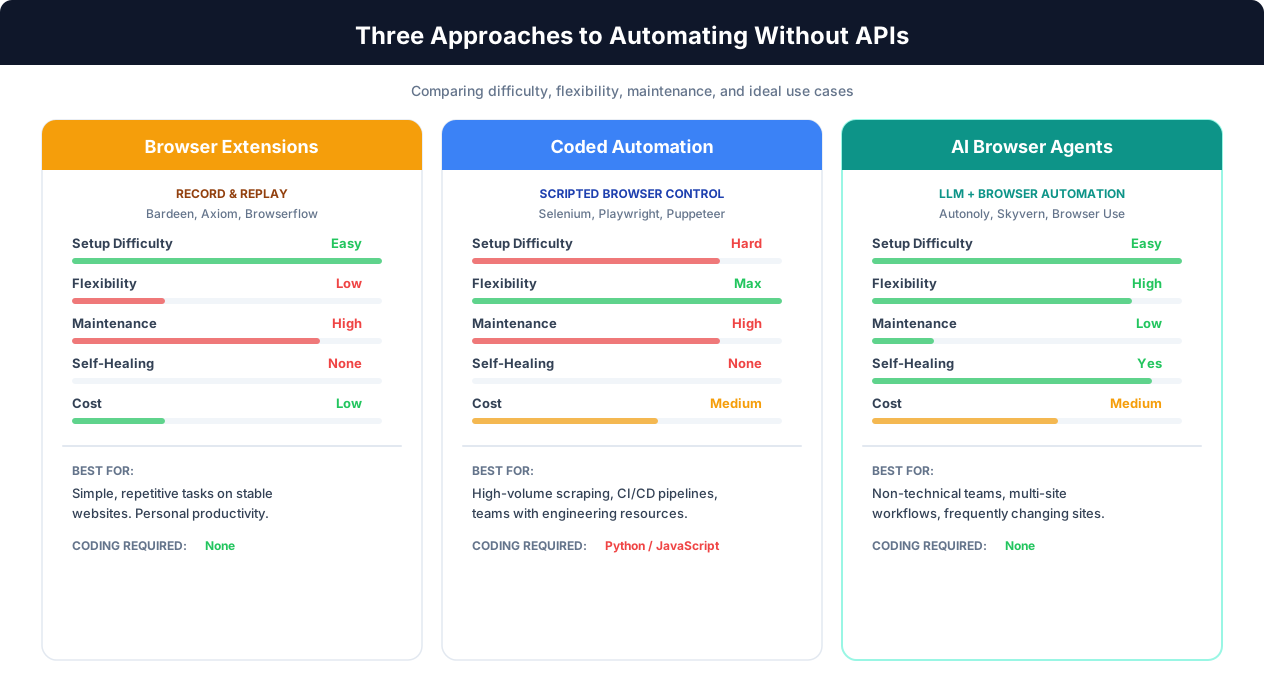
Approach 1: Browser Extensions (Record-and-Replay)
Browser extensions like Bardeen, Axiom, Browserflow, and iMacros work by recording your actions in the browser — clicks, keystrokes, scrolls, data selections — and replaying them on demand. You install a Chrome extension, perform the task once while the tool records, and then run the recorded sequence whenever needed.
How it works technically: The extension injects JavaScript into the current tab, captures DOM events (click coordinates, element selectors, typed values), and stores a sequence of actions. On replay, it re-identifies each element by its CSS selector or XPath, then dispatches synthetic events to replay the interaction.
Advantages:
- Easiest to set up — no coding, no server, no configuration
- Fastest time-to-first-automation (minutes, not hours)
- Low cost (many have free tiers)
- Good for simple, repetitive tasks on stable websites
- Runs in your existing browser — no separate infrastructure
Limitations:
- Brittle: Hard-coded selectors break when the target site changes its layout, CSS classes, or element IDs. Even a minor site update can break the entire workflow.
- Local execution only: Most run in your browser tab, meaning your computer must be on and the browser open. No 24/7 background execution.
- Limited logic: Conditional branching ("if this element exists, do X; otherwise do Y") is rudimentary or absent.
- No error recovery: If something unexpected happens (popup, CAPTCHA, timeout), the replay typically fails silently or crashes.
- Single-tab context: Orchestrating workflows across multiple sites or tabs is difficult.
- Cannot handle dynamic content well: Pages that load content asynchronously, use infinite scroll, or render via JavaScript frameworks often confuse recorded selectors.
Best for: Simple, repetitive tasks on websites that rarely change — downloading a weekly report from a stable portal, filling a single form with the same structure every time, basic data extraction from a consistent page layout.
Approach 2: Coded Browser Automation (Selenium, Playwright, Puppeteer)
Developer-oriented automation frameworks let you write code that controls a browser programmatically. Selenium (the veteran), Playwright (the modern choice), and Puppeteer (Chrome-specific) are the major players. More recently, frameworks like Browser Use add LLM integration on top of Playwright. For a deep comparison, see our Playwright vs Selenium vs Puppeteer guide.
How it works technically: You write scripts (Python, JavaScript, Java, C#) that use the framework's API to launch a browser, navigate to URLs, locate elements via selectors, interact with them, wait for conditions, extract data, and handle errors. The code runs on a server, CI/CD pipeline, or local machine.
Advantages:
- Maximum control: You can handle any edge case with code — complex conditional logic, retries, data transformations, database writes.
- Runs anywhere: Server, cloud VM, Docker container, CI/CD pipeline — fully headless, no display needed.
- Handles JavaScript-heavy sites: Real browser engine executes all JS, iframes, shadow DOM.
- Well-documented, large communities: Extensive resources, Stack Overflow answers, and third-party tooling.
- Free and open source: No licensing costs for the frameworks themselves.
Limitations:
- Requires developers: Writing and maintaining Playwright/Selenium scripts requires real programming skills. Non-technical team members cannot create or modify automations.
- High maintenance burden: Every target site needs its own script. When a site changes, a developer must update selectors, waits, and logic. Across dozens of sites, maintenance becomes a full-time job.
- Slow to build: Each automation takes hours to days of developer time, including handling edge cases, login flows, error states, and retry logic.
- No semantic understanding: Scripts locate elements by CSS selectors or XPath — they have no understanding of what a button means. A "Submit" button renamed to "Send" or moved to a different position breaks the script.
Best for: Teams with developers who need maximum control, high-volume scraping, integration into existing engineering pipelines, or tasks requiring complex programmatic logic that no-code tools cannot express.
Approach 3: AI Browser Agents (Autonoly, Skyvern, Browser Use)
AI browser agents combine a real browser automation framework (typically Playwright) with a large language model that reasons about the page. Instead of hard-coded selectors, the agent reads the page — via DOM parsing, accessibility tree analysis, or visual screenshots — and decides what to do next based on semantic understanding. You describe the task in plain English; the agent figures out the rest.
How it works technically: The agent operates in a perception-reasoning-action loop. It observes the current page state (DOM structure, visible elements, screenshots), feeds that observation to an LLM, receives a structured action (click element X, type Y into field Z, extract data from table), executes the action via Playwright, and repeats. This loop runs until the task is complete or the agent determines it cannot proceed. Learn more about how AI agents work in our guide to AI agents.
Advantages:
- No coding required: Describe tasks in plain English. Non-technical users can create and modify automations.
- Self-healing: When a website changes its layout, the agent adapts because it understands the page semantically, not by memorized selectors.
- Handles unexpected scenarios: Popups, CAPTCHAs, error messages, and layout variations are handled through reasoning, not pre-programmed exception handling.
- Works across any website: One agent handles government portals, vendor sites, competitor pages, and legacy systems without separate configurations.
- Cloud execution: Runs on cloud infrastructure 24/7 — no local browser needed.
Limitations:
- Slower per action: Each step requires an LLM inference call (1-3 seconds) on top of page load time. A 20-step task takes 30-90 seconds vs. 5-10 seconds for a coded script.
- LLM costs: Each agent session consumes LLM tokens. High-volume tasks (thousands of records) can become expensive compared to coded solutions.
- Less deterministic: LLMs can occasionally misinterpret ambiguous UIs. Critical tasks benefit from human-in-the-loop review.
- Newer technology: The AI agent ecosystem is younger than Selenium (which has 20+ years of maturity). Tooling, debugging, and best practices are still evolving.
Best for: Teams without developers who need to automate diverse websites, tasks spanning multiple different sites, workflows on sites that change frequently, and anyone who values setup speed over per-action execution speed.
Tool-by-Tool Comparison: Choosing the Right Solution
Knowing the three approaches is the starting point. The next question is: which specific tool within each approach fits your needs? Here is an honest comparison of the major tools across key dimensions.
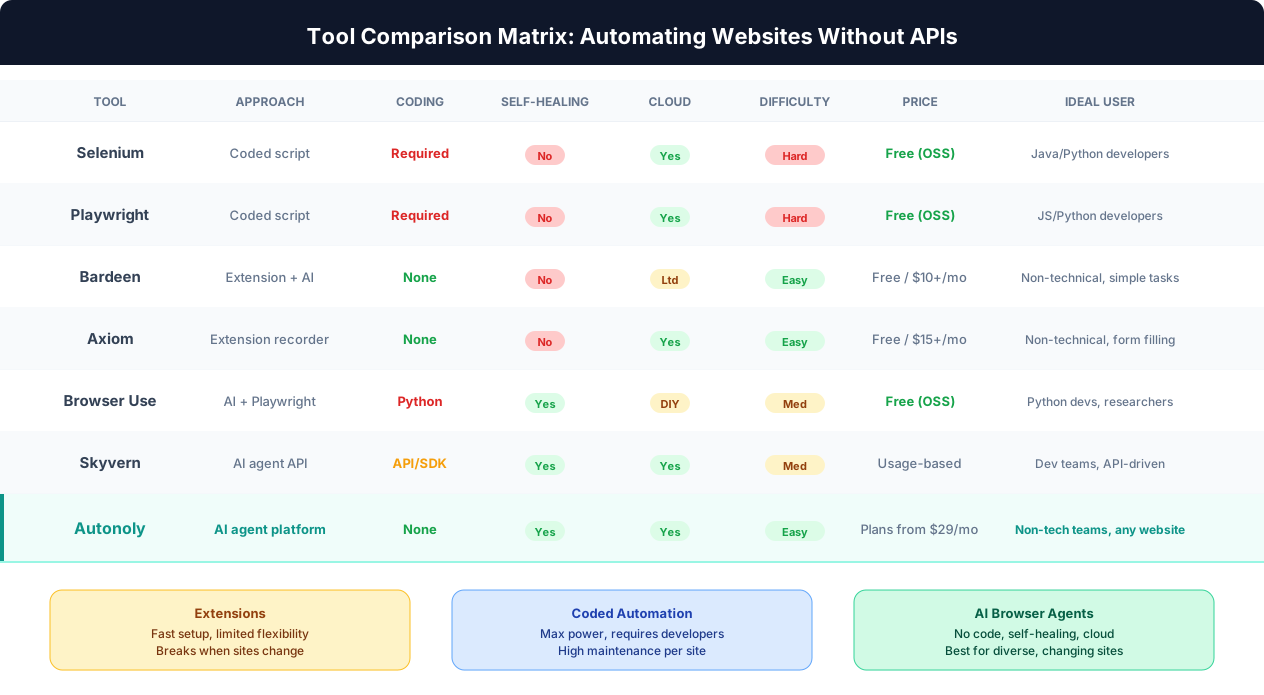
Browser Extension Tools
| Tool | Approach | Coding Required | Cloud Execution | Self-Healing | Best For |
|---|---|---|---|---|---|
| Bardeen | Extension + AI assist | None | Limited (Pro) | No | Simple scraping, CRM data entry, personal productivity |
| Axiom | Extension recorder | None | Yes (paid) | No | Form filling, repetitive clicks, simple multi-step tasks |
| Browserflow | Extension recorder | None | No | No | Quick local automations, personal use |
For a deeper look at extension tools, see our Bardeen alternatives comparison and Axiom vs Browserflow vs Autonoly analysis.
Coded Automation Frameworks
| Tool | Language | Browser Support | Cloud/Headless | Community | Best For |
|---|---|---|---|---|---|
| Selenium | Python, Java, JS, C#, Ruby | Chrome, Firefox, Safari, Edge | Yes | Massive (20+ years) | Enterprise testing, cross-browser, teams with Java/Python devs |
| Playwright | Python, JS/TS, Java, C# | Chromium, Firefox, WebKit | Yes | Fast-growing | Modern web apps, parallel execution, best API design |
| Puppeteer | JavaScript/TypeScript | Chrome/Chromium only | Yes | Large | Chrome-specific tasks, Node.js teams, PDF generation |
AI Browser Agent Platforms
| Tool | Coding Required | Cloud Execution | Self-Healing | Workflow Builder | Best For |
|---|---|---|---|---|---|
| Autonoly | None | Yes (built-in) | Yes | Yes (visual) | Non-technical teams, multi-site workflows, form filling, data extraction |
| Skyvern | API/SDK | Yes | Yes | No | Developer teams wanting AI-assisted automation via API |
| Browser Use | Python required | Self-hosted | Yes | No | Developers building custom AI agents, research projects |
For detailed head-to-head analyses, see our Autonoly vs Skyvern and Browser Use alternatives comparisons.
How to Choose
If you have developers and need maximum control or high-volume scraping: Playwright or Selenium. If you need a quick, simple automation on a stable site: Bardeen or Axiom. If you need to automate diverse, changing websites without code: Autonoly or another AI agent platform. Many teams end up using a combination — API tools (Zapier/Make) for the 35% of apps with APIs, and an AI agent for the 65% without.
Real-World Use Cases: What People Actually Automate Without APIs
Theory is useful; seeing real examples is better. These are the categories of tasks that businesses most commonly automate on websites without APIs, along with how each approach handles them.
1. Downloading Invoices and Statements From Vendor Portals
The problem: Your company has accounts on 15-30 vendor portals. Each month, someone logs into each portal, navigates to the billing or invoices section, downloads the latest invoice PDF, renames it, and saves it to the right folder. Each portal has a different UI, different navigation, and different download mechanisms.
Extension approach: Record a sequence for each vendor portal. Works if the portal UI is stable. Breaks when any vendor redesigns their billing page. Must be run manually on your computer for each portal.
Coded approach: Write a Playwright script per vendor with login handling, navigation, PDF download, and file naming. Reliable but requires 2-4 hours of developer time per portal, plus ongoing maintenance.
AI agent approach: Tell the agent: "Log into [vendor portal URL], go to invoices, download the latest invoice for this month, and save it to Google Drive in the Vendor Invoices folder." The agent handles each portal's unique UI. If a portal changes its layout, the agent adapts. One prompt template works across all vendors with URL and credential swaps.
Typical time savings: 8-12 hours per month for a company with 20 vendor portals.
2. Filling Government Permit and Compliance Forms
The problem: Construction companies, real estate developers, and licensed professionals routinely submit forms through government portals — building permits, business license renewals, environmental compliance reports, tax filings. Each portal has multi-page forms with dozens of fields, specific formatting requirements, and unique submission flows.
Extension approach: Works for simple, single-page forms. Struggles with multi-step forms, conditional fields ("if you selected X, fill out section Y"), and file upload requirements.
Coded approach: Highly capable but expensive. A Selenium script for a complex government form can take a developer 1-2 days to build and test, including all the edge cases. Worth it only if you submit the same form hundreds of times.
AI agent approach: Provide the agent with source data (spreadsheet, document) and the portal URL. The agent reads the source data, navigates the form, fills each field, handles conditional sections, uploads documents, and submits. For form filling from spreadsheets, see our dedicated guide.
Typical time savings: 20-40 minutes per form submission. For a company submitting 50 permits per month, that is 16-33 hours saved.
3. Extracting Data From Legacy CRMs and Internal Tools
The problem: Your company's older CRM, ERP, or industry-specific software has data you need for reporting, analytics, or migration — but no export API, limited CSV exports, and a web UI that was built in the early days of web development.
Extension approach: Can scrape visible data from simple list pages. Cannot handle pagination, search-and-extract workflows, or data that requires navigating into individual records.
Coded approach: Effective but tedious. The developer must reverse-engineer the legacy system's session management, CSRF tokens, and page structure. Legacy web apps often use non-standard HTML, frames, or ActiveX controls that make automation harder.
AI agent approach: The agent navigates the legacy UI like a human user — searching, clicking into records, extracting fields, handling pagination — and exports structured data to Google Sheets, CSV, or your modern database. The agent's semantic understanding handles the quirky UIs that legacy systems are known for. See our AI data extraction guide for more.
4. Monitoring Competitor Prices Across Multiple Websites
The problem: You want to track how competitors price products or services. Competitor websites have no API (obviously), change layouts frequently, and may use anti-bot protections.
Extension approach: Record a scraping sequence for each competitor page. Breaks whenever a competitor redesigns. Cannot handle dynamic pricing pages that load content via JavaScript.
Coded approach: Write scrapers with Playwright, including anti-detection measures, proxy rotation, and JavaScript rendering. Robust but requires ongoing developer maintenance as competitor sites change. See our anti-bot detection guide.
AI agent approach: Tell the agent which competitors and products to monitor. The agent visits each site, locates prices (even on dynamically loaded pages), extracts them, and compiles a comparison report. When a competitor redesigns their site, the agent adapts without code changes.
Typical time savings: 5-10 hours per week for monitoring 20-50 competitor products.
5. Submitting Insurance Quotes Across Carrier Portals
The problem: Independent insurance agencies must log into 6-12 different carrier portals to submit the same client information and get quotes. Each carrier has a proprietary multi-page form with different field names, layouts, and required data points. There are no APIs — each carrier guards their quoting system.
Extension approach: Impractical. Carrier forms are too complex, with too many conditional fields and multi-step flows for simple record-and-replay.
Coded approach: Some agencies have built custom Selenium scripts per carrier, but maintaining scripts across 8-12 carriers (each of which updates their portal regularly) requires a dedicated developer.
AI agent approach: Feed client data to the agent once. The agent sequentially navigates each carrier's portal, fills out quote forms, adapts to each carrier's unique layout, handles carrier-specific fields and options, and compiles all quotes into a comparison spreadsheet. This is one of the highest-ROI use cases for AI browser agents — see our form automation features.
Typical time savings: 3-4 hours per client. For an agency processing 15 clients per week, that is 45-60 hours saved weekly.
Important Consideration
When automating interactions with government portals, banking sites, or insurance carriers, always verify that automated access complies with the site's terms of service and your industry's regulatory requirements. Use dedicated service accounts, maintain audit trails, and implement human-in-the-loop review for submissions that have legal or financial consequences.
How AI Browser Agents Actually Work: The Technical Deep Dive
Understanding the technology behind AI browser agents helps you evaluate them critically — and sets realistic expectations for what they can and cannot do. This section goes deeper than marketing copy.
The Perception-Reasoning-Action Loop
Every AI browser agent operates in a loop with three phases:
1. Perception: Reading the Page
The agent needs to understand what is currently on screen. Two complementary approaches exist:
- DOM/Accessibility Tree Parsing: The agent reads the HTML DOM or the browser's accessibility tree, extracting interactive elements (buttons, links, inputs, dropdowns) with their labels, roles, and states. This is fast, token-efficient, and precise for well-structured pages.
- Vision/Screenshot Analysis: The agent takes a screenshot and sends it to a vision-capable LLM (Claude, GPT-4V) for visual interpretation. This catches things DOM parsing misses — content rendered as images, complex CSS layouts, canvas elements, and spatial relationships between elements.
Production-grade agents use both. DOM parsing provides the primary element map; vision serves as a fallback and verification layer.
2. Reasoning: Deciding What to Do
The LLM receives the current page state, the overall task description, and the history of actions taken so far. It reasons about:
- Which element to interact with next
- What type of interaction (click, type, select, scroll, wait)
- What data to provide (for form fields)
- Whether the current page matches expectations
- How to handle unexpected states (errors, popups, missing elements)
This is where AI agents fundamentally differ from scripted automation. A Selenium script knows exactly which element to click because a developer specified it. An AI agent figures out which element to click by understanding the page context — "the submit button is the large green button at the bottom of the form labeled 'Submit Application'."
3. Action: Interacting With the Page
The agent executes the decided action through the browser automation framework (Playwright). This is the same underlying technology as coded automation — the difference is what generates the commands. In coded automation, a developer writes them. In an AI agent, the LLM generates them.
Self-Healing: Why AI Agents Survive Website Changes
The most practical advantage of AI agents is self-healing. Here is a concrete example of how it works:
Scenario: A government portal redesigns its business search page. The search input field changes from <input id="entityName" class="search-field"> to <input data-testid="business-search-input" class="redesigned-input">.
- Selenium script: Immediately breaks. The selector
#entityNameor.search-fieldno longer matches anything. A developer must inspect the new page, find the new selector, update the code, test, and deploy. - Browser extension: Same failure. The recorded action targeted an element that no longer exists.
- AI agent: Reads the page, sees a text input with placeholder text "Search business entities" near a search icon and a heading that says "Business Entity Search." The agent identifies this as the search input and proceeds. No update needed.
Self-healing is not magic — it has limits. If a website fundamentally changes its workflow (not just its layout), the agent may need updated instructions. But for the routine layout changes, CSS updates, and element reorganizations that break traditional scripts weekly, AI agents handle them transparently.
Performance Characteristics
| Metric | Coded Script (Playwright) | AI Agent | Human |
|---|---|---|---|
| Time per page interaction | 0.1 - 0.5 seconds | 1 - 3 seconds | 3 - 10 seconds |
| 10-step form completion | 5 - 15 seconds | 30 - 90 seconds | 3 - 10 minutes |
| Setup time per website | 2 - 8 hours (developer) | 5 - 15 minutes | N/A |
| Maintenance per month | 1 - 4 hours (developer) | 0 - 30 minutes | N/A |
| Handles layout changes | No (manual fix) | Yes (automatic) | Yes |
| Handles new edge cases | No (must code) | Usually (reasoning) | Yes |
The Speed Tradeoff
AI agents are 5-10x slower per action than coded scripts but 10-50x faster than humans. For most business automation use cases — where the alternative is a person spending minutes or hours — the agent's speed is more than sufficient. For high-volume tasks requiring sub-second execution across millions of records, coded automation remains the better choice.
The Decision Framework: Which Approach Is Right for Your Task?
Choosing between browser extensions, coded automation, and AI agents is not about which is "best" in the abstract. It depends on your specific constraints: team skills, budget, task complexity, volume, and how often the target websites change.
The Five Decision Factors
1. Does your team have developers?
If yes: Coded automation (Playwright/Selenium) is viable and gives maximum control. Consider it for high-volume, mission-critical tasks where you need deterministic behavior.
If no: Eliminate coded automation. Choose between browser extensions (simple tasks) and AI agents (complex tasks).
2. How complex is the task?
If simple (single page, few steps, stable site): Browser extensions are fast and sufficient.
If complex (multi-page forms, conditional logic, multiple sites, error handling): AI agents or coded automation.
3. How often does the target site change?
If rarely (government sites with stable designs, internal tools): Any approach works. Extensions and scripts will be reliable.
If frequently (competitor sites, modern SaaS UIs, actively developed portals): AI agents' self-healing capability provides significant maintenance savings.
4. What volume are you processing?
If low volume (dozens per day): AI agents — setup speed matters more than per-action cost.
If medium volume (hundreds per day): Either AI agents or coded automation depending on team skills.
If high volume (thousands+ per day): Coded automation — per-action cost and speed become dominant factors.
5. What is your budget?
If minimal: Open-source coded frameworks (free) or browser extension free tiers.
If moderate: AI agent platforms provide the best value considering time-to-automation and maintenance costs.
If significant: Coded automation with dedicated developer time, or enterprise AI agent plans for maximum coverage.
Quick Decision Matrix
| Your Situation | Recommended Approach |
|---|---|
| Non-technical team, simple tasks, stable sites | Browser extension (Bardeen, Axiom) |
| Non-technical team, complex tasks or changing sites | AI agent (Autonoly) |
| Developer team, high volume, stable targets | Coded automation (Playwright) |
| Developer team, diverse targets, want faster setup | AI agent with API access (Skyvern, Browser Use) |
| Mix of API and non-API systems | Zapier/Make for API systems + AI agent for the rest |
| Enterprise with dedicated automation team | Playwright for core pipelines + AI agent for long tail |
The Hybrid Strategy
The most effective automation stacks are not one-tool solutions. They combine approaches strategically:
- API-based tools (Zapier, Make, direct APIs) for the ~35% of systems that offer programmatic access. These are fast, cheap, and reliable.
- AI browser agents for the ~65% of systems without APIs — government portals, vendor sites, legacy tools, competitor websites. These handle diversity and change.
- Coded automation for the high-volume, mission-critical pipelines that justify developer investment — large-scale scraping, data migration, automated testing.
This three-layer approach eliminates the automation coverage gap entirely. Read our shorter introduction to API-free automation or our Zapier vs Make vs n8n vs Autonoly comparison for more on hybrid strategies.
Security, Compliance, and Reliability Considerations
Automating interactions with business-critical websites — especially government portals, financial systems, and healthcare platforms — demands serious attention to security and reliability. This section covers what to evaluate and what questions to ask.
Credential Security
Any tool that logs into websites on your behalf needs your credentials. The security model matters enormously:
| Factor | Browser Extensions | Coded Automation | AI Agent Platforms |
|---|---|---|---|
| Where credentials live | Browser storage (local) | Your code/config files | Platform's encrypted vault |
| Encryption | Varies (often weak) | Your responsibility | AES-256 at rest, TLS in transit (verify) |
| Access isolation | No (same browser context) | Your responsibility | Per-user, per-task isolation (verify) |
| Audit trail | None | Your responsibility | Full logging (verify) |
Security Checklist for AI Agent Platforms
Before granting an AI agent access to any business system, verify: (1) credentials are encrypted at rest and in transit, (2) each agent session runs in an isolated environment, (3) full audit logs record every action, (4) you can revoke access instantly, (5) the platform has SOC 2 Type II certification or equivalent, (6) data retention policies match your compliance requirements.
Compliance Considerations
Terms of Service: Most websites' ToS address automated access. Many government portals permit it for legitimate business use. Competitor websites and social platforms often restrict it. Always review the ToS before automating.
Data protection regulations: If your automation touches personal data (EU residents, California consumers), ensure your approach complies with GDPR, CCPA, and other applicable regulations. This includes data minimization, retention limits, and right-to-deletion support. Read our legal guide to web scraping for detailed analysis.
Industry-specific regulations: Healthcare (HIPAA), financial services (SOX, PCI DSS), and other regulated industries have specific requirements for how data is processed and stored. Your automation approach must satisfy these requirements end-to-end.
Reliability in Production
Production automation needs predictable behavior. Here is what to expect from each approach:
Browser Extensions: 70-85% reliability on stable sites. Silent failures are common — the extension may click the wrong element or fail to find one without reporting an error. Not suitable for unattended production use.
Coded Automation: 90-99% reliability when well-built and maintained. Explicit error handling, retries, and logging make failures visible and recoverable. Degrades when target sites change.
AI Agents: 85-96% first-attempt reliability across diverse sites. Higher effective reliability (92-98%) with retry logic. Occasional LLM reasoning errors require monitoring. Best practice is to enable live browser viewing for the first runs of any new workflow, then switch to alert-based monitoring.
Recommended production setup for AI agents:
- Run new workflows manually 3-5 times with live browser view to verify behavior
- Enable retry logic (2-3 attempts with backoff)
- Configure failure notifications (email, Slack)
- Set up human-in-the-loop approval for high-stakes actions (payments, submissions)
- Review agent activity logs weekly
- Schedule periodic manual verification runs for critical workflows
Getting Started: Your First API-Free Automation in 15 Minutes
Enough theory. Here is a practical step-by-step guide to automating your first website that lacks an API. We will use Autonoly as the example, but the principles apply to any AI agent platform.
Step 1: Pick Your First Target (2 minutes)
Choose a task that is:
- Performed at least weekly
- On a website without an API or Zapier integration
- Repetitive (same general steps each time, different data)
- Low-risk (start with data extraction, not financial submissions)
Recommended first targets:
- Extracting business entity data from a Secretary of State portal
- Downloading a report from an internal tool or vendor portal
- Checking prices on 3-5 competitor websites
- Looking up permit statuses on a county portal
Step 2: Describe the Task in Plain English (3 minutes)
Open the AI agent chat and describe what you want done. Be specific about:
- The URL to start at
- What to search for or fill in
- What data to extract or what action to complete
- Where to put the results
Example prompt:
"Go to the California Secretary of State business search at https://bizfileonline.sos.ca.gov/search/business. Search for 'Acme Holdings LLC'. Click on the matching result. Extract the entity number, status, formation date, jurisdiction, and agent for service of process. Put the results in a new row in this Google Sheet: [sheet URL]."
Step 3: Watch the Agent Work (5 minutes)
The agent opens a cloud browser and begins working. Through the live browser view, you can watch every step:
- Browser navigates to the Secretary of State website
- Agent identifies the search form and enters the business name
- Agent reads search results, identifies the correct match
- Agent clicks through to the entity detail page
- Agent extracts each requested data field
- Agent writes the data to your Google Sheet
If the agent makes a mistake or takes a wrong path, type a correction in the chat: "That's the wrong entity — look for the one registered in Delaware." The agent adjusts immediately.
Step 4: Convert to a Repeatable Workflow (3 minutes)
Once the task succeeds, save it as a reusable workflow:
- Parameterize the variable inputs (company name, search term, etc.)
- Connect your data source (spreadsheet with a list of companies to look up)
- Set a schedule (daily, weekly, on-demand)
- Configure output destination and notification preferences
Your manual, repetitive task is now a scheduled automation that runs without your involvement. See our workflow scheduling guide for advanced scheduling options.
Step 5: Scale Gradually
After your first successful automation:
- Add more targets to the same workflow (more companies, more portals)
- Create a second automation for a different task
- Explore multi-site workflows (one task that spans several websites)
- Connect AI agent outputs to your existing API-based automations (Zapier/Make) for end-to-end coverage
Pro Tip
Start with extraction tasks (reading data from websites) before attempting action tasks (submitting forms, making payments). Extraction is lower-risk, gives you confidence in the tool, and the extracted data often feeds into your next automation. Most teams have 3-5 automations running within their first week.
The Future of API-Free Automation
The API gap is not shrinking — it is growing. As businesses adopt more specialized software, interact with more government systems, and expand across more geographies, the number of websites that lack programmatic access continues to increase. At the same time, the technology for automating these sites is advancing rapidly.
Trends Shaping the Next Generation
1. Multi-modal AI agents: Current agents primarily use DOM parsing with vision as a fallback. Next-generation agents will natively combine text understanding, visual perception, and even audio processing — enabling automation of sites with complex visual interfaces, embedded videos, or voice-based interactions.
2. Agent-to-agent coordination: Instead of a single agent handling a complex workflow, multiple specialized agents will collaborate — one navigating government portals, another handling data transformation, a third managing output delivery. This mirrors how human teams divide work.
3. Persistent agent memory: Agents that remember previous interactions with a website — its layout patterns, common error states, successful navigation paths — will get faster and more reliable over time. Cross-session learning is already emerging in platforms like Autonoly (see cross-session learning).
4. Proactive automation: Today, you tell an agent what to do. Tomorrow, agents will observe your manual work patterns and suggest automations: "I noticed you download invoices from these 12 vendor portals every month. Would you like me to handle that?"
5. Better hybrid orchestration: Seamless hand-off between API-based and browser-based automation within a single workflow. Zapier handles steps 1-3 via APIs; an AI agent handles steps 4-6 via browser; the results flow back to Zapier for steps 7-8. No manual coordination needed.
What This Means for Your Automation Strategy
The practical takeaway: do not wait for websites to build APIs. They will not. The 65% of sites that lack API access today will still lack it in three to five years. The tools to automate them exist now and are improving rapidly.
Start with the approach that matches your current team and needs — extensions for simple tasks, coded automation for developer teams, AI agents for no-code flexibility — and build from there. The most successful teams treat API-free automation not as a workaround but as a core capability, investing in it alongside their API-based automation stack.
The Bottom Line
Every website is automatable. The question is no longer "can this be automated?" but "which approach is the most efficient way to automate it?" This guide gave you the framework to answer that question for any website you encounter. Start with your highest-ROI target, prove the value, and expand from there.
Frequently Asked Questions
Quick answers to the most common questions about automating websites without APIs.
What percentage of websites have APIs?
Roughly 35% of business-relevant websites offer API or integration access. The remaining 65% — government portals, legacy systems, competitor sites, niche tools — require browser-based automation.
Is it legal to automate websites without APIs?
Generally yes. The hiQ v. LinkedIn ruling established that accessing publicly available data via automated means is permissible. Respect Terms of Service, comply with GDPR/CCPA for personal data, and use legitimate accounts for login-protected sites. See our legal guide.
How do AI agents differ from RPA tools like UiPath?
RPA uses hard-coded selectors and pre-defined workflows. AI agents use LLMs to reason semantically, enabling self-healing, natural language setup, and adaptation to unexpected scenarios without specialized developers.
Can browser automation handle 2FA?
TOTP-based 2FA (authenticator apps) can be fully automated. SMS-based 2FA requires human intervention for initial login; the agent maintains the session afterward. Push-notification 2FA requires manual approval.
What happens when a website redesigns?
Extensions and scripts break — they rely on hard-coded selectors. AI agents adapt automatically because they understand pages semantically. Major workflow changes (not just layout changes) may still need updated instructions.
How fast is AI browser automation?
AI agents are 5-10x slower per action than coded scripts (1-3 seconds vs. 0.1-0.5 seconds per step) but 10-50x faster than a human. For most business tasks, agent speed is more than adequate.
Can I handle anti-bot protections?
AI agents handle many protections through human-like interaction patterns and proper browser fingerprinting. For aggressive blocking, residential proxies and stealth configurations help. See our anti-bot detection guide.
Can I combine API tools (Zapier) with browser automation?
Yes — this hybrid strategy is recommended. Use Zapier/Make for the ~35% of apps with APIs, and an AI browser agent for the ~65% without. This eliminates the coverage gap entirely. See our platform comparison.