What Is Browser Use and Why People Search for Alternatives
Browser Use is an open-source Python library that lets you connect large language models (LLMs) to a browser, enabling AI agents to navigate websites, fill forms, extract data, and complete multi-step tasks autonomously. With over 78,000 GitHub stars, it has become one of the most popular AI browser automation projects in the open-source ecosystem. If you are weighing whether to build or buy, our overview of what automation is and the AI automation guide help frame the decision.
What Makes Browser Use Impressive
Browser Use deserves genuine credit for what it achieves. The library provides a clean abstraction layer between AI models (GPT-4, Claude, Gemini, and others) and browser interactions. You write a Python script that describes a task in natural language, and Browser Use handles the complex work of converting that into real browser actions — clicking buttons, filling forms, reading page content, navigating between pages, and extracting structured data.
The project is well-maintained, has an active community, supports multiple LLM providers, and benefits from the kind of rapid iteration that thriving open-source projects enjoy. For Python developers, it is a genuinely excellent tool.
The Core Problem: Python Required
Here is the fundamental limitation that drives people to search for Browser Use alternatives: it requires Python programming knowledge. This is not a minor barrier. To use Browser Use, you need to:
- Install Python 3.11 or later on your machine
- Set up a virtual environment and manage dependencies with pip or Poetry
- Write Python scripts that define agent tasks and configure browser sessions
- Obtain and configure API keys for your chosen LLM provider
- Debug Python errors when something goes wrong
- Deploy and schedule scripts using cron jobs, cloud functions, or a server
For a software developer, these steps are routine. For a marketing manager, an operations coordinator, a recruiter, or a small business owner, they represent an impassable wall. And that is precisely the audience searching for "Browser Use alternatives" — people who saw what Browser Use can do, got excited about the possibilities, and then discovered they need to code.
Important Context
This article is not a criticism of Browser Use. It is an excellent project that has introduced thousands of developers to AI browser automation. This guide is specifically for non-developers who want similar capabilities through no-code or low-code tools. If you can write Python, Browser Use itself may be your best option.
What Non-Developers Actually Need
When non-technical users search for Browser Use alternatives, they typically want:
- AI-powered browser automation that can handle complex, multi-step web tasks
- Natural language task description — tell the tool what to do in plain English
- No installation or coding — sign up and start using immediately
- Visual feedback — see what the automation is doing, not read console logs
- Scheduled execution — run tasks automatically without manually triggering scripts
- Reliable error handling — the tool recovers from problems without you debugging Python tracebacks
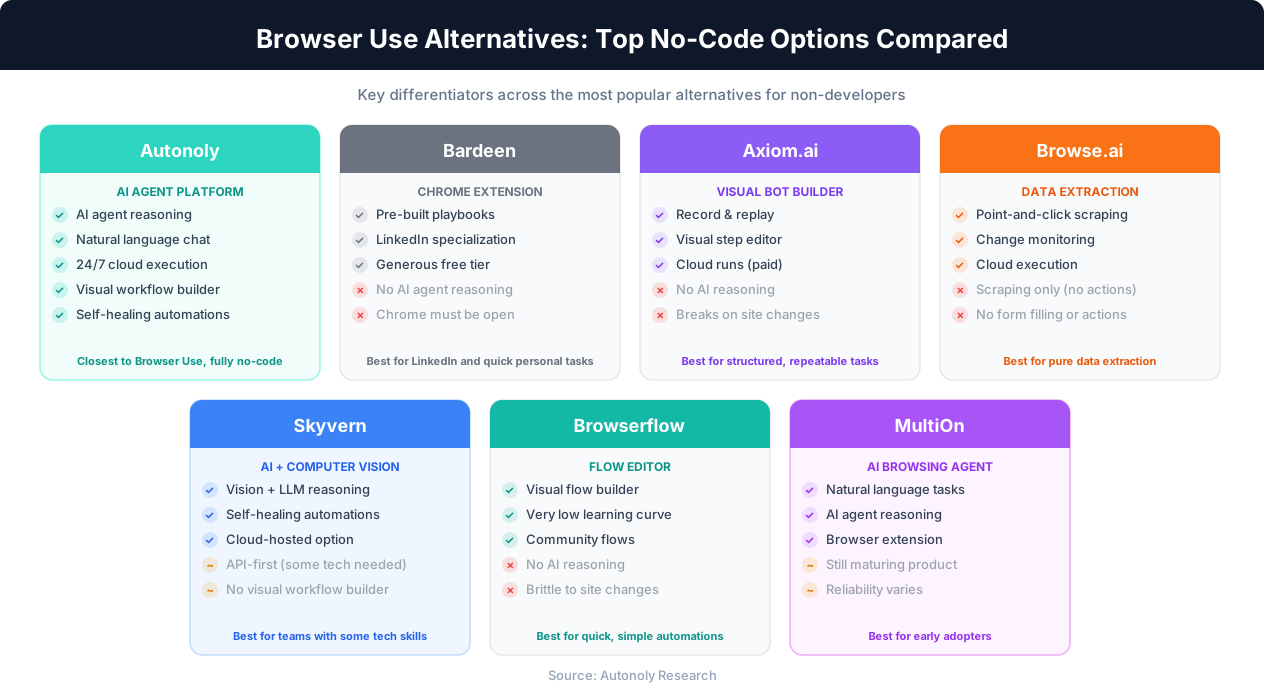
The alternatives in this guide all meet at least some of these criteria, though they vary significantly in how much AI intelligence they bring to the table versus traditional step-by-step automation.
Autonoly: The Closest No-Code Equivalent to Browser Use
Autonoly is the no-code alternative that most closely replicates what Browser Use does — AI-powered browser automation where you describe tasks in natural language and an AI agent executes them in a real browser. The key difference is that everything happens through a web-based interface instead of Python scripts.
How It Works
With Browser Use, you write something like agent.run('Go to Amazon and find the top 10 wireless headphones under $50') in a Python file. With Autonoly, you type that same instruction into the AI agent chat and watch the agent execute it in a live browser window you can observe in real time.
The underlying concept is identical: an LLM reasons about what browser actions to take, executes them, observes the results, and decides the next step. The difference is the interface layer — code versus conversation.
Key Advantages Over Browser Use (for Non-Developers)
| Capability | Browser Use | Autonoly |
|---|---|---|
| Setup | Install Python, pip install, configure API keys | Sign up and start |
| Task definition | Write Python scripts | Type in natural language chat |
| Visual feedback | Console output, optional screenshot saving | Live browser view in real time |
| Scheduling | Set up cron jobs or cloud functions manually | Built-in scheduling |
| Error handling | Python exceptions, manual debugging | AI-powered retry and adaptation |
| Workflow building | Code multi-step logic in Python | Visual workflow builder |
| Team collaboration | Share code via Git repositories | Shared workspaces, role-based access |
| Anti-detection | Manual proxy and fingerprint configuration | Built-in proxy rotation and fingerprint management |
What You Get That Browser Use Cannot Provide
Beyond replacing the code requirement, Autonoly adds capabilities that are difficult or impossible to implement with Browser Use alone:
- Visual workflow builder: Chain browser actions, data transformations, API calls, and integrations (Google Sheets, Slack, email) into automated pipelines on a drag-and-drop canvas
- Cloud execution: Agents run on Autonoly's infrastructure 24/7 — no need to keep your computer on or manage servers
- Cross-session learning: The AI agent improves over time, remembering how it handled similar tasks previously
- Anti-detection infrastructure: Proxy rotation, browser fingerprint management, and CAPTCHA handling built in — features that require significant additional code with Browser Use
- Document processing: Full PDF extraction, spreadsheet automation, and data entry capabilities integrated into the same platform
Where Browser Use Still Wins
To be fair, Browser Use has advantages that Autonoly cannot match:
- Free and open-source: Browser Use costs nothing beyond LLM API fees. Autonoly is a paid subscription service.
- Full customization: With Python, you have complete control over agent behavior, custom tool definitions, and integration with any Python library. Autonoly's customization is bounded by what the platform offers.
- Self-hosted: Browser Use runs on your own infrastructure. Your data never leaves your machines. Autonoly processes data through cloud infrastructure.
- Cutting-edge features: As an open-source project with rapid development, Browser Use often gets new LLM features (vision, function calling improvements) before commercial platforms.
Bottom Line
Autonoly is the best choice for non-developers who want Browser Use-level AI browser automation without writing code. If you can code Python and want maximum control, Browser Use itself remains an excellent option.
Best For
Non-technical teams that need AI agent-powered browser automation: data scraping, form filling, price monitoring, cross-system data entry, and automated reporting.
Bardeen: Chrome Extension Automation with AI Assist
Bardeen is a Chrome extension that automates browser tasks through pre-built playbooks and an AI-assisted workflow builder. It takes a fundamentally different approach from Browser Use — rather than an AI agent that reasons through tasks step by step, Bardeen provides structured automation templates that you configure and trigger.
How Bardeen Differs from Browser Use
Browser Use is an AI agent that figures out how to accomplish a goal. Bardeen is primarily a macro recorder and template system that has added AI features on top. This distinction matters: Bardeen's automations are more predictable but less flexible than what an AI agent can handle.
Bardeen's strengths lie in its simplicity and its deep integrations with sales and productivity tools. You install the Chrome extension, browse the playbook library, pick one that matches your need, connect your accounts, and run it. For standard use cases (especially LinkedIn prospecting and CRM enrichment), this template-based approach gets you running faster than any AI agent.
Key Features
- 1,000+ pre-built playbooks: Ready-to-use automation templates for common tasks
- AI playbook generation: Describe what you want and Bardeen generates a playbook (though this works best for simple tasks)
- Native integrations: Direct connections to Google Sheets, HubSpot, Salesforce, Notion, Slack, and 30+ other tools
- LinkedIn specialization: Purpose-built playbooks for profile scraping, connection requests, and lead enrichment
- Free tier: Generous free plan for basic personal use
Limitations as a Browser Use Alternative
| Factor | Browser Use | Bardeen |
|---|---|---|
| AI reasoning | Full LLM-powered agent loop | Limited AI assist (template generation) |
| Handling unexpected UI | Agent adapts in real time | Fails if selectors break |
| Complex multi-step tasks | Agent reasons through steps | Must pre-build each step manually |
| Runs unattended | Yes (on your server) | No — requires Chrome open on your machine |
| Cross-browser support | Yes (Playwright) | Chrome only |
Bardeen is an excellent tool, but it occupies a different category than Browser Use. If you are searching for a no-code version of Browser Use's AI agent capabilities, Bardeen's template-based approach may feel limiting. If you primarily need LinkedIn automation and simple data scraping with zero learning curve, Bardeen is hard to beat.
Best For
Individual sales reps and recruiters who need quick LinkedIn automation and simple browser tasks in Chrome. Budget-conscious users who want a free or low-cost option for basic automation. Read our full Autonoly vs Bardeen comparison for a deeper analysis.
Axiom.ai and Browserflow: Visual Browser Automation Builders
Axiom.ai and Browserflow both provide visual, no-code interfaces for building browser automations. They sit in a middle ground between Bardeen's template approach and Autonoly's AI agent approach — you build automations step by step in a visual editor rather than selecting templates or describing tasks to an AI.
Axiom.ai
Axiom.ai is a Chrome extension that lets you record and build browser automations visually. You click through a task once, and Axiom records the steps. You can then edit, add logic (loops, conditions, data input), and schedule the automation.
Key features:
- Visual bot builder: Point-and-click interface for defining browser actions
- Step recording: Record yourself performing a task and Axiom converts it to a replayable automation
- Data scraping: Built-in scraping capabilities with pagination and data export
- Scheduling: Run bots on schedule (requires Axiom cloud, paid plan)
- Google Sheets integration: Read from and write to Google Sheets within automations
As a Browser Use alternative: Axiom is a solid no-code option for people who want to automate specific, repeatable browser tasks. However, it lacks the AI reasoning that makes Browser Use powerful. You are building rigid automations — if a website changes its layout, your automation breaks. There is no LLM deciding what to do next based on what it sees on the page.
Browserflow
Browserflow takes a similar approach to Axiom but with a focus on being lightweight and fast. It runs as a Chrome extension with a visual flow builder where you chain together browser actions.
Key features:
- Flow-based editor: Connect browser actions in a visual flow
- Variable support: Use variables to pass data between steps
- Conditional logic: Add if/else branches based on page content
- Cloud runs: Execute automations in the cloud (paid feature)
- Community flows: Browse and use automations built by other users
As a Browser Use alternative: Browserflow is cleaner and more intuitive than Axiom for simple automations, but it shares the same fundamental limitation — no AI reasoning. Your automations are brittle scripts that break when websites change.
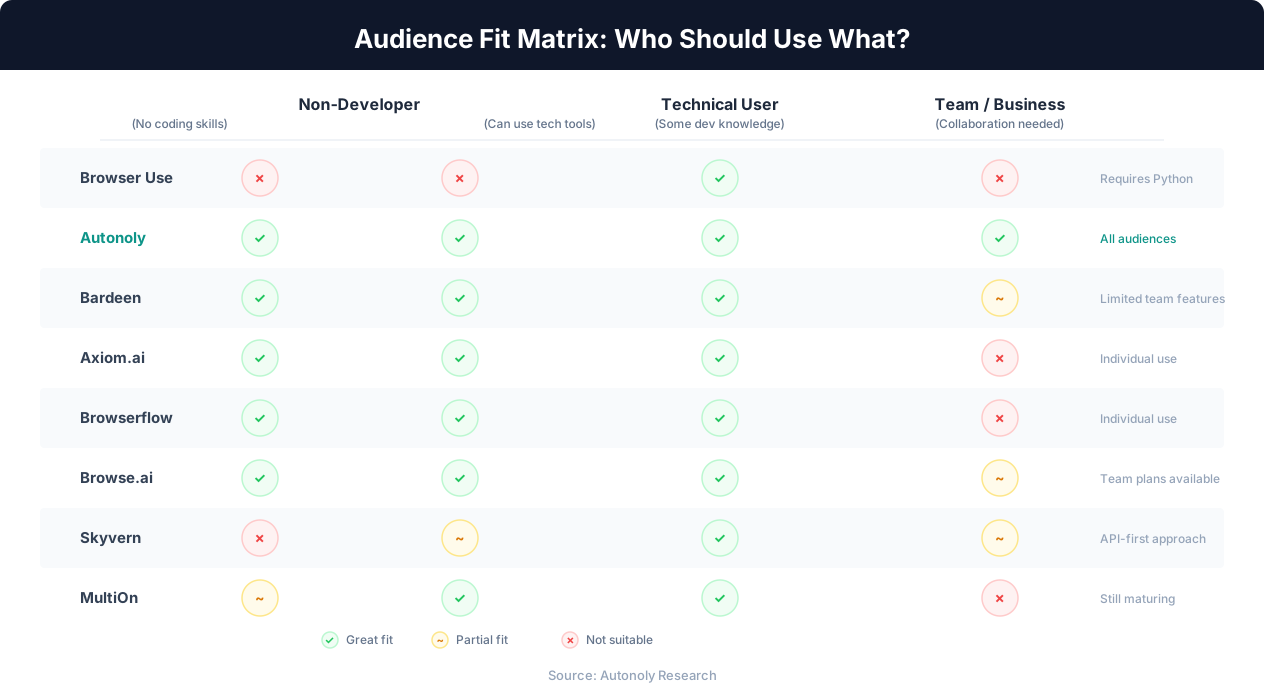
Axiom vs Browserflow Comparison
| Factor | Axiom.ai | Browserflow |
|---|---|---|
| Interface | Bot builder (step-by-step) | Flow editor (visual connections) |
| Recording | Yes — record and replay | Yes — record and replay |
| AI reasoning | No | No |
| Cloud execution | Yes (paid) | Yes (paid) |
| Free tier | Limited free plan | Limited free plan |
| Learning curve | Low | Very low |
| Best for | Structured, repeatable tasks | Quick, simple automations |
Key Distinction
Both Axiom and Browserflow are closer to traditional browser automation (like Selenium or Puppeteer for non-coders) than to what Browser Use does. They automate clicks and form fills, but they do not reason about tasks. If you want the AI reasoning aspect of Browser Use in a no-code package, look at Autonoly or Skyvern instead.
Browse.ai, Skyvern, and MultiOn: Specialized Alternatives
Three more alternatives worth considering, each with a different specialization.
Browse.ai
Browse.ai focuses specifically on web scraping and monitoring — it is not a general browser automation tool. You point it at a webpage, train it to extract the data you want (by clicking on examples), and it runs on schedule to collect that data automatically.
Key features:
- Visual data extraction: Click on the data you want on a page, and Browse.ai learns the pattern
- Monitoring: Track changes on web pages and get alerts when something changes
- Prebuilt robots: Library of ready-made extraction templates for popular sites
- Google Sheets export: Automatic data delivery to spreadsheets
- No extension required: Runs in the cloud, no browser extension needed
As a Browser Use alternative: Browse.ai is excellent if your only need is data extraction and monitoring. It handles scraping with far less setup than Browser Use. However, it cannot fill forms, navigate multi-step processes, or perform actions beyond reading data from pages. If you need Browser Use for scraping specifically, Browse.ai is a strong no-code option. If you need it for general browser automation, look elsewhere.
Skyvern
Skyvern is the most technically interesting alternative on this list. It is an AI-powered browser automation platform that, like Browser Use, uses computer vision and LLMs to interact with websites. Skyvern can look at a webpage, understand its structure visually, and interact with it — even on sites it has never seen before.
Key features:
- Computer vision + LLM: Understands web pages visually, not just through DOM selectors
- Self-healing automations: Adapts when websites change layout
- Cloud-hosted option: Managed service available (you do not need to run your own infrastructure)
- API-first: Designed to be integrated into other applications via API
- Open-source core: The engine is open-source, with a cloud-hosted commercial version
As a Browser Use alternative: Skyvern is conceptually the closest to Browser Use — it uses AI agents with visual understanding to automate browsers. The cloud-hosted version removes some of the technical barrier, but Skyvern is still more developer-oriented than truly no-code. Its primary interface is an API, not a chat or visual builder. It is a good middle ground for teams that have some technical capability but do not want to manage Browser Use infrastructure.
MultiOn
MultiOn positions itself as an AI agent that can browse the web on your behalf. You give it tasks in natural language, and it uses a browser to complete them. The company has pivoted multiple times and the product has evolved significantly, but the core proposition remains: delegate browser tasks to an AI agent.
Key features:
- Natural language tasks: Describe what you want done in plain English
- Autonomous browsing: The agent navigates websites, fills forms, and completes multi-step tasks
- API and browser extension: Available as both an API for developers and a browser extension for end users
- Multi-step workflows: Can chain together complex sequences of browser actions
As a Browser Use alternative: MultiOn is conceptually similar to Browser Use in its AI agent approach but is still maturing as a product. Reliability can be inconsistent for complex tasks, and the product direction has shifted multiple times. It is worth watching but may not be ready for business-critical automation at this stage.
| Tool | Primary Focus | AI Reasoning | No-Code Friendly | Cloud Execution | Best For |
|---|---|---|---|---|---|
| Browse.ai | Data extraction | Minimal | Yes | Yes | Scraping and monitoring only |
| Skyvern | AI browser automation | Yes (vision + LLM) | Partial (API-first) | Yes | Technical teams wanting managed AI automation |
| MultiOn | General AI agent | Yes | Yes (extension + API) | Yes | Early adopters willing to tolerate instability |
Full Comparison: All Alternatives Side by Side
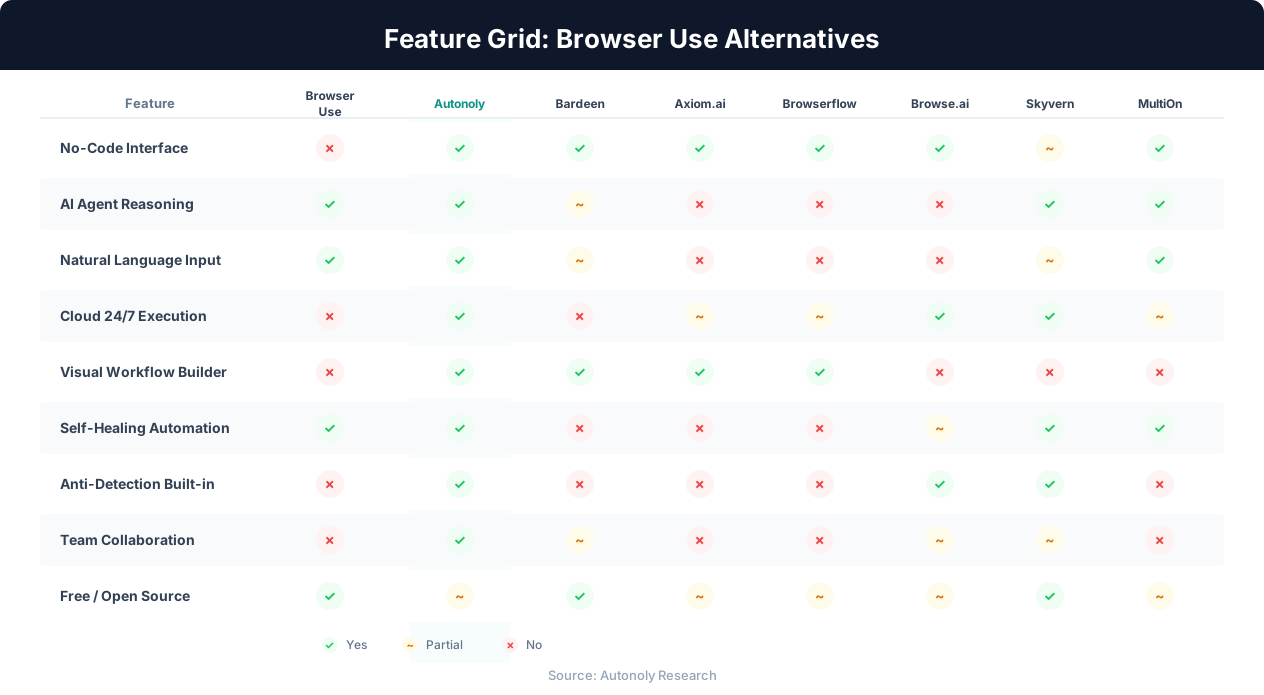
Here is a comprehensive comparison of all seven Browser Use alternatives across the dimensions that matter most for non-developers.
Core Capabilities
| Feature | Browser Use | Autonoly | Bardeen | Axiom.ai | Browserflow | Browse.ai | Skyvern | MultiOn |
|---|---|---|---|---|---|---|---|---|
| No-code interface | No (Python) | Yes (chat + visual) | Yes (extension) | Yes (visual builder) | Yes (flow editor) | Yes (point-and-click) | Partial (API + dashboard) | Yes (extension + chat) |
| AI agent reasoning | Yes | Yes | Limited | No | No | Minimal | Yes | Yes |
| Natural language input | Yes (in code) | Yes (chat) | Yes (playbook gen) | No | No | No | Via API | Yes |
| Visual workflow builder | No | Yes | Yes (playbook editor) | Yes | Yes | No | No | No |
| Live browser view | Optional (screenshots) | Yes (real-time) | In Chrome tab | In Chrome tab | In Chrome tab | No | Via dashboard | Via extension |
| Cloud 24/7 execution | Manual server setup | Yes | No (Chrome must be open) | Yes (paid) | Yes (paid) | Yes | Yes | Limited |
| Self-healing (site changes) | Yes (LLM reasoning) | Yes (LLM reasoning) | No | No | No | Limited | Yes (vision + LLM) | Yes (LLM reasoning) |
| Anti-detection | Manual configuration | Built-in | Minimal | Minimal | Minimal | Built-in | Built-in | Minimal |
User Experience
| Factor | Browser Use | Autonoly | Bardeen | Axiom.ai | Browserflow | Browse.ai | Skyvern | MultiOn |
|---|---|---|---|---|---|---|---|---|
| Setup time (first task) | 30-60 min | 5 min | 5 min | 10 min | 10 min | 10 min | 15-30 min | 5 min |
| Technical skill needed | Python developer | None | None | None | None | None | Some (API knowledge) | None |
| Learning curve | Steep | Low | Very low | Low | Very low | Very low | Medium | Low |
| Error debugging | Python tracebacks | AI-assisted | Visual retry | Step-by-step review | Flow review | Automatic retry | Dashboard logs | Limited visibility |
| Team collaboration | Git repos | Shared workspaces | Template sharing | Limited | Community flows | Team plans | API-based | Limited |
Pricing Overview
| Tool | Free Tier | Starting Paid Price | Pricing Model |
|---|---|---|---|
| Browser Use | Free (open-source) | LLM API costs only (~$0.10-1.00/task) | Pay per LLM usage |
| Autonoly | Limited free runs | $49/month | Subscription + runs |
| Bardeen | Yes (generous) | $10/month | Credit-based |
| Axiom.ai | Limited free plan | $15/month | Subscription + bots |
| Browserflow | Limited free plan | $19/month | Subscription |
| Browse.ai | Limited free robots | $49/month | Subscription + credits |
| Skyvern | Open-source (self-host) | Custom pricing | Usage-based |
| MultiOn | Limited free usage | Varies | Usage-based |
Pricing Reality Check
Browser Use looks cheapest on paper because it is free and open-source. But the true cost includes LLM API fees ($0.10-1.00 per task), your development time building and maintaining scripts, server costs for hosting, and debugging time when things break. For a non-developer, the cost of hiring someone to set up and maintain Browser Use scripts often exceeds the subscription cost of any commercial alternative.
How to Choose the Right Alternative for Your Needs
The best Browser Use alternative depends on three factors: what you want to automate, your technical comfort level, and your budget. Here is a decision framework.
Decision by Use Case
| If You Want To... | Best Choice | Why |
|---|---|---|
| Automate any browser task with AI (like Browser Use, but no code) | Autonoly | Closest to Browser Use's AI agent approach, fully no-code |
| Automate LinkedIn prospecting | Bardeen | Purpose-built LinkedIn playbooks, fast setup |
| Build step-by-step browser macros | Axiom.ai or Browserflow | Visual builders for repeatable, structured tasks |
| Extract data from websites (scraping only) | Browse.ai | Specialized for data extraction and monitoring |
| Get AI automation with some technical control | Skyvern | AI-powered with API access for customization |
| Experiment with cutting-edge AI browsing | MultiOn | Novel approach, but less mature |
Decision by Technical Comfort Level
Zero technical skills: Bardeen, Browserflow, or Browse.ai have the gentlest learning curves. Autonoly is also accessible but offers more advanced capabilities that may take slightly longer to explore fully.
Comfortable with technology but cannot code: Autonoly or Axiom.ai. Both offer powerful capabilities with intuitive interfaces. Autonoly's AI agent approach handles more complex tasks.
Some technical skills (can read APIs, understand JSON): Skyvern's cloud-hosted version gives you AI-powered automation with API-level control. Good for integrating browser automation into existing systems.
Can write Python but prefer managed solutions: Consider sticking with Browser Use for maximum control, or use Skyvern's cloud version for managed infrastructure. Autonoly may still be worthwhile if your team includes non-technical members who need to create automations independently.
Decision by Budget
Free or minimal budget: Browser Use (if you can code) or Bardeen's free tier (if you cannot). Both provide genuine value at no cost for basic use cases.
$10-50/month: Bardeen, Axiom.ai, or Browserflow for simple automations. Autonoly's entry tier if you need AI reasoning.
$50-300/month: Autonoly for full AI agent capabilities, Browse.ai for dedicated scraping, or Skyvern for managed AI automation.
The Real Question
The most important question is not "which tool replaces Browser Use" but rather "do I need AI reasoning or structured automation?" If your tasks are predictable and repeatable (fill this form, scrape this page), Bardeen or Axiom handle them well. If your tasks require judgment, adaptation, and multi-step reasoning (research this topic, monitor these competitors, handle whatever you find), you need an AI agent like Autonoly or Skyvern.
Can You Combine Multiple Tools?
Yes, and many teams do. A common pattern is using Bardeen for quick personal Chrome automations alongside Autonoly for scheduled, team-wide workflows. Browse.ai handles dedicated monitoring while Autonoly manages complex multi-step processes. The tools are not mutually exclusive.
For a broader view of the automation landscape beyond browser tools, including workflow platforms like Zapier and Make, read our comprehensive no-code automation guide.
What Non-Developers Should Know Before Starting
If you are new to browser automation and came here because Browser Use looked amazing but required coding, here are practical tips for getting started with no-code alternatives.
Start With One Simple Task
Do not try to automate your entire workflow on day one. Pick one task that you do repeatedly and that takes at least 15 minutes each time. Good first automations include:
- Scraping product prices from a competitor website
- Extracting contact information from a list of company websites
- Filling out a recurring form with data from a spreadsheet
- Monitoring a webpage for changes and getting alerted
- Copying data from one web tool to another
Expect Imperfection
No browser automation tool — including Browser Use — works flawlessly 100% of the time. Websites change, CAPTCHAs appear, sessions expire, and unexpected popups interrupt flows. The question is not whether problems occur, but how the tool handles them. AI-powered tools (Autonoly, Skyvern) recover from many issues automatically. Template-based tools (Bardeen, Axiom) require you to notice and fix the problem.
Think About Maintenance
An automation that works today may break next month when the target website updates its design. Consider maintenance when choosing a tool:
- AI agent tools (Autonoly, Skyvern): Lowest maintenance — the AI adapts to changes
- Template tools with active communities (Bardeen): Medium maintenance — templates get updated by the community
- Visual builder tools (Axiom, Browserflow): Higher maintenance — you fix each automation manually when it breaks
Respect Website Terms of Service
Browser automation can be used to interact with websites in ways their operators may not intend. Always review the terms of service of websites you automate against. Using automation to scrape data, fill forms, or interact with sites should comply with their acceptable use policies. This applies equally to Browser Use, its alternatives, and any other automation tool. For a deeper discussion of the legal landscape, see our guide on web scraping legality.
Security and Credentials
Many browser automations require logging into websites. When using cloud-based tools (Autonoly, Browse.ai, Skyvern), you provide your credentials to a third-party service. Ensure the platform you choose has appropriate security measures — encryption, credential vaults, and access controls. For the most sensitive workflows, consider whether a local tool (Bardeen, Axiom) that uses your existing browser sessions is more appropriate.
Getting Started Checklist
1. Identify one repeatable task that takes 15+ minutes
2. Try the free tier of two different tools from this guide
3. Run the same task on both and compare the experience
4. Evaluate: Did the automation save you net time including setup?
5. Commit to the tool that felt more natural for your workflow
The Future: Will Browser Use Get a No-Code Interface?
A natural question is whether Browser Use itself will eventually offer a no-code interface, making all these alternatives unnecessary. It is worth considering the trajectory of the project and the broader market.
Browser Use's Evolution
Browser Use has evolved rapidly since its initial release. The project has added support for multiple LLM providers, improved its browser control capabilities, and built a growing ecosystem of examples and integrations. However, the project's identity is fundamentally developer-first — it is a Python library designed to be imported into code, not a product designed for end users.
Some open-source projects do eventually spawn commercial products with user-friendly interfaces (think Hugging Face, which started as a developer tool and now has a web-based model hub). Browser Use could follow a similar path, and there are hints of commercial offerings in the project's roadmap. But building a production-quality no-code platform is a fundamentally different challenge than building a Python library — it requires product design, infrastructure, user management, billing, support, and all the other elements that make a commercial product viable.
The Broader Trend
The browser automation space is converging toward AI-powered, no-code tools. Every major automation platform is adding AI capabilities, and new startups are launching specifically to make AI browser automation accessible to non-developers. This trend suggests that the gap between what Browser Use can do and what no-code tools can do will continue to narrow.
Key trends to watch:
- Vision-based automation: Tools like Skyvern use computer vision alongside LLMs, making automations more robust against website changes. Expect more tools to adopt this approach.
- Agent marketplace models: Platforms where you can browse, customize, and deploy pre-built AI agents for common tasks — combining the ease of templates with the power of AI reasoning.
- Hybrid approaches: Tools that let non-developers start with natural language and visual builders but allow developers to extend with code when needed.
- Improved reliability: As LLMs get better at tool use and reasoning, AI-powered browser automations will become more reliable, reducing the gap between AI agents and hand-coded automations.
What This Means for You
If you are a non-developer looking for Browser Use alternatives today, the options are already good and getting better rapidly. Choose a tool that meets your current needs from this guide, start automating, and expect the tools to improve significantly over the coming months. The investment you make in learning any of these platforms will pay off as they add capabilities — and the automation patterns you build today will transfer easily if you switch tools later.
The era of AI browser automation being exclusively for developers is ending. The tools covered in this guide prove that non-developers can access powerful browser automation today — and the gap will only continue to close.
For more comparisons of automation platforms, explore our guide to the best AI agent platforms, our guide to automating without APIs, and our complete automation-without-coding walkthrough.