Three Tools, Three Philosophies of Browser Automation
Axiom.ai, Browserflow, and Autonoly all solve the same core problem — automating repetitive browser tasks without writing code. But each tool approaches it from a fundamentally different angle, and understanding these philosophies explains most of the practical differences you will encounter. For the foundational concepts behind all three, see what automation is and our workflow automation guide.
Axiom.ai: Record-and-Replay Macros
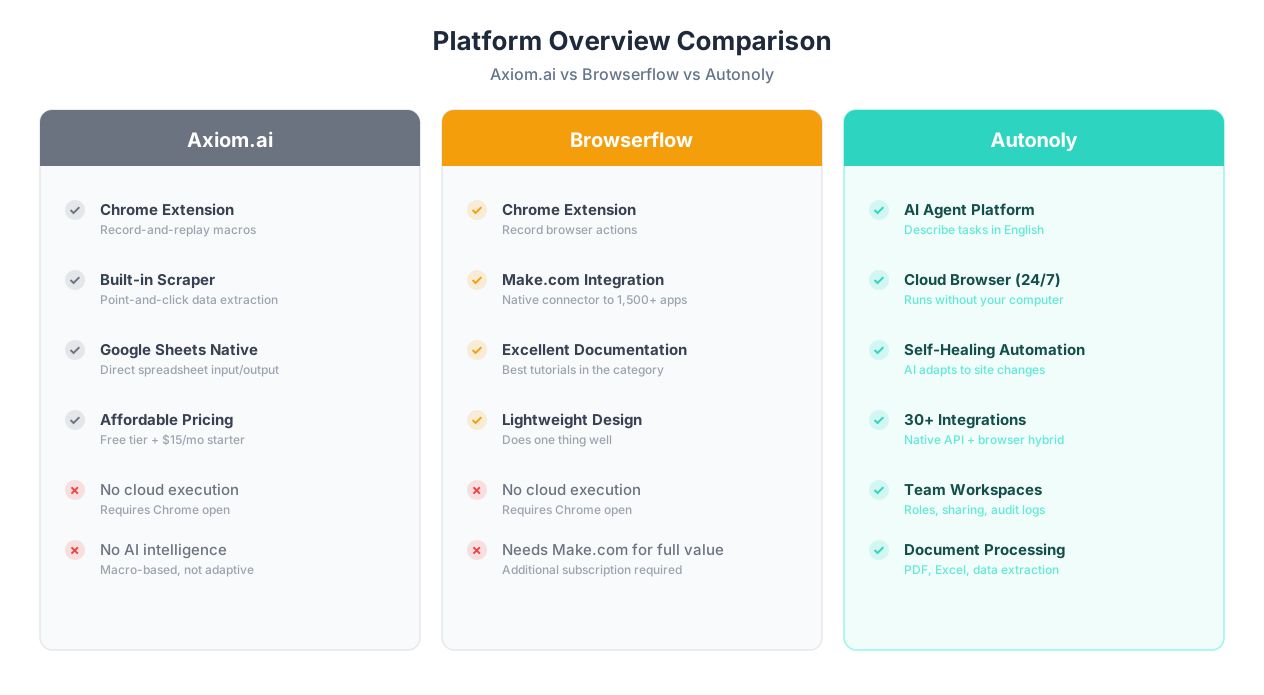
Axiom.ai is a Chrome extension that treats browser automation like macro recording. You click "record," perform actions in your browser, and Axiom captures them as a replayable sequence. It descends from the screen-scraper tradition: identify elements, click them, extract text, repeat. Axiom has expanded beyond pure recording to include a visual builder for editing steps, scheduled execution, and basic data scraping capabilities. Its strength is directness — what you see is exactly what gets automated.
Browserflow: The Lightweight Connector
Browserflow positions itself as "Zapier for sites without APIs" — a Chrome extension that records browser actions and connects them to external services through Make.com integration. Where Axiom focuses on self-contained browser macros, Browserflow emphasizes connecting browser actions to the broader automation ecosystem. It is deliberately lightweight: minimal features, clear documentation, and a focus on doing one thing well. Browserflow also offers strong tutorials and a polished onboarding experience that makes first-time automation accessible.
Autonoly: AI Agent Platform
Autonoly is an AI-native automation platform. Instead of recording clicks or building step-by-step sequences, you describe what you want in plain English and an AI agent figures out how to do it. The agent operates a cloud-based browser — not a Chrome extension — which means automations run 24/7 without your computer being on. Autonoly also includes a visual workflow builder, 30+ integrations, document processing, and team collaboration features. It is the most full-featured of the three but has a higher learning ceiling for complex multi-step workflows.
Quick Summary
Axiom.ai is best for simple Chrome macros and scraping. Browserflow is best for lightweight browser-to-app connections via Make.com. Autonoly is best for AI-driven complex workflows that run on schedule. Each tool wins different scenarios — this comparison helps you match your needs to the right one.
| Attribute | Axiom.ai | Browserflow | Autonoly |
|---|---|---|---|
| Type | Chrome extension | Chrome extension | Cloud AI agent platform |
| Automation approach | Record-and-replay macros | Record browser actions | Describe tasks in English |
| Free tier | Yes (limited runs) | Yes (limited runs) | Yes (limited runs) |
| Requires Chrome open | Yes | Yes | No (cloud-based) |
| Best for | Simple scraping, form filling | Make.com users, lightweight tasks | Complex AI-driven workflows |
| Learning curve | Low | Very low | Low-medium |
All three tools occupy the same competitive tier — roughly DA 20-40 — meaning they are genuine alternatives to each other rather than one being a clear market leader. The right choice depends entirely on your specific use case, technical comfort, and how complex your automation needs are.
Architecture: Chrome Extensions vs Cloud Platform
The most consequential difference between these three tools is architectural. Axiom.ai and Browserflow are both Chrome extensions that run inside your local browser. Autonoly runs AI agents in the cloud with their own browser sessions. This single distinction drives most of the practical differences you will experience.
Axiom.ai Architecture
Axiom installs as a Chrome extension and manipulates your current browser session. When you run an automation, Axiom opens tabs, clicks elements, and extracts data in your local Chrome. This means:
- Your computer must be on and Chrome must be open for automations to execute
- You can see everything happening in real time as tabs open and close
- Your logged-in sessions are available — no credential configuration needed for sites you are already authenticated on
- Local resources are consumed — CPU, memory, and bandwidth come from your machine
- Scheduling is limited — Axiom offers scheduled runs, but they only fire if Chrome is open at the scheduled time
Browserflow Architecture
Browserflow follows the same Chrome extension model as Axiom with one key distinction: deeper integration with Make.com (formerly Integromat). Browserflow treats the browser as one node in a larger automation pipeline, sending data to and receiving triggers from Make.com scenarios. This hybrid approach means:
- Same Chrome dependency as Axiom — browser must be open
- Data flows to Make.com where it connects to 1,500+ app integrations
- Lighter footprint — Browserflow focuses on browser actions and delegates data routing to Make.com
- Single-purpose design — does browser recording well without trying to be a full platform
Autonoly Architecture
Autonoly runs in the cloud. When you describe a task, an AI agent launches a remote browser session, executes the workflow, and returns results. Key implications:
- Runs 24/7 — agents execute on schedule regardless of your computer state
- Browser-agnostic — access the dashboard from any browser or device
- Parallel execution — run multiple agents simultaneously
- Observable — watch agent execution through live browser view
- Requires credential setup — since agents run remotely, you configure credentials for authenticated sites
What the Architecture Means in Practice
| Scenario | Axiom.ai | Browserflow | Autonoly |
|---|---|---|---|
| Run automation at 3 AM | Only if Chrome is open | Only if Chrome is open | Runs automatically |
| Run from phone/tablet | No | No | Yes (web dashboard) |
| Run 5 tasks in parallel | Limited by Chrome tabs | Limited by Chrome tabs | 5 parallel cloud agents |
| Access logged-in sites | Uses your sessions (easy) | Uses your sessions (easy) | Requires credentials (extra step) |
| Share with teammates | Export/import bots | Share via Make.com | Shared workspace with roles |
| Handle site layout changes | Breaks (manual fix) | Breaks (manual fix) | AI adapts automatically |
Key Insight
For quick, ad-hoc tasks in Chrome, the extension model (Axiom and Browserflow) is genuinely simpler — no credential setup, no cloud session to launch. For scheduled, unattended, or team-based automation, Autonoly's cloud model is necessary. Choose based on whether your automations need to run without you present.
Feature-by-Feature: 15 Capabilities Compared
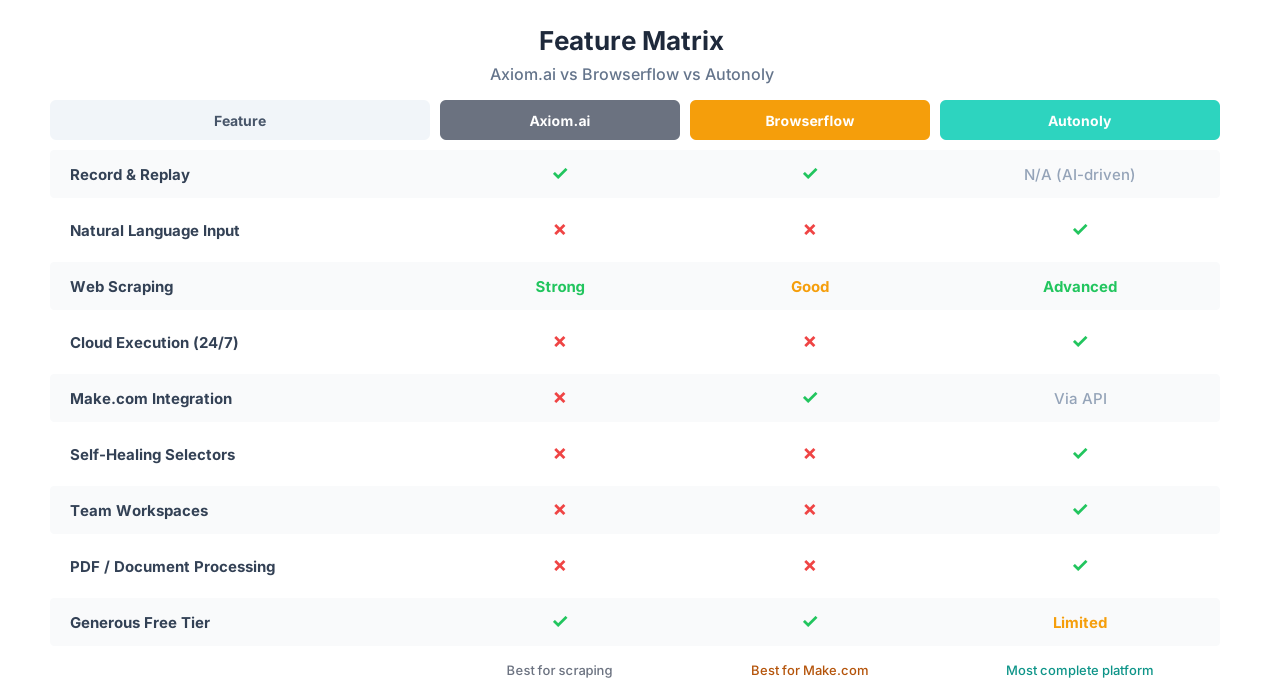
Beyond architecture, these three tools differ across specific features that determine what you can actually accomplish. Here is a detailed comparison of 15 capabilities that matter most for browser automation.
| Feature | Axiom.ai | Browserflow | Autonoly |
|---|---|---|---|
| Record browser actions | Yes (core feature) | Yes (core feature) | No (AI-driven instead) |
| Natural language input | No | No | Yes (AI agent chat) |
| Visual workflow editor | Yes (step editor) | Basic (sequence view) | Yes (full builder) |
| Web scraping | Strong (built-in scraper) | Good (page data extraction) | Advanced (AI-guided scraping) |
| Form filling | Good (template-based) | Good (recorded sequences) | Advanced (AI field mapping) |
| Scheduled execution | Yes (requires Chrome open) | Limited | Full cron-based scheduling |
| Cloud execution (24/7) | No | No | Yes |
| Make.com integration | No | Yes (core feature) | Via API |
| Native API integrations | Google Sheets, webhooks | Via Make.com (1,500+ apps) | 30+ native integrations |
| Self-healing selectors | No | No | Yes (LLM-based adaptation) |
| PDF processing | No | No | Yes (AI extraction) |
| Excel/spreadsheet handling | Basic (Google Sheets export) | Via Make.com | Full processing |
| Team workspaces | No | No | Yes (roles, sharing, audit) |
| Parallel task execution | No | No | Yes (multiple agents) |
| Free tier | Yes (generous) | Yes | Yes (limited) |
Where Axiom.ai Excels
Axiom's record-and-replay approach is genuinely powerful for its target use cases:
- Simple scraping: Point at a list of items on a page, and Axiom extracts them into a spreadsheet. The scraping module is intuitive and handles pagination, scrolling, and multi-page extraction.
- Form filling: Record yourself filling a form once, then replay it with different data from a spreadsheet. Straightforward and reliable for consistent form layouts.
- Google Sheets integration: Axiom reads input data from and writes output data to Google Sheets natively, making it a practical data pipeline for spreadsheet-centric workflows.
- Affordable entry point: The free tier is generous enough for occasional use, and paid plans are competitively priced for individuals.
Where Browserflow Excels
Browserflow's strength is its deliberate simplicity and ecosystem connectivity:
- Make.com integration: If you already use Make.com for workflow automation, Browserflow plugs browser actions directly into your existing scenarios. This is Browserflow's killer feature — it bridges the gap between Make.com's API integrations and websites that lack APIs.
- Documentation and onboarding: Browserflow has unusually good documentation for a tool in this market segment. Tutorials are clear, examples are practical, and the learning path is well-structured.
- Lightweight design: Browserflow does not try to be everything. It records browser actions, sends data to Make.com, and gets out of the way. For users who value simplicity over features, this restraint is a feature.
- Quick first automation: Going from install to first working automation takes under 5 minutes. The recording interface is the most intuitive of the three tools.
Where Autonoly Excels
Autonoly's advantages center on AI intelligence, reliability, and scale:
- Natural language automation: Describe what you want instead of recording clicks. For complex tasks, this is dramatically faster than building step-by-step sequences.
- 24/7 cloud execution: Workflows run on schedule without your computer being on — essential for business-critical automations.
- Self-healing when sites change: When a website updates its layout, Autonoly's AI agents reason about the new UI rather than failing on broken CSS selectors.
- Document processing: Full PDF extraction, spreadsheet manipulation, and data entry automation that go beyond browser-only capabilities.
- Team collaboration: Shared workspaces, role-based access, and centralized automation management for teams.
5 Real Scenarios: Which Tool Wins Each One?
Feature tables are useful, but real-world scenarios reveal which tool actually delivers. Here are five common automation tasks and how each tool handles them.
Scenario 1: Scrape 200 Product Prices From a Competitor Site
| Aspect | Axiom.ai | Browserflow | Autonoly |
|---|---|---|---|
| Setup time | 10-15 min (record + configure pagination) | 10-15 min (record + configure) | 5 min (describe to agent) |
| Execution | Runs in Chrome tabs | Runs in Chrome tabs | Runs in cloud browser |
| Output | Google Sheets | Make.com (route to any destination) | Any destination (Sheets, DB, API) |
| When site layout changes | Breaks — manual fix | Breaks — manual fix | AI adapts automatically |
Winner: Axiom.ai for one-time scraping jobs. Axiom's scraping module is purpose-built for this exact task — point at elements, configure pagination, hit run. For ongoing monitoring where reliability matters, Autonoly's self-healing and cloud execution give it the edge.
Scenario 2: Connect a Legacy Web Portal to Your CRM via Make.com
| Aspect | Axiom.ai | Browserflow | Autonoly |
|---|---|---|---|
| Make.com integration | Not supported | Native — core feature | Via API webhook |
| Setup complexity | Would need webhooks workaround | Direct connection to Make scenario | Describe task, agent handles routing |
| Data flow | Manual export/import | Automatic browser-to-Make pipeline | Automatic end-to-end |
Winner: Browserflow. This is exactly what Browserflow was built for — acting as the browser automation node in a Make.com scenario. If your automation stack centers on Make.com, Browserflow slots in perfectly.
Scenario 3: Fill Out 50 Vendor Registration Forms Across Different Sites
| Aspect | Axiom.ai | Browserflow | Autonoly |
|---|---|---|---|
| Multi-site handling | Separate bot per site (50 bots) | Separate recording per site (50 recordings) | One description, agent handles all sites |
| Field mapping | Manual per site | Manual per site | AI maps fields automatically |
| Error recovery | Stops on error | Stops on error | AI reasons about errors and retries |
| Total setup time | Several hours (building 50 bots) | Several hours (50 recordings) | 30-60 minutes (describe once, agent adapts) |
Winner: Autonoly. When forms differ across 50 sites, the record-and-replay approach requires building a separate automation for each site. Autonoly's AI agent understands form structure and adapts to each site from a single task description.
The Pattern
Axiom wins for focused Chrome scraping tasks. Browserflow wins when you need browser actions feeding into Make.com. Autonoly wins when tasks span multiple sites, need AI reasoning, or must run on schedule. The deciding factors are: how many different sites, how much the sites change, and whether you need unattended execution.
Scenario 4: Daily Report — Scrape 3 Dashboards and Email a Summary
| Aspect | Axiom.ai | Browserflow | Autonoly |
|---|---|---|---|
| Scheduling | Chrome must be open at report time | Trigger via Make.com schedule (Chrome must be open) | Runs at 7 AM daily automatically |
| Email sending | Not native — manual or webhook | Via Make.com Gmail module | Native email integration |
| Multi-dashboard handling | Three separate bots, run sequentially | Three recordings in one Make scenario | One agent handles all three |
| Weekend/vacation coverage | No — you must be at your computer | No — Chrome must be running | Yes — cloud runs independently |
Winner: Autonoly for daily scheduled reports. Browserflow earns second place because Make.com handles the email sending and data routing, but still requires Chrome to be open. Axiom is the weakest fit for scheduled, unattended tasks.
Scenario 5: Quick One-Off Data Grab From a Page You Are Viewing
| Aspect | Axiom.ai | Browserflow | Autonoly |
|---|---|---|---|
| Speed | Instant — extension is right there | Instant — extension is right there | Requires opening dashboard |
| Friction | Zero context switching | Zero context switching | Switch to Autonoly, paste URL |
| Overhead | None | None | Cloud session launch |
Winner: Tie between Axiom.ai and Browserflow. For quick, ad-hoc data grabs from a page you are already looking at, Chrome extensions win. There is no setup, no dashboard to switch to, and no cloud session to wait for. Autonoly is overkill for this use case.
Use Case Summary
| Use Case | Best Tool | Why |
|---|---|---|
| Simple page scraping | Axiom.ai | Purpose-built scraping module |
| Browser + Make.com pipeline | Browserflow | Native Make.com integration |
| Multi-site form filling | Autonoly | AI adapts to different sites |
| Scheduled daily reports | Autonoly | 24/7 cloud execution |
| Quick one-off data grab | Axiom.ai / Browserflow | Chrome extension convenience |
Pricing: What You Actually Pay at Every Level
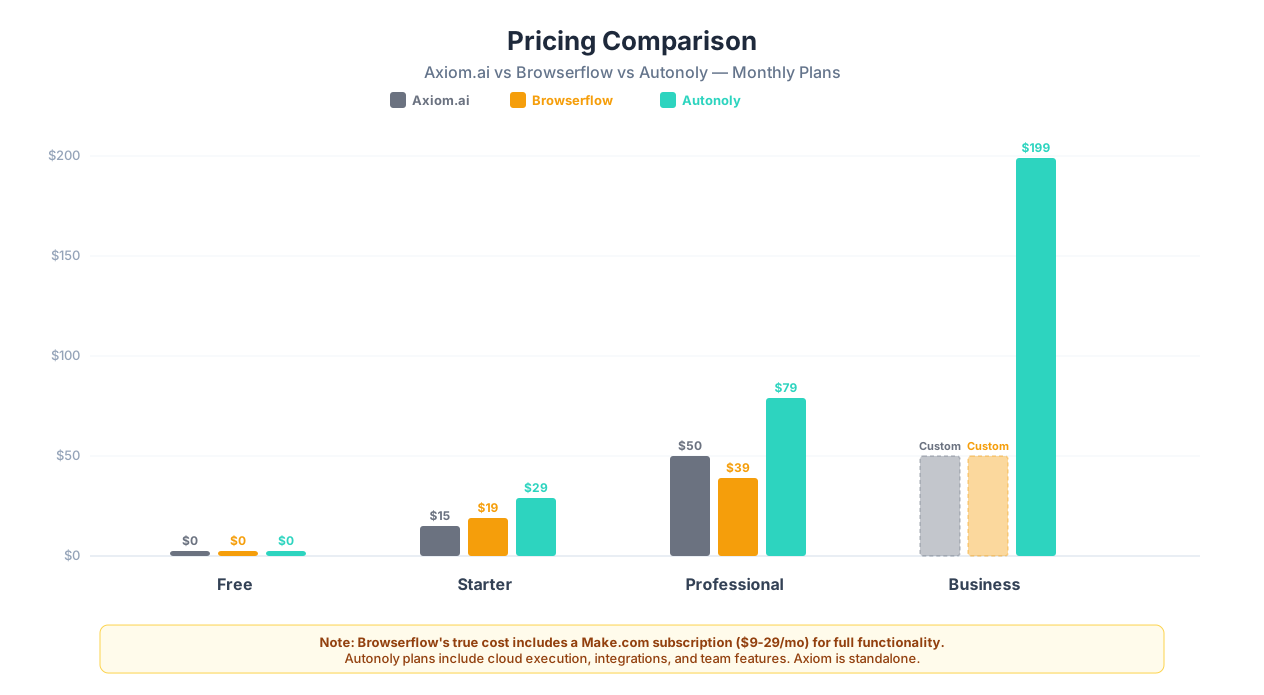
All three tools offer free tiers, but pricing structures differ significantly. Here is what you actually pay at different usage levels.
Plan-by-Plan Breakdown
| Tier | Axiom.ai | Browserflow | Autonoly |
|---|---|---|---|
| Free | $0 — limited runs, basic features | $0 — limited runs | $0 — limited agent runs |
| Starter / Basic | $15/mo — more runs, scheduled execution | $19/mo — more runs, priority support | $29/mo — 500 runs, AI agent |
| Professional | $50/mo — unlimited bots, advanced features | $39/mo — unlimited recordings, Make.com priority | $79/mo — 2,000 runs, team features |
| Business / Team | Custom pricing | Custom pricing | $199/mo — 10,000 runs, advanced features |
Cost Per Automation at Scale
Raw plan prices do not tell the full story. The real cost depends on what you get per dollar:
| Factor | Axiom.ai | Browserflow | Autonoly |
|---|---|---|---|
| Price for 500 monthly runs | ~$15/mo | ~$19/mo | $29/mo |
| Cloud execution included | No | No | Yes |
| Make.com cost (if needed) | N/A | Add $9-29/mo for Make | N/A (integrations included) |
| True monthly cost | $15 | $28-48 (with Make.com) | $29 |
Hidden Cost Alert
Browserflow's pricing is deceptively low at first glance. Since Browserflow relies on Make.com for data routing and integrations, the real cost is Browserflow's plan plus a Make.com subscription. At the Professional tier, that is $39 + $16-29 for Make = $55-68/month total. Axiom.ai's standalone pricing is more transparent, and Autonoly's plans include integrations natively.
Value by User Type
| User Type | Best Value | Why |
|---|---|---|
| Individual, occasional use | Axiom.ai ($0-15/mo) | Most affordable, generous free tier |
| Make.com power user | Browserflow ($19-39/mo + Make) | Essential if Make.com is your automation hub |
| Team with scheduled needs | Autonoly ($79-199/mo) | Cloud execution + team features included |
| Budget-conscious scraper | Axiom.ai ($15/mo) | Best scraping features per dollar |
For the latest plan details, check each tool's pricing page or visit our Autonoly pricing for current plans.
Ease of Use: First Automation in Under 10 Minutes?
We tested all three tools by performing the same task: scrape a list of 20 items from a product listing page and export them to a spreadsheet. Here is how each tool handled the experience from sign-up to working output.
Axiom.ai: 7 Minutes — Familiar and Direct
Axiom's onboarding installs the Chrome extension and drops you into a bot builder. The "record" button is prominent. Clicking it opens a recording overlay on your current page — you click elements to mark them for extraction, and Axiom detects the pattern (list of products, repeated elements). Configuring pagination required one extra step (telling Axiom where the "next page" button is). The output went directly to Google Sheets. The whole process felt like using a screen recording tool — intuitive for anyone who has used Loom or similar products.
Learning curve: Very low for basic tasks. The visual step editor is straightforward. Complexity increases when you need conditional logic or data transformation, which require understanding Axiom's expression syntax.
Browserflow: 5 Minutes — The Fastest First Run
Browserflow had the fastest time-to-first-automation of any tool we tested. Install the extension, click "record," perform the scraping actions, stop recording. The recording interface is cleaner and more focused than Axiom's — fewer options means fewer decisions. Exporting data to a spreadsheet required connecting to Make.com and adding a Google Sheets module, which added 3-4 minutes if you have never used Make.com before.
Learning curve: The lowest of the three. Browserflow's documentation is genuinely excellent — clear tutorials with step-by-step screenshots that cover common use cases. The tool's intentional simplicity means there is less to learn. The ceiling is also lower — when you need features Browserflow does not have, you move to Make.com or another tool.
Autonoly: 6 Minutes — Different but Intuitive
Autonoly's approach is fundamentally different. Instead of recording, you open the AI agent chat and type: "Scrape all product names, prices, and URLs from [page URL] and save to a spreadsheet." The agent launched a cloud browser, navigated to the page, identified the product elements, extracted the data, and exported to Google Sheets. Total interaction time was shorter (typing one sentence vs. clicking through a recording), but the cloud session launch added a few seconds of wait time.
Learning curve: Low for basic tasks — if you can describe what you want, you can use Autonoly. The learning curve steepens for complex workflows where you need to understand the visual workflow builder, conditional logic, and integration configuration. But for the initial experience, describing a task in English is arguably the most natural interface of the three.
Ease of Use Verdict
| Dimension | Axiom.ai | Browserflow | Autonoly |
|---|---|---|---|
| Time to first automation | 7 min | 5 min | 6 min |
| Documentation quality | Good | Excellent | Good |
| Learning curve (basic) | Low | Very low | Low |
| Learning curve (advanced) | Medium | Low (limited features) | Medium-high |
| Interface style | Visual step editor | Minimal recorder | Chat + visual builder |
Key Insight
Browserflow is the easiest to learn and has the best documentation. Axiom is the most familiar if you have used macro recorders before. Autonoly is the most natural for people who prefer describing tasks in words over clicking through a visual builder. All three are genuinely accessible to non-technical users for basic tasks.
Final Verdict: When to Choose Each Tool
After comparing all three tools across architecture, features, pricing, and ease of use, here are clear recommendations based on your specific situation.
Choose Axiom.ai If...
- Your primary need is web scraping and data extraction from Chrome
- You want a record-and-replay macro tool that feels like a screen recorder
- You need Google Sheets integration without additional services
- Your budget is tight — $0-15/month handles most individual needs
- You do not need automations to run when your computer is off
- Your workflows are 3-5 step sequences on a single website
Axiom.ai is the best choice for individuals who need a straightforward Chrome macro tool, especially for scraping and form filling on sites they visit regularly. It is the Toyota Corolla of browser automation — reliable, affordable, and good enough for most common tasks.
Choose Browserflow If...
- You already use Make.com and need browser actions in your scenarios
- You want to connect websites without APIs to your existing automation stack
- You value simplicity and good documentation over feature count
- Your automation pipeline is Make.com-centric and you need one more piece
- You prefer tools that do one thing well over Swiss Army knives
Browserflow is the best choice for Make.com users who need to add browser automation to their existing workflows. Its tagline — "Zapier for sites without APIs" — accurately describes its sweet spot. If you are not using Make.com, Browserflow's value proposition weakens significantly.
Honest Assessment
Many users start with Axiom.ai or Browserflow and outgrow them as their automation needs expand. If your needs are simple and Chrome-based today, start with one of those tools. If you already know you need scheduled execution, multi-site workflows, or team collaboration, start with Autonoly and avoid the migration later.
Choose Autonoly If...
- You need automations to run 24/7 on schedule without your computer on
- Your workflows span multiple websites with different layouts
- You are tired of broken automations every time a site updates its UI
- You need document processing — PDFs, spreadsheets, complex data extraction
- You work as a team and need shared workspaces and audit logs
- You prefer describing tasks in English over recording click sequences
- Your workflows require conditional logic, error handling, or data transformation
Autonoly is the best choice for teams and individuals whose automation needs exceed what a Chrome extension can deliver. The AI agent approach shines for complex, multi-step workflows across different websites, and cloud execution makes scheduled automation reliable.
The Hybrid Approach
These tools are not mutually exclusive. A practical combination for many teams:
- Axiom.ai or Browserflow for quick, ad-hoc Chrome tasks — scraping a page you are looking at, filling a form on the spot
- Autonoly for scheduled, team-wide automations that need reliability, scale, and AI adaptability
This mirrors how many teams use email — a quick Slack message for informal communication, a formal email for important correspondence. Different tools for different contexts.
For more automation platform comparisons, read our Autonoly vs Bardeen deep dive, our guide to the best web scraping tools, or our comparison of how to automate without APIs.
Getting Started and Migration Tips
Whether you are new to browser automation or switching from one tool to another, here are practical tips for each platform.
Starting With Axiom.ai
- Install the Chrome extension from the Chrome Web Store
- Click the Axiom icon and choose "Create new bot"
- Hit "Record" and perform the actions you want to automate
- Edit the recorded steps in the visual editor if needed
- Connect Google Sheets for data input/output
- Test with a small dataset before running at scale
Axiom's website has a template library with pre-built bots for common tasks. Start with a template and customize it rather than building from scratch.
Starting With Browserflow
- Install the Browserflow Chrome extension
- Create a Make.com account if you do not have one
- Record your first browser action sequence
- Connect the recording to a Make.com scenario
- Configure data routing in Make.com (Google Sheets, CRM, email, etc.)
- Set up scheduling through Make.com's scenario scheduler
Browserflow's documentation walks through each of these steps with screenshots. If you are new to Make.com, budget an extra 30 minutes to learn the basics of scenario building.
Starting With Autonoly
- Sign up at autonoly.com and access your dashboard
- Open the AI agent chat
- Describe your automation task in plain English
- Watch the agent build and execute the workflow in the live browser view
- Review results, adjust the description if needed, and save the workflow
- Set up scheduling for recurring execution
Migrating Between Tools
If you are switching from one tool to another, these tips will save time:
| Migration Path | Key Considerations |
|---|---|
| Axiom to Browserflow | Re-record your bots as Browserflow sequences. If you need integrations beyond Google Sheets, the Make.com connection adds value. Check that Browserflow supports the same page interactions your Axiom bots use. |
| Axiom to Autonoly | Describe your existing Axiom bots to the AI agent — it will rebuild them as cloud workflows. You gain scheduled execution and self-healing but lose the instant Chrome extension access. Best for when you need reliability and scale. |
| Browserflow to Autonoly | Your Make.com scenarios can connect to Autonoly via webhooks if needed. For full migration, describe your browser automation tasks to the AI agent and let it rebuild them with native integrations. |
| Any tool to Autonoly | Start by listing your existing automations: what they do, how often they run, and which sites they interact with. Feed each description to the AI agent one by one. Run both tools in parallel for a week before deactivating the old one. |
Parallel Running Period
Regardless of which direction you are migrating, run both tools simultaneously for at least one week. This catches edge cases that testing alone misses: timing issues, site-specific quirks, data format differences, and real-world error conditions. Only deactivate the old tool after verifying the new one handles everything correctly.
For a broader comparison of automation platforms beyond browser tools, see our n8n vs Zapier vs Make comparison or our guide to the best AI agent platforms.