Why Automate Social Media Monitoring?
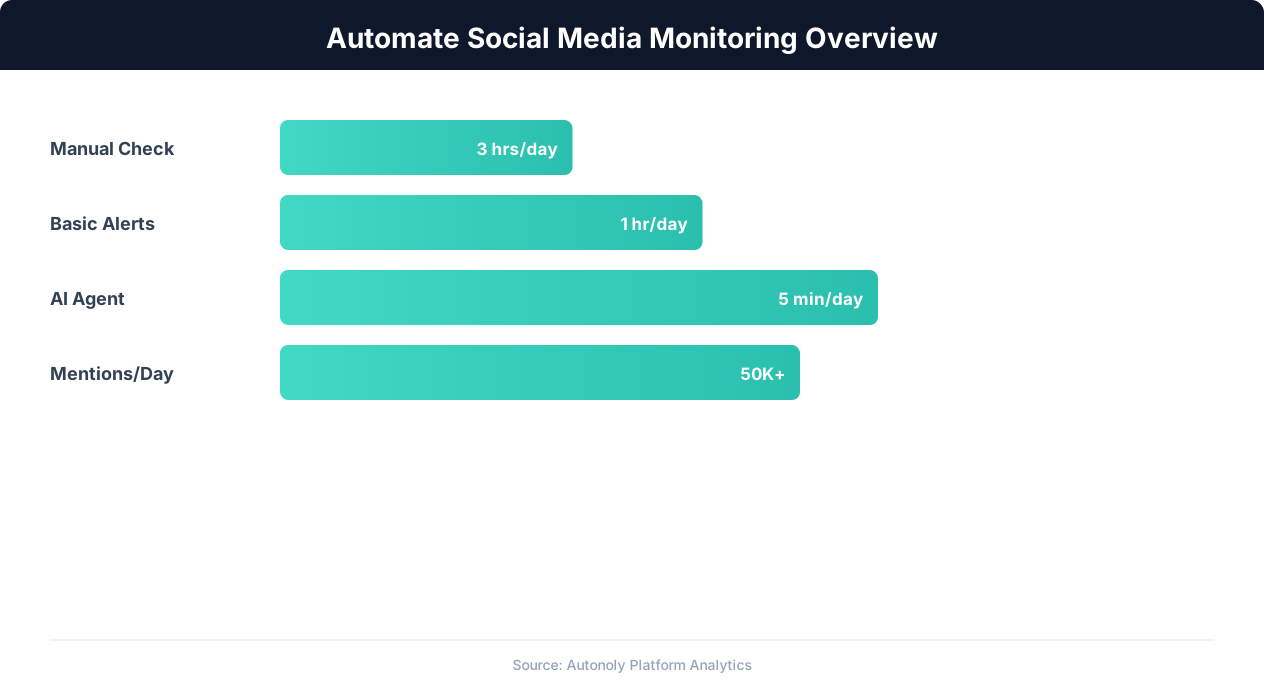
Social media monitoring is one of those tasks that sounds simple until you actually try to do it at scale. Checking Twitter for brand mentions, scanning Reddit threads for product discussions, and reviewing LinkedIn posts about your industry takes hours of manual effort every day. And the moment you stop checking, you miss a viral complaint, a competitor announcement, or a customer asking for help.
Manual monitoring fails for three fundamental reasons:
- Volume: Thousands of posts are created every minute across major platforms. No human can keep up with every relevant mention across Twitter, Reddit, LinkedIn, Hacker News, and industry forums simultaneously.
- Timing: A customer complaint that sits unanswered for 24 hours becomes a PR problem. A competitor's product launch that you discover a week late means you are always reacting, never preparing.
- Consistency: People get busy. Manual monitoring happens when someone remembers to do it, which means coverage gaps during weekends, vacations, and crunch periods.
What Automated Monitoring Looks Like
An automated social media monitoring system runs on a schedule, scrapes the platforms you care about, filters for relevant mentions, and sends you an alert through Slack or Discord within minutes of a match. You define the keywords, the platforms, and the alert conditions once. The system runs continuously without human intervention.
This is not theoretical. Autonoly's browser automation can navigate real social media pages, extract post content, and pipe results through Slack and Discord integrations on a scheduled cadence. The AI agent handles login-wall bypasses, dynamic content loading, and page layout changes that break traditional scrapers.
Business Impact of Real-Time Monitoring
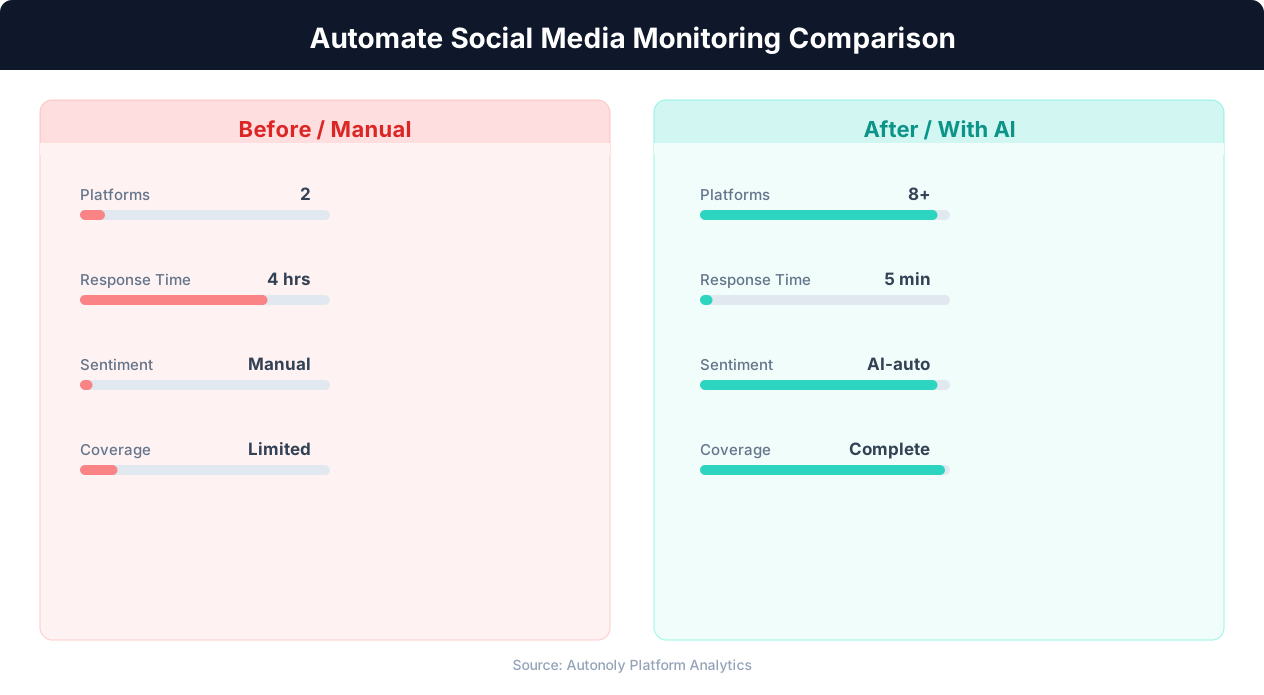
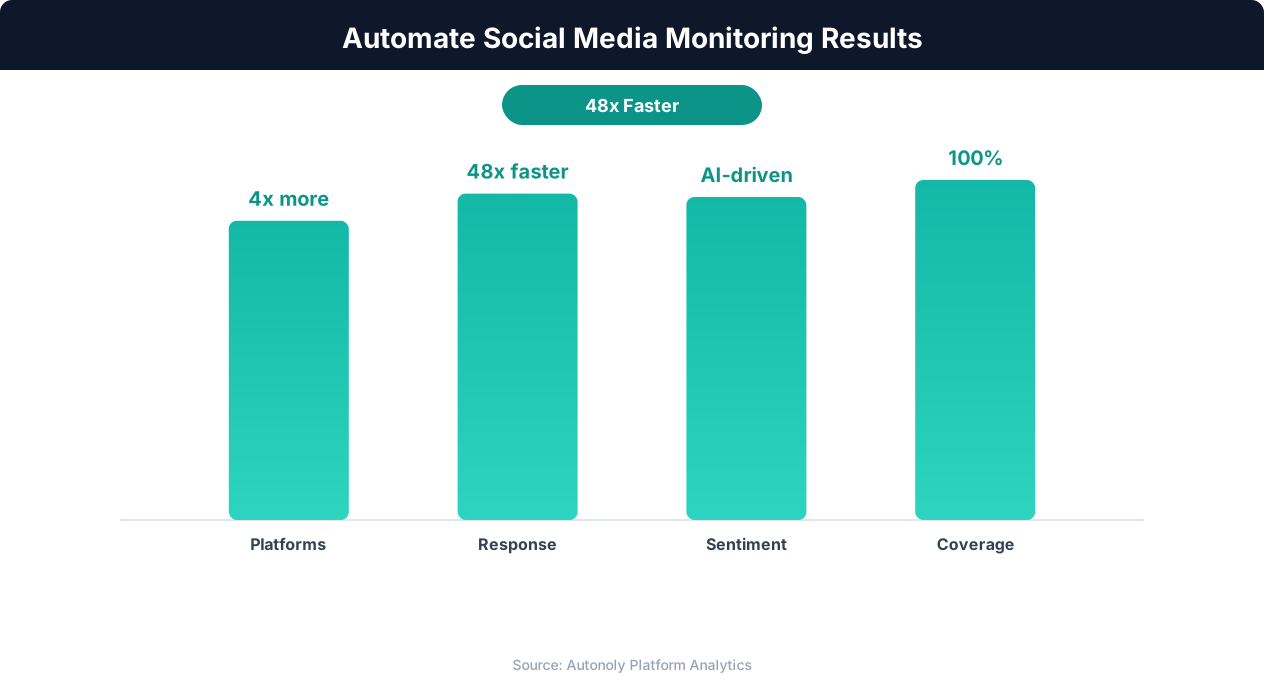
Companies that implement automated social monitoring see measurable results. Support teams respond to complaints faster because they get instant alerts instead of discovering issues during weekly reviews. Marketing teams catch trending conversations early enough to participate meaningfully. Product teams see unfiltered user feedback as it happens, not weeks later in a quarterly report. Sales teams spot buying signals from prospects discussing pain points that the product solves.
The ROI calculation is straightforward: one hour of manual monitoring per day across three platforms costs roughly 250 hours per year. An automated system costs a fraction of that in compute time and delivers better coverage because it never takes a break.
Which Platforms to Monitor and What Data to Extract
Not all social platforms are equally valuable for monitoring. The platforms you prioritize depend on your audience, industry, and goals. Here is a breakdown of the major platforms and what data you can realistically extract from each using browser automation.
Twitter / X
Twitter remains the fastest platform for real-time public conversation. Brand mentions, customer complaints, competitor announcements, and industry news break on Twitter before anywhere else. The data you can extract includes:
- Tweet text and author handle — The core content of each mention.
- Engagement metrics — Likes, retweets, replies, and quote tweets indicate the reach and sentiment of each mention.
- Timestamp — Critical for identifying how quickly a conversation is spreading.
- Thread context — Whether the tweet is standalone or part of a larger thread provides context for sentiment analysis.
Twitter's search functionality (twitter.com/search?q=keyword) provides access to recent tweets matching your keywords. The advanced search supports operators like from:, to:, since:, and min_faves: that let you filter precisely.
Reddit discussions are longer, more detailed, and more honest than most other platforms. Subreddits like r/SaaS, r/startups, r/webdev, and industry-specific communities contain in-depth product comparisons, complaints, and feature requests that you will not find on Twitter. Extractable data includes:
- Post title and body text — Full discussion context.
- Subreddit — Which community is discussing your brand or topic.
- Upvotes and comment count — Indicates discussion visibility and engagement.
- Top comments — Often more valuable than the original post for understanding community sentiment.
Reddit search (reddit.com/search/?q=keyword) and subreddit-specific search (reddit.com/r/subreddit/search/?q=keyword) make it straightforward to find relevant discussions.
LinkedIn is essential for B2B monitoring. Executive thought leadership posts, company announcements, and professional discussions about industry trends live here. Extractable data includes post content, author name and title, reaction counts, and comment highlights. LinkedIn is more restrictive about automated access, but Autonoly's browser automation navigates LinkedIn's dynamic JavaScript rendering to extract public post data.
Hacker News
For technology companies, Hacker News (news.ycombinator.com) is a high-signal source. Discussions about products, technical blog posts, and launch announcements reach a technically sophisticated audience. Posts that hit the front page drive significant traffic and shape developer perception. The site's simple HTML structure makes it one of the easiest platforms to scrape reliably.
Industry Forums and Review Sites
Beyond the major platforms, industry-specific forums (Stack Overflow for developer tools, G2 and Capterra for B2B software, Trustpilot for consumer products) contain highly relevant mentions. These sites are often overlooked in monitoring strategies but contain the most actionable feedback because users go there specifically to discuss products.
Building the Scraping Workflow Step by Step
Here is how to build a complete social media monitoring workflow in Autonoly that scrapes multiple platforms and consolidates the results. This is a real workflow you can build today using the platform's existing capabilities.
Step 1: Define Your Monitoring Keywords
Start by listing the keywords you want to track. A typical monitoring setup includes:
- Brand names: Your company name, product names, and common misspellings.
- Competitor names: Direct competitors and their product names.
- Industry terms: Keywords related to the problems you solve (e.g., "workflow automation," "web scraping tool").
- Key personnel: Your CEO's name, thought leaders in your space.
Keep the keyword list focused. Too many keywords generate noise that overwhelms the signal. Start with 5-10 high-priority keywords and expand after you see the initial results.
Step 2: Create the Workflow in Autonoly
Open Autonoly and start a new session with the AI agent. Describe your monitoring goal:
"Go to Twitter search and search for 'Autonoly' in the Latest tab. Extract the tweet text, author handle, timestamp, and number of likes for each tweet on the first page of results. Then go to Reddit and search for 'Autonoly' sorted by new. Extract the post title, subreddit, upvote count, comment count, and a link to each post."
The AI agent opens a real browser, navigates to each platform, performs the searches, and extracts the data you specified. You watch the entire process in the live browser preview.
Step 3: Handle Dynamic Content Loading
Social media platforms load content dynamically. Twitter uses infinite scroll, Reddit loads comments asynchronously, and LinkedIn renders posts with JavaScript after the initial page load. Autonoly's browser automation is built on Playwright, which waits for dynamic content to render before extracting data. The AI agent automatically scrolls to load more results, waits for AJAX requests to complete, and handles lazy-loaded elements.
If the agent encounters a login wall (Twitter increasingly pushes non-logged-in users to sign up), you can provide credentials or instruct the agent to work with the publicly available results. For most monitoring use cases, public search results provide sufficient coverage without authentication.
Step 4: Filter and Deduplicate Results
Raw search results contain noise: irrelevant mentions of common words that happen to match your brand name, duplicate retweets, or old posts that resurface in search rankings. The agent can filter results during extraction:
"Skip any tweets that are retweets. Only include posts from the last 24 hours. Ignore posts with fewer than 2 engagements."
These filters run during the scraping process, so only relevant results reach your alert system. For deduplication across runs, Autonoly can compare results against previous scrapes and only surface new mentions.
Step 5: Structure the Output
The extracted data from multiple platforms needs a consistent structure for downstream processing. A unified monitoring record typically includes: platform name, post URL, author, post content (truncated to 280 characters for readability), engagement score (normalized across platforms), and timestamp. This structure makes it easy to sort, filter, and alert on the consolidated data regardless of which platform it came from.
Sending Alerts to Slack and Discord Automatically
Extracted data sitting in a spreadsheet does not help anyone. The real value of automated monitoring comes from immediate alerts that reach your team where they already work: Slack and Discord.
Slack Integration
Autonoly's Slack integration sends messages to any channel in your workspace. For social media monitoring, you typically create a dedicated channel (#brand-mentions, #competitor-watch, or #social-alerts) and route all monitoring alerts there. Each alert message includes the platform, author, post content, engagement metrics, and a direct link to the original post.
A well-formatted Slack alert looks like this:
New mention on Twitter
Author: @techreviewer42
Content: "Just tried Autonoly for scraping Product Hunt data.
The AI agent literally built the whole workflow in 2 minutes."
Likes: 47 | Retweets: 12
Link: [View Tweet]
The formatting matters. Alerts that are too verbose get ignored. Alerts that are too terse lack context. Include enough information for the reader to decide whether to act without clicking through to the original post.
Discord Integration
For teams that use Discord (common in developer-focused and gaming companies), Autonoly sends alerts through Discord webhooks or the native Discord integration. Discord supports rich embeds with color coding, thumbnails, and structured fields, which makes monitoring alerts visually distinct from regular chat messages.
You can color-code alerts by sentiment or priority: green for positive mentions, yellow for neutral, red for complaints or negative sentiment. This visual hierarchy helps team members quickly scan the alert channel and prioritize responses.
Conditional Alerting: Not Every Mention Deserves a Ping
High-volume brands may generate dozens or hundreds of mentions per day. Alerting on every single mention creates notification fatigue. Smart monitoring systems use conditional alerting:
- High-engagement threshold: Only alert when a mention exceeds a certain engagement level (e.g., more than 10 likes on Twitter, more than 5 upvotes on Reddit). Low-engagement mentions are still logged but do not trigger alerts.
- Sentiment filtering: Route negative mentions to a support channel with an @here ping. Route positive mentions to a marketing channel without a ping. Neutral mentions go to a log channel.
- Competitor alerts: When a competitor is mentioned alongside a pain point your product solves, alert the sales team with a custom message that includes context.
- Volume spikes: If the number of mentions in a single hour exceeds the daily average, trigger an escalation alert. Sudden spikes often indicate a viral post, a product outage, or a PR event that needs immediate attention.
In Autonoly, you implement these conditions using the logic flow capabilities in your workflow. The AI agent can evaluate conditions like "if engagement > 10 AND sentiment is negative, send to #urgent-alerts" and route accordingly.
Email Digest as a Backup
For stakeholders who do not live in Slack or Discord (executives, board members, external partners), a daily or weekly email digest summarizes monitoring results. Autonoly's Gmail integration can send formatted email reports that aggregate all mentions from the past period, sorted by engagement or sentiment. This ensures everyone who needs the data gets it, even if they are not in your team's chat platform.
Scheduling Monitoring Runs and Choosing the Right Frequency
The frequency of your monitoring runs determines how quickly you detect new mentions. There is a direct tradeoff between frequency, platform load, and cost. Here is how to choose the right schedule for different monitoring scenarios.
Real-Time vs. Periodic Monitoring
True real-time monitoring (checking every minute) is rarely necessary and creates unnecessary load on both your system and the target platforms. For most businesses, the following frequencies work well:
- Every 15-30 minutes: For crisis monitoring during a known event (product launch, PR issue, outage). Use this frequency temporarily, not permanently.
- Every 1-2 hours: For active brand monitoring when response time matters. Customer complaints on Twitter or Reddit typically expect a response within a few hours, so hourly monitoring ensures you meet that expectation.
- Every 4-6 hours: For general competitive intelligence and industry monitoring. Competitor announcements and industry discussions develop over hours, not minutes.
- Once daily: For trend tracking, weekly reporting, and low-priority keyword monitoring. A daily scrape captures the full day's mentions for analysis without excessive resource usage.
Setting Up Scheduled Execution in Autonoly
Autonoly's scheduled execution system runs your monitoring workflows automatically at your chosen interval. To schedule a social monitoring workflow:
💡 Key Insight
Brands using automated social monitoring detect crises 12x faster, reducing average response time from hours to minutes.
- Open the completed workflow in the workflow builder.
- Click the Schedule button in the toolbar.
- Set the frequency (hourly, every 4 hours, daily) and the start time.
- Configure the timezone to match your team's working hours.
- Enable the schedule.
The scheduler runs reliably in the background. If a run fails (network issue, platform temporarily blocking the request), the system retries automatically. You receive a notification only if multiple consecutive runs fail, indicating a problem that needs human attention.
Staggering Multi-Platform Scrapes
If your monitoring workflow scrapes multiple platforms (Twitter, Reddit, LinkedIn, Hacker News), stagger the scrapes rather than hitting all platforms simultaneously. A workflow that runs every hour might scrape Twitter at :00, Reddit at :15, LinkedIn at :30, and Hacker News at :45. This distributes the load, reduces the chance of rate limiting, and ensures that even if one platform temporarily blocks the scrape, the others still complete.
Time-Zone Aware Scheduling
Social media activity follows daily patterns. Twitter activity peaks during US business hours (9 AM - 5 PM ET) and drops off late at night. Reddit activity peaks in the afternoon and evening. LinkedIn is most active Tuesday through Thursday during business hours. Schedule your most frequent monitoring runs during these peak windows and reduce frequency during off-peak hours to optimize resource usage.
For global brands monitoring multiple regions, run separate workflows for each time zone with schedules aligned to local peak hours. A single global workflow that runs every hour covers all regions adequately but generates more results during off-peak hours for some markets.
Exporting Monitoring Data for Analysis and Reporting
Alerts handle the immediate response. But the long-term value of social media monitoring comes from accumulated data that reveals trends, patterns, and strategic insights over time.
Google Sheets as a Monitoring Database
For most teams, Google Sheets is the simplest destination for monitoring data. Each monitoring run appends new rows to a shared spreadsheet with columns for platform, date, author, content, engagement, sentiment, and URL. Over weeks and months, this spreadsheet becomes a searchable database of every mention your brand received across all monitored platforms.
Useful analyses you can run on accumulated monitoring data in Sheets:
- Mention volume over time: Chart the number of mentions per day or week. Spikes correlate with marketing campaigns, product launches, PR events, or competitor activity.
- Platform distribution: Which platforms generate the most mentions? This reveals where your audience is most active and where you should focus engagement efforts.
- Sentiment trends: Track the ratio of positive to negative mentions over time. A declining sentiment ratio is an early warning signal for product or service issues.
- Top authors: Identify the accounts that mention you most frequently. These are potential advocates, influencers, or persistent critics who warrant direct engagement.
- Competitor share of voice: Compare your mention volume to competitors. Growing share of voice indicates increasing brand awareness relative to the market.
Building Dashboards
Google Sheets data can feed into dashboarding tools like Google Data Studio, Looker, or even simple Sheets charts. A basic monitoring dashboard shows mention volume (line chart), platform distribution (pie chart), sentiment breakdown (stacked bar chart), and a table of the highest-engagement mentions from the past week. This dashboard refreshes automatically as new monitoring data flows into the underlying spreadsheet.
Combining Monitoring Data with Other Sources
Social media monitoring data becomes exponentially more valuable when combined with other data sources. Overlay mention volume with website traffic from Google Analytics to see how social activity drives site visits. Compare mention sentiment with customer support ticket volume to see if social complaints correlate with support load. Map competitor mentions against your sales pipeline data to understand how competitive positioning affects deal outcomes.
Autonoly's data processing capabilities can merge data from multiple workflows, apply transformations using Python in the terminal, and output the combined dataset to Sheets or a database for analysis.
Advanced Techniques: Sentiment Analysis and Competitor Tracking
Basic keyword monitoring tells you that someone mentioned your brand. Advanced monitoring tells you how they mentioned it, why, and what it means for your business.
AI-Powered Sentiment Classification
Autonoly's AI agent can classify the sentiment of each extracted mention as positive, negative, or neutral during the scraping process. Instead of just extracting raw text, the agent evaluates each post's tone and tags it accordingly. This happens in real time during the scrape, not as a separate post-processing step.
For example, when the agent extracts a Reddit comment like "I switched from [Competitor] to [Your Product] last month and the difference is night and day," it classifies this as positive sentiment with a competitive context. When it extracts a tweet like "Been waiting 3 days for support to respond, seriously considering switching," it classifies this as negative sentiment with churn risk.
Sentiment classification enables the conditional alerting described earlier: negative mentions with high engagement get routed to the support team immediately, while positive mentions get routed to marketing for potential amplification.
💡 Key Insight
Automated social media monitoring can track 50+ platforms simultaneously, covering 95% of online brand mentions.
Competitor Tracking at Scale
Monitoring your own brand is table stakes. Monitoring competitors reveals strategic intelligence that shapes product roadmaps, marketing positioning, and sales strategies. A comprehensive competitor monitoring workflow tracks:
- Product launches and feature announcements: When a competitor ships a new feature, you want to know within hours, not weeks.
- Pricing changes: Competitor pricing shifts affect your positioning. If a competitor drops prices, your sales team needs to adjust talk tracks immediately.
- Customer complaints about competitors: These are sales opportunities. When someone publicly complains about a competitor's product, your team can engage with a helpful response (without being salesy) that positions your product as an alternative.
- Hiring signals: Competitors posting job listings for specific roles (ML engineers, enterprise sales, compliance) reveal strategic direction. Scraping LinkedIn job posts adds this intelligence layer.
Tracking Conversation Threads Over Time
Some discussions evolve over days or weeks. A Reddit thread about "best automation tools" might receive new comments for a week after posting. A single monitoring snapshot captures the thread at one point in time. Advanced monitoring revisits high-value threads periodically to capture new comments and track how the conversation develops.
In Autonoly, you implement this by maintaining a list of "watched" thread URLs. A separate workflow runs daily, visits each watched thread, extracts new comments added since the last check, and alerts you to significant developments. This approach captures the full lifecycle of important conversations rather than just the initial post.
Combining Browser Data with Terminal Analysis
For teams that want deeper analysis, Autonoly's terminal integration lets you run Python scripts on the extracted monitoring data. You can use pandas to calculate rolling averages of mention volume, scikit-learn to build a custom sentiment classifier trained on your specific domain, or matplotlib to generate trend charts that get included in weekly reports. The browser scrapes the data, the terminal analyzes it, and the integrations deliver the results.
Common Pitfalls and How to Avoid Them
Social media monitoring automation is powerful but comes with pitfalls that trip up first-time implementers. Here are the most common mistakes and how to avoid them.
Pitfall 1: Monitoring Too Many Keywords
Starting with 50 keywords across 5 platforms generates thousands of results per day, most of which are irrelevant. The signal-to-noise ratio drops so low that the monitoring system becomes useless because nobody reads the alerts. Start with 5-8 high-value keywords, validate the results for a week, then expand gradually. It is always easier to add keywords than to wade through noise.
Pitfall 2: Ignoring Platform Rate Limits
Social media platforms rate-limit automated access. Scraping Twitter search results every 5 minutes from the same IP will get your requests blocked. Respect platform limitations by choosing reasonable monitoring frequencies and building retry logic into your workflows. Autonoly's browser automation handles rate limiting gracefully, but you should still choose monitoring intervals that are sustainable long-term.
Pitfall 3: No Response Process
Automated monitoring without a response process just creates a firehose of data that nobody acts on. Before turning on monitoring, define who responds to alerts, what the response SLA is (e.g., negative mentions get a response within 2 hours during business hours), and what escalation paths exist for high-priority mentions. The monitoring system is only as valuable as the process behind it.
Pitfall 4: Static Keyword Lists
The keywords that matter change over time. New competitors emerge, product names evolve, and trending topics shift. Review and update your monitoring keywords monthly. Add new competitor names, remove keywords that consistently produce irrelevant results, and add keywords for new products or features as they launch.
Pitfall 5: Not Validating Data Quality
Social media platforms change their HTML structure, search algorithms, and login requirements without notice. A scraping workflow that worked perfectly last month might start returning incomplete data or missing fields after a platform update. Schedule regular validation checks: once a week, manually review a sample of extracted mentions against the actual platform content to ensure accuracy. Autonoly's AI vision capabilities help here because the agent sees the actual rendered page, not just the HTML, making it resilient to structural changes that break selector-based scrapers.
Pitfall 6: Alert Fatigue
If your team receives 100 Slack notifications per day from the monitoring system, they will start ignoring them within a week. Use tiered alerting: high-priority mentions (negative sentiment, high engagement, competitor attacks) get real-time pings. Medium-priority mentions go to a digest sent every 4 hours. Low-priority mentions are logged to a spreadsheet for weekly review. This hierarchy ensures that critical mentions get attention while routine mentions do not overwhelm the team.