
Webhooks Explained: Stop Asking "Any Updates?" Every 5 Seconds
Webhook event types: CRM, payment, form, custom
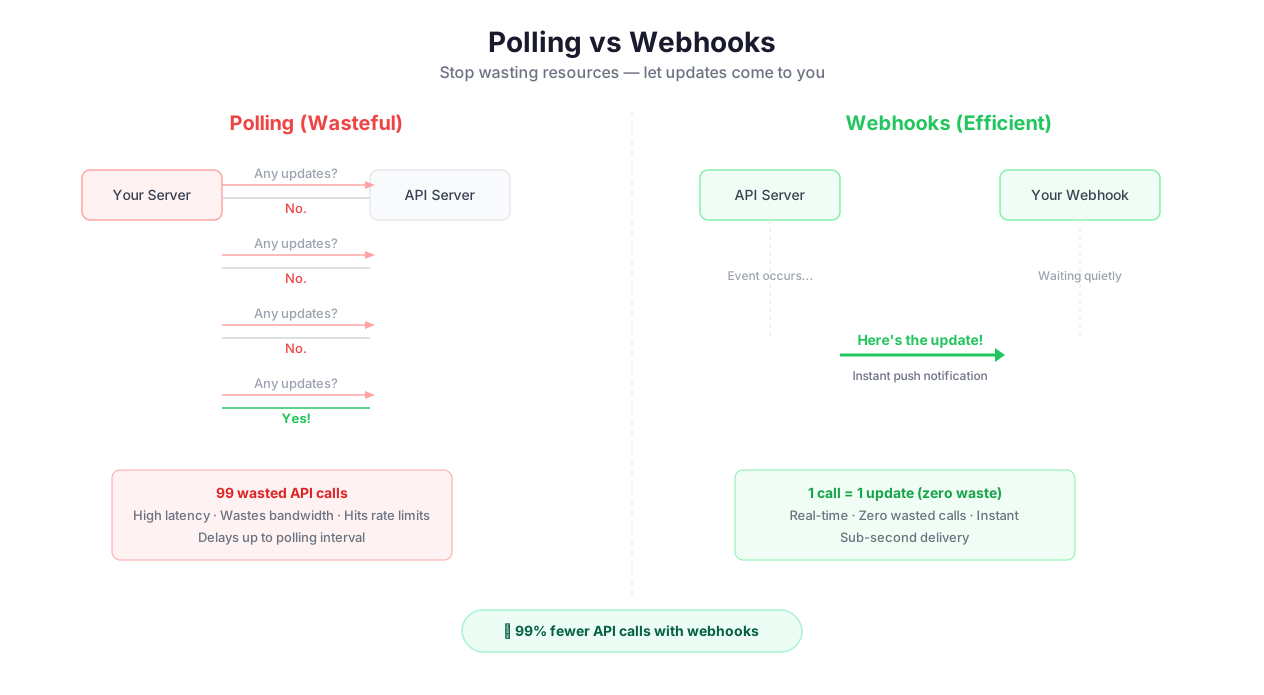
Imagine checking your mailbox every 30 seconds, all day long, just in case a letter arrived. That is what polling does — your automation asks an API "anything new?" over and over, wasting API calls, burning rate limits, and still missing events that happen between checks.
Webhooks flip the model. Instead of you asking, the other system tells you when something happens. Stripe sends a payment_intent.succeeded event the moment a charge clears. Shopify sends an orders/create event the instant a customer completes checkout. GitHub sends a push event the second someone pushes code. Your workflow starts within milliseconds of the event, not minutes.
This is not a subtle difference. A polling-based workflow that checks for new orders every 15 minutes might process an order up to 14 minutes and 59 seconds after it was placed. A webhook-triggered workflow processes it in under 5 seconds. For order fulfillment, lead response, fraud detection, and security alerts, that gap is the difference between a good customer experience and a bad one.
Polling vs. Webhooks: The Numbers
API cost: Polling a service every minute = 1,440 API calls/day, even when nothing happens. Webhooks = 0 calls during quiet periods, 1 call per event.
Latency: Polling at 5-minute intervals = average 2.5 minutes of delay. Webhooks = sub-second delay.
Reliability: Polling can miss events that happen between checks (e.g., a record created and deleted within the polling interval). Webhooks capture every event.
Rate limits: Polling consumes rate limit budget continuously. Webhooks consume zero rate limit budget (the external service sends to you, not the other way around).
The only advantage of polling: it works with services that do not support webhooks. For everything else, webhooks are strictly better. For teams evaluating Autonoly's webhook support against other platforms, our Zapier vs Make vs n8n vs Autonoly comparison covers the differences.
Setting Up Webhook Receivers
Polling vs webhook vs streaming comparison
Setting up a webhook receiver in Autonoly takes under a minute:
- Create the endpoint — Autonoly generates a unique HTTPS URL (e.g.,
https://hooks.autonoly.com/wh/abc123xyz) - Copy the URL and paste it into the sending service's webhook configuration (Stripe Dashboard > Webhooks > Add Endpoint, Shopify Admin > Settings > Notifications, GitHub Repo > Settings > Webhooks, etc.)
- Select which events to receive in the sending service (most services let you choose specific event types rather than receiving everything)
- The endpoint is live immediately — test it by triggering a test event from the sending service
Here is something most documentation skips: you can create the webhook endpoint before building the workflow. Incoming requests are queued, and once you attach a workflow, the queue is processed. This is invaluable during development — configure the webhook in Stripe, trigger a few test events, capture the real payloads, and then build your workflow using actual production data structures instead of guessing.
Payload Parsing: Extracting the Fields You Need
Webhooks send data as JSON payloads. A Stripe payment_intent.succeeded event, for example, sends a payload with 50+ fields — event ID, type, timestamp, payment amount, currency, customer ID, payment method details, metadata, and more. You probably need three of them.
How Payload Parsing Works in Autonoly
Incoming JSON is automatically parsed into a structured object. You access fields using dot notation:
data.object.amount— the payment amount (in cents, because Stripe uses cents — a gotcha that catches everyone once)data.object.customer— the Stripe customer ID (which you then use in a follow-up API call to get the customer's email)data.object.metadata.order_id— custom metadata you attached when creating the payment intent
Trigger, receive, and process webhook workflow
For deeply nested payloads, Autonoly's auto-mapping detects field names and maps them to workflow inputs. For custom mapping, drag and drop fields from the payload preview to your workflow input variables. You can apply transforms during mapping — convert a Unix timestamp to a readable date, extract a domain from an email address, or convert cents to dollars.
Default values handle optional fields gracefully. If a webhook payload sometimes includes a discount_code field and sometimes does not, set a default value of null or "none" so your workflow does not break on the missing field.
Security: Validating That Webhooks Are Genuine
This is where most webhook implementations fail, and where real security incidents happen.
An exposed webhook URL can receive requests from anyone on the internet. If your Stripe webhook URL leaks (or is guessed), an attacker could send fake payment_intent.succeeded events to trigger order fulfillment for non-existent payments. This is not theoretical — it has happened to real companies.
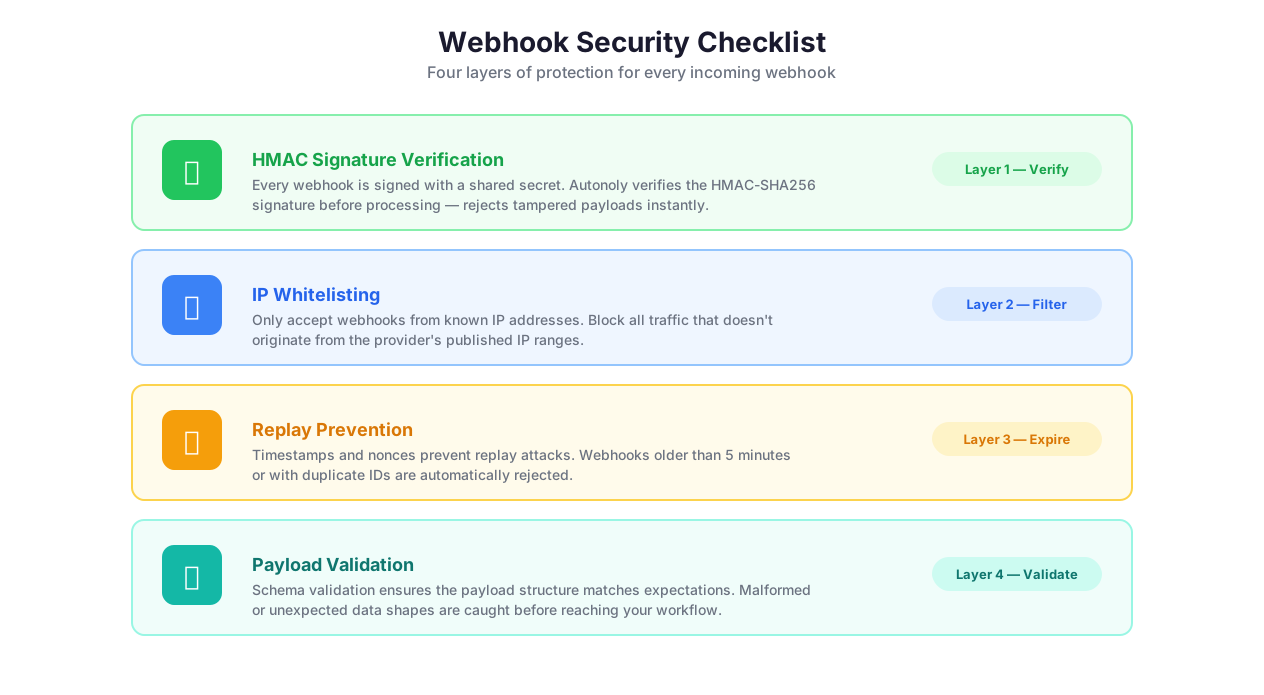
HMAC Signature Validation
The gold standard for webhook security is HMAC signature verification. Here is how it works:
- You and the sending service share a secret key (generated during webhook setup)
- When the service sends a webhook, it computes an HMAC-SHA256 hash of the payload body using the shared secret
- The hash is included in a request header (
Stripe-Signature,X-Hub-Signature-256, etc.) - Autonoly computes the same hash using the stored secret and the received payload body
- If the hashes match, the request is authentic. If not, it is rejected.
This prevents both forgery (an attacker cannot compute the correct hash without the secret) and tampering (changing any byte of the payload changes the hash).
Stripe, GitHub, Shopify, Twilio, and most major services support HMAC signatures. Always enable it in production. Autonoly handles the verification automatically — you just paste the webhook signing secret into the endpoint configuration.
IP Whitelisting
An additional layer: restrict incoming requests to specific IP addresses. Stripe publishes their webhook source IPs. GitHub publishes theirs. Combine IP whitelisting with HMAC signatures for defense in depth.
Replay Prevention
HMAC alone does not prevent replay attacks — an attacker who intercepts a valid webhook could re-send it later. Autonoly checks the timestamp in the webhook payload and rejects events older than a configurable threshold (default: 5 minutes). This ensures that captured webhooks cannot be replayed.
Retry Logic: What Happens When Your Receiver Is Down
Your Autonoly instance is always available (it is cloud-hosted). But what about the reverse — what happens when the sending service sends a webhook and fails to reach the endpoint?
Most webhook senders have built-in retry logic:
Stripe retries up to 3 times over 24 hours with exponential backoff
GitHub retries once after a short delay
Shopify retries up to 19 times over 48 hours
Twilio retries up to 2 times with exponential backoff
The important detail: retries send the exact same payload with the same event ID. Your workflow must be idempotent — processing the same event twice should not create duplicate orders, send duplicate emails, or double-charge customers. Use the event ID to check if you have already processed this event, and skip it if so. Autonoly's webhook handler tracks received event IDs and flags duplicates automatically.
If your workflow is the one that fails (not the delivery, but the processing), Autonoly logs the failure and lets you replay the webhook with one click from the dashboard. You can also edit the payload before replaying — useful for testing edge cases or fixing data issues before reprocessing.
Building Real-Time Event Pipelines
The real power of webhooks emerges when you chain them with Autonoly's processing capabilities.
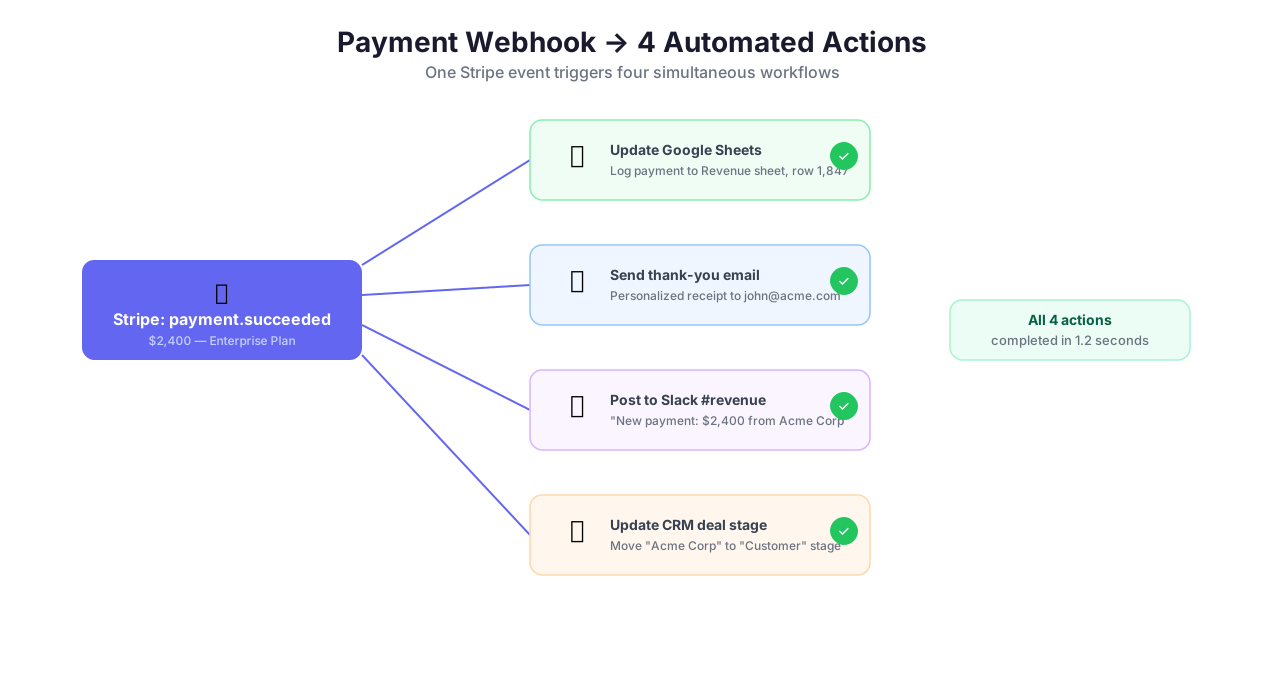
Real Example: Stripe Payment to Full Fulfillment
Here is a concrete, end-to-end webhook pipeline:
- Stripe sends `payment_intent.succeeded` webhook with customer ID and payment amount
- Extract customer email and amount from the payload (
data.object.customeranddata.object.amount) - Call Stripe API via HTTP request to get full customer details (
GET /v1/customers/{id}) - Update Google Sheets revenue tracker with a new row: customer name, email, amount, date
- Send thank-you email via Gmail integration with the customer's name and purchase amount
- Post to Slack #revenue channel: "New payment: $X from Customer Name"
Six steps, four different services, runs in under 10 seconds, triggered automatically every time a payment succeeds. No polling. No manual data entry. No missed payments.
Combining Webhooks with Other Triggers
Webhooks pair naturally with other trigger types:
Webhook + [Scheduled Execution](/features/scheduled-execution) — webhooks handle individual events in real-time; a daily schedule aggregates them into reports
Webhook + [Logic & Flow](/features/logic-flow) — route webhook payloads through conditional branches based on event type, amount thresholds, customer segment, or any payload field
Webhook + [Database](/features/database) — write every webhook event to a database for historical analysis, then query the database on a schedule for trend reporting
Monitoring and Debugging
The webhook dashboard provides full visibility into every incoming request:
Request log — view every incoming request with headers, body, source IP, and timestamp
Execution status — see whether the triggered workflow succeeded, failed, or is still running
Replay — re-send any past request with one click to re-trigger the workflow
Error details — when validation fails or the workflow errors, the full error chain is captured
Latency metrics — time from webhook receipt to workflow start and workflow completion
The replay feature deserves special attention. When a webhook-triggered workflow fails at step 4 of 6, you fix the issue in step 4, then replay the original webhook. You do not need to ask Stripe to re-send the event. You do not need to manually reconstruct the payload. One click, and the exact same data flows through the fixed workflow.
Best Practices
Always enable HMAC signature validation on production endpoints. During development, unauthenticated endpoints are convenient for testing. In production, an exposed webhook URL without authentication is a security vulnerability. At minimum, use a secret token. For financial or order-processing workflows, HMAC-SHA256 signatures are non-negotiable.
Make your webhook-triggered workflows idempotent. Webhook senders retry. Networks glitch. The same event will arrive more than once. Design your workflow so that processing the same event twice produces the same result as processing it once — use the event ID to check for duplicates before creating records, sending emails, or charging cards. This single practice prevents the most common class of webhook bugs.
Validate incoming payloads with a JSON schema. Define the expected structure — required fields, data types, value ranges — and reject anything that does not match. This prevents malformed data from entering your workflow and causing cryptic failures at step 8 when the missing field is finally referenced. It also protects against injection if payload data is used in database queries.
Use the queue feature during development. Create the webhook endpoint before building the workflow. Trigger real events from the sending service. The payloads are queued and visible in the dashboard. Now build your workflow using the actual payload structure — field names, data types, nesting — instead of guessing from documentation that may be outdated.
Set up dead-letter handling for critical workflows. If a webhook triggers a workflow that fails repeatedly (bug in the workflow, not in the webhook), the events should not be silently lost. Configure failure notifications so you know immediately when events are failing. Review the webhook dashboard regularly to catch accumulating failures. For mission-critical workflows, set up a fallback path that logs failed events to a database for manual review. Our AI workflow automation guide includes tips for optimizing execution reliability.
Security & Compliance
Webhook endpoints are HTTPS-only — Autonoly does not accept webhook requests over plain HTTP. All data in transit is encrypted with TLS 1.3, which is critical when webhooks carry customer data, payment details, or personally identifiable information.
HMAC signature verification provides the strongest authentication layer. The sending system signs each request using a shared secret, and Autonoly verifies the signature before processing. Combined with timestamp-based replay prevention, this ensures that every processed webhook is authentic, untampered, and fresh.
All incoming webhook requests are logged with full headers, body, source IP, timestamp, and processing status. Logs are retained for 30 days by default (configurable on enterprise plans) and are available in the security dashboard. For organizations subject to SOC 2, PCI DSS, or HIPAA audit requirements, webhook logs can be exported or forwarded to external SIEM systems (Splunk, Datadog, Sumo Logic). The combination of authentication, validation, idempotency tracking, and logging provides a complete audit trail for every event that triggers a workflow.
Common Use Cases
Real-Time Lead Response (Sub-60-Second Contact)
A marketing team uses Typeform for lead capture. When a prospect submits the form, Typeform sends a webhook to Autonoly within 1 second. The workflow immediately enriches the lead — visiting the prospect's company website with Browser Automation, extracting company size, industry, and technology stack with Data Extraction, and writing the enriched record to a database. Logic & Flow checks if the company matches the ideal customer profile (50+ employees, SaaS industry, uses Salesforce). If yes, an email campaign sequence starts within 60 seconds of form submission with a personalized message referencing the company's tech stack. Research shows that contacting leads within 5 minutes increases conversion by 9x — this workflow contacts them in under 1 minute. See our lead generation automation guide.
E-Commerce Order Processing Pipeline
An online store receives Shopify orders/create webhooks for every new order. The payload contains order items, customer details, shipping address, and payment status. The workflow verifies payment via API & HTTP, checks inventory levels in a PostgreSQL database, updates stock counts (using a transaction to prevent race conditions on concurrent orders), generates a shipping label through the ShipStation API, sends an order confirmation via Email Campaigns with estimated delivery date, and posts a summary to the #orders Slack channel. If any product drops below the reorder threshold, a separate branch triggers a procurement alert. The entire pipeline runs in under 15 seconds per order.
CI/CD Pipeline Integration
A development team configures GitHub to send pull_request.closed webhooks when PRs are merged to main. The webhook triggers a deployment workflow: SSH Terminal connects to the staging server, runs git pull && npm install && npm run build && pm2 restart all, then waits 30 seconds for the service to stabilize. Browser Automation then runs visual regression checks against critical pages — homepage, pricing page, checkout flow — using AI Vision to compare screenshots against baselines. If visual differences exceed a threshold, the workflow posts before/after screenshots to a Slack channel via Integrations and creates a Jira ticket via API & HTTP. If everything looks clean, it posts a green-check confirmation to Slack.
Multi-Platform Data Aggregation
A data team receives webhooks from five SaaS tools: HubSpot (new deals), Stripe (payments), Intercom (new conversations), Mixpanel (user events), and Zendesk (new tickets). Each webhook triggers a workflow that normalizes the incoming data — converting each service's unique schema to a common format — via Data Processing and writes it to a central PostgreSQL database. A nightly scheduled workflow runs aggregation queries across all sources: correlate deal creation with payment timing, map support tickets to customer segments, identify which user events predict conversion. The webhooks provide real-time data ingestion; the schedule provides cross-source intelligence.
Check pricing for webhook endpoint limits and request volume per plan.