
The Dirty Secret of Data Work: 80% is Cleaning
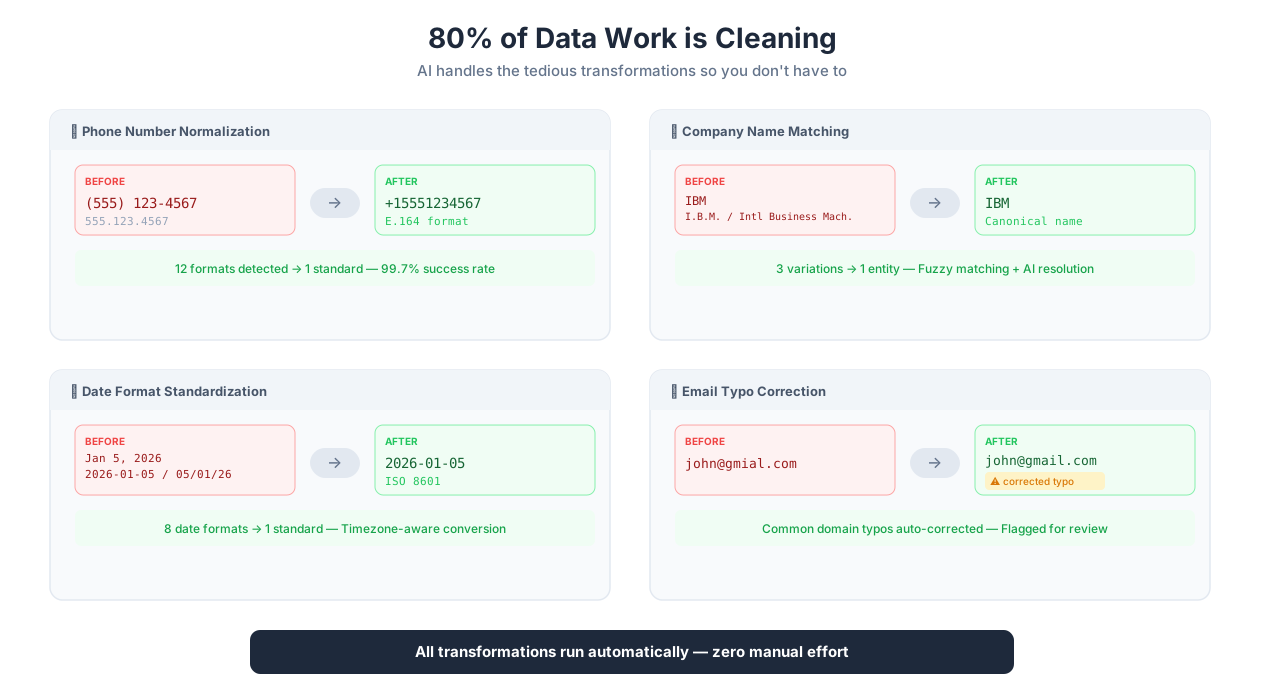
Data processing pipeline: clean, transform, validate, deliver
Here is a number that every data engineer knows but nobody puts on their resume: 80% of data work is cleaning. Not modeling. Not analyzing. Not visualizing. Cleaning. Removing duplicates. Fixing date formats. Normalizing company names. Converting phone numbers. Handling null values. Merging datasets where "IBM" in one source needs to match "I.B.M." in another and "International Business Machines" in a third.
This is not a new problem. The "80% cleaning" statistic has been cited since at least 2016 (a CrowdFlower survey pegged it at 80% of data scientists' time). What has changed is that AI can now handle most of this work — not perfectly, not without oversight, but well enough to turn a three-day data cleaning project into a three-hour one.
Autonoly's Data Processing sits between raw data (from Data Extraction, API responses, file uploads, or manual entry) and your destination (Google Sheets, Airtable, a database, a CRM, an Excel report). It is the bridge that turns messy, inconsistent, duplicate-ridden raw data into clean, normalized, validated output that is actually useful. If you want to understand the full pipeline — from extraction through processing to delivery — our guide on AI workflow automation covers the end-to-end architecture.
Why "I'll Clean It in Excel" Stops Working
Every data processing journey starts the same way: someone exports raw data to a spreadsheet and manually cleans it. For 50 rows, this works fine. For 500 rows, it takes an afternoon. For 5,000 rows, you start writing Excel formulas. For 50,000 rows, you learn Python. For 500,000 rows, you give up and hire a data engineer.
The problem is not just scale. Manual data cleaning is unrepeatable. You spend four hours cleaning a dataset on Tuesday. On Thursday, you get an updated version and have to do it all again. Every time, you apply the same cleaning rules by hand, and every time, you miss something different. One week you forget to normalize the phone numbers. The next week you forget to deduplicate by email instead of by name (and end up with "John Smith" appearing once even though there are three different John Smiths).
Data processing inside the automation pipeline solves this by making cleaning rules explicit, repeatable, and automated. Define the rules once — normalize phone numbers to E.164 format, deduplicate by email, convert dates to ISO 8601, remove rows with missing required fields — and they run the same way every time, on every dataset, with zero manual intervention.
The Real Data Problems (and How to Solve Them)
Let me walk through the data quality problems that consume most of that 80%, with specific examples of how each one works in practice.
Phone Number Normalization
You extract 10,000 contact records from business directories across 5 countries. The phone numbers look like this:
+1 (555) 123-4567555-123-45675551234567+44 20 7946 0958020 7946 0958+91-98765-43210
Six different formats for what should be a single standardized field. Without normalization, deduplication fails (the same person listed with two different phone formats appears as two separate contacts), API lookups fail (your CRM rejects (555) 123-4567 because it expects E.164 format), and analytics are misleading (your "unique contacts" count is inflated by 15-30%).
Autonoly normalizes all of these to E.164 format: +15551234567, +442079460958, +919876543210. The no-code transform handles standard formats automatically. For edge cases (extensions, vanity numbers, alpha-numeric numbers), a Python processing step with the phonenumbers library provides full control.
Company Name Standardization
This one is deceptively hard. You have a lead list from three sources. The same company appears as:
"IBM" (abbreviation)
"I.B.M." (abbreviation with periods)
"International Business Machines" (full legal name)
"International Business Machines Corporation" (full legal name with suffix)
"IBM Corp" (mixed)
"ibm" (case variation)
These all need to map to a single canonical name for deduplication and CRM matching to work. Simple approaches — lowercase, remove periods, strip "Corp/Inc/LLC" — handle 70% of cases. The remaining 30% require fuzzy matching: "Hewlett Packard" vs "Hewlett-Packard" vs "HP" vs "HP Inc." vs "Hewlett Packard Enterprise" (which is actually a different company post-2015 split).
Autonoly handles this with a combination of no-code transforms (case normalization, suffix stripping, period removal) and AI-assisted fuzzy matching that uses company context (industry, location, size) to disambiguate genuinely different companies from variant names of the same entity.
Date Parsing Across Formats
Dates are a special kind of nightmare because the same string can mean different things:
01/05/2026— is this January 5 (US) or May 1 (EU)?Jan 5, 2026— unambiguous but non-standard for databases2026-01-05— ISO 8601, machine-friendly, human-hostile05/01/2026— same ambiguity as the first5 January 2026— clear but verbose2 days ago— relative, requires knowing when the extraction ranLast Tuesday— relative AND vagueQ1 2026— granularity mismatch
Without knowing the source locale, 01/05/2026 is genuinely ambiguous. Autonoly handles this by tracking the source domain's locale when possible (a UK retailer's dates are DD/MM, a US retailer's are MM/DD), and letting you specify the interpretation when the source is ambiguous. Relative dates ("2 days ago", "last week") are converted to absolute dates using the extraction timestamp as the reference point.
Currency Conversion and Formatting
Price data extracted from international sources mixes formats: $1,299.99 (US), 1.299,99 EUR (Germany), £1,299.99 (UK), JP¥129,999 (Japan, no decimals). Some prices include tax (EU VAT-inclusive pricing), some do not (US pre-tax). Some include shipping, some do not.
Normalization means: strip currency symbols, convert to a consistent decimal format, optionally convert to a single currency using exchange rates (with a configurable date for the rate — today's rate or the extraction date's rate), and flag or adjust for tax inclusion. This turns an incomparable mess into a dataset where price_usd means the same thing for every row.
Address Standardization
Addresses from different sources use different formats, abbreviations, and levels of completeness:
"123 Main St, Apt 4B, New York, NY 10001"
"123 Main Street, #4B, NYC, New York 10001"
"123 Main St., Suite 4B, New York City, NY"
All the same place. Address standardization normalizes street abbreviations (St/St./Street), city names (NYC/New York City/New York), state formats (NY/New York), and adds missing components (ZIP code lookup). For use cases that need it, geocoding converts the standardized address to latitude/longitude coordinates. The Python environment includes the usaddress and geopy libraries for US address parsing and geocoding.
The Pipeline Architecture
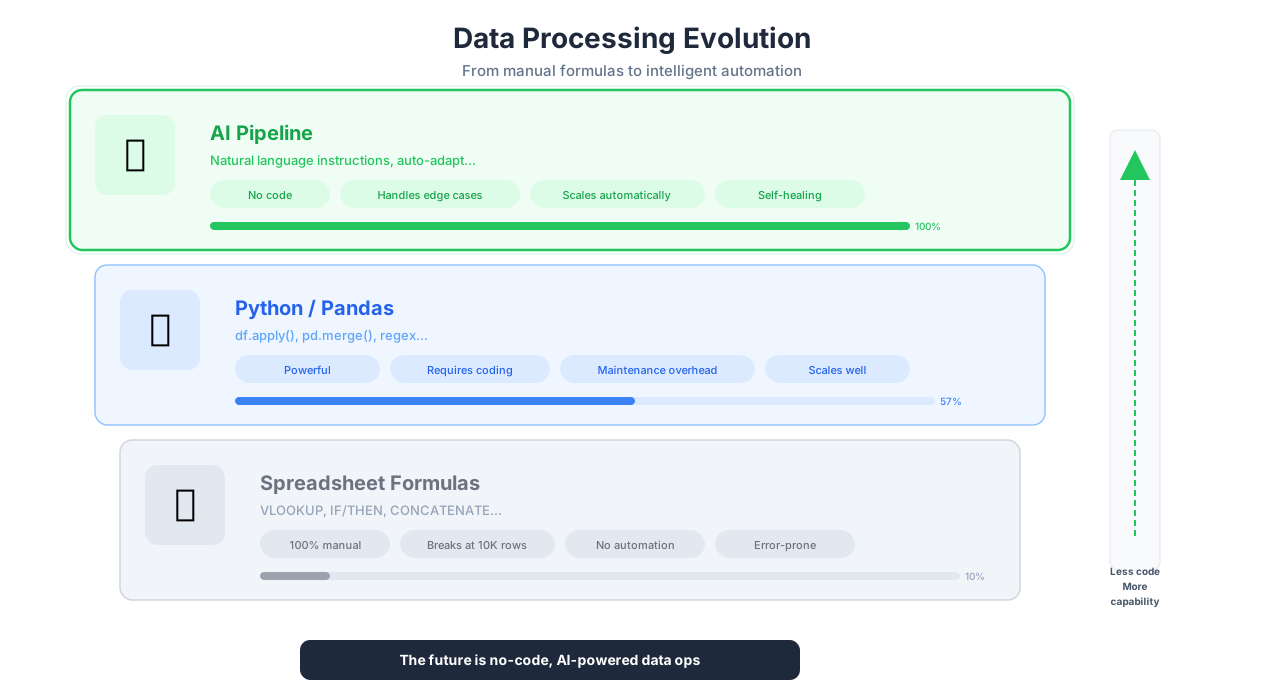
Spreadsheet formulas vs Python pandas vs AI-assisted data processing
Every data processing workflow follows the same fundamental architecture, whether you are cleaning 100 rows or 100,000:
Source → Clean → Transform → Validate → Destination
Each stage has a specific job:
Source. Where the data comes from. Data Extraction output, API responses, uploaded CSV/Excel files, or data from a previous workflow step. The source stage is responsible for getting data into the pipeline, not for judging its quality.
Clean. Remove obvious garbage. Strip whitespace, fix encoding issues (mojibake — those é characters that should be é), remove empty rows, handle null values (replace with defaults, remove the row, or flag for review). This is the unglamorous work that prevents everything downstream from failing.
Transform. Apply business logic. Normalize formats (dates, phones, currencies). Calculate derived fields (price per square foot from price and square footage). Merge datasets (join lead data with enrichment data on email address). Classify records (tag leads by industry using AI). This is where domain knowledge matters — the transforms are different for every use case.
Validate. Check that the output meets quality standards before it reaches the destination. Type checking (price should be a number, email should contain @), range checking (price should be positive, date should be in the past 5 years), completeness checking (every row must have a name and email). Rows that fail validation go to a quarantine path via Logic & Flow for manual review rather than contaminating the destination with bad data.
Destination. Where the clean, validated data goes. Google Sheets, Airtable, Excel file, CSV export, database, API push, or the next step in a larger workflow.
No-Code Transforms vs Python: When to Use Which
Autonoly offers two processing approaches, and choosing the right one for each task matters more than you might think.
No-code transforms are built-in operations you configure through the AI Agent Chat or the Visual Workflow Builder: deduplication, filtering, sorting, field mapping, format conversion, text manipulation, regex extraction, JSON flattening. Use these for standard operations. They are faster to set up, easier to maintain, and less error-prone than writing code. If you can describe the operation in one sentence ("remove duplicates by email", "convert dates to ISO 8601", "filter rows where price > 100"), the no-code transform is the right choice.
Python execution is for everything else. Autonoly provides a full Python 3 environment with pandas, numpy, requests, scikit-learn, BeautifulSoup, and more pre-installed. You can install any additional package with pip at runtime. Use Python for: custom scoring models, statistical analysis, API-based data enrichment, machine learning inference, complex multi-step transformations that cannot be expressed as simple filter/sort/map operations, and any logic that requires conditional branching or iterative processing.
The rule of thumb: start with no-code, switch to Python when you hit a wall. Most data processing pipelines are 80% no-code transforms and 20% Python for the custom logic that makes the output truly useful.
A Real Workflow, End to End
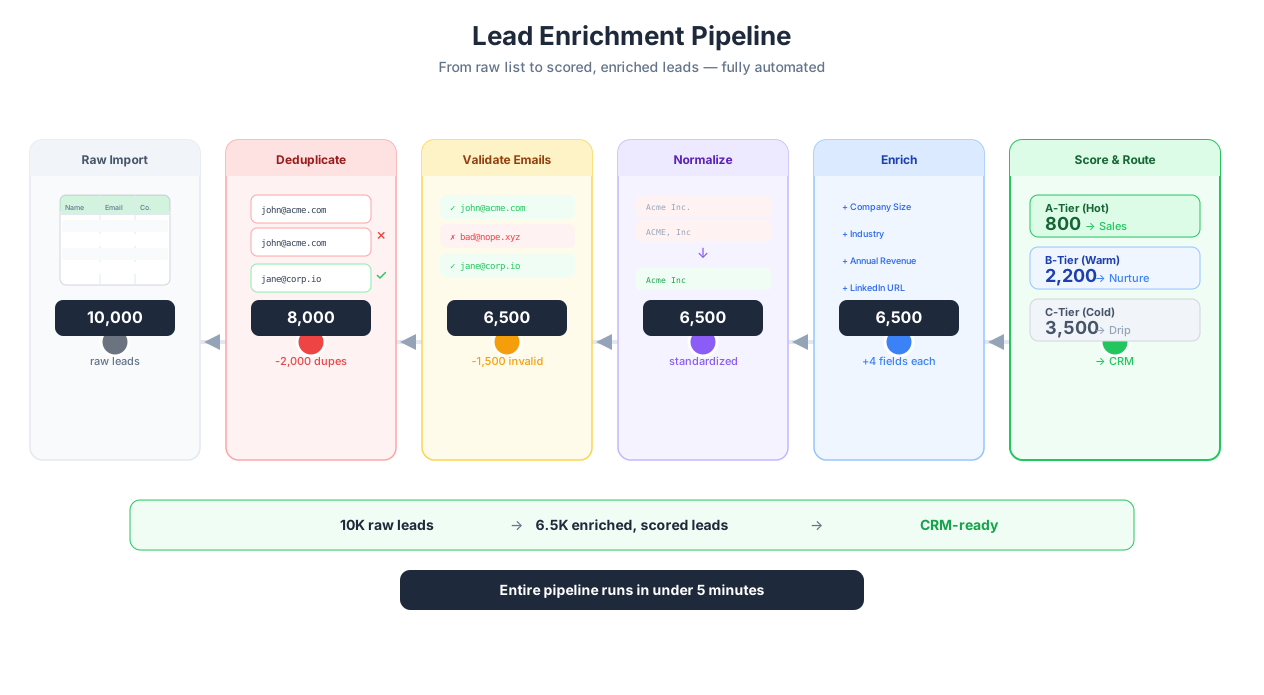
Complete data processing pipeline from extraction to delivery
Let me walk through a complete, realistic data processing workflow — the kind of pipeline that a sales operations team might build and run weekly.
Goal: Extract 10,000 leads from LinkedIn Sales Navigator, clean and enrich the data, score leads by fit, and push qualified leads to HubSpot.
Step 1: Extract. The Data Extraction agent scrapes LinkedIn Sales Navigator search results for a specific set of criteria (industry, company size, job title, geography). For each result, nested extraction visits the profile page and extracts: full name, current title, company name, company LinkedIn URL, location, number of connections, and any shared connections.
Step 2: Clean. Data Processing removes duplicate profiles (matching by LinkedIn URL — the most reliable dedup key because names are not unique and the same person might appear in multiple searches). It strips whitespace, normalizes company names (removing "Inc.", "LLC", "Ltd.", standardizing capitalization), and parses full names into first name and last name fields.
Step 3: Enrich. A Python script calls the Clearbit API (or Apollo, or ZoomInfo — whichever your team uses) with each company's domain to add: company size (employee count), industry classification, annual revenue estimate, tech stack, and funding status. A second API call validates email addresses (constructed from the name + company domain pattern) using a verification service.
Step 4: Score. Another Python script calculates a lead score (0-100) based on your ideal customer profile: +20 points for matching industry, +15 for company size in target range, +10 for seniority level, +5 for located in a target geography, -10 for unverified email, -20 for companies under 10 employees (below your minimum). The scoring logic is your business knowledge encoded in code — and once it is encoded, it applies consistently to every lead.
Step 5: Validate. Validation checks that every lead has: a non-empty name, a valid email address (verified), a company name that matched an enrichment result, and a score above 0. Leads that fail validation go to a quarantine Google Sheet for manual review. Leads with scores below 40 are saved to a separate "nurture" list. Leads scoring 40+ proceed to the destination.
Step 6: Deliver. Qualified leads push to HubSpot CRM via the HubSpot API integration, creating new contacts with all enriched fields populated. A Slack notification fires to the sales channel: "127 new qualified leads added to HubSpot. Top score: 85. Average score: 52. 43 leads quarantined for review."
This entire pipeline runs every Monday at 7 AM via Scheduled Execution. The sales team arrives to a fresh batch of scored, enriched leads in their CRM. No manual data cleaning. No Excel gymnastics. No copy-paste from LinkedIn to HubSpot.
Error Handling: What Happens When a Row Fails
This is the question most data processing tools ignore. In real-world pipelines, things go wrong at the row level: an API enrichment call times out for one company, a date value is unparseable, a phone number does not match any known format, a required field is null. What happens to that row?
Four strategies, and you should choose deliberately:
Skip. Drop the row and continue processing. Use this for disposable data — if one product listing out of 10,000 has a malformed price, losing it is cheaper than stopping the pipeline. Log which rows were skipped and why.
Retry. Attempt the operation again, usually with a delay. Use this for transient errors — API timeouts, rate limit responses, network hiccups. Set a maximum retry count (3 is usually sufficient) and a backoff interval (1s, 2s, 4s). If retries exhaust without success, fall through to one of the other strategies.
Quarantine. Route the failed row to a separate output — a "review" sheet, an error log, a quarantine table. Use this when the data is valuable enough that you want a human to fix it rather than losing it. This is the default approach for most business-critical pipelines. Add enough context to the quarantine output that the reviewer can fix the issue: include the original row data, the processing step that failed, and the error message.
Alert. When a critical row fails — or when the failure rate exceeds a threshold (e.g., more than 5% of rows failed enrichment) — send a notification via Slack, email, or webhook. This is for monitoring, not handling. The alert tells you the pipeline needs attention; the other strategies determine what happens to the individual rows.
You configure error handling per processing step in the Visual Workflow Builder or via Logic & Flow conditional branches.
Comparison: How Autonoly Fits the Landscape
Spreadsheet formulas (Excel, Google Sheets). Everyone's first data processing tool. VLOOKUP, CONCATENATE, IF, TRIM, SUBSTITUTE — these handle simple cleaning tasks. The problems: formulas do not scale (try running a VLOOKUP across 50,000 rows referencing a 10,000-row lookup table — your spreadsheet freezes), they are error-prone (one wrong cell reference corrupts the output silently), and they are not automatable (you run them manually every time). For one-off cleaning of a small dataset, spreadsheets are fine. For anything recurring or large, they are a trap.
Python with pandas. The gold standard for data processing power. Pandas can handle millions of rows, supports every transformation imaginable, and integrates with the entire Python ecosystem (ML libraries, API clients, databases). The problem: you need to know Python. Writing a pandas pipeline to clean, deduplicate, enrich, and export data takes an experienced data engineer 2-4 hours. Debugging it when it breaks takes longer. Maintaining it as requirements change requires engineering discipline. For teams with Python expertise and complex, bespoke requirements, pandas is unbeatable. For everyone else, it is inaccessible.
Dedicated ETL tools (Fivetran, Airbyte, dbt). These are designed for data warehouse pipelines — extracting from SaaS APIs and databases, loading into Snowflake or BigQuery, and transforming with SQL. They are excellent for that use case. But they are overkill and overpriced for "I scraped 5,000 leads and need to clean them before pushing to HubSpot." They also do not handle browser-based extraction — they expect structured data sources (APIs, databases, CSV files).
Autonoly's position. Visual, AI-assisted data processing that requires no code for standard operations and provides full Python for custom logic — integrated directly into the same platform where you extract data and deliver results. The tradeoff: Autonoly is not a data warehouse tool. If you are building a production data warehouse with 50 data sources, incremental loads, and complex dbt models, use the tools built for that (Fivetran + dbt + Snowflake). If you are processing data from web extraction, API calls, and file uploads — cleaning, enriching, and delivering to spreadsheets, CRMs, and databases — Autonoly handles the full pipeline without stitching together multiple tools.
Best Practices from Production Pipelines
Validate at the entry point, not just at the exit. Most teams add validation before exporting data. But validating immediately after extraction — checking for required fields, expected data types, and reasonable value ranges — saves processing time and prevents bad data from cascading through expensive enrichment steps. If a lead does not have a company name, do not waste an API call trying to enrich it. Route it to quarantine immediately via Logic & Flow.
Deduplicate on the right key. This sounds obvious, but choosing the wrong deduplication key is the most common data processing mistake I see. For product data, deduplicate on URL or SKU — never on product name, which varies across sources ("iPhone 16 Pro" vs "Apple iPhone 16 Pro 128GB"). For contacts, email is more reliable than name (there are many John Smiths). For real estate listings, combine address + listing date as a composite key because the same property can be listed multiple times at different prices. Our web scraping best practices guide covers deduplication strategies in detail.
Chain small steps, do not build monoliths. A 200-line Python script that deduplicates, normalizes, enriches, scores, and exports is impossible to debug when row 3,847 causes an unhandled exception. Build five focused steps instead: deduplicate → normalize → enrich → score → export. Each step is independently testable. When something fails, you know exactly which step and can inspect its input and output. The Visual Workflow Builder makes this modular architecture visible and manageable.
Save raw data before processing. This is the data engineering equivalent of "commit before you refactor." If your processing pipeline has a bug — and it will, eventually — you want the original extracted data to fall back to. Push raw extraction results to a Google Sheet or save as CSV before processing begins. Once you trust your pipeline (after 10+ successful runs), you can eliminate the intermediate save to reduce complexity. Read our guide on automate Google Sheets for strategies on using Sheets as intermediate checkpoints.
Monitor failure rates, not just success. A pipeline that processes 9,500 out of 10,000 rows successfully has a 5% failure rate. That might be acceptable — or it might mean you are silently losing your most valuable data. Check what is failing and why. If the same enrichment API consistently times out for companies with very long names, that is a fixable bug. If 5% of phone numbers are unparseable because they contain extensions your normalization does not handle, add extension handling. Continuous improvement of processing pipelines is what separates production-grade automation from throwaway scripts.
Security and Compliance
Data processing is often the most sensitive step in an automation pipeline. Raw data comes in, potentially containing PII (names, emails, phone numbers, addresses), financial data (prices, account numbers), or health information (patient records, insurance claims). The processing step is where this data is transformed, enriched, combined, and routed.
All data processing runs in isolated execution environments that are destroyed after each run. Python scripts execute in sandboxed containers with no network access except through explicitly configured API calls — this prevents scripts from exfiltrating data to unauthorized endpoints. Processing results are encrypted at rest (AES-256) and in transit (TLS 1.3).
PII handling. Data processing nodes are the ideal place to anonymize or pseudonymize records before they reach external destinations. Hash email addresses (SHA-256 with salt), truncate phone numbers (keep only country code and last 4 digits), generalize locations (city-level instead of full address), and remove or redact names. If your pipeline extracts contact data for market research purposes, anonymizing before delivery to the research team ensures compliance with GDPR's data minimization principle.
Execution logging. The execution log captures which processing operations were performed, how many rows were processed, and error counts — without logging actual data values. This means your compliance team can audit what the pipeline did without accessing the data itself. For comprehensive security details, visit the Security feature page.
Explore the templates library for pre-built data processing pipelines, or check the pricing page for processing limits on each plan.
Common Use Cases in Detail
Competitive Price Intelligence
An e-commerce brand extracts pricing data from 10 competitor websites weekly using Data Extraction. The raw data is a mess: Amazon prices include "list price" and "deal price", some EU competitors show VAT-inclusive prices while US competitors show pre-tax, shipping costs are sometimes bundled and sometimes separate, and the same product appears with different names across sites ("Nike Air Max 90" vs "Nike AM90" vs "Air Max 90 Men's").
The processing pipeline: normalize all prices to USD pre-tax (using exchange rates from an API call and known VAT rates per country), match products across sites using a combination of UPC codes (when available) and fuzzy name matching, calculate the average market price per product, and flag products where the brand's price exceeds market average by more than 15%. The output pushes to Google Sheets with conditional formatting — red for overpriced, green for competitive. See our ecommerce price monitoring guide for the full setup.
Lead Generation and Scoring
A B2B SaaS company collects leads from three sources: Data Extraction from industry directories, API responses from ZoomInfo enrichment, and CSV exports from webinar registration forms. Data processing merges the three sources (deduplicating by email, preferring the most complete record when duplicates exist), normalizes company names and phone numbers, validates email addresses against a verification API, calculates a lead score based on company size, industry match, and engagement signals, and routes scored leads to HubSpot with appropriate lifecycle stage tags. Leads scoring below threshold go to a nurture sequence instead of direct sales outreach. Learn more in our automating lead generation guide.
Survey and Research Data Analysis
A market research firm collects 5,000 survey responses via API requests from their survey platform. The raw data has all the usual problems: respondents enter "yes", "Yes", "YES", "y", "Y", and "yeah" for the same boolean question. Free-text fields contain typos, mixed languages, and irrelevant responses. Timestamp fields mix timezones. Some responses are incomplete (respondent abandoned halfway through).
Processing cleans the responses (normalize boolean values, trim whitespace, standardize dates to UTC), filters incomplete submissions (must have answered at least 80% of questions), and aggregates by demographic group. A Python script calculates statistical measures — mean, median, standard deviation, confidence intervals — for each quantitative question by segment. AI Content classification tags open-ended responses by theme and sentiment, turning 3,000 free-text responses into 12 categorized themes with sentiment scores. The output exports to a multi-tab Excel file: one tab per demographic segment, one tab for free-text analysis, one tab for statistical summaries. Uploads to Google Drive for the research team.
Database Migration from Legacy Systems
A healthcare clinic migrates patient records from a legacy practice management system (circa 2008, no API, Windows-only desktop app accessible through a web portal) to a modern cloud-based EHR. Browser Automation extracts patient records from the legacy web interface — demographics, insurance information, visit history, diagnoses, and medications. Data processing handles the transformation: mapping old field names to the new system's schema (the legacy system calls it "Pt. Last Name", the new system expects "patientfamilyname"), converting date formats (the legacy system uses MM/DD/YY with a Y2K-era two-digit year), normalizing diagnosis codes (mapping ICD-9 codes from the legacy system to current ICD-10 codes), and standardizing medication names (matching brand names to generic equivalents using an NLM RxNorm API lookup). Records that fail validation — missing required fields, unrecognized diagnosis codes, dates that do not parse — are quarantined for manual review by clinical staff. Successfully processed records upload to the new EHR via API requests. The migration runs in batches of 500 patients with checkpointing, so a failure at batch 47 resumes from batch 46 rather than starting over.