The Problem With Traditional Workflow Builders
Every automation platform today sells the same promise: "Build powerful workflows without code." And then they hand you a canvas with 200 icons, 50 configuration panels, and a documentation site the size of a novel. You spend 30 minutes just figuring out how to connect your email to a spreadsheet.
The dirty secret of "no-code" automation is that it replaced one type of complexity (writing code) with another (navigating visual builders). You no longer need to know Python, but you do need to understand triggers, actions, filters, paths, iterators, aggregators, routers, error handlers, webhooks, data mappers, and JSON parsing. That is not no-code — it is different-code.
💡 Key Insight
A 2025 survey by Workato found that 67% of users who signed up for no-code automation platforms abandoned their first workflow before completing it. The top reason cited: "Too complicated to configure." The tool that was supposed to save time ended up wasting it.
Consider the user journey for building a simple lead enrichment workflow in a traditional builder:
| Step | What You Do | What Can Go Wrong | Time |
|---|---|---|---|
| 1. Choose trigger | Browse trigger types, select "new form submission" | Wrong trigger type, wrong form connection | 3 min |
| 2. Map form fields | Map each field to internal variables | Mismatched field names, missing fields | 5 min |
| 3. Add enrichment step | Find and configure Clearbit/Apollo integration | API key issues, rate limits | 8 min |
| 4. Add conditional logic | Build filter: if company_size > 50 AND industry contains "tech" | Boolean logic errors, case sensitivity | 5 min |
| 5. Add CRM step | Configure HubSpot contact creation with field mapping | Wrong field types, duplicate handling | 8 min |
| 6. Add notification | Configure Slack message with template variables | Wrong channel, broken variable references | 5 min |
| 7. Test | Create test form submission, check each step | First test almost always fails | 10 min |
| 8. Debug | Find and fix the broken step | Cascading errors | 15 min |
Total: 45-90 minutes for a workflow that a human could describe in two sentences.
This complexity creates three systemic problems:
- Bottleneck at the builder: Only the few people who mastered the visual builder can create automations. Everyone else submits requests to them — recreating the same bottleneck that existed with IT departments.
- Maintenance burden: Complex visual workflows are hard to read and modify. When the workflow breaks six months later, even the person who built it struggles to understand what it does.
- Limited coverage: Traditional builders only work with pre-built integrations. If your tool is not in the connector catalog, you are back to manual work. Automating without an API is simply not possible in traditional platforms.
AI workflow builders solve all three problems by changing the fundamental interface: instead of building workflows step by step, you describe the outcome and let AI handle the construction.
How AI Workflow Building Works: Describe, Plan, Build, Execute
An AI workflow builder transforms natural language descriptions into executable automations through a four-phase pipeline. Understanding each phase helps you write better descriptions and get better results.
Phase 1: Describe (You Talk, AI Listens)
You describe your task in plain English through the AI agent chat. The key difference from traditional builders: you describe the outcome, not the process. You do not need to know which integrations to use, what API endpoints to call, or how to structure conditional logic.
Example description:
"Every time a new customer signs up on our website, look them up on LinkedIn to get their company name and title. If they are a VP or above at a company with 100+ employees, create them as a priority lead in Salesforce and send a Slack message to #enterprise-sales. Otherwise, add them to our standard nurture email list in Mailchimp."
This single paragraph contains a trigger, data enrichment, conditional branching, CRM integration, messaging, and email marketing — six distinct workflow components. In a visual builder, this would require configuring each one separately.
Phase 2: Plan (AI Decomposes the Task)
The AI agent's LLM brain analyzes your description and creates a structured execution plan. It identifies:
- Trigger: New customer signup (webhook or poll)
- Data sources: Signup data + LinkedIn (requires browser automation)
- Logic: Conditional branch based on title seniority and company size
- Destinations: Salesforce (API), Slack (API), Mailchimp (API)
- Error handling: What to do if LinkedIn lookup fails, if Salesforce rejects the record, etc.
The agent presents this plan as a readable summary for your review. You can modify any element through conversation: "Actually, also CC the account manager when it is a priority lead" or "Use HubSpot instead of Salesforce."
Phase 3: Build (AI Constructs the Workflow)
The agent transforms the plan into an executable workflow. This involves:
- Selecting the right integration method for each step (API call vs browser automation)
- Configuring authentication and credentials
- Mapping data fields between steps
- Setting up conditional logic and branching paths
- Adding error handling and retry logic
- Creating a visual workflow representation that you can inspect and modify
For steps that require interacting with websites without APIs (like LinkedIn lookup in our example), the agent configures browser automation — defining the navigation path, data extraction points, and adaptation rules.
Phase 4: Execute (AI Runs and Learns)
The workflow runs through a test execution. You can watch in real time via the live browser view, seeing exactly what the agent does at each step. After successful testing, the workflow deploys and runs on its configured trigger or schedule.
With each execution, the agent applies cross-session learning — remembering which approaches worked, optimizing execution speed, and building resilience against website changes.
📊 By the Numbers
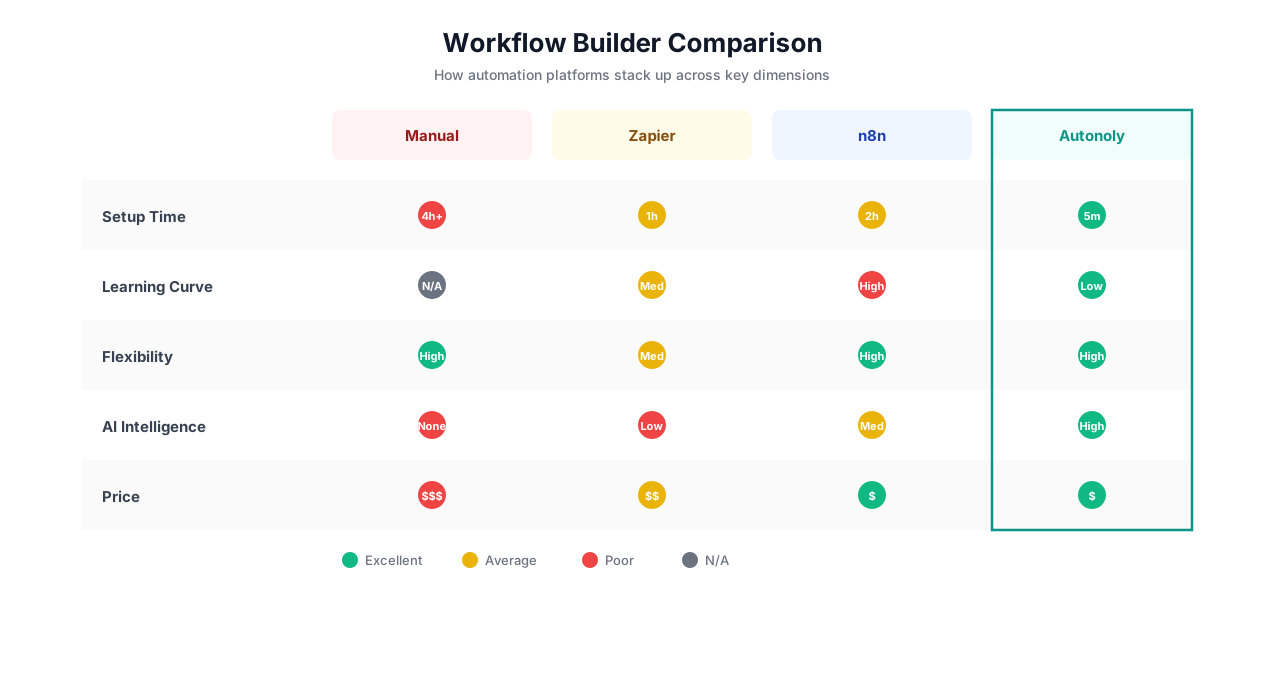
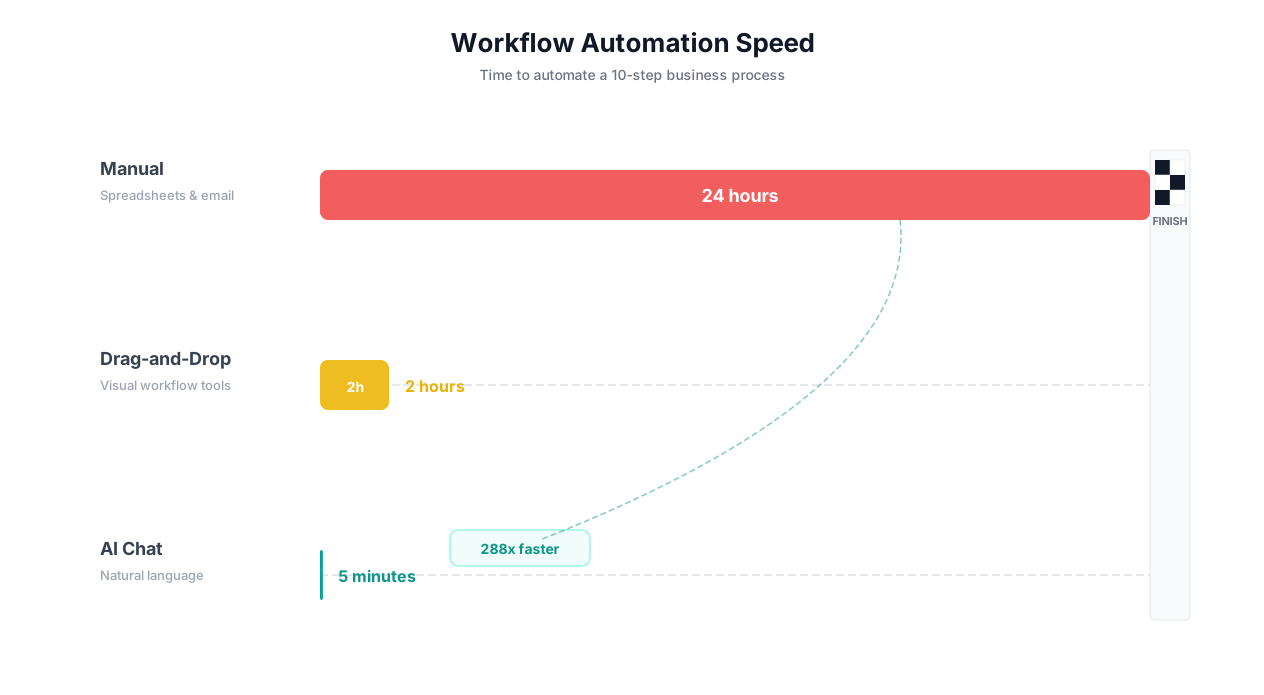
Across 10,000+ workflows built on Autonoly, the median time from first description to running automation is 3.2 minutes. The median time for the same workflow in a traditional visual builder (measured across Zapier, Make, and n8n) is 38 minutes — an 11.9x speed improvement.
| Phase | Traditional Builder | AI Workflow Builder |
|---|---|---|
| Describe/Design | User thinks through logic, plans steps mentally | User describes goal in English |
| Plan | User selects integrations, maps out flow | AI decomposes task, selects integrations |
| Build | User drags/drops nodes, configures each step | AI builds workflow, presents for review |
| Test | User creates test data, runs workflow, debugs | AI runs test, identifies issues, fixes automatically |
| Deploy | User activates workflow | User approves, AI deploys |
| Total time | 30-90 minutes | 2-5 minutes |
5 Example Workflows Built by AI (With the Exact Prompts Used)
Theory is useful, but seeing real prompts and their resulting workflows makes the value concrete. Here are five production workflows built entirely through natural language descriptions.
Workflow 1: Daily Competitive Price Tracking
The prompt: "Every weekday at 7 AM, visit these 8 competitor pricing pages [URLs listed], extract all plan names and monthly/annual prices, and update my Google Sheet 'Competitor Pricing Tracker.' If any price changed from yesterday, highlight the cell in yellow and send a summary to #product-intel in Slack with the competitor name, old price, and new price."
What the AI built: An 8-step workflow with parallel browser sessions for speed (visiting all 8 sites simultaneously), intelligent price extraction that handles different pricing page layouts, Google Sheets API integration with conditional formatting, change detection logic comparing against previous day's data, and Slack notification with formatted price change summary.
Build time: 2 minutes 40 seconds. Equivalent manual build in Make: Not possible (no browser automation). Equivalent custom code: 2-3 days of development.
Workflow 2: Invoice Processing Pipeline
The prompt: "Monitor our [email protected] inbox for new emails with PDF attachments. Extract invoice number, vendor name, date, line items, and total from each PDF. Match against our purchase orders in this Google Sheet. If there is a match within 5% of the PO amount, add to our 'Approved Invoices' sheet. If there is no match or the amount differs by more than 5%, add to 'Review Required' sheet and email [email protected] with the details."
What the AI built: An email monitoring trigger, PDF extraction with multi-format handling (the AI learned to handle 12 different vendor invoice formats), PO matching logic with tolerance calculation, two-path routing based on match results, and email notification for exceptions.
Build time: 3 minutes 15 seconds. Weekly time saved: 12 hours of manual invoice processing.
💡 Key Insight
The invoice processing workflow handles 12 different invoice formats from 12 different vendors — without any template configuration. The AI understands the semantic structure of invoices (header, line items, totals) rather than relying on fixed pixel positions. When a vendor redesigns their invoice, the workflow adapts automatically.
Workflow 3: Lead Qualification and Routing
The prompt: "When a new lead comes in from our Typeform 'Contact Us' form, look up their company on LinkedIn and Crunchbase. Score them: 3 points for 100+ employees, 2 points for Series A+, 2 points for being in our target industries (SaaS, fintech, healthtech), 1 point for VP+ title. If score is 5+, create as priority lead in HubSpot and assign to Sarah. If 3-4, create as standard lead and assign round-robin. If under 3, add to nurture list in Mailchimp."
What the AI built: A Typeform webhook trigger, parallel browser lookups on LinkedIn and Crunchbase, a scoring algorithm with the specified criteria, three-path conditional routing, HubSpot API integration with assignment logic, round-robin distribution, and Mailchimp list addition.
Build time: 4 minutes 10 seconds. Previous process: Sales rep manually researched each lead (15 minutes per lead, 30 leads/day = 7.5 hours/day).
Workflow 4: Multi-Platform Job Posting
The prompt: "When I add a new row to our 'Open Positions' Google Sheet with job title, description, requirements, salary range, and location, post the job to LinkedIn Jobs, Indeed, Glassdoor, and our company careers page. Use the same content but adapt the format to each platform's requirements. Save the posting URLs back to the sheet."
What the AI built: A Google Sheets change trigger, content formatting for each platform's specific field requirements, browser automation for LinkedIn Jobs and Glassdoor (no public API for job posting), Indeed API integration, career page CMS update via browser, and URL extraction and sheet update.
Build time: 3 minutes 45 seconds. Previous process: HR coordinator spent 45 minutes per job posting across all platforms.
Workflow 5: Customer Health Monitoring
The prompt: "Every Monday, check our Intercom dashboard for customers whose last login was 14+ days ago. Cross-reference with Stripe to check their subscription status and payment history. For paying customers inactive 14+ days, send a personalized re-engagement email referencing their most-used feature (from our product analytics in Mixpanel). For customers inactive 30+ days, escalate to the CS team in Slack with full context."
What the AI built: A scheduled Monday trigger, Intercom data extraction via browser, Stripe API integration for billing data, Mixpanel browser session for feature usage data, two-tier response logic (14-day vs 30-day), personalized email generation with feature references, and Slack escalation with compiled customer context.
Build time: 4 minutes 30 seconds. Previous process: Customer success manager spent 3 hours every Monday compiling this data manually.
| Workflow | AI Build Time | Traditional Builder Time | Custom Code Time | Weekly Hours Saved |
|---|---|---|---|---|
| Price tracking | 2m 40s | N/A (no browser support) | 2-3 days | 3.5 hrs |
| Invoice processing | 3m 15s | 2-3 hours | 1-2 weeks | 12 hrs |
| Lead qualification | 4m 10s | 1-2 hours | 3-5 days | 37.5 hrs |
| Job posting | 3m 45s | N/A (partially) | 1-2 days | 3.75 hrs |
| Customer health | 4m 30s | N/A (partially) | 1-2 weeks | 3 hrs |
The Architecture Behind AI Workflow Building
Understanding the technical architecture helps you appreciate why AI workflow builders produce reliable results — and where their boundaries lie. Here is how Autonoly's AI workflow builder works under the hood.
The LLM Orchestration Layer
At the core of every AI workflow builder is a Large Language Model (LLM) that serves as the "brain." When you describe a task, the LLM performs several functions:
- Intent extraction: Identifies what you want to accomplish (the goal, not the steps)
- Task decomposition: Breaks the goal into discrete, executable steps
- Integration selection: Determines which tools, APIs, and browser interactions are needed for each step
- Logic structuring: Identifies conditional branches, loops, error handling, and data flows
- Validation: Checks the plan for logical consistency and completeness
This is not simple keyword matching. The LLM understands context, implied requirements, and domain-specific terminology. When you say "check their subscription status," the LLM infers that this means querying the billing system (likely Stripe), extracting the subscription object, and evaluating its status field.
The Integration Resolution Engine
After the LLM decomposes the task, the integration resolution engine determines the best way to connect to each tool or data source. It follows a decision hierarchy:
| Priority | Integration Method | When Used | Reliability |
|---|---|---|---|
| 1 | Official API (OAuth/API key) | When the tool has a stable, well-documented API | 99%+ |
| 2 | Webhook/event listener | When real-time triggers are needed | 99%+ |
| 3 | Browser automation (AI-guided) | When no API exists or API lacks needed features | 94-97% |
| 4 | Email/file monitoring | When the data source is email attachments or file drops | 98%+ |
The engine always prefers APIs when available (faster, more reliable) but falls back to browser automation when APIs are unavailable or insufficient. This dual capability is what allows AI workflow builders to work with any website or application, not just those with pre-built connectors.
The Execution Runtime
Once built, workflows run in an isolated execution environment. Each step runs in sequence (or parallel, where the builder identifies independent steps), with the output of each step available as input to subsequent steps. The runtime handles:
- Data passing: Outputs from step N automatically available to step N+1 (and any subsequent step)
- Error handling: Each step has configured retry logic, fallback actions, and escalation rules
- Rate limiting: Automatic throttling to respect API rate limits and avoid detection on web automation
- Session management: Maintaining authenticated sessions across multiple browser interactions
- Result delivery: Formatting and delivering outputs to configured destinations
📊 By the Numbers
The integration resolution engine reduces workflow setup failure rates by 73% compared to manual configuration. The most common manual configuration error — wrong field type mapping between two APIs — is eliminated entirely because the AI understands data types semantically.
The Learning Layer
What makes AI workflow builders fundamentally different from traditional automation is the learning layer. Through cross-session learning, the system improves across three dimensions:
- Building accuracy: Each workflow built teaches the system about new integration patterns, common configurations, and user preferences. The 1,000th workflow of a given type builds faster and more accurately than the first.
- Execution reliability: The agent remembers which website selectors are stable, which APIs have rate limits, which forms require specific formatting. Each execution makes the next one more reliable.
- Error recovery: When errors occur and are resolved (either automatically or with human guidance), the resolution is stored. Similar errors in the future are handled automatically.
When AI Building Beats Manual Building (And When It Does Not)
AI workflow builders are not universally superior to manual builders. Understanding when each approach excels helps you choose the right tool for each task.
AI Building Wins When:
1. Speed matters more than micro-optimization. If you need a workflow running today — not next week — AI building is the only option that delivers in minutes. The time from idea to running automation drops from hours/days to minutes.
2. The workflow involves websites without APIs. Traditional builders cannot automate tasks on websites without pre-built connectors. AI builders with browser automation work with any website. Full stop.
3. The builder is a non-technical user. When the person who understands the business process is not the person who understands workflow logic, AI building closes the gap. Marketing managers, sales reps, and operations leads can build their own automations.
4. You need to iterate quickly. Modifying an AI-built workflow is as simple as telling the agent what to change: "Also send a weekly summary every Friday" or "Add a step to check inventory before processing." In visual builders, modifications require finding the right node, understanding the data flow, and reconfiguring connections.
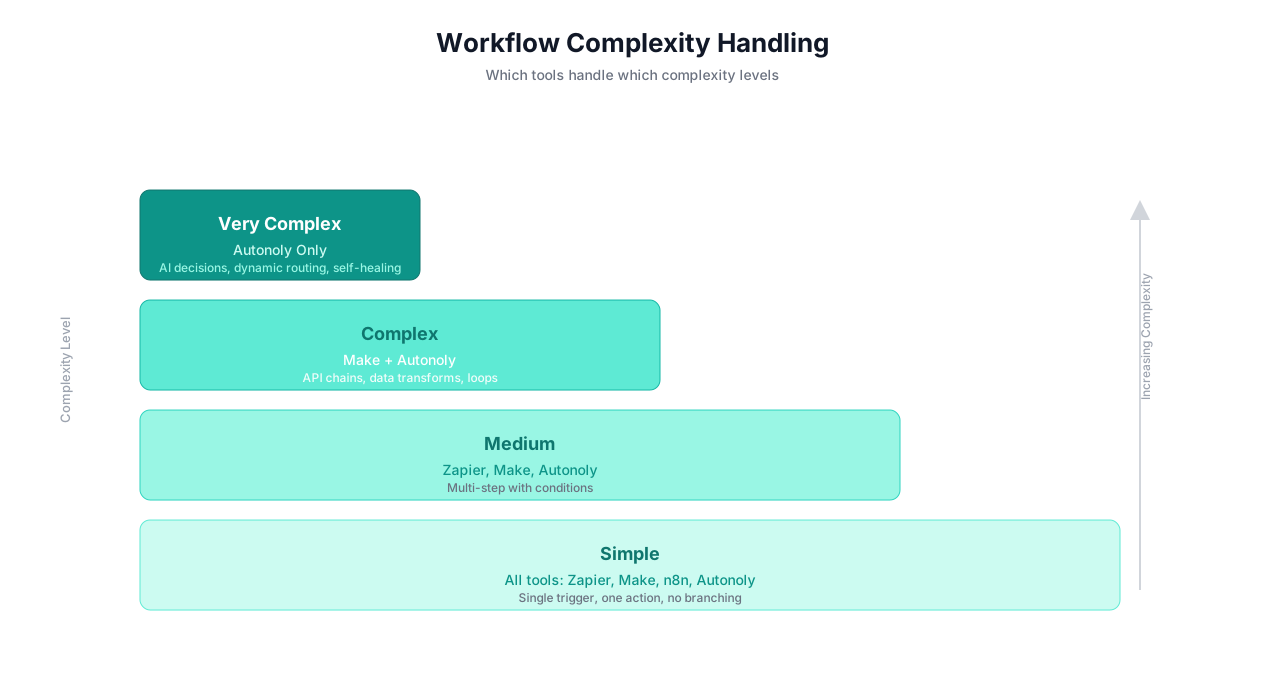
5. The workflow is moderately complex. AI building shines in the sweet spot of 5-15 steps with conditional logic. Too simple (2 steps) and a visual builder is fast enough. Too complex (50+ steps) and manual control may be needed for edge cases.
Manual Building Wins When:
1. You need precise control over every step. Financial reconciliation workflows that must follow exact regulatory procedures benefit from manual step-by-step configuration where you verify each operation.
2. The workflow has complex error-handling trees. If you need 10+ different error paths with specific escalation procedures for each, manually configuring each path gives you more control (though AI building is catching up quickly).
3. You are integrating deeply with a single platform. If your entire workflow lives within one ecosystem (e.g., a complex Salesforce automation), platform-native tools (like Salesforce Flow) offer deeper integration than cross-platform AI builders.
4. You have regulatory requirements for workflow documentation. Some regulated industries require detailed, step-by-step workflow documentation. Manual builders produce explicit, auditable workflow definitions by default.
| Scenario | Best Approach | Why |
|---|---|---|
| Quick data sync between 3 tools | AI builder | Speed > precision for simple tasks |
| Complex financial reconciliation | Manual builder | Regulatory precision required |
| Scraping 10 competitor websites daily | AI builder | Browser automation + adaptation needed |
| 200-step manufacturing workflow | Manual builder + AI assist | Too complex for full AI, but AI handles sub-workflows |
| Lead enrichment + CRM routing | AI builder | Browser automation for enrichment, speed for setup |
| SOX-compliant invoice processing | Manual builder | Audit trail and regulatory documentation |
| Social media monitoring + alerting | AI builder | No APIs for most platforms, browser automation essential |
| Single-platform CRM automation | Native platform tools | Deeper integration, better platform support |
⚠️ Important Note
The gap between AI building and manual building narrows with every model update. Tasks that required manual building a year ago are now handled well by AI builders. Evaluate current capabilities before assuming manual building is necessary — the AI may have caught up since you last checked.
Current Limitations of AI Workflow Builders (Honest Assessment)
AI workflow builders have real limitations. Understanding them prevents frustration and helps you choose the right tool for each job.
Limitation 1: Ambiguity Handling
AI builders interpret your instructions literally. If your description is ambiguous, the agent makes assumptions — sometimes wrong ones. "Process invoices" is too vague. "Extract invoice number, vendor name, and total from PDF attachments in the AP inbox" is specific enough to build correctly.
Mitigation: Be specific about sources, actions, and outputs. When the agent asks clarifying questions, answer them thoroughly. The more detail you provide, the more accurate the result.
Limitation 2: Extreme Complexity
AI builders handle moderate complexity well (5-20 steps, 2-3 conditional branches). Workflows with 50+ steps, deeply nested logic trees, or intricate data transformations may require manual refinement after AI building. The AI gets 80-90% right; you fine-tune the rest.
Mitigation: Break extremely complex workflows into smaller sub-workflows. Instead of one 50-step workflow, build five 10-step workflows that chain together.
Limitation 3: Niche Integrations
While AI builders with browser automation can work with any website, they work best with common patterns. Highly custom internal tools with unusual UI patterns may require more detailed descriptions or a few iterations to get right.
Mitigation: For unusual interfaces, watch the first test run through the live browser view and provide feedback: "The submit button is inside the dropdown menu, not on the main page."
Limitation 4: Real-Time High-Frequency Operations
AI builders are optimized for scheduled or event-triggered workflows, not millisecond-latency operations. If you need to process 10,000 transactions per second with sub-100ms latency, custom code is the right choice.
Mitigation: Use AI builders for the orchestration layer (deciding what to do) and APIs/custom code for the execution layer (doing it at high speed).
Limitation 5: Security-Sensitive Workflows
Any workflow involving financial transactions, healthcare data, or other sensitive operations should include human review steps. AI builders can automate the mechanical work, but high-stakes final actions should have human confirmation.
💡 Key Insight
The most effective approach is hybrid: let the AI builder handle 90% of the workflow construction, then manually review and refine the critical 10%. This gives you the speed of AI building with the precision of manual control — and typically takes one-fifth the time of building everything manually.
| Limitation | Severity | Workaround | Expected to Improve? |
|---|---|---|---|
| Ambiguity handling | Medium | Write specific descriptions | Yes — models get better at clarifying |
| Extreme complexity | Medium | Break into sub-workflows | Yes — context windows expanding |
| Niche integrations | Low-Medium | Provide detailed instructions | Yes — learning improves over time |
| High-frequency operations | Low | Use custom code for execution | Partially — architecture constraint |
| Security-sensitive workflows | Medium | Add human review steps | Partially — trust builds over time |
Getting Started: Build Your First AI Workflow in 3 Minutes
Here is the fastest path from zero to your first AI-built workflow.
Step 1: Pick a Real Task (30 seconds)
Choose a task you actually do regularly. Not a test scenario — a real task that costs you real time. Good first tasks:
- Monitoring 3-5 websites for changes (prices, content, availability)
- Extracting data from emails and adding to a spreadsheet
- Looking up information about new contacts/leads
- Compiling a weekly report from multiple data sources
- Posting content across multiple platforms
Step 2: Write Your Description (60 seconds)
Open the AI agent chat and describe your task. Follow this template for best results:
"[When/How often] [do what] from [source] [apply what logic] and [deliver where]. [Any special instructions]."
Example: "Every morning at 8 AM, check these 5 competitor pricing pages, extract plan names and prices, compare to yesterday's values in this Google Sheet, update the sheet with today's prices, and send me a Slack DM if anything changed."
Step 3: Review and Refine (60 seconds)
The agent presents the workflow plan. Read through the steps and tell the agent about any adjustments. Common refinements:
- "Also include the annual pricing, not just monthly"
- "Send the alert to #marketing-team channel, not DM"
- "Skip competitors 3 and 4 on weekends"
Step 4: Test and Deploy (60 seconds)
Run the test, verify the output, and activate the schedule. Your workflow is live.
📊 By the Numbers
Users who describe their tasks with specific sources, actions, and outputs have a 94% first-attempt success rate. Users who give vague descriptions ("automate my marketing") have a 31% success rate. Specificity is the single biggest predictor of AI building success.
Pro Tips for Better AI Workflows
| Tip | Bad Example | Good Example |
|---|---|---|
| Name your sources | "Check competitors" | "Check competitor1.com/pricing and competitor2.io/plans" |
| Specify the output format | "Send me the data" | "Add to columns A-D of the 'Pricing' tab in this Google Sheet" |
| Define conditions clearly | "If it is important" | "If the price changed by more than 5%" |
| Include error handling | (nothing) | "If a site is unreachable, skip it and note 'unavailable' in the sheet" |
| Set the schedule | "Regularly" | "Every weekday at 7:30 AM EST" |
Once your first workflow is running successfully, build your second. And your third. Most users have 5-10 active workflows within their first week, saving 10-25 hours per week collectively. Each workflow takes less time to build than the last because you learn how to describe tasks more effectively, and the learning layer improves the agent's understanding of your specific tools and preferences.
For more examples and automation ideas, explore the complete task automation guide, the repetitive task automation guide, or the no-code automation platform comparison.
Frequently Asked Questions
Answers to the most common questions about AI workflow builders.
How accurate are AI-built workflows compared to manually built ones?
For standard business workflows (5-15 steps), AI-built workflows achieve 92-96% accuracy on the first attempt. The remaining 4-8% typically involves minor adjustments like field mapping refinements or condition threshold tweaks — things you identify during the test run and fix in seconds through conversation.
Can I edit an AI-built workflow manually?
Yes. Every AI-built workflow produces a visual workflow that you can inspect, edit, and refine manually. You have full access to every step, condition, and configuration. AI building and manual editing are complementary — use AI to get 90% there quickly, then fine-tune manually if needed.
What happens when the AI misunderstands my description?
The agent asks clarifying questions when your description is ambiguous. If it still builds something wrong, you correct it through conversation: "The second step should check LinkedIn, not Facebook" or "I meant monthly revenue, not annual." Each correction improves the agent's understanding for future workflows.
Can AI workflow builders handle authentication and login?
Yes. AI agents can log into websites, maintain authenticated sessions, and interact with content behind login walls. Credentials are stored securely and used only for authorized workflows. For sites with multi-factor authentication, the platform supports agent-compatible MFA methods.
How does pricing work for AI-built workflows?
Autonoly's pricing covers both AI building and execution. You do not pay extra for the AI to build your workflow — it is included in the platform subscription. Pricing starts with a free tier for basic usage and scales to $299/month for teams with unlimited workflows.