10 Repetitive Tasks You Should Automate With AI Today
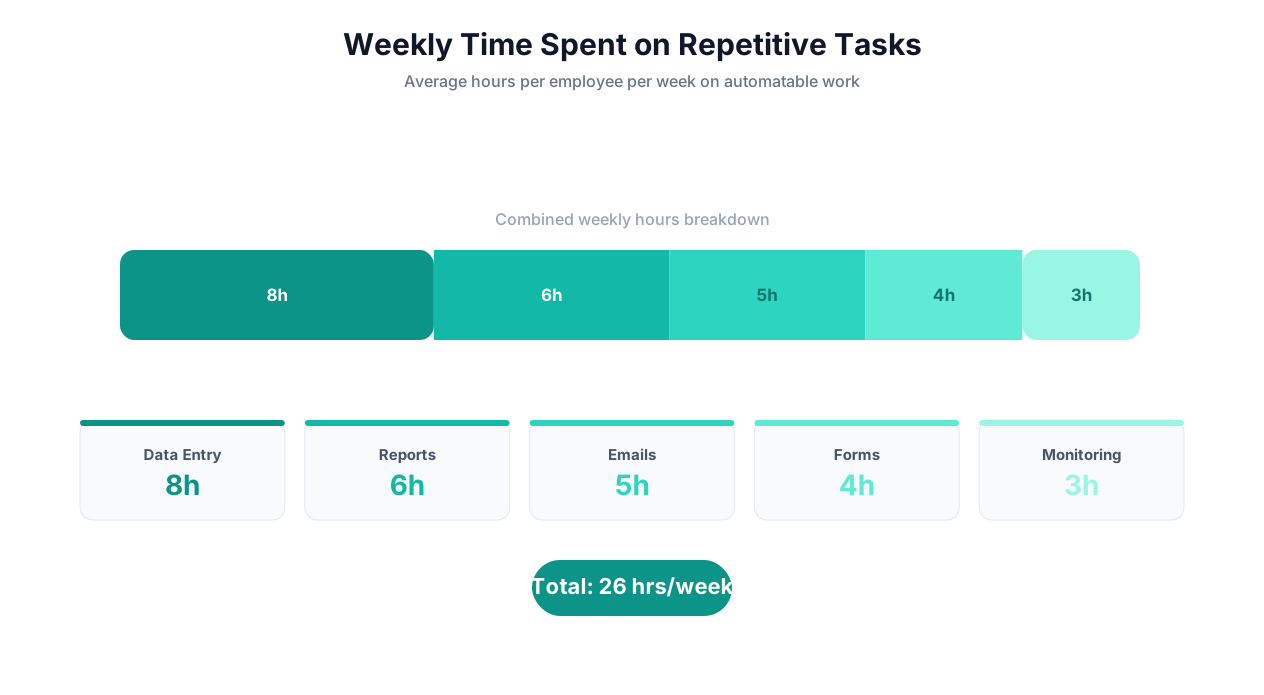
These are the 10 most common repetitive tasks across business functions, ranked by a combination of time consumed and ease of automation. Each can be automated with an AI agent in under 10 minutes.
1. Data Entry Between Systems
What it is: Copying information from one system to another — CRM to spreadsheet, email to database, invoice to accounting system, form submission to project management tool.
Time consumed: 5-15 hours per week for teams without automation
How to automate: Tell the AI agent: "When a new entry appears in [source system], extract [specific fields] and create/update a record in [destination system]." The agent handles both API-connected and non-API systems through browser automation.
Autonoly templates: Cross-platform data sync, automated data entry
2. Report Generation From Multiple Sources
What it is: Pulling data from 3-8 different tools (analytics, CRM, ad platforms, spreadsheets, project management) and combining it into a weekly or monthly report.
Time consumed: 3-8 hours per report
How to automate: "Visit [list of dashboards/sources], extract [specific metrics], and compile them into [Google Sheet/email template] with [formatting requirements]. Run every [Monday at 8 AM]."
Related guide: Automated email reports
3. Email Follow-Up and Outreach
What it is: Checking CRM for deals/contacts that need follow-up, researching the contact's recent activity, and drafting personalized follow-up emails.
Time consumed: 1-2 hours per day for sales and customer success teams
How to automate: "Check [CRM] for contacts with no activity in [X days]. Visit their LinkedIn profile and company website. Draft a follow-up email referencing their recent activity. Queue for my review."
4. Invoice Processing and Data Extraction
What it is: Receiving invoices via email or portal, reading the PDF, extracting invoice details (number, vendor, line items, amounts, due date), and entering data into the accounting system.
Time consumed: 10-20 minutes per invoice
How to automate: "Monitor [inbox/portal] for new invoices. Extract invoice number, vendor name, line items, amounts, tax, and due date from the PDF. Validate against purchase orders. Create an entry in [accounting system]."
Related guide: Invoice processing automation, PDF data extraction
📊 By the Numbers
The average accounts payable department processes 500 invoices per month manually, taking 12 minutes each = 100 hours/month. AI-automated invoice processing reduces this to 5-8 hours of exception review — a 92% time savings.
5. Social Media Monitoring
What it is: Checking social media platforms for brand mentions, competitor activity, industry trends, and engagement metrics. Compiling findings into a summary.
Time consumed: 1-3 hours per day
How to automate: "Monitor [Twitter, Reddit, LinkedIn, Instagram] for mentions of [brand/keywords]. Extract post content, author, engagement metrics, and sentiment. Compile a daily summary and send to [Slack channel/email]."
Related guide: Social media monitoring automation
6. Lead Research and Enrichment
What it is: Taking a list of company names or domains and researching each one to find contact information, company size, industry, technology stack, funding history, and recent news.
Time consumed: 15-30 minutes per lead
How to automate: "For each company in [this spreadsheet], visit their website and LinkedIn page. Extract company size, industry, key contacts (names, titles, emails), recent news, and technology stack. Add results to the spreadsheet."
Related guide: Lead generation automation
7. Form Filling Across Multiple Portals
What it is: Filling out the same or similar information in forms across multiple websites — job postings, insurance quotes, government filings, vendor applications.
Time consumed: 15-60 minutes per form set
How to automate: "Take the data from [source spreadsheet/system] and fill out the forms at [list of portal URLs]. Submit each form and capture confirmation numbers."
Related guide: Form filling from spreadsheets
8. Competitor Price and Product Tracking
What it is: Visiting competitor websites to check current pricing, product updates, new features, job postings, and press releases.
Time consumed: 2-5 hours per week
How to automate: "Visit [competitor URLs/pricing pages] daily. Extract plan names, prices, and feature lists. Compare against last week's data. Highlight changes in [Google Sheet]. Alert via Slack if any price changes by more than 5%."
Related guide: Competitor data scraping, competitor monitoring template
9. Content Aggregation and Curation
What it is: Browsing industry news sites, blogs, and social media to find relevant content for sharing, repurposing, or competitive intelligence.
Time consumed: 1-2 hours per day
How to automate: "Visit [list of industry blogs, news sites, and subreddits]. Extract articles published in the last 24 hours that mention [topics/keywords]. Summarize each in 2 sentences. Compile into a daily digest and send to [Slack/email]."
10. Compliance Checks and Regulatory Monitoring
What it is: Checking regulatory websites, industry databases, and government portals for new rules, filing deadlines, license renewals, and compliance updates.
Time consumed: 3-8 hours per week
How to automate: "Visit [list of regulatory URLs] daily. Check for new publications, rule changes, and enforcement actions. Classify each by relevance to [our business areas]. Summarize and send a daily digest to the compliance team."
| Task | Manual Time/Week | AI Agent Time/Week | Setup Time | ROI Payback |
|---|---|---|---|---|
| Data entry | 10 hrs | 0.5 hrs | 5 min | Day 1 |
| Report generation | 6 hrs | 0.25 hrs | 10 min | Day 1 |
| Email follow-ups | 7.5 hrs | 1 hr | 5 min | Day 1 |
| Invoice processing | 12 hrs | 1 hr | 10 min | Day 1 |
| Social monitoring | 10 hrs | 0.5 hrs | 5 min | Day 1 |
| Lead research | 15 hrs | 1.5 hrs | 5 min | Day 1 |
| Form filling | 5 hrs | 0.5 hrs | 5 min | Day 1 |
| Price tracking | 4 hrs | 0.25 hrs | 5 min | Day 1 |
| Content curation | 7.5 hrs | 0.5 hrs | 5 min | Day 1 |
| Compliance monitoring | 5 hrs | 0.5 hrs | 10 min | Day 1 |
| Total | 82 hrs | 6.5 hrs | 65 min | — |
ROI Calculator: Time Saved x Hourly Rate = Your Automation Value
The ROI of automating repetitive tasks is the easiest business case you will ever make. The math is simple and the payback is immediate.
The Basic Formula
Weekly Hours Saved = (Current manual hours) - (Hours for agent setup + review)
Annual Value = Weekly Hours Saved × 52 × Fully Loaded Hourly Rate
Annual Cost = Platform subscription × 12
Net Annual ROI = (Annual Value - Annual Cost) ÷ Annual Cost × 100%
Example Calculations by Role
| Role | Salary + Benefits | Hourly Rate | Repetitive Task Hours/Week | Hours Automated | Annual Value of Saved Time |
|---|---|---|---|---|---|
| Sales Rep | $85,000 | $43 | 18 hrs | 15 hrs | $33,540 |
| Marketing Analyst | $75,000 | $38 | 15 hrs | 12 hrs | $23,712 |
| AP Clerk | $50,000 | $25 | 25 hrs | 22 hrs | $28,600 |
| Operations Manager | $95,000 | $48 | 12 hrs | 10 hrs | $24,960 |
| Recruiter | $70,000 | $36 | 20 hrs | 17 hrs | $31,824 |
| Compliance Analyst | $80,000 | $41 | 14 hrs | 11 hrs | $23,452 |
💡 Key Insight
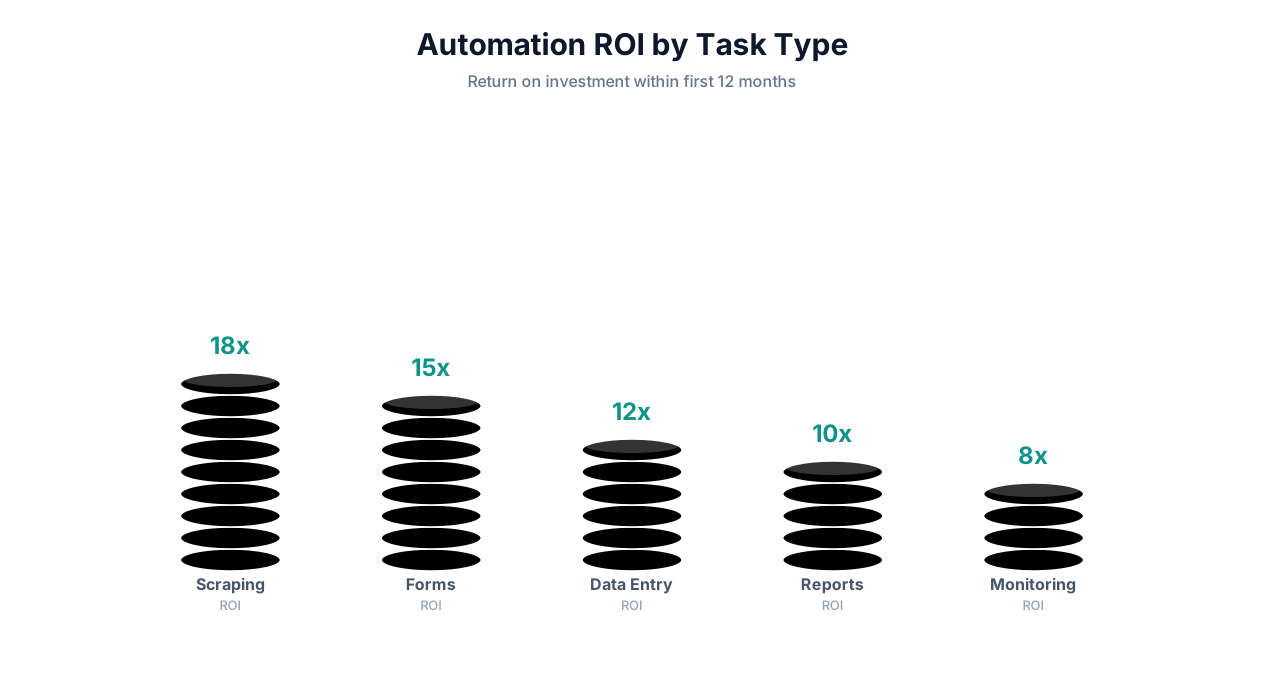
For a team of 5 people, automating 15 hours of repetitive work per person per week at an average $40/hour rate saves $156,000 per year. Against a $299/month platform cost ($3,588/year), that is a 4,247% ROI. Even automating a single task for one person typically pays for the platform in the first week.
Beyond Time: The Unmeasured ROI
The time-savings calculation is the easy part. The harder-to-measure but often larger benefits include:
- Revenue acceleration: Sales reps who spend 15 more hours/week on actual selling close more deals. A 10% improvement in close rate from more selling time on a $500K pipeline = $50K additional revenue.
- Data quality improvement: Eliminating manual data entry reduces errors from 3-5% to under 0.5%. Clean data improves every downstream process — from reporting accuracy to customer experience to compliance readiness.
- Employee satisfaction: Nobody joins a company to copy-paste data. Eliminating drudge work improves job satisfaction, which directly reduces turnover. Replacing a knowledge worker costs 50-200% of their annual salary.
- Speed advantage: Reports that took 2 days to compile now arrive in 10 minutes. Competitive intelligence that was updated monthly now updates daily. The speed advantage compounds into better decisions and faster responses.
- Scalability without headcount: When you automate a process, scaling it from 10x to 100x volume does not require 10x more people. The automation scales linearly; human labor does not.
Building Your ROI Case
To build a compelling internal business case for AI automation:
- Audit for one week: Have each team member track time spent on repetitive tasks for 5 business days. Be specific: which task, how long, which tools/sites involved.
- Calculate direct savings: Sum hours × hourly rates across the team.
- Add indirect savings: Error correction time, opportunity cost, employee satisfaction impact.
- Compare to platform cost: Autonoly plans start at $49/month for individuals, $299/month for teams.
- Present the payback period: For most teams, it is measured in days, not months.
How to Identify Tasks Worth Automating: The FRED Framework
Not every task should be automated. Some tasks are too infrequent, too complex, or too judgment-dependent to benefit from automation. Use the FRED framework to evaluate which tasks are the best automation candidates.
F — Frequency
How often do you perform this task? Daily tasks yield 260x annual ROI (260 working days). Weekly tasks yield 52x. Monthly tasks yield 12x. Tasks performed less than monthly are rarely worth automating unless each instance is very time-consuming (1+ hours).
Threshold: Automate if the task happens at least weekly.
R — Rules-Based
Does the task follow a consistent, describable process? Can you explain it to someone in 5 sentences or fewer? Tasks with clear rules ("go here, extract this, put it there") are ideal for automation. Tasks requiring deep judgment, creative thinking, or nuanced interpersonal skills are not.
Threshold: Automate if you can describe the process in under 5 steps with clear inputs and outputs.
E — Electronic
Does the task involve digital systems? Websites, emails, spreadsheets, PDFs, databases, and SaaS tools are all automatable. Physical tasks (opening mail, filing paper documents) are not — unless they have a digital equivalent (scanning paper to PDF, then processing digitally).
Threshold: Automate if 100% of the task happens on a screen.
D — Dull
Is the task mind-numbingly boring? Tasks that make you dread Monday morning are exactly the tasks that should be automated first. Not because automation is only for boring work — but because boring work has the highest hidden costs (disengagement, errors from inattention, turnover).
Threshold: Automate if team members actively dislike or avoid the task.
⚠️ Important Note
The FRED framework is a prioritization tool, not a hard filter. A task that scores high on Frequency but low on Rules-Based might still be partially automatable — automate the rules-based steps and leave the judgment steps for humans. The goal is not 100% automation of every task; it is eliminating the mechanical parts so humans can focus on the parts that require thinking.
Scoring Your Tasks
| Task | Frequency (1-5) | Rules-Based (1-5) | Electronic (Y/N) | Dull (1-5) | Total Score | Automate? |
|---|---|---|---|---|---|---|
| CRM data entry | 5 (daily) | 5 (clear process) | Y | 5 (hated) | 15 | Immediately |
| Weekly report compilation | 3 (weekly) | 4 (mostly repeatable) | Y | 4 (tedious) | 11 | Yes |
| Client proposal writing | 3 (weekly) | 2 (requires judgment) | Y | 2 (somewhat creative) | 7 | Partially — automate research and data gathering, human writes narrative |
| Strategic planning | 1 (quarterly) | 1 (high judgment) | Y | 1 (engaging) | 3 | No |
Where to Start: Your Automation Roadmap
Rank all identified tasks by FRED score. Start with the highest-scoring task — it will deliver the most value with the least friction. Build confidence and expertise with that first automation before moving to the next.
Most teams find 8-15 tasks scoring 10+ on the FRED scale. Automating just the top 5 typically saves 15-25 hours per week per person.
Setting Up Your First AI Agent: A 10-Minute Walkthrough
Here is a concrete, step-by-step guide to automating your first repetitive task with an AI agent. We will use a common example: automating a weekly competitor price monitoring task.
Scenario
You currently visit 8 competitor pricing pages every Monday, note down their plan names and prices, and update a Google Sheet. It takes 45 minutes. Let's automate it.
Step 1: Open Autonoly's AI Agent Chat (1 minute)
Navigate to Autonoly's AI agent. If you do not have an account, the free tier supports this workflow. You will see a chat interface where you can describe tasks in natural language.
Step 2: Describe the Task (2 minutes)
Type a description like this:
"Every Monday at 7:30 AM, visit these competitor pricing pages:
1. competitor-a.com/pricing
2. competitor-b.com/pricing
[list all 8 URLs]
From each page, extract all plan names and their monthly prices. Put the data in this Google Sheet: [paste Sheet URL]. Use columns: Competitor, Plan Name, Monthly Price, Date Checked. If any price has changed from the previous week, highlight the row in yellow and send me a Slack message in #competitive-intel with a summary of what changed."
The key is being specific about what to extract and where to put it. You do not need to explain how to navigate the sites — the agent figures that out.
Step 3: Review the Generated Workflow (2 minutes)
The agent responds with the workflow it has built:
- Step 1: Navigate to competitor-a.com/pricing
- Step 2: Extract plan names and monthly prices
- Step 3: Repeat for competitors B through H
- Step 4: Compare against previous week's data in Google Sheets
- Step 5: Write new data to Google Sheets, highlight changes
- Step 6: If changes detected, send Slack notification with summary
Review and approve. If you want modifications ("Also extract annual prices" or "Skip competitors that have a paywall"), tell the agent in the chat.
Step 4: Connect Integrations (2 minutes)
The agent prompts you to connect the required integrations:
- Google Sheets: Authorize Autonoly to read/write your spreadsheet
- Slack: Authorize Autonoly to send messages to your workspace
These are one-time authorizations. Once connected, all future workflows can use the same integrations.
Step 5: Run a Test (3 minutes)
Click "Run Now" to execute the workflow immediately. Watch the agent through the live browser view:
- It opens competitor-a.com/pricing in a real browser
- It reads the pricing page, identifies plan cards or pricing tables
- It extracts plan names and prices
- It navigates to the next competitor
- After all 8 competitors, it writes data to your Google Sheet
Check the Google Sheet to verify accuracy. If everything looks right, confirm the Monday 7:30 AM schedule. Your 45-minute weekly task is now fully automated.
What Happens Next
Every Monday at 7:30 AM, the workflow runs automatically. By 8:00 AM, your Google Sheet has updated competitor pricing and your Slack channel has a summary of any changes. You spend zero time on the task — unless a price change requires your attention, in which case the Slack notification tells you exactly what changed and where.
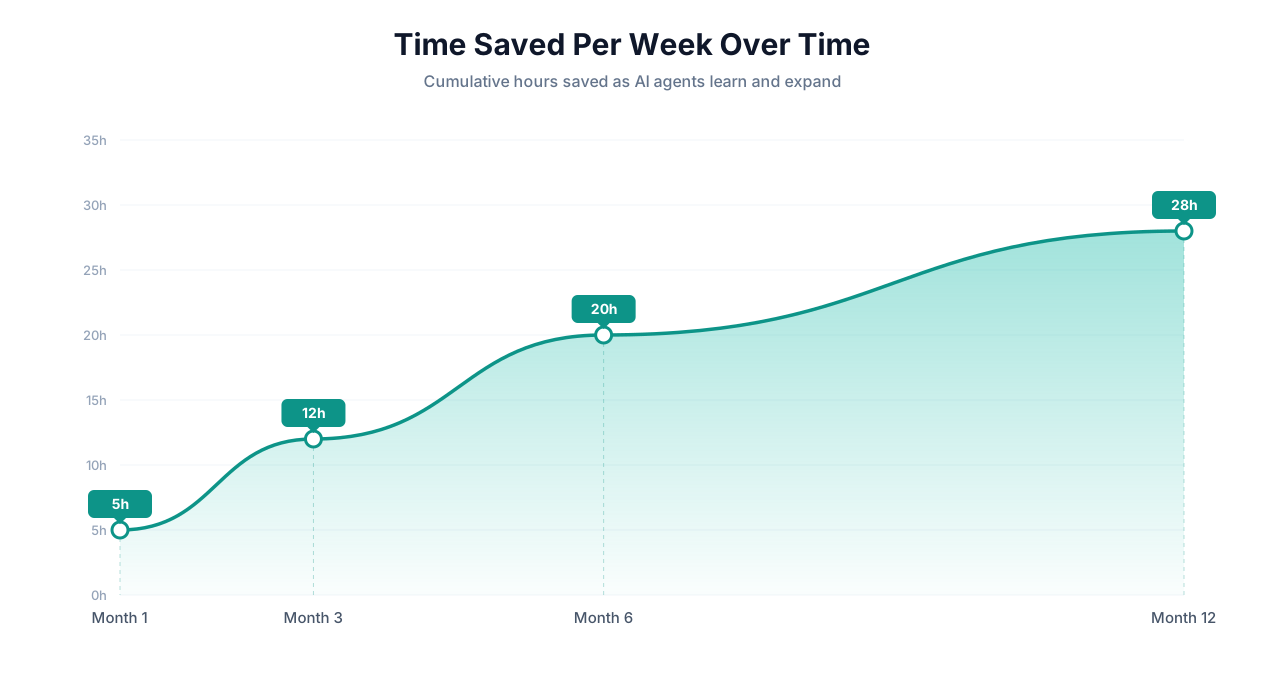
After your first automation is running, pick your next FRED-scored task and repeat the process. Most users have 5+ automations running within their first week.
Before and After: Real Teams That Eliminated Repetitive Work
These case studies document real teams that systematically identified and automated their repetitive tasks using AI agents. Names and specific numbers are representative of actual deployments.
Case Study 1: Sales Team at a B2B SaaS Company (12 Reps)
Before automation:
- Each rep spent 2 hours/day on CRM data entry (logging calls, updating deal stages, adding notes from emails)
- 1 hour/day on lead research (visiting LinkedIn, company websites, Crunchbase for prospect intelligence)
- 30 minutes/day compiling activity reports for weekly pipeline reviews
- Total repetitive work: 3.5 hours/rep/day × 12 reps = 42 hours/day = 210 hours/week
After automation (deployed over 3 weeks):
- Week 1: Automated CRM data entry — agent extracts action items from emails and call transcripts, updates deal records automatically. Time saved: 2 hrs/rep/day.
- Week 2: Automated lead research — agent visits prospect websites and LinkedIn profiles, compiles research briefs for each upcoming call. Time saved: 45 min/rep/day.
- Week 3: Automated pipeline reporting — agent pulls CRM data into formatted weekly reports and sends to Slack every Friday at 4 PM. Time saved: 30 min/rep/day.
Results after 90 days:
| Metric | Before | After | Change |
|---|---|---|---|
| Time on repetitive tasks | 3.5 hrs/rep/day | 0.5 hrs/rep/day | -86% |
| Time on selling activities | 3.5 hrs/rep/day | 6.5 hrs/rep/day | +86% |
| Deals closed per rep/month | 3.2 | 4.7 | +47% |
| CRM data accuracy | 72% | 96% | +24 pts |
| Rep satisfaction (1-10) | 5.8 | 8.4 | +2.6 pts |
📊 By the Numbers
The 47% increase in deals closed per rep generated approximately $2.1M in additional annual revenue for the 12-person team. The entire AI agent platform cost: $299/month ($3,588/year). ROI: 58,427%.
Case Study 2: Finance Team at a Mid-Market Company (4 People)
Before automation:
- AP clerk processed 60 invoices/week manually (12 hrs/week)
- Controller compiled monthly close reports from 6 systems (16 hrs/month)
- Team reconciled vendor statements against internal records (8 hrs/week)
- Compliance officer monitored 15 regulatory sites weekly (5 hrs/week)
- Total repetitive work: 29 hours/week
After automation:
- Invoice processing automated with PDF extraction + accounting system entry. AP clerk reviews exceptions only (2 hrs/week).
- Monthly close reports automated — agent pulls data from all 6 systems and compiles formatted reports (30 min/month review).
- Vendor reconciliation automated — agent compares statements line by line, flags discrepancies (1 hr/week review).
- Regulatory monitoring automated — agent scans 15 sites daily, sends digest of relevant changes (30 min/day review).
Results:
| Metric | Before | After | Change |
|---|---|---|---|
| Weekly hours on repetitive tasks | 29 hrs | 6 hrs | -79% |
| Invoice processing errors | 4.2% | 0.3% | -93% |
| Monthly close time | 8 business days | 3 business days | -63% |
| Regulatory compliance issues | 2-3 per year | 0 | -100% |
Case Study 3: Operations Team at an E-Commerce Brand (3 People)
Before automation:
- Competitor price checks across 15 sites (4 hrs/week)
- Product listing updates across 4 marketplaces (8 hrs/week)
- Inventory level checks across 6 supplier portals (3 hrs/week)
- Review monitoring across Google, Trustpilot, Amazon (2 hrs/week)
- Total: 17 hours/week
After automation:
- All competitor pricing automated with daily updates and change alerts (0 hrs/week ongoing)
- Listing updates automated — agent pushes product data to all 4 marketplaces from a master spreadsheet (1 hr/week review)
- Inventory monitoring automated — agent checks supplier portals daily, alerts when stock drops below thresholds (0 hrs/week)
- Review monitoring automated — agent collects all reviews, flags negative reviews in Slack for response (15 min/day)
Results:
| Metric | Before | After | Change |
|---|---|---|---|
| Weekly hours on repetitive tasks | 17 hrs | 2.5 hrs | -85% |
| Pricing competitiveness | Checked weekly | Checked daily | 7x more frequent |
| Stockout incidents | 3-4 per month | 0-1 per month | -75% |
| Review response time | 3-5 days | Same day | -80% |
Getting Started: Your First Week of Task Automation
Here is a structured plan for your first week of automating repetitive tasks with AI agents. Follow this sequence to build momentum and establish the habit of automation.
Day 1: Audit Your Time
Track every task you perform today. For each task, note:
- What you did (brief description)
- How long it took
- Whether it was repetitive (have you done it before?)
- What tools/websites were involved
By end of day, you will have a list of 15-25 tasks. Highlight the ones that are repetitive and electronic — these are your automation candidates. Score them with the FRED framework from the previous section.
Day 2: Automate Your #1 FRED Task
Take the highest-scoring task from your audit and automate it with Autonoly. Follow the 10-minute setup walkthrough in the previous section. Watch the first execution. Verify the output. If it runs correctly, schedule it.
Goal: One working automation by end of day.
Day 3: Automate Tasks #2 and #3
Now that you understand the pattern (describe → review → test → schedule), automate your next two tasks. These might be slightly more complex — multi-step workflows or cross-platform data synchronization. Refer to extraction templates and sync templates for starting points.
Goal: Three working automations by end of day.
Day 4: Share With Your Team
Show your automations to 2-3 colleagues. Help them identify their top repetitive tasks and set up their first automation. The best way to scale automation is peer-to-peer — when someone sees a colleague save 2 hours with a 5-minute setup, they immediately want to do the same.
Day 5: Measure and Plan
Calculate your first-week results:
- How many hours did your automations save this week?
- What is the projected annual saving at this rate?
- What are the next 5 tasks to automate?
Create a shared document or Slack channel for "automation wins" — a place where team members share what they have automated and how much time it saves. This creates a positive feedback loop that drives ongoing adoption.
💡 Key Insight
Teams that designate an "automation champion" — one person who actively looks for automation opportunities and helps colleagues set them up — achieve 3x higher adoption rates and 4x more total hours saved than teams that leave automation adoption to individual initiative.
Common Pitfalls and How to Avoid Them
| Pitfall | Why It Happens | How to Avoid |
|---|---|---|
| Trying to automate everything at once | Excitement after first success | Focus on 1-2 new automations per week. Quality over quantity. |
| Automating the wrong tasks | Picking impressive-sounding tasks instead of high-FRED tasks | Always use the FRED framework. Automate the boring, frequent tasks first. |
| Not verifying output | Trust after first few successes | Verify the first 5-10 runs of every new automation. Trust but verify. |
| Single point of failure | Only one person knows how the automations work | Document automations, share access, train 2-3 team members. |
| Forgetting to measure ROI | Automation becomes invisible once it works | Track hours saved per automation monthly. Celebrate wins. |
The organizations that successfully eliminate repetitive work do not treat automation as a one-time project. They treat it as an ongoing practice — a habit of continuously identifying mechanical work and converting it into automated workflows. AI agents make this practice accessible to everyone, not just technical teams.
Get started with Autonoly and automate your first repetitive task in under 5 minutes. No code, no APIs, no developer required.
Frequently Asked Questions
Common questions about automating repetitive tasks with AI.
What types of repetitive tasks can AI agents automate?
AI agents can automate any repetitive digital task that involves websites, emails, documents, spreadsheets, or online tools. Common examples include data entry between systems, report generation, email follow-ups, invoice processing, social media monitoring, lead research, form filling, price tracking, content curation, and compliance checks. If the task follows a consistent pattern and happens on a screen, it can likely be automated.
How long does it take to set up a task automation?
Most single-task automations take 2-5 minutes to set up with an AI agent. You describe the task in plain English, review the generated workflow, run a test, and schedule. Complex multi-step workflows involving multiple data sources may take 10-15 minutes. Compare this to hours or days for traditional automation tools.
Will AI agents replace my job?
AI agents replace repetitive tasks, not jobs. The goal is to free you from the 40% of your day spent on mechanical work so you can focus on the strategic, creative, and interpersonal work that requires human intelligence. Teams that adopt AI agents typically see their roles evolve toward higher-value activities — not elimination.
What if the AI agent makes a mistake?
AI agents are highly accurate (90-98% on routine tasks) but not infallible. Best practice is to verify the first 5-10 runs of any new automation and configure error notifications so you are alerted to any issues. For high-stakes tasks (financial transactions, client-facing communications), configure a human-in-the-loop review step before final actions are taken.
How much money can I save by automating repetitive tasks?
For a single knowledge worker, automating 15 hours/week of repetitive work at a $40/hour loaded rate saves approximately $31,200/year. For a team of 10, that scales to $312,000/year. Platform costs range from $49-299/month, making the ROI typically 1,000-5,000% in the first year.