Why Automated Competitor Intelligence Matters
Every business operates in a competitive landscape, and the companies that understand that landscape best consistently outperform those that do not. Competitor intelligence — knowing what your competitors charge, what they sell, how they position themselves, and where they are heading — is not a luxury for enterprise teams with dedicated analyst departments. It is a fundamental business input that companies of every size need.
The Problem with Manual Monitoring
Most businesses monitor competitors manually. Someone on the team periodically visits competitor websites, notes prices, screenshots product pages, and updates a spreadsheet. This approach has critical flaws:
- Inconsistency: Manual checks happen when someone remembers to do them. Competitors change prices on Tuesday, but your team does not check until Friday — by then, you have missed three days of opportunity or exposure.
- Incomplete coverage: A human can reasonably track 5-10 competitor products. If your competitive landscape includes hundreds or thousands of SKUs across multiple competitors, manual monitoring covers a fraction of what matters.
- No historical data: Manual spot-checks produce snapshots, not time series. Without historical data, you cannot identify pricing trends, seasonal patterns, or strategic shifts in competitor behavior.
- Resource drain: Every hour spent manually checking competitor websites is an hour not spent on analysis, strategy, or execution. The data collection should be automated so human effort goes to interpretation and action.
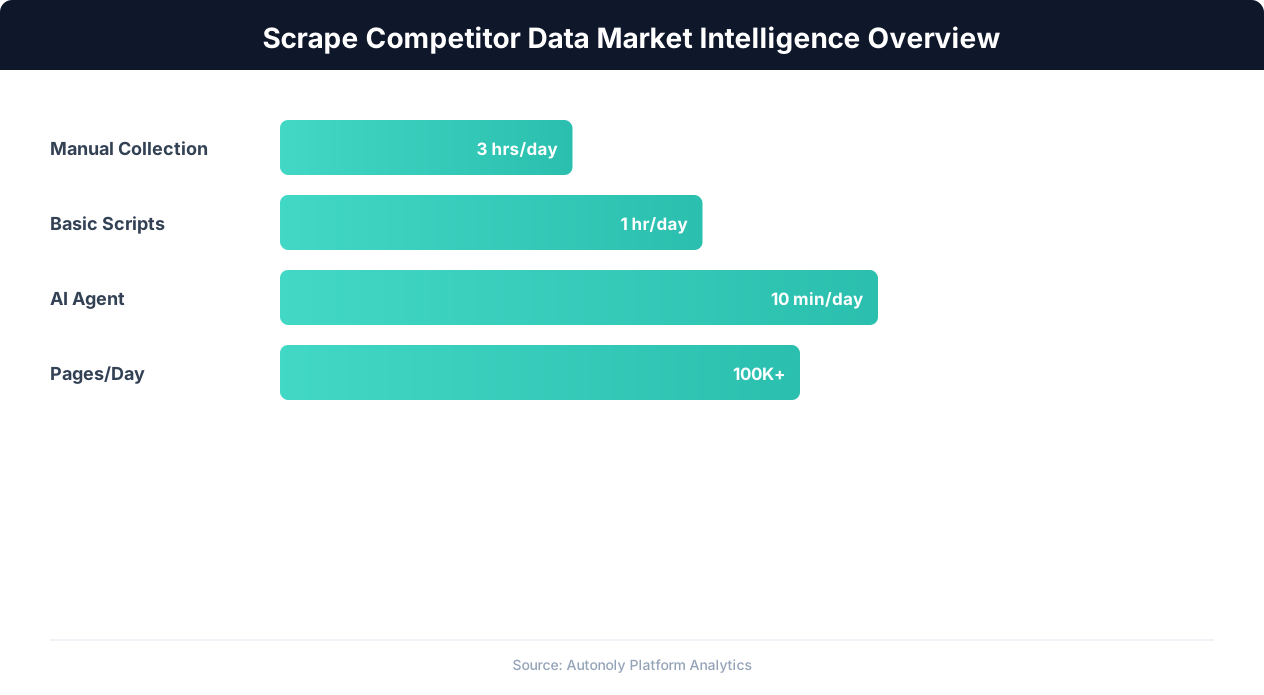
What Automated Competitor Intelligence Delivers
Automated scraping transforms competitor monitoring from a sporadic manual task into a continuous intelligence system:
- Price change detection within hours: Scheduled scrapes catch price changes the same day they happen, not days or weeks later.
- Complete product catalog tracking: Monitor hundreds or thousands of competitor products without scaling your analyst team.
- Historical trend data: Daily scrapes build a time series that reveals pricing strategies, seasonal patterns, and long-term strategic direction.
- Proactive alerts: Receive Slack or email notifications when specific conditions are met — a competitor drops prices below a threshold, launches a new product, or posts new job openings in a strategic area.
This guide shows you how to build this system using Autonoly's browser automation, scheduled execution, and integrations.
What Competitor Data to Scrape and Where to Find It
Competitor websites reveal far more than most businesses realize. The data you can extract spans pricing, product strategy, hiring direction, marketing positioning, and technology choices. Knowing where to look — and what to extract from each source — determines the intelligence value of your scraping operation.
Pricing Pages and Product Catalogs
The most immediately actionable competitor data is pricing. SaaS companies publish pricing tiers on their pricing pages. E-commerce competitors list product prices in their catalogs. Service businesses often publish rate cards or quote calculators. Key data points to extract from pricing pages:
- Price per plan/tier: The listed price for each pricing tier, including monthly and annual rates.
- Feature lists per tier: Which features are included in each tier. Changes to feature packaging reveal strategic shifts.
- Enterprise/custom pricing indicators: "Contact Sales" buttons or custom pricing language indicates changes in go-to-market strategy.
- Promotional pricing: Discounts, trial periods, and limited-time offers.
- Currency and regional pricing: Competitors may offer different prices in different markets.
Product and Feature Pages
Competitor product pages reveal their feature roadmap more clearly than any press release. Scrape product pages to track:
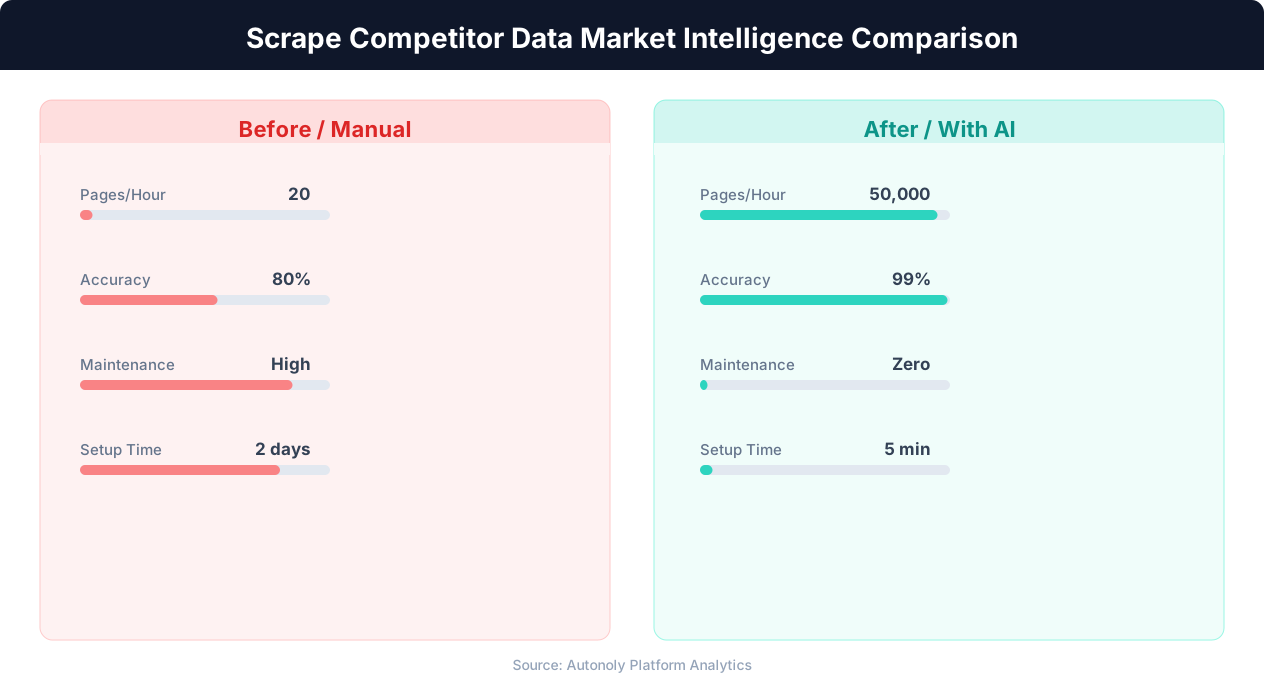
- Feature additions and removals: New features appearing on the product page signal strategic priorities. Features being quietly removed may indicate pivots.
- Product descriptions and positioning: How competitors describe their products reveals their target audience, value propositions, and differentiation strategy. Track changes in messaging over time.
- Integration listings: Which integrations a competitor supports reveals their partnership strategy and target market segments.
- Customer logos and case studies: New logos and case studies indicate customer wins and target industries.
Job Postings
Competitor job postings are one of the most underutilized intelligence sources. They reveal where a company is investing before the investment becomes visible in the product:
- Engineering roles: Job postings for AI/ML engineers, blockchain developers, or mobile engineers reveal future product direction months before launches.
- Sales roles by region: New sales roles in specific geographies indicate market expansion plans.
- Leadership hires: VP and C-level postings signal strategic shifts (a new VP of Enterprise Sales means an enterprise push).
- Team size indicators: The volume and seniority of postings reveals how aggressively a competitor is scaling.
Blog and Content Marketing
Competitor blogs reveal their content strategy, target keywords, and product messaging. Track publishing frequency, topic themes, and the keywords they are targeting. If a competitor suddenly publishes five articles about a specific topic, they are likely planning a product launch or market push in that area.
Review Sites and Social Proof
Third-party review sites (G2, Capterra, Trustpilot) contain competitor ratings, review counts, and sentiment data. Scraping these over time reveals whether competitor sentiment is improving or declining — a leading indicator of market position changes that precedes revenue impact by months.
Building a Competitor Monitoring Workflow with Autonoly
Here is how to build a comprehensive competitor monitoring system step by step using Autonoly's AI agent.
Step 1: Define Your Competitor List and Data Points
Start by listing the competitors you want to monitor and the specific data points you need from each. Create a Google Sheet with columns for: Competitor Name, Website URL, Page Type (pricing, product, jobs, blog), Specific URL, and Data Points to Extract. This sheet becomes your scraping manifest — the agent uses it as its instruction set.
Step 2: Build the First Scraping Workflow
Open Autonoly and start an AI agent session. Describe your monitoring goal:
"Go to competitor-website.com/pricing and extract all pricing tier names, prices (monthly and annual), and the feature list for each tier. Save the results with today's date."
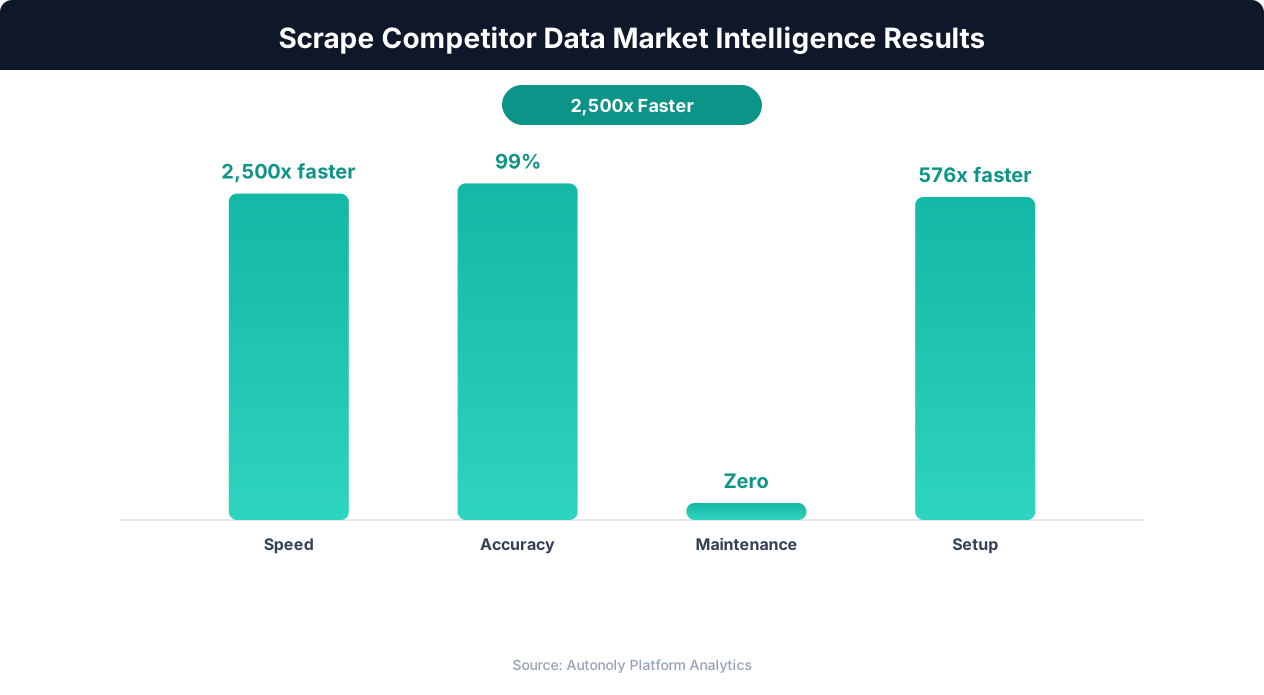
The agent opens a real browser via browser automation, navigates to the pricing page, and extracts the requested data. You can watch this happen in real time through the live browser control panel. The agent handles dynamic pricing pages that load with JavaScript, expandable feature lists that require clicking to reveal, comparison toggles (monthly/annual), and regional pricing selectors.
Step 3: Handle Multiple Competitors
Extend the workflow to cover all competitors in your list. The agent can iterate through your competitor spreadsheet, visiting each pricing page in sequence and extracting the same data points. For competitors with different page structures, the agent adapts its extraction strategy automatically — this is the advantage of AI-powered scraping over rigid scripts that break when page layouts differ.
Step 4: Configure Google Sheets Export
Tell the agent to write all extracted data to a Google Sheet with a consistent structure. Each row represents one data point capture: Competitor, Plan Name, Monthly Price, Annual Price, Features, and Scrape Date. Append each scrape's results rather than overwriting, building a historical dataset that enables trend analysis. Autonoly's Google Sheets integration handles the writing natively.
Step 5: Set Up Change Detection
The most valuable insight is not the current price — it is when a price changes. Build a change detection layer by having the workflow compare the latest scrape against the previous scrape. When a price changes, when a new feature appears, or when a new job posting is published, the workflow flags the change. This comparison can be done in Autonoly's terminal using a short Python script with pandas that diffs the current and previous datasets.
Step 6: Configure Alerts
Connect change detection to alerts. When the workflow detects a meaningful change, it sends a notification via Slack, Discord, or Gmail with the details: which competitor, what changed, the old value, and the new value. "Competitor X dropped their Pro plan from $99/mo to $79/mo" is an actionable alert that your pricing team can respond to immediately.
Scheduling Recurring Competitor Scrapes
One-time competitor research is useful, but the real competitive advantage comes from continuous monitoring. Autonoly's scheduled execution turns your competitor scraping workflow into an always-on intelligence system.
Choosing the Right Scraping Frequency
The optimal scraping frequency depends on the type of data and how quickly it changes:
- Pricing data: Daily scrapes for e-commerce and SaaS pricing. Prices can change at any time, and a 24-hour detection window is fast enough for most competitive responses.
- Product pages and features: Weekly scrapes. Product pages change less frequently than prices, and weekly checks catch updates without unnecessary load on competitor sites.
- Job postings: Weekly scrapes. New job postings typically stay up for weeks, and weekly monitoring catches new listings promptly.
- Blog content: Weekly or bi-weekly scrapes. Competitor publishing cadences are usually weekly at most.
- Review sites: Weekly scrapes. Review counts and ratings change gradually, and weekly snapshots provide sufficient granularity for trend analysis.
Setting Up the Schedule
In Autonoly's workflow builder, click Schedule on your completed competitor monitoring workflow. Configure the cron expression for your desired frequency — daily at 6 AM for pricing, weekly on Monday mornings for product pages and jobs. Set the timezone to match your business operations. Each scheduled run executes the full workflow automatically: navigate to competitor sites, extract data, write to Google Sheets, run change detection, and send alerts if changes are detected.
Managing Multiple Schedules
For comprehensive competitor monitoring, you will likely have multiple scheduled workflows — one for pricing (daily), one for product pages (weekly), one for job postings (weekly), and potentially one for review sites (weekly). Autonoly's dashboard shows all active schedules, their last run status, and upcoming execution times. If a scheduled run fails (due to a site change or temporary access issue), the system retries automatically and alerts you if the retry also fails.
Data Accumulation and Trend Analysis
After a few weeks of daily pricing scrapes, you have enough historical data to identify meaningful trends. Use Autonoly's terminal to run trend analysis on your accumulated data:
- Price trend lines: Plot competitor prices over time to identify gradual price increases, seasonal discounting patterns, or strategic price reductions.
- Feature expansion rate: Count the number of features on each competitor's product page over time to gauge development velocity.
- Hiring velocity: Track the number of open job postings per competitor over time. Accelerating hiring signals aggressive growth; declining postings may indicate financial pressure.
This historical perspective transforms raw scraping data into strategic intelligence that informs your own pricing, product, and go-to-market decisions.
Building Slack Alerts and Competitive Dashboards
Raw data in a spreadsheet is useful for analysts, but the rest of your organization needs intelligence delivered in actionable formats — real-time alerts for urgent changes and dashboards for strategic context.
Slack Alert Configuration
Autonoly's Slack integration lets you send formatted messages to any channel when your competitor monitoring workflow detects changes. Effective alert design follows a few principles:
- Separate channels by urgency. Create a #competitor-pricing-alerts channel for price changes (high urgency, notify immediately) and a #competitor-intel-weekly for less time-sensitive updates like blog posts and job changes.
- Include context in the alert. A good alert message includes: the competitor name, what changed, the old value, the new value, and a link to the source page. "CompetitorX: Pro plan price dropped from $99/mo to $79/mo — link to pricing page" is actionable. "Price change detected" is not.
- Set thresholds to reduce noise. Not every minor change warrants an alert. Configure thresholds — only alert on price changes greater than 5%, or only on new job postings at the director level and above. This prevents alert fatigue while ensuring important changes are not missed.
Discord Alerts for Smaller Teams
For teams that use Discord instead of Slack, Autonoly's Discord integration provides the same alerting capability. Configure a dedicated competitor intelligence channel in your Discord server and route alerts there. The message formatting and threshold logic works identically.
💡 Key Insight
Companies with automated competitive intelligence programs make strategic decisions 5x faster than those relying on manual research.
Email Digest Reports
For stakeholders who prefer email, build a weekly digest that summarizes all competitor changes detected during the week. Use Autonoly's Gmail integration to send a formatted email every Monday morning with: price changes across all competitors, new products or features detected, new job postings by department, and notable review count or rating changes. This digest turns your continuous monitoring into a weekly briefing that leadership can review in 5 minutes.
Building a Google Sheets Dashboard
Google Sheets can serve as a lightweight competitive dashboard with some formatting:
- Summary tab: A table showing each competitor, their current pricing for key tiers, the date of their last price change, and a directional indicator (price up, down, or unchanged). Use conditional formatting to highlight recent changes in red or green.
- Price history tab: Sparkline charts showing price trends for each competitor over the last 90 days. Google Sheets' SPARKLINE function creates inline charts directly in cells.
- Feature comparison tab: A matrix comparing features across competitors, updated weekly. This becomes your competitive feature matrix that product and sales teams reference constantly.
- Hiring tab: A summary of current open positions by competitor and department, with week-over-week changes highlighted.
This dashboard, populated automatically by your scheduled scraping workflows, provides the entire organization with always-current competitive intelligence at a glance.
Advanced Competitive Intelligence Techniques
Beyond basic price and feature monitoring, several advanced techniques extract deeper strategic intelligence from publicly available data.
Technology Stack Detection
Competitor websites reveal their technology choices through HTTP headers, JavaScript libraries, meta tags, and third-party service integrations. Scraping these signals reveals which analytics tools competitors use (indicating their data sophistication), which marketing automation platforms they run (indicating their go-to-market approach), which payment processors they integrate (indicating their monetization strategy), and which CDNs and hosting providers they use (indicating their infrastructure scale). Technology changes often precede strategic shifts — a competitor migrating from basic analytics to an enterprise data platform is likely planning a data-driven strategy overhaul.
Content Gap Analysis
Scrape competitor blogs and documentation sites, then analyze the content for topic coverage gaps. Compare the topics your competitors cover against your own content library to identify: topics competitors cover that you do not (potential content opportunities), topics you cover that competitors do not (your differentiation areas), and keyword gaps where competitors rank and you do not (SEO opportunities). This analysis is straightforward with Autonoly's terminal — load scraped content into pandas, extract keywords using TF-IDF, and compute coverage matrices.
💡 Key Insight
Organizations using systematic competitor monitoring identify market opportunities 60% earlier than their competitors.
Pricing Pattern Recognition
With several months of daily pricing data, you can identify competitor pricing patterns that inform your own strategy. Common patterns include:
- End-of-quarter discounting: Many SaaS companies offer discounts in the last 2-3 weeks of each quarter to hit revenue targets. If your competitor consistently discounts at quarter-end, you can time your own promotions to avoid competing on price during those periods.
- Seasonal pricing: E-commerce competitors often follow predictable seasonal patterns — lower prices during slow seasons to maintain volume, higher prices during peak demand.
- Price anchoring changes: When a competitor raises their enterprise tier price while keeping their mid-tier stable, they are using the enterprise tier as a price anchor to make the mid-tier seem more attractive. This signals a strategic shift in target customer segment.
Job Posting Sentiment Analysis
Competitor job postings contain language that reveals company culture, strategic priorities, and growth stage. Scraping and analyzing the language in job descriptions over time reveals shifts in positioning — a competitor that starts emphasizing "enterprise" and "compliance" in their engineering postings is likely pivoting upmarket. A competitor adding "AI" and "machine learning" to every job description is signaling a technology strategy shift (or following a hype cycle).
Combining Intelligence Sources
The most powerful competitive intelligence comes from combining multiple data sources. A competitor that simultaneously raises prices, adds enterprise features, hires enterprise sales reps, and publishes case studies about large customers is executing a clear upmarket strategy. Any one of those signals alone is ambiguous — together, they form a clear strategic picture. Autonoly's ability to chain multiple workflows together makes it straightforward to build multi-source intelligence systems that detect these compound signals automatically.
Ethical Guidelines and Legal Boundaries
Competitor intelligence through web scraping is a legitimate business practice, but it must be conducted within ethical and legal boundaries. Crossing those boundaries exposes your company to legal risk, reputational damage, and potential regulatory action.
What Is Acceptable
- Scraping publicly available pages: Any page that is accessible without logging in — pricing pages, product pages, blog posts, job listings — is fair game for monitoring. This data is published specifically for public consumption.
- Monitoring at reasonable frequency: Daily or weekly scrapes of competitor pages with appropriate delays between requests do not impose meaningful load on competitor servers.
- Using data for internal decision-making: Analyzing competitor pricing to inform your own pricing strategy is standard competitive practice. Using scraped job posting data to understand competitor strategy is legitimate market research.
- Factual data extraction: Extracting facts (prices, feature lists, job titles) carries minimal legal risk. Facts are not copyrightable.
What to Avoid
- Scraping behind authentication: Creating fake accounts on competitor platforms to access non-public data (internal dashboards, customer-only content, partner portals) is unauthorized access and potentially illegal under the CFAA.
- Copying and republishing content: Scraping competitor blog posts or product descriptions and publishing them on your site is copyright infringement, not competitive intelligence.
- Impersonating competitors: Using scraped branding, product descriptions, or customer testimonials to create misleading marketing materials crosses legal and ethical lines.
- Aggressive scraping that impacts performance: Sending hundreds of requests per minute to a competitor's website could constitute a denial-of-service attack. Always use reasonable rate limits.
- Scraping personal data of competitor employees: Collecting personal information (personal email addresses, home addresses, phone numbers) of competitor employees goes beyond competitive intelligence into privacy violation territory.
Maintaining Ethical Standards
The best test for ethical competitor intelligence is the newspaper test: would you be comfortable if your competitor intelligence practices were described in a news article? If the answer is yes — "Company X monitors competitor pricing daily using automated tools" — you are in safe territory. If the answer is no — "Company X created fake accounts to access competitor's internal data" — you have crossed a line.
For a deeper discussion of scraping legality, see our guide on whether web scraping is legal and our web scraping best practices guide. Responsible scraping practices protect your company while delivering the competitive intelligence you need to make informed decisions.