Why No-Code Is Eating Software: The $187 Billion Shift
In 2019, the no-code market was a niche worth $4.3 billion. By 2026, Gartner estimates it will exceed $187 billion — a 43x increase in seven years. This is not a bubble. It is a fundamental restructuring of how software gets built and who builds it.
The driver is simple math. There are approximately 28 million software developers worldwide. There are over 3 billion knowledge workers. That means for every developer, there are 107 people who need software but cannot build it. No-code closes this gap by giving non-developers the power to build automations, workflows, and applications without writing a single line of code.
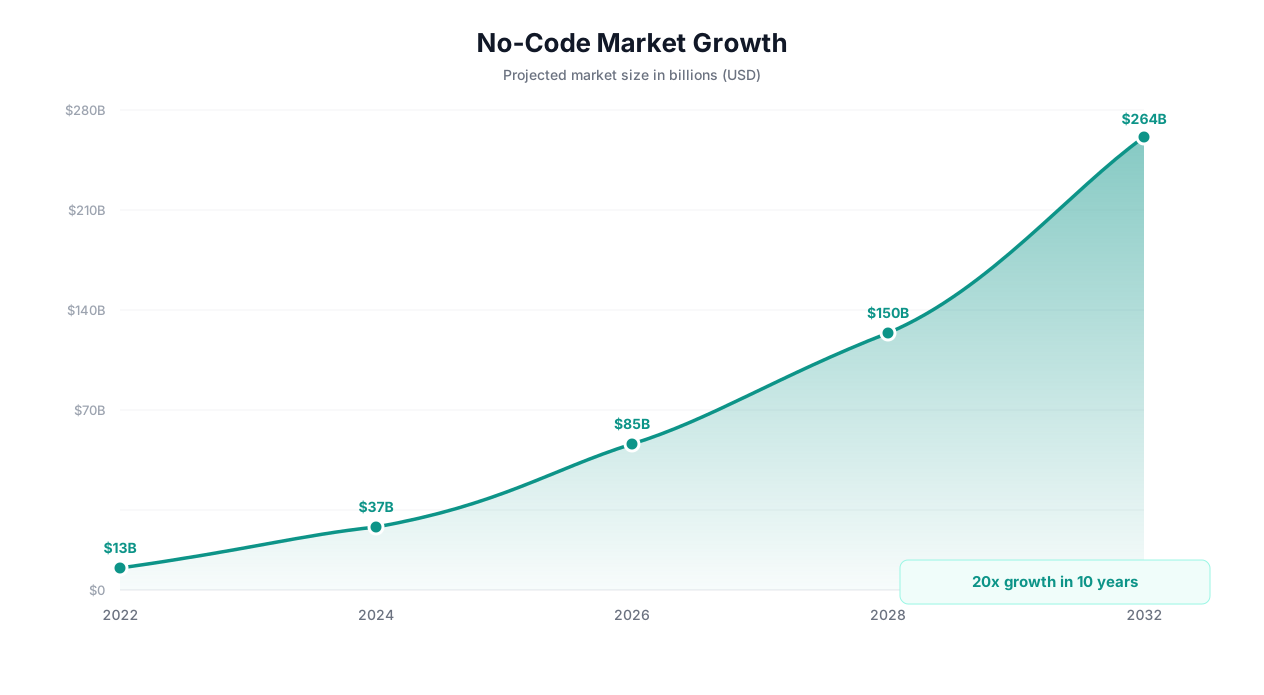
But the no-code revolution is not just about market size. It is about who controls automation. In the old model, business teams submitted requests to IT, waited weeks or months for implementation, and often received something that did not quite match what they needed. In the new model, the person who understands the problem builds the solution — in minutes, not months.
💡 Key Insight
Forrester reports that 75% of all application development will use no-code or low-code platforms by 2027, up from 25% in 2022. The shift is not coming — it has already happened in forward-thinking organizations.
Consider what happened in spreadsheets. Before Excel, creating a financial model required a programmer. Spreadsheets democratized financial modeling. No-code platforms are doing the same thing for automation. The complete no-code automation guide covers the fundamentals, but in 2026 the landscape has changed dramatically — AI has entered the equation.
Three forces are converging to make 2026 the tipping point for no-code automation:
| Force | What Changed | Impact on No-Code |
|---|---|---|
| AI maturity | LLMs can understand natural language task descriptions and build workflows autonomously | Eliminates even the visual builder — describe and deploy |
| Browser automation | AI agents can interact with any website, not just those with APIs | Removes the integration bottleneck that limited traditional no-code |
| Cost reduction | AI inference costs dropped 90% from 2023 to 2026 | Makes AI-powered automation affordable for individuals and small teams |
| Enterprise trust | No-code platforms now handle compliance, audit trails, and enterprise security | Removes the last barrier to adoption in regulated industries |
The result: no-code is no longer just for simple automations. In 2026, teams are building complex, multi-step workflows that span dozens of applications — all without writing code. And with AI-powered platforms like Autonoly, they are not even building workflows manually. They are describing what they need and letting AI handle the rest.
What Makes a True No-Code Platform (Not Just Low-Code in Disguise)
The term "no-code" gets thrown around loosely. Many platforms market themselves as no-code but require scripting for anything beyond basic use cases. A true no-code automation platform meets six non-negotiable criteria.
1. Zero Code Required for Any Use Case
This sounds obvious, but most "no-code" platforms eventually force you into code. Zapier requires JavaScript for custom transformations. Make uses filters with pseudo-code syntax. n8n's advanced features require JavaScript or Python. A true no-code platform handles conditional logic, data transformation, error handling, and complex routing without ever exposing code.
2. Natural Language Configuration
In 2026, the standard for no-code has shifted. Visual drag-and-drop builders were the no-code standard in 2020. But drag-and-drop is still a skill — you need to understand workflow logic, triggers, conditions, and data mapping. True no-code in 2026 means natural language configuration: you describe what you want in English, and the platform builds it.
3. Works With Any Application
Most no-code platforms only work with applications that have pre-built connectors. If your tool is not in their integration catalog, you are stuck. A true no-code platform works with any website or application — with or without an API — using browser automation to interact with the UI directly.
📊 By the Numbers
Zapier supports approximately 7,000 app integrations. The average mid-size business uses 130+ SaaS tools. That means roughly 30-40% of your tools likely lack a Zapier connector. AI-powered no-code platforms that use browser automation close this gap to 0%.
4. Self-Healing When Things Change
Websites change. APIs update. Forms get redesigned. A brittle automation that breaks every time a source changes is not truly no-code — it requires ongoing technical maintenance. True no-code platforms use AI to detect and adapt to changes automatically, using cross-session learning to improve reliability over time.
5. Human-Readable Workflows
Even when AI builds the workflow, you need to understand what it does. True no-code platforms present workflows in plain language that anyone can read, review, and modify. Not flowcharts full of technical jargon — simple, readable descriptions of each step.
6. Enterprise-Grade Security Without Configuration
Security should not require a DevOps team to configure. True no-code platforms include encryption at rest and in transit, role-based access control, audit logs, and compliance features out of the box — without any technical setup.
| Criteria | Traditional No-Code (2020) | AI-Powered No-Code (2026) |
|---|---|---|
| Interface | Drag-and-drop visual builder | Natural language + visual builder |
| Skill needed | Workflow logic understanding | Ability to describe what you want |
| Integration coverage | Limited to pre-built connectors | Any website or app (with or without API) |
| Maintenance | Manual fixes when things break | Self-healing with AI adaptation |
| Setup time per workflow | 15-60 minutes | 2-5 minutes |
| Who can use it | Tech-savvy business users | Anyone who can write a sentence |
The gap between 2020-era no-code and 2026 AI-powered no-code is as significant as the original gap between code and no-code. If you are still using a drag-and-drop builder, you are using last generation's tools.
No-Code vs Low-Code vs Full Code: Which Approach Fits Your Team?
Before choosing a platform, you need to understand where no-code fits in the broader automation spectrum. Each approach has legitimate use cases, and many organizations use all three depending on the task.
Full Code (Python, JavaScript, Custom Scripts)
Full code gives you maximum control and flexibility. You can build anything — but it requires software developers, takes weeks to months to implement, and demands ongoing maintenance. Full code automation makes sense for high-volume, mission-critical processes where you need absolute control over every detail.
Best for: Companies with dedicated engineering teams, custom infrastructure, and complex logic that cannot be expressed in visual workflows.
Low-Code (Retool, Appsmith, OutSystems)
Low-code platforms provide visual builders for 80% of the work but expect you to write code for the remaining 20% — custom transformations, advanced logic, complex integrations. They are faster than full code but still require developers or technically skilled users.
Best for: Internal tools, admin dashboards, and applications that need custom logic but do not justify full custom development.
No-Code (Zapier, Make, Autonoly)
No-code platforms handle 100% of the workflow without any code. The range of what "no-code" means varies dramatically between platforms — from simple trigger-action automations (Zapier) to AI-powered automation of any digital task (Autonoly).
Best for: Business teams automating their own workflows, rapid prototyping, and any task where speed of implementation matters more than micro-optimization.
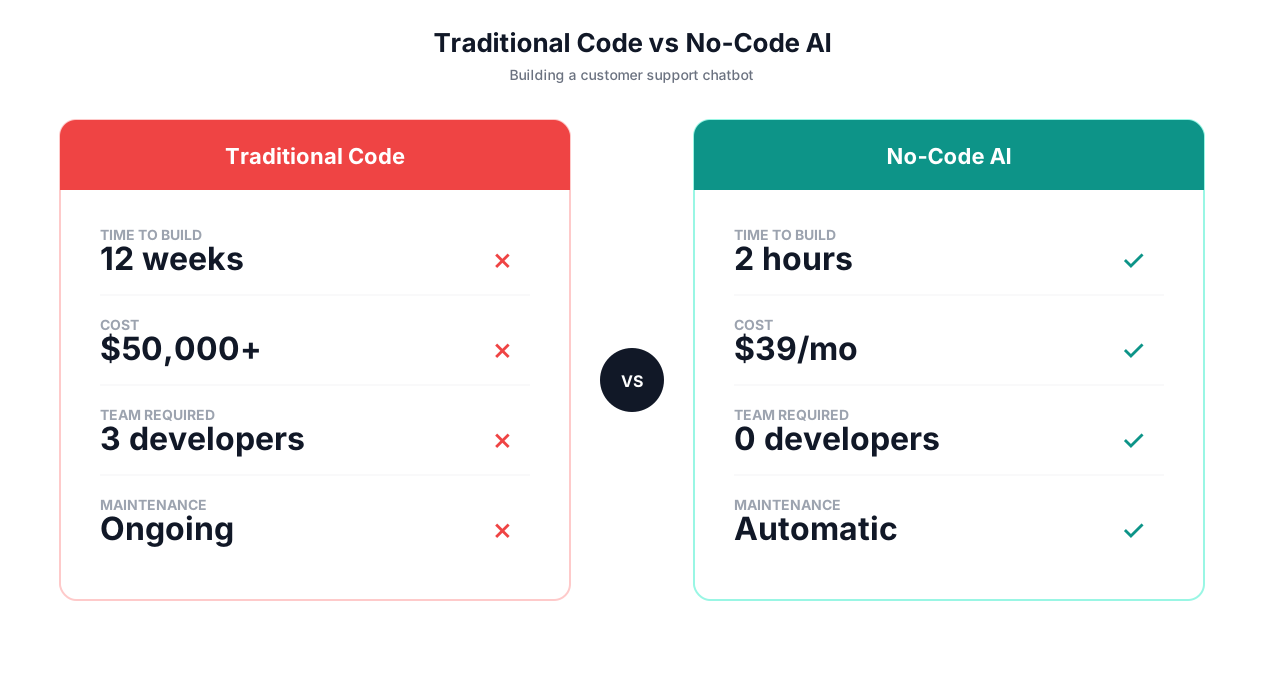
| Factor | Full Code | Low-Code | No-Code (Traditional) | No-Code (AI-Powered) |
|---|---|---|---|---|
| Setup time | Weeks to months | Days to weeks | 15-60 minutes | 2-5 minutes |
| Technical skill | Software developer | Developer or power user | Workflow logic skills | None (plain English) |
| Flexibility | Unlimited | High | Medium (within connectors) | High (any website/app) |
| Maintenance cost | High (code updates) | Medium | Low-Medium | Very low (self-healing) |
| Cost per workflow | $5,000-50,000+ | $500-5,000 | $20-200/mo | $49-299/mo |
| Scalability | Excellent | Good | Good | Excellent |
| Error handling | Custom (as good as your code) | Semi-custom | Basic retry/skip | AI-powered adaptation |
| Integration coverage | Anything (with dev work) | Good (API + custom) | Limited (connector catalog) | Any website or app |
⚠️ Important Note
The right choice depends on your team composition, not just the task. A team with zero developers should not attempt full-code automation. A team with dedicated engineers should not use no-code for mission-critical financial processing. Match the approach to both the task and the team.
The Decision Framework
Use this decision tree to choose your approach:
- Do you have developers available? If no, skip to no-code.
- Is this a one-off or repeating task? One-off tasks rarely justify full code development. Use no-code.
- Does the task require custom algorithms or ML models? If yes, consider low-code or full code.
- Is speed of implementation critical? If you need it running today, no-code is the only realistic option.
- Does the task involve websites without APIs? If yes, you need AI-powered no-code with browser automation.
In practice, most teams end up using a hybrid approach. Core infrastructure runs on full code. Internal tools use low-code. Business process automation — the vast majority of workflows by volume — runs on no-code platforms.
5 Things You Can Build Without Code in 2026 (That Required Developers Before)
The capabilities of no-code platforms have expanded dramatically. Here are five categories of automation that previously required development teams but can now be built by anyone — in minutes.
1. Cross-Platform Data Pipelines
Previously, syncing data between multiple SaaS tools required custom ETL scripts, middleware servers, and database management. Now, you describe the data flow in English: "Pull new leads from our website form, enrich them with LinkedIn data, add them to HubSpot with the enriched fields, and notify the sales team in Slack."
The AI agent handles the entire pipeline — including the web scraping of LinkedIn profiles, which has no API equivalent. Traditional no-code tools cannot do this because LinkedIn scraping requires browser automation.
| Pipeline Component | Old Approach (Code) | New Approach (No-Code AI) |
|---|---|---|
| Data source connection | API wrapper libraries, OAuth setup | "Connect to our HubSpot account" |
| Data transformation | Python pandas scripts | "Combine first and last name into full name" |
| Error handling | try/catch blocks, logging, alerts | Built-in with AI retry and adaptation |
| Scheduling | Cron jobs, AWS Lambda | "Run every morning at 8 AM" |
| Monitoring | Custom dashboards, PagerDuty | Built-in execution logs and alerts |
2. Competitive Intelligence Dashboards
Building a competitive intelligence system used to require web scraping scripts, a database, a reporting frontend, and ongoing maintenance when competitor websites changed. Now: "Monitor these 15 competitor pricing pages daily. Track plan names, prices, and feature lists. Update this Google Sheet and send me a Slack alert when any price changes more than 5%."
The agent uses competitor monitoring templates and adapts automatically when competitors redesign their pricing pages.
3. Document Processing Workflows
Extracting data from PDFs, invoices, and contracts used to require OCR libraries, template matching, and extensive QA. Now: "When a new invoice arrives in our AP inbox, extract the vendor name, invoice number, line items, and total. Validate against our PO system. If it matches, add to QuickBooks. If it does not, flag for review."
The AI agent handles PDF extraction across different invoice formats without needing format-specific templates. It understands the semantic structure of invoices — where to find totals, how to parse line items — using AI reasoning rather than hard-coded rules.
💡 Key Insight
AI-powered document processing achieves 95-99% extraction accuracy across varied formats — compared to 70-85% for traditional template-based OCR. The difference: AI understands what an invoice looks like conceptually, not just where specific pixels are located.
4. Multi-Channel Marketing Automation
Coordinating marketing campaigns across email, social media, ads, and website content used to require marketing engineers or expensive platforms like Marketo. Now: "Every time we publish a new blog post, create a Twitter thread summarizing the key points, schedule a LinkedIn post with the article link, add it to our email newsletter draft, and update the content section of our website."
The agent handles content distribution across platforms — including those without APIs — using browser automation to post directly to social media platforms.
5. Customer Onboarding Workflows
Building automated customer onboarding sequences used to require engineering teams to integrate CRM, email, billing, and product systems. Now: "When a new customer signs up in Stripe, create their account in our portal, send a welcome email sequence, schedule a kickoff call in Calendly, create a project in Asana, and add them to our customer success Slack channel."
This workflow spans 5+ tools, some with APIs and some without. The AI agent handles both API integrations and browser-based interactions seamlessly, creating a unified onboarding experience that previously required weeks of custom development.
📊 By the Numbers
The average custom-built onboarding workflow costs $15,000-50,000 in development time and takes 4-8 weeks to implement. The same workflow built with an AI-powered no-code platform costs $99-299/month and deploys in under an hour.
How Autonoly's AI Eliminates the Builder Entirely
Traditional no-code platforms simplified automation by replacing code with visual drag-and-drop builders. Autonoly takes the next step: replacing the builder with AI. Instead of manually connecting triggers, actions, and conditions in a flowchart, you have a conversation with an AI agent that builds the workflow for you.
The Evolution of Automation Interfaces
Understanding where AI-powered no-code fits requires seeing the full evolution:
| Era | Interface | Skill Required | Example |
|---|---|---|---|
| 2000-2015 | Write code | Programming | Custom Python scripts |
| 2015-2022 | Drag-and-drop builder | Workflow logic | Zapier, Make |
| 2022-2024 | Visual builder + AI assist | Some workflow logic | Make AI, Zapier AI |
| 2025+ | Natural language conversation | Ability to describe goals | Autonoly |
Each transition removed a layer of complexity. Writing code required understanding programming languages. Visual builders required understanding workflow logic — triggers, conditions, loops, data mapping. AI-powered automation requires only the ability to describe what you want in plain English.
How It Works in Practice
Here is a real example. Say you want to automate lead qualification. In a traditional no-code platform, you would:
- Create a new workflow
- Add a trigger (new form submission)
- Add a data enrichment step (connect to Clearbit or similar)
- Add conditional logic (if company size > 50 AND industry = SaaS, then...)
- Add an action (create CRM contact)
- Add another action (send Slack notification)
- Add another action (add to email sequence)
- Test each connection individually
- Fix broken data mappings
- Deploy
Total time: 30-60 minutes if everything works on the first try. More realistically, 1-2 hours with troubleshooting.
In Autonoly, you type: "When a new lead fills out our website contact form, look up their company on LinkedIn to check company size and industry. If they have 50+ employees and are in SaaS or tech, add them to HubSpot as a hot lead, assign to our enterprise rep Sarah, and send a Slack message to #sales-leads. Otherwise, add them as a nurture lead and start the standard email drip."
The AI agent parses this description, builds the workflow with all the necessary steps, and presents it for review. You approve, test, and deploy — all in under 5 minutes.
💡 Key Insight
The key difference is not just speed — it is accessibility. Building a conditional workflow in Zapier requires understanding boolean logic, data mapping, and integration configuration. Describing the same workflow in English requires only understanding the business process. This opens automation to marketing managers, sales reps, and operations leads who would never touch a visual builder.
Beyond Building: Self-Healing Execution
Building the workflow is only half the challenge. The other half is keeping it running. Traditional no-code workflows break when websites change, APIs update, or unexpected data formats appear. Autonoly's AI agents handle these situations autonomously using cross-session learning.
When a monitored website redesigns its layout, the agent detects the change, identifies the new element locations using AI vision, updates its approach, and continues executing — all without human intervention. This self-healing capability means your automations run reliably for months and years, not just until the next website update.
| Failure Scenario | Traditional No-Code Response | AI-Powered No-Code Response |
|---|---|---|
| Website redesigns UI | Workflow breaks, manual fix needed | Agent detects change, adapts automatically |
| New popup or CAPTCHA appears | Workflow fails | Agent handles or escalates intelligently |
| Data format changes | Mapping error, workflow stops | Agent recognizes new format, adjusts parsing |
| API rate limit hit | Error, manual retry | Agent implements backoff and retry |
| Login session expires | Workflow fails until re-authenticated | Agent re-authenticates and continues |
Platform Comparison: Zapier vs Make vs n8n vs Autonoly
Choosing the right no-code automation platform depends on your specific needs, technical capabilities, and budget. Here is an honest comparison of the four leading platforms in 2026, based on testing each across identical automation scenarios.
| Feature | Zapier | Make (Integromat) | n8n | Autonoly |
|---|---|---|---|---|
| Pricing | $29.99-$99.99/mo | $10.59-$34.12/mo | Free (self-hosted) / $24/mo (cloud) | Free tier / $49-$299/mo |
| Interface | Linear visual builder | Flowchart visual builder | Node-based visual builder | Natural language + visual builder |
| App integrations | 7,000+ | 1,800+ | 400+ (community nodes) | Any website/app (unlimited) |
| Browser automation | No | No | No (without custom code) | Yes — full live browser control |
| Works without APIs | No | No | Limited (with coding) | Yes — interacts with any UI |
| AI workflow building | Basic (suggests Zaps) | Basic (copilot assist) | No | Full (builds from description) |
| Self-healing | No | No | No | Yes — AI adapts to changes |
| Self-hosting option | No | No | Yes | No (cloud only) |
| Learning curve | Low | Medium | Medium-High | Very Low |
| Best for | Simple API-to-API triggers | Complex multi-step workflows | Technical users wanting control | Any task, especially those without APIs |
Zapier: The Market Leader
Zapier pioneered the no-code automation space and remains the most widely used platform. Its strengths are simplicity and integration breadth — with 7,000+ app connectors, it covers most mainstream SaaS tools. The linear builder makes simple trigger-action automations intuitive.
Limitations: Zapier struggles with complex workflows. Multi-step Zaps with branching logic become unwieldy. More critically, Zapier is entirely API-dependent — it cannot interact with websites that lack official integrations. Government portals, legacy systems, competitor websites, and custom internal tools are all out of reach. For a full breakdown, see our Zapier vs Make vs n8n vs Autonoly comparison.
Make (formerly Integromat): The Power User Choice
Make offers a more powerful visual builder than Zapier, with true branching, parallel execution, and sophisticated data transformation. Its flowchart-style interface handles complex multi-step workflows better than Zapier's linear approach.
Limitations: Make's power comes at the cost of complexity. The learning curve is steeper, and advanced features like iterators and aggregators require workflow logic understanding. Like Zapier, Make is API-dependent and cannot automate tasks on websites without integrations.
n8n: The Open-Source Option
n8n provides maximum control with self-hosting, source code access, and fair-code licensing. For technical teams that want to own their automation infrastructure, n8n is the most flexible option. See our n8n vs Zapier vs Make comparison for details.
Limitations: n8n requires technical skills to set up and maintain. Self-hosting means managing servers, updates, and backups. The community node ecosystem is smaller than Zapier's integration catalog. n8n is "no-code" in execution but often requires code for advanced use cases.
Autonoly: The AI-First Approach
Autonoly takes a fundamentally different approach. Instead of providing a better visual builder, it eliminates the builder as the primary interface. You describe tasks to an AI agent in natural language, and the agent builds, tests, and deploys the workflow. For complex workflows, you can review and edit the generated visual workflow.
Limitations: Autonoly is newer and lacks the decade-long track record of Zapier. It does not offer self-hosting (cloud only). For very simple trigger-action workflows between popular apps, Zapier or Make may be more straightforward.
⚠️ Important Note
No single platform is best for every use case. Many teams use Zapier for simple API-based triggers and Autonoly for tasks that require browser automation or interaction with sites without APIs. The platforms are complementary, not mutually exclusive.
Cost Comparison for Typical Usage
| Usage Scenario | Zapier Monthly Cost | Make Monthly Cost | n8n Monthly Cost | Autonoly Monthly Cost |
|---|---|---|---|---|
| 10 simple workflows, 1,000 tasks/mo | $29.99 | $10.59 | $0 (self-hosted) | $0 (free tier) |
| 25 workflows, 5,000 tasks/mo | $73.50 | $18.82 | $24 | $49 |
| 50 workflows, 20,000 tasks/mo | $99.99 | $34.12 | $24 (self-hosted) | $99 |
| 100+ workflows, team of 10 | $598.50 | $113.12 | $79 | $299 |
Getting Started With No-Code Automation in 5 Minutes
Here is how to go from zero to your first running automation in five minutes using an AI-powered no-code platform.
Step 1: Identify Your Most Repetitive Task (30 seconds)
Think about the task you do most often that follows a predictable pattern. Good candidates include:
- Checking multiple websites for updates
- Copying data between spreadsheets or tools
- Sending follow-up emails based on CRM data
- Downloading reports and forwarding them
- Filling out forms on web portals
Pick the one that annoys you most. That is your first automation.
Step 2: Describe It in Plain English (60 seconds)
Open the AI agent chat and describe your task. Be specific about sources, actions, and outputs. For example:
"Every Monday morning, go to our three competitor websites (competitor1.com/pricing, competitor2.com/plans, competitor3.io/pricing), extract all plan names and monthly prices, and update this Google Sheet with the new data. If any price changed from last week, highlight it in yellow and send me a Slack message."
Step 3: Review the Generated Workflow (60 seconds)
The AI agent breaks your description into steps and presents a workflow. Review each step to confirm it matches your intent. Common adjustments at this stage:
- "Also extract the annual pricing, not just monthly"
- "Send the Slack message to #marketing instead of DM"
- "Run at 7 AM instead of 9 AM"
Step 4: Run a Test (90 seconds)
Execute the workflow and watch through the live browser view. The agent navigates to each competitor site, extracts pricing data, populates your Google Sheet, and sends notifications. Verify the output looks correct.
Step 5: Deploy and Schedule (30 seconds)
If the test passed, confirm the schedule. Your automation is now live. It will run automatically at the specified time, and you will receive outputs and alerts as configured.
💡 Key Insight
First-time Autonoly users create an average of 4.7 automations in their first week. Once you experience the speed of AI-built workflows, you start seeing automation opportunities everywhere — and each one takes just minutes to deploy.
What to Automate Next
After your first workflow is running, here are the highest-ROI automations to build next, ordered by typical time savings:
| Automation | Weekly Time Saved | Difficulty | Related Guide |
|---|---|---|---|
| Data entry from spreadsheet to website | 5-15 hours | Easy | Automate data entry |
| PDF invoice processing | 5-20 hours | Easy | PDF extraction guide |
| Competitor price monitoring | 2-5 hours | Easy | Competitor scraping guide |
| Email report generation | 3-8 hours | Medium | Email report guide |
| Lead generation and enrichment | 5-15 hours | Medium | Lead gen guide |
| Cross-platform data sync | 5-10 hours | Medium | Task automation guide |
The pattern is always the same: identify a repetitive task, describe it to the AI agent, review, test, deploy. Each subsequent automation is faster than the last because you learn how to describe tasks more effectively and the agent builds on previous learning.
Frequently Asked Questions
Answers to the most common questions about no-code automation platforms.
What is the difference between no-code and low-code?
No-code platforms require zero programming — everything is configured through visual interfaces or natural language descriptions. Low-code platforms provide visual builders for most functionality but require code for advanced customization (typically 10-20% of the workflow). The practical difference: no-code platforms can be used by anyone, while low-code platforms still need technically skilled users.
Can no-code platforms handle complex, multi-step workflows?
Yes, but capabilities vary dramatically by platform. Simple no-code tools handle linear trigger-action patterns. Advanced no-code platforms like Autonoly handle complex multi-step workflows with branching logic, error handling, and cross-platform coordination — all configured through natural language descriptions rather than code.
Is no-code automation secure enough for business-critical processes?
Enterprise-grade no-code platforms include encryption at rest and in transit, role-based access control, full audit logs, SOC 2 compliance, and data isolation. For high-stakes processes (financial transactions, sensitive customer data), configure human-in-the-loop review steps where the automation does the work and a human approves before final execution.
Will no-code automation replace developers?
No. No-code automation replaces repetitive, predictable tasks — not software development. Developers focus on building products, infrastructure, and custom systems. No-code platforms handle the routine operational workflows (data entry, report generation, system syncing) that developers should not be spending time on anyway. The result is that developers work on higher-value projects while business teams automate their own processes.
How do no-code platforms handle errors and exceptions?
Traditional no-code platforms offer basic error handling: retry failed steps, skip errors, or stop the workflow. AI-powered platforms go further — the agent reasons about errors, tries alternative approaches, and learns from failures. For critical errors that require human judgment, the platform escalates with full context about what went wrong and what was attempted.
What happens to my automations if I switch platforms?
This is a valid concern. Most no-code platforms use proprietary workflow formats that do not transfer between platforms. When evaluating platforms, consider data portability, export capabilities, and API access to your workflow definitions. The underlying business logic — the description of what your workflow does — is always transferable, even if the implementation is not.