Why Small Businesses Need Automation More Than Enterprises
Small businesses operate with fewer people, tighter budgets, and less margin for error than their enterprise counterparts. Paradoxically, this makes automation more important for small businesses, not less. When you have a five-person team instead of fifty, every hour spent on repetitive manual work is a larger percentage of your total capacity. Automation is not a luxury for small businesses — it is a survival mechanism.
The Hidden Cost of Manual Processes
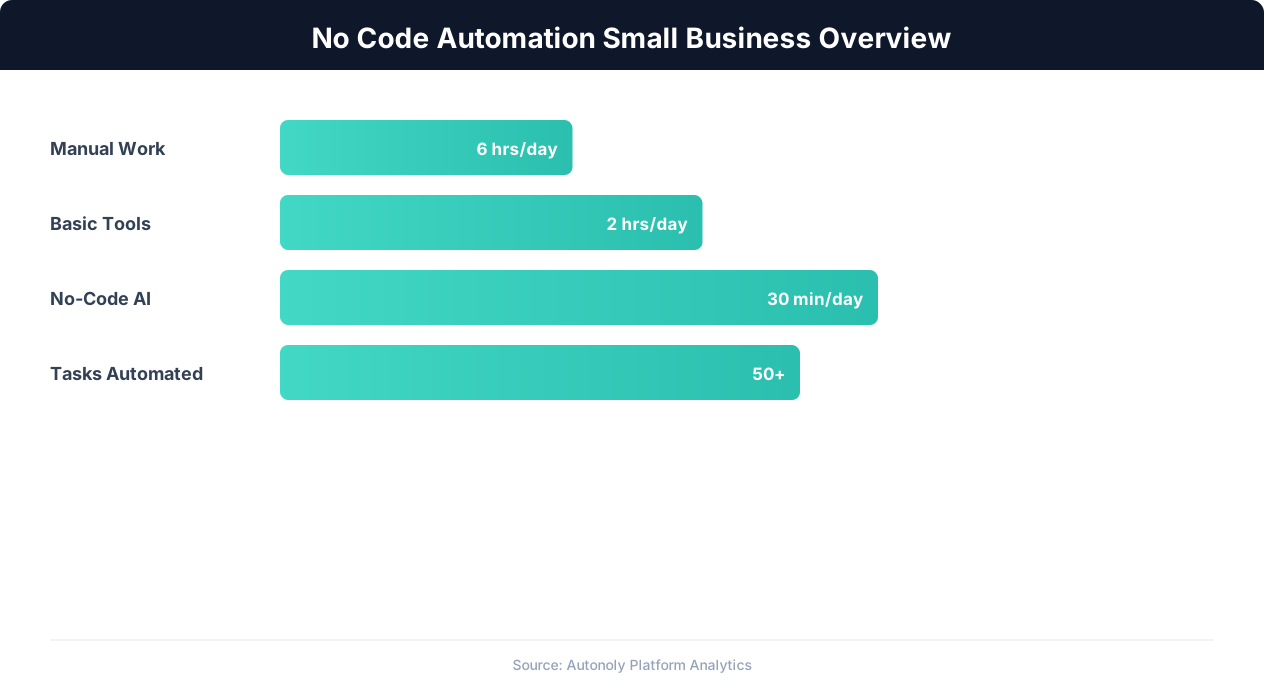
Consider how a typical small business handles leads. A potential customer fills out a contact form on the website. Someone checks email, copies the lead information into a spreadsheet, sends an acknowledgment email, creates a task in the project management tool, and notifies the sales person via Slack. This process takes 5-10 minutes per lead. At 20 leads per day, that is nearly two hours of pure data shuffling — work that adds zero value beyond moving information between systems.
Multiply this pattern across invoicing, inventory updates, customer onboarding, report generation, and social media posting, and you quickly find that 20-30% of a small team's time goes to work that a computer could do in seconds. At an average cost of $25-50 per hour for a skilled employee, that translates to $15,000-$30,000 per year in wasted labor per person.
Why No-Code Matters for Small Teams
Enterprise companies can hire developers to build custom integrations and automation scripts. Small businesses cannot justify that expense. No-code automation platforms bridge this gap by allowing non-technical team members to build automated workflows using visual interfaces, drag-and-drop builders, and plain-English descriptions instead of code.
The best no-code platforms share several characteristics that make them suitable for small businesses:
- Low learning curve: A marketing manager or operations lead can build useful automations within hours, not weeks.
- Affordable entry points: Free tiers or low-cost starter plans that scale with usage rather than requiring large upfront commitments.
- Pre-built integrations: Connections to the tools small businesses already use — Google Workspace, QuickBooks, Shopify, Mailchimp, Slack.
- Reliability without maintenance: Cloud-hosted platforms that run without server management, updates, or DevOps expertise.
The no-code automation market has exploded in recent years, with dozens of platforms competing for small business adoption. The challenge is no longer finding a tool — it is choosing the right one from an overwhelming number of options. This guide cuts through the noise by comparing the platforms that actually matter for small businesses.
How We Evaluated: Criteria That Matter for SMBs
Not all automation platforms are built for the same audience. A platform that excels for a 500-person company with a dedicated IT team may be terrible for a 5-person startup. We evaluated each platform against criteria specifically relevant to small business needs.
Ease of Use
How quickly can a non-technical person build their first useful automation? We tested each platform by having someone with no automation experience build a common small business workflow: capturing form submissions, adding them to a spreadsheet, and sending a notification. Platforms where this took under 15 minutes scored highest.
Pricing and Value at SMB Scale
Small businesses need to know what they will actually pay, not just the starting price. We analyzed pricing at realistic small business usage levels: 500-2,000 automation runs per month, 5-15 active workflows, and 1-3 team members. Some platforms that look affordable at the starter tier become expensive quickly as usage grows.
Integration Breadth
Small businesses use an average of 25-50 different software tools. The more native integrations a platform offers, the less custom work is needed. We counted not just the total number of integrations but specifically the ones small businesses actually use: Google Workspace, Microsoft 365, Shopify, WooCommerce, QuickBooks, Xero, Mailchimp, HubSpot, Slack, and popular CRMs.
Complexity Ceiling
Many small business automations are simple two-step connections (trigger + action). But as businesses grow, they need conditional logic, data transformation, error handling, and multi-step workflows. We evaluated how well each platform handles workflows that go beyond basic if-this-then-that patterns.
Browser and Web Automation
Not every system offers an API. Small businesses frequently need to automate interactions with web portals, legacy systems, and websites that only have a browser interface. Platforms that include browser automation capabilities score higher because they can handle these "last mile" automation challenges that API-only tools cannot.
Scoring Summary
| Criteria | Weight | Why It Matters |
|---|---|---|
| Ease of Use | 25% | No dedicated technical staff to build/maintain |
| Pricing at SMB Scale | 25% | Budget constraints are real |
| Integration Breadth | 20% | Must connect to existing tools |
| Complexity Ceiling | 15% | Needs grow over time |
| Browser/Web Automation | 15% | Many systems lack APIs |
Platform-by-Platform Comparison
Here is a detailed breakdown of the top no-code automation platforms and how they stack up for small business use cases.
Zapier
Zapier is the most recognized name in no-code automation and the platform most small businesses try first. Its strength is the sheer number of integrations — over 6,000 apps — which means virtually any SaaS tool you use has a Zapier connector. The interface is straightforward: pick a trigger app, pick an action app, map fields, and activate.
For small businesses, Zapier works well for simple two-step automations. Where it struggles is complexity and cost. Multi-step Zaps (workflows with 3+ steps) require the Professional plan, and pricing scales with the number of tasks (automation runs) per month. A small business running 2,000 tasks per month across 15 Zaps will pay $50-70/month — not prohibitive, but it adds up.
Zapier has no browser automation capability. If you need to interact with a website that does not have an API (filling forms, downloading reports from a portal), Zapier cannot help. You will need a separate tool for those workflows.
Make (formerly Integromat)
Make offers a visual workflow builder that is more powerful than Zapier's linear interface. Workflows are built as flowcharts with branching paths, loops, and parallel execution. This makes Make better suited for complex automations that require conditional logic or data transformation.
Pricing is more favorable for small businesses — Make includes more operations per dollar than Zapier, and multi-step workflows are available on all paid plans. The free tier includes 1,000 operations per month, which is generous enough for testing and light usage.
The downside is complexity. Make's interface has a steeper learning curve than Zapier. Non-technical users may find the flowchart-based builder intimidating at first, though it becomes intuitive with practice. Like Zapier, Make has no browser automation support.
n8n
n8n is an open-source automation platform that can be self-hosted for free or used as a cloud service. For technically-inclined small businesses (or those with a part-time developer), n8n offers the most flexibility. You can write custom JavaScript in any node, access raw API requests, and extend the platform with custom nodes.
The self-hosted version is completely free with no task limits — you only pay for server hosting (typically $5-20/month on a cloud VPS). The cloud-hosted version starts at $20/month. This makes n8n one of the most cost-effective options for high-volume automations.
The tradeoff is that n8n requires more technical skill than Zapier or Make. Self-hosting requires basic server administration knowledge. The workflow builder is powerful but less polished. For small businesses without any technical team members, n8n may be more tool than they need. For a deeper comparison, see our Zapier vs Make vs n8n vs Autonoly breakdown.
Autonoly
Autonoly takes a fundamentally different approach by combining a visual workflow builder with an AI agent that can build and execute workflows through natural language conversation. Instead of manually configuring each node and mapping fields, you describe what you want in plain English and the AI builds the workflow for you.
What sets Autonoly apart for small businesses is its browser automation capability. The AI agent controls a real browser, which means it can automate interactions with any website — not just apps with APIs. This eliminates the integration gap that limits Zapier and Make. Need to download a report from a vendor portal, extract data from a government website, or fill out forms on a platform with no API? Autonoly handles it.
The platform also includes data extraction, SSH terminal access for server tasks, and native integrations with Google Sheets, Slack, Gmail, and other common tools. Pricing includes a free tier for light usage and scales based on workflow runs.
Activepieces
Activepieces is a newer open-source alternative that positions itself as a simpler version of n8n. It has a cleaner interface, pre-built templates, and a growing library of integrations. The self-hosted version is free, and the cloud version starts at a competitive price point.
For small businesses, Activepieces is worth considering if you want open-source flexibility with a more approachable interface than n8n. However, its integration library is smaller than the established platforms, and the community is still growing. It does not include browser automation.
Side-by-Side Feature Comparison
This table summarizes the key differences across platforms at a glance. Use it as a quick reference when evaluating which platform fits your specific needs.
| Feature | Zapier | Make | n8n | Autonoly | Activepieces |
|---|---|---|---|---|---|
| Free Tier | 100 tasks/mo | 1,000 ops/mo | Unlimited (self-host) | Yes | Unlimited (self-host) |
| Starting Paid Price | $19.99/mo | $9/mo | $20/mo (cloud) | $29/mo | $10/mo (cloud) |
| Integrations | 6,000+ | 1,500+ | 400+ | 200+ & any website | 200+ |
| Browser Automation | No | No | No | Yes | No |
| AI Agent | No | No | No | Yes | No |
| Visual Builder | Linear | Flowchart | Flowchart | Canvas + AI | Flowchart |
| Self-Host Option | No | No | Yes | No | Yes |
| Conditional Logic | Paid plans | All plans | Yes | Yes | Yes |
| Learning Curve | Low | Medium | Medium-High | Low | Medium |
| Data Extraction | No | Limited | With code | Built-in AI | No |
Which Integrations Matter Most?
Raw integration counts can be misleading. Zapier's 6,000+ integrations include many niche apps that most businesses never use. What matters is coverage of the tools you actually rely on. All five platforms support the core small business stack: Google Workspace, Slack, common CRMs, and email marketing tools. The differentiation comes at the edges — industry-specific tools, legacy systems, and web-only portals where browser automation becomes essential.
Pricing at Realistic Usage
Here is what each platform costs at a usage level typical for an active small business (approximately 2,000 automation runs per month, 10-15 active workflows):
| Platform | Estimated Monthly Cost | Notes |
|---|---|---|
| Zapier | $49-69 | Professional plan for multi-step |
| Make | $16-29 | Core plan sufficient |
| n8n (self-hosted) | $5-20 | Server costs only |
| n8n (cloud) | $20-50 | Starter or Pro plan |
| Autonoly | $29-59 | Includes browser automation |
| Activepieces (cloud) | $10-25 | Growing feature set |
Which Platform for Which Use Case?
The best platform depends on what you are automating. Here are specific recommendations based on common small business automation scenarios.
Simple App-to-App Connections
Best choice: Zapier
If your automations are primarily connecting two cloud apps — new Shopify order creates a row in Google Sheets, new form submission sends a Slack notification, new email attachment saves to Google Drive — Zapier's simplicity and integration breadth make it the easiest option. These are one-trigger, one-action workflows where Zapier's linear builder is perfectly suited.
Complex Multi-Step Workflows
Best choice: Make or n8n
When you need branching logic (if the order value is over $500, route to priority fulfillment; otherwise, standard processing), data transformation (reformatting dates, calculating totals, merging data from multiple sources), or loops (process each row in a spreadsheet individually), Make and n8n handle complexity better than Zapier. Make is friendlier for non-technical users; n8n is more powerful for those comfortable with some code.
Website and Browser Automation
Best choice: Autonoly
If any part of your workflow involves interacting with a website that does not have an API — filling out web forms, downloading reports from portals, scraping product data, monitoring competitor websites — Autonoly is the only platform in this comparison that handles it natively. The live browser control feature lets the AI agent navigate websites exactly as a human would, clicking buttons, filling forms, handling popups, and extracting data from rendered pages.
💡 Key Insight
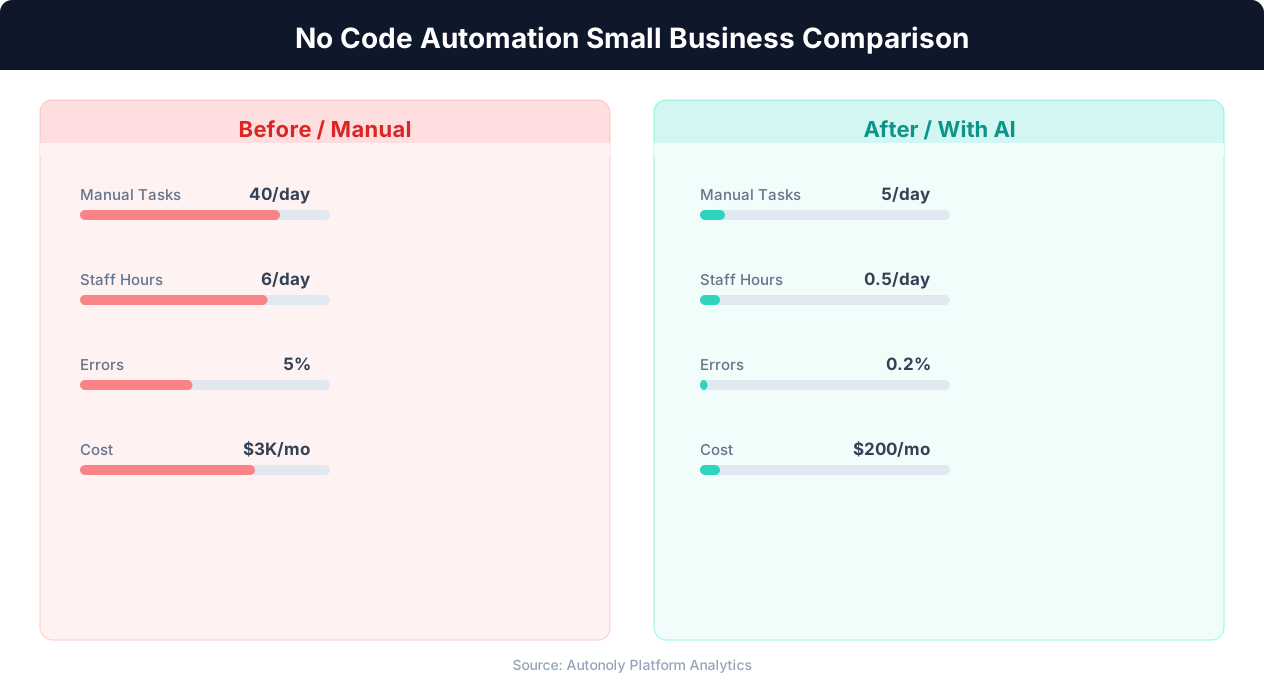
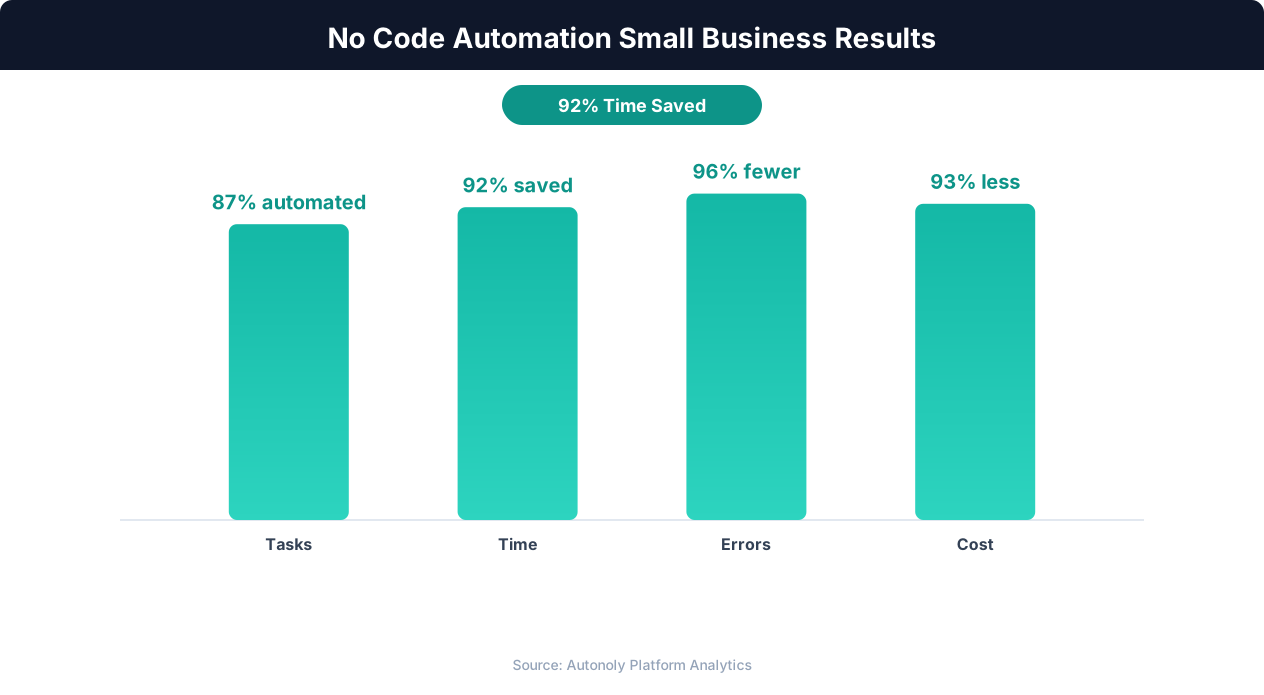
Small businesses using no-code automation save an average of $50,000-$100,000 annually in operational costs.
Common small business scenarios that require browser automation:
- Entering orders into a supplier's web portal that has no API
- Downloading monthly reports from a vendor dashboard
- Monitoring competitor pricing on their websites
- Filling out government or compliance forms online
- Extracting data from industry-specific web applications
For a detailed walkthrough of browser-based data entry, see our guide on automating data entry.
Data Extraction and Web Scraping
Best choice: Autonoly
If your business needs to extract data from websites — product prices, real estate listings, job postings, directory information — Autonoly's combination of browser automation and AI vision capabilities makes it the strongest choice. Other platforms require integrating with separate scraping tools, adding complexity and cost. See our web scraping best practices guide for more detail.
Budget-Constrained, High-Volume Automation
Best choice: n8n (self-hosted)
If you have a team member comfortable with basic server administration and Docker, self-hosted n8n provides unlimited automation runs for just the cost of a small cloud server. This is the most cost-effective option for businesses running thousands of automations per month, especially if those automations are purely API-based and do not require browser interaction.
Getting Started With Zero Technical Knowledge
Best choice: Autonoly or Zapier
For team members with absolutely no technical background, the two easiest starting points are Zapier (for API-based automations) and Autonoly (for anything involving websites or requiring an AI assistant to build the workflow). Autonoly's AI agent chat lets you describe what you want in plain English, which eliminates the need to understand triggers, actions, and field mapping.
Getting Started: Your First Automation in 15 Minutes
The best way to evaluate an automation platform is to build something real. Here is a quick-start guide for creating your first useful automation — a lead capture workflow that takes form submissions and routes them to your team.
The Workflow
When someone submits a contact form on your website, the automation should: add their information to a Google Sheet for tracking, send them an acknowledgment email, and notify your team via Slack with the lead details. This three-step workflow covers the fundamentals of automation: triggering on events, writing to external systems, and sending notifications.
Building It With Autonoly
Open Autonoly and start a conversation with the AI agent. Describe your workflow:
"When a new row is added to my Google Sheet called 'Website Leads', send an email to the contact's email address thanking them for reaching out, and post a message to the #sales channel in Slack with the lead's name, email, and message."
The agent builds the workflow visually on the canvas, connecting a Google Sheets trigger to an email action and a Slack notification. You authorize the Google and Slack connections when prompted, review the workflow, and activate it. The entire process typically takes under 10 minutes.
Building It With Zapier
In Zapier, create a new Zap. Set the trigger to "New Spreadsheet Row" in Google Sheets, select your spreadsheet, and test the trigger. Add a second step with Gmail's "Send Email" action, mapping the recipient field to the email column from the sheet. Add a third step with Slack's "Send Channel Message" action, composing the notification message with data from the trigger. Turn on the Zap.
Building It With Make
In Make, create a new scenario. Add a Google Sheets "Watch Rows" module as the trigger. Connect a Gmail "Send an Email" module and a Slack "Create a Message" module in parallel (both triggered by the same new row). Configure the field mappings and activate the scenario.
Tips for Your First Automation
- Start with a workflow you currently do manually at least once per day. The time savings are immediately visible, which builds confidence and momentum.
- Test thoroughly before activating. Run 2-3 test records through the automation and verify every step works correctly. A broken automation is worse than no automation — it creates false confidence that work is being done.
- Set up error notifications. Every platform supports alerts when an automation fails. Enable them from day one so you catch issues before they become problems.
- Document what you build. Name your workflows descriptively (not "Workflow 1") and add notes explaining what each step does. Future-you will thank present-you.
Scaling Beyond Your First Automation
Once your first automation is running reliably, look for the next highest-impact workflow to automate. Common second automations for small businesses include: automated reporting (daily or weekly summaries sent to your inbox), Google Sheets data syncing between systems, and lead generation workflows that combine data extraction with outreach. Each additional automation compounds the time savings, freeing your team to focus on work that actually requires human judgment.
Common Mistakes Small Businesses Make With Automation
Automation is powerful, but it is not magic. Small businesses that approach automation without a plan often make predictable mistakes that waste time and create frustration. Avoiding these pitfalls accelerates your automation ROI.
Automating Bad Processes
The most common mistake is automating a process without first evaluating whether the process itself makes sense. If your lead routing involves five unnecessary approval steps because "that's how we've always done it," automating those five steps just makes a bad process run faster. Before automating, ask: does this process need to exist in its current form? Can steps be eliminated? Simplify first, then automate.
Over-Engineering From Day One
Beginners often try to build a comprehensive, enterprise-grade automation system on their first attempt. They want conditional branching for every edge case, error handling for scenarios that may never occur, and integrations with tools they might use someday. Start with the simplest version that solves the core problem. You can add complexity later when real-world usage reveals which edge cases actually matter.
💡 Key Insight
78% of small businesses report that no-code automation was operational within one week of setup.
Ignoring Error Handling
The opposite mistake is building automations with zero error handling. What happens when the Google Sheet is temporarily unavailable? When the email address in the spreadsheet is malformed? When the Slack channel is renamed? Production automations need basic error handling: retry logic for transient failures, notifications for persistent errors, and fallback actions for critical workflows.
Choosing Based on Price Alone
The cheapest tool is not always the cheapest solution. A free tool that requires 10 hours of configuration and ongoing maintenance costs more than a $30/month tool that works in 15 minutes. Evaluate total cost of ownership, including setup time, maintenance time, and the cost of limitations you will need to work around.
Not Measuring Results
If you do not track how much time your automations save, you cannot justify expanding your automation investment. Before automating a process, estimate how long it takes manually and how often it runs. After automating, compare. This creates a concrete ROI number that justifies the platform subscription and makes the case for automating additional processes.
Platform Lock-in Without Evaluation
Many small businesses sign up for the first platform they encounter and never evaluate alternatives, even when their needs change. The automation landscape evolves rapidly. A platform that was the best choice a year ago may no longer fit as your workflows become more complex. Periodically evaluate whether your current platform still meets your needs, especially when you hit limitations that require workarounds. Switching platforms is easier than most people assume — the workflow logic transfers even if the specific configuration does not.
The Future of Small Business Automation
The automation landscape is shifting rapidly, driven by advances in AI and the growing expectation that every business process should be optimized. Understanding where the market is heading helps small businesses make platform choices that will remain relevant.
AI-Powered Workflow Building
The most significant trend is the integration of AI into workflow creation itself. Instead of manually configuring triggers, actions, and field mappings, users describe what they want and an AI builds the workflow. This lowers the barrier to automation from "can use a visual builder" to "can describe a process in English." Autonoly's AI agent is at the forefront of this shift, and other platforms are beginning to add AI-assisted building features.
Browser Automation Becomes Standard
As more business processes involve web-based systems that lack APIs, browser automation is transitioning from a niche capability to a standard platform feature. Small businesses that deal with government portals, industry-specific web applications, or vendor systems without integrations increasingly need browser automation as part of their automation stack. Platforms that include it natively, rather than requiring a separate tool, will have a significant advantage.
Cross-Session Learning
Current automation platforms treat every workflow as independent — each one starts from scratch with no knowledge of your other automations or business context. The next generation of platforms will include cross-session learning, where the system builds an understanding of your business over time and applies that knowledge to new automations. If the system knows your Google Sheets naming conventions, your Slack channel structure, and your typical data formats, it can pre-configure new workflows with minimal input.
From Automation to Autonomous Operations
The long-term trajectory is from automation (human designs the workflow, computer executes it) to autonomy (computer identifies what should be automated and handles it independently). AI agents represent the first step toward this future — they can plan, execute, and adapt without step-by-step human instruction. For small businesses, this means automation that requires less and less human oversight, freeing owners and team members to focus entirely on strategic decisions, customer relationships, and creative work.
The platforms that will dominate the small business market in the coming years are those that combine ease of use with genuine AI capabilities — not just marketing buzzwords, but AI that actually reduces the effort required to automate business processes. When evaluating platforms, ask: does the AI actually save me time, or is it just a chatbot bolted onto a traditional workflow builder? The answer to that question increasingly separates the leaders from the followers.