The API Dependency Problem: Why Zapier and Make Can't Automate Everything
Integration platforms like Zapier, Make (formerly Integromat), and Workato have transformed how businesses connect their software tools. With thousands of pre-built connectors, they make it trivially easy to build workflows like "When a new row appears in Google Sheets, create a HubSpot contact and send a Slack notification." These API-to-API workflows are powerful, reliable, and form the backbone of modern business operations.
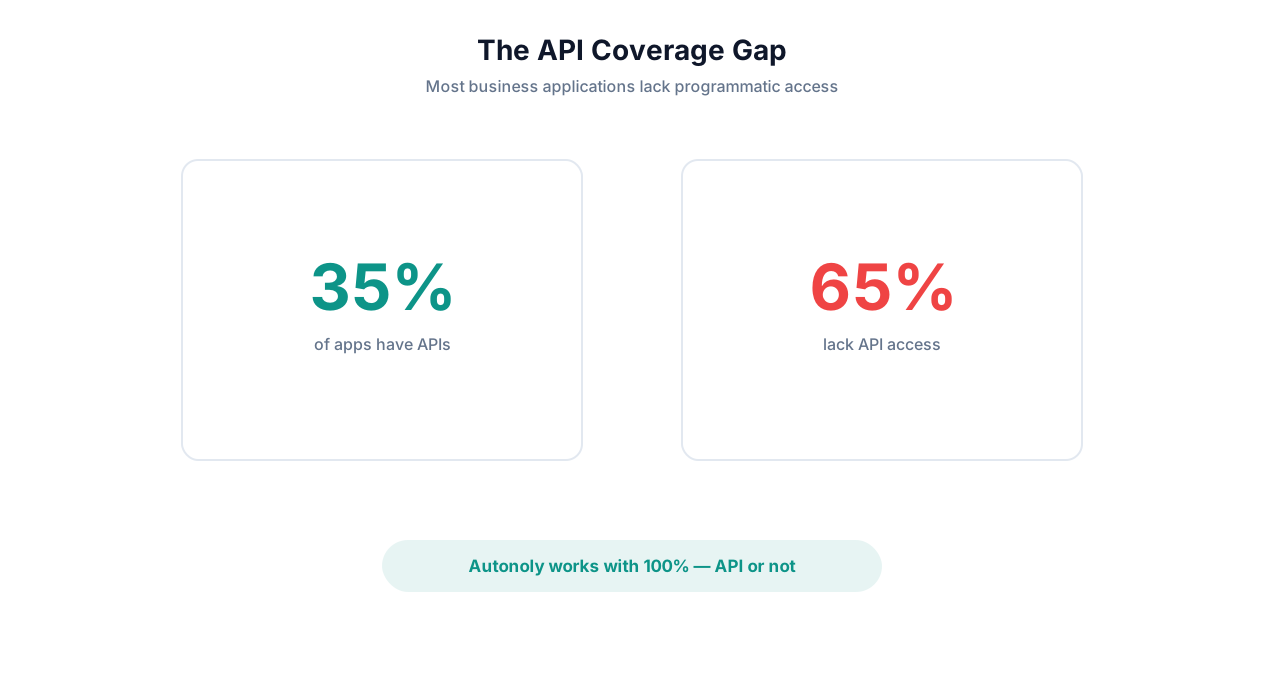
But there is a fundamental limitation that these platforms cannot overcome: they only work with applications that have APIs and pre-built integrations.
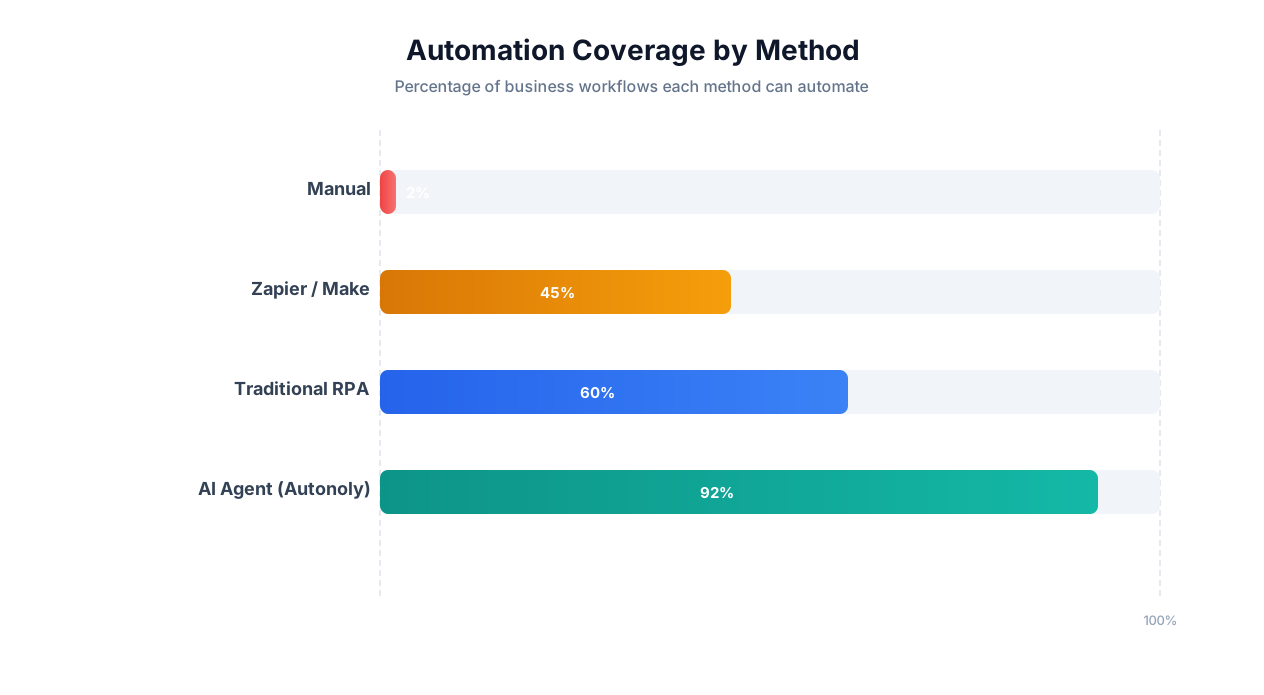
This seems like a minor constraint until you audit your actual workflow. The average business team uses 20-30 software tools, websites, and platforms in their daily work. Of those, Zapier supports roughly 60-70%. The remaining 30-40% — the government portals, legacy systems, competitor websites, niche industry tools, and internal applications — are completely invisible to API-based automation platforms.
💡 Key Insight
A 2025 survey by Forrester found that 43% of enterprise automation initiatives stall because the target application lacks an API or pre-built integration. The "API coverage gap" is the single largest barrier to full workflow automation — and it affects every industry.
The Three Types of API-Less Workflows
The automation gap falls into three categories, each with different characteristics:
1. Websites that will never have APIs
Government portals (IRS, DMV, state regulatory sites), court filing systems, public records databases, competitor websites, and social media platforms that restrict API access. These sites are designed for human browsers and have no business incentive to build API access for third-party automation.
2. Applications that could have APIs but don't
Legacy enterprise software (older ERP, CRM, or accounting systems), niche industry tools with small user bases, internally built company tools, and newer SaaS products that haven't built integration ecosystems yet. The economics of building and maintaining API access don't justify it for these vendors.
3. Workflows that span both API and non-API systems
The most common scenario: a workflow that starts in a system with API access (like your CRM) but requires interaction with a system without it (like a government portal or competitor website). Traditional automation handles the first half; the second half falls back to manual work.
The Real Cost of the API Gap
When part of a workflow cannot be automated due to missing APIs, the entire workflow breaks down. A human must handle the non-API steps manually, which means:
| Impact | Description | Cost |
|---|---|---|
| Manual labor | Someone must perform the non-API steps by hand | $30-75/hour in labor |
| Latency | Manual steps introduce hours or days of delay | Missed deadlines, delayed decisions |
| Errors | Manual data entry has 3-5% error rate | Data quality degradation downstream |
| Partial automation frustration | Workers resent doing the "API-less" steps when the rest is automated | Morale and turnover |
| Scalability ceiling | Cannot scale beyond human capacity on manual steps | Growth bottleneck |
The API dependency problem is not a theoretical concern — it is the daily reality for operations teams, finance departments, compliance officers, and anyone whose work touches systems that Zapier cannot reach. Read our detailed comparison of Zapier vs Make vs n8n vs Autonoly for more context.
How Browser-Based AI Agents Work: The Technology Behind API-Free Automation
Browser-based AI agents solve the API coverage gap by doing exactly what a human does: they open a real web browser, navigate to a website, read the page, interact with UI elements, and extract or input data. But instead of a human controlling the browser, an AI agent — powered by a large language model — is behind the wheel.
The Technical Stack
A browser-based AI agent combines three technologies:
1. Browser Automation Framework (Playwright or Puppeteer)
The agent controls a real Chromium, Firefox, or WebKit browser through an automation framework. This is not a simplified HTML renderer — it is the same browser engine that regular users run, complete with JavaScript execution, CSS rendering, cookie handling, and session management. The framework exposes programmatic control: navigate to a URL, click an element, type text, read page content, take screenshots, handle downloads.
Autonoly uses Playwright through its live browser control system. Read our Playwright vs Selenium vs Puppeteer comparison for a deep dive on why Playwright is the strongest framework for this purpose.
2. Large Language Model (LLM) for Reasoning
The LLM is the brain. It receives observations from the browser (page content, visible elements, error messages), reasons about what to do next, and produces structured action commands. The LLM handles the intelligence that traditional scripts cannot: understanding page context, adapting to layout changes, interpreting error messages, and making decisions about alternative approaches.
3. Perception Pipeline (DOM + Vision)
The perception pipeline converts raw browser output into a format the LLM can understand. Two approaches exist:
- DOM-based: The agent reads the HTML Document Object Model, extracts interactive elements (buttons, links, inputs), and presents a structured accessibility tree to the LLM. Fast and token-efficient, but can miss visually complex layouts.
- Vision-based: The agent takes a screenshot and sends it to a vision-capable LLM (Claude, GPT-4V) for interpretation. More robust for complex UIs but slower and more expensive. Essential for sites that render content as images, canvas elements, or complex CSS layouts.
Production-grade agents use both — DOM parsing for speed and precision, vision for fallback and verification.
📊 By the Numbers
Modern AI agents process and reason about a web page in 1-3 seconds — comparable to a fast human reader. A 10-step form-filling task that takes a human 5-10 minutes completes in 30-60 seconds with a browser-based AI agent, including page load times and adaptive error handling.
The Agent Loop in Practice
Here is what happens when you tell an AI agent to "Go to the Texas Secretary of State website and look up the filing status of ABC Corporation":
- Navigate: Agent opens the browser, goes to the Texas SOS website
- Perceive: Agent reads the page, identifies the business search link
- Act: Agent clicks the business search link
- Perceive: Agent sees the search form with fields for entity name, filing number, etc.
- Reason: Agent determines it should search by entity name since that is what was provided
- Act: Agent types "ABC Corporation" into the entity name field and clicks Search
- Perceive: Agent reads the search results, identifies matching entities
- Act: Agent clicks on the correct entity
- Perceive: Agent reads the entity detail page — filing status, formation date, registered agent, etc.
- Output: Agent extracts and structures the relevant data, delivers it in the requested format
Each step involves the full perception-reasoning-action loop. If the site layout is different from expected, if there are multiple search results, or if the site requires accepting terms before searching, the agent adapts — because it is reasoning about what it sees, not following a hard-coded script.
How This Differs From Traditional Scraping
| Dimension | Traditional Script/Bot | AI Browser Agent |
|---|---|---|
| How it finds elements | Hard-coded CSS selectors or XPath | Semantic understanding of page content and structure |
| When site changes layout | Breaks immediately, requires developer fix | Adapts automatically by reasoning about the new layout |
| Handling unexpected popups | Crashes or ignores | Identifies popup type, decides whether to close, accept, or interact |
| Login and authentication | Must pre-program specific login flow | Recognizes login forms generically and completes them |
| Multi-site workflows | Separate script per site, fragile coordination | Single agent handles multiple sites, adapts to each |
| Setup time | Hours to days per site (developer required) | Minutes (describe in English) |
| Maintenance | Constant — sites change frequently | Minimal — agent self-heals |
What You Can Automate Without APIs: Four Categories of API-Less Systems
Browser-based AI agents unlock automation for four categories of systems that are invisible to traditional integration platforms. Each category represents a significant pool of manual work that has resisted automation until now.
1. Government and Regulatory Portals
Government websites are the most common API-free automation target. They are used by every business for tax filings, permit applications, regulatory compliance, and public records lookups — yet almost none of them offer API access.
Examples you can automate today:
- IRS: Download tax transcripts, check refund status, submit extension filings
- State SOS: Business entity searches, annual report filings, registered agent updates
- County assessor: Property tax lookups, assessment appeals, parcel data extraction
- DMV: Vehicle registration renewals, title status checks
- Permit portals: Building permit applications, status tracking, inspection scheduling
- OSHA: Workplace safety filings and incident report submissions
A single business might interact with 10-20 different government portals annually. Each has a unique UI, different form requirements, and no API integration. AI agents handle all of them through the same mechanism: browser-based interaction guided by LLM reasoning.
2. Legacy Enterprise Systems
Many businesses run critical operations on software that predates the API era. These systems work, they contain valuable data, and replacing them would be enormously expensive — but they have no modern integration capabilities.
Examples you can automate:
- Older ERP systems (pre-cloud SAP, Oracle EBS) with web-based interfaces but no REST APIs
- Custom-built internal tools and admin portals
- Industry-specific software (insurance rating engines, medical billing systems, legal case management) with web UIs but no integrations
- On-premise CRM systems that predate Salesforce-era integration standards
⚠️ Important Note
When automating legacy enterprise systems, always work with your IT team to ensure the agent's actions comply with security policies. Use dedicated service accounts, restrict access to necessary functions only, and maintain audit logs. Browser-based automation should enhance your security posture, not compromise it.
3. Competitor and Third-Party Websites
Websites you do not control — competitor sites, industry databases, marketplace listings, review platforms — are inherently API-less from your perspective. You cannot build an integration; you can only visit them as a browser user.
Examples you can automate:
- Competitor pricing page monitoring (daily price checks across 10-50 competitor sites)
- Job board scraping for market intelligence (who is hiring, for what roles, at what salaries)
- Review aggregation from Google, Yelp, TrustPilot, G2 for sentiment analysis
- Real estate listing extraction from Zillow, Redfin, Realtor.com
- Social media data collection from Instagram, TikTok, and LinkedIn
- Patent and trademark database searches
See our competitor monitoring template and competitor scraping guide for detailed walkthroughs.
4. SaaS Applications Without Integrations
Even in the modern SaaS landscape, many useful tools lack Zapier/Make integrations. This is especially true for:
- Newer SaaS products that haven't built their integration ecosystem yet
- Vertical SaaS tools (niche industry software) with small user bases
- Free or low-cost tools that don't invest in API development
- Enterprise tools with API access limited to expensive tiers
AI agents fill this gap by interacting with these tools through their web interface — extracting data, updating records, triggering actions — exactly as a user would, but faster and at scale.
| System Category | Example | Why No API? | AI Agent Solution |
|---|---|---|---|
| Government | State business filing portal | No incentive to build API | Navigate forms, submit filings, download confirmations via browser |
| Legacy | On-premise insurance rating engine | Predates API era | Interact with web UI, extract quotes, update records |
| Competitor | Competitor pricing pages | No access granted | Visit pages, extract prices, compare over time |
| SaaS | Niche project management tool | Small team, no resources | Read dashboards, update tasks, export data via browser |
Real Examples: API-Free Automation in Production
These are not hypothetical scenarios — they represent actual automation workflows running in production for real businesses, all interacting with systems that have no APIs.
Example 1: Multi-State Business Compliance Filing
The business: A holding company registered in 12 states. Each state requires annual compliance filings through a different portal with different forms, deadlines, and requirements.
Before AI agents: A paralegal spent 3 days each quarter navigating 12 different state portals, filling out forms, uploading documents, and downloading confirmations. Total: ~96 hours per year dedicated to a pure data-entry task.
After AI agents: An Autonoly agent was given the task: "For each of these 12 states, navigate to the Secretary of State business filing portal, complete the annual report with our updated company information, pay the filing fee, and download the confirmation receipt." The agent handles each state's unique portal UI, form fields, and payment flow. Total agent runtime: ~45 minutes. Human review time: ~30 minutes to verify receipts.
Annual savings: 90+ hours of paralegal time = $6,750+ at $75/hr
Example 2: Insurance Carrier Quote Collection
The business: An independent insurance agency that quotes across 8 carriers for each commercial client. Each carrier has a proprietary online portal with no API access.
Before AI agents: A producer manually logged into each carrier portal, navigated multi-page quote request forms (each different), entered client data, and waited for quotes. Time: 3-4 hours per client across all 8 carriers.
After AI agents: The agent reads client data from the agency management system, then sequentially navigates to each carrier's portal and fills out quote forms. It adapts to each carrier's unique form layout, required fields, and data formats. When a carrier's portal is down or returns an error, the agent retries later. All quotes are compiled into a comparison spreadsheet using intelligent form filling.
Time savings: 3-4 hours per client reduced to 20 minutes of review. With 15 new clients per week, that is 52.5 hours saved weekly.
Example 3: Government Permit Application Tracking
The business: A construction company tracking 40-60 active building permits across 5 different county and city permit portals.
Before AI agents: A project coordinator logged into each portal daily, searched for each permit by number, checked the status, noted any required actions, and updated the internal tracking spreadsheet. Time: 2+ hours daily.
After AI agents: The agent runs every morning at 6 AM. It navigates to each portal, searches for each permit number, extracts the current status, inspection dates, and any notes, and updates a Google Sheet with the latest data. If any permit status changes, it sends a Slack notification to the project manager.
Time savings: 10+ hours per week. The project coordinator now spends time managing permits instead of tracking them.
Example 4: Competitor Job Posting Intelligence
The business: A tech company's talent acquisition team monitoring competitors' hiring activity for strategic intelligence.
Before AI agents: A recruiting analyst manually visited 15 competitor career pages weekly, cataloged new job postings, categorized them by department and seniority, and compiled a report for leadership. Time: 5 hours per week.
After AI agents: The agent visits each competitor's careers page, extracts all current postings (title, department, location, date posted), compares against last week's snapshot, and produces a formatted report highlighting new postings, removed postings, and trends ("CompetitorX added 8 AI engineering roles this month"). The report is delivered via email every Monday morning.
Time savings: 4.5 hours per week. Intelligence is also more comprehensive because the agent checks all 15 sites every run, while the analyst sometimes skipped sites under time pressure.
Example 5: Medical Prior Authorization Submission
The business: A multi-provider medical practice submitting 30-50 prior authorizations per week across 6 insurance carrier portals.
Before AI agents: A medical office administrator navigated to each carrier's portal, filled out prior auth forms with patient information, diagnosis codes, procedure codes, and clinical justification. Average time: 25 minutes per authorization = 15-20 hours per week.
After AI agents: The agent reads prior auth requests from the EHR system, navigates to the appropriate carrier portal, completes the authorization form, uploads supporting documentation, and captures the authorization number. Complex cases with unusual clinical scenarios are flagged for human handling.
Time savings: 12-15 hours per week. Approval turnaround time also decreased because authorizations are submitted within hours instead of days.
API Automation vs. Browser Automation: When to Use Each
API-based and browser-based automation are not competing approaches — they are complementary. Understanding when to use each ensures you choose the right tool for each task and build the most efficient overall automation stack.
| Factor | API-Based Automation | Browser-Based AI Agent |
|---|---|---|
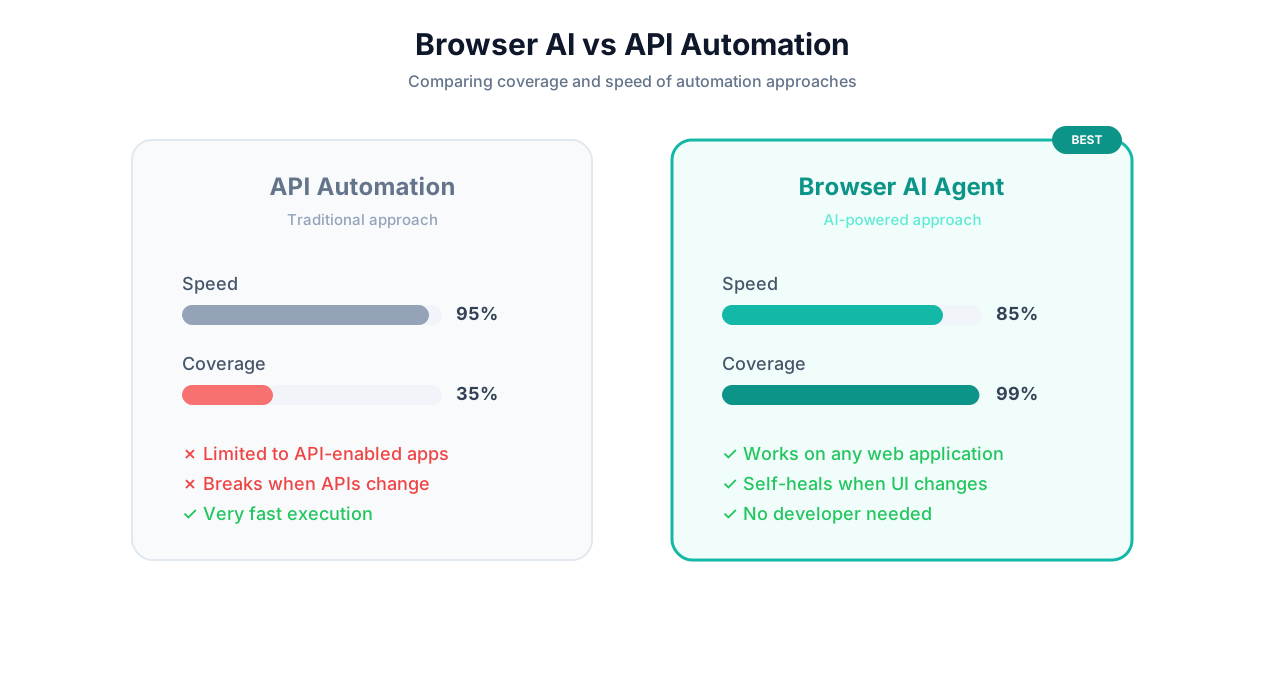
| Speed | Fast — direct data transfer, no UI rendering | Slower — must load and render pages |
| Reliability | Very high — structured contracts, versioned endpoints | High — but website changes can require adaptation |
| Coverage | Limited to apps with API integrations (60-70% of common tools) | Universal — any website or web app |
| Cost per action | Low — minimal compute resources | Higher — browser rendering + LLM reasoning |
| Setup complexity | Low for pre-built connectors, high for custom APIs | Low — describe in English |
| Maintenance | Low (if API is stable) | Low (agent self-heals, but occasional attention needed) |
| Data volume | Handles millions of records efficiently | Best for hundreds to thousands of records per run |
| Authentication | OAuth, API keys — standardized | Browser login — flexible but requires credential management |
The Decision Framework
Use this framework to decide which approach is right for each task:
Use API automation (Zapier, Make, direct API) when:
- Both source and destination have reliable API integrations
- The task involves high-volume data transfer (thousands of records)
- Speed is critical (real-time or near-real-time requirements)
- The workflow is a simple trigger-action pattern
Use browser-based AI agents when:
- The target system has no API or integration
- The task involves navigating complex web UIs
- You need to interact with multiple diverse websites in one workflow
- The target website changes frequently (agent adapts, scripts break)
- The task requires visual understanding (reading charts, interpreting layouts)
Use both (hybrid approach) when:
- A workflow spans systems with and without APIs
- The API-connected parts need speed and the non-API parts need flexibility
- You want API reliability where possible and browser fallback where necessary
💡 Key Insight
The most effective automation stacks use API-based tools for the 60-70% of workflows that involve API-connected apps, and AI agents for the remaining 30-40% that involve API-less systems. This hybrid approach eliminates the coverage gap entirely while optimizing for speed and cost where possible.
Real-World Hybrid Example
A recruiting team's workflow:
- API step: New job requisition is created in their ATS (Greenhouse) → triggers a Zapier automation
- API step: Zapier creates a Slack channel for the role and adds hiring team members
- Browser agent step: AI agent posts the job listing to 6 job boards (Indeed, LinkedIn, Glassdoor, ZipRecruiter, AngelList, Stack Overflow) — each with a different form UI and no API integration for job posting
- API step: When applications arrive in the ATS, Zapier notifies the Slack channel
- Browser agent step: AI agent researches top candidates on LinkedIn and personal websites, compiles research summaries
Steps 1, 2, and 4 use API automation because the tools support it. Steps 3 and 5 use browser-based agents because the target sites either lack APIs or restrict API access. The result is end-to-end automation of the entire hiring workflow.
Security and Reliability: Is Browser Automation Safe for Business Use?
Browser-based automation raises legitimate security and reliability questions. Addressing these concerns head-on is important for any team evaluating this approach.
Security Considerations
Credential Management
AI agents that log into websites need credentials. The key question is how those credentials are stored and used:
- Encryption: Credentials should be encrypted at rest (AES-256 or equivalent) and in transit (TLS 1.3). They should never be stored in plain text or logged.
- Isolation: Each agent session should run in an isolated environment. One user's credentials should never be accessible to another user's agents.
- Scope limitation: Agents should only have access to the specific credentials needed for their assigned tasks, not a global credential store.
- Audit logging: Every credential usage should be logged — when, by which agent, for which task.
Data Handling
Data extracted or processed by agents must be handled securely:
- Data should be encrypted in transit and at rest
- Extracted data should be delivered only to the designated output (Google Sheets, email, etc.) and not retained on the platform longer than necessary
- For sensitive data (financial, medical, personal), ensure the platform is SOC 2 compliant and, if applicable, HIPAA or GDPR compliant
📊 By the Numbers
In a 2025 security audit of 12 AI agent platforms, only 4 met enterprise security standards (SOC 2 Type II, encrypted credential storage, full audit trails, and data isolation). Always verify security certifications before granting an agent access to business systems.
Prompt Injection Risks
When an AI agent reads a web page, malicious content on that page could potentially manipulate the agent's behavior through prompt injection — hidden instructions embedded in page content that attempt to override the agent's task. Mitigation strategies include:
- Input sanitization: Stripping potential injection payloads from page content before LLM processing
- Goal anchoring: Reinforcing the agent's original task instructions to resist mid-task goal changes
- Action restrictions: Limiting the agent's available actions to only what is needed for the current task (no arbitrary code execution, no access to systems outside the task scope)
Reliability Considerations
What Happens When a Website Is Down?
Agent platforms should include retry logic with configurable policies: immediate retry, retry after delay, retry with exponential backoff, or fail gracefully and notify. For scheduled workflows, the platform should detect failures and re-queue the task.
What Happens When a Website Changes?
This is the core advantage of AI agents over traditional scripts. Because agents reason about what they see rather than relying on hard-coded selectors, most layout changes are handled automatically. Major redesigns may require the agent to adapt over 1-2 runs as it learns the new layout.
Real-world reliability data: across Autonoly's platform, agents maintain a 92% first-attempt success rate on tasks involving sites that change their layout at least monthly. With retry logic, the effective success rate rises to 96%.
How to Handle Edge Cases
| Edge Case | How AI Agents Handle It | How Scripts Handle It |
|---|---|---|
| CAPTCHA appears | Some solved via AI vision; others flagged for human | Crash or fail silently |
| Unexpected popup/modal | Identify, close or interact as appropriate | Crash or click blindly |
| Rate limiting / temporary block | Detect, wait, retry with backoff | Crash or get permanently blocked |
| Session timeout | Detect, re-authenticate, resume | Crash or start over from beginning |
| Form validation errors | Read error message, correct input, retry | Crash or submit invalid data |
Best Practices for Secure Browser Automation
- Use dedicated service accounts (not personal credentials) for agent access
- Apply principle of least privilege — give agents access only to what they need
- Review agent actions via live browser view for the first few runs of any new workflow
- Set up failure notifications so you know immediately if something goes wrong
- For sensitive tasks, configure human-in-the-loop approval before final actions (submissions, payments)
- Regularly audit agent activity logs
Setup Guide: Automating Your First API-Less Workflow
Here is a step-by-step guide to automating a task on a website that has no API, using Autonoly's AI agent.
Step 1: Identify the Target Task
Choose a task that meets these criteria:
- Involves a website without API access (government portal, competitor site, legacy tool)
- You perform it regularly (at least weekly)
- It follows a consistent pattern (even if the specific data changes)
- The output is structured data or a completed action (not subjective judgment)
Good first tasks:
- Extracting data from a government business registry
- Checking prices on 5-10 competitor websites
- Filling out a recurring form on a vendor portal
- Downloading reports from a SaaS tool that lacks export APIs
Step 2: Describe the Task to the AI Agent
Open the AI agent chat and describe your task. Include:
- The URL(s) to visit
- What to do on each page (search, fill form, extract data, click buttons)
- What the output should look like (spreadsheet columns, data format)
- Where to deliver the output (Google Sheets, email, Slack)
Example description:
"Go to the Texas Secretary of State business search (https://mycpa.cpa.state.tx.us/coa/), search for 'Acme Corp', click on the matching result, and extract the entity name, filing number, status, formation date, and registered agent. Put the data in this Google Sheet: [link]."
Step 3: Watch the First Execution
The agent will open a browser and navigate to the site. Watch through the live browser view as it:
- Navigates to the URL
- Identifies the search form
- Enters the search term
- Reads and interprets the results
- Clicks on the correct result
- Extracts the requested data
- Writes data to Google Sheets
If the agent takes a wrong turn (clicks the wrong link, misidentifies a field), you can provide feedback in the chat and the agent will adjust.
Step 4: Refine and Schedule
After a successful first run:
- Adjust the task description if anything was not quite right
- Add more targets if applicable ("Do this for these 20 company names")
- Set a schedule for recurring execution (daily, weekly, monthly)
- Configure notifications for completion or errors
Step 5: Expand to More Complex Workflows
Once comfortable with single-site tasks, try multi-site workflows:
- "Check our business filing status in all 12 states where we are registered"
- "Compare product prices across Amazon, Walmart, and Target for these 50 SKUs"
- "Submit this monthly compliance form to both the state and federal regulatory portals"
Each workflow builds on the same principles: describe the task, watch the first run, refine, and schedule. The agent's cross-session learning means it gets faster and more reliable with each execution.
💡 Key Insight
The most successful users of API-free automation follow a "crawl, walk, run" approach: start with one simple extraction task (crawl), expand to form filling and multi-site workflows (walk), then build complex cross-platform automation pipelines that combine API and browser steps (run). Most teams reach the "run" stage within 30 days.
Frequently Asked Questions
Answers to the most common questions about automating without APIs using browser-based AI agents.
Is it legal to automate interactions with websites that don't have APIs?
In most cases, yes — with important caveats. The hiQ v. LinkedIn ruling established that accessing publicly available data is not a violation of the Computer Fraud and Abuse Act. However, you should always respect a website's Terms of Service, robots.txt directives, and rate limiting. Avoid accessing data behind login walls unless you have a legitimate account and are not violating the ToS. Read our complete legal guide to web scraping for detailed analysis.
Can browser automation handle two-factor authentication?
It depends on the 2FA method. TOTP-based 2FA (authenticator apps) can be handled by the agent if you provide the TOTP secret. SMS-based 2FA typically requires human intervention for the first login, after which the agent maintains the authenticated session. Some platforms support session persistence to avoid repeated authentication.
How fast is browser automation compared to API automation?
Browser automation is slower than API calls because it involves rendering pages, processing visual content, and executing the reasoning loop. A single API call might take 100ms while a browser-based interaction takes 5-15 seconds. However, for tasks that have no API alternative, the relevant comparison is against manual work — where browser automation is 10-50x faster than a human.
What if the target website blocks automated access?
Some websites use anti-bot detection (Cloudflare, DataDome, PerimeterX). AI agents handle many of these through browser fingerprint management and human-like interaction patterns. See our guide to anti-bot detection. For sites with aggressive blocking, consider whether the data is available from alternative sources or whether the site's Terms of Service prohibit automated access.
Can I automate desktop applications, or only web-based ones?
Most AI agent platforms, including Autonoly, focus on web-based automation — any application accessible through a browser. Desktop application automation (native Windows/Mac apps) requires different technology (typically RPA tools like UiPath or Automation Anywhere). However, as more enterprise software moves to web-based interfaces, the browser automation approach covers an increasing percentage of business applications.