The API Dependency Problem: Why Zapier Can't Automate Everything
Zapier is one of the most successful automation platforms ever built. Since launching in 2012, it has connected over 7,000 apps through API integrations, enabling millions of users to create automated workflows without writing code. If you work with popular SaaS tools — Gmail, Slack, Google Sheets, HubSpot, Stripe — Zapier is genuinely excellent at wiring them together.
But there is a fundamental architectural limitation baked into Zapier's DNA: it only works with apps that have APIs and pre-built connectors.
This seems like a minor caveat until you sit down and list every tool, website, and platform your business actually interacts with. The CRM has an API. Email has an API. Your accounting software probably has an API. But what about:
- The government portal where you file permits?
- Your competitor's pricing page?
- The legacy vendor system with no modern API?
- The internal portal your company built 8 years ago?
- The industry-specific software used by only a few thousand companies?
- The website where you manually check order statuses?
None of these have Zapier integrations. None of them ever will. And yet, these are often the tasks that consume the most manual time — precisely because they cannot be automated with traditional integration platforms.
💡 Key Insight
A 2025 Productiv study found that the average mid-market company uses 137 SaaS applications. Zapier covers approximately 7,000 apps — an impressive number, but the total number of web applications, portals, and sites that businesses interact with exceeds 50,000. That leaves a significant gap of tools that cannot be automated through API connectors alone.
This is not a criticism of Zapier. API-based integration is a brilliant approach for the apps it covers. The problem is that API-based integration fundamentally cannot cover everything. Websites exist that will never build Zapier connectors — government sites, competitor sites, legacy systems, niche tools, internal portals. For these, you need a different approach entirely.
That different approach is browser automation powered by AI agents. Instead of connecting through APIs, an AI agent opens a real browser, navigates to the website, and interacts with it the way a human would — reading text, clicking buttons, filling forms, downloading files. No API required. No integration connector needed. If a human can do it in a browser, an AI agent can automate it.
This is not a theoretical gap. Every business hits this wall. The marketing team wants to automate competitor price monitoring — Zapier cannot visit competitor websites. The finance team wants to automate government tax filings — the IRS portal has no Zapier connector. The operations team wants to pull data from a legacy vendor system — the vendor has no API at all. These are the tasks that stay manual, and they are often the most time-consuming tasks in the organization.
This comparison explores exactly when Zapier is the right tool (often), when AI browser automation is the right tool (more often than you think), and when using both together gives you complete coverage.
What Zapier Does Well: The Undisputed King of API Integrations
Before we discuss limitations, let us be clear about where Zapier genuinely excels. Dismissing Zapier would be dishonest — it is a category-defining product with real advantages that AI browser automation does not replace.
1. The Largest Integration Library in the World
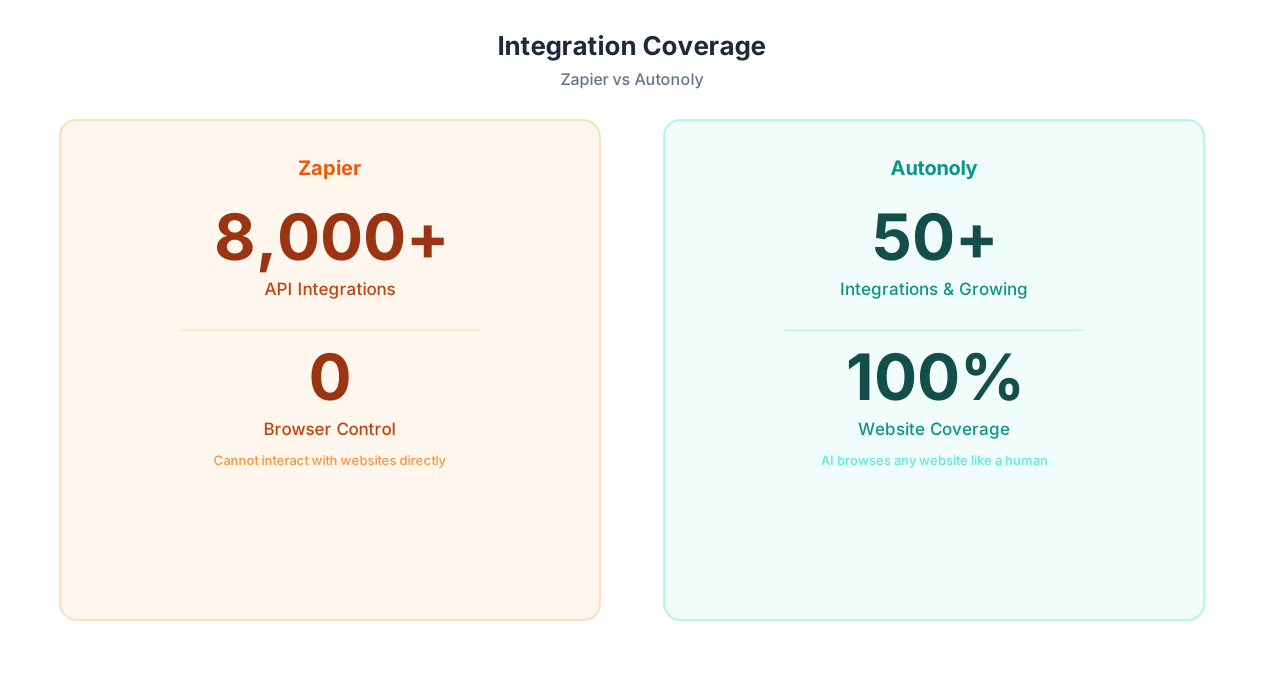
Zapier connects to over 7,000 apps. For popular SaaS tools, the breadth of available integrations is unmatched. When both your source and destination apps have Zapier connectors, setup is fast and reliable.
2. Rock-Solid Reliability for API Workflows
API-to-API workflows on Zapier are extremely reliable. When you connect Stripe to Google Sheets, the data transfer is direct, fast, and almost never fails. APIs are designed for machine-to-machine communication — they are structured, versioned, and predictable.
3. Massive Template Library
Zapier offers thousands of pre-built workflow templates. "When a new Typeform response comes in, add a row to Google Sheets and send a Slack notification" — templates like this get you running in 2 minutes.
4. Multi-Step Workflows With Logic
Zapier supports filters, conditional paths, formatters, and multi-step sequences. You can build sophisticated workflows that route data based on conditions, transform formats, and trigger different actions based on input values.
5. Mature, Battle-Tested Infrastructure
Zapier processes billions of tasks per month across millions of users. Their infrastructure is mature, their uptime is excellent, and their support ecosystem (documentation, community, partners) is extensive.
📊 By the Numbers
Zapier reports over 2.2 million businesses use their platform, with 7,000+ app integrations and billions of automated tasks executed. For API-to-API workflows, their reliability rate exceeds 99.5%. These are genuinely impressive numbers that no competitor should ignore.
| Zapier Strength | Why It Matters | Autonoly Equivalent |
|---|---|---|
| 7,000+ app integrations | Widest API coverage available | API support + browser automation for any site |
| Sub-second triggers | Near-instant webhook-based automation | Scheduled or webhook-triggered agents |
| Mature ecosystem | Documentation, community, support | Growing ecosystem |
| Simple pricing model | Pay per task, easy to understand | Subscription-based with included runs |
| Enterprise compliance | SOC 2, HIPAA, established vendor | Newer platform, compliance growing |
If your automation needs are fully covered by apps with Zapier connectors, and your workflows are trigger-action patterns ("when X happens in App A, do Y in App B"), Zapier is hard to beat. It does this exceptionally well, and there is no reason to switch to a different tool for these use cases.
We say this without reservation: for pure API-to-API workflows, Zapier is the best tool on the market. The depth of integrations, the reliability of execution, the maturity of the platform, and the size of the community make it the default choice when both ends of your workflow have API connectors. Our goal with this comparison is not to convince you to abandon Zapier — it is to help you understand what Zapier cannot do, and what fills that gap.
What Zapier Can't Do: The Browser Automation Gap
Zapier's API-centric architecture creates a clear boundary around what it can automate. Anything that requires interacting with a website's user interface — rather than its API — falls outside Zapier's capability. Here is what that means in practice.
1. Zapier Cannot Browse Websites
Zapier cannot visit a website, read its content, click buttons, or fill forms. If you need to scrape competitor pricing, check a government portal, or fill out an online application, Zapier simply cannot do it. There is no "visit URL and extract data" action in Zapier — because Zapier communicates through APIs, not browsers.
2. Zapier Cannot Interact With Apps Without Connectors
If the software you use does not have a Zapier integration, you are stuck. Niche industry tools, internal company portals, legacy enterprise systems, government websites — none of these will ever have Zapier connectors. The number of websites and applications that lack APIs or Zapier integrations vastly outnumbers those that have them.
3. Zapier Cannot Handle UI-Dependent Workflows
Many business processes require navigating web UIs: logging into portals, clicking through multi-page forms, downloading reports from dashboards, posting content to platforms without API support. These UI-dependent workflows are invisible to Zapier's API-based approach.
4. Zapier Cannot Process Documents Natively
While Zapier has some document-related integrations, it cannot open a PDF, read its contents, extract structured data from tables, or convert between document formats. PDF data extraction, spreadsheet processing, and document transformation require capabilities beyond API integration.
5. Zapier Cannot Adapt to Website Changes
This point is moot for Zapier itself (since it does not browse websites), but it is critical context for the comparison: even if you use a traditional web scraping tool alongside Zapier, those scrapers break when websites change their layouts. AI agents adapt automatically using LLM-based reasoning.
The Resulting Manual Work
The consequence of these limitations is that teams end up with a split workflow: Zapier handles the API-connected tools, and humans handle everything else manually. The manual portion often includes the most time-consuming tasks — exactly the ones that most need automation.
| Task | Has Zapier Integration? | Manual Time/Week | Automatable With AI Agent? |
|---|---|---|---|
| Sync HubSpot to Google Sheets | Yes | N/A (automated) | Yes |
| Scrape competitor pricing pages | No | 3-4 hours | Yes |
| Fill government permit applications | No | 2-3 hours | Yes |
| Extract data from vendor invoices (PDF) | Limited | 8-10 hours | Yes |
| Post jobs across 6 job boards | Partial (2-3 boards) | 2-3 hours | Yes |
| Check order status on supplier portals | No | 4-5 hours | Yes |
| Update legacy ERP system | No | 5-6 hours | Yes |
| Download reports from analytics dashboards | Partial | 1-2 hours | Yes |
⚠️ Important Note
We are not saying Zapier is a bad tool — it is excellent at what it does. The point is that API integration and browser automation solve different problems. Expecting Zapier to browse websites is like expecting a screwdriver to hammer nails. The right response is to use both tools for their respective strengths.
The 65% Gap: Why Most Business Tasks Can't Be Fully Automated With APIs Alone
Here is a number that surprises most automation professionals: approximately 65% of the websites and applications that businesses interact with daily do not have API integrations available through any integration platform.
This is not because those businesses use obscure tools. It is because the vast majority of web interactions are not with major SaaS products. They are with:
- Government and regulatory portals — IRS, state licensing boards, permit applications, compliance reporting
- Supplier and vendor portals — Order tracking, invoice submission, catalog browsing
- Competitor websites — Pricing pages, product catalogs, job postings
- Industry-specific platforms — MLS systems (real estate), court filing systems (legal), medical portals (healthcare)
- Internal tools and legacy systems — Custom-built portals, older enterprise software, intranet applications
- Public data sources — Business directories, research databases, public records
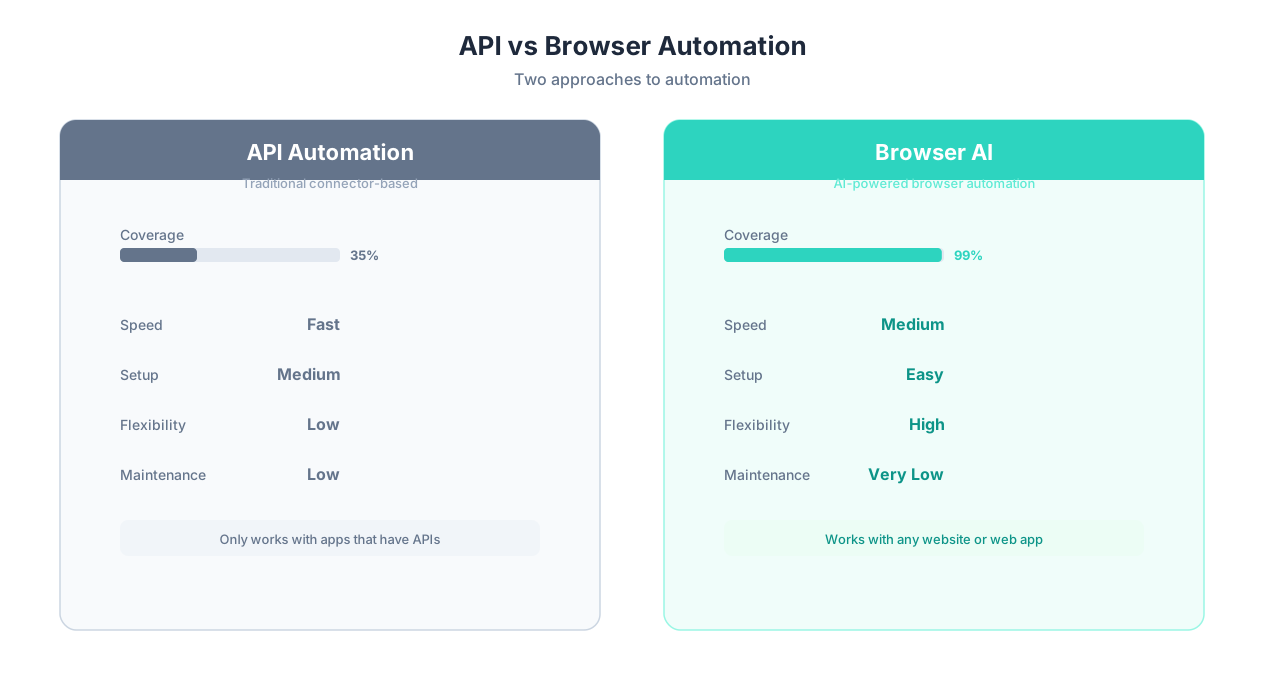
Zapier's 7,000+ integrations cover the top layer — the well-known SaaS tools that millions of businesses use. But beneath that layer is a much larger universe of websites and applications that power daily business operations and will never have API connectors.
Why This Gap Exists
Three structural reasons explain why most web applications lack API integrations:
- No business incentive: Government portals, competitor websites, and public data sources have no motivation to build APIs for third-party automation. A state DMV will never build a Zapier connector.
- Legacy architecture: Many enterprise systems were built before APIs became standard. Rebuilding them with modern APIs is a multi-year, multi-million-dollar project that organizations continually defer.
- Niche market size: Industry-specific tools serving thousands (not millions) of users cannot justify the engineering investment required to build and maintain Zapier integrations.
The Real-World Impact
For a typical 50-person company, the automation coverage gap looks something like this:
| Category | Apps/Sites Used | With Zapier Integration | Without Integration | % Uncovered |
|---|---|---|---|---|
| Core SaaS (CRM, email, chat) | 12 | 11 | 1 | 8% |
| Finance/accounting | 6 | 4 | 2 | 33% |
| Industry-specific tools | 8 | 2 | 6 | 75% |
| Government/regulatory portals | 5 | 0 | 5 | 100% |
| Vendor/supplier portals | 15 | 3 | 12 | 80% |
| Internal tools/legacy systems | 7 | 0 | 7 | 100% |
| Competitor/market research sites | 20 | 0 | 20 | 100% |
| Total | 73 | 20 | 53 | 73% |
💡 Key Insight
The 65% gap is not a Zapier problem — it is an API problem. No integration platform, no matter how many connectors it builds, can cover websites and applications that do not offer APIs. Browser automation is the only approach that works for these tools, because it interacts with the UI directly rather than requiring backend API access.
This is why comparing Autonoly to Zapier is not really about "which is better" — it is about understanding that they solve fundamentally different parts of the automation puzzle. Zapier automates the 35% of your tools that have APIs. AI browser automation handles the 65% that do not. Together, they cover everything.
Feature Comparison: API Platform vs AI Browser Automation Platform
Now let us compare specific features across both platforms. This is an apples-to-oranges comparison in many ways — like comparing a delivery truck to a helicopter — but understanding the feature differences helps clarify which tool fits which need.
| Feature | Zapier | Autonoly | Notes |
|---|---|---|---|
| API integrations | 7,000+ apps | Growing library + any API via custom connector | Zapier wins on breadth |
| Browser automation | Not available | Full live browser control | Autonoly only |
| Natural language setup | Limited (recent AI addition) | Core feature — AI agent chat | Autonoly native |
| Visual workflow builder | Yes — mature drag-and-drop | Yes — AI-assisted builder | Zapier more mature |
| Conditional logic | Yes — paths, filters, formatters | Yes — AI-generated conditions | Both strong |
| Scheduled triggers | Yes — time-based, webhook, polling | Yes — cron-based scheduling | Both strong |
| Web scraping | Not available | Full AI-guided scraping | Autonoly only |
| Form filling | Not available (API-based form submission only) | Full UI-based form filling | Autonoly only |
| PDF processing | Limited (via third-party integrations) | Native AI-powered PDF extraction | Autonoly stronger |
| Self-healing automation | No — fails if API changes | Yes — AI adapts to UI changes | Autonoly advantage |
| Cross-session learning | No | Yes — agents improve over time | Autonoly only |
| Team collaboration | Yes — shared workspaces, folders | Yes — shared workspaces, roles | Both strong |
| Error handling | Retry, skip, custom paths | AI-assisted recovery + retry | Autonoly more adaptive |
| Execution speed | Sub-second (webhook) | Seconds to minutes (browser-based) | Zapier faster for API tasks |
| Data transformation | Built-in formatter, code steps | AI-powered transformation | Both capable |
| Mobile app | Yes | Web dashboard (mobile responsive) | Zapier more polished |
📊 By the Numbers
Zapier executes API-to-API tasks in under 1 second via webhooks. Autonoly's browser-based tasks take 10-60 seconds per page interaction. For pure API workflows, Zapier is 10-100x faster. For tasks requiring browser interaction, Autonoly provides a capability Zapier simply does not have — speed is not the relevant metric when the alternative is manual work.
The Core Difference Visualized
Think of automation needs as a spectrum:
| Automation Type | Zapier | Autonoly | Example |
|---|---|---|---|
| API-to-API (both apps have APIs) | Excellent | Good | Stripe payment triggers Slack notification |
| API-to-Browser (one app lacks API) | Cannot do | Excellent | CRM update triggers government portal filing |
| Browser-to-API (source lacks API) | Cannot do | Excellent | Scrape competitor pricing, update Google Sheets |
| Browser-to-Browser (neither has API) | Cannot do | Excellent | Copy data from legacy portal to internal tool |
Zapier excels in the first category. Autonoly covers all four. The question is how much of your automation need falls into the first category versus the other three.
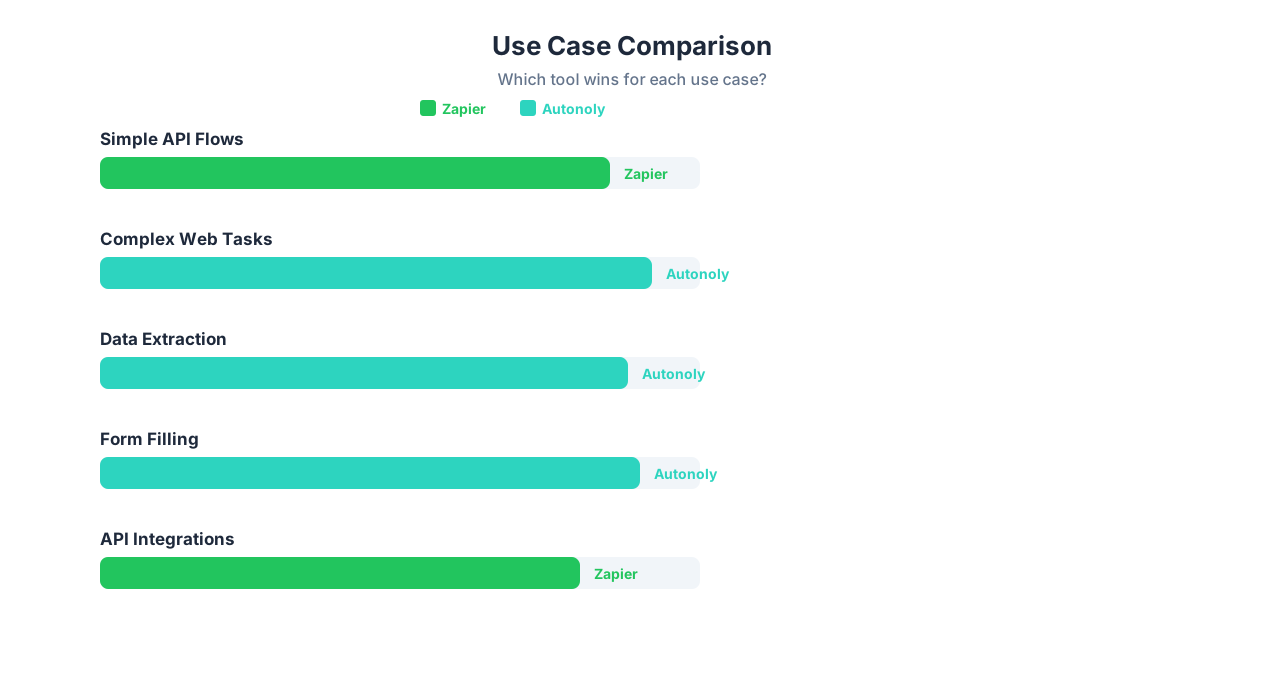
Use Case: When Zapier Is the Better Choice
Zapier remains the better choice in several clear scenarios. Here is when you should use Zapier instead of (or alongside) Autonoly.
1. Both Apps Have Reliable Zapier Connectors
If your workflow connects two well-supported SaaS apps — Gmail to Slack, Stripe to QuickBooks, Typeform to HubSpot — Zapier handles this faster, more reliably, and more cost-effectively than browser automation. API-to-API data transfer is inherently faster and more reliable than navigating web UIs.
2. You Need Sub-Second Trigger Response
Zapier's webhook triggers fire in under a second. If you need near-instant automation ("the moment a payment comes in, immediately send a confirmation email"), Zapier's speed advantage is significant. Browser automation introduces seconds of latency per page interaction.
3. You Want the Largest Integration Library
With 7,000+ connectors, Zapier has integrations for nearly every popular SaaS tool. If you are evaluating tools and all your apps are in Zapier's directory, the setup simplicity is hard to beat.
4. Your Team Already Uses Zapier Extensively
If your organization has 50+ Zaps running, team members trained on the platform, and established workflows, the switching cost is real. Adding Autonoly alongside Zapier makes more sense than replacing it.
💡 Key Insight
Zapier is the better tool for pure API-to-API workflows where both apps have reliable connectors. This is not a consolation point — it is a genuine, significant advantage. API communication is faster, more reliable, and more efficient than browser automation for the apps it supports. Use Zapier where it works; use AI browser automation where it does not.
5. Simple, Linear Workflows
For straightforward "when this happens, do that" workflows without complex logic, Zapier's template library gets you running in minutes. A 2-step Zap connecting Typeform to Google Sheets is simpler to set up than describing the same task to an AI agent. Zapier has optimized this experience over a decade — the template library alone covers thousands of common trigger-action combinations.
6. You Need Enterprise Compliance and Established Vendor Status
Zapier is SOC 2 Type II certified, HIPAA compliant, and has been vetted by thousands of enterprise procurement teams. For organizations where vendor approval processes are strict and security reviews are mandatory, Zapier's established compliance posture is a genuine advantage. Newer platforms — including Autonoly — are building these certifications but may not yet meet every enterprise compliance checklist.
Zapier's Ideal Scenarios
| Scenario | Why Zapier Wins |
|---|---|
| New Shopify order triggers Slack notification | Direct API, sub-second delivery |
| Google Calendar event creates Asana task | Native connectors, zero maintenance |
| Stripe payment adds row to Google Sheets | Reliable, real-time, simple setup |
| HubSpot deal update triggers email sequence | Deep CRM integration |
| Typeform submission creates Notion page | Template exists, 2-minute setup |
Use Case: When Autonoly Is the Better Choice
Autonoly becomes the right choice whenever your automation requires interaction with websites, portals, or applications that lack API integrations. Here are specific scenarios.
1. The Website You Need to Automate Has No API
Government portals, competitor websites, vendor portals, legacy systems, internal tools — if there is no API, Zapier cannot help. Autonoly's live browser control interacts with any website through the UI, exactly as a human would. This is Autonoly's primary advantage and the most common reason teams adopt it alongside Zapier.
2. You Need Web Scraping
Extracting data from websites — competitor pricing, job listings, real estate data, product catalogs — requires browser automation. Zapier has no web scraping capability. Autonoly's AI-guided scraping handles dynamic pages, pagination, and JavaScript-rendered content. See our guides on scraping competitor data, Google Maps, LinkedIn, and Zillow.
3. You Need to Fill Forms Across Multiple Portals
Insurance agents filing quotes on 6 carrier portals, HR teams posting jobs on 8 boards, compliance teams submitting reports to regulatory sites — form filling across multiple portals is a browser task that Zapier cannot address.
4. You Need to Process Documents
Extracting data from PDF invoices, purchase orders, contracts, and reports is a core business need. Autonoly's AI-powered PDF extraction handles diverse document formats. Zapier offers limited document processing through third-party integrations that add cost and complexity.
5. You Want AI to Build Workflows From Descriptions
Zapier recently added AI features, but its core workflow creation is still drag-and-drop. Autonoly was built AI-first — describe what you want in plain English through the AI agent chat, and the agent builds and executes the workflow. For complex, multi-step automations, this is dramatically faster than manually connecting steps.
6. Your Automations Keep Breaking
If you are using third-party scrapers or browser tools alongside Zapier and they constantly break when websites change, Autonoly's cross-session learning and LLM-based adaptation reduce maintenance overhead by 80-90%. The AI agent reasons about what changed and adjusts automatically.
Autonoly's Ideal Scenarios
| Scenario | Why Autonoly Wins |
|---|---|
| Scrape 20 competitor pricing pages daily | No API exists — browser automation required |
| Fill out government permit applications | Government portals lack APIs entirely |
| Extract data from 100 PDF invoices weekly | AI-powered document processing |
| Post job listings across 8 job boards | Most job boards lack full API coverage |
| Monitor regulatory websites for changes | No API — requires website change monitoring |
| Sync data with legacy ERP system | Legacy system has no API |
Pricing Comparison and Using Zapier + Autonoly Together
Pricing Comparison
Zapier and Autonoly use different pricing models, making direct comparison important.
| Plan | Zapier | Autonoly |
|---|---|---|
| Free | 100 tasks/month, 5 Zaps | Limited agent runs |
| Starter | $19.99/month — 750 tasks | $49/month — 500 runs |
| Professional | $49/month — 2,000 tasks | $79/month — 2,000 runs |
| Team | $69/month — 2,000 tasks, shared workspace | $299/month — 10,000 runs, team features |
| Enterprise | Custom pricing | Custom pricing |
⚠️ Important Note
"Tasks" in Zapier and "runs" in Autonoly are not equivalent units. A Zapier task is a single action step (one Zap with 5 steps consumes 5 tasks per execution). An Autonoly run is one complete workflow execution regardless of steps. A 10-step workflow on Zapier costs 10 tasks; the same workflow on Autonoly costs 1 run. Factor this into your cost comparison.
The Case for Using Both Tools Together
This may be surprising coming from Autonoly, but the smartest approach for many teams is to use both tools:
- Zapier handles API-to-API workflows — connecting your SaaS tools where reliable connectors exist
- Autonoly handles browser-based workflows — automating websites, portals, and apps without APIs
- The two can connect — Zapier can trigger Autonoly workflows via webhook, and Autonoly can feed data into Zapier-connected apps
This combined approach gives you complete automation coverage:
| Layer | Tool | Coverage |
|---|---|---|
| API integrations (SaaS tools) | Zapier | ~35% of business app interactions |
| Browser automation (everything else) | Autonoly | ~65% of business app interactions |
| Total | Both | ~100% coverage |
Example: Combined Workflow
A realistic combined workflow: "When a new lead enters HubSpot (detected by Zapier), have Autonoly research the company by visiting their website, extract key information (industry, size, recent news), and update the HubSpot record with enrichment data (via Zapier)."
In this workflow, Zapier handles the HubSpot trigger and the final HubSpot update (API-to-API), while Autonoly handles the website research (browser automation). Each tool does what it does best.
💡 Key Insight
The question is not "Zapier OR Autonoly" — it is "where does each tool fit in my automation stack?" Teams that use both achieve near-complete automation coverage. Teams that use only Zapier leave 65% of their manual work untouched. Teams that use only Autonoly pay browser automation costs for simple API tasks that Zapier handles more efficiently.
The Bottom Line
Zapier is an excellent tool. It pioneered no-code automation and remains the best platform for API-to-API workflows. But API integration alone cannot automate everything a business needs. The websites, portals, documents, and legacy systems that lack APIs represent the majority of manual work — and that is exactly where AI browser automation fills the gap.
If all your tools have Zapier connectors and your workflows are trigger-action patterns, Zapier is the right choice. If you need to interact with websites, process documents, scrape data, or fill forms on portals without APIs, Autonoly is the right tool. If you need both (most teams do), use both.
For more platform comparisons, see our Zapier vs Make vs n8n vs Autonoly comparison, our free Zapier alternatives guide, or our guide to automating without APIs.
Frequently Asked Questions
Can Zapier automate websites?
No. Zapier connects apps through APIs. It cannot visit websites, click buttons, fill forms, or scrape data from web pages. For website automation, you need a browser automation tool like Autonoly.
Is Autonoly a Zapier replacement?
Not exactly. Autonoly replaces Zapier for browser-based automation tasks (web scraping, form filling, portal interaction). For simple API-to-API workflows where both apps have Zapier connectors, Zapier remains the faster and more cost-effective option. Many teams use both tools together.
Can I connect Zapier and Autonoly?
Yes. Zapier can trigger Autonoly workflows via webhooks, and Autonoly can feed data into Zapier-connected apps. This lets you use Zapier for API integrations and Autonoly for browser automation within the same end-to-end workflow.
Which is cheaper for basic automation?
Zapier starts at $19.99/month for 750 tasks. Autonoly starts at $49/month for 500 runs. For simple API-to-API workflows, Zapier is cheaper. For workflows that require browser automation (which Zapier cannot do at all), Autonoly is the only option — making price comparison irrelevant.
Does Autonoly support the same 7,000+ integrations as Zapier?
No. Autonoly's API integration library is smaller. However, Autonoly can interact with any website through browser automation — including all 7,000+ apps Zapier supports (via their web UIs) plus the thousands of sites and portals that Zapier cannot reach.
What about Make or n8n as alternatives?
Make and n8n are integration platforms similar to Zapier — they also rely on API connectors and cannot browse websites. See our full comparison of Zapier vs Make vs n8n vs Autonoly and our n8n vs Zapier vs Make comparison for details.