


Why Convert Emails to PDF Archives?
Email is ephemeral by nature — accounts get deactivated when employees leave, servers get migrated to new platforms, inboxes get cleaned up by overzealous storage management policies, and entire email systems get replaced during vendor transitions. But many email communications have long-term legal, regulatory, or business value that far outlasts the email system they were created in. Client agreements confirmed via email, vendor negotiations, compliance correspondences, intellectual property discussions, and employment-related communications may need to be preserved for years or even decades. The disconnect between email's transient nature and the permanent value of its content creates a fundamental business risk that most organizations underestimate until it is too late.
The risk of relying on live email for archival is real and underappreciated. When a key employee leaves the company and their Google Workspace account is deactivated after the standard 30-day grace period, every email they sent and received is gone — including the contract negotiation thread with your biggest client, the vendor agreement that included special pricing terms, or the compliance correspondence that proves your organization met its regulatory obligations. Recovering these communications after the fact ranges from difficult to impossible. Even with data retention policies enabled in Google Workspace, the recovery process is complex, time-limited, and often incomplete.
Even when email accounts remain active, email is not a reliable archive. Messages get accidentally deleted, labels get reorganized, and search becomes unreliable as inbox volume grows. A legal team that needs to produce communications from three years ago for a discovery request faces hours of searching through a cluttered inbox, hoping nothing critical was deleted in a cleanup sweep. Gmail's storage limits add another pressure — when an employee hits their quota, they start deleting old messages, potentially destroying records your organization is legally required to retain.
PDF is the gold standard for document archival. It is format-stable (a PDF created today will look identical in 20 years), widely accepted by courts and regulators as evidence, and easy to store, search, and share. By automatically converting important Gmail threads to PDFs, you create a durable archive that survives email system changes, employee departures, storage migrations, and platform transitions. Your communications are preserved in a format that will outlast any email provider. The archive exists independently of any single person's inbox, making it a true organizational asset rather than a personal one.
How the AI Agent Archives Emails
Autonoly's AI Agent Chat connects to your Gmail account and identifies emails matching your archival criteria. For each matching email thread, the agent:
- Reads the full thread: All messages in the conversation, including replies and forwards, are captured in chronological order
- Extracts metadata: Sender, recipients (To, CC, BCC), timestamps, subject line, and message IDs are preserved in the PDF header
- Formats the content: Email body content is rendered as formatted text, preserving paragraphs, lists, links, and inline images
- Includes attachments: File attachments are either embedded in the PDF or saved as companion files alongside it
- Generates the PDF: The final document looks like a printed email thread — professional, readable, and complete
- Verifies integrity: A hash of the original email content is included in the PDF metadata for tamper-detection purposes
The Data Extraction engine handles HTML emails, plain-text emails, and mixed-format threads. Rich formatting like tables, images, and styled text is preserved in the PDF output. For emails with inline images (like signatures or embedded charts), the images appear in their correct positions. The agent strips tracking pixels, invisible spacer images, and other invisible elements that add no archival value while preserving all visible content faithfully. The resulting PDF is a faithful reproduction of what the email looked like when it was received.
Archival Organization
The agent saves PDFs to Google Drive in a folder structure you define:
By date:
/Email Archive/2026/March/for chronological browsingBy sender:
/Email Archive/Clients/AcmeCorp/for client-organized archivesBy label:
/Email Archive/Legal/or/Email Archive/Contracts/mirroring your Gmail labelsBy project:
/Email Archive/Project-Alpha/for project-based organizationBy department:
/Email Archive/Sales/or/Email Archive/HR/for team-based filing
Each PDF is named consistently — typically {Date}_{Sender}_{Subject}.pdf — making files easy to find without opening them. The agent truncates long subjects and sanitizes filenames to avoid filesystem issues. Use the Visual Workflow Builder to set up custom naming conventions and folder structures that match your organization's filing standards. The agent also maintains an index spreadsheet in Google Sheets that catalogs every archived thread with its metadata, making the entire archive searchable without opening individual PDFs.
Compliance and Legal Requirements
For industries with regulatory retention requirements (finance, healthcare, legal, government), email archival is not optional — it is a legal obligation. HIPAA requires healthcare organizations to retain certain communications for 6 years. Financial services regulations like SOX mandate retention of audit-related communications. Employment law requires retention of HR-related emails for statute-of-limitations periods. This workflow ensures compliance by:
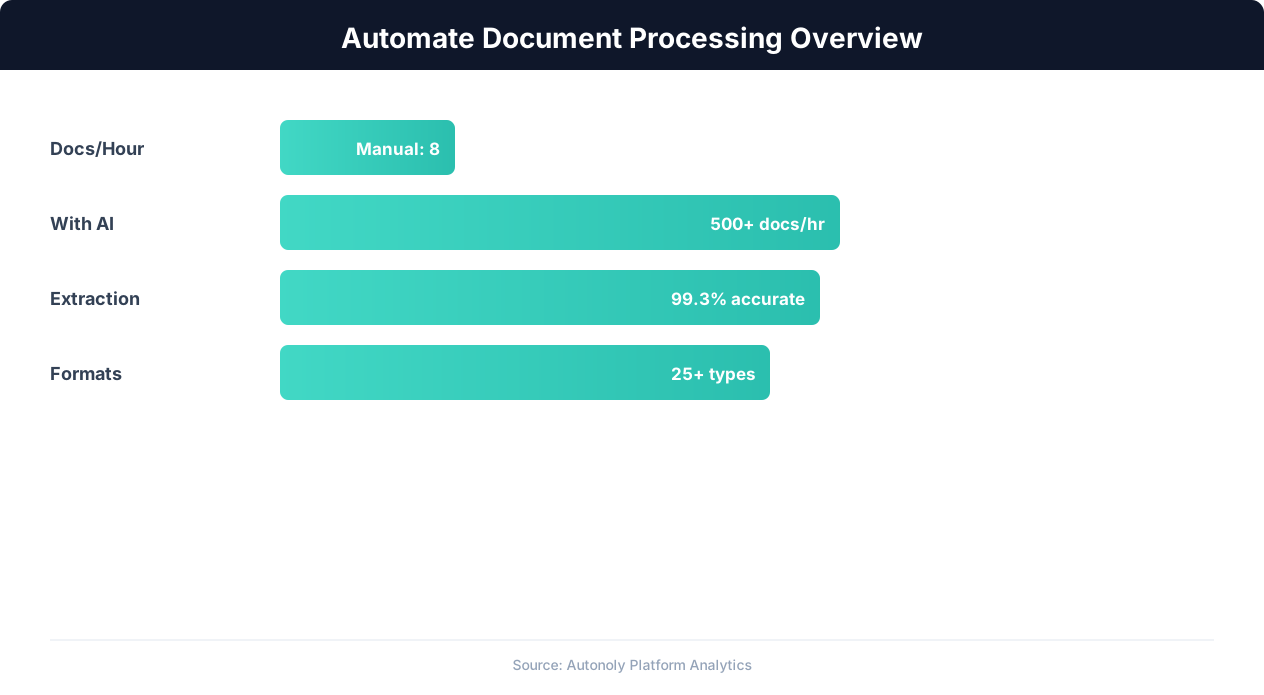
Document processing automation time savings by document type
Key Insight: Companies automating document workflows see a 90% reduction in processing time, cutting invoice handling from 12 days to less than 24 hours (Ardent Partners).
Preserving metadata: All email headers are included, providing a verifiable chain of communication
Timestamping: Each PDF includes the archival date and the original email timestamps
Completeness: Full threads are archived, not just individual messages, preserving conversation context
Immutability: Once saved as a PDF in Google Drive, the content cannot be accidentally edited (unlike live email threads)
Auditability: Every archival action is logged with the email identifier, archival timestamp, and destination path
Add Logic & Flow conditions to apply different retention rules to different email categories. Legal correspondence gets archived indefinitely in a locked folder, while routine vendor emails are archived for 3 years. Compliance-critical emails can trigger additional actions — logging to a Google Sheets retention tracker or sending a confirmation to a compliance officer via Slack. Use Data Processing to apply retention policies that automatically flag archives approaching their expiration date for review or deletion.
Handling Attachments
For emails with attachments, you have configuration options:
Embed in PDF: Small attachments (images, short documents) are embedded directly in the archive PDF
Save alongside: Larger attachments are saved as separate files in the same Drive folder, with a reference in the PDF
Attachment index: A summary table at the end of the PDF lists all attachments with filenames, sizes, and types
The agent handles all common attachment types — PDFs, Office documents, images, and compressed files. For very large attachments, it saves the file to Drive and includes a link in the archive PDF. Use Browser Automation to access and archive email threads from web-based email clients beyond Gmail when needed. Use SSH & Terminal to push archived PDFs to on-premises storage systems or compliance platforms that require local file storage.
Use Cases
Legal holds: When litigation is anticipated, archive all email threads involving specific parties or topics. The PDF archive provides a defensible, timestamped record that cannot be altered after creation. The content hash in the PDF metadata provides additional tamper-evidence for litigation support.
Employee offboarding: Before deactivating a departing employee's email account, archive all their critical threads — client communications, project discussions, and contractual correspondence — so institutional knowledge is preserved. Run the archival as part of your standard offboarding checklist to ensure nothing is lost.
Client project closeout: At the end of a project, archive all client communication threads into a project folder for future reference, disputes, or audit purposes. The archive serves as a complete record of every decision made and every requirement discussed.
Regulatory compliance: Meet industry-specific email retention requirements with automated, consistent archival that does not depend on individual employees remembering to save important messages. The automated process provides demonstrable compliance controls for regulatory audits.
Scheduling and Volume
The workflow runs weekly by default, archiving all new matching emails since the last run using differential processing — only threads with new messages since the last archival run are processed. For high-volume compliance needs, increase to daily processing using cron-style scheduling. The agent handles hundreds of email threads per run efficiently, and each thread is processed once and labeled in Gmail to prevent duplicate archival. The Gmail label also serves as a visual indicator for users, showing which threads in their inbox have been archived.
Each run produces a summary log showing how many threads were archived, total file sizes, and any threads that could not be processed. Send this summary to a Slack channel or via Gmail to your compliance team so they have visibility into the archival process. The notification chain ensures someone is always aware of archival status and can investigate any failures promptly. A monthly rollup report summarizes total archive volume, storage consumption, and archival completeness statistics. Over weeks and months, your Drive folder grows into a comprehensive, searchable email archive that protects your organization's communications permanently. Browse the templates library for pre-built archival workflows for legal, healthcare, and financial services. See pricing for storage and processing limits per plan.
Further Reading
Explore more about the tools and techniques used in this workflow: Automate Email Reports, No Code Automation Guide, Pdf Ocr, Scheduled Execution.