Zapier Is Great -- Until You Hit the Wall
Let us start with an honest statement: Zapier is an outstanding product. It is the undisputed leader in API-based workflow automation, connecting over 7,000 applications through pre-built integrations. Millions of businesses use it daily to wire together their SaaS tools, and for those workflows, it is fast, reliable, and genuinely hard to beat.
But if you have used Zapier for any length of time, you have almost certainly experienced the moment where you try to automate something and realize Zapier simply cannot do it. You search the integration directory. You try workarounds with webhooks. You browse the community forum for hacks. And eventually you accept that the task you need to automate lives outside Zapier's reach.
That moment is not a Zapier bug. It is an architectural boundary. Zapier works by talking to applications through their APIs -- programmatic interfaces that let software communicate with other software. When both ends of your workflow have APIs and Zapier connectors, everything works beautifully. When one end does not have an API, Zapier has no way to interact with it at all.
Understanding the Distinction
This post is not about replacing Zapier. It is about understanding the specific category of tasks that fall outside API automation entirely, and finding the right tool for those tasks. The best automation stack for most teams includes both API integration (Zapier) and browser automation (for everything Zapier cannot reach).
This distinction matters because the tasks Zapier cannot automate are often the ones that consume the most manual time. They tend to involve older systems, government websites, vendor portals, and niche platforms -- exactly the kinds of tools that lack modern APIs and probably never will have them. The result is a frustrating split: your modern SaaS tools are automated, but your most tedious manual work remains untouched.
Understanding exactly where Zapier hits its limits -- and what fills the gap -- lets you build a complete automation strategy instead of accepting that some tasks will always be manual.
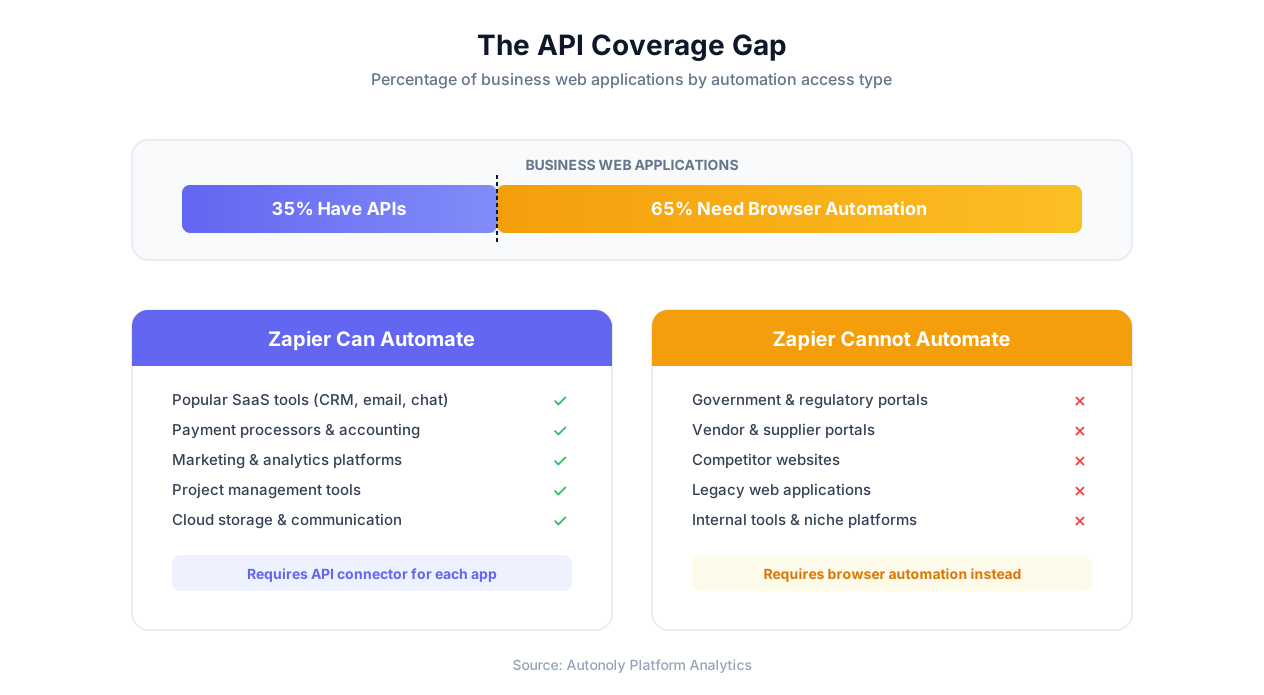
The API Coverage Gap: Why 65% of Business Tools Can't Be Automated With Zapier
Zapier's 7,000+ integrations sound comprehensive, but they represent a specific slice of the tools businesses actually use. The uncomfortable reality is that most websites and web applications that organizations interact with daily do not have APIs, do not have Zapier connectors, and never will.
Consider what a typical mid-size company interacts with beyond their core SaaS stack:
- Government and regulatory portals -- State licensing boards, IRS filing systems, permit applications, environmental compliance reporting, customs declarations. Not a single one of these has a Zapier connector, and given their nature, they almost certainly never will.
- Vendor and supplier portals -- Order tracking systems, invoice submission portals, distributor catalogs, wholesale pricing databases. Most of these are proprietary web applications built for specific supply chains with no public API.
- Competitor websites -- Pricing pages, product catalogs, job listings, press releases, store locations. Competitors have zero incentive to provide APIs that make it easy for you to monitor them.
- Industry-specific platforms -- MLS systems for real estate, court filing systems for legal, medical record portals for healthcare, fleet management systems for logistics. These serve thousands of users (not millions), making API development and Zapier integration economically unfeasible.
- Internal and legacy systems -- Custom-built employee portals, older ERP installations, homegrown CRM systems, intranet tools built a decade ago. These were never designed for external API access.
Why This Gap Is Structural
Three forces ensure this gap will persist:
- No economic incentive: Government agencies, competitors, and niche vendors have no business reason to build Zapier connectors. A state DMV serves its constituents through a web portal; building an API for automation platforms is not in their mandate or budget.
- Legacy architecture: Enterprise systems built before APIs became standard would require significant re-architecture to expose programmatic interfaces. Many organizations have deferred this investment indefinitely.
- Market size economics: Building and maintaining a Zapier integration requires ongoing engineering effort. For platforms serving fewer than 100,000 users, the cost rarely justifies the investment.
Key Insight
The 65% gap is not a Zapier problem -- it is an API problem. No integration platform can cover tools that do not offer programmatic access. The only way to automate interactions with these tools is through the same interface humans use: the browser.
This is why the question is not "Zapier or something else" -- it is "Zapier plus what else?" API automation covers the well-connected SaaS layer. Browser automation covers everything beneath it. Together, they eliminate the gap.
Eight Specific Things Zapier Cannot Do
Let us move from the abstract to the concrete. Here are eight specific categories of automation that Zapier's architecture fundamentally cannot handle, regardless of workarounds or third-party add-ons.
1. Automate Websites That Don't Have APIs
This is the core limitation. If a website or web application does not expose an API, Zapier cannot interact with it. Period. There is no "browse website" action in Zapier, no way to navigate to a URL and extract content, and no way to fill in a form on a site that lacks a connector. For the thousands of portals, tools, and sites your team interacts with that fall outside Zapier's 7,000-app library, the task stays manual.
Example: Your team spends three hours per week checking order status on a supplier's web portal that has no API. Each check involves logging in, navigating to the orders page, searching for specific order numbers, and recording the status. Zapier cannot automate any part of this.
2. Fill Forms on Government and Vendor Portals
Government portals for tax filing, permit applications, compliance reporting, and licensing are web-only interfaces with no programmatic access. The same applies to many vendor and distributor portals. If your business files reports across multiple state agencies or submits applications through multiple portals, each one requires manual form filling. Zapier cannot navigate to these sites, enter credentials, fill form fields, upload documents, or click submit.
Example: A compliance team files monthly environmental reports across twelve state regulatory portals. Each filing takes 20-30 minutes of manual data entry. That is four to six hours monthly on a single recurring task. Browser-based form automation handles all twelve portals using the same data source.
3. Scrape or Monitor Websites
Zapier cannot visit a website and extract information from it. If you need to monitor competitor pricing, track changes on a regulatory website, scrape job listings for market research, or extract product data from catalogs, Zapier has no mechanism to do this. Some users try combining Zapier with third-party scraping services, but this adds cost, complexity, and fragility to the workflow.
Example: An e-commerce team monitors pricing across 15 competitor websites daily. Each price check involves visiting the site, navigating to specific product pages, and recording the current price. This is inherently a browser task that no API platform can address.
4. Handle CAPTCHAs and Anti-Bot Challenges
Many websites use CAPTCHA challenges to verify human users. Since Zapier communicates through APIs, CAPTCHAs are irrelevant for the sites it supports. But for sites that lack APIs and require browser interaction, CAPTCHAs become a barrier that traditional scripted automation cannot overcome. AI-powered browser automation solves visual CAPTCHAs using the same pattern-recognition capabilities that let it understand page layouts.
5. Process PDFs and Documents Visually
Zapier can move PDF files between apps (save a Gmail attachment to Dropbox), but it cannot open a PDF, read its contents, extract structured data from tables, or interpret handwritten text. Many businesses receive critical data in PDF format -- invoices, purchase orders, contracts, regulatory filings, lab results -- and need that data entered into their systems. Zapier's file-passing capability does not address the data extraction problem.
Example: An accounts payable team processes 200 vendor invoices monthly. Each invoice has a different layout with line items, tax amounts, and payment terms scattered across the document. AI-powered PDF extraction reads and structures this data automatically.
6. Interact With Legacy Web Applications
Older enterprise applications built on non-standard frameworks often have complex interfaces that only work through the browser. These applications lack APIs entirely. Zapier cannot interact with them. AI browser automation navigates them the same way human users do, adapting to whatever interface the application presents.
7. Navigate Multi-Step Workflows Across Sites
Some business processes span multiple websites in sequence: look up a part number on a manufacturer's site, check availability on the distributor's portal, compare prices on supplier sites, and enter the purchase order internally. Zapier cannot orchestrate cross-site workflows where most sites lack API access. AI browser automation handles these by navigating each site in sequence, carrying data forward.
8. Adapt When Websites Change Their Layouts
Even if you use a third-party web scraping or browser tool alongside Zapier, traditional automation scripts break when websites update their design. A changed button label, a moved form field, or a redesigned navigation menu can disable a scraping workflow overnight. AI-powered browser agents use visual understanding and large language model reasoning to adapt automatically when layouts change, dramatically reducing maintenance overhead compared to selector-based scripting.
Important Clarification
None of these limitations are Zapier defects. They are inherent constraints of the API-based integration model. Zapier is built to connect APIs, and it does that extremely well. The tasks above require a fundamentally different approach -- interacting with websites through their user interface rather than through APIs.
Zapier vs Browser Automation: A Side-by-Side Comparison
To make the distinction concrete, here is a direct comparison of what each approach can and cannot do. This is not about one being better than the other -- it is about understanding which tool fits which job.
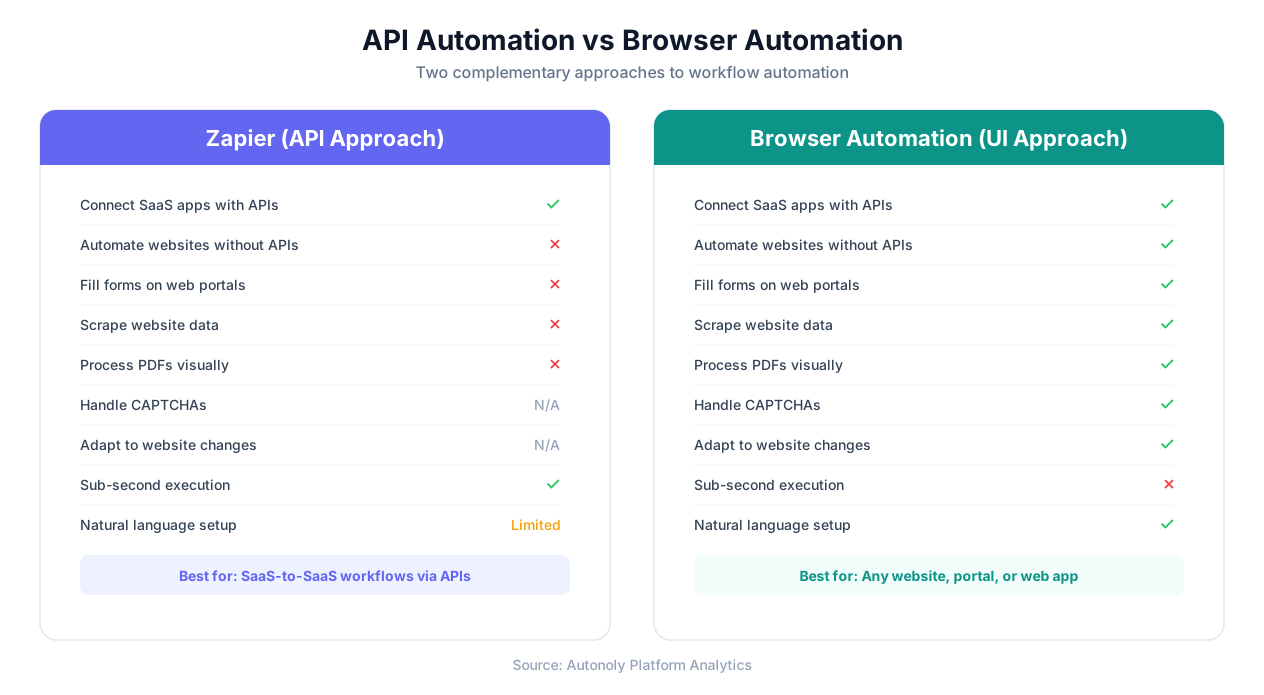
| Capability | Zapier (API Approach) | Browser Automation (UI Approach) |
|---|---|---|
| Connect SaaS apps with APIs | Excellent -- 7,000+ integrations | Supported but not the primary strength |
| Automate websites without APIs | Not possible | Core capability -- works with any website |
| Fill web forms on any portal | Only via API-based form submission | Full UI interaction -- dropdowns, date pickers, file uploads |
| Scrape website data | Not possible | AI-guided extraction from any page |
| Process PDF documents | File transfer only (no data extraction) | Visual AI reads and extracts structured data |
| Handle CAPTCHAs | Not applicable (API bypasses UI) | AI-powered CAPTCHA solving |
| Adapt to website changes | Not applicable | AI adapts automatically using visual reasoning |
| Execution speed | Sub-second (webhook triggers) | Seconds to minutes (browser interaction) |
| Setup complexity | Low for supported apps | Low -- describe task in plain English |
| Maintenance overhead | Low (API contracts are stable) | Low (AI adapts to changes) |
| Enterprise compliance | SOC 2, HIPAA, mature vendor | Growing compliance certifications |
When to Use Which
The decision framework is straightforward:
- Both apps have Zapier connectors? Use Zapier. API-to-API automation is faster, more reliable, and requires zero browser overhead.
- One or both apps lack APIs? Use browser automation. It is the only way to interact with websites that do not offer programmatic access.
- Workflow spans both types? Use both. Let Zapier handle the API-connected steps and browser automation handle the web interaction steps.
Key Insight
For pure API-to-API workflows, Zapier is the better tool. This is not a consolation point -- it is a genuine advantage. API communication is inherently faster and more reliable than browser interaction for the apps that support it. The goal is to use the right tool for each part of your automation, not to force one tool to do everything.
The most effective automation teams treat Zapier and browser automation as complementary layers. Zapier covers the top layer of well-connected SaaS applications. AI browser automation covers the larger layer of websites, portals, and legacy tools that lack API access. Between the two, there is no website or application that cannot be automated.
Real-World Scenarios Where Zapier Falls Short
Theory is useful, but specifics are more convincing. Here are eight concrete business scenarios that teams commonly try to automate with Zapier before realizing it cannot handle them -- along with how browser automation solves each one.
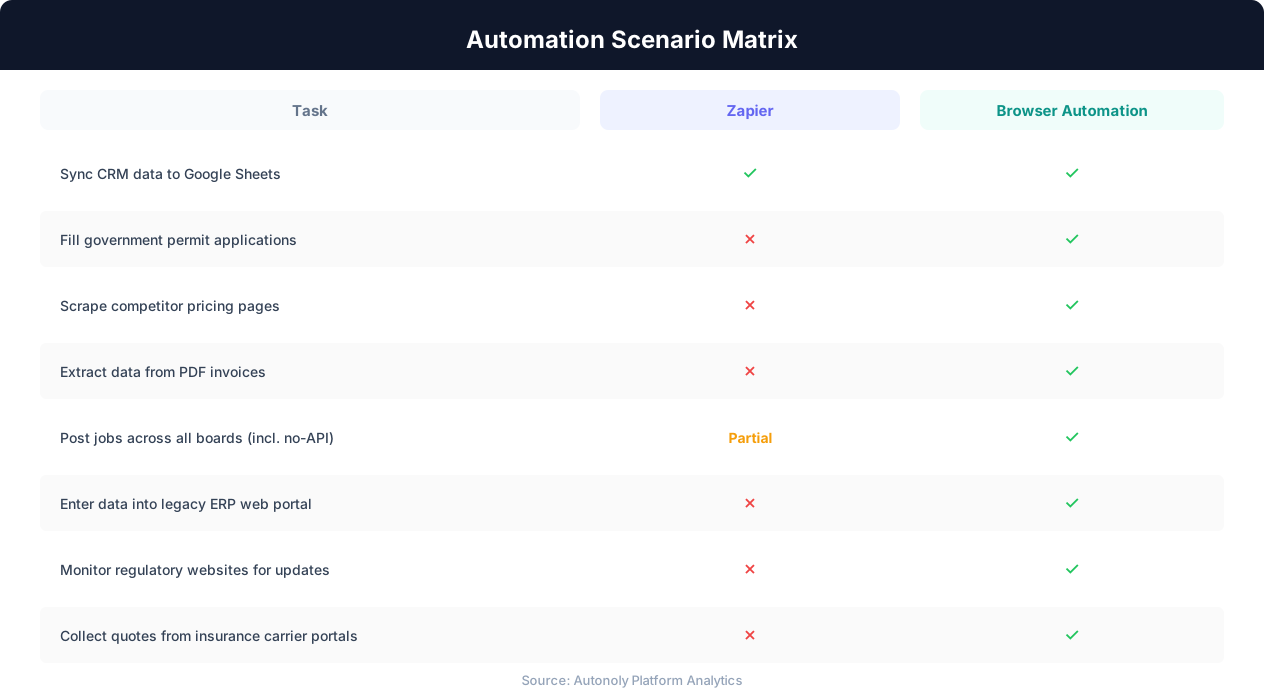
Scenario 1: Government Permit Applications
A construction company files building permits across multiple county and city portals. Each portal has a different form layout, different required documents, and no API. The team spends 15-20 hours per week manually filling these applications.
Zapier: Cannot help. Zero government portals have Zapier connectors.
Browser automation: An AI agent navigates to each portal, fills the application form using data from a central spreadsheet, uploads required documents, and submits. The same workflow adapts to each portal's unique layout. Time reduced to 2-3 hours of supervised automated runs.
Scenario 2: Competitor Price Monitoring
An e-commerce retailer tracks pricing across 20 competitor websites daily to adjust their own pricing strategy. Each competitor's product page has a different structure, and none provide price feeds or APIs.
Zapier: Cannot visit websites or extract data from them.
Browser automation: A scheduled web scraping workflow visits each competitor's site, navigates to the relevant product pages, extracts current prices, and writes them to a Google Sheet. The AI agent handles different page layouts, JavaScript-rendered content, and pagination automatically.
Scenario 3: Vendor Invoice Processing
An accounts payable department receives 300 invoices monthly from 50 different vendors. Each invoice arrives as a PDF with a unique format. The data needs to be entered into the company's accounting system, which is a legacy web application with no API.
Zapier: Can receive email attachments but cannot read PDF content or interact with the legacy accounting portal.
Browser automation: A workflow extracts structured data from each PDF (vendor name, invoice number, line items, totals), then navigates to the accounting portal and enters the data through the web interface.
Scenario 4: Multi-Portal Job Posting
An HR team posts jobs across eight boards. Three have Zapier connectors; five do not. Manual posting to the five takes 30-45 minutes per job per board.
Zapier: Handles the three boards with connectors only.
Browser automation: Posts to all eight boards by navigating to each site, filling the posting form, and submitting. Handles different form structures and field types across all platforms.
Scenario 5: Insurance Quote Collection
An insurance broker collects quotes from six carrier portals for each client. Each portal requires login, multi-step form entry, and PDF download. None have public APIs.
Zapier: Cannot interact with any carrier portal.
Browser automation: An agent logs into each portal, enters client details, downloads the quote PDF, extracts premium details, and compiles all six quotes into a comparison spreadsheet. Total time per client drops from two hours to fifteen minutes.
Scenario 6: Legacy ERP Data Synchronization
A manufacturing company runs an on-premise ERP with a web interface but no API. Sales data from the modern CRM needs to be entered into the ERP daily.
Zapier: Can read CRM data but cannot write to the legacy ERP.
Browser automation: Reads new sales records from the CRM, navigates to the ERP's web interface, and enters each record through the data entry form, handling non-standard UI elements via visual AI.
Scenario 7: Regulatory Website Monitoring
A compliance team monitors five regulatory agency websites for new rules and enforcement actions. Missing a critical update could mean non-compliance.
Zapier: Cannot visit or monitor websites.
Browser automation: A scheduled workflow visits each agency's website daily, checks for new publications, and sends alerts via email or Slack when changes are detected. See our guide on monitoring website changes.
Scenario 8: Cross-Platform Data Migration
A company is migrating from an old project management tool (web-only, no API, no export) to a modern platform. Thousands of records need extraction and re-entry.
Zapier: Cannot extract data from the old system (no API).
Browser automation: Navigates through the old system's web interface, extracts every record with details and attachments, then writes to the new system or exports for bulk import. Handles pagination, nested data, and file downloads automatically.
What to Use Instead: AI Browser Automation
The tool that fills Zapier's gap is AI-powered browser automation. Unlike API integration (which talks to applications through code), browser automation interacts with websites through the same user interface that humans use -- opening a real browser, navigating to pages, reading content, clicking buttons, and filling forms.
How AI Browser Automation Works
The concept is simple: describe what you want to automate in plain English, and an AI agent executes the task in a cloud browser. No coding, no selectors, no API configuration. The agent understands your instructions, navigates to the relevant websites, and performs the actions you described.
With Autonoly, the process works like this:
- Describe the task: Tell the agent what you need in natural language. For example: "Go to the state licensing portal, log in with my credentials, navigate to the renewal section, fill out the renewal form using the data in my Google Sheet, upload the required documents, and submit."
- Agent explores: The AI agent opens a cloud browser, navigates to the target website, and explores the interface to understand its structure. You can watch this happen in real time through live browser view.
- Agent executes: The agent fills forms, clicks buttons, handles dropdowns and date pickers, uploads files, and processes whatever the website requires. If it encounters a CAPTCHA, it solves it. If a page loads slowly, it waits. If a layout looks different from expected, it adapts.
- Convert to workflow: Once the task runs successfully, it converts into a reusable, scheduled workflow. The workflow runs automatically on your chosen schedule without further instruction.
Why AI Makes the Difference
Browser automation is not new -- tools like Selenium and Puppeteer have existed for years. What makes AI browser automation different is the intelligence layer:
- Natural language setup: No coding or CSS selectors. Describe what you want in plain English.
- Visual understanding: The AI agent sees the page the way a human does, understanding layout and context rather than relying on brittle element IDs.
- Self-healing: When a website changes its layout, the AI agent adapts. Traditional scrapers break; AI agents continue working.
- Complex reasoning: The agent handles conditional logic, error recovery, and multi-step decision-making.
The Complement, Not the Replacement
AI browser automation does not replace Zapier for API workflows. It replaces the manual work that Zapier cannot reach. The ideal setup for most teams is Zapier for SaaS-to-SaaS connections plus browser automation for portals, legacy apps, websites, and anything without an API. This combination eliminates the gap entirely.
What You Can Automate With Browser Automation
Anything a human can do in a web browser, an AI agent can automate:
- Fill forms on any website, portal, or web application
- Scrape data from any website, including JavaScript-rendered pages
- Extract data from PDFs and documents
- Navigate multi-step workflows across multiple websites
- Log into authenticated portals and perform tasks
- Download reports, files, and documents from dashboards
- Monitor websites for changes and send alerts
- Enter data from spreadsheets into web applications
The key difference from Zapier is universality: browser automation works with any website, regardless of whether it has an API, a connector, or any programmatic access at all. If it has a URL and a user interface, it can be automated.
Building a Complete Automation Stack: Zapier + Browser Automation
The most effective automation strategy does not choose between Zapier and browser automation -- it uses both. Each tool handles the automation category it was designed for, and together they eliminate manual work across every system your team touches.
Layer 1: API Integration (Zapier)
Use Zapier for all workflows where both endpoints have reliable API connectors:
- CRM to email marketing synchronization
- Payment processor to accounting software
- Form submission to project management tool
- Calendar events to Slack notifications
- E-commerce orders to fulfillment systems
These workflows are Zapier's strength. They run in sub-second time, rarely fail, and require minimal maintenance. Do not try to replace these with browser automation -- API communication is objectively better for apps that support it.
Layer 2: Browser Automation (Autonoly)
Use AI browser automation for everything Zapier cannot reach:
- Government and regulatory portal filings
- Vendor portal data entry and order tracking
- Competitor website monitoring and price scraping
- Legacy system data synchronization
- PDF and document data extraction
- Cross-site data migration and transfer
- Form filling on portals without APIs
Layer 3: Connecting the Layers
The most powerful workflows span both layers. For example:
- Zapier receives a webhook when a new order arrives in your e-commerce platform.
- Zapier routes the order data to a Google Sheet and sends a Slack notification.
- Autonoly picks up the new row from the Google Sheet on a scheduled run.
- The AI agent navigates to the supplier's web portal (no API), logs in, and submits the purchase order through the portal's web form.
- The agent records the confirmation number back into the Google Sheet.
- Zapier detects the updated row and sends a confirmation email to the customer.
In this workflow, Zapier handles the API-connected steps (webhook, Sheets, Slack, email), and Autonoly handles the browser-dependent step (supplier portal). Neither tool alone could complete the full workflow, but together they automate it end to end.
Key Insight
Google Sheets often serves as the bridge between API and browser automation layers. Zapier writes data to a Sheet; Autonoly reads from it (or vice versa). This simple pattern connects the two tools without complex integration work. See our Google Sheets automation guide for details.
Getting Started
If you are already using Zapier and hitting its limits, adding browser automation is straightforward:
- Identify your manual gaps: List the tasks your team still does manually because Zapier cannot handle them. These are your browser automation candidates.
- Start with one workflow: Pick the manual task that consumes the most time and automate it with Autonoly. Most teams start with form filling, data extraction, or website monitoring.
- Connect the layers: Use Google Sheets, webhooks, or native integrations to bridge your Zapier workflows and browser automation workflows.
- Scale gradually: Once the first workflow is running reliably, move to the next manual task on your list. Each automated workflow frees hours of manual time.
You do not need to abandon Zapier or migrate anything. Browser automation adds coverage for the tasks Zapier was never designed to handle, giving you complete automation coverage across every tool and website your team uses. See our pricing page for plan details.
How to Decide Which Tool You Need
Making the right choice comes down to one question: does the website or application you need to automate have an API?
Decision Framework
| Situation | Recommended Tool | Reason |
|---|---|---|
| Both apps have Zapier connectors | Zapier | API automation is faster and more reliable for supported apps |
| Target website has no API | Browser automation | Only browser interaction works without API access |
| Need to scrape or monitor a website | Browser automation | Zapier cannot visit or read websites |
| Need to fill forms on portals | Browser automation | Zapier cannot interact with web forms directly |
| Need to process PDFs visually | Browser automation | Zapier transfers files but cannot read them |
| Workflow spans API and non-API systems | Both together | Each handles its respective layer |
| Need sub-second trigger response | Zapier | API webhooks are instantaneous |
| Need to automate legacy web apps | Browser automation | Legacy systems rarely have APIs |
Red Flags That You Need Browser Automation
You need browser automation alongside Zapier if any of these apply:
- Team members spend hours weekly on repetitive tasks in web portals
- You have searched Zapier's directory for a tool and found no connector
- Third-party scraping tools break whenever a website updates
- You extract data from PDFs or documents regularly
- Workflows require logging into portals and navigating multi-step processes
- You monitor competitor or regulatory websites for changes
- You interact with government portals for filings or compliance
What to Look for in a Browser Automation Platform
If you decide browser automation is needed, evaluate platforms on these criteria:
- AI-powered setup: Can you describe tasks in natural language? Platforms like Autonoly let you describe what you want in plain English.
- Self-healing: Does the platform adapt when websites change, or do workflows break?
- Cloud execution: Does automation run in a cloud browser, or require your local machine?
- Workflow conversion: Can one-time tasks become repeatable, scheduled workflows?
- Integration capability: Can it connect to Google Sheets, Slack, and email to bridge with Zapier?
- Security: Does it encrypt credentials and provide audit trails?
One Final Note
Do not abandon Zapier for tasks it handles well. API automation is superior to browser automation for supported apps -- it is faster, lighter, and more reliable. The right strategy is to use Zapier where it excels and add browser automation where it cannot reach. Together, they give you complete coverage with no manual gaps.
Compare directly: Best Zapier alternatives.