

Why Automate Lead Follow-Up Sequences?
The difference between a closed deal and a missed opportunity is often timing and persistence. Research consistently shows that most sales require five or more touchpoints before a prospect converts, yet the majority of sales reps give up after one or two emails — a persistence gap documented in sales benchmarking studies from sources like HubSpot. According to industry data, 44% of salespeople abandon a lead after just one follow-up attempt, despite the fact that 80% of sales require at least five follow-up contacts. The problem is not lack of effort — it is lack of bandwidth. When you are juggling dozens of leads simultaneously, manually drafting and scheduling personalized follow-ups for each one becomes impossible. Important leads slip through the cracks, follow-up timing becomes inconsistent, and the personalization that makes outreach effective gets sacrificed for speed.
Automating follow-up sequences with Gmail integration ensures that every single lead receives a consistent, well-timed nurture sequence regardless of how busy your team is. Leads that entered your pipeline from Google Sheets get personalized attention at scale, dramatically increasing your conversion rate without adding headcount. The automation runs every day without fail, sending the right message to the right lead at exactly the right time in their buyer journey.
This approach works especially well for startups and small teams where dedicated marketing automation platforms like HubSpot or Marketo are too expensive or complex to justify. Those platforms start at hundreds of dollars per month and require significant setup time. With Autonoly, your spreadsheet becomes the CRM, and the AI agent handles the outreach — giving you enterprise-grade nurture capabilities at a fraction of the cost and complexity.
The impact on conversion rates is substantial. Teams that implement consistent follow-up sequences typically see a 20-30% increase in lead-to-opportunity conversion rates simply because leads that would have been forgotten now receive timely, relevant touches. For a team generating 100 leads per month, that translates to 20-30 additional opportunities that would have otherwise been lost to inaction.
How the AI Agent Manages Drip Sequences
Autonoly's AI Agent Chat reads your lead spreadsheet, identifies new entries that have not yet received their first email, and sends personalized messages through your connected Gmail account. The agent tracks each lead's position in the sequence by updating a status column in your spreadsheet — you can see at a glance which leads are at which stage, who has been contacted, and who is due for their next touch.
The Data Processing engine handles personalization tokens. Each email template can reference any column in your spreadsheet — lead name, company name, industry, form message, or custom fields. The result feels like a hand-crafted email rather than a mass blast, which significantly improves open and reply rates. Personalized subject lines alone can increase open rates by 26% compared to generic ones.
The agent respects your sending schedule precisely. If you define a sequence of three emails at days 1, 3, and 7, the agent checks each lead's entry date and sends only the email that is due today. Leads that have already replied are automatically skipped — the agent checks your Gmail inbox for responses and marks those leads as engaged. This prevents the embarrassing situation of sending an automated follow-up to someone who already responded.
Building Your Email Sequence
Use the Visual Workflow Builder to design your sequence visually. Each step represents an email in the drip campaign with its own template, delay interval, and send conditions. Common sequences include:
Day 1: Introduction email referencing their specific inquiry
Day 3: Value proposition with a relevant case study or resource
Day 7: Social proof email with customer testimonials
Day 14: Final follow-up with a direct calendar booking link
You can create multiple sequences for different lead sources or qualification levels. The Logic & Flow engine lets you branch the sequence based on spreadsheet data — send one sequence to enterprise leads and a different one to small business leads. Leads from a webinar signup might receive a sequence that references the webinar topic, while leads from a pricing page form get a more direct sales-oriented sequence. Browse the templates library for pre-built email sequence workflows you can customize.
What Data You Get
Every interaction is tracked and logged back to your Google Sheets spreadsheet:
Lead Name and Email — The recipient of each message
Sequence Step — Which email in the sequence was sent (Email 1, Email 2, etc.)
Send Timestamp — Exact date and time the email was delivered
Status — Sent, Replied, Bounced, or Opted Out
Reply Date — When the lead responded, if applicable
Days Since Entry — How long the lead has been in the sequence
This data gives you a complete audit trail of all outreach activity and enables conversion funnel analysis — you can see exactly where in the sequence leads tend to engage or drop off.
Personalization and Deliverability
Mass email tools often land in spam because they send from shared infrastructure with poor sender reputation. Because Autonoly sends through your own Gmail account via Browser Automation, emails come from your real email address with your real sending reputation. This dramatically improves deliverability compared to bulk email platforms. The emails carry your authentic Gmail headers, your signature, and your domain reputation — making them indistinguishable from personally typed messages.
The agent also manages sending velocity intelligently. It spaces emails throughout the day rather than blasting them all at once, mimicking natural human sending behavior. This protects your Gmail account from rate limits and spam flags. For Google Workspace accounts, the agent stays well within the 2,000 daily send limit, and for personal Gmail accounts, it respects the 500 daily limit.
Customizing Your Workflow
Beyond basic drip sequences, you can build sophisticated nurture workflows. Add conditional branches that change the next email based on the lead's industry or company size. Insert delay adjustments for leads from different time zones so emails arrive during their business hours. Create re-engagement sequences for leads that went cold — if a lead has not replied after the initial sequence, enroll them in a gentler monthly check-in cadence.
Integration Options
Chain your follow-up sequence with other Autonoly workflows for a complete sales motion. Connect to Slack for real-time reply notifications so the handoff from automated nurture to human conversation is seamless. Link with Airtable or Notion for richer CRM tracking. Combine with the lead capture automation so new form submissions automatically enter the drip sequence without any manual step. Visit the Integrations page for all connection options.
Use Cases
B2B sales teams nurturing inbound demo requests through a multi-touch sequence before scheduling calls
Freelancers and consultants following up with prospects who inquired about services
Real estate agents sending listing updates and check-ins to prospective buyers
Recruiting firms maintaining engagement with passive candidates over weeks
SaaS startups converting free trial users to paid plans through educational email sequences
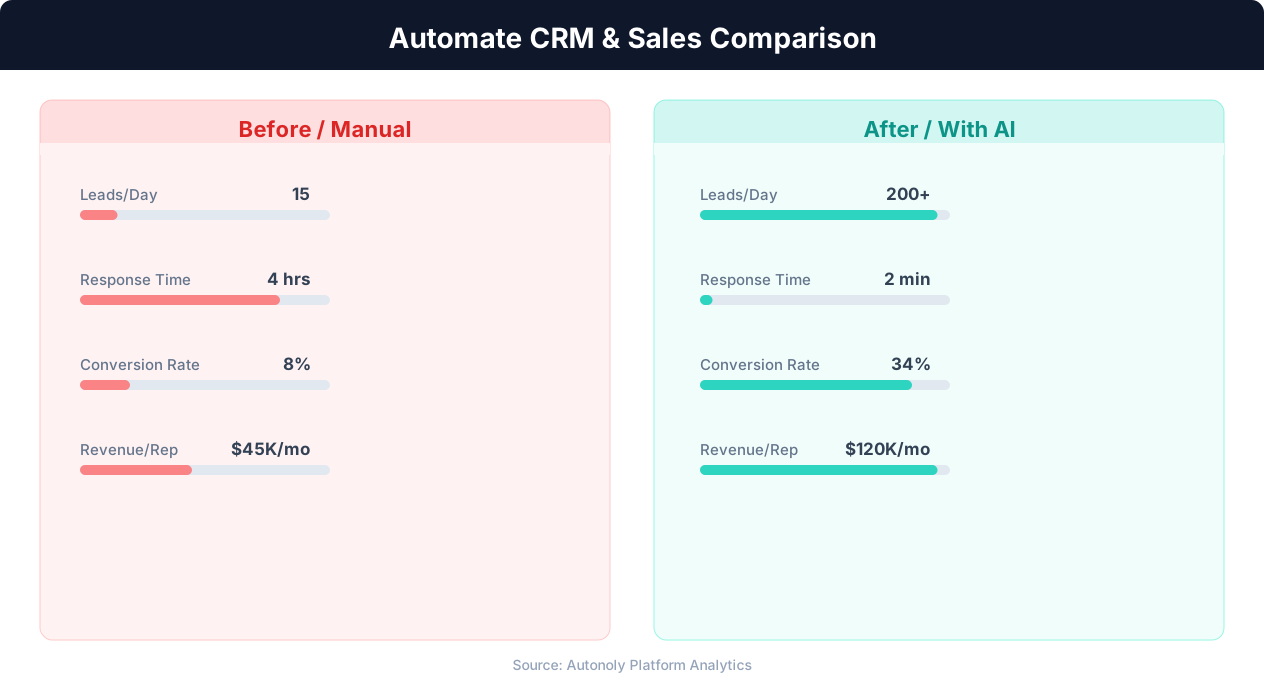
Manual vs automated CRM data entry time comparison
Key Insight: Sales reps spend only 28% of their time actually selling — the rest goes to data entry, scheduling, and admin tasks that automation can eliminate (Salesforce Research).
How the AI Agent Does It
The AI agent opens a real browser session, logs into your Gmail account, and composes each email individually. It reads lead data from Google Sheets, merges personalization fields into your email templates, and sends each message through Gmail's standard compose interface. Because it uses Browser Automation rather than API calls, the emails are indistinguishable from manually sent messages — same headers, same formatting, same deliverability. The agent handles Gmail's compose window, rich text formatting, signature insertion, and attachment additions if your templates include files like case study PDFs.
Handling Replies and Opt-Outs
Before sending each email, the agent checks your Gmail inbox for replies from that lead. If a reply is found, the lead is marked as engaged and removed from the automated sequence. The agent also respects opt-out requests by scanning reply content for unsubscribe language. This ensures compliance with email communication best practices and protects your sender reputation.
Key Insight: Responding to leads within 5 minutes makes you 9x more likely to convert them. Automated capture and routing makes sub-minute response times possible.
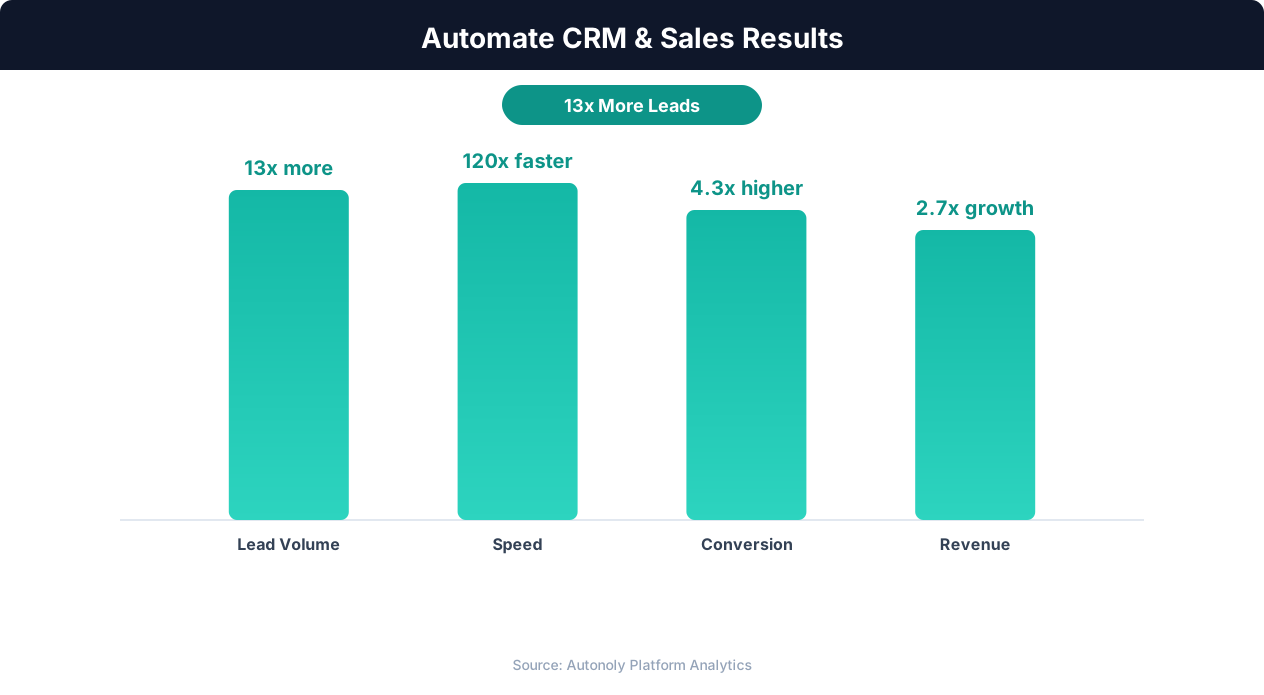
Sales pipeline velocity improvements with automation
Key Insight: Companies using automated lead capture see 3x more qualified leads entering their pipeline compared to manual processes (Salesforce State of Sales Report).
Scheduling and Automation
Run this workflow daily using the Visual Workflow Builder. Each day, the agent reviews your entire lead list in Google Sheets, determines which leads are due for their next email, and sends the appropriate message. The daily cadence ensures that follow-ups go out consistently even during weekends or holidays — your pipeline stays active while your team rests. Add Logic & Flow conditions to pause sequences during company holidays, adjust send times for different time zones, or escalate hot leads who reply quickly to a direct call list in Slack. Check our pricing page for details on daily run allocations.
Further Reading
Explore more about the tools and techniques used in this workflow: Automate Email Reports, Automate Lead Generation, Email Campaigns, Scheduled Execution.