
The Data Extraction Landscape in 2026: APIs, Scraping, and Everything in Between
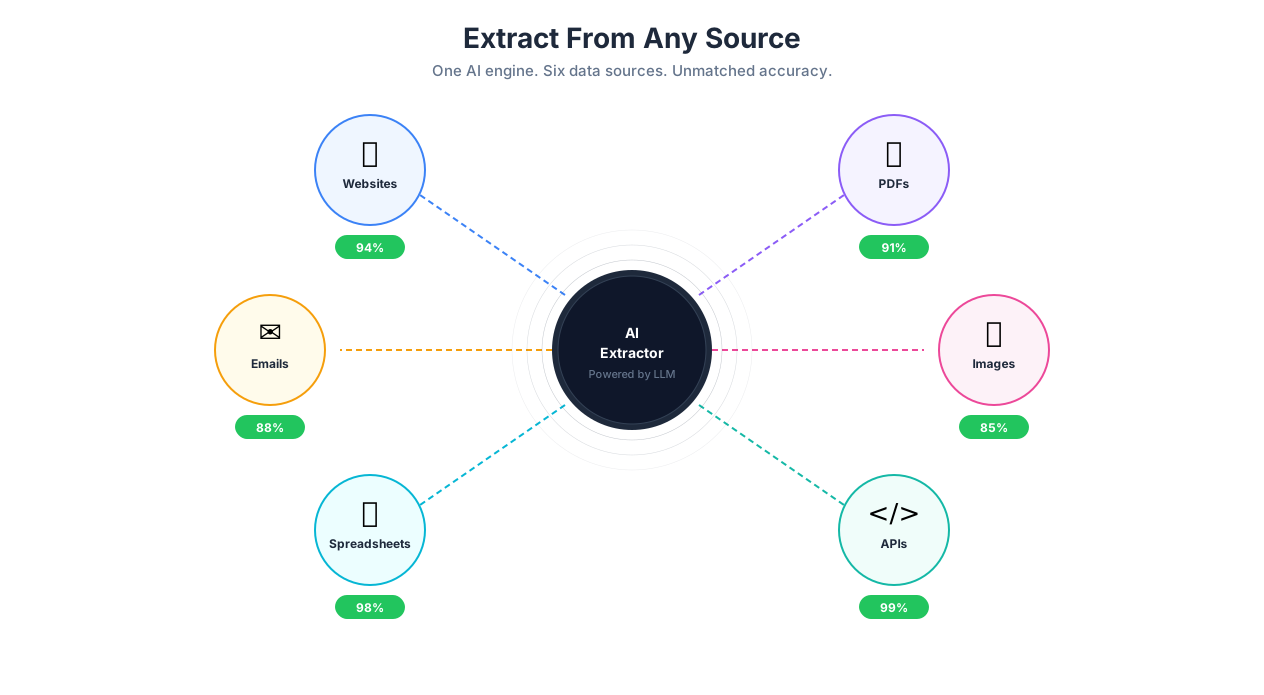
Data extraction from websites, PDFs, emails, and documents
Let me be direct about something the web scraping industry does not like to admit: there is no single tool that handles every extraction scenario well. The data you need lives in different places — websites, PDFs, email inboxes, spreadsheets, images, API endpoints — and each source has its own set of challenges. A tool that scrapes e-commerce product listings beautifully will choke on a scanned invoice. A PDF parser that handles structured documents perfectly will produce garbage from a hand-scanned receipt.
Autonoly's approach to data extraction is different from traditional scraping tools because it uses AI to understand page *semantics*, not just DOM structure. It does not care that the price is in a <span class="a-price-whole"> on Amazon and a <div data-testid="price"> on eBay. It looks at the page, understands "that number next to the product name is the price," and extracts it. This is the same approach that makes it robust against site redesigns — the AI adapts to new layouts the way a human would, by recognizing content by what it means rather than where it sits in the HTML tree.
But before we get into how Autonoly handles extraction, let's be honest about the landscape. If the data you need is available through a public API, use the API. It is faster, more reliable, and the data provider wants you to use it. APIs have rate limits and data formats documented. Scraping is for when there is no API, the API is limited (Twitter's API pricing anyone?), or the data you need is not exposed through the API (most real estate sites show more data on the web than through their feeds). Our guide on what AI agents are covers the broader context of how extraction fits into automated workflows.
Why Traditional Scraping Breaks — The Real Reasons
If you have used BeautifulSoup, Scrapy, or Cheerio, you know the drill: write a scraper, it works for three weeks, then it breaks because the site changed a class name from product-card to product-card-v2. You fix it. Two weeks later, it breaks again. This maintenance treadmill is the reason most scraping projects die within six months.
But selector fragility is only the surface problem. The deeper issues are:
JavaScript-heavy SPAs. Sites built with React, Vue, or Angular do not serve HTML with data in it. They serve an empty <div id="root"> and a JavaScript bundle that builds the page client-side. BeautifulSoup sees nothing because it does not execute JavaScript. You need a real browser — Puppeteer, Playwright, or an AI agent that controls one.
Anti-bot detection. Cloudflare Turnstile, DataDome, PerimeterX (now HUMAN), Akamai Bot Manager — these systems analyze browser fingerprints, mouse movements, request timing, TLS fingerprints, and JavaScript execution patterns to distinguish bots from humans. Simple HTTP requests with a fake user-agent string get blocked within minutes on any serious e-commerce site. Residential proxy rotation helps but costs $5-15 per GB and adds latency. AI agents that control real browsers with human-like interaction patterns get through far more reliably because they actually behave like browsers — they have real fingerprints, real mouse movements, and real rendering.
Dynamic content loading. A product page might load the title and image first, then fetch pricing from a separate API call, load reviews via infinite scroll, and inject sponsored recommendations 3 seconds after initial render. Traditional scrapers that fire a request and parse the response miss everything that loads asynchronously. Even Playwright scripts need explicit wait conditions for each piece of lazy-loaded content — and those wait conditions are themselves fragile.
How AI Extraction Actually Works
The core insight behind AI-powered extraction is this: instead of asking "what is the CSS path to this element?", the AI asks "what does this content mean?" When you tell Autonoly "extract all product prices from this search results page," the AI examines the rendered page — visually, semantically, and structurally — and identifies which elements represent prices. It does this using the same pattern recognition that lets a human glance at a page and immediately understand its layout, even on a site they have never visited.
This matters in practice because it makes extraction resilient to three things that break traditional scrapers:
- Site redesigns. When Amazon changes its search results layout (which it does constantly for A/B testing), the AI still recognizes prices because prices look like prices — numbers with dollar signs near product names. The CSS path changed, but the visual pattern did not.
- Cross-site consistency. A single extraction prompt — "extract product name, price, rating, and review count" — works on Amazon, eBay, Walmart, Target, Best Buy, and Etsy. You do not need a separate scraper for each site. The AI adapts to each site's layout automatically.
- Mixed content. Real pages contain a mess of organic results, sponsored listings, recommendation carousels, newsletter signup modals, and cookie consent banners. The AI distinguishes between the data you want and the noise around it, the same way you would when scanning a page visually.
Extraction from Different Source Types
Websites are the most common extraction source, but Autonoly handles several others:
PDFs. Extract tables, line items, and structured data from PDF documents — invoices, contracts, reports, financial statements. The AI handles both digitally-created PDFs (where text is selectable) and scanned documents (where OCR is needed). A real example: extracting invoice line items — vendor name, item description, quantity, unit price, total — from 500 PDF invoices into a single spreadsheet. The challenge is that every vendor formats invoices differently, so template-based PDF extraction (like what Tabula or Camelot offer) requires a new template for each vendor. The AI generalizes across formats.
Emails. Extract structured data from email content — order confirmations, shipping notifications, receipt details, newsletter content. Connect your inbox and the agent parses email bodies, extracting the fields you specify. This is particularly useful for tracking purchases, aggregating notifications, or building datasets from email-based workflows.
Images. Using AI Vision, extract text and data from screenshots, photos of documents, business cards, or any image containing readable information. The OCR capabilities handle printed text, handwriting (with lower accuracy — be realistic), and text embedded in graphics.
Spreadsheets. Yes, sometimes the "extraction" is from existing Excel or CSV files that need to be parsed, filtered, and restructured. Upload files or connect to cloud storage, and the agent processes them alongside web-extracted data.
Types of Web Extraction
Single Element Extraction
Grab a specific piece of information from a page: a stock price from Yahoo Finance, a weather reading from Weather.gov, the current Bitcoin price from CoinGecko, a company's employee count from their LinkedIn page. You describe what you want, and the agent finds and extracts it.
This mode is useful for monitoring — run it on a schedule and track how a value changes over time. Set up an alert when the price drops below a threshold or when a specific text changes on a page.
Collection Extraction
This is the bread and butter. The agent identifies repeating structures on a page — rows in a table, cards in a product grid, items in a search result list — and extracts every instance into a structured dataset. Each item becomes a row, and the agent detects columns automatically.
Real examples that work well:
Amazon search results: Product name, price (current and original), star rating, review count, Prime eligibility, and sponsored flag — including the sponsored listings that load asynchronously 2-3 seconds after the organic results
Zillow listings for a ZIP code: Address, price, beds/baths, square footage, price history (extracted from the detail page via nested extraction), days on market, and listing agent
LinkedIn job postings: Title, company, location, salary range (when disclosed), posting date, applicant count, and whether the company is actively hiring for other roles
Crunchbase company profiles: Company name, industry, funding total, last round, employee count, headquarters, and founding year
Nested Collection Extraction
This is where extraction gets genuinely powerful — and where most traditional scraping tools fall apart. Nested extraction visits each item in a collection to get more data from its detail page.
Example: you want a comprehensive product catalog from a Shopify store. The collection page shows product name, thumbnail, and price. But you also need the full description, all variant sizes with individual prices, SKU codes, inventory status, and customer reviews. Nested extraction:
- Extracts the list of 200 products from the collection page
- Clicks into each product's detail page
- Extracts the additional fields: full description, variant details, specifications, reviews
- Merges everything back into a single dataset with one row per product (or one row per variant, depending on your needs)
This uses the Browser Automation engine to navigate between pages seamlessly. The agent handles pagination on both the collection page and within individual product pages (review pagination, specification tabs, etc.).
Full HTML and Markdown Capture
For use cases where you need the raw content rather than structured fields — feeding web pages into AI & Content for summarization, building a training dataset, archiving page content — you can capture the full HTML or a cleaned Markdown version of any page or page section.
Handling Anti-Bot Detection
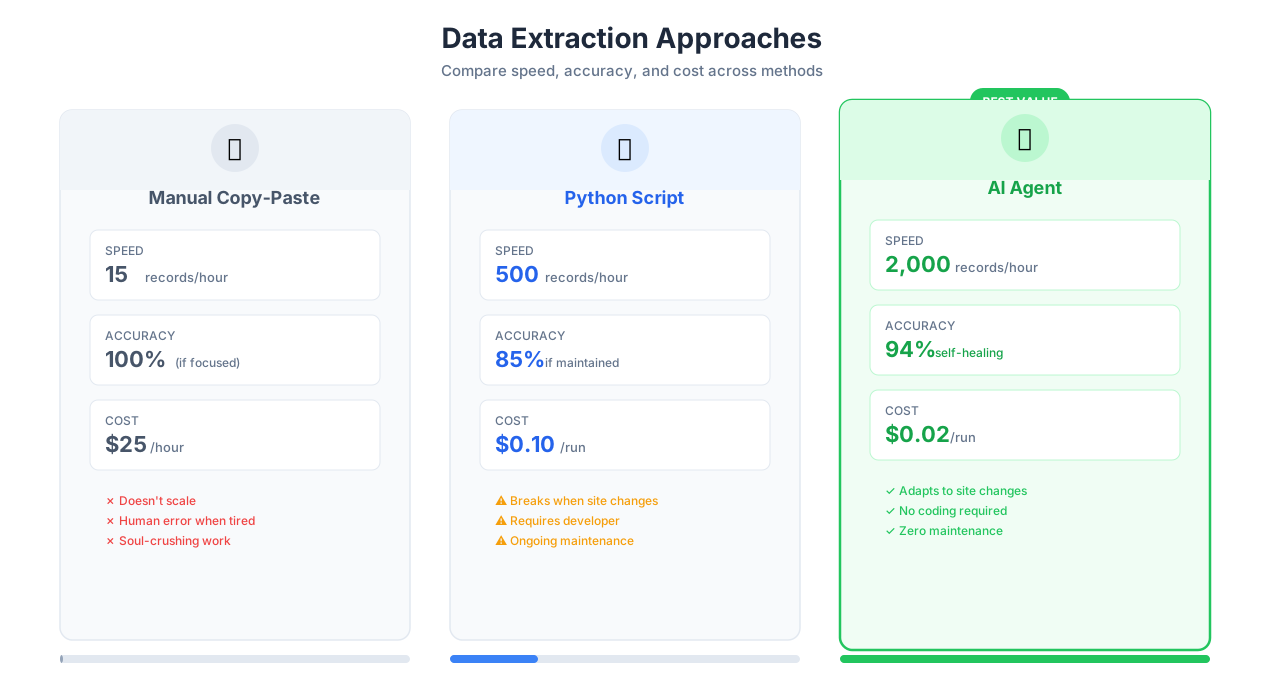
Traditional scraping vs AI-native extraction comparison
This is the section most extraction tools gloss over, so let me be specific.
Cloudflare Turnstile is the most common anti-bot system you will encounter. It appears on roughly 20% of the top 10,000 websites. Cloudflare analyzes browser fingerprints, JavaScript execution, and interaction patterns. Simple HTTP-based scrapers get blocked instantly. Browser-based scrapers get blocked if they have detectable automation signatures (the navigator.webdriver flag, missing browser plugins, incorrect screen dimensions). Autonoly's agents run in full browser environments with realistic fingerprints, which gets through Cloudflare's standard protection in most cases. Cloudflare's Enterprise Bot Management tier is harder — it uses ML models that analyze request patterns over time.
DataDome protects many e-commerce sites (Foot Locker, Hermes, major European retailers). It uses a JavaScript challenge that executes client-side and sends telemetry data back to DataDome's servers. Scrapers that do not execute the JavaScript get blocked. Scrapers that execute it but have detectable automation patterns get blocked after a few requests.
Rate limiting is universal. Even sites without sophisticated anti-bot systems will block you if you send 100 requests per second. Autonoly handles this with configurable delays between requests, automatic backoff when it detects rate limiting (HTTP 429 responses or CAPTCHA triggers), and session rotation. The default behavior is conservative — roughly one request every 2-3 seconds — which is sustainable on most sites without triggering blocks.
An honest limitation: no extraction tool, including Autonoly, can guarantee 100% success against all anti-bot systems. Sites that really do not want to be scraped (dating sites, some financial platforms, ticket vendors during sales) deploy aggressive protection that blocks even sophisticated browser-based approaches. In those cases, consider whether the site has an API, a data partnership program, or a feed you can subscribe to. For guidance on sustainable extraction practices, our guide on bypassing anti-bot detection covers specific strategies per protection system.
Ethical Scraping: The Conversation Nobody Wants to Have
Extracting publicly visible data from websites is generally legal in the US (hiQ Labs v. LinkedIn established this), but "legal" and "ethical" are different things. Here is my position:
Respect robots.txt. If a site's robots.txt says "do not scrape," that is a clear signal from the site operator. You can technically ignore it, but you should not. Autonoly checks robots.txt by default.
Throttle your requests. Scraping a site at 100 pages per second can degrade their service for real users. Do not be that person. Use reasonable delays.
Do not scrape personal data without a lawful basis. GDPR, CCPA, and similar frameworks apply to scraped data just as much as data collected through forms. Extracting email addresses from websites to build a cold outreach list may be technically possible, but doing it without consent is a compliance liability.
Use the data responsibly. Price comparison, market research, academic research — these are legitimate. Building a clone of someone's site with their scraped content is not.
Read our comprehensive guide on web scraping best practices for detailed legal and ethical considerations.
Pagination, Scrolling, and Scale
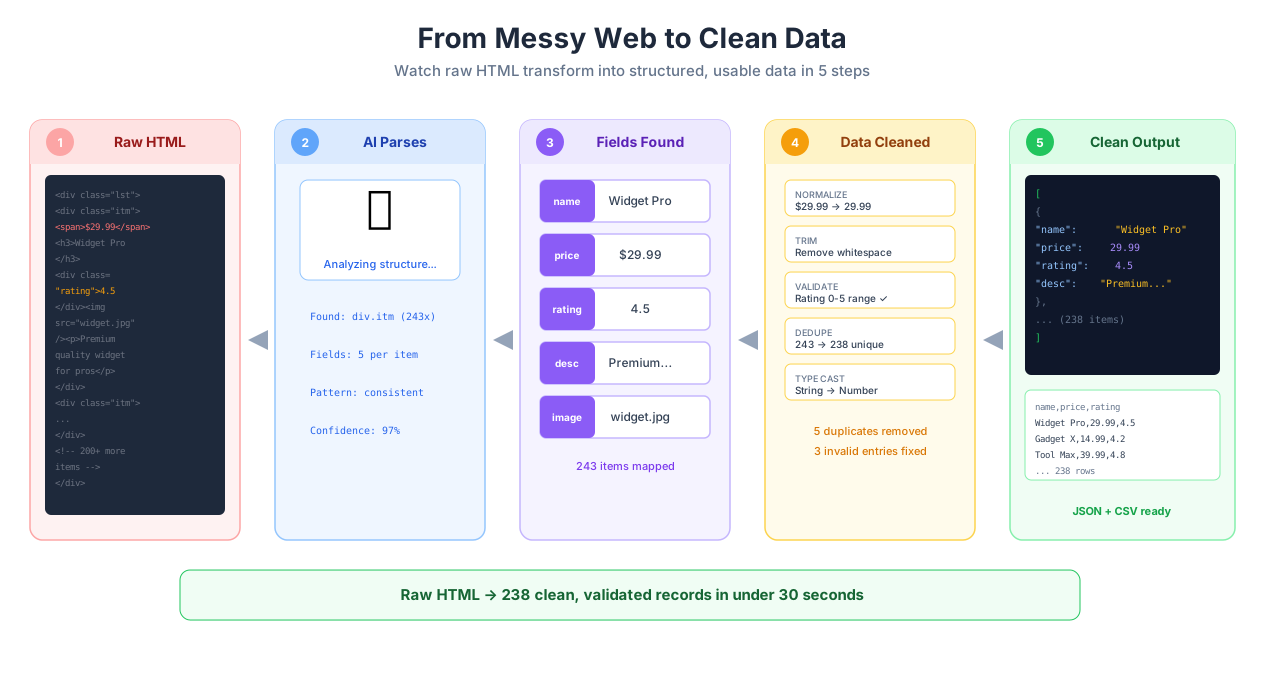
Data extraction pipeline from source to clean output
Real-world data never fits on a single page. Autonoly handles every pagination pattern:
Numbered pagination — clicking through page 1, 2, 3... and collecting data from each. The agent detects "Next" buttons, page number links, and URL patterns automatically.
Infinite scroll — continuous scrolling to trigger lazy-loaded content. The agent scrolls until no new content appears, with configurable limits to prevent infinite loops on sites with truly endless feeds (social media timelines).
"Load more" buttons — clicking expansion triggers repeatedly until the dataset is complete.
URL-based pagination — modifying
?page=or&offset=parameters in the URL for efficient multi-page crawls without full browser navigation for each page.Cursor-based pagination — handling API-style pagination where each response includes a cursor for the next batch.
For very large extractions — 10,000+ pages — combine data extraction with Logic & Flow to build resilient loops with error handling, checkpointing (save progress every 500 records), and retry logic for pages that time out. Without checkpointing, a failure at page 8,000 means restarting from scratch. With it, you resume from page 7,500.
Data Quality After Extraction
Raw extracted data is rarely clean. Prices come with currency symbols and comma separators ($1,299.99 vs 1299.99). Dates appear in every format imaginable (Jan 5, 2026, 01/05/2026, 2026-01-05, 5 January 2026). Text fields contain extra whitespace, HTML entities (&), and invisible characters. Product names on the same site vary (iPhone 16 Pro Max 256GB on the listing page, Apple iPhone 16 Pro Max - 256 GB - Black Titanium on the detail page).
This is normal. Extraction is step one. Step two is Data Processing — cleaning, normalizing, deduplicating, and validating the extracted data. Build your workflows with both steps from the start, not as an afterthought.
Output Formats and Destinations
Extracted data can be delivered in multiple formats:
Excel (.xlsx) — with support for multiple sheets, column formatting, and auto-width. This is what most business users actually want, despite what engineers think. A well-formatted Excel file with headers, frozen rows, and conditional highlighting is worth more to a sales director than a perfectly structured JSON file.
CSV — lightweight and universal. Works with every data tool, database import utility, and programming language. Use this when the data feeds into a technical pipeline.
JSON — structured format ideal for developer workflows, API integrations, and nested data that does not flatten well into rows. If your data has variable-length arrays per row (multiple reviews per product, multiple authors per paper), JSON preserves the structure better than CSV.
Direct integrations — push data straight to Google Sheets, Notion, Airtable, or any connected tool without intermediate files. Google Sheets is the most popular destination because it gives non-technical stakeholders a live, shareable view of the data.
You can also chain extraction output directly into Data Processing for cleaning and transformation before delivery to the final destination.
Data Volume and Pricing
Extraction volume depends on your plan. The pricing page has full details on pages and records per tier. For large-scale extraction projects, check the templates library for pre-built workflows optimized for common extraction patterns.
Best Practices from Real Extraction Projects
Always preview before full extraction. Extract 5-10 rows first and inspect the output. Verify field names, data types (prices are numbers not strings, URLs are complete not relative), and completeness. Fixing a bad extraction template on a 10-row sample costs seconds. Fixing it after extracting 10,000 rows costs hours. This sounds obvious, but I have seen teams launch full extractions without previewing more times than I can count.
Be explicit about fields in your prompt. "Extract all the data" is lazy and produces inconsistent results. "Extract product name, current price in USD, original price if discounted, star rating as a decimal, review count as an integer, and the product URL" produces clean, consistent columns that do not need renaming. Our web scraping best practices guide covers prompt engineering for extraction in depth.
Use nested extraction for detail-rich datasets. A listing page shows name and price. The detail page has specifications, reviews, shipping info, seller information, and variant options. Nested extraction visits each detail page automatically. Yes, it takes longer — 200 products with detail page visits might take 20 minutes instead of 30 seconds for the listing page alone — but the resulting dataset is comprehensive enough to be useful.
Handle rate limiting proactively, not reactively. Do not wait until you get blocked to add delays. Configure reasonable intervals from the start — 2-5 seconds between page loads for most sites, longer for sites you know to be aggressive about blocking. Random delays (2-5 seconds instead of exactly 3 seconds) are more effective because fixed intervals are a detectable bot pattern. Use Logic & Flow for this.
Deduplicate after extraction, not during. Trying to skip items you have seen before during extraction adds complexity and creates edge cases (what if the same item appears with a slightly different URL?). Extract everything, then deduplicate in the Data Processing step where you have full control over matching logic.
Save extraction results before processing them. This is the data engineering equivalent of "commit before you refactor." If your processing pipeline has a bug, you want the raw extraction results to fall back to. Push raw results to a Google Sheet or save as CSV, then process separately. Once you trust your pipeline, you can eliminate the intermediate save.
Security and Compliance
All extraction sessions run in isolated browser environments that are destroyed after each execution. Extracted data is encrypted in transit (TLS 1.3) and at rest (AES-256) in your workspace. Access to extraction results is governed by role-based permissions — viewers can see results but cannot modify extraction configurations. Full audit logs track every extraction run, including the target URL, extracted record count, timestamp, and the user who initiated the execution.
From a compliance standpoint, three things to be aware of:
- Terms of Service. Most websites' ToS prohibit automated scraping. Whether these terms are legally enforceable against someone who never agreed to them (you did not click "I agree" to Amazon's ToS by visiting their product pages) is unsettled law that varies by jurisdiction. The hiQ Labs v. LinkedIn decision favored scrapers of public data, but this is not blanket permission. Know the legal landscape for your use case.
- Personal data. When extracting names, emails, phone numbers, or other PII, GDPR (EU), CCPA (California), and similar frameworks apply. You need a lawful basis for processing. "I scraped it from a public website" is not automatically a lawful basis under GDPR. Autonoly provides Data Processing tools to anonymize or pseudonymize extracted data before it reaches your final destination.
- Downstream liability. You are responsible for how you use extracted data. Building a competitive price comparison tool with publicly available pricing data is generally fine. Scraping copyrighted content to train an AI model is a different legal category entirely. Consult legal counsel for ambiguous cases.
For guidance on responsible extraction practices, read our comprehensive guide on web scraping best practices.
Comparison: How Autonoly Stacks Up
Apify is powerful and developer-first. You write actors (scrapers) in JavaScript or Python, deploy them to Apify's cloud, and run them on schedule. The platform is excellent for engineers who want full control. The tradeoff: you need to write and maintain code. When a site changes, you update your actor. Apify's actor marketplace has pre-built scrapers for popular sites, but they break when the underlying sites change, and the maintainer may or may not update them promptly.
Octoparse is visual and no-code. You click through a page in their visual editor, define extraction fields, and run the scraper. It works well for simple, stable sites. The tradeoff: Octoparse's AI capabilities are limited compared to purpose-built AI extraction. When a site has complex dynamic content, anti-bot protection, or requires login + multi-step navigation, Octoparse struggles.
Bright Data (formerly Luminati) is the heavyweight proxy provider that also offers a scraping browser and dataset marketplace. If you need residential proxies at scale or pre-built datasets (they sell ready-made datasets for Amazon, LinkedIn, etc.), Bright Data is the market leader. The tradeoff: it is expensive ($500+/month for serious use), complex to configure, and overkill for teams that need to scrape a few hundred pages weekly.
Autonoly's position: AI-native extraction that requires no code, handles anti-bot detection through real browser automation, and integrates extraction into larger workflows (extract, process, deliver) without stitching together multiple tools. The tradeoff: for extremely high-volume extraction (millions of pages daily), a dedicated scraping infrastructure like Apify or Bright Data with custom proxy rotation will outperform an AI-agent-based approach on raw throughput. Autonoly is designed for the 95% of extraction use cases where intelligence and reliability matter more than raw speed.
Common Use Cases in Detail
E-commerce Price Intelligence
A DTC brand monitors 10 competitor websites weekly. For each competitor, the agent extracts their full product catalog: product name, price (current and original), availability, variant options, shipping cost thresholds. The extraction runs on a schedule every Monday at 6 AM. Data Processing normalizes prices (removing currency symbols, converting to USD), deduplicates products across sites (matching by UPC or exact product name), and calculates the average market price per product. The output pushes to Google Sheets with conditional formatting that highlights products where the brand's price is more than 15% above market average. The pricing team reviews the sheet every Monday morning and adjusts. Read our guide on ecommerce price monitoring for a detailed setup walkthrough, and our guide on scraping Amazon product data for Amazon-specific techniques.
Real Estate Investment Analysis
A property investment firm tracks every new listing in 5 target ZIP codes across Zillow, Redfin, and Realtor.com. Nested extraction captures each listing's detail page — price history, tax assessment, comparable sales, neighborhood demographics, school ratings, flood zone status. Data Processing deduplicates listings that appear on multiple sites (matching by address), normalizes price to price-per-square-foot, and calculates a custom investment score based on the firm's criteria (cap rate estimate, price-to-rent ratio, appreciation trend). Scored listings push to Airtable where analysts filter by investment threshold. See our scraping Zillow real estate data guide for the step-by-step setup.
Recruiting and Job Market Analysis
A staffing agency tracks job postings across 8 job boards in their specialization (healthcare IT). The agent extracts job title, company, location, salary range (when posted — roughly 40% of postings include it), required certifications, and posting date. AI Content classification tags each posting by seniority level and sub-specialty. Weekly trend reports reveal which health systems are hiring aggressively, which roles have salary increases, and which certifications are newly in demand. The agency uses this intelligence to advise both candidates (which certifications to pursue) and clients (what salary ranges to offer to be competitive). Our guide on scraping LinkedIn data covers professional network extraction.
Invoice Processing at Scale
An accounts payable department receives 500+ vendor invoices monthly in PDF format. Each invoice has a different layout — different vendors, different formats, different field locations. The agent extracts vendor name, invoice number, date, line items (description, quantity, unit price, total), tax amount, and payment terms from each PDF. Data Processing validates extracted amounts (line item totals should sum to the invoice total), normalizes vendor names (matching "IBM Corp." and "International Business Machines" to the same vendor), and formats the output for import into their accounting system (NetSuite, QuickBooks, SAP). The extraction handles both digital PDFs (text-selectable) and scanned documents (OCR-based), though accuracy on poor-quality scans drops noticeably — expect 95%+ accuracy on clean scans and 80-90% on low-resolution or skewed documents.