Why Monitor Websites for Changes?
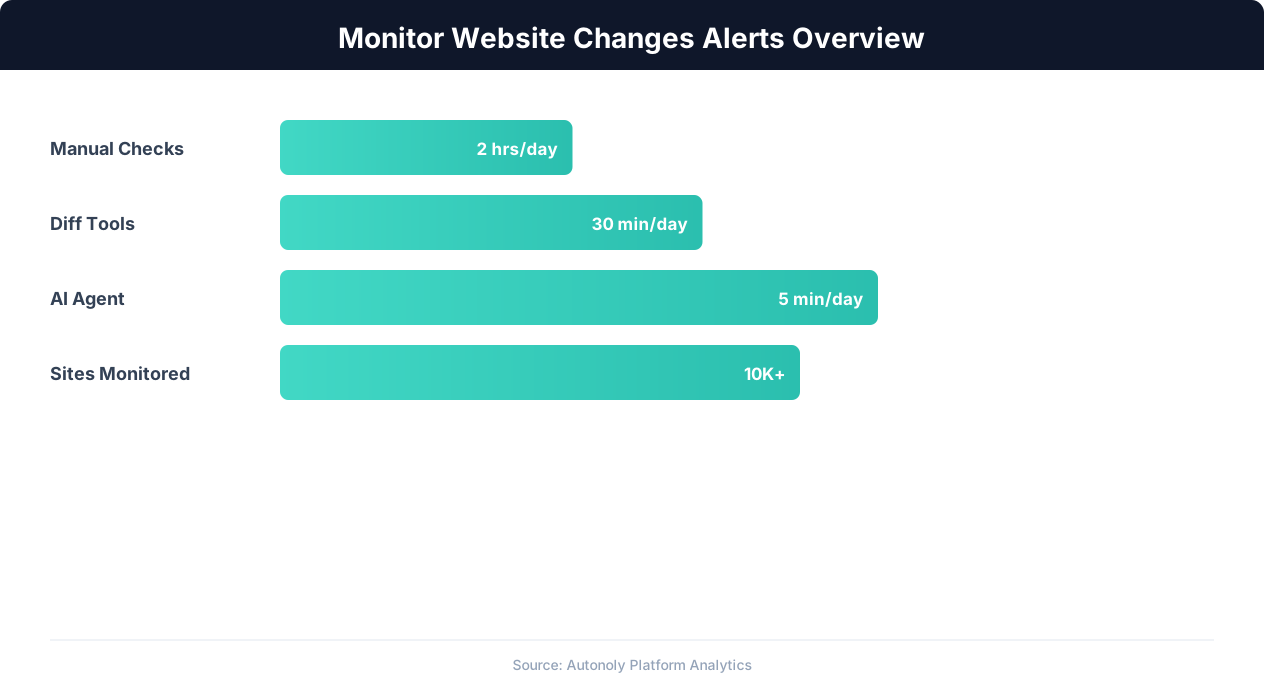
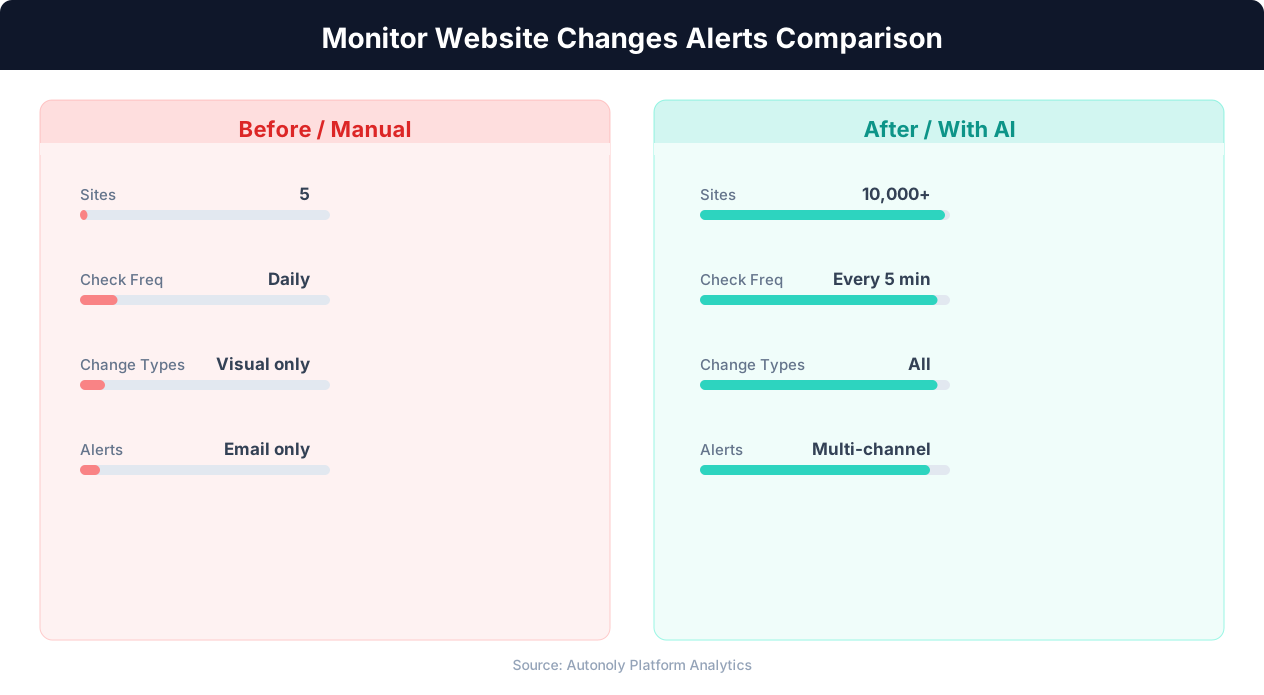
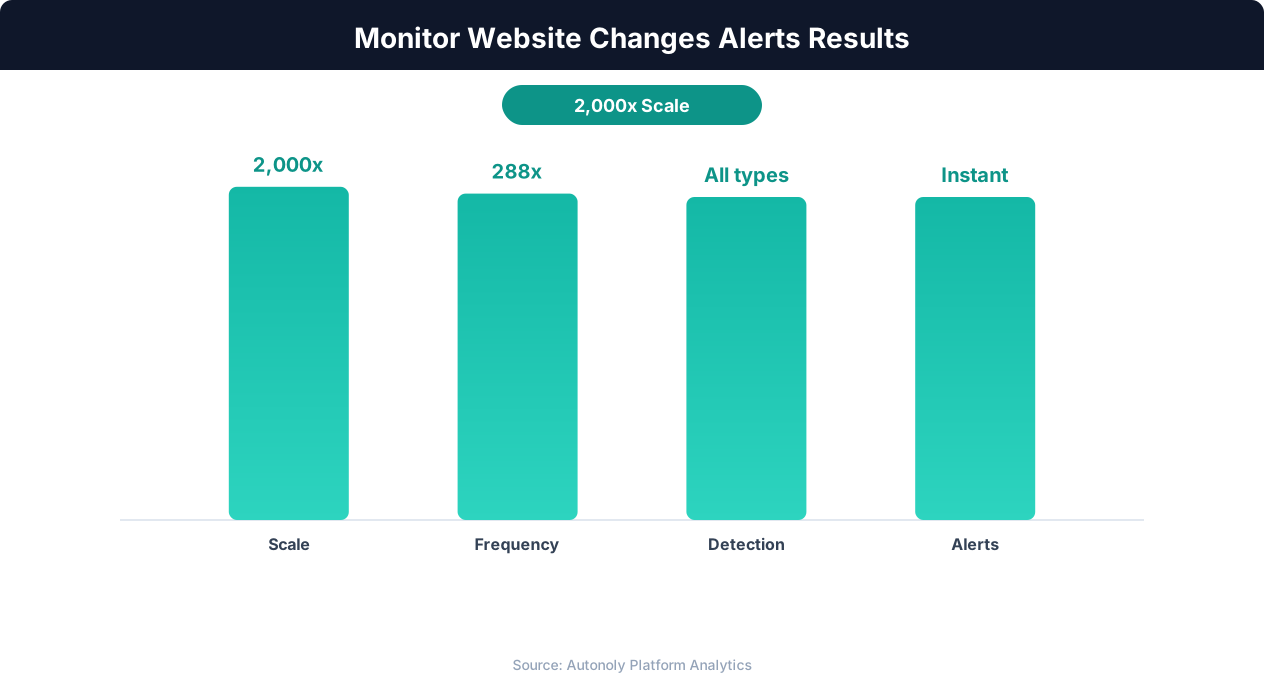
The internet is constantly changing. Prices fluctuate, products go in and out of stock, competitors update their offerings, regulatory agencies publish new rulings, and content is added, modified, or removed every second. For businesses that depend on timely information, manually checking websites for changes is both impractical and unreliable. A human can realistically monitor 5-10 pages per day. Automated monitoring can track thousands of pages per hour and alert you the moment something changes.
Business-Critical Monitoring Use Cases
Website monitoring drives actionable business decisions across many scenarios:
- Price monitoring: Track competitor prices, supplier costs, and marketplace listings. Get alerted when prices drop below a threshold, competitors undercut you, or a product you want goes on sale. This is the foundation of dynamic pricing strategy and purchasing optimization.
- Stock and availability: Monitor product pages for stock status changes. Know instantly when a sold-out item is back in stock, when a competitor runs out of inventory (creating an opportunity for you), or when your own products show availability issues on retailer websites.
- Content changes: Track changes to competitor websites, industry publications, government regulatory pages, or any content that affects your business. Detect when a competitor launches a new product, changes their pricing page, or updates their feature comparison.
- SEO monitoring: Track your search engine rankings for target keywords. Get alerted when your position changes, when a new competitor enters the top results, or when Google modifies the SERP layout for your keywords.
- Compliance and regulatory: Monitor government agency websites for new regulations, policy changes, or enforcement actions in your industry. Timely awareness of regulatory changes can mean the difference between compliance and penalties.
- Job and opportunity monitoring: Track career pages, grant announcements, RFP portals, and bid opportunities. Get alerted when new positions or opportunities are posted that match your criteria.
The Cost of Not Monitoring
Without automated monitoring, you miss time-sensitive opportunities and threats. A competitor drops their price by 20% and wins market share for three days before you notice. A sold-out product comes back in stock and sells out again within hours. A regulatory change is published that affects your operations, but you do not discover it until weeks later. Each of these scenarios has a direct financial impact that automated monitoring prevents.
The asymmetry is stark: automated monitoring costs minutes to set up and runs continuously. Manual checking costs hours of human time and still misses changes that occur between checks. For any website where timely change detection matters, automation is not optional — it is the cost of competing effectively.
Types of Website Changes You Can Monitor
Website changes come in many forms, and different monitoring approaches are suited to different types of changes. Understanding the taxonomy of web changes helps you design monitoring workflows that catch what matters and ignore the noise.
Content Changes
The most common monitoring target is page content — the text, images, and data displayed on a web page. Content changes include:
- Text modifications: Words, paragraphs, or sections that are added, removed, or edited
- Numerical changes: Prices, quantities, ratings, statistics, or any numeric value that updates
- Structural changes: New sections, removed navigation items, layout reorganizations
- Media changes: New images, updated product photos, video additions
Availability Changes
Availability monitoring focuses on binary state changes:
- In stock / out of stock: Product availability on e-commerce sites
- Available / unavailable: Appointment slots, event tickets, reservation availability
- Published / removed: Job postings, listings, articles, or pages that appear or disappear
- Open / closed: Application deadlines, registration periods, submission windows
Price Changes
Price monitoring is a specialized form of content change detection focused on numerical values with business significance:
- Absolute price changes: The price went from $99 to $79
- Percentage changes: A 15% price reduction
- Price threshold crossing: Price dropped below your target of $80
- Price trend reversal: Price was rising for two weeks and started declining
Technical Changes
Beyond visible content, technical changes can be significant:
- HTTP status code changes: A page returning 200 (OK) starts returning 404 (Not Found) or 301 (Redirect)
- SSL certificate changes: Certificate expiration or issuer changes
- Response time changes: A page that loaded in 2 seconds now takes 10 seconds
- New pages or URLs: New pages appearing on a website that did not exist before
Choosing What to Monitor
| Business Goal | What to Monitor | Alert Condition |
|---|---|---|
| Competitive pricing | Competitor product pages | Price decreases > 5% |
| Purchase opportunity | Target product pages | Price drops below threshold |
| Inventory intelligence | Product availability status | Stock status changes |
| Competitive intelligence | Competitor feature/pricing pages | Any content change |
| Compliance | Regulatory agency pages | New publications or updates |
| Opportunity detection | Job boards, RFP portals | New listings matching criteria |
How Website Change Detection Works
Website monitoring tools work by periodically loading a web page, extracting the relevant content, comparing it to a previous version, and triggering an alert when differences are detected. The implementation details vary, but the core loop is always the same: fetch, compare, alert.
The Monitoring Loop
- Fetch the page: The monitoring tool loads the target URL. For simple, static pages, an HTTP request suffices. For dynamic, JavaScript-rendered pages, a full browser engine is required to render the content before extraction.
- Extract the target content: Rather than comparing the entire page (which would produce false positives from ads, timestamps, and random page elements), the tool extracts only the specific content you care about: a price element, a stock status indicator, a specific paragraph, or a defined section of the page.
- Compare to previous state: The extracted content is compared against the stored state from the previous check. The comparison method depends on the content type: exact text comparison for strings, numerical comparison for prices, and visual comparison for screenshots.
- Evaluate alert conditions: If a change is detected, the tool evaluates whether it meets your alert criteria. Not every change warrants an alert — you might only want notifications for price decreases greater than 10%, or availability changes from "out of stock" to "in stock."
- Send notification: If the change meets your alert criteria, the tool sends a notification through your configured channel: email, Slack, SMS, webhook, or push notification.
- Update stored state: The current state becomes the new baseline for the next comparison cycle.
- Wait and repeat: The tool waits for the configured interval (every 5 minutes, hourly, daily) and repeats the process.
Simple vs. Intelligent Monitoring
Basic monitoring tools compare raw page HTML and flag any difference. This produces excessive false positives because modern web pages contain dynamic elements (ad rotations, session tokens, random IDs, view counters) that change on every page load without any meaningful content change.
Intelligent monitoring, as implemented by Autonoly's website monitoring, uses targeted extraction to focus on specific page elements. Instead of comparing the entire page HTML, you define which elements to watch (the price in a specific location, the stock status text, a particular paragraph). Changes to watched elements trigger alerts; changes to everything else are ignored.
Handling Dynamic and JavaScript-Heavy Sites
Many monitoring targets are JavaScript-rendered single-page applications (SPAs) where the content does not exist in the initial HTML response. E-commerce prices loaded via API calls, stock availability rendered by React components, and content managed by client-side JavaScript all require browser-based monitoring that executes JavaScript before extracting content.
Autonoly's monitoring uses real Chromium browser automation to render pages fully before extraction, ensuring that dynamically loaded content is captured accurately. This is the same approach used for scraping dynamic websites and provides reliable change detection on any site that works in a browser.
Step-by-Step: Setting Up Website Monitoring with Autonoly
This walkthrough demonstrates setting up automated monitoring for competitor product prices with Slack notifications. The same approach works for any monitoring use case — adjust the target URL, watched elements, and alert conditions to match your needs.
Step 1: Identify Your Monitoring Targets
Define exactly what you want to monitor. For competitive price monitoring, list the specific product pages you want to track. For example:
- Competitor A's pricing page: https://competitor-a.com/pricing
- Competitor B's flagship product: https://competitor-b.com/product/flagship
- Amazon listing for your product category: https://amazon.com/dp/B0XXXXXXXXX
For each target, identify the specific data point you care about: the price shown in the hero section, the "Starting at" price, the stock availability text, etc.
Step 2: Create a Monitoring Workflow
In Autonoly, create a new workflow and describe your monitoring goal to the AI Agent:
"Monitor the product page at https://competitor-a.com/product/widget for price changes. Check the page every 6 hours. If the price changes by more than 5% in either direction, send a Slack message to the #competitive-intel channel with the old price, new price, and percentage change."
The agent navigates to the target page, identifies the price element, captures the current value as the baseline, and configures the monitoring schedule.
Step 3: Define Alert Conditions
Not every change is worth an alert. Configure conditions that filter for meaningful changes:
- Threshold-based: Alert only when the price changes by more than 5% (ignores minor fluctuations like $99.99 to $99.97)
- Direction-based: Alert only on price decreases (you care when competitors lower prices, not when they raise them)
- Absolute value: Alert when the price drops below $80 (your target purchase price)
- State change: Alert when stock status changes from any state to "In Stock" (you want to know when a sold-out item returns)
The agent configures these conditions as part of the monitoring workflow.
Step 4: Configure Notification Channels
Choose where alerts should be delivered. Autonoly supports multiple notification channels through its integrations:
- Slack: Send alerts to a specific channel or direct message. Include the page URL, old value, new value, and change percentage in the message.
- Email: Send alert emails to a distribution list. Useful for teams without Slack or for escalation alerts.
- Webhook: Send alert data to a custom endpoint for integration with your own systems, dashboards, or automation tools.
Step 5: Schedule and Activate
Set the monitoring frequency based on how quickly you need to know about changes:
- Every 5-15 minutes: For flash sales, limited stock items, or time-critical opportunities
- Every 1-6 hours: For competitive pricing, content changes, and general monitoring
- Daily: For slower-moving changes like regulatory updates, job postings, and market research
Activate the scheduled workflow and the monitoring runs automatically at your specified interval.
Step 6: Review Initial Results
After the first few monitoring cycles, check that the system is detecting changes correctly. Visit the monitored page manually, note the current values, and verify they match what the monitor has captured. If the site has rotating content (A/B tests, personalized pricing), you may need to adjust the monitoring to account for expected variation.
Advanced Monitoring Strategies
Basic page-level monitoring catches obvious changes, but advanced strategies extract significantly more intelligence from the same monitoring infrastructure.
Multi-Page Price Comparison
Instead of monitoring a single competitor's price, monitor the same product across multiple retailers simultaneously. Each monitoring cycle captures prices from Amazon, Walmart, Target, Best Buy, and the manufacturer's site, writing all prices to a single Google Sheets row. This provides a complete market view in one spreadsheet, showing which retailer has the lowest price, the average market price, and the price range at any point in time.
Differential Monitoring
Some changes are only meaningful in context. A price drop of $5 on a $500 product is trivial, but $5 on a $20 product is significant. Configure alerts based on percentage change rather than absolute change to automatically adjust sensitivity based on the value being monitored.
Similarly, monitor the delta between your price and competitor prices rather than competitor prices alone. An alert when a competitor's price crosses below yours is more actionable than an alert about any competitor price change.
Historical Trend Tracking
Each monitoring check creates a data point. Over time, these accumulate into a time series that reveals patterns invisible in individual snapshots:
💡 Key Insight
Competitors change pricing an average of 3-5 times per month — automated monitoring catches 100% of changes within minutes.
- Seasonal pricing patterns: Does the competitor always lower prices in Q4? Do supplier costs follow a predictable annual cycle?
- Day-of-week patterns: Are prices lower on weekdays vs. weekends? Are new job postings concentrated on Mondays?
- Response patterns: When you change your price, how quickly does the competitor respond? Understanding response latency informs pricing strategy.
Store monitoring results in Google Sheets with timestamps, and use charting to visualize trends over weeks and months.
Content Digest Monitoring
For content-heavy pages (news sites, blogs, competitor resource centers), monitoring for "any change" produces too many alerts. Instead, configure digest monitoring: the tool checks for changes every hour but only sends a single summary alert once per day listing all changes detected in the past 24 hours. This provides comprehensive coverage without alert fatigue.
Visual Change Detection
Some changes are visual rather than textual — a layout redesign, a new banner, or a changed product image. Autonoly's AI vision can compare screenshots of a page between monitoring cycles and detect visual changes that text-based monitoring would miss. This is particularly useful for monitoring competitor landing pages, ad creatives, and promotional banners.
Cascade Monitoring
When a change is detected on one page, automatically trigger monitoring checks on related pages. If a competitor's pricing page changes, immediately check their feature comparison page, blog (for announcement posts), and social media accounts. This cascade approach captures the full picture around significant changes rather than just the initial trigger.
Managing Alerts Without Alert Fatigue
The biggest risk with website monitoring is alert fatigue — receiving so many notifications that you start ignoring them, defeating the purpose of monitoring entirely. Thoughtful alert management ensures that every notification is meaningful and actionable.
Alert Prioritization
Not all changes are equally important. Implement a tiered alert system:
| Priority | Condition | Channel | Example |
|---|---|---|---|
| Critical | Price drops > 20% or stock returns | Slack + SMS + Email | Competitor undercuts by 25% |
| High | Price changes 5-20% | Slack + Email | Supplier raises prices 10% |
| Medium | Content changes on key pages | Daily email digest | Competitor updates features page |
| Low | Minor text or style changes | Weekly summary | Footer copyright text updated |
Critical alerts demand immediate attention and go to multiple channels. Low-priority changes are batched into periodic summaries.
Noise Reduction
Common sources of false-positive alerts and how to eliminate them:
- Timestamp and date changes: Pages that display the current date or "Last updated" timestamps change every time they are loaded. Exclude date/time elements from your monitoring scope.
- Ad rotations: Dynamic ad placements change on every page load. Focus monitoring on the page's primary content area, excluding ad slots.
- Session-specific content: Some sites personalize content based on cookies, location, or browsing history. Use a clean browser session for each monitoring check to ensure consistent baselines.
- A/B testing: Sites running A/B tests show different content to different visitors. This appears as constant change to a monitor. If A/B testing produces false positives, increase the change threshold or compare against multiple consecutive checks before alerting.
- Minor formatting changes: Whitespace differences, capitalization changes, or HTML restructuring that does not affect visible content. Use text-content comparison rather than HTML comparison to ignore markup changes.
Cooldown Periods
For frequently changing data (like cryptocurrency prices or auction bids), set a cooldown period between alerts. Instead of receiving an alert every 5 minutes as the price fluctuates, set a 1-hour cooldown so you receive at most one alert per hour. The alert includes the latest value and the change since the last alert, giving you a summary without the noise.
Alert Routing by Team
Different changes matter to different teams. Route alerts based on content type:
- Price changes go to the pricing/revenue team's Slack channel
- Competitor content changes go to the marketing team
- Regulatory updates go to the compliance team
- Technical changes (downtime, redirect changes) go to the engineering team
Autonoly's integration options support routing alerts to different Slack channels, email addresses, and webhook endpoints based on the type and priority of the detected change.
Real-World Monitoring Use Cases
These examples illustrate how organizations use automated website monitoring to drive business outcomes across different industries and functions.
E-Commerce Price Monitoring
An online retailer monitors 500 competitor product pages across Amazon, Walmart, and niche competitors. The monitoring workflow runs every 4 hours, extracts current prices, and writes them to a Google Sheet that serves as a pricing intelligence dashboard. Alert rules trigger when a competitor drops below the retailer's price by more than 3%, giving the pricing team time to respond before losing sales. Over a quarter, this system identified 47 competitive pricing threats and enabled same-day price matching that preserved an estimated $120K in revenue.
For a detailed implementation guide, see our e-commerce price monitoring article.
Stock Availability Monitoring
A reseller monitors 200 products across manufacturer and distributor websites for stock availability. Many of these products have long lead times and sell out quickly when restocked. The monitoring workflow checks every 30 minutes and sends instant Slack alerts when any watched product changes from "Out of Stock" to "In Stock" or "Pre-order Available." The reseller's purchasing team can place orders within minutes of restocking, securing inventory before competitors.
💡 Key Insight
Businesses using website change alerts respond to market shifts 8x faster than those relying on manual checks.
Competitor Intelligence
A SaaS company monitors competitor websites for changes to pricing pages, feature comparison pages, changelog/release notes, and blog posts. This provides a continuous feed of competitive intelligence without requiring anyone to manually visit competitor sites. When a competitor adds a new feature, the marketing team learns about it the same day and can update positioning materials. When a competitor changes pricing, the sales team is briefed within hours.
Government and Regulatory Monitoring
A compliance team monitors FDA, SEC, and state regulatory agency websites for new publications, guidance documents, and enforcement actions in their industry. Government websites often have poor or no notification systems, making manual monitoring the default — and a significant time drain. Automated monitoring checks these pages daily and sends digest emails summarizing all new publications. This reduced the compliance team's manual monitoring time from 10 hours per week to zero while improving detection speed.
Real Estate and Property Monitoring
A real estate investor monitors Zillow, Redfin, and local MLS websites for new listings matching specific criteria (location, price range, property type). Alerts are sent via Slack within an hour of a new listing appearing, enabling early-bird offers before the listing gets widespread attention. Combined with real estate automation workflows, this creates a comprehensive property acquisition pipeline.
Job and Opportunity Monitoring
A government contractor monitors federal procurement websites (SAM.gov, FBO) for new RFPs and contract opportunities matching their capabilities. Each new posting triggers an alert with the opportunity title, deadline, and value. The business development team reviews alerts daily and decides which opportunities to pursue, ensuring they never miss a relevant posting. The same approach works for monitoring career pages of target employers, grant announcement pages, and academic conference CFPs.
Building a Complete Monitoring Pipeline
A mature website monitoring system goes beyond simple change detection to include data storage, analysis, and automated response. Building a complete pipeline maximizes the value of your monitoring investment.
Data Storage Layer
Every monitoring check should store its results, not just trigger alerts. Write each check's extracted data to Google Sheets or a database with timestamps. This builds a historical record that enables trend analysis and provides evidence for business decisions. A year of daily price monitoring data is a powerful asset for pricing strategy, vendor negotiations, and market analysis.
Analysis Layer
Apply automated analysis to stored monitoring data:
- Trend detection: Identify prices or metrics that are consistently moving in one direction over multiple data points
- Anomaly detection: Flag values that deviate significantly from historical norms (a product usually priced at $50-$55 suddenly appearing at $25 is likely a pricing error or clearance sale)
- Correlation analysis: Identify relationships between monitored metrics (competitor A always adjusts prices within 48 hours of competitor B's changes)
Response Automation
The most advanced monitoring systems do not just alert humans — they trigger automated responses:
- Automatic price matching: When a competitor drops their price, automatically update your price on your own marketplace listings
- Automatic purchasing: When a monitored product drops below your target price, automatically add it to your cart or trigger a purchase order
- Automatic reporting: When competitive changes accumulate, automatically generate and distribute a weekly competitive intelligence report
- Automatic content updates: When your monitored data changes (new regulations published, competitor launches a feature), automatically update your own website or internal wiki
Autonoly's visual workflow builder supports these response automations through connected workflow nodes. A monitoring node feeds into a logic flow node that evaluates conditions, which triggers action nodes (Google Sheets write, Slack notification, API call, or another automation workflow).
Scaling Monitoring
As your monitoring needs grow, organize workflows systematically:
- Group by purpose: Separate pricing monitors, content monitors, and availability monitors into distinct workflows
- Use shared outputs: Multiple monitoring workflows can write to the same Google Sheet, creating a unified monitoring dashboard
- Standardize alert formats: Use consistent alert message formats across all monitors so recipients can quickly parse notifications
- Document monitoring scope: Maintain a registry of what is being monitored, why, and who is responsible for acting on alerts
A well-organized monitoring portfolio becomes a core business intelligence capability that grows more valuable over time as historical data accumulates and patterns emerge. Combined with scheduled automated workflows for the monitoring itself and automated reports for stakeholder communication, this creates a complete intelligence system powered entirely by website change detection.