


Why Automate Receipt Processing?
Expense reporting is universally dreaded. Employees hoard receipts in wallets, email inboxes, and phone photo libraries for weeks, then spend hours at month-end manually entering each one into a spreadsheet or expense tool. The result is predictably painful: late submissions, missing receipts that were thrown away or faded beyond readability, incorrect categorizations made in haste, and frustrated finance teams chasing down documentation from employees who would rather do anything else. The friction is so high that many legitimate business expenses never get submitted at all — employees simply absorb the cost rather than deal with the process.
The financial impact is significant. Studies show that the average expense report takes 20 minutes to complete and costs $58 in processing overhead when you factor in employee time, manager review time, and finance team reconciliation. For a company with 50 employees each submitting monthly reports, that is $34,800 per year spent on the administrative mechanics of expense management — before accounting for the cost of errors, late submissions, and policy violations that slip through manual review. And that figure does not include the legitimate expenses that go unsubmitted because the process is too painful, which represents lost tax deductions and understated business costs.
The compliance risk is equally concerning. Missing receipts mean unsubstantiated expenses that may not be deductible. Incorrect categorizations distort your financial reporting and can trigger audit findings. Late submissions mean your monthly close is delayed while finance waits for stragglers. And when expense data finally arrives, it often needs manual correction — the restaurant receipt categorized as "Office Supplies" or the personal purchase accidentally included in the business report. Each correction requires back-and-forth communication between the employee, their manager, and the finance team.
Automating receipt processing with Autonoly turns this painful process into a hands-free pipeline. Receipts flow in from email and Drive as they happen — not in a month-end scramble. The AI agent extracts every relevant field, categorizes the expense correctly, and adds it to a running report in Google Sheets. By the time month-end arrives, your expense report is already complete, categorized, and ready for approval. The days of receipt hoarding are over, and your finance team can close the books on schedule instead of waiting for late submissions.
How the AI Agent Processes Receipts
Autonoly's AI Agent Chat handles receipts from multiple input channels, meeting employees where their receipts already are:
Email receipts: The agent monitors your Gmail for purchase confirmations, digital receipts, and forwarded receipt images. It recognizes common receipt email formats from Amazon, Uber, airlines, restaurants, SaaS vendors, and thousands of other merchants. Digital receipts from online purchases are the easiest to process and typically achieve near-perfect extraction accuracy.
PDF receipts: Upload receipt PDFs to a designated Google Drive folder. The agent scans new files daily and extracts data from each, handling everything from formal invoices to casual payment confirmations. This channel is ideal for receipts received from vendors who email PDF attachments.
Image receipts: Photograph paper receipts and upload the images. The agent applies OCR to read the text, then extracts structured data. This works with phone camera photos, scanned images, and even screenshots of digital receipts. For best OCR results, ensure photos are well-lit and the text is in focus.
For each receipt, the Data Extraction engine identifies:
Merchant name: The business where the purchase was made
Date: Transaction date, handling various date formats and time zones
Total amount: Including tax and tip where applicable
Tax breakdown: Separate tax amounts when listed, broken down by rate
Payment method: Last four digits of card, cash, or digital wallet
Line items: Individual items purchased with quantities and prices (when available on the receipt)
Currency: Detected from symbols or codes, with automatic conversion to your base currency
Automatic Categorization
The agent categorizes each expense based on merchant type and line item descriptions. Standard categories include:
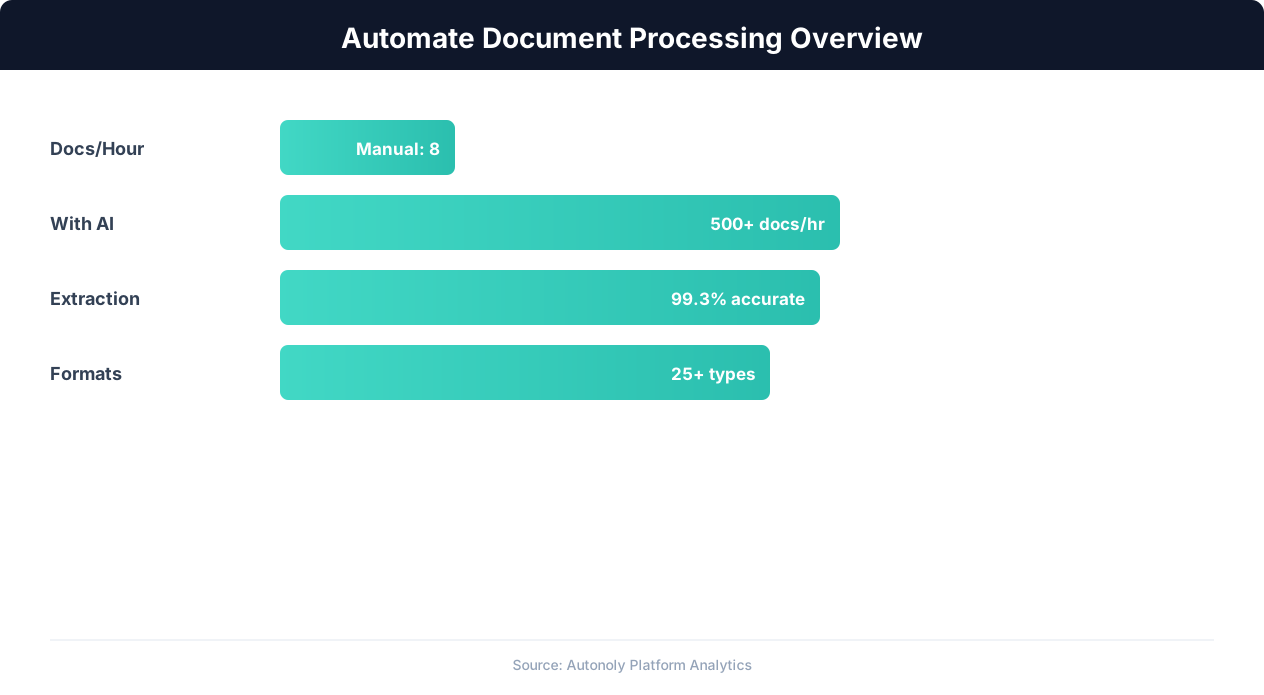
Document processing automation time savings by document type
Key Insight: 65% of organizations report that document-intensive processes are their biggest operational bottleneck. Automation eliminates this bottleneck entirely (Forrester).
Meals & Entertainment: Restaurants, coffee shops, catering
Travel: Airlines, hotels, car rentals, ride-sharing
Software & Subscriptions: SaaS tools, cloud services, domain renewals
Office Supplies: Stationery, equipment, furniture
Professional Services: Consulting, legal, accounting fees
Transportation: Gas, parking, public transit, tolls
You can customize these categories or add new ones through the Visual Workflow Builder. The agent learns your categorization preferences over time — if you always categorize Uber rides as "Client Travel" instead of "Transportation," it adapts accordingly. Add Logic & Flow conditions for nuanced rules: Uber rides during business travel get categorized as "Client Travel" while local Uber rides go to "Transportation." The categorization logic can also reference your company's expense policy to automatically flag out-of-policy items.
Building the Expense Report
The Google Sheet is structured as a running ledger with one row per receipt. The agent maintains running totals by category, by employee (for team expense reports), and by time period. Summary tabs auto-calculate monthly and quarterly totals, giving you instant visibility into spend patterns without any manual aggregation. A dashboard tab visualizes spend by category and employee, making it easy to spot trends and anomalies at a glance.
Add Logic & Flow conditions to flag expenses that require approval — purchases above a dollar threshold, out-of-policy categories, or receipts missing required details. The agent can send a Slack notification to the approver when a flagged expense is logged, enabling real-time approval instead of month-end batch review. Browse the templates library for pre-built expense report formats designed for different team sizes and approval workflows. Use Data Processing to enforce per-diem limits for travel expenses and automatically flag amounts that exceed your company's daily maximums.
For teams, each employee can forward receipts to a shared inbox or upload to a shared Drive folder. The agent attributes each receipt to the correct employee based on the sender address, email signature, or subfolder name. Each employee's expenses are tracked separately while rolling up into a consolidated team report for management review.
Integration Options
Chain receipt processing with the invoice extraction workflow for a complete financial data pipeline. Export the categorized expense data to your accounting software via CSV, or connect to Airtable for teams that prefer a database view. Use Data Processing to convert currencies for international expenses or apply per-diem rules for travel. Connect to Google Sheets budget tracking sheets to show real-time spend against budget by category. Use Browser Automation to pull credit card transaction data for reconciliation against receipts — matching statement line items to submitted receipts and flagging unmatched transactions. Use SSH & Terminal to push expense data to your ERP or accounting database for consolidated financial reporting.
Scheduling and Processing
The workflow runs daily by default, sweeping all new receipts from email and Drive since the last run using differential processing. Each processed receipt is labeled in Gmail or moved to an "Archived" folder in Drive to prevent reprocessing. The agent logs any receipts it could not fully parse, flagging them for manual review with a note explaining what was unclear (e.g., "Amount unreadable due to image quality" or "Merchant name not identifiable"). The flag includes a link to the original receipt so the reviewer can check the source document directly.
For travelers submitting receipts in batches after a trip, the agent handles bulk processing seamlessly — 50 receipts process in under 10 minutes. A notification chain confirms processing completion via Slack and highlights any receipts that need attention. The daily cadence means receipts are processed within 24 hours of submission, keeping your expense data current throughout the month instead of creating a month-end crunch. A weekly summary notification via Gmail shows each employee their running expense total by category, encouraging timely submission and giving them visibility into their spending patterns. See pricing for receipt volume limits per plan.
Further Reading
Explore more about the tools and techniques used in this workflow: Automate Data Entry, No Code Automation Guide, Pdf Ocr, Ai Vision.