Why Scrape Google Maps for Lead Generation?
Google Maps is the largest directory of local businesses on the internet. With over 200 million businesses listed globally, it represents an unparalleled source of verified contact information, customer reviews, and operational details. For sales teams, marketing agencies, and entrepreneurs, Google Maps data is the foundation of local lead generation at scale.
The Value of Local Business Data
Every business listed on Google Maps provides a rich profile of data points that are directly useful for outreach and sales prospecting. Unlike generic business directories that rely on self-reported information, Google Maps data is continuously verified through Google's algorithms, user contributions, and business owner updates. This means the data you extract is more accurate and current than most alternative sources.
Consider what a single Google Maps business listing tells you: the business name, exact street address, phone number, website URL, hours of operation, star rating, total review count, review text, business category, photos, and often the owner's name. For a sales professional, this is a complete prospect profile — enough to personalize outreach without any additional research.
Why Manual Collection Does Not Scale
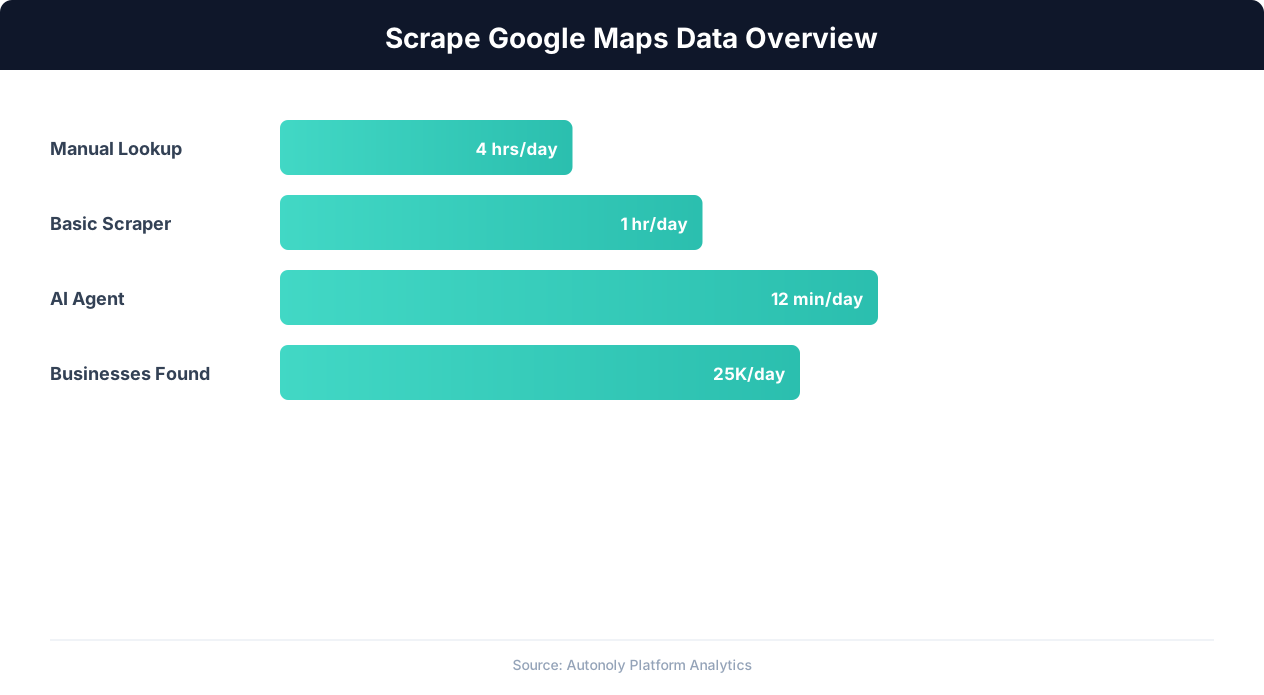
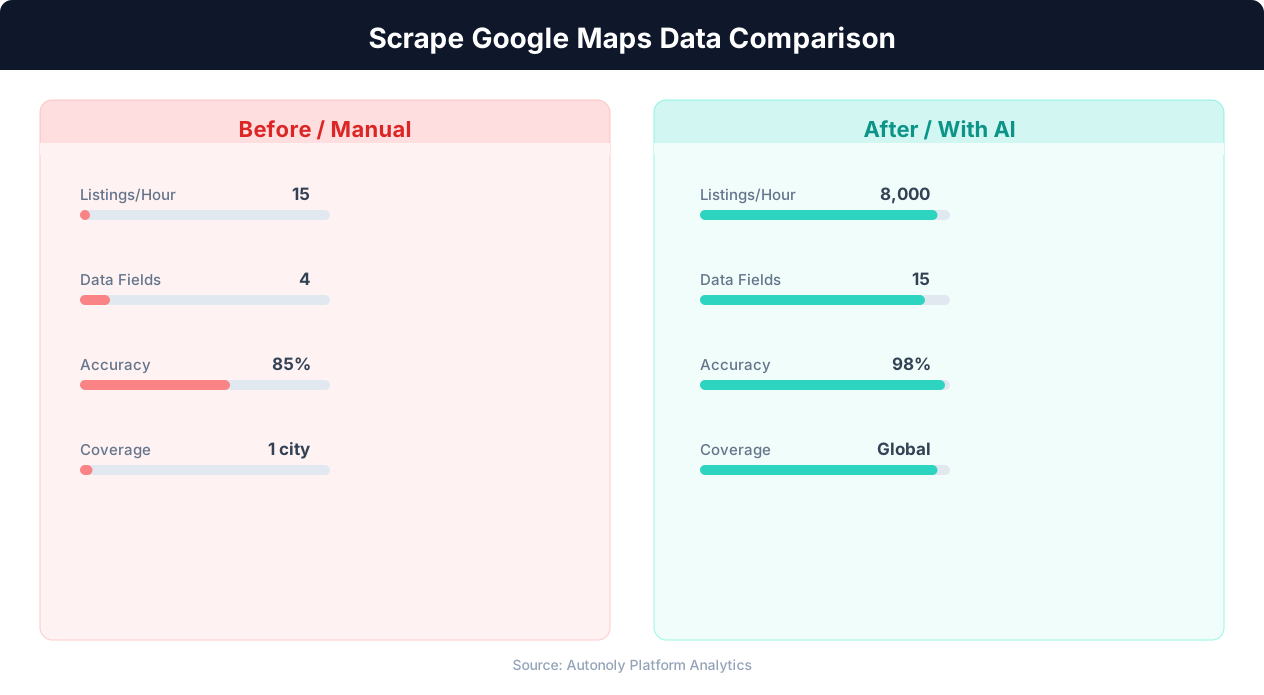
Manually searching Google Maps and copying business details into a spreadsheet works when you need 10 or 20 leads. But most lead generation campaigns require hundreds or thousands of prospects. A marketing agency targeting dentists in Texas needs data on thousands of dental practices across dozens of cities. A SaaS company selling to restaurants needs to identify every restaurant in their target markets. At this scale, manual data collection takes weeks of tedious work that could be completed in hours with automation.
Google Maps vs. Other Lead Sources
Compared to purchasing lead lists from data brokers, Google Maps scraping offers several advantages. The data is free (you are extracting publicly displayed information), current (listings are updated in real time), and verifiable (you can confirm any data point by visiting the listing yourself). Purchased lead lists, by contrast, are often months or years old, contain disconnected phone numbers, and include businesses that have closed. Google Maps data is also richer — review ratings and counts give you qualification signals that purchased lists never include.
For teams already using tools like data extraction for web scraping, adding Google Maps to your data pipeline is a natural extension that dramatically expands your prospecting capabilities.
What Business Data Can You Extract From Google Maps?
Google Maps business listings contain a structured set of data fields that vary slightly by business category but follow a consistent overall pattern. Understanding what is available helps you design extraction workflows that capture exactly what your sales or marketing process needs.
Core Contact Information
The most immediately useful data for lead generation includes:
- Business name — The official business name as registered with Google. This is the primary identifier for de-duplication and CRM matching.
- Phone number — The primary contact number. Google verifies phone numbers during the business verification process, making these more reliable than numbers from unverified directories.
- Website URL — The business's primary website. This enables further enrichment — you can scrape the website for email addresses, team member names, and technology stack information.
- Full address — Street address, city, state, and ZIP code. Essential for geographic segmentation and territory-based sales assignment.
- Google Maps URL — The direct link to the business listing. Useful for verification and for including in CRM notes.
Reputation and Social Proof Data
Google Maps provides rich reputation data that helps qualify leads before outreach:
- Star rating — The aggregate rating from 1.0 to 5.0. Businesses with low ratings may be more receptive to services that improve their online reputation or customer experience.
- Total review count — The number of Google reviews. A high review count indicates an established, active business. A low review count on an older listing suggests a business that may need marketing help.
- Individual reviews — The text of customer reviews, reviewer names, review dates, and per-review ratings. Review text reveals pain points, common complaints, and the business's response patterns.
- Review response rate — Whether and how the business responds to reviews indicates their engagement level with online reputation management.
Operational Details
Additional data fields provide context for more targeted outreach:
- Business category — Google's classification (e.g., "Italian Restaurant," "Personal Injury Attorney," "Auto Repair Shop"). This is the primary field for industry-based filtering.
- Hours of operation — When the business is open. Useful for scheduling calls and understanding business size (24/7 operations vs. limited hours).
- Price level — Google's price indicator ($, $$, $$$, $$$$) where available. This signals the business's market positioning.
- Popular times — Foot traffic patterns by hour and day. Available for businesses with sufficient visit data.
- Photos — Business photos, including interior, exterior, and product images. Photo quality and quantity indicate the business's investment in their online presence.
Structured Data Table
| Field | Example | Lead Gen Use |
|---|---|---|
| Business Name | Mario's Italian Kitchen | Personalized outreach |
| Phone | (512) 555-0147 | Direct cold calling |
| Website | mariositalian.com | Email discovery, tech analysis |
| Address | 123 Main St, Austin, TX 78701 | Territory assignment |
| Rating | 4.3 | Qualification scoring |
| Reviews | 287 | Business maturity signal |
| Category | Italian Restaurant | Industry filtering |
| Hours | 11 AM - 10 PM | Call scheduling |
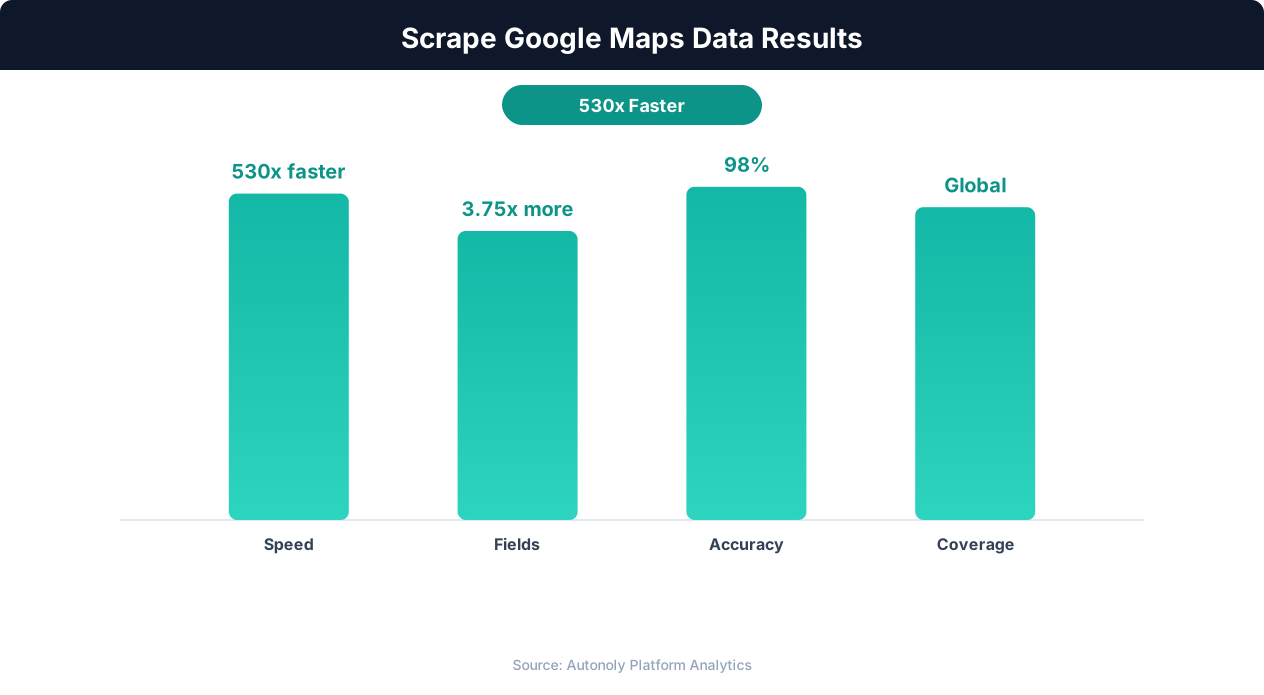
The specific fields you extract should match your sales process. A cold-calling team needs phone numbers and business names. An email marketing agency needs websites (to find contact emails). A local SEO agency needs ratings, review counts, and website URLs to identify businesses with weak online presence.
Technical Challenges of Scraping Google Maps
Google Maps is one of the more technically challenging sites to scrape due to its heavy reliance on JavaScript rendering, dynamic content loading, and sophisticated anti-bot protections. Understanding these challenges is essential for building reliable extraction workflows.
JavaScript-Heavy Rendering
Google Maps is a single-page application (SPA) built entirely with JavaScript. When you load a Google Maps search, the page fetches data through internal API calls and renders the results dynamically in the browser. This means traditional HTTP-based scrapers that only download HTML get an empty shell with no business data. You need a real browser engine that executes JavaScript, renders the page, and waits for dynamic content to load before extracting data.
Infinite Scroll and Lazy Loading
Google Maps search results do not use traditional pagination with page numbers. Instead, results load through infinite scrolling — as you scroll down the results panel, additional businesses load dynamically. A typical Google Maps search for a business category in a city returns 20-60 results that load in batches of approximately 20 as you scroll. The scraper must programmatically scroll the results panel, wait for new results to render, and continue scrolling until all results are loaded.
This infinite scroll behavior creates a timing challenge. Scroll too fast and some results will not have time to render. Scroll too slowly and the scraping process takes unnecessarily long. The optimal approach is to scroll to the bottom of the currently loaded results, wait for new results to appear (typically 1-2 seconds), then scroll again.
Anti-Bot Detection
Google employs robust anti-bot measures across all its properties, including Maps. These include:
- reCAPTCHA challenges: Google deploys its own reCAPTCHA system, which is among the most sophisticated CAPTCHA technologies available. Repeated automated requests trigger reCAPTCHA verification.
- IP-based rate limiting: Google monitors request volume per IP address and throttles or blocks IPs that exceed normal browsing patterns.
- Browser fingerprinting: Google checks for automation indicators including the
navigator.webdriverproperty, missing browser plugins, and inconsistent rendering behavior. - Behavioral analysis: Google tracks mouse movements, scroll patterns, and click behavior to distinguish human users from bots. Perfectly regular scrolling intervals are a detection signal.
Dynamic Element Selectors
Google frequently updates the CSS class names and DOM structure of Google Maps. Class names are often minified and change between deployments (e.g., .Nv2PK might become .M8T2pe after an update). Scrapers that rely on specific CSS selectors break whenever Google pushes a frontend update, which can happen multiple times per week. This is why AI-powered extraction that understands page content semantically — rather than relying on brittle CSS selectors — provides much more reliable results over time.
Why AI-Powered Scraping Works Better
Traditional scraping approaches require constant maintenance as Google changes its frontend. AI-powered tools like Autonoly's AI agent approach Google Maps the way a human would: they read the visual content on the page, identify business listings by their semantic meaning rather than CSS selectors, and adapt automatically when the layout changes. This dramatically reduces maintenance overhead and improves extraction reliability.
Step-by-Step: Scraping Google Maps with Autonoly
Autonoly's AI agent makes Google Maps scraping straightforward by handling the technical complexity behind the scenes. Here is a complete walkthrough for extracting business data from Google Maps for lead generation.
Step 1: Create a New Workflow
Log into your Autonoly dashboard and create a new workflow. Name it descriptively — for example, "Google Maps Plumbers in Dallas" — so you can identify it later. Open the AI Agent chat panel to start building your scraping workflow through natural language.
Step 2: Describe Your Target Data
Tell the AI agent exactly what you want to extract and from where. Be specific about the search query, location, and data fields. For example:
"Search Google Maps for 'plumbers' in Dallas, Texas. For each business in the results, extract the business name, phone number, website, full address, star rating, number of reviews, and business category. Collect all available results."
The agent launches a live browser, navigates to Google Maps, enters the search query, and begins identifying business listings in the results panel.
Step 3: Review the First Results
The agent extracts the first batch of results and presents them for your review. Check that all fields are being captured correctly. Common adjustments at this stage include:
- Specifying that you want the direct phone number, not a tracking number
- Requesting the full street address rather than just the city
- Asking the agent to skip results that are ads or promoted listings
The agent adjusts its extraction approach based on your feedback and continues.
Step 4: Handle Scrolling and Complete Extraction
Google Maps loads results in batches as you scroll. The agent automatically scrolls through the results panel, waits for new listings to load, and extracts data from each batch. For a typical city-level search like "plumbers in Dallas," you can expect 60-200 results depending on the category density. The agent handles all scrolling, loading waits, and extraction automatically.
Step 5: Expand to Multiple Searches
For comprehensive lead generation, you often need to search multiple business categories or locations. You can instruct the agent to run multiple sequential searches:
"Now search for 'HVAC contractors' in Dallas, Texas using the same extraction fields. Then search for 'electricians' in Dallas, Texas."
The agent runs each search sequentially, aggregating results into a single dataset. It automatically de-duplicates businesses that appear in multiple search results by matching on phone number and address.
Step 6: Export to Google Sheets
Once extraction is complete, configure the output destination. For lead generation, Google Sheets is the most common choice because it integrates easily with CRM tools and email outreach platforms. The agent writes the extracted data directly to a Google Sheet you specify, with clean column headers and properly formatted data.
Step 7: Schedule Recurring Runs
Business listings on Google Maps change over time — new businesses open, others close, phone numbers and ratings change. For ongoing lead generation, schedule your workflow to run weekly or monthly. Each run captures new and updated listings, appending them to your existing dataset with timestamps so you can identify fresh leads.
Advanced Search Strategies for Maximum Coverage
The quality of your Google Maps lead data depends heavily on your search strategy. A single broad search rarely captures all relevant businesses. Sophisticated lead generation requires systematic search planning that maximizes coverage while minimizing duplicates.
Geographic Grid Strategy
Google Maps returns results based on the map viewport and search center point. Searching "plumbers in Texas" returns a different set of results than searching "plumbers" while the map is centered on Dallas, Houston, or San Antonio. For statewide or regional coverage, divide your target area into a grid of overlapping search zones. Each zone should be small enough that Google Maps displays all relevant businesses (typically a city or neighborhood level) but large enough that the total number of searches remains manageable.
For example, to comprehensively scrape dentists across the greater Los Angeles area:
- Search "dentist" in Downtown Los Angeles
- Search "dentist" in Santa Monica
- Search "dentist" in Pasadena
- Search "dentist" in Long Beach
- Search "dentist" in Glendale
- Continue for each neighborhood or city within the metro area
After collecting all results, de-duplicate by phone number or Google Place ID to produce a clean, comprehensive list.
💡 Key Insight
Google Maps contains data on over 200 million businesses worldwide, making it the largest local business database.
Category Variation Strategy
Google Maps categorizes businesses using a taxonomy of over 4,000 categories. Businesses sometimes appear under unexpected categories, and searching only the most obvious term misses them. To maximize coverage, search variations and related terms:
| Primary Search | Additional Searches |
|---|---|
| plumber | plumbing contractor, plumbing repair, drain cleaning, pipe repair |
| dentist | dental clinic, dental office, orthodontist, cosmetic dentist, pediatric dentist |
| restaurant | Italian restaurant, Mexican restaurant, sushi restaurant, cafe, bistro |
| lawyer | attorney, law firm, legal services, personal injury lawyer, family lawyer |
Each category variation may surface businesses that did not appear in the primary search, particularly niche or specialty businesses that used specific category labels.
Keyword Qualifier Strategy
Adding qualifiers to your search terms helps you find specific subsets of businesses:
- Service-based qualifiers: "emergency plumber," "24 hour locksmith," "same day delivery" — identifies businesses offering specific service levels
- Price-based qualifiers: "affordable dentist," "luxury spa" — segments businesses by market positioning
- Attribute-based qualifiers: "women-owned business," "family-owned restaurant" — targets businesses with specific attributes
Review-Based Filtering
After extraction, use review data to qualify leads. Businesses with high review counts (100+) are established and likely have budget for services. Businesses with low ratings (under 3.5 stars) may be struggling and open to solutions. Businesses with no website listed are the warmest leads for web design and digital marketing agencies. These filters transform raw Google Maps data into qualified, segmented lead lists ready for targeted outreach.
Combining with Website Scraping
Google Maps gives you the business name, phone, and website URL. The next step is enriching this data by scraping the business's own website for email addresses, team member names, technology stack, and social media profiles. Autonoly's browser automation can chain these steps together: first extract business data from Google Maps, then visit each business's website to collect additional contact details. This creates a comprehensive prospect profile that goes far beyond what Google Maps alone provides.
Cleaning and Exporting Your Lead Data
Raw Google Maps data requires cleaning and structuring before it becomes a usable lead list. Phone numbers need standardization, addresses need parsing, and duplicate entries need removal. Proper data hygiene separates effective lead lists from noisy, unreliable ones.
Phone Number Standardization
Google Maps displays phone numbers in various formats: (512) 555-0147, 512-555-0147, +1 512 555 0147, and 5125550147 all represent the same number. Before importing into a CRM or dialer, standardize all phone numbers to a single format. The E.164 international format (+15125550147) is the most universally compatible, but many US-focused CRMs prefer (XXX) XXX-XXXX format. Autonoly's data processing nodes can automatically reformat phone numbers during extraction.
Address Parsing
Google Maps often returns addresses as a single string: "123 Main St, Dallas, TX 75201." For CRM import and territory assignment, you typically need these split into separate fields: street address, city, state, and ZIP code. Standard address parsing works for most US addresses, but edge cases (suite numbers, PO boxes, multi-line addresses) require careful handling. Configure your workflow to split addresses at extraction time rather than trying to parse them after the fact.
Duplicate Removal
When using the geographic grid or category variation strategies described above, duplicate businesses are inevitable. A plumber in downtown Dallas appears in searches for both "plumber downtown dallas" and "plumber dallas." The most reliable de-duplication key is the phone number — two listings with the same phone number are almost certainly the same business, even if the names differ slightly ("Joe's Plumbing" vs "Joe's Plumbing LLC").
When phone numbers are not available, fall back to a combination of business name similarity and address matching. Exact name matching catches obvious duplicates, but fuzzy matching (using algorithms like Levenshtein distance) catches variations like "McDonald's" vs "McDonalds" vs "McDonald's Restaurant."
Data Quality Scoring
Not all extracted leads are equal quality. Create a simple scoring system to prioritize outreach:
| Signal | Score Impact | Reasoning |
|---|---|---|
| Has website | +2 | Active online presence, easier to research |
| Has phone number | +2 | Direct contact method available |
| 50+ reviews | +1 | Established business with revenue |
| Rating under 4.0 | +1 | May need improvement services |
| No website | +3 | Highest priority for digital service providers |
| Recently opened | +2 | New businesses actively seeking services |
Export Destinations
Depending on your sales workflow, export your cleaned lead data to the appropriate destination:
- Google Sheets: Best for small teams and simple outreach workflows. Integrates with automation tools for follow-up sequences.
- CRM (HubSpot, Salesforce, Pipedrive): Best for sales teams with established CRM workflows. Import via CSV or use API integrations.
- Email outreach tools (Lemlist, Instantly, Apollo): For email campaigns, export business name, website, and any discovered email addresses directly to your outreach platform.
- Cold calling tools (PhoneBurner, Mojo Dialer): For phone-based outreach, export business name, phone number, and category for call prioritization.
Autonoly supports direct export to Google Sheets through its native integrations, and CSV export works with any CRM or outreach tool that accepts file imports.
Compliance and Best Practices
Scraping Google Maps data for lead generation sits at the intersection of data extraction law, privacy regulations, and platform terms of service. Operating responsibly protects your business from legal risk and ensures the longevity of your lead generation pipeline.
Google's Terms of Service
Google's Terms of Service prohibit automated data extraction from Google Maps without explicit permission. Google also offers the Places API as the official, supported method for accessing business data programmatically. The Places API provides structured business data including names, addresses, phone numbers, ratings, and reviews — but it comes with significant cost (approximately $17 per 1,000 requests for detailed place information) and rate limits that make large-scale lead generation expensive.
In practice, the distinction between scraping and API usage is a commercial one. Both access the same publicly displayed data. The key risk factor is the volume and impact of your scraping activity. Low-volume scraping that mimics human browsing behavior (a few hundred businesses per session with natural delays) carries minimal practical risk. High-volume, aggressive scraping that degrades Google's service or circumvents access controls carries more risk.
Privacy Regulations
Google Maps business data is largely commercial information (business names, business phone numbers, business addresses), which is generally not subject to personal data privacy regulations like GDPR or CCPA. However, some data points cross into personal territory:
💡 Key Insight
Businesses using Google Maps data for lead generation report 3x higher contact rates compared to purchased lead lists.
- Sole proprietor names: A business listed under an individual's name ("John Smith Consulting") contains personal data under GDPR.
- Reviewer information: Names and photos of Google reviewers are personal data. Scraping and storing reviewer data requires a legitimate interest basis under GDPR.
- Home-based businesses: Some Google Maps listings use residential addresses, which may constitute personal data.
For lead generation in the EU/UK, ensure you have a legitimate interest basis for processing the data, provide a way for individuals to opt out of your outreach, and limit data retention to what is necessary for your business purpose.
Responsible Scraping Practices
Follow these best practices to operate sustainably:
- Rate limit your requests. Add delays of 3-5 seconds between page loads. This reduces server impact and minimizes detection risk.
- Scrape only what you need. If you only need phone numbers and business names, do not also scrape review text and photos. Minimizing data collection reduces both privacy risk and storage costs.
- Keep data current. Stale data creates problems — calling disconnected numbers wastes time and frustrates prospects. Re-scrape your lead lists periodically and remove outdated entries.
- Honor opt-out requests. If a business owner asks you to remove their information from your list, do so promptly. This is both a legal requirement under many privacy frameworks and a basic courtesy.
- Do not republish scraped data. Using Google Maps data for your own sales outreach is very different from republishing it as a competing business directory. The former is standard sales practice; the latter creates significant legal exposure.
For a broader discussion of web scraping legal considerations, see our comprehensive web scraping best practices guide.
Scaling Your Google Maps Lead Generation Pipeline
Once you have validated your Google Maps scraping workflow with a single city and business category, the natural next step is scaling across multiple geographies, categories, and enrichment sources. Scaling introduces new challenges around data management, workflow orchestration, and lead quality maintenance.
Multi-City, Multi-Category Campaigns
Enterprise lead generation often requires coverage across dozens of cities and multiple business categories. A home services marketing agency might need data on plumbers, electricians, HVAC contractors, roofers, and landscapers across 50 metro areas. That is 250 unique search combinations, each potentially returning 100+ results. At this scale, manual workflow management becomes impractical.
Autonoly's visual workflow builder supports parameterized workflows where you define the search logic once and feed in variable inputs (cities, categories) from a spreadsheet. This transforms a single workflow into a scalable pipeline that processes any number of search combinations without duplicating workflow logic.
Enrichment Pipeline
Google Maps data is the starting point, not the end point. A complete lead enrichment pipeline adds layers of additional data:
- Website scraping: Visit each business's website to extract email addresses, team member names, technology stack (WordPress, Shopify, etc.), and social media links.
- Social media profiling: Check if the business has active social media presence and engagement levels. Businesses with weak social media are strong prospects for marketing services.
- Business verification: Cross-reference Google Maps data with state business registries, BBB listings, or Yelp to verify business legitimacy and get additional data points.
- Intent signal detection: Monitor the business's website for hiring pages (indicating growth), technology changes (indicating modernization), or new location announcements (indicating expansion).
Each enrichment step can be automated as a separate Autonoly workflow that triggers after the Google Maps extraction completes. This creates a multi-stage pipeline where raw Google Maps data enters at one end and fully enriched, qualified lead profiles emerge at the other.
Lead Scoring and Segmentation
At scale, you cannot treat all leads equally. Implement automated lead scoring based on the extracted and enriched data:
- High priority: Business has no website, 50+ reviews (established but digitally underserved), phone number available
- Medium priority: Business has a basic website (no blog, outdated design), 20-50 reviews, active Google listing
- Low priority: Business has a modern website, strong online presence, 200+ reviews (likely already working with an agency)
Segment leads by geography, category, and priority score. This enables your sales team to focus outreach on the highest-value prospects first while lower-priority leads enter nurture sequences.
Ongoing Monitoring and Refresh
Lead data decays over time. Businesses close, phone numbers change, new businesses open. For sustained lead generation, schedule your Google Maps scraping workflows to run monthly. Each run captures new listings and updates to existing ones. Use Autonoly's scheduling feature to automate these recurring runs, and configure alerts through Slack or email integrations to notify your team when new leads are available.
A well-maintained Google Maps lead generation pipeline provides a continuous stream of fresh, qualified prospects — turning what was once a manual research task into an automated competitive advantage. Combined with automated lead generation workflows, this approach can generate thousands of verified business leads per month with minimal ongoing effort.