The Document Bottleneck Every Business Hits
Every business runs on documents. Invoices arrive from suppliers. Contracts come back signed. Insurance claims, purchase orders, receipts, statements, and onboarding forms flow in constantly — by email attachment, by portal download, by scan, and occasionally still on paper. And for the vast majority of organizations, the way these documents get processed has not fundamentally changed in a decade: a human opens the file, reads it, finds the fields that matter, and retypes them into an accounting system, a CRM, or a spreadsheet.
This is the document bottleneck, and it is expensive in ways that are easy to underestimate. A single invoice might take three to five minutes to key in by hand. A contract that needs key terms summarized — renewal date, payment terms, liability cap — can take fifteen minutes or more to abstract. An insurance claim with attached documentation, photos, and an adjuster's notes can consume an hour. Multiply any of these by the hundreds or thousands of documents a mid-size company handles each month, and you are looking at entire full-time roles dedicated to nothing but reading and retyping.
Why Manual Document Handling Resists Improvement
The reason this work has been so hard to automate is that documents are messy. No two vendors format an invoice the same way. One puts the total in the top-right corner, another buries it in a table at the bottom. Contracts use different clause structures and different ordering. Claims arrive as bundles of mixed document types — a claim form, a police report, repair estimates, photographs — all in a single PDF. Traditional automation tools choke on this variability because they expect structure that simply is not there.
The 2026 reality is that intelligent document processing (IDP) has matured into a category that handles exactly this messiness. The global IDP market is projected to reach roughly $11.6 billion by 2029, growing at nearly 30% annually — a reflection of how many organizations are moving document work off human desks and onto AI systems that read documents the way a person does, but at machine speed and scale.
The True Cost of Manual Document Processing
Beyond the labor of keying data, manual document handling produces transcription errors (industry studies consistently put manual data-entry error rates between 1% and 4%), slow cycle times that delay payments and decisions, inconsistent filing that makes audits painful, and zero structured data to analyze later. A finance team processing 2,000 invoices a month at four minutes each spends over 130 hours monthly on data entry alone — before a single one is approved or paid.
This Article Is About the Whole Pipeline
Plenty has been written about narrow slices of this problem — downloading invoices from vendor portals, for example. This guide is deliberately broader. It covers the end-to-end document-AI workflow: ingesting any document type, classifying what it is, extracting the fields that matter, validating that the data is correct, keeping a human in the loop for the cases that need judgment, and routing the structured result into your system of record — an accounting platform, a CRM, a claims system, or a database. The same architecture handles invoices, contracts, and claims; only the fields and the destination change.
How AI Document Processing Actually Works: The Six-Stage Pipeline
Intelligent document processing is not a single technology — it is a pipeline that chains several AI capabilities together. Modern IDP uses OCR as a foundational step and then layers computer vision, natural language understanding, and machine learning on top to classify, understand, extract, and validate data in the document's context. Understanding the stages helps you see where to put quality controls.
Stage 1: Ingestion
Documents arrive from many channels: an email inbox, a shared drive, a vendor portal, an upload form, a scanner. The first job of the pipeline is to capture every document regardless of how it arrives and normalize it into a consistent format. An AI agent that drives a real browser can log into portals and pull documents down, monitor an inbox for attachments, or watch a folder — so ingestion is not limited to a single channel. The output is simply a queue of documents waiting to be understood.
Stage 2: OCR and Layout Recognition
Optical character recognition turns the pixels of a scanned or image-based document into machine-readable text, and this is where accuracy starts to matter enormously. Legacy OCR engines manage 70–85% accuracy on clean printed text and degrade badly on noisy scans. Modern AI-driven systems reach 95–99% on clean printed documents and 85–95% on handwriting and low-quality scans. Crucially, modern systems also recognize layout — they understand that a block of numbers is a table and that a label sits next to its value. Autonoly's PDF OCR and AI vision capabilities handle this stage, reading both the text and the visual structure of each page.
Stage 3: Classification
Before you can extract anything useful, you have to know what the document is. A pipeline that processes mixed inbound mail needs to tell an invoice from a purchase order from a contract from a claim form. AI classification reads the document and assigns it a type, which then determines which extraction rules and which downstream destination apply. For bundled documents — a claim PDF containing a form, a report, and photos — classification can split the bundle into its component documents and handle each appropriately.
Stage 4: Extraction
This is the heart of the pipeline. For each document type, the system pulls out the fields that matter — for an invoice: vendor, invoice number, date, line items, subtotal, tax, and total; for a contract: parties, effective date, term length, renewal mechanics, and liability cap; for a claim: claimant, policy number, date of loss, claim type, and claimed amount. The breakthrough that makes modern extraction work across formats is that AI understands the semantic meaning of a field rather than its fixed position. It knows that "Amount Due," "Balance Payable," and "Total" all refer to the same concept, wherever they appear. This is handled by Autonoly's data extraction engine.
Stage 5: Validation
Extracted data is not automatically trustworthy. A robust pipeline validates it: do the line items sum to the subtotal? Does the tax rate look plausible for the jurisdiction? Does the invoice number already exist in the system (a possible duplicate)? Does the contract's renewal date fall in a sensible range? Does the claimed amount fall within policy limits? Validation rules catch extraction errors and genuine document problems before they propagate downstream. The data processing stage applies these checks and computes confidence scores for each field.
Stage 6: Routing
Finally, the validated, structured data is routed to its destination. Invoices flow into the accounting system. Contract terms land in a CRM or contract-management database with a renewal reminder scheduled. Claims data enters the claims platform with the right queue assignment. Routing logic — built visually with conditional branches — decides where each document goes based on its type, its content, and its validation status.
One Pipeline, Many Document Types
The same six-stage architecture processes invoices, contracts, and claims. What changes between them is the classification label, the set of fields you extract, the validation rules you apply, and the system you route into. Build the pipeline once, and adding a new document type becomes a configuration task rather than a new engineering project.
Invoices: From Inbox to Accounting System Without Manual Entry
Invoices are the most common starting point for document automation because the volume is high, the format variability is brutal, and the downstream system (accounting) is well-defined. IDP can cut invoice processing time by roughly 75% while reaching 99%+ field accuracy on standard invoices — which is exactly the kind of high-volume, well-bounded task automation is built for.
The End-to-End Invoice Flow
A complete automated invoice pipeline looks like this:
- Ingest. Pull invoices from supplier portals and monitor the accounts-payable inbox for emailed PDFs. If you are still collecting invoices by hand, automating that collection step is itself worthwhile — our guide to automating invoice downloads from vendor portals covers the browser-driven side of ingestion in depth.
- Classify. Confirm the document is an invoice (and not a statement, a quote, or a credit note, which need different handling).
- Extract. Pull vendor, invoice number, date, PO reference, line items, subtotal, tax, and total. The structured output mirrors what you would get from manually turning PDF documents into structured data — only automatically.
- Validate. Check that line items sum correctly, that the invoice number is not a duplicate, that the vendor exists in your master list, and that the total falls within expected ranges for that vendor.
- Match. Where a purchase order exists, perform three-way matching against the PO and the goods receipt.
- Route. Push validated invoices into your accounting platform and queue them for approval and payment.
Routing Into Your Accounting Platform
The routing destination depends on your stack. Teams running QuickBooks can have validated invoice data create bills directly. Firms on Zoho Books or FreeAgent can route the same structured output to those platforms instead. Because the extraction produces clean, normalized fields, the integration step is straightforward: the hard work of reading the document is already done by the time data reaches the accounting system.
What Three-Way Matching Adds
Three-way matching — confirming that the invoice agrees with the purchase order and the goods receipt — is the control that prevents overpayment and catches fraud. When automated, it flips invoice processing from a fully manual task into an exception-based one: the system auto-approves the 85–90% of invoices that match cleanly and surfaces only the discrepancies for a human to review. That is the single biggest lever for reducing AP headcount without reducing control. For a deeper look at the downstream approval and payment stages, see our guide to automating invoice processing end to end.
Invoices Are the Proving Ground
Start your document-AI program with invoices. The volume justifies the effort, the success criteria are unambiguous (the numbers either match the source PDF or they do not), and the ROI shows up in the first month. Once invoices run reliably, the same pipeline architecture extends to contracts and claims with minimal additional work.
Contracts: Extracting Key Terms and Never Missing a Renewal
Contracts are a different beast from invoices. They are longer, written in prose rather than tabular data, and the fields that matter are buried inside clauses rather than printed in labeled boxes. But the business pain is just as real: legal and operations teams spend hours abstracting key terms from every contract, and renewal dates slip through the cracks, leading to unwanted auto-renewals or missed renegotiation windows.
What to Extract From a Contract
Contract extraction focuses on the terms that drive decisions and obligations:
- Parties: Who are the counterparties, and what entities are bound?
- Dates: Effective date, term length, renewal date, and termination notice period.
- Commercial terms: Pricing, payment schedule, discounts, and escalation clauses.
- Risk terms: Liability caps, indemnification, warranties, and limitation-of-liability language.
- Renewal mechanics: Is it auto-renewing? What notice period is required to prevent renewal?
- Governing law and jurisdiction: Which legal framework applies?
Because contracts are natural-language documents, extraction here leans heavily on language understanding rather than layout recognition. The AI reads the full text, locates the relevant clauses, and pulls the specific values — much the way a paralegal would abstract a contract, but in seconds. Autonoly's data extraction and AI vision features handle both the text and any signature blocks, stamps, or scanned pages.
The Renewal-Reminder Win
The single highest-value contract automation is renewal management. Once the renewal date and notice period are extracted, the pipeline can schedule a reminder to fire well before the notice deadline — giving your team time to renegotiate, renew, or cancel deliberately rather than by default. Using scheduled execution, you can run a recurring job that scans contracts approaching their notice window and alerts the responsible owner. For a portfolio of even a few dozen contracts, this alone prevents the kind of silent auto-renewal that locks companies into unwanted spend for another year.
Routing Contract Data
Extracted contract metadata typically routes into a CRM or a contract-management database, where it becomes searchable and reportable. Suddenly you can answer questions like "Which contracts renew in Q3?" or "Which agreements have liability caps below $1M?" without opening a single PDF. The structured data, not the document, becomes the asset. Conditional logic flows can route high-value or high-risk contracts to legal for review while sending routine agreements straight to the repository.
Insurance Claims: Processing Mixed Document Bundles at Scale
Insurance claims are the hardest of the three document types — and where automation delivers some of the largest gains. A single claim is rarely one clean document. It is a bundle: a claim form, supporting evidence (repair estimates, medical reports, police reports), photographs, correspondence, and sometimes an adjuster's handwritten notes. Processing it manually means an adjuster opens the bundle, reads every piece, extracts the relevant facts, cross-checks them against the policy, and makes a decision. A hybrid AI-plus-human approach to claims has been shown to cut average claim processing time by around 60%.
The Claims Pipeline
An automated claims workflow runs the full six-stage pipeline, with classification and validation doing especially heavy lifting:
- Ingest the claim bundle from the intake channel.
- Classify and split the bundle into its component documents — separating the claim form from the police report from the repair estimate from the photos.
- Extract from each component: claimant details and policy number from the form, incident details from the report, line-item costs from the estimate, and damage indicators from the photos via vision AI.
- Validate against the policy: is the policy active on the date of loss? Is the claim type covered? Does the claimed amount fall within limits and deductibles?
- Route to the right queue: straightforward, low-value, clearly-covered claims toward fast-track or straight-through processing; complex, high-value, or ambiguous claims to a human adjuster with the extracted summary already prepared.
Why Classification Matters So Much Here
In claims, getting the document types right up front determines whether the rest of the pipeline works. Misclassify a repair estimate as a medical report and the extraction rules misfire. This is why robust classification — and the ability to split bundles — is non-negotiable for claims automation. The payoff is that adjusters stop spending time on data assembly and spend it on judgment: assessing coverage, negotiating settlements, and investigating the small fraction of claims that look suspicious.
Purpose-Built Claims Document Workflows
For insurers and brokers, Autonoly offers a dedicated insurance document management solution that combines AI extraction with the document-bundle handling claims require. It applies the same ingest-classify-extract-validate-route architecture, tuned for the mixed-document reality of claims intake — keeping a human adjuster in the loop precisely where coverage decisions and financial weight demand it.
Human-in-the-Loop Is the Point, Not a Limitation
Nobody is suggesting AI should auto-approve a complex bodily-injury claim. The value is that automation handles the assembly and the routine decisions, so human experts focus on the cases that actually need them. That division of labor is what makes claims automation both faster and safer than the fully manual alternative — a theme we return to in the validation section below.
Validation and Human-in-the-Loop: Where Accuracy Really Comes From
The most dangerous misconception about AI document processing is that the goal is 100% automation with no humans involved. It is not. The goal is to automate everything that can be processed reliably and route everything else to a human — efficiently, with the AI's best extraction already done. Getting this design right is the difference between an automation that saves time and one that quietly introduces errors into your financials.
Confidence Scores Drive Everything
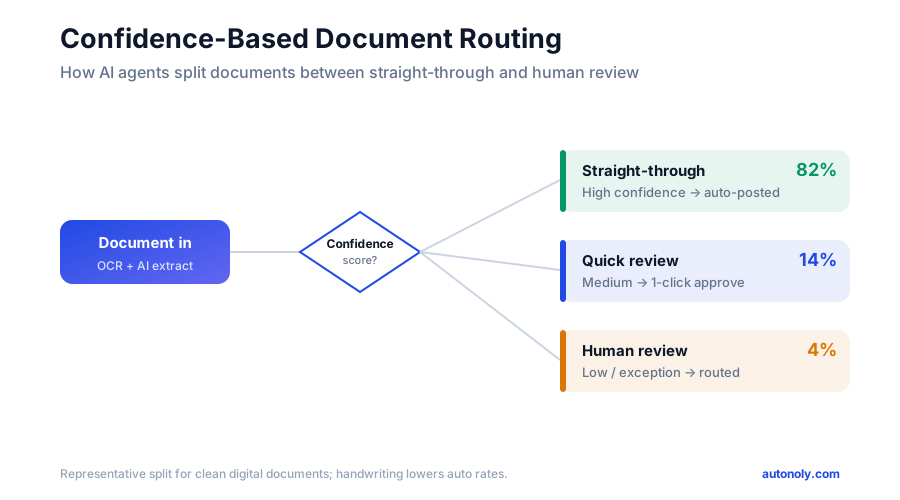
Modern extraction does not just return a value — it returns a value plus a confidence score. "Invoice total: $4,212.50, confidence 0.99" is very different from "Invoice total: $4,212.50, confidence 0.62." A well-designed pipeline uses these scores to decide what gets auto-processed and what gets human review:
- High confidence on all critical fields: auto-process (straight-through).
- Low confidence on any critical field: route to a human for a quick verify-or-correct.
- Failed a validation rule: route to a human with the specific problem flagged.
This is what people mean by straight-through processing (STP). The 2026 benchmark for STP on financial and identity fields is roughly 99.9% field-level accuracy — the threshold at which a document can move through the workflow with no human review. The practical insight is that moving from 95% to 99% field accuracy cuts exception reviews from about 1 in 20 documents to about 1 in 100, which dramatically reduces the human workload while keeping quality high.
What Validation Rules Catch
Confidence scores tell you how sure the model is about what it read. Validation rules tell you whether what it read makes sense. The two are complementary:
- Arithmetic checks: line items must sum to the subtotal; subtotal plus tax must equal total.
- Cross-reference checks: the vendor must exist in your master list; the invoice number must not be a duplicate; the policy must be active on the date of loss.
- Range checks: amounts, dates, and rates must fall within plausible bounds for the document type and counterparty.
- Completeness checks: required fields must be present; a contract missing a governing-law clause gets flagged for attention.
These checks run on the data processing layer and are where domain knowledge gets encoded. They are also where you catch genuine document problems — a vendor's arithmetic error, a duplicate submission, a claim against a lapsed policy — that a human keying data quickly might miss entirely.
Designing the Human-in-the-Loop Experience
When a document does need human review, the experience should be fast. The reviewer sees the original document on one side and the extracted fields on the other, with low-confidence fields highlighted. They confirm or correct in seconds rather than re-keying from scratch. Critically, corrections feed back into the system so the pipeline improves over time. The most effective deployments keep humans in the loop precisely for sensitive validation, exception handling, and decisions that carry compliance or financial weight — and automate the rest.
The Right Mental Model
Do not measure success by "percentage of documents with zero human touch." Measure it by total processing cost and error rate. A pipeline that auto-processes 90% of documents and routes 10% to a fast human-review queue beats both fully manual processing and reckless full automation. Tune the confidence thresholds to your risk tolerance: lower them for low-stakes documents, raise them for anything touching money or compliance.
Comparing Approaches: Manual, Template OCR, RPA, and AI Agents
Document processing can be tackled several ways, and the right choice depends on document volume, format variability, and how much engineering you want to own. Here is an honest comparison of the four main approaches.
| Approach | Handles Format Variety | Setup Effort | Maintenance | Best For |
|---|---|---|---|---|
| Manual entry | Excellent | None | None | Very low volume (under ~50/month) |
| Template OCR | Poor | High (one template per format) | High (breaks on layout change) | A few stable, fixed-format documents |
| Traditional RPA | Limited | Very high (developer-built bots) | High (bots break on UI change) | Large enterprises with RPA teams |
| AI agents (IDP) | Excellent | Low (describe in plain English) | Low (self-adapting) | Any team with variable-format documents |
Manual Entry
Still the right answer below a certain volume. If you process a few dozen documents a month, the overhead of building any automation may exceed the labor it saves. Manual entry handles any format and any edge case — it just does not scale, and it carries a steady 1–4% error rate.
Template-Based OCR
The first generation of document automation. You define a template that says "the invoice number is in this box, the total is in that box," and the OCR reads those positions. It works beautifully — until a vendor changes their layout or a new vendor sends a differently formatted invoice, at which point the template fails silently. Template OCR requires a template per format, which becomes unmanageable across hundreds of suppliers — the brittleness that drove the move from plain OCR to IDP.
Traditional RPA
Robotic process automation can move data between systems and even drive document-handling UIs, but it expects structure and breaks when interfaces or formats change. RPA bots are built by developers, cost real money to license and maintain, and treat each format as a separate project. For organizations that already own an RPA platform, it has a place — but it is rarely the fastest or cheapest path to document automation today.
AI Agents (Modern IDP)
AI-agent-based processing reads documents semantically rather than positionally, which is why it tolerates format variation that breaks templates and RPA. You describe what to extract in plain language, the agent figures out where each field lives, and the pipeline self-adapts when formats change. Because the same agent can also drive a browser, the ingestion and routing stages — logging into portals, navigating systems, pushing data — come built in rather than bolted on. For most teams in 2026 with variable-format documents, this is the pragmatic choice.
Pitfalls to Avoid and How to Get Started
Document-AI projects fail in predictable ways. Knowing the common pitfalls in advance is the cheapest insurance you can buy. Here are the ones that trip teams up most often, followed by a pragmatic rollout plan.
Pitfall 1: Chasing 100% Automation
The most common mistake is treating any human involvement as a failure. It is not. The 1–5% of documents that need human eyes are exactly the ones where a mistake would be expensive. Design the human-in-the-loop queue from day one, set confidence thresholds deliberately, and measure success by cost and error rate — not by the percentage of documents with zero human touch.
Pitfall 2: Skipping Validation
Extraction without validation is a liability. A confidence score tells you the model is sure about what it read; it does not tell you the document itself is correct. Without arithmetic checks, duplicate detection, and cross-reference rules, you will dutifully load a vendor's typo or a duplicate invoice straight into your books. Build validation rules before you turn on routing.
Pitfall 3: Automating Everything at Once
Teams that try to onboard every document type and every integration on day one end up with a fragile system nobody trusts. Start with one document type (invoices), get it running reliably for two full cycles, then expand. Each new type is a configuration change on a proven pipeline, not a fresh project.
Pitfall 4: Ignoring the Edge Cases
Bundled claims, handwritten annotations, low-quality scans, and foreign-language documents are where naive pipelines fall over. You do not have to solve them all immediately, but you do have to detect them and route them to humans rather than silently mis-processing them. A pipeline that knows what it cannot handle is far safer than one that guesses.
Pitfall 5: Forgetting the Audit Trail
For anything touching finance, compliance, or insurance, you need a record of what was extracted, what was validated, what a human changed, and where the data went. Bake logging in from the start; retrofitting it later is painful.
A Pragmatic Rollout Plan
- Weeks 1–2: Pick one document type and one destination. Invoices into your accounting platform is the canonical first project. Map the fields you need and the validation rules that matter.
- Weeks 2–4: Build and test the pipeline. Using a tool like Autonoly's AI agent chat, describe the extraction in plain English and run it against a sample of real documents. Tune confidence thresholds and validation rules against the results.
- Weeks 4–6: Add the human-in-the-loop queue and go live in shadow mode. Run the pipeline alongside your manual process, compare outputs, and build trust before you cut over.
- Weeks 6–8: Cut over and assemble the full workflow. Connect ingestion, extraction, validation, and routing into a single automation using the visual workflow builder, and schedule it to run continuously.
- Month 3 onward: Expand. Add contracts, then claims, then the long tail of document types — each one reusing the architecture you have already proven.
Shadow Mode Builds Trust
Before you let an automated pipeline write to your system of record, run it in parallel with your existing process for a couple of cycles. Compare the automated output against the human output, investigate every discrepancy, and only cut over once the automation consistently matches or beats the manual baseline. This single step prevents almost every catastrophic go-live story.
Conclusion: Turn Documents Into Data, Automatically
Documents are the connective tissue of business, and for too long they have also been its biggest manual bottleneck. The shift happening across finance, legal, and insurance teams in 2026 is simple to state: stop treating documents as things people read and retype, and start treating them as data sources that AI reads, validates, and routes automatically. The technology has crossed the threshold where this is not a research project — it is a configuration exercise on a proven pipeline.
The architecture is the same regardless of document type. Ingest from any channel, classify what arrived, extract the fields that matter with semantic understanding rather than rigid templates, validate against business rules and confidence thresholds, keep a human in the loop for the small fraction that genuinely needs judgment, and route the structured result into your accounting system, CRM, or claims platform. Build it once for invoices, and contracts and claims follow with minimal additional effort.
The payoff is concrete: invoice processing time cut by around 75%, claims cycle times down by roughly 60% with a hybrid human-plus-AI model, transcription errors largely eliminated, renewal dates never missed, and a growing store of structured data that lets you actually analyze what flows through your documents. Your finance and operations people stop being human OCR engines and start doing the judgment work machines cannot.
Start With One Document Type This Week
You do not need a six-month transformation program. Pick your highest-volume document — almost certainly invoices — and build a single pipeline that ingests, extracts, validates, and routes it into your accounting platform. Autonoly's AI agents combine PDF OCR, data extraction, and browser-driven routing in one no-code platform, so you can describe the workflow in plain English and watch it run. Prove the value on one document type, then let the same architecture take on contracts and claims. The manual document era is ending — start the transition while it is still a competitive advantage.