Two Generations of Automation, One Decision to Make
If you are evaluating automation tools, you have probably noticed the landscape has split into two fundamentally different camps. On one side, traditional Robotic Process Automation (RPA) platforms like UiPath, Automation Anywhere, and Blue Prism have spent over a decade establishing themselves in enterprise environments. If you are still mapping out what automation actually means for your team, the RPA vs AI automation breakdown is a useful starting point. On the other, a new generation of AI browser agents — platforms like Autonoly, Skyvern, Browser Use, and others — are approaching the same problem from a completely different angle.
Both camps promise to automate repetitive digital tasks. Both can save your team significant time. But they work in fundamentally different ways, serve different use cases well, and come with different trade-offs in cost, reliability, maintenance, and accessibility.
This article is a genuine attempt to help you decide which approach — or which combination — fits your situation. We will be honest about where RPA wins, where AI agents win, and where the answer depends entirely on your specific context. No technology is universally better; the right choice depends on what you are automating, who is building the automations, and what your budget looks like.
What This Article Covers
We will define both technologies clearly, explain the architectural differences, present an honest cost comparison, walk through real scenarios where each approach is better, and give you a decision framework you can apply to your own situation. If you are already familiar with both technologies, skip to the decision framework section.
Before we dive in, a note on perspective: Autonoly is an AI browser agent platform, so we obviously have a viewpoint. But we have also seen enough automation projects — both AI-based and RPA-based — to know that traditional RPA remains the right answer for a meaningful number of use cases. We will call those out clearly.
What Is Traditional RPA and How Does It Work?
Robotic Process Automation emerged as a way to automate repetitive computer tasks without modifying the underlying applications. The core idea was appealing: instead of building expensive system integrations or custom APIs, you could create a software "robot" that mimicked human interactions with existing applications — clicking buttons, typing text, reading screens, and moving data between systems.
The Architecture of Traditional RPA
An RPA bot is essentially a script that interacts with application user interfaces. Here is how it works at a technical level:
- Element identification: The bot identifies UI elements using selectors — CSS selectors, XPaths, element IDs, or accessibility attributes. For desktop applications, it uses Windows UI Automation framework, image recognition, or OCR.
- Scripted interactions: A developer programs a sequence of actions: click element A, wait for element B to appear, type text into element C, read the value from element D. Each action targets a specific element identified by its selector.
- Flow control: The script includes if/then branching, loops, and exception handling — all defined in advance by the developer. Every possible path through the workflow must be anticipated and coded.
- Orchestration: A central server (like UiPath Orchestrator or Automation Anywhere Control Room) manages scheduling, credential storage, queue distribution, and monitoring across multiple bots.
Major RPA Platforms
| Platform | Strength | Typical Customer |
|---|---|---|
| UiPath | Largest ecosystem, strong desktop automation, extensive training | Fortune 500, large enterprise |
| Automation Anywhere | Cloud-native architecture, strong document processing | Enterprise, mid-market |
| Blue Prism | Security-first design, strong in regulated industries | Banking, healthcare, government |
| Microsoft Power Automate | Deep Microsoft ecosystem integration, accessible pricing | Microsoft-centric organizations |
| Pegasystems | Combined BPM and RPA, case management | Complex enterprise workflows |
What RPA Does Well
Traditional RPA has been enormously successful for good reasons. When you have a stable application with a predictable UI, and you need to process thousands of identical transactions, RPA delivers:
- Speed: A bot can execute UI interactions much faster than a human, processing hundreds of records per hour.
- Consistency: The bot does exactly the same thing every time, eliminating human errors like typos, skipped steps, or inconsistent data entry.
- Determinism: Given the same inputs, the bot always produces the same outputs. This is critical for audit-sensitive processes where regulators need to verify exactly what happened.
- 24/7 operation: Bots do not take breaks, sick days, or vacations. Unattended bots can run overnight, on weekends, and during holidays.
Credit Where Due
The RPA industry has automated billions of transactions, saved enterprises millions of hours, and created a legitimate new category of enterprise software. The platforms are mature, the ecosystems are vast, and the technology works well within its design parameters. The limitations we discuss later are not failures of execution — they are inherent constraints of the selector-based architectural approach.
What Are AI Browser Agents and How Do They Work?
AI browser agents represent a fundamentally different approach to automation. Instead of following pre-scripted sequences of UI interactions, an AI agent uses a large language model (LLM) to understand web pages, reason about tasks, and decide how to interact with applications dynamically.
The Architecture of AI Browser Agents
An AI browser agent works like this:
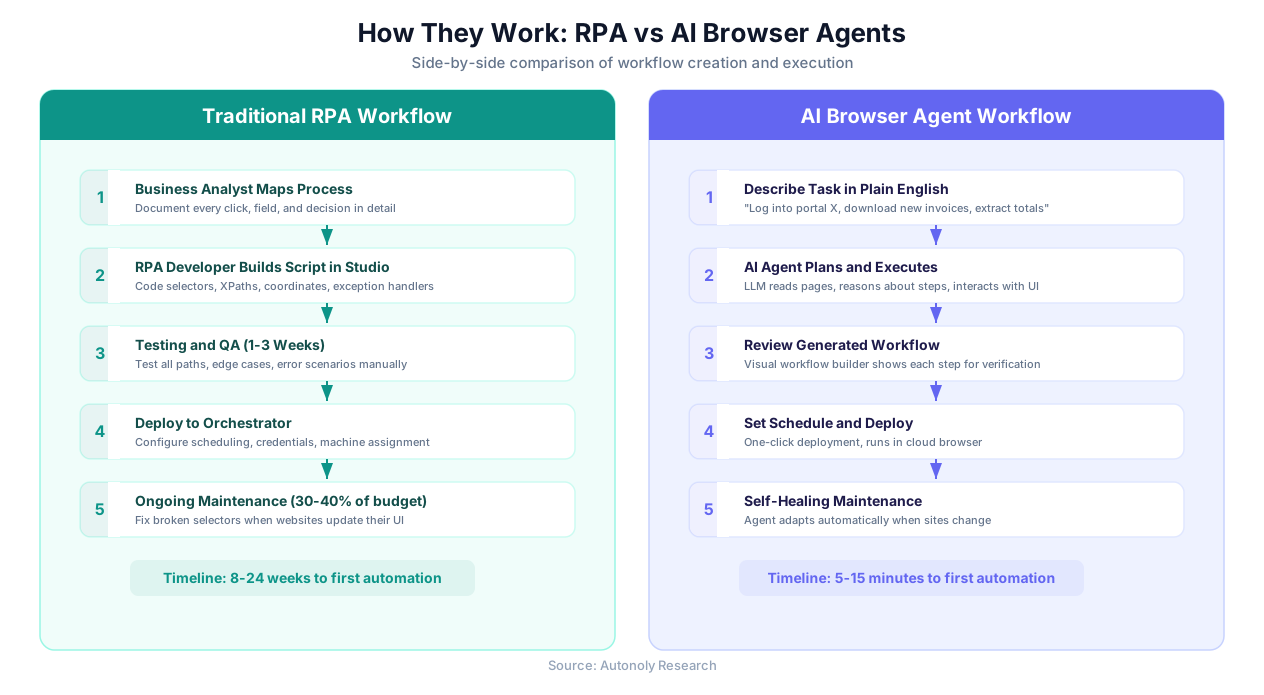
- Natural language input: You describe the task you want automated in plain English. For example: "Log into our vendor portal, navigate to invoices, download all invoices from this month, and extract the total amounts into a spreadsheet."
- Semantic page understanding: The agent loads the target website in a real cloud browser and reads the page — not just the raw HTML, but the semantic meaning. It understands "this is a login form," "this is a navigation menu," "this is a data table with invoice records."
- Reasoning and planning: The LLM reasons about how to accomplish the goal. It identifies the steps needed, determines which elements to interact with based on their meaning (not their CSS selectors), and plans its approach.
- Adaptive execution: As the agent executes each step, it observes the result and adjusts its approach. If a page looks different than expected, if a popup appears, or if a button has moved, the agent adapts rather than failing.
- Workflow generation: After completing the task, platforms like Autonoly convert the agent's actions into a reusable visual workflow that can be scheduled and run repeatedly.
Major AI Browser Agent Platforms
| Platform | Approach | Differentiator |
|---|---|---|
| Autonoly | Full-stack: AI agent chat + visual workflow builder + cloud browser + integrations | End-to-end platform for non-technical users |
| Skyvern | API-first browser automation with vision models | Developer-oriented, strong API |
| Browser Use | Open-source browser agent framework | Flexible, requires technical setup |
| MultiOn | AI agent for web tasks | Consumer-oriented web assistant |
| Induced AI | Enterprise browser automation with AI | Enterprise features and compliance |
How AI Agents "See" Web Pages
The key technical difference is how AI agents identify elements on a page. Instead of relying on selectors like #login-button or div.nav > ul > li:nth-child(3) > a, an AI agent understands the page semantically:
- A text input next to a label that says "Email" is an email input field — regardless of its CSS class, ID, or position in the DOM.
- A button that says "Sign In" or "Log In" or "Submit" is understood as the login action — the agent does not need the exact text to be pre-specified.
- A table with columns labeled "Invoice #," "Date," and "Amount" is understood as an invoice table — even if the column order changes or the table uses different styling.
This semantic understanding is what makes AI agents adaptive. When a website changes its layout, renames its CSS classes, or reorganizes its navigation, the agent still finds the right elements because it understands what they are, not just where they are.
How Autonoly Implements This
Autonoly combines an AI agent chat interface where you describe tasks, a live browser control that lets you watch the agent work in real time, and a visual workflow builder that converts agent actions into repeatable, editable workflows. The result is automation that non-technical users can build, verify, and maintain without writing code.
Head-to-Head: Where Each Approach Wins
Neither technology is universally superior. Each has genuine strengths that make it the better choice in specific scenarios. Here is an honest comparison across the dimensions that matter most.
Reliability and Maintenance
This is where the architectural difference has the biggest practical impact.
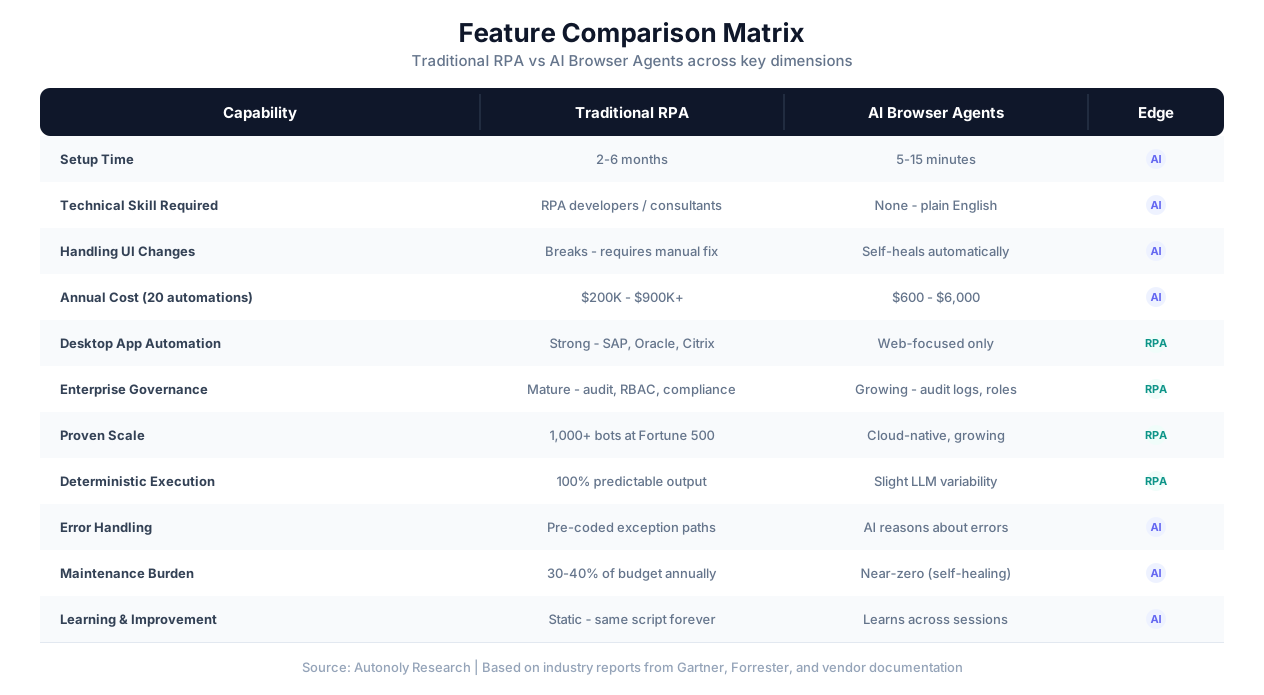
Traditional RPA delivers near-perfect reliability on day one. A well-built RPA bot running against a stable application will execute flawlessly, every time. The problem emerges over time: websites change, applications update, and selectors break. Industry data consistently shows that 30-50% of RPA bots require monthly maintenance, and organizations spend 30-40% of their total RPA budget on fixing broken bots.
AI browser agents have slightly lower initial reliability — perhaps 95-97% compared to RPA's 99% — because LLM inference introduces a small margin of variability. However, that reliability stays consistent over time. When a website changes its layout, the agent adapts rather than breaking. Over a 12-month period, AI agents maintain significantly higher average reliability than RPA bots on dynamic websites.
| Time Period | RPA Reliability (dynamic website) | AI Agent Reliability | RPA Maintenance Incidents |
|---|---|---|---|
| Week 1 | 99% | 96% | 0 |
| Month 1 | 93% | 95% | 1-2 |
| Month 3 | 80% | 95% | 4-8 |
| Month 6 | 68% | 94% | 10-16 |
| Month 12 | 58% | 93% | 20-35 |
Important Caveat
The table above reflects reliability on websites that change frequently (vendor portals, e-commerce sites, public web applications). For stable, internally-controlled enterprise applications like SAP or Oracle, RPA reliability stays much higher (85-95%+) because the target UI rarely changes. The reliability advantage of AI agents is most pronounced on the open web.
Who Can Build Automations
Traditional RPA requires trained developers. UiPath bots are built in UiPath Studio, a visual scripting IDE that requires understanding of selectors, variables, data types, exception handling, and the UiPath framework. Automation Anywhere uses a similar approach. Even "citizen developer" initiatives typically require weeks of training and produce simpler automations.
AI browser agents can be configured by anyone who can describe a task in English. A marketing manager, an accountant, a procurement specialist — anyone who understands the process can build the automation. No scripting, no selectors, no developer training required.
This accessibility difference has a compounding effect: in organizations with RPA, there is typically a backlog of 6-12 months of automation requests waiting for developer capacity. With AI agents, business users build their own automations in minutes, eliminating the bottleneck entirely.
Desktop vs Web Automation
This is an area where RPA has a genuine, significant advantage.
Traditional RPA can automate desktop applications — SAP GUI, Oracle Forms, Citrix virtual desktops, mainframe terminal emulators, thick-client Windows applications. These platforms have spent years building integrations for enterprise desktop software. If your automation targets desktop applications, RPA is currently the only mature option.
AI browser agents operate in web browsers. They excel at automating websites, web applications, and cloud-based SaaS tools. But they cannot automate native desktop applications, Citrix sessions, or mainframe terminals. This is a fundamental limitation of the browser-based approach.
The Shift to Web
It is worth noting that the enterprise software landscape is steadily moving to web-based interfaces. SAP, Oracle, Salesforce, and most major enterprise platforms now have web frontends. For organizations whose processes primarily involve web-based applications, the desktop automation advantage of RPA is becoming less relevant over time — though it remains critical for legacy environments.
Enterprise Governance and Compliance
Traditional RPA has a decade-long head start in enterprise governance. UiPath Orchestrator and similar platforms offer comprehensive audit trails, role-based access control (RBAC), credential vaulting, SLA monitoring, bot performance analytics, and compliance reporting. Regulated industries (banking, healthcare, government) have established compliance frameworks specifically around RPA governance.
AI browser agents are newer and still building governance capabilities. Audit logs, team roles, and basic compliance features exist, but they are not yet at the maturity level of established RPA platforms. For organizations subject to strict regulatory requirements around automation determinism and auditability, this gap matters.
Scale
Traditional RPA has been proven at massive scale — thousands of bots running across global enterprise operations, processing millions of transactions. The orchestration infrastructure is mature and battle-tested.
AI browser agents operate on cloud infrastructure that scales on demand, but the track record at extreme enterprise scale is shorter. For most organizations (running dozens to hundreds of automations), this distinction is academic. For Fortune 500 companies running 1,000+ automations, RPA's proven track record is a genuine advantage.
The Real Cost Comparison: It Is Not Even Close
The cost difference between traditional RPA and AI browser agents is the most dramatic distinction, and it deserves a detailed, honest breakdown. We are comparing total cost of ownership — not just software licensing, but implementation, staffing, and ongoing maintenance.
Traditional RPA Costs
RPA pricing involves multiple cost layers that are often underestimated during evaluation:
Software licensing: Enterprise RPA platforms charge per-robot licenses, typically $5,000-$15,000 per unattended bot per year, plus platform fees for orchestration, analytics, and development environments. A deployment with 20 bots might incur $80,000-$150,000 in annual licensing.
Implementation: Most organizations hire system integrators (Deloitte, Accenture, EY, PwC, or specialized RPA consultancies) to build their first bots. Implementation costs range from $50,000 for a small deployment to $500,000+ for enterprise rollouts. Each individual bot costs $5,000-$25,000 to build, depending on process complexity.
Staffing: RPA requires dedicated developers. An experienced UiPath developer earns $90,000-$140,000 per year. Most RPA programs need at least one full-time developer per 10-20 bots, plus a part-time RPA architect and business analyst. A 20-bot deployment typically requires 2-3 dedicated staff members.
Maintenance: This is the hidden cost that catches most organizations off guard. Industry research consistently shows that 30-40% of the total annual RPA investment goes to maintenance — fixing broken selectors, updating scripts after application changes, re-testing workflows, and handling production failures. For a $200,000 annual investment, that is $60,000-$80,000 per year in maintenance alone.
| Cost Component | Small (5 automations) | Medium (20 automations) | Large (100+ automations) |
|---|---|---|---|
| Software licensing | $15,000-$40,000/yr | $80,000-$150,000/yr | $300,000-$600,000/yr |
| Implementation | $25,000-$75,000 | $100,000-$250,000 | $500,000-$1,500,000 |
| RPA staff | $90,000-$140,000/yr | $180,000-$420,000/yr | $500,000-$1,200,000/yr |
| Annual maintenance | $10,000-$30,000/yr | $40,000-$100,000/yr | $150,000-$400,000/yr |
| First-year total | $140,000-$285,000 | $400,000-$920,000 | $1,450,000-$3,700,000 |
| Annual recurring | $115,000-$210,000 | $300,000-$670,000 | $950,000-$2,200,000 |
AI Browser Agent Costs
AI browser agents use a SaaS pricing model with dramatically lower total costs:
| Cost Component | Small (5 automations) | Medium (20 automations) | Large (100+ automations) |
|---|---|---|---|
| Platform subscription | $50-$100/mo ($600-$1,200/yr) | $100-$500/mo ($1,200-$6,000/yr) | Custom enterprise pricing |
| Implementation | $0 (self-service) | $0 (self-service) | $0-$10,000 (optional onboarding) |
| Dedicated staff | $0 (business users build) | $0 (business users build) | $0-$80,000 (optional automation lead) |
| Annual maintenance | $0 (self-healing) | $0 (self-healing) | $0 (self-healing) |
| First-year total | $600-$1,200 | $1,200-$6,000 | $10,000-$90,000 |
| Annual recurring | $600-$1,200 | $1,200-$6,000 | $10,000-$80,000 |
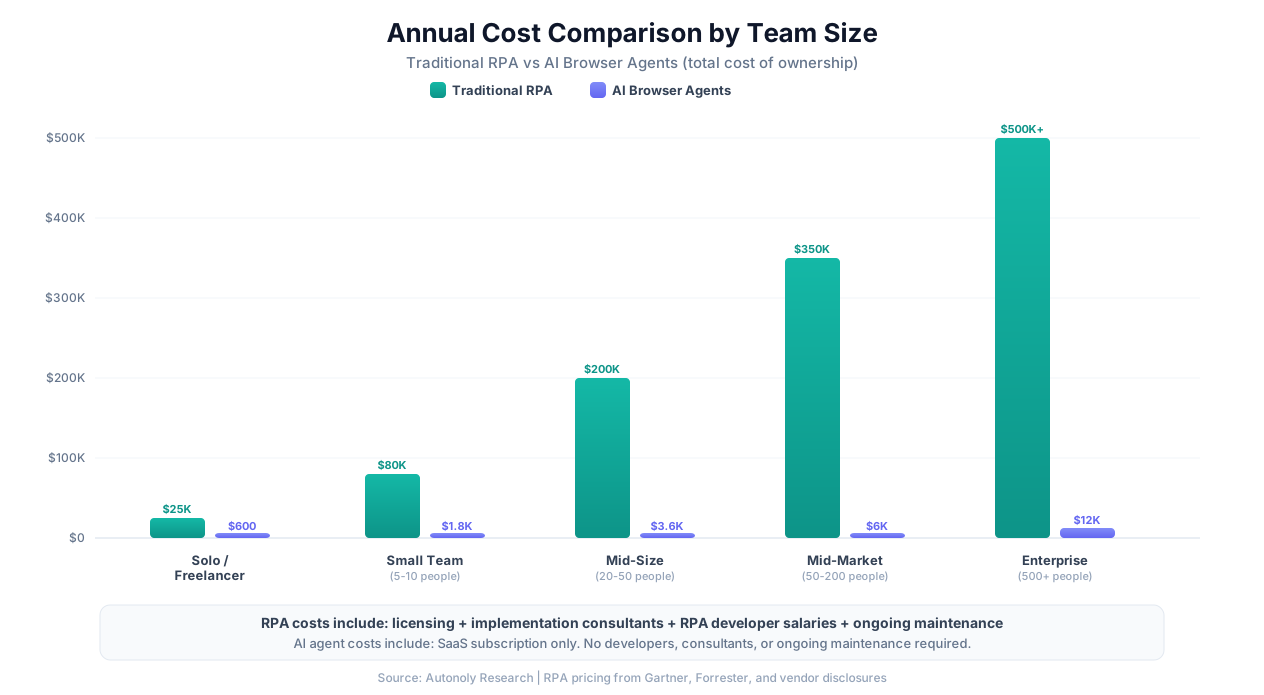
Why the Cost Difference Is So Large
The 50-200x cost difference is not a pricing trick — it reflects three fundamental architectural differences:
- No developers needed: AI agents eliminate the largest cost component of RPA — the human developers who build and maintain bots. Business users describe tasks in English; the AI builds the workflow.
- No implementation project: There is no multi-month implementation phase with consultants. A user can go from sign-up to running automation in 15 minutes.
- No maintenance burden: Self-healing agents eliminate the 30-40% of budget that RPA programs spend on fixing broken bots. The agent adapts to changes automatically.
Fair Warning on Cost Comparisons
These cost comparisons reflect different market segments and different capabilities. RPA platforms include desktop automation, enterprise governance, compliance tooling, and massive-scale orchestration that AI agent platforms are still building. Comparing raw costs without considering capability differences is misleading. If you need SAP desktop automation with SOX compliance reporting, an AI browser agent at $100/month does not replace that — and pretending it does would be dishonest. The cost comparison is most relevant when both technologies can accomplish the same tasks, which is primarily web-based automation.
Real Scenarios: When to Choose Which
Abstract comparisons are useful, but automation decisions happen in concrete situations. Here are realistic scenarios with honest recommendations for which technology fits best.
Scenarios Where Traditional RPA Is the Better Choice
| Scenario | Why RPA Wins | Example |
|---|---|---|
| SAP data entry at scale | Requires SAP GUI desktop automation, proven SAP integrations | A manufacturer processing 5,000 purchase orders per day in SAP |
| Citrix virtual desktop automation | AI agents cannot interact with Citrix sessions; RPA has specialized Citrix extensions | A bank automating processes in a Citrix-hosted legacy banking system |
| Regulated financial transaction processing | Deterministic execution, comprehensive audit trails, SOX compliance, established regulatory acceptance | An insurance company processing claims where regulators require proof of exact processing steps |
| 1,000+ automation enterprise program | Proven orchestration at massive scale, mature bot lifecycle management, extensive partner ecosystem | A Fortune 100 company with a global RPA Center of Excellence managing 2,000 bots |
| Mainframe terminal automation | RPA has terminal emulator integrations; AI agents cannot access mainframes | A government agency automating data entry in a mainframe-based benefits system |
| Existing RPA program with high ROI | Migration cost outweighs benefits when current bots are delivering value with acceptable maintenance | A company with 50 stable UiPath bots that rarely break because they target internally controlled applications |
When RPA Is Working, Do Not Fix It
If you have an existing RPA program that is delivering value — bots are running, maintenance is manageable, ROI is positive — there is no urgent reason to rip it out and replace it with AI agents. The strongest case for AI agents is for new automation initiatives, for processes that RPA struggles with (dynamic websites), or for organizations that have not yet invested in RPA and want a faster, cheaper starting point.
Scenarios Where AI Browser Agents Are the Better Choice
| Scenario | Why AI Agents Win | Example |
|---|---|---|
| Automating across external vendor portals | External websites change frequently; self-healing agents avoid constant maintenance | A procurement team downloading invoices from 15 different vendor portals that update their UIs regularly |
| Small business automation | $50-500/month vs $100,000+ for RPA; no developers needed | A 20-person agency automating client reporting, lead scraping, and social media data collection |
| Business users building their own automations | No developer bottleneck; the person who knows the process builds the automation directly | An HR coordinator automating candidate screening across multiple job boards |
| Quick automation of simple tasks | 15-minute setup vs 6-week RPA project; economical for tasks saving even 1-2 hours per week | A researcher automating daily data collection from three government databases |
| Web scraping across many sites | Self-healing handles frequent layout changes; no per-site selector maintenance | A market research firm collecting pricing data from 50+ competitor websites weekly |
| Form filling on government portals | Government portals update unpredictably; AI agents adapt without maintenance | An immigration law firm automating visa application forms across multiple government portals |
| Dynamic e-commerce monitoring | E-commerce sites update weekly; AI agents handle layout changes automatically | A retailer monitoring competitor pricing, stock levels, and promotions across 30 e-commerce sites |
Scenarios Where Either Could Work
Some scenarios fall in a gray area where both approaches are viable. The choice depends on your existing infrastructure, budget, and team:
- Internal web application automation: If your internal tools are web-based and relatively stable, both RPA and AI agents can handle them. RPA offers more deterministic execution; AI agents offer faster setup and lower cost.
- Document processing: Both RPA (with document understanding modules) and AI agents can extract data from PDFs and documents. RPA platforms have more mature document AI; AI agent platforms are catching up quickly.
- Email and communication automation: Both approaches can automate email workflows. RPA uses API-based or desktop email integration; AI agents can navigate webmail interfaces or use built-in integrations.
The Hybrid Approach: Using Both Where Appropriate
For organizations with existing RPA investments, the question is not always "replace or keep" — it is often "where does each technology add the most value?" A hybrid approach uses traditional RPA for what it does best and AI browser agents for what they do best.
How a Hybrid Strategy Works
The clearest dividing line is between desktop and web automation:
- RPA handles: Desktop applications (SAP, Oracle, Citrix), high-volume transaction processing in stable internal systems, processes requiring deterministic execution for compliance, and existing bots that are running successfully.
- AI agents handle: Web-based processes across external websites, new automation requests that would otherwise join the RPA developer backlog, dynamic websites and portals that change frequently, and smaller tasks that do not justify the cost of an RPA bot.
Integration Between the Two
In a hybrid setup, RPA and AI agents can complement each other in the same business process. For example:
- An AI agent scrapes data from 20 vendor websites (where self-healing handles frequent changes).
- The extracted data is passed to an RPA bot via a shared database, API, or file.
- The RPA bot enters the data into SAP (where desktop automation is required).
- The RPA bot produces a compliance report with full audit trail.
This approach lets each technology operate in its zone of strength. The AI agent handles the dynamic, web-facing portion that would break RPA bots regularly. The RPA bot handles the stable, desktop-facing, audit-sensitive portion that AI agents cannot reach.
The Hybrid ROI
Organizations running hybrid automation often find that AI agents can absorb the "long tail" of automation requests — the dozens of small, 5-10 step tasks that each save a few hours per week but never justify a full RPA bot implementation. By offloading these to AI agents, the RPA team can focus on the high-value, complex automations where their expertise is most valuable, eliminating the backlog without hiring additional RPA developers.
Migration Considerations
If you are considering moving some processes from RPA to AI agents, here are practical guidelines:
- Migrate first: Web-based processes that break frequently (external portals, public websites), simple processes that are expensive to maintain as RPA bots, and new requests in the developer backlog.
- Migrate last (or never): Desktop application automations, compliance-critical processes with regulatory approval tied to RPA, high-volume stable processes with positive ROI, and processes deeply integrated with RPA orchestration (queues, credentials, scheduling).
- No direct migration path: You cannot convert a UiPath script into an AI agent workflow. Instead, describe the same task to the AI agent and let it build a new workflow. For simple processes, this takes minutes. For complex processes, it may take an hour of iteration.
Decision Framework: How to Choose
Here is a practical framework you can apply to your specific situation. Answer each question honestly, and the right approach usually becomes clear.
Start With These Five Questions
| # | Question | If Yes, Lean Toward... |
|---|---|---|
| 1 | Does the automation target desktop applications (SAP, Oracle, Citrix, mainframes)? | Traditional RPA (required) |
| 2 | Do you have strict regulatory requirements for deterministic, auditable automation? | Traditional RPA (recommended) |
| 3 | Do you need to automate 500+ processes with enterprise governance? | Traditional RPA (mature at this scale) |
| 4 | Is your budget under $10,000/year for automation tooling? | AI browser agents (only viable option) |
| 5 | Do the target websites change their UI frequently (external portals, public sites)? | AI browser agents (self-healing advantage) |
The Decision Flowchart
Step 1: What are you automating?
- Desktop applications only → RPA
- Web-based applications only → Continue to Step 2
- Mix of desktop and web → Hybrid (RPA for desktop, AI agents for web)
Step 2: How stable are the target applications?
- Internal, stable, controlled by your IT team → Either can work; continue to Step 3
- External, frequently changing, not controlled by you → AI agents
Step 3: What is your budget and team?
- Enterprise budget ($100K+/year), dedicated RPA team → RPA (if governance matters) or AI agents (if speed matters)
- SMB budget (under $10K/year), no dedicated automation team → AI agents
Step 4: What is your timeline?
- Need results this week → AI agents
- Can invest 2-6 months for robust enterprise rollout → RPA
The Quick Test
If you can describe your automation need in 2-3 English sentences, an AI browser agent can probably handle it. If you need a 20-page process document before you can even spec the automation, traditional RPA's structured approach may be more appropriate.
Decision Summary Table
| Your Situation | Recommended Approach | Reasoning |
|---|---|---|
| SMB, web-based processes, budget-conscious | AI browser agents | 100x cheaper, no developers needed, 15-minute setup |
| Enterprise, desktop apps, regulated industry | Traditional RPA | Desktop automation, compliance, proven at scale |
| Enterprise, mix of desktop and web processes | Hybrid | Each technology in its zone of strength |
| Team with existing RPA bots that work well | Keep RPA + add AI agents for new web automations | Do not fix what is working; expand with AI agents |
| Fast-moving team, need automation this week | AI browser agents | Minutes to deploy vs months for RPA |
| Government or healthcare with strict audit requirements | Traditional RPA | Mature governance, regulatory acceptance |
| Agency or consultancy automating across client websites | AI browser agents | Self-healing handles diverse, changing client sites |
Getting Started
If AI browser agents sound like the right fit, you can test the approach in minutes. Autonoly offers a free tier that lets you describe a task, watch the AI agent complete it in a live cloud browser, and verify the results before committing. No credit card, no sales call, no 6-month implementation project.
If traditional RPA is the right fit, UiPath, Automation Anywhere, and Blue Prism all offer community editions or trial programs for evaluation. Expect a longer evaluation cycle — typically 4-8 weeks for a proof of concept.
If the hybrid approach makes sense, start by identifying which of your current processes are web-based and which are desktop-based. Move web-based processes to AI agents first (fastest ROI), keep desktop processes on RPA, and evaluate the results after 90 days.