Why People Look for Bardeen Alternatives
Bardeen is a well-designed Chrome extension that makes browser automation accessible. Install it, pick a playbook, and you are automating within minutes. For individual users who want to speed up LinkedIn prospecting, scrape a page they are looking at, or push data from a website to Google Sheets, Bardeen delivers genuine value at a fair price ($10-15/month for paid plans, with a usable free tier). For the broader context of what automation is and how to design durable workflows, our workflow automation guide is a good companion read.
But as automation needs grow beyond quick personal workflows, Bardeen's architecture creates friction that no amount of feature updates can solve. The core issue is structural: Bardeen runs as a Chrome extension inside your local browser. This means:
- Your computer must be on. Close your laptop, and every automation stops. No overnight monitoring, no weekend data collection, no scheduled reports at 6 AM.
- Chrome-only. No Firefox, no Safari, no Edge. If your team uses different browsers, some members are locked out.
- Single-machine execution. Each automation runs in one person's browser. Sharing across a team means everyone installs the extension and maintains their own playbooks.
- Playbook fragility. Bardeen playbooks use CSS selectors and page structure to navigate websites. When a site updates its layout, playbooks break and need manual repair.
- Limited complexity ceiling. Playbooks handle linear workflows well, but conditional branching, error recovery, and multi-site orchestration push against the extension model's boundaries.
What Bardeen Does Well
Credit where it is due: Bardeen's Chrome extension model is genuinely simpler for quick, ad-hoc automation. Right-click, run a playbook, done. No credentials to configure, no cloud session to wait for. For personal productivity use cases — especially LinkedIn prospecting — Bardeen remains a solid tool. This guide is for people who have hit the extension model's ceiling and need more.
The pattern we see most often is users who start with Bardeen for personal automation, build 5-10 playbooks, and then realize they need their automations to run reliably without supervision. That is the inflection point where cloud-based alternatives become necessary. Whether your trigger is needing scheduled execution, team collaboration, multi-site workflows, or just fewer broken playbooks, the alternatives below address these gaps from different angles.
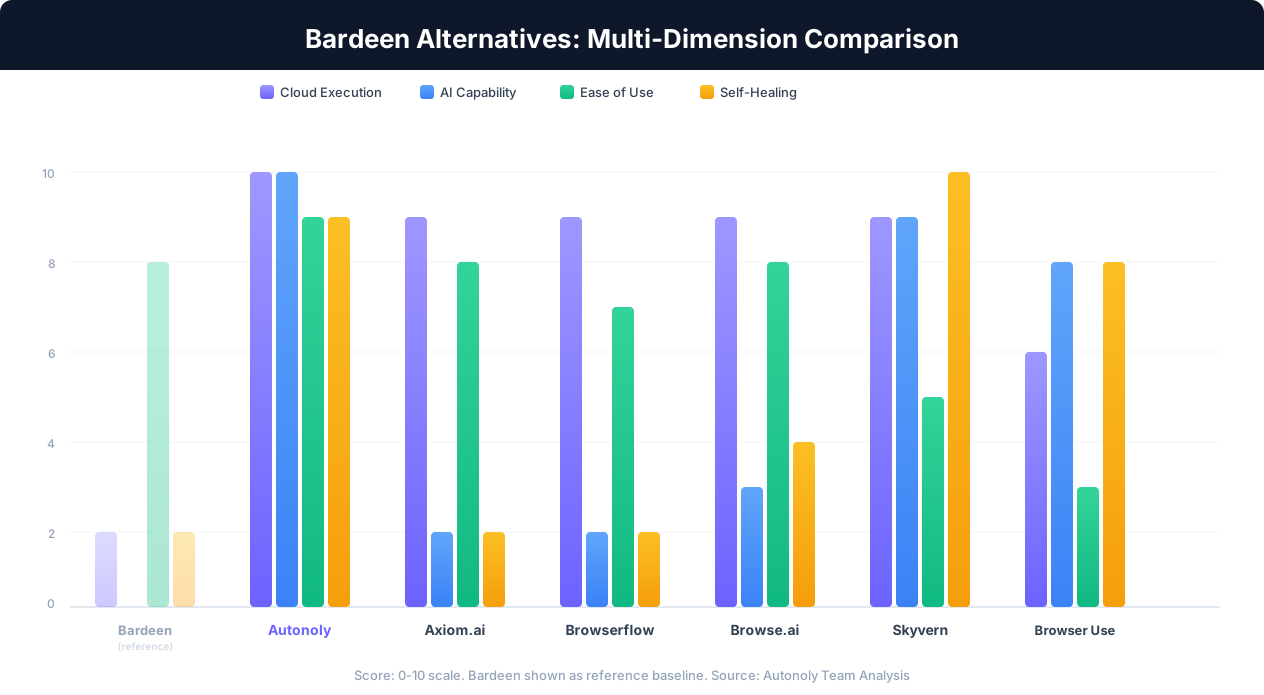
Each tool on this list takes a different approach to cloud-based browser automation. Some are AI-native platforms, others are visual automation builders, and one is an API-first integration tool. The right choice depends on your specific requirements — we will be direct about each tool's strengths and weaknesses so you can match the tool to your needs.
1. Autonoly: AI Agent with Cloud Browser Automation
Autonoly is an AI-native automation platform that combines an AI agent with cloud-based browser sessions. Instead of building playbooks step by step, you describe what you want in plain English and an AI agent plans the approach, builds the workflow on a visual canvas, and executes it in a remote browser you can watch in real time.
What Makes It Different From Bardeen
The core architectural difference is that Autonoly runs browser sessions in the cloud, not in your local Chrome. This means automations execute 24/7 on schedule whether your computer is on or off. The AI agent adds a second dimension: instead of manually mapping selectors and building each step, you describe the outcome and the agent figures out how to achieve it. When websites change their layout, the AI agent adapts rather than failing on broken selectors.
Key Features
- AI agent chat: Describe tasks in natural language. The agent builds multi-step workflows automatically.
- Live browser control: Watch the agent work in a real-time browser view from any device.
- Visual workflow builder: Drag-and-drop canvas for building and editing workflows with conditional logic, loops, and error handling.
- Cloud execution: Scheduled runs, parallel agents, no computer-on requirement.
- Native integrations: Google Sheets, Gmail, Slack, Airtable, Notion, Discord, plus API/HTTP for any REST endpoint.
- Anti-detection: Proxy rotation, fingerprint management, and CAPTCHA handling built in.
Strengths
- AI-first approach means faster workflow creation for complex multi-step tasks
- Cloud execution solves the fundamental computer-must-be-on problem
- Self-healing: AI adapts when websites change layouts instead of breaking
- Team workspaces with shared workflows and role-based access
- Document processing capabilities beyond browser automation
Limitations
- Higher price point than Bardeen for individual users ($49/month vs $10-15/month)
- Cloud browser sessions require credential configuration for authenticated sites — less instant than Bardeen's use-your-existing-login approach
- AI agent is powerful but adds latency compared to Bardeen's instant in-browser execution for simple tasks
- Fewer pre-built templates for specific use cases like LinkedIn prospecting compared to Bardeen's mature playbook library
Pricing
- Free tier: Limited runs, all features accessible
- Pro: $49/month (500 runs)
- Team: $79/month (2,000 runs, collaboration features)
- Business: $299/month (10,000 runs, advanced features)
Best For
Teams and individuals who need reliable, scheduled browser automation that runs without supervision. Operations teams managing multi-site workflows, agencies handling client automations, and anyone who has outgrown the extension model. Particularly strong for web scraping, data entry, form filling, and workflows that span multiple websites.
For a detailed head-to-head, see our Autonoly vs Bardeen comparison.
2. Axiom.ai: No-Code Browser Automation in the Cloud
Axiom.ai is a no-code browser automation platform that sits between Bardeen's simplicity and full RPA tools. It uses a Chrome extension for recording automations but executes them in the cloud — giving you the recording convenience of an extension with the reliability of cloud execution.
What Makes It Different From Bardeen
Axiom's key differentiator is its record-and-replay model combined with cloud execution. You record actions in your browser (clicks, typing, navigation) and Axiom converts them into cloud-runnable automations. This hybrid approach means you get the intuitive setup of recording your actions locally, but the automation runs in Axiom's cloud infrastructure on schedule — your computer does not need to stay on.
Key Features
- Record and replay: Record browser actions visually, then replay them in the cloud
- Cloud execution: Scheduled runs without requiring your browser or computer to be active
- Pre-built templates: Templates for common workflows (data scraping, form filling)
- Data scraping: Built-in scraper with pagination handling and export to spreadsheets
- Integrations: Google Sheets, Airtable, webhooks, and API connections
Strengths
- Recording interface is intuitive — if you can click through a workflow, you can automate it
- Cloud execution solves the always-on requirement, unlike Bardeen
- Clean, modern interface that is less overwhelming than enterprise RPA tools
- Good balance of simplicity and capability for medium-complexity workflows
Limitations
- No AI agent — you still build workflows step by step (or by recording), which becomes tedious for complex multi-step tasks
- Record-and-replay automations are still selector-dependent: when site layouts change significantly, recorded automations may break
- Smaller integration library than established platforms like Make or Zapier
- Pricing can escalate quickly for high-volume use cases
Pricing
- Free tier available with limited runs
- Starter: ~$15/month
- Pro: ~$50/month
- Team plans available
Best For
Users who want the simplicity of recording browser actions (similar to Bardeen's approach) but need cloud execution for scheduled, unattended workflows. Good for small teams with moderate-complexity automation needs who do not want to learn a full platform.
3. Browserflow: Visual Browser Automation with Cloud Runs
Browserflow is a visual browser automation tool that emphasizes a clean, flowchart-based workflow builder. Like Axiom, it bridges the gap between extension-based recording and cloud execution, but Browserflow puts more emphasis on the visual editing experience.
What Makes It Different From Bardeen
Browserflow provides a proper visual workflow editor where each step is a node in a flowchart — similar to how Make.com structures API workflows, but applied to browser actions. You can record actions, then edit and rearrange them visually. Automations run in the cloud, not in your local browser. This visual approach makes complex workflows easier to understand and maintain than Bardeen's linear playbook format.
Key Features
- Visual flowchart builder: Drag-and-drop nodes for browser actions, data extraction, and logic
- Recording mode: Record browser actions and convert them to editable flow nodes
- Cloud execution: Schedule automations to run without your computer on
- Conditional logic: If/else branching, loops, and error handling within flows
- Data export: Extract data to Google Sheets, CSV, or via webhooks
Strengths
- Visual editor is one of the best among browser automation tools — complex workflows are readable at a glance
- Good balance of recording convenience and manual editing control
- Cloud execution with scheduling support
- Conditional logic and loops are first-class features, not afterthoughts
Limitations
- No AI agent — workflow creation is manual (visual, but manual)
- Smaller user community means fewer templates and community resources than Bardeen
- Still relies on selectors under the hood, so site changes can break flows
- Integration ecosystem is narrower than platforms like Make.com or Zapier
- Relatively newer platform — less battle-tested at scale compared to established tools
Pricing
- Free tier with limited cloud runs
- Pro: ~$29/month
- Team plans at higher tiers
Best For
Users who value a clean visual editor for browser automation and need cloud execution. If you find Bardeen's playbook editor too linear and want to see your automation logic as a flowchart, Browserflow is a compelling choice. Best suited for users with moderate technical comfort who want more control over their automation structure without writing code.
4. Browse.ai: Specialized Cloud Web Scraping
Browse.ai focuses specifically on web scraping and monitoring rather than general browser automation. If your primary reason for leaving Bardeen is to extract and monitor data from websites on a schedule, Browse.ai does that one thing very well.
What Makes It Different From Bardeen
While Bardeen is a general-purpose browser automation tool that includes scraping, Browse.ai is purpose-built for data extraction. You point it at a website, train it on the data you want (visually selecting elements), and Browse.ai handles scheduling, pagination, change detection, and data export. Everything runs in the cloud, so your computer does not need to be on. The tradeoff is that Browse.ai is not designed for general automation tasks like form filling, CRM updates, or multi-step workflows.
Key Features
- Visual data selection: Point-and-click interface for selecting which data to extract
- Cloud monitoring: Schedule scraping runs and get alerts when data changes
- Pagination handling: Automatically follows pagination to extract complete datasets
- Pre-built robots: Templates for popular sites (Amazon, LinkedIn, Google Maps)
- API access: Programmatic access to extracted data
- Change detection: Monitor pages for changes and get notified
Strengths
- Exceptional at its core use case — web scraping and data monitoring
- Point-and-click training is extremely intuitive for non-technical users
- Change detection feature is well-implemented for price monitoring and competitor tracking
- Pre-built robots for popular sites save significant setup time
- Good handling of pagination and multi-page data extraction
Limitations
- Not a general automation tool — cannot fill forms, send emails, update CRMs, or orchestrate multi-step workflows
- Limited to data extraction and monitoring use cases
- No AI agent for building automations from natural language
- For sites with heavy anti-bot measures, success rates vary
- Pricing is based on credits that can deplete quickly on large scraping jobs
Pricing
- Free: 50 credits/month, 2 robots
- Starter: ~$39/month (1,000 credits)
- Professional: ~$99/month (5,000 credits)
- Enterprise: custom pricing
Best For
Users whose primary need is extracting data from websites and monitoring for changes — competitor price tracking, lead list building, market research, product data aggregation. If you need a dedicated web scraping tool that runs in the cloud on schedule, Browse.ai is more focused and polished than Bardeen's built-in scraper. If you also need general browser automation (form filling, CRM workflows, multi-step processes), look at the other alternatives on this list.
5. Skyvern: AI-Powered Browser Automation for Complex Workflows
Skyvern is an AI-native browser automation platform that uses vision-based AI models to interact with websites. Rather than relying on CSS selectors or DOM elements, Skyvern's AI "sees" web pages like a human would and decides how to interact with them. This makes it particularly resilient to website changes.
What Makes It Different From Bardeen
Skyvern takes the most aggressive AI-first approach on this list. Instead of recording actions or building step-by-step playbooks, you give Skyvern a task description and it uses computer vision plus LLM reasoning to figure out how to accomplish it. The AI interprets page layouts visually, identifies form fields, buttons, and navigation elements without relying on stable selectors. This makes Skyvern extremely resilient to website changes — if a site moves a button or redesigns a form, the AI adapts because it "sees" the new layout rather than looking for a specific DOM element.
Key Features
- Vision-based AI navigation: Interprets web pages visually, not through selectors
- Natural language task description: Describe what you want done, AI figures out the steps
- Self-healing automations: Adapts to website changes automatically
- Cloud execution: Runs in the cloud without your browser
- API-first design: Built for developers to integrate browser automation into applications
- Open source core: The core engine is open source on GitHub
Strengths
- Most resilient to website changes of any tool on this list — vision-based approach does not break when selectors change
- Excellent for automating complex, multi-step forms on government portals, insurance applications, and legacy systems
- Open-source core means you can self-host and customize
- Strong API for integrating browser automation into your own applications
- Active development with a well-funded team
Limitations
- More developer-oriented — API-first design means the UI is less polished for non-technical users
- No visual workflow builder — you interact primarily through API calls or task descriptions
- AI-based execution is slower than selector-based tools for simple, repetitive tasks
- Each AI-driven execution costs more than a deterministic playbook run due to LLM API usage
- Smaller template/recipe library compared to Bardeen or Axiom
Pricing
- Open source: Free (self-hosted)
- Cloud: Usage-based pricing (per task execution)
- Enterprise: Custom pricing
Best For
Developers and technical teams who need browser automation that is resilient to website changes. Ideal for automating complex forms on government, insurance, or enterprise portals where traditional selectors break frequently. Also strong for teams that want to self-host their browser automation infrastructure. Less suited for non-technical users or simple, high-volume scraping tasks where speed matters more than adaptability.
6. Browser Use: Open-Source AI Browser Agent Framework
Browser Use is an open-source Python framework for building AI-driven browser agents. It sits at the developer-tool end of the spectrum — more of a framework you build on than a product you sign up for.
What Makes It Different From Bardeen
Browser Use is not a product you install and use — it is a library you integrate into your own Python applications. You write code that creates an AI agent capable of controlling a browser, give it a task description, and the agent uses an LLM to reason about how to accomplish it. This gives you maximum flexibility and control, but requires Python development skills and infrastructure management.
Key Features
- Open source: MIT license, fully customizable
- LLM-powered agent: Supports multiple LLM providers (OpenAI, Anthropic, etc.)
- Playwright-based browser control: Full browser automation via Playwright
- Python API: Programmatic control over agent behavior
- Vision + DOM extraction: Hybrid approach using both visual analysis and DOM parsing
- Custom tool integration: Extend the agent with your own tools and actions
Strengths
- Maximum flexibility — you control every aspect of the agent's behavior
- Free and open source — no platform subscription fees (only LLM API costs)
- Active community and rapid development on GitHub
- Can be integrated into existing applications and data pipelines
- Supports self-hosting for data privacy requirements
Limitations
- Requires Python development skills — not accessible to non-technical users
- You manage the infrastructure: server hosting, browser sessions, scaling, monitoring
- No visual workflow builder, no pre-built templates, no point-and-click interface
- Agent behavior can be unpredictable — requires careful prompt engineering and guardrails
- Each agent run costs LLM API fees ($0.05-0.50+ per task depending on complexity)
- Debugging agent behavior requires understanding both LLM outputs and browser automation
Pricing
- Framework: Free (open source)
- LLM costs: $0.05-0.50+ per task (varies by model and complexity)
- Infrastructure: Your hosting costs ($5-50/month for a VPS, more at scale)
Best For
Python developers who want to build custom AI browser agents and integrate them into their own applications. Ideal for startups building automation features into their products, ML engineers experimenting with browser agents, and technical teams that need full control over execution. Not suitable for non-technical users or teams that want a ready-to-use product without coding.
7. Make.com: API-Based Automation (When You Don't Need a Browser)
Make.com (formerly Integromat) is not a browser automation tool, but it deserves a spot on this list because many Bardeen users discover that some of their workflows do not actually need a browser — they just need the right API connections. Make is the best no-code platform for API-based workflow automation.
What Makes It Different From Bardeen
Make operates entirely through APIs — it does not control a browser at all. Instead, it connects directly to the APIs of popular services (Google Sheets, Slack, HubSpot, Salesforce, etc.) and routes data between them. The advantage is speed and reliability: API calls are deterministic, fast, and do not break when a website redesigns its UI. The disadvantage is obvious: if a system does not have an API integration on Make, you cannot automate it.
Key Features
- Visual scenario builder: Flowchart-based workflow editor with branching and parallel paths
- 1,500+ integrations: Pre-built connectors for major SaaS tools
- Webhooks: Trigger workflows from any external event
- Data transformation: Built-in functions for parsing, formatting, and calculating
- Scheduling: Run scenarios on any interval from 1 minute to monthly
- Error handling: Built-in error routes, retry logic, and notifications
Strengths
- Most reliable execution of any tool on this list — API calls are deterministic, no browser rendering to fail
- 1,500+ pre-built integrations cover most popular SaaS tools
- Best visual workflow editor among API-based automation platforms
- Generous free tier: 1,000 operations/month with full feature access
- Excellent for data routing, transformation, and multi-app workflows
- Mature platform with extensive documentation and community resources
Limitations
- No browser automation at all — cannot interact with websites that lack API integrations
- Cannot scrape web pages, fill browser forms, or navigate web portals
- Limited to what APIs expose — many business systems (government portals, legacy tools, internal apps) have no API
- Operation-based pricing can get expensive for high-volume data processing
Pricing
- Free: 1,000 operations/month, 2 active scenarios
- Core: ~$9/month (10,000 operations)
- Pro: ~$16/month (10,000 operations + advanced features)
- Teams: ~$29/month per member
When to Choose Make Over a Browser Automation Tool
If you review your Bardeen playbooks and realize most of them just move data between SaaS tools that have APIs (e.g., new Google Form response creates a HubSpot contact and sends a Slack notification), you may not need browser automation at all. Make handles these API-to-API workflows more reliably, faster, and often cheaper than any browser-based tool. Only use a browser automation tool when the target system genuinely has no API.
Best For
Users who are leaving Bardeen and realize their workflows are primarily data routing between SaaS applications. If your automations connect Google Sheets to Slack, route CRM data, process form submissions, or sync databases — Make is more reliable and faster than any browser automation tool. Pair it with a browser automation tool (Autonoly, Axiom, etc.) for workflows that genuinely require interacting with websites. For a deeper comparison of API-based automation platforms, see our Zapier vs Make vs n8n vs Autonoly guide.
Comparison Table: All 7 Alternatives at a Glance
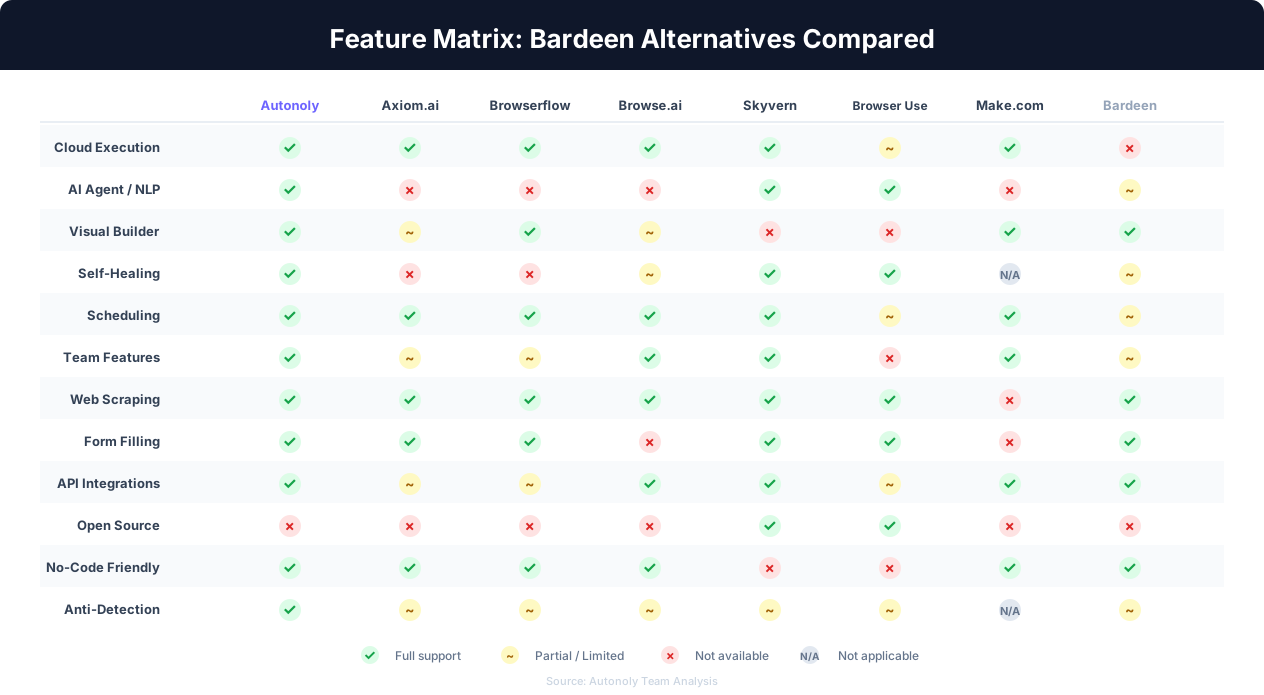
This table summarizes the key differences across all seven Bardeen alternatives. Use it to quickly narrow down which tools match your requirements before diving deeper.
Core Capabilities
| Feature | Autonoly | Axiom.ai | Browserflow | Browse.ai | Skyvern | Browser Use | Make.com |
|---|---|---|---|---|---|---|---|
| Cloud execution | Yes | Yes | Yes | Yes | Yes | Self-hosted | Yes |
| Browser automation | Full (AI agent) | Full (record) | Full (visual) | Scraping only | Full (AI vision) | Full (code) | None (API only) |
| AI agent / NLP | Yes | No | No | No | Yes | Yes | No |
| Visual builder | Yes | Basic | Yes (strong) | Minimal | No | No | Yes (strong) |
| Self-healing | Yes (LLM) | No | No | Partial | Yes (vision) | Yes (LLM) | N/A (API) |
| Scheduling | Yes | Yes | Yes | Yes | Yes | Manual setup | Yes |
| Team features | Yes | Basic | Basic | Yes | Yes | No | Yes |
| Open source | No | No | No | No | Core is OSS | Yes (MIT) | No |
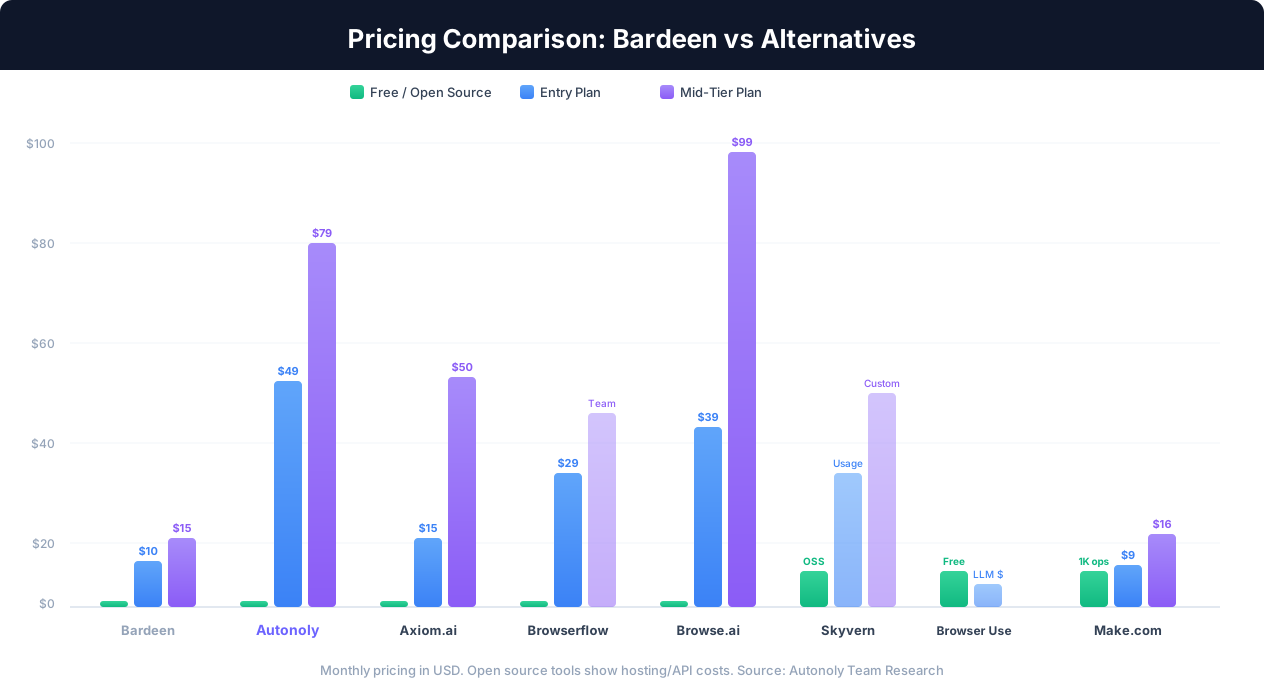
Pricing Summary
| Tool | Free Tier | Entry Paid Plan | Mid-Tier Plan | Pricing Model |
|---|---|---|---|---|
| Bardeen (reference) | Limited credits | $10/month | $15/month | Per-seat, credits |
| Autonoly | Limited runs | $49/month | $79/month | Per-workspace, runs |
| Axiom.ai | Limited runs | ~$15/month | ~$50/month | Per-seat, runs |
| Browserflow | Limited runs | ~$29/month | Team pricing | Per-seat, runs |
| Browse.ai | 50 credits/month | ~$39/month | ~$99/month | Credits per extraction |
| Skyvern | Free (self-host) | Usage-based | Custom | Per task execution |
| Browser Use | Free (open source) | LLM costs only | LLM + hosting | LLM API usage |
| Make.com | 1,000 ops/month | ~$9/month | ~$16/month | Operations-based |
Best Use Case by Tool
| Use Case | Best Tool | Runner-Up |
|---|---|---|
| 24/7 scheduled browser automation | Autonoly | Axiom.ai |
| Web scraping and data monitoring | Browse.ai | Autonoly |
| Complex forms (government, insurance) | Skyvern | Autonoly |
| API-to-API data routing | Make.com | N/A (category leader) |
| Custom AI browser agents (developers) | Browser Use | Skyvern |
| Visual browser automation (no code) | Browserflow | Axiom.ai |
| Budget-friendly cloud automation | Axiom.ai | Make.com |
| Self-hosted / data privacy | Browser Use | Skyvern |
How to Choose the Right Bardeen Alternative
With seven alternatives covering different approaches, the right choice depends on your specific situation. Answer these questions to narrow down your options.
Decision 1: Do You Actually Need Browser Automation?
The most important question is often overlooked. Review your Bardeen playbooks and categorize each one:
- Moves data between SaaS tools (e.g., Google Sheets to HubSpot): You do not need browser automation. Use Make.com.
- Interacts with websites (e.g., scrapes pages, fills forms, navigates portals): You need browser automation. Continue to Decision 2.
Many Bardeen users discover that 30-50% of their playbooks are really just API workflows disguised as browser tasks. Moving those to Make.com improves reliability and reduces costs.
Decision 2: What Is Your Technical Comfort Level?
- Non-technical / no-code: Autonoly (AI builds workflows), Axiom.ai (record actions), Browserflow (visual editor), Browse.ai (point-and-click scraping)
- Somewhat technical: All of the above, plus Skyvern's cloud offering
- Developer / Python: Browser Use (maximum control), Skyvern (self-hosted option)
Decision 3: What Is Your Primary Use Case?
Quick Decision Guide
"I need scheduled scraping and change detection." Start with Browse.ai.
"I need complex workflows across multiple sites." Start with Autonoly.
"I need to automate gnarly government/insurance forms." Start with Skyvern.
"I need visual browser automation without AI complexity." Start with Browserflow or Axiom.ai.
"I want to build custom browser agents in Python." Start with Browser Use.
"My workflows are all API-based, actually." Start with Make.com.
Decision 4: Budget Sensitivity
If price is the primary factor:
- Free / minimal cost: Browser Use (open source, pay only LLM costs) or Make.com free tier (if API-based workflows suffice)
- Under $20/month: Axiom.ai or Make.com paid tiers
- $30-80/month: Autonoly, Browserflow, or Browse.ai depending on use case
- Budget flexible: Choose based on capability match, not price
Decision 5: Team vs Individual
If you need shared workspaces, role-based access, and centralized workflow management, your realistic options are Autonoly, Make.com, or Browse.ai — the others have limited or no team collaboration features.
Hybrid Approaches
Many teams use multiple tools for different workflow types:
- Make.com + Autonoly: Make for API routing, Autonoly for browser workflows. This is the most common hybrid pattern for teams leaving Bardeen.
- Browse.ai + Make.com: Browse.ai for scheduled scraping, Make.com for processing and routing the extracted data.
- Bardeen + Autonoly: Keep Bardeen for quick personal Chrome tasks, use Autonoly for scheduled team workflows. The tools complement each other.
There is no rule that says you must pick one tool and use it for everything. The best automation setup often involves two complementary tools — one for browser interaction, one for data routing — rather than forcing every workflow through a single platform.
For additional perspective on automation platform selection, see our guides on the best AI agent platforms, free Zapier alternatives, and automating tasks without coding.
Compare directly: Best Bardeen alternatives.