Why People Look for Zapier Alternatives
Zapier revolutionized no-code automation by making it possible for anyone to connect apps without writing code. But as automation needs grow, many users hit Zapier's limitations — and its pricing — harder than expected. Understanding why people seek alternatives helps you evaluate whether a switch makes sense for your situation. For the fundamentals of what automation is and how to plan workflows that scale, see our workflow automation guide.
Pricing That Scales Steeply
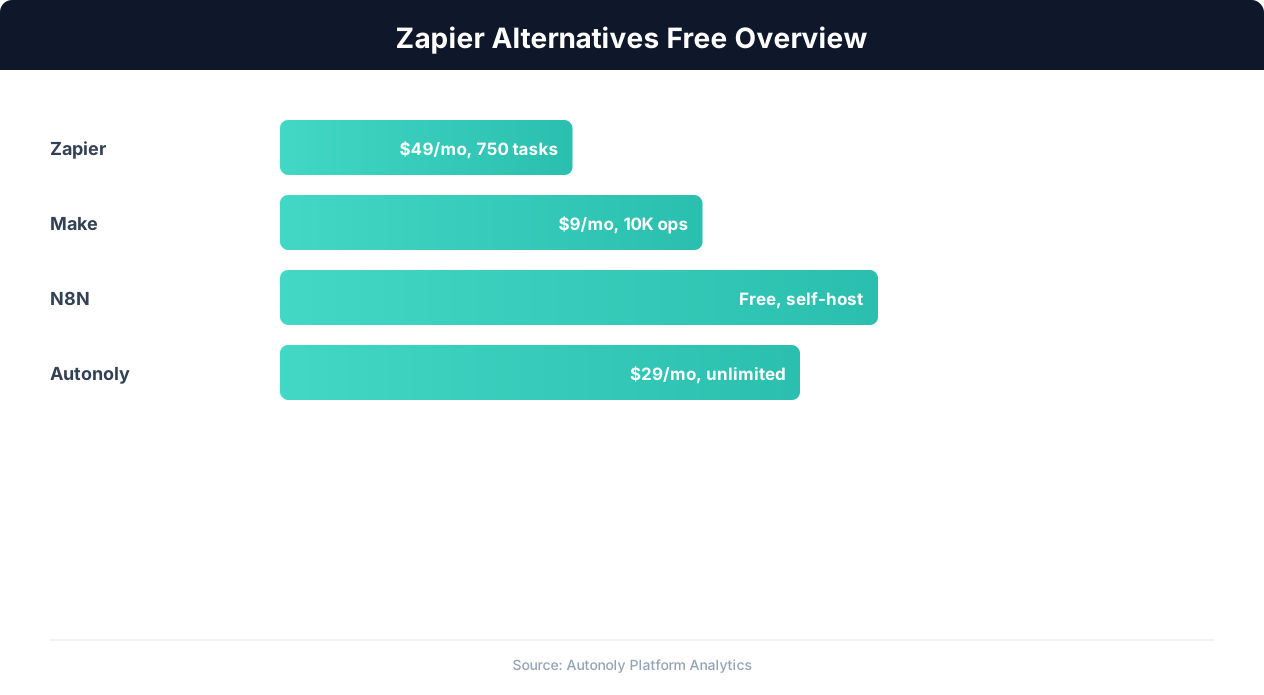
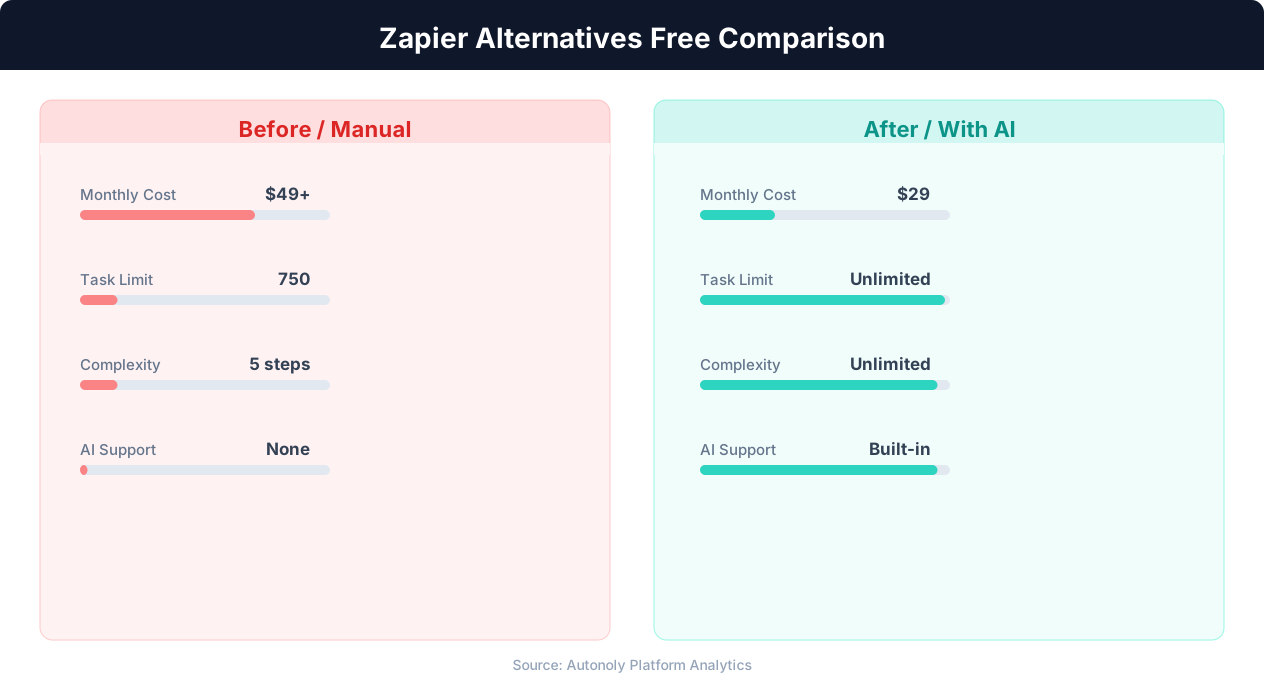
Zapier's most common pain point is pricing. The free plan allows just 100 tasks per month with single-step Zaps only. To unlock multi-step workflows, you need the Starter plan at $19.99/month (750 tasks). For conditional logic and filters, the Professional plan at $49/month is required. A growing business that runs 5,000 tasks per month with complex workflows easily reaches $100-200/month — a significant recurring expense for what are often straightforward data routing tasks.
The task-based pricing model means you pay for every trigger-action execution, even if the action is as simple as adding a row to a spreadsheet. For high-volume workflows (processing hundreds of form submissions, syncing inventory updates, or handling webhook events), costs accumulate rapidly. Many users find themselves optimizing workflows to reduce task counts rather than building the workflows they actually need.
Limited Complexity
Zapier's linear workflow model works well for simple A-to-B connections but becomes awkward for complex logic. While Zapier has added Paths (conditional branching) and Looping, these features feel bolted on rather than native. Workflows with multiple conditional branches, error handling, and data transformation are difficult to build and debug in Zapier's interface compared to platforms designed around a flowchart model from the start.
No Browser Automation
Zapier only connects to apps through APIs. If a system does not have a Zapier integration (or its integration is limited), you are stuck. Many businesses rely on web portals, legacy systems, and internal tools that only have a browser interface. Zapier cannot interact with these systems at all — you need a separate tool, adding complexity and cost.
Data Processing Limitations
Zapier's built-in data transformation capabilities are limited. Reformatting dates, parsing complex JSON, splitting strings, and performing calculations require using Zapier's "Formatter" tool or "Code" step, both of which have constraints. For data-heavy workflows, the lack of robust data processing becomes a bottleneck.
These limitations do not make Zapier a bad product — it remains excellent for simple automations with supported apps. But they explain why a large and growing market of alternatives has emerged, each addressing different gaps in Zapier's offering.
Free Tier Breakdown: What You Actually Get
When evaluating free alternatives, the devil is in the details. A "free plan" that limits you to 100 tasks per month is very different from a self-hosted solution with unlimited executions. Here is exactly what each platform's free tier provides.
Zapier Free Plan
- 100 tasks per month
- 5 Zaps (active workflows)
- Single-step Zaps only (one trigger + one action)
- 15-minute polling interval (checks for new data every 15 minutes)
- No conditional logic, no filters, no formatters
Verdict: Useful only for testing or the most basic automations. One active form-to-spreadsheet workflow could consume the entire monthly allotment in a few days.
Make Free Plan
- 1,000 operations per month
- 2 active scenarios (workflows)
- Minimum 15-minute scheduling interval
- Full access to conditional logic and data transformation
- 100 MB data transfer
Verdict: Significantly more generous than Zapier. 1,000 operations supports light to moderate automation. The 2-scenario limit is the main constraint — you can build complex workflows but only two of them.
n8n Self-Hosted (Free)
- Unlimited workflows
- Unlimited executions
- All features included (no feature gating)
- Full API access and custom code support
- You provide the server (typically $5-20/month VPS)
Verdict: The most genuinely free option in terms of capabilities. The cost is your time setting up and maintaining a server. For technically comfortable users, this is unbeatable value.
n8n Cloud Free Tier
- Limited test executions
- 5 active workflows
- Community support only
Verdict: Designed for evaluation, not production use. Transition to a paid plan or self-host for real workloads.
Autonoly Free Tier
- Limited workflow runs per month
- Access to AI agent, browser automation, and all node types
- Full visual workflow builder
- No feature gating — all capabilities available
Verdict: Unique in offering browser automation and AI agent capabilities on the free tier. Best for users whose workflows involve website interaction, data extraction, or complex tasks where the AI agent saves significant setup time.
Activepieces Free (Self-Hosted)
- Unlimited flows and executions
- All community pieces (integrations) included
- You provide the server
- Open source under MIT license
Verdict: Similar to n8n's self-hosted model but with a simpler interface. Good for teams that want open-source freedom with less complexity than n8n.
IFTTT Free Plan
- 2 Applets (workflows)
- Standard integrations only
- No conditional logic
- No multi-step workflows
Verdict: IFTTT has moved heavily toward consumer smart home automation. Its free tier is too limited for business use, and its business capabilities lag behind every other platform in this comparison.
n8n: The Open Source Powerhouse
n8n deserves special attention because it is the most capable free alternative for technically inclined users. It is open source, self-hostable, and feature-rich in ways that rival or exceed Zapier's paid plans.
What Makes n8n Stand Out
n8n uses a visual flowchart builder where each node represents a step in your workflow. Unlike Zapier's linear chain, n8n workflows can branch, merge, loop, and run steps in parallel. Every node exposes its raw input and output data, making debugging straightforward — you can see exactly what data flows through each step.
The platform includes over 400 integrations (called "nodes") covering major services: Google Workspace, Slack, databases (PostgreSQL, MySQL, MongoDB), HTTP requests, SSH, email protocols, and more. Where n8n's integration library falls short, you can make raw HTTP requests to any API or write custom JavaScript/Python code directly within a workflow node.
Self-Hosting n8n
Self-hosting is where n8n becomes truly free. The recommended setup is a Docker container on a small cloud VPS:
docker run -d --name n8n \
  -p 5678:5678 \
  -v n8n_data:/home/node/.n8n \
  n8nio/n8n
This runs n8n on port 5678 with persistent data storage. A $5-10/month VPS from any major cloud provider (DigitalOcean, Hetzner, Linode) handles most small business workloads comfortably. For higher-volume usage, a $20/month server provides ample headroom.
Where n8n Falls Short
n8n's weaknesses are real and worth acknowledging:
- No browser automation: n8n cannot interact with websites through a browser. All integrations are API-based. For web portals, legacy systems, or sites without APIs, you need a separate tool.
- Steeper learning curve: The interface is powerful but assumes some technical knowledge. Non-technical team members may struggle with concepts like JSON data mapping, webhook configuration, and error handling flows.
- Self-hosting maintenance: You are responsible for updates, backups, SSL certificates, and server security. While not complex, this requires ongoing attention.
- Community vs. enterprise support: Free users rely on community forums and documentation. Paid support requires the enterprise tier.
n8n is the right choice if you have technical capacity on your team and your workflows are primarily API-based. For a broader comparison with other platforms, see our detailed four-way platform comparison.
Make: The Visual Workflow Builder
Make (formerly Integromat) occupies the middle ground between Zapier's simplicity and n8n's power. It offers a genuine visual builder with branching and parallel execution while maintaining a polished, user-friendly interface.
Why Make Attracts Zapier Users
Make's visual scenario builder is its primary differentiator. Workflows are rendered as flowcharts where you can see branching paths, parallel routes, and data flowing between modules. This visual approach makes complex workflows much easier to understand and debug than Zapier's stacked list of steps.
The pricing model is also more favorable. Make counts "operations" instead of "tasks," and an operation in Make maps closely to a single API call. The free plan's 1,000 operations per month is roughly equivalent to 500-1,000 Zapier tasks, depending on workflow complexity. Paid plans start at $9/month for 10,000 operations — significantly cheaper than Zapier at equivalent volumes.
Make's Strengths
- Visual debugging: When a scenario fails, Make highlights the exact module that failed and shows the input data that caused the error. This makes troubleshooting dramatically faster than Zapier's error logs.
- Data transformation: Built-in functions for string manipulation, date formatting, math operations, and array processing. These are accessible through a formula builder without writing code.
- Scheduling flexibility: Scenarios can run on custom intervals — every 5 minutes, hourly, daily, or on specific days. The free plan is limited to 15-minute intervals.
- Webhooks as triggers: Any external system that can send a webhook can trigger a Make scenario. This is available even on the free plan.
Make's Limitations
- No browser automation: Like Zapier and n8n, Make is API-only. It cannot interact with websites that lack integrations.
- No self-hosting: Make is cloud-only. You cannot run it on your own infrastructure, which means you are dependent on Make's pricing and data handling policies.
- Module-specific quirks: Some Make modules have inconsistent behavior or limited configuration options compared to their Zapier equivalents. The Google Sheets module, for example, handles date formats differently than expected.
- Scenario complexity limits: Very large scenarios (50+ modules) can become sluggish in the editor and difficult to navigate visually.
Make is the best Zapier alternative for users who want more power and lower prices without the technical overhead of self-hosting. It strikes the right balance between capability and accessibility for small to medium teams.
Autonoly: AI Agent Meets Browser Automation
Autonoly approaches automation from a fundamentally different angle than the other platforms. Instead of providing a library of pre-built integrations, Autonoly combines an AI agent with a real browser to automate anything you can do on the web — plus traditional API integrations.
What Makes Autonoly Different
The core difference is the AI agent. Instead of manually configuring each step of a workflow, you describe what you want in natural language. The agent plans the approach, builds the workflow on a visual canvas, and can execute steps in a real browser. This means:
- No integration limits: If it has a website, Autonoly can automate it. No need to wait for a native integration to be built.
- Browser-native actions: Fill forms, click buttons, navigate multi-page processes, handle popups, download files — all through a real Chromium browser that the AI controls.
- Visual verification: Watch the AI agent work in a live browser preview. You see exactly what the agent sees and can provide guidance in real time.
- Intelligent data extraction: The AI uses vision capabilities and DOM analysis to extract structured data from any web page, even those with complex layouts or dynamic content.
When Autonoly Shines Over Zapier
Autonoly outperforms Zapier in scenarios where browser interaction is required:
💡 Key Insight
Free Zapier alternatives offer 2-10x more monthly task executions at no cost compared to Zapier's free tier.
- Web portals without APIs: Government filing systems, supplier ordering portals, industry-specific SaaS platforms with limited APIs.
- Data extraction: Scraping product data, monitoring competitor prices, collecting information from directories. See our guides on scraping Amazon product data and extracting real estate listings.
- Complex form filling: Multi-step forms with dynamic fields, conditional sections, and file uploads that change based on previous inputs.
- End-to-end processes: Workflows that start with email, involve browser actions, process data, and end with a Google Sheets update — all in one platform.
Autonoly's Integration Layer
Beyond browser automation, Autonoly includes native integrations with common business tools: Google Sheets (read, write, create), Gmail, Google Drive, Slack, Airtable, Notion, and Discord. For other services, the API/HTTP node connects to any REST API, and the SSH terminal enables server-side automation.
Free Tier and Pricing
Autonoly offers a free tier that includes access to all features — browser automation, AI agent, all node types, and the visual builder. The free tier is run-limited rather than feature-limited, which means you can build and test complex workflows without upgrading. Paid plans scale based on the number of workflow runs and browser automation time.
For users whose primary pain point with Zapier is the inability to automate website interactions, Autonoly is the most direct solution. It eliminates the need for separate scraping tools, browser automation add-ons, or manual workarounds for systems without APIs.
Other Free Alternatives Worth Knowing
Beyond the major platforms, several other tools serve specific niches in the free automation space.
Activepieces
Activepieces is an open-source automation platform that bills itself as a simpler alternative to n8n. It has a cleaner interface, TypeScript-based piece (integration) development, and a growing community. The self-hosted version is free under an MIT license with no feature restrictions. The cloud version offers a limited free tier with paid plans starting competitively.
Activepieces is best for teams that want open-source flexibility but find n8n's interface overwhelming. Its integration library is smaller (around 100+ pieces) but covers the essentials. The platform is actively developed and adding integrations regularly.
Pipedream
Pipedream is developer-focused, offering a free tier with 10,000 invocations per month — the most generous task allowance among cloud-hosted platforms. Workflows combine no-code steps with inline Node.js, Python, or Go code. This makes it excellent for developers who want the convenience of pre-built triggers but need custom logic.
The free tier includes 10,000 invocations/month, 100 workflows, and 30-second execution time limits. For developer-heavy teams, Pipedream may be more practical than Zapier at zero cost.
Huginn
Huginn is a fully open-source, self-hosted automation system written in Ruby. It is the most mature open-source option, having been in active development since the early days of automation platforms. Huginn agents (its term for workflow steps) can monitor websites, send notifications, process data, and chain together into complex pipelines.
The downside is that Huginn's interface is dated and its learning curve is steep. It has no visual builder — workflows are configured through forms and YAML. Huginn is best for experienced developers who want maximum control and do not mind a utilitarian interface.
Apache Airflow
Airflow is an enterprise-grade workflow orchestration tool designed for data engineering pipelines. It is overkill for typical business automation but worth mentioning because it is free, open-source, and handles complex scheduling and dependency management better than any other tool. If your "automation" is really "data pipeline orchestration" (ETL processes, data warehouse loading, report generation), Airflow may be more appropriate than a business automation platform.
Microsoft Power Automate
If your business is already invested in the Microsoft 365 ecosystem, Power Automate's free tier (included with many Microsoft 365 subscriptions) covers basic automation within Microsoft's tools. It integrates deeply with Outlook, Teams, SharePoint, and Excel Online. Outside the Microsoft ecosystem, it is less capable and more complex than dedicated automation platforms.
How to Choose the Right Zapier Alternative
With so many options, choosing the right alternative comes down to three factors: your technical capacity, your workflow types, and your budget sensitivity.
Decision Framework
Answer these three questions to narrow your choice:
1. Does your team include someone comfortable with server administration?
- Yes: Self-hosted n8n or Activepieces gives you unlimited free automation with full control.
- No: Cloud-hosted platforms (Make, Autonoly, Pipedream) handle infrastructure for you.
2. Do your workflows involve websites without APIs?
- Yes: Autonoly is the only platform in this comparison with native browser automation. All others are API-only.
- No: Any platform will work. Choose based on pricing and usability.
💡 Key Insight
73% of small businesses overpay for automation — free alternatives cover 80% of typical use cases.
3. How price-sensitive are you?
- Very (need truly free): Self-host n8n or Activepieces. Pay only for server hosting.
- Moderate ($10-30/month budget): Make or Autonoly offer the best value at this price point.
- Flexible (willing to pay for the best fit): Evaluate all options based on features, not just price.
Migration Path From Zapier
If you are currently using Zapier and considering a switch, the migration process is straightforward in concept: rebuild your Zaps on the new platform. In practice, this means:
- Inventory your current Zaps. List every active Zap, its trigger, actions, and monthly task volume.
- Identify integration dependencies. Check whether each trigger and action app has a corresponding integration on the target platform. This is where Zapier's 6,000+ integration library matters — some niche apps may not have equivalents elsewhere.
- Rebuild in priority order. Start with your most critical, highest-volume workflows. Get those running on the new platform before deactivating the Zapier versions.
- Run in parallel. Keep Zapier active for a transition period (even downgrading to the free plan) until you verify the new platform handles everything correctly.
Hybrid Approaches
You do not have to choose just one platform. Many businesses use a hybrid approach:
- Zapier for simple app connections that use niche integrations only available on Zapier
- Make or n8n for complex, multi-step workflows with branching logic
- Autonoly for browser-based automation, data extraction, and AI-powered workflows
This hybrid approach costs more in total subscription fees but ensures you use the best tool for each task type, avoiding the compromises inherent in forcing every workflow through a single platform.
Real-World Cost Savings: Zapier vs Alternatives
Abstract comparisons are useful, but concrete numbers make the decision tangible. Here is what switching from Zapier to an alternative looks like in real dollar terms for a typical small business.
Scenario: Growing E-Commerce Business
A small e-commerce business with 15 active automations running approximately 5,000 tasks per month. Workflows include order processing, inventory updates, customer notifications, review requests, and reporting.
| Platform | Monthly Cost | Annual Cost | Annual Savings vs Zapier |
|---|---|---|---|
| Zapier (Professional) | $99 | $1,188 | — |
| Make (Pro) | $29 | $348 | $840 |
| n8n (self-hosted) | $15 | $180 | $1,008 |
| n8n (cloud Starter) | $24 | $288 | $900 |
| Autonoly (Pro) | $59 | $708 | $480 |
Scenario: Marketing Agency
An agency managing automation for 5 clients, running 50+ workflows and approximately 15,000 tasks per month. Workflows include social media scheduling, lead routing, report generation, client notifications, and cross-platform data syncing.
| Platform | Monthly Cost | Annual Cost | Annual Savings vs Zapier |
|---|---|---|---|
| Zapier (Team) | $299 | $3,588 | — |
| Make (Teams) | $99 | $1,188 | $2,400 |
| n8n (self-hosted) | $30 | $360 | $3,228 |
| Autonoly (Business) | $149 | $1,788 | $1,800 |
The Hidden Savings: Time and Capability
Dollar savings on subscription fees are only part of the equation. Platforms with better capabilities also save time:
- Make's visual debugger saves 1-2 hours per month troubleshooting failed workflows compared to Zapier's error logs.
- n8n's custom code support eliminates the need for workaround Zaps that multiple-step around Zapier's data processing limitations.
- Autonoly's browser automation eliminates the need for separate scraping tools, RPA subscriptions, or manual data entry for systems without APIs — a savings that can exceed the platform cost itself.
The most impactful switch depends on your specific bottleneck. If you are hitting Zapier's price ceiling, Make or self-hosted n8n delivers the largest cost reduction. If you are hitting Zapier's capability ceiling (needing browser automation, AI, or complex logic), Autonoly or n8n delivers the largest productivity gain. For more platform analysis, see our comprehensive AI agent platform comparison.
Compare directly: Best Zapier alternatives · Best Make alternatives · Best n8n alternatives.