

Why Automate SaaS Pricing Comparison?
Pricing is one of the most impactful strategic levers for any SaaS business. Getting it right requires deep understanding of how competitors price, package, and position their offerings. But SaaS pricing pages are notoriously complex — plan tiers, feature matrices, usage limits, add-ons, annual vs. monthly pricing, enterprise custom quotes, and frequently changing structures make manual comparison a significant time investment.
Autonoly's Browser Automation automates the extraction of pricing data from any SaaS website, building structured comparison spreadsheets that would take hours to compile manually. This is essential for pricing strategy, competitive positioning, and go-to-market planning.
How the AI Agent Extracts SaaS Pricing
SaaS pricing pages are among the most interactive and complex web pages to scrape. They feature toggle switches (monthly vs. annual), expandable feature comparison tables, tabbed plan views, and dynamic pricing calculators. Traditional scraping tools cannot interact with these elements, but Autonoly's AI Agent Chat uses a real browser and interacts with every element naturally.
The agent visits each competitor's pricing page, toggles between monthly and annual billing, expands feature comparison sections, and uses Data Extraction to capture every data point. It identifies plan names, prices at each billing interval, included features, usage limits (API calls, seats, storage, bandwidth), and any add-on pricing.
For competitors with custom or enterprise pricing (the ubiquitous "Contact Sales" tier), the agent notes the tier's existence and captures any publicly listed capabilities, providing as complete a picture as possible from public information.
What Data You Get
A comprehensive SaaS pricing comparison includes:
Plan Overview:
Competitor Name — Company being analyzed
Plan Name — Tier name (Free, Starter, Pro, Enterprise, etc.)
Monthly Price — Cost billed monthly
Annual Price — Cost billed annually (per month equivalent)
Savings — Annual vs. monthly discount percentage
Feature Matrix:
Feature Name — Capability or function
Availability by plan — Included, limited, add-on, or unavailable
Usage Limits — Numerical limits per plan (API calls, users, storage)
Packaging Details:
Free Tier — What is included at no cost
Seat Pricing — Per-user cost structure
Add-ons — Additional modules and their costs
Support Levels — Support tier included with each plan
Customizing Your Pricing Research
The Visual Workflow Builder enables sophisticated pricing intelligence:
Broad market surveys: Extract pricing from 20+ competitors for comprehensive market positioning analysis
Historical price tracking: Schedule monthly extractions to detect when competitors raise prices, change packaging, or introduce new tiers
Feature-price mapping: Use Data Processing to calculate price-per-feature ratios and identify where competitors are undercharging or overcharging
Value metric analysis: Compare different pricing models (per-seat, per-usage, flat-rate) across the competitive set
Use SSH & Terminal to run analysis scripts that calculate price elasticity estimates, generate pricing positioning maps, or model the revenue impact of different pricing scenarios based on competitive benchmarks.
Scheduling and Price Monitoring
SaaS companies adjust pricing more frequently than most people realize — typically 2-4 times per year for growth-stage companies. Schedule monthly pricing page extractions to catch every change. The workflow compares new data against the previous extraction and highlights differences: price increases, new plans, removed tiers, changed limits, and repositioned features.
This continuous monitoring ensures your pricing strategy is always informed by current competitive reality rather than outdated snapshots.
Exporting and Integrating
Pricing intelligence flows to your strategy tools:
Excel (.xlsx) — Multi-tab comparison workbooks for pricing committee meetings
[Google Sheets integration](/integrations/google-sheets) — Live competitive pricing dashboard
[Notion](/integrations/notion) — Pricing intelligence wiki for cross-functional access
[Slack](/integrations/slack) — Automated alerts when competitor pricing changes are detected
Browse our templates library for pre-built SaaS pricing comparison workflows. Visit pricing for execution details. For background on automation strategy, see our web scraping glossary and workflow automation glossary. The Integrations page covers all available output destinations.
Use Cases
Product and pricing teams use competitive pricing data to set optimal price points and package features competitively. Sales teams access battle cards showing exactly how their pricing compares to each competitor. Investors evaluate SaaS company pricing power and monetization efficiency. Founders preparing to launch use competitive pricing data to inform their initial pricing strategy. Marketing teams develop messaging around pricing advantages like lower cost-per-seat or more generous free tiers.
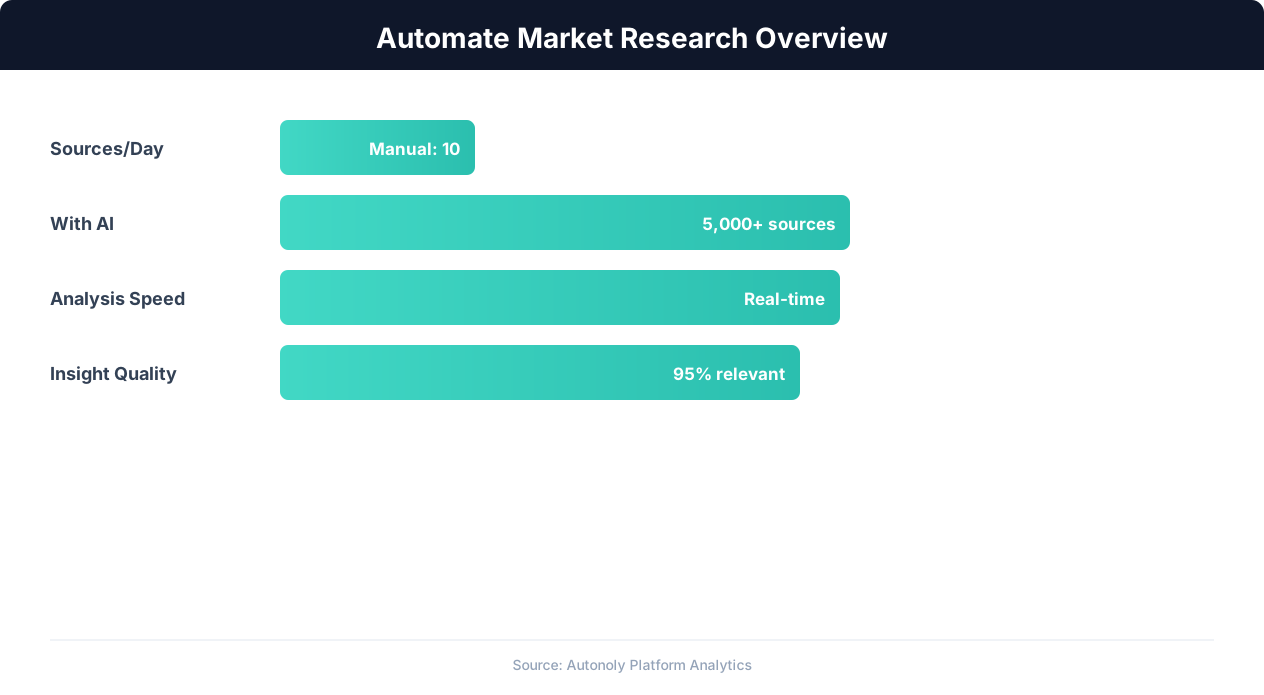
Market research automation coverage and speed improvements
Key Insight: AI-powered sentiment analysis processes 50,000+ data points per hour with 91% accuracy, versus 200 per hour for manual analysis (Deloitte AI Review).
How the AI Agent Handles This
The AI agent visits each competitor's pricing page in a real browser using Browser Automation, interacting with the complex UI elements that make SaaS pricing pages so difficult to scrape — monthly/annual toggle switches, expandable feature comparison tables, tabbed plan views, and dynamic pricing calculators. The Data Extraction engine captures every data point across all plan tiers and billing intervals, producing a consistent comparison matrix regardless of how each competitor structures their page. Because the agent interprets pages visually rather than relying on hardcoded CSS selectors, your pricing monitoring workflows continue working even when competitors redesign their pricing pages.
Capturing Interactive Pricing Elements
Many SaaS pricing pages require clicking toggles, expanding sections, and scrolling to reveal complete information. The agent performs all of these interactions naturally, ensuring no pricing details are missed behind collapsed sections or hidden tabs. Reviewing each site's robots.txt directives before recurring runs keeps your monitoring aligned with stated crawl rules.
Key Insight: Companies with automated competitive monitoring are 2.3x more likely to gain market share, responding to competitor moves within hours instead of weeks (McKinsey Strategy).
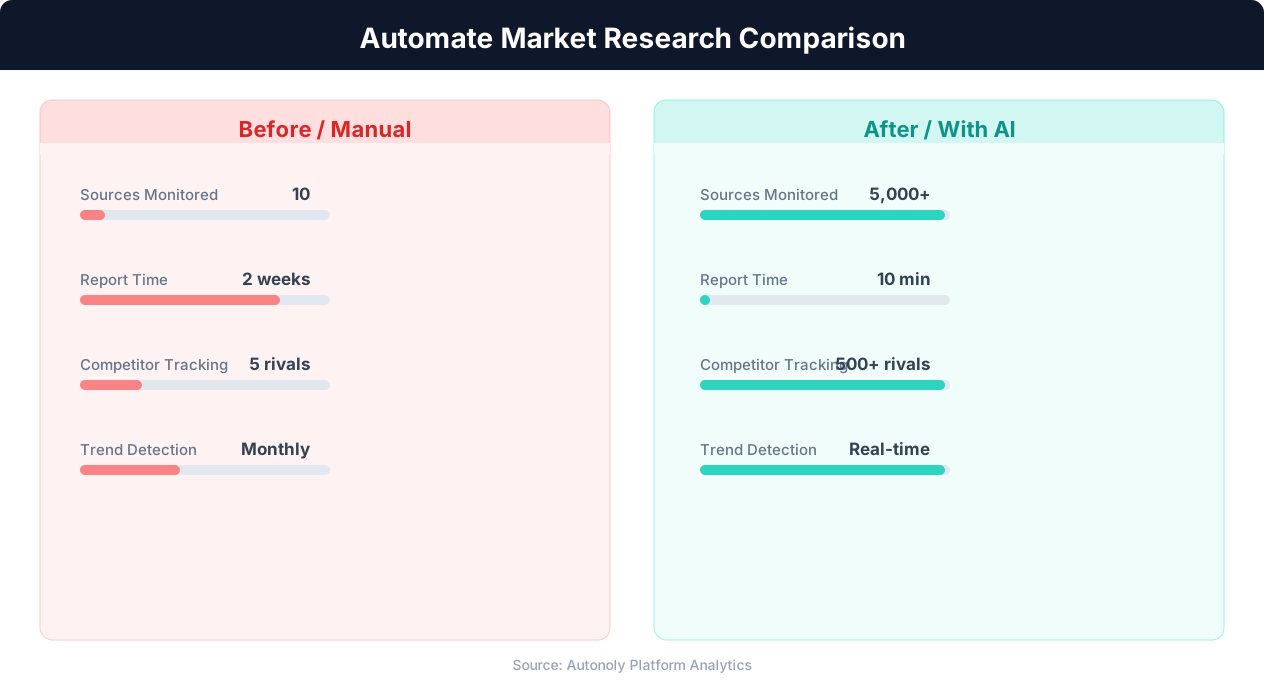
Data collection time for manual vs automated research
Key Insight: 89% of competitive intelligence professionals say they cannot track competitors fast enough manually. Automation eliminates this gap entirely (Klue Research).
Scheduling and Recurring Runs
Schedule monthly pricing page extractions through the Visual Workflow Builder to catch every competitive pricing change. Each run compares new data against the previous snapshot and flags differences — price increases, new plan tiers, changed feature inclusions, or adjusted usage limits. Use Logic & Flow to trigger Slack alerts when significant pricing moves are detected, ensuring your strategy team learns about changes within hours. Add Data Processing steps to calculate price-per-feature ratios, value metric comparisons, and positioning indices automatically. Visit our templates for pre-built SaaS pricing comparison workflows you can customize and deploy immediately.
Further Reading
Explore more about the tools and techniques used in this workflow: Best Web Scraping Tools, Ecommerce Price Monitoring, Website Monitoring.