The Manual Problem: Why Legal Professionals Are Trapped in Portal Work
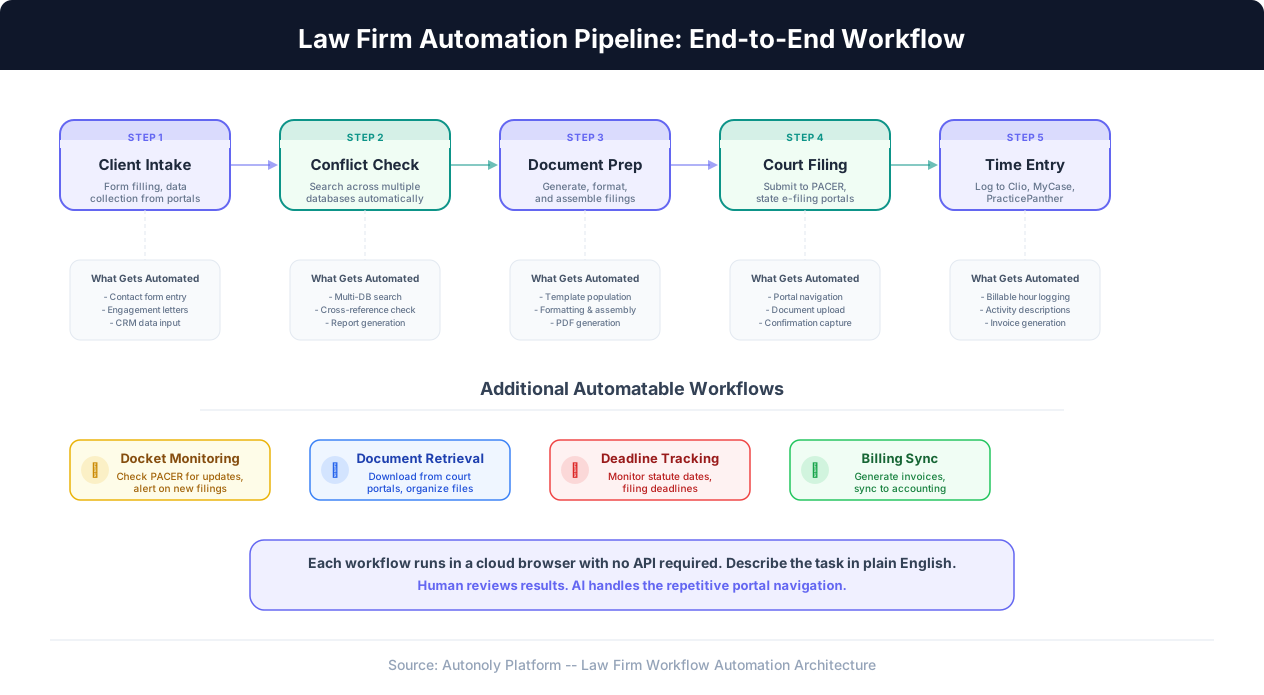
Law firms operate in one of the most portal-intensive professional environments imaginable. A mid-size litigation firm with 20 attorneys interacts with dozens of web-based systems every single day. PACER for federal court filings and docket searches. State-specific e-filing portals — each with its own interface, authentication requirements, and filing procedures. Understanding what automation is and how business process automation applies to portal-heavy legal work explains why so much of this is automatable. Conflict check databases. Practice management platforms like Clio, PracticePanther, or MyCase for time entry and billing. Document management systems. Client intake portals. Secretary of State websites for corporate filings. County recorder offices for property records. The list is long, and it grows every year as more government agencies and courts move their processes online.
The fundamental challenge is not that these portals are difficult to use. Legal professionals are smart, detail-oriented people who can navigate any web interface. The challenge is volume and repetition. Filing a single motion in federal court through PACER takes 10-15 minutes: log in, navigate to the correct case, select the filing type, upload the document, associate parties, verify the filing, pay the fee, and download the confirmation receipt. That is perfectly manageable. Now multiply it by 8 filings across 5 different jurisdictions in a single afternoon, and a skilled paralegal has spent half their day on a process that requires no legal judgment at all — just careful clicking through web forms.
Conflict checks are another prime example. When a potential new client contacts the firm, an attorney or paralegal must search the firm's internal database, then check external databases and public records to ensure no conflicts of interest exist. For a firm handling corporate litigation, this might mean searching across the firm's own CMS, state bar records, corporate registry databases, and court docket records. Each search is a separate portal with separate credentials and separate search interfaces. A thorough conflict check for a corporate client with multiple subsidiaries and related entities can take 2-4 hours of pure portal navigation.
Time entry is perhaps the most universally despised manual task in law. Every billable hour must be logged with a description, client/matter number, billing code, and time increment. Most firms use practice management platforms like Clio or PracticePanther for this, but the entry process itself is tedious and often deferred until end-of-day or end-of-week, leading to under-billing. Studies consistently show that attorneys who log time contemporaneously bill 10-20% more than those who reconstruct their time at the end of the week — but the manual entry burden discourages real-time logging.
The financial impact is staggering. A paralegal billing at $150/hour who spends 20 hours per week on portal work represents $156,000 per year in capacity consumed by tasks that require no legal expertise. For an associate billing at $250-$400/hour, the cost is even higher. Across a 20-attorney firm with 10 paralegals, the aggregate cost of manual portal work easily reaches seven figures annually.
What makes this particularly frustrating is that most of these portals were never designed for the volume of use that modern law firms require. PACER was built for occasional public records access, not for firms that file hundreds of documents per month. State e-filing systems were designed for individual attorneys filing one case at a time, not for firms managing portfolios of hundreds of active cases. The systems work — they are just painfully slow when you need to use them at scale.
Why Traditional Technology Solutions Fail Law Firms
Law firms are not unaware that technology could help. Many have tried — and most have been disappointed. Understanding why traditional approaches fail is essential to understanding why AI browser automation represents a fundamentally different category of solution.
The API Problem: Most Legal Portals Have None
Integration platforms like Zapier and Make have transformed workflow automation in many industries. They work by connecting software through APIs — standardized programming interfaces that allow systems to exchange data automatically. The problem for law firms is that the most time-consuming portals they use do not have APIs.
PACER has no public API for case filing. State e-filing portals — from New York's NYSCEF to California's various county systems to Texas's eFileTexas — have no APIs available to law firms. County recorder websites have no APIs. Most conflict check databases have limited or no API access. Even practice management platforms like Clio and PracticePanther, which do have APIs, offer APIs that cover only a subset of their functionality. You can create time entries through Clio's API, but many of the complex workflows attorneys actually perform in Clio — generating specific reports, managing trust account transactions, running specialized billing configurations — are not available through the API.
This means that traditional integration tools simply cannot connect to the systems where law firms spend the most time. A Zapier automation that connects your email to Slack is useful, but it does nothing for the 20 hours per week your paralegals spend navigating court portals.
Custom Software: Too Expensive, Too Slow, Too Fragile
Some larger firms have attempted to build custom automation using browser scripting tools like Selenium or Playwright. This approach technically works — you can write code that navigates any web portal. The problems are practical:
- Development cost: Building custom browser scripts for even a handful of portals requires a dedicated developer (or team) at $150,000-$250,000/year in salary. Most law firms do not have in-house developers and do not want to hire them.
- Maintenance burden: Court portals and e-filing systems change their interfaces regularly. When PACER updates its layout or a state e-filing portal redesigns its submission flow, every custom script that touches that portal breaks. A firm automating 10 portals can expect 3-5 breakages per quarter, each requiring developer intervention.
- Brittleness: Custom scripts rely on specific page elements — button IDs, CSS selectors, URL patterns. They are inherently fragile. A single class name change on a court portal's login page can halt an entire filing automation.
- No institutional knowledge: When the developer who built the scripts leaves the firm (and they will), the scripts become unmaintainable black boxes that gradually stop working.
Common Pitfall
Many firms have invested $50,000-$100,000 in custom Selenium scripts for court portal automation, only to abandon them within 12-18 months when the maintenance cost exceeded the time savings. The scripts that worked perfectly in the first month broke after portal updates and required constant developer attention to keep running.
Legal-Specific Software: Incomplete Coverage
There are software products designed specifically for law firms — court filing services, document management platforms, practice management suites. These solve real problems, but they each address only one piece of the workflow. A court filing service handles PACER submissions but does not touch your conflict checks or time entries. A document management system organizes your files but does not interact with court portals. A practice management platform handles billing but does not automate docket monitoring.
The result is that a firm using best-in-class legal software still has gaps where manual portal work persists. And these gaps are exactly where the most tedious, repetitive work lives — the cross-system workflows that span multiple portals and require a human to be the integration layer, copying data from one system and entering it into another.
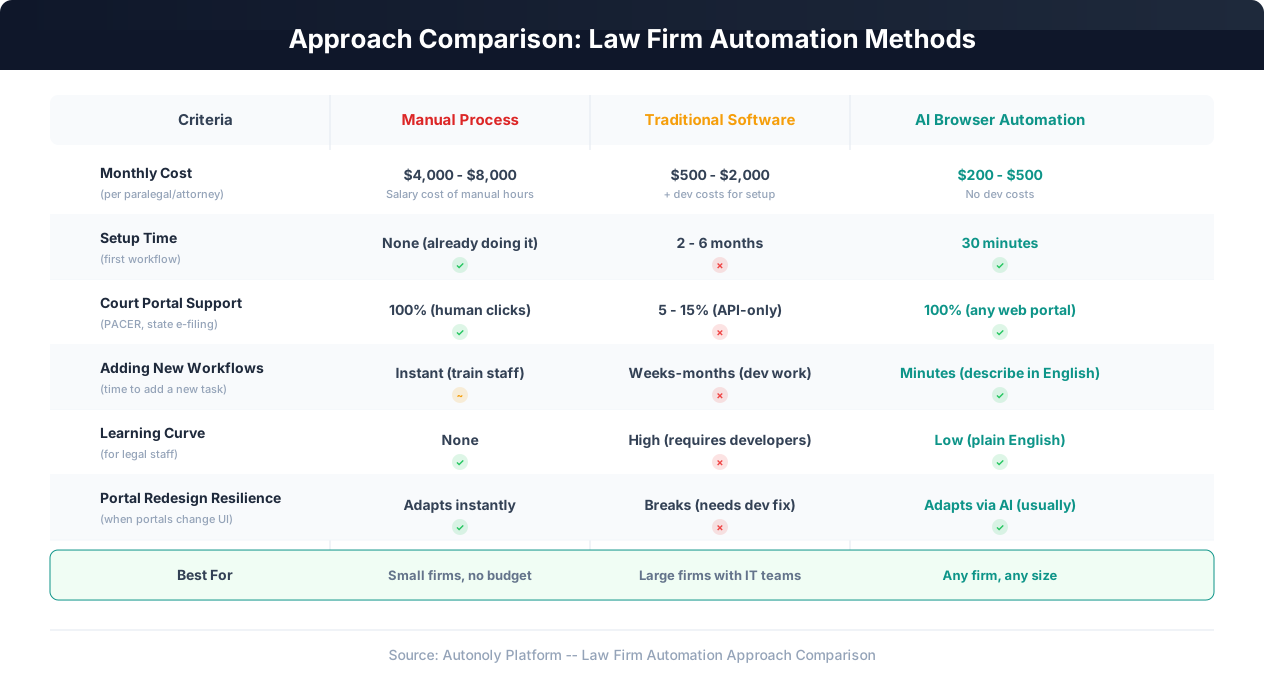
The ideal solution would work with every portal a law firm uses, require no APIs, need no developers to set up or maintain, and be accessible to non-technical legal professionals. That is what AI browser automation provides.
Six Law Firm Workflows to Automate First
Not every task at a law firm is a good candidate for automation. The highest-value targets are tasks that are high-frequency, follow consistent patterns, span multiple portals, and require minimal legal judgment. Here are the six workflows where browser automation delivers the most dramatic impact, ranked by typical time savings.
1. Court Filing and Docket Monitoring
This is the single highest-impact automation for most litigation firms. The workflow encompasses two related activities: submitting filings to court portals and monitoring dockets for new activity.
Filing automation: When an attorney prepares a motion, brief, or other filing, the paralegal currently logs into the relevant court portal (PACER for federal, the state-specific system for state courts), navigates to the correct case, selects the filing type, uploads the document with the correct cover sheet, associates the appropriate parties, verifies all fields, submits the filing, pays the filing fee, and downloads the confirmation receipt. For a firm handling 40-60 filings per week across multiple jurisdictions, this consumes 8-10 hours of paralegal time weekly.
With AI browser automation, the paralegal prepares the filing documents and describes the task: "File this motion in Case No. 2:XX-cv-XXXXX in the Southern District of New York via PACER. It is a Motion to Compel Discovery. Associate it with our client [name] as the moving party." The AI agent navigates PACER, completes the filing form, uploads the document, and returns the confirmation. The paralegal reviews and confirms. What took 15 minutes per filing now takes 2 minutes of review.
Docket monitoring: Attorneys need to know when opposing counsel files something, when the court issues an order, or when a deadline is approaching. Currently, someone at the firm checks each active case's docket periodically — daily for active cases, weekly for less active ones. For a firm with 200 active cases, daily docket checks across PACER and state systems consume 5+ hours per week.
An automated monitoring workflow checks every active case's docket daily, compares it against the last known state, and alerts the responsible attorney only when something new appears. The 5 hours of manual checking becomes 10 minutes of reviewing exception alerts.
2. Conflict of Interest Checks
Conflict checks are mandatory before taking on any new client or matter. For corporate litigation and transactional work, thorough conflict checks are complex and time-consuming.
A typical conflict check involves: searching the firm's internal CRM or practice management database for any connection to the potential client, their subsidiaries, parent companies, officers, and directors; checking state bar records for any disciplinary connections; searching public court records for any related litigation; and sometimes checking corporate registry databases (Secretary of State websites) to map the client's corporate structure and identify all related entities.
Each of these searches is a separate portal with separate navigation. For a corporate client with 15 related entities, a thorough conflict check can involve 60+ individual portal searches — easily 3-4 hours of work.
Browser automation reduces this to a batch operation. The attorney provides the entity names and the automation runs all searches across all databases simultaneously (or sequentially where portals require it), compiles the results into a single conflict report, and flags any potential matches for attorney review. The 3-4 hours of manual searching becomes 15-20 minutes of AI-driven search with 10 minutes of attorney review.
3. Time Entry and Billing
Time entry is the bane of every attorney's existence. The task itself is simple — log the time spent, describe the activity, assign the correct client/matter and billing code — but it is death by a thousand cuts. Ten entries per day, five days per week, fifty weeks per year: that is 2,500 individual time entries per attorney per year, each requiring 1-2 minutes of data input into Clio, PracticePanther, MyCase, or whatever platform the firm uses.
AI browser automation can streamline this in several ways. An attorney can dictate or type a natural-language summary of their day — "Spent 2.3 hours on the Smith matter reviewing deposition transcripts and preparing cross-examination questions, then 1.5 hours on the Johnson contract negotiation drafting Section 4 amendments" — and the automation translates this into structured time entries in the practice management platform, assigning the correct matter numbers, billing codes, and time increments.
Practice Tip
Firms that automate time entry typically see a 10-15% increase in captured billable hours. The reason is simple: when logging time takes 10 seconds instead of 2 minutes, attorneys are more likely to log small tasks (quick emails, brief phone calls) that they would otherwise skip. Over a year, those skipped entries add up to significant revenue.
4. Client Intake and Onboarding
When a new client engages the firm, the intake process involves collecting contact information, entering it into the CRM and practice management platform, generating engagement letters, setting up the matter in the billing system, creating a client folder in the document management system, and sometimes running initial conflict checks and filing corporate documents. This touches 3-5 different portals and typically takes 30-60 minutes per new client.
An automated intake workflow chains these steps together: the paralegal enters the client information once, and the automation populates it across all systems — CRM, practice management, document management, billing — and generates the engagement letter from the firm's template. What touched five portals and took an hour now requires one data entry and a review step.
5. Document Retrieval and Organization
Legal work generates and consumes enormous volumes of documents. Retrieving documents from court portals (PACER case documents, state court filings, county records), downloading discovery productions from secure portals, and pulling corporate records from Secretary of State websites are all frequent, repetitive tasks.
A document retrieval automation can batch-download all new documents from specified court cases, name them according to the firm's naming convention, and file them in the correct client matter folder. For a firm tracking 200 active cases, this saves hours of weekly download-rename-file work.
6. Cross-Jurisdictional Research
Firms practicing in multiple states or federal circuits often need to check court rules, filing requirements, and local procedures across jurisdictions. Each court has its own website with its own structure. Finding the local rules for the Eastern District of Michigan, the filing fee for a civil complaint in Cook County, Illinois, or the electronic filing requirements for the Delaware Court of Chancery each requires navigating a different portal.
An automated research workflow can pull this information from multiple court websites and compile it into a single reference document, saving attorneys the time of navigating each site individually.
How AI Browser Automation Works for Legal Workflows
AI browser automation is fundamentally different from both traditional API integrations and coded browser scripts. Understanding the mechanism is important for evaluating whether it fits your firm's needs and risk tolerance.
The Core Mechanism: AI-Controlled Cloud Browser
With a platform like Autonoly, the process works in three stages. First, you describe the task in plain English to the AI agent. For example: "Log into PACER, search for Case No. 1:XX-cv-XXXXX in the Southern District of New York, check if any new documents have been filed since Monday, and if so, download them and save them as PDFs." Second, the AI agent executes the task in a cloud browser — a real browser session running on a remote server. You can watch the execution in real time, seeing exactly what the AI clicks, types, and downloads. Third, the successful execution can be saved as a reusable workflow through the visual workflow builder, which can run on a schedule or be triggered on demand.
This approach has critical advantages for law firms specifically.
Works with Every Portal — No Exceptions
Because the AI agent operates a real browser, it can interact with any web portal that a human can use. PACER, NYSCEF, eFileTexas, CM/ECF, any state court e-filing system, any county recorder website, any Secretary of State portal, Clio, PracticePanther, MyCase, NetDocuments — if it has a web interface, the automation can use it. No API required. No integration to configure. No developer needed.
This is the critical difference from every other automation approach. API-based tools can only work with systems that offer APIs. Custom scripts require developers to build and maintain them for each portal. AI browser automation works with every portal out of the box because it uses the same interface you do.
Adapts to Portal Changes
Court portals change. PACER has undergone several interface updates. State e-filing systems redesign their submission flows. Clio releases new UI versions. When these changes happen, coded browser scripts break immediately because they rely on specific page element selectors.
AI browser automation handles changes differently. Because the AI agent understands the intent of each action — "click the button to file a new document" rather than "click the element with CSS selector #btn-file-new" — it can often navigate a redesigned portal without any updates to the workflow. If a button moves from the left sidebar to the top navigation bar, the AI agent finds it by understanding what it does, not where it was positioned.
This is not magic, and it is not perfect. Major redesigns may still require adjusting the workflow description. But the failure mode is dramatically better than coded scripts: instead of complete breakage requiring a developer, you get occasional adjustments requiring a 5-minute conversation with the AI agent.
No Code Required
This matters enormously for law firms. Most firms do not have developers, do not want to hire developers, and should not have to hire developers to automate web portal work. AI browser automation platforms let paralegals, legal assistants, and attorneys themselves create and modify automations by describing tasks in plain English. The technical complexity is handled by the platform.
| Feature | Traditional Scripting | AI Browser Automation |
|---|---|---|
| Who creates workflows | Software developers | Paralegals, assistants, attorneys |
| How workflows are defined | Code (Python, JavaScript) | Plain English description |
| Time to create first workflow | Days to weeks | 30 minutes |
| When portal UI changes | Script breaks, needs dev fix | AI adapts automatically (usually) |
| Multi-portal workflows | Complex integration code | Chain tasks in plain English |
| Ongoing maintenance | Continuous dev effort | Minimal (occasional refinement) |
What AI Browser Automation Cannot Do
Honesty matters. AI browser automation is not a replacement for legal judgment, and it has real limitations:
- It cannot make legal decisions. It can file a document you have prepared, but it cannot decide what to file or whether to file. Every substantive legal action requires human review and approval.
- It is not instant. The AI agent navigates portals at roughly human speed — sometimes faster, sometimes slower. A PACER filing that takes a human 15 minutes might take the AI 5-8 minutes. The time savings come from automation running without human attention, not from superhuman speed.
- Complex portal interactions may need refinement. Some court portals have unusual workflows, CAPTCHAs, or multi-step authentication that may require adjustments to get the automation working reliably. Initial setup for complex portals may take a few iterations.
- It requires supervision for high-stakes tasks. For court filings where an error could have legal consequences, you should review the automation's work before final submission, especially during the first few runs of a new workflow.
Recommended Approach
Start with low-risk, high-frequency tasks like docket monitoring and document downloads. Build confidence in the automation's reliability before progressing to filing submissions. Use the live browser view to watch the first several runs of any new workflow. Once you have verified accuracy, let the automation run with periodic spot-checks rather than constant supervision.
Security and Compliance: Attorney-Client Privilege, Ethics, and Data Protection
Security is not optional in legal practice — it is an ethical obligation. The ABA Model Rules of Professional Conduct require attorneys to make reasonable efforts to prevent unauthorized access to client information (Rule 1.6(c)). Any automation platform that handles client data, court credentials, or case documents must meet stringent security requirements. Here is what to evaluate.
Attorney-Client Privilege and Confidentiality
The most fundamental concern is whether using browser automation creates a risk to attorney-client privilege. The analysis is straightforward: browser automation is a tool, like a copier, a fax machine, or a cloud storage service. Using it does not waive privilege any more than using any other technology tool does. However, the firm must ensure that the platform's security measures are adequate to protect privileged material.
Key requirements:
- Encryption at rest and in transit: All client data, case documents, and credentials must be encrypted using AES-256 (or equivalent) at rest and TLS 1.3 in transit.
- Session isolation: Each automation session must run in an isolated cloud browser instance. One client's data must never be accessible from another client's session. After the session ends, the browser instance and any temporary data must be destroyed.
- Access controls: The platform must support role-based access so that only authorized personnel can access specific client matters. A paralegal working on the Smith case should not be able to access automation workflows for the Johnson case unless authorized.
- Audit logging: Every action taken by the automation must be logged — what portal was accessed, what data was retrieved, what documents were filed, when, and by whom. These logs must be immutable and available for review.
Credential Management
Browser automation requires login credentials for court portals, practice management platforms, and other systems. These credentials are sensitive and must be handled with care.
Best practices include:
- Store credentials in an encrypted vault within the automation platform, not in plain text or spreadsheets.
- Use dedicated service accounts for automation where portals support them, rather than sharing individual attorney credentials.
- Implement credential rotation on a regular schedule.
- Ensure that staff who run automated workflows can trigger them without ever seeing the underlying credentials.
| Security Requirement | Why It Matters for Law Firms | What to Verify |
|---|---|---|
| AES-256 encryption at rest | Protects client data and court credentials | Encryption certification, key management |
| SOC 2 Type II certification | Independent verification of security controls | Current audit report from accredited firm |
| Isolated browser sessions | Prevents cross-client data leakage | Architecture documentation, session lifecycle |
| Role-based access controls | Staff runs workflows without seeing credentials | Granular permission levels per matter |
| Immutable audit logs | Required for compliance and malpractice defense | Log retention policy, export capabilities |
| US data residency | Some state bars require domestic data storage | Cloud infrastructure location documentation |
Ethical Considerations
Several state bar associations have issued ethics opinions on attorneys' use of technology and cloud services. The consensus is clear: attorneys may use cloud-based tools and automation, but they must exercise reasonable diligence in selecting and monitoring those tools. Specifically:
- Competence (Rule 1.1): Attorneys have a duty to understand the technology they use, at least at a level sufficient to identify risks and ensure adequate protections.
- Supervision (Rules 5.1, 5.3): Automated workflows are tools, and like any tool used by support staff, they require appropriate attorney supervision. This does not mean watching every automation run, but it does mean establishing review processes and monitoring for errors.
- Communication (Rule 1.4): Clients should be informed that the firm uses automation technology in their matter handling, similar to how clients are informed about the use of cloud storage or outsourced services.
Important: Court Portal Terms of Service
Before automating interactions with any court portal, review its terms of service. Some court systems explicitly prohibit automated access or impose rate limits. PACER, for example, has terms that restrict automated bulk downloads. Violating portal terms of service could result in account suspension or bar disciplinary issues. Always ensure your automation respects rate limits and operates within the portal's stated policies.
Two-Factor Authentication
Many court portals and practice management platforms now require two-factor authentication. Browser automation handles this in several ways: TOTP-based 2FA (authenticator apps) can be automated programmatically; SMS-based 2FA can be routed to a dedicated number readable by the automation; and for portals with hardware tokens or other non-automatable 2FA, the workflow pauses and prompts a human to complete the authentication step before resuming. Most firms configure TOTP wherever possible for fully unattended operation.
ROI Calculation: The Real Numbers Behind Legal Automation
Law firm partners make decisions based on numbers. Here is a realistic ROI analysis for browser automation at different firm sizes, using conservative estimates.
Time Savings Per Legal Professional
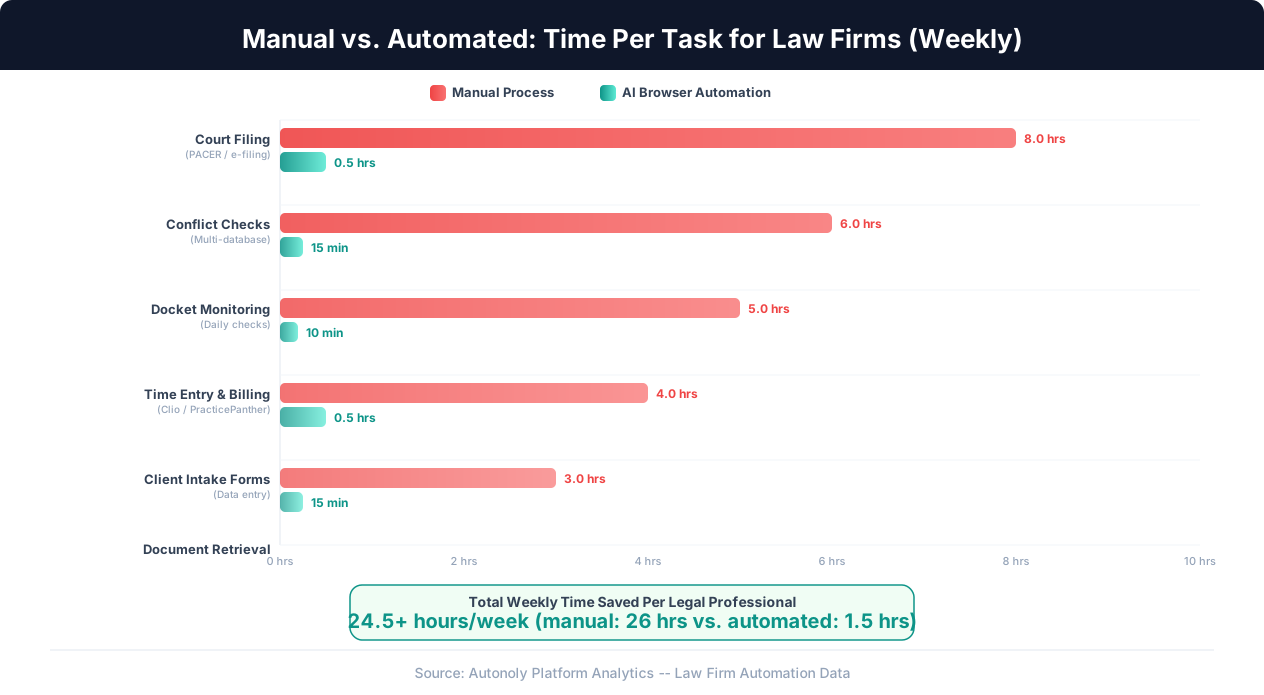
Based on the workflows described above, here are conservative weekly time savings estimates:
| Task | Manual Time/Week | Automated Time/Week | Weekly Savings |
|---|---|---|---|
| Court filings (PACER / e-filing) | 8-10 hrs | 30 min (review) | 7.5-9.5 hrs |
| Conflict checks | 4-6 hrs | 15 min (review) | 3.75-5.75 hrs |
| Docket monitoring | 4-5 hrs | 10 min (exceptions) | 3.8-4.8 hrs |
| Time entry and billing | 3-4 hrs | 30 min (review) | 2.5-3.5 hrs |
| Client intake | 2-3 hrs | 15 min (review) | 1.75-2.75 hrs |
| Document retrieval | 3-4 hrs | 10 min (review) | 2.8-3.8 hrs |
| Total | 24-32 hrs | 1.5-2 hrs | 22-30 hrs |
Financial Impact by Firm Size
Here is the math for three common firm sizes. These calculations assume a blended billing rate and a conservative 40% realization rate on recovered hours (meaning only 40% of saved time converts to additional billed work — the rest goes to non-billable activities, business development, or improved work-life balance).
Small Firm (5 attorneys, 3 paralegals)
- Blended billing rate: $225/hour
- Staff using automation: 6 (of 8 total)
- Hours recovered per person per week: 22 hours (conservative)
- Weeks per year: 48
- Total hours recovered: 6 x 22 x 48 = 6,336 hours/year
- At 40% realization: 2,534 billable hours recovered
- Additional revenue potential: 2,534 x $225 = $570,150/year
- Automation cost: ~$3,600/year ($300/month)
- Net ROI: $566,550/year
Mid-Size Firm (20 attorneys, 12 paralegals)
- Blended billing rate: $275/hour
- Staff using automation: 25 (of 32 total)
- Hours recovered per person per week: 24 hours
- Total hours recovered: 25 x 24 x 48 = 28,800 hours/year
- At 40% realization: 11,520 billable hours recovered
- Additional revenue potential: 11,520 x $275 = $3,168,000/year
- Automation cost: ~$6,000/year ($500/month)
Large Firm (100+ attorneys)
For large firms, the numbers scale proportionally. However, large firms also have more complex security, compliance, and change management requirements. The ROI per attorney is similar, but the implementation timeline is typically longer (6-12 months for firm-wide rollout vs. 2-4 months for smaller firms).
A Note on ROI Honesty
These numbers represent potential capacity recovery, not guaranteed revenue. The actual revenue impact depends on whether the firm has demand to fill the recovered hours with billable work and whether attorneys use the freed time productively. Firms with existing client demand that they are struggling to meet will see the highest real-dollar returns. Firms with excess capacity may see the benefit more in reduced overtime, improved work-life balance, and the ability to take on new clients without hiring additional staff.
Beyond Revenue: Indirect Benefits
- Reduced malpractice risk: Automated docket monitoring catches every new filing. Humans miss things, especially during busy periods. A missed deadline or overlooked court order is a malpractice claim waiting to happen.
- Staff retention: Legal professionals who spend less time on portal drudgery and more time on substantive legal work are more engaged and less likely to leave. Attorney and paralegal turnover is expensive — typically 1-2x annual salary in recruiting and training costs.
- Scalability: Taking on 20 new cases no longer requires hiring an additional paralegal to handle the corresponding increase in portal work. The automation scales with caseload.
- Consistency: Every filing is submitted correctly. Every docket is checked on schedule. Every conflict check is thorough. Automation does not have bad days, get distracted, or cut corners when busy.
Implementation Guide: Rolling Out Automation at Your Firm
Implementing browser automation at a law firm requires a structured approach that respects the firm's culture, security requirements, and professional obligations. Here is a practical roadmap.
Phase 1: Single-Task Pilot (Weeks 1-2)
Start with one high-frequency, low-risk task. Docket monitoring is the ideal first automation for most litigation firms. It is high-frequency (daily or weekly checks), low-risk (read-only — you are downloading information, not submitting anything), and the time savings are immediately visible.
Choose 10-20 active cases in a single jurisdiction (e.g., PACER for federal cases). Set up an automated workflow that checks each case's docket daily and compares it against the last known state. When new activity appears, it sends an alert to the responsible attorney. Run this alongside your existing manual docket-checking process for two weeks to verify accuracy.
During the pilot, track three metrics:
- Accuracy: Did the automation catch every new docket entry? Were there any false positives or missed entries?
- Time savings: How much time did the manual docket-checking process previously take vs. how much time the review-only process takes?
- Reliability: Did the automation complete every scheduled run successfully? How were portal login issues, timeouts, or other errors handled?
Phase 2: Expand and Add Tasks (Weeks 3-6)
Once docket monitoring is proven reliable, expand to additional jurisdictions and add your second automation target. Document retrieval is a natural next step — downloading newly filed documents from monitored cases and organizing them in your document management system.
This phase is also when you establish firm-wide standards for automation:
- Naming conventions: How are downloaded documents named? (e.g., CaseNumber_DocumentType_FilingDate.pdf)
- Folder structure: Where do automated downloads land? A staging folder for review, or directly into the client matter folder?
- Review process: Who reviews automated work? How soon after completion?
- Error handling: What happens when a portal login fails or a download errors out? Who gets notified?
Implementation Tip
Designate one person at the firm as the "automation coordinator" — ideally a senior paralegal or office manager who understands the firm's workflows and is comfortable with technology. This person owns the automation roadmap, trains staff, troubleshoots issues, and serves as the liaison between the firm and the automation platform. Firms that skip this step consistently report slower adoption.
Phase 3: Multi-Portal Workflows (Weeks 7-12)
With individual portal automations running reliably, begin building multi-step workflows that chain actions across portals:
- Filing workflow: Upload document to court portal, capture confirmation number, log the filing in the practice management system, create a time entry for the filing activity, and save the confirmation receipt to the client folder.
- New matter setup: Enter client data in the CRM, create the matter in the billing system, set up the client folder in document management, run the initial conflict check, and generate the engagement letter.
- Monthly billing preparation: Pull all unbilled time entries from the practice management platform, generate draft invoices, identify any entries that need attorney review, and compile the billing packet.
Phase 4: Firm-Wide Adoption (Months 4-6)
At this stage, the automation infrastructure is proven and internal expertise exists. The focus shifts to:
- Training all staff on using automated workflows.
- Building a library of reusable workflow templates for the firm's most common tasks.
- Establishing monitoring dashboards to track automation performance, error rates, and time savings.
- Identifying client-facing opportunities — such as automatically sending case status updates to clients based on docket activity.
Change Management Considerations
The biggest obstacle to automation adoption at law firms is rarely technical — it is cultural. Some staff members will worry that automation threatens their jobs. Others will distrust technology handling sensitive legal work. Address these concerns directly:
- Automation replaces tasks, not people. No paralegal loses their job because docket checking is automated. Instead, that paralegal now spends those 5 hours per week on higher-value work — preparing filings, coordinating with clients, supporting attorneys on substantive legal tasks.
- Human review remains essential. Automation handles the navigation and data retrieval. Humans review the results. This is not about removing people from the process — it is about removing tedious clicking from their day.
- Start with volunteers. Identify the staff members who are most frustrated by portal work and let them pilot the automation first. Their positive experience will drive organic adoption across the firm.
Getting Started: Your First Legal Automation in 30 Minutes
The most effective way to evaluate browser automation for your firm is to automate one real task and measure the result. Here is a step-by-step guide to setting up your first automation — a PACER docket monitoring workflow — in approximately 30 minutes.
Step 1: Choose Your Target Cases (5 Minutes)
Select 5-10 active federal cases that you currently check for docket activity on a regular basis. Note the case numbers and the courts they are filed in. These will be your test cases.
Step 2: Set Up the Platform (5 Minutes)
Sign up for Autonoly and configure your workspace. Add your PACER credentials to the encrypted credential vault. If your firm has specific security requirements, review the platform's security documentation and SOC 2 report before proceeding.
Step 3: Describe the Task (10 Minutes)
Using the AI agent chat, describe the docket monitoring task in plain English: "Log into PACER, navigate to Case No. 1:XX-cv-XXXXX in the Southern District of New York, check the docket for any entries filed after [last check date], and if there are new entries, download a copy of each new document and list the entry details." Watch the AI agent execute this in the live browser view to verify it navigates correctly.
Step 4: Refine and Save (5 Minutes)
If the AI agent navigates correctly and retrieves the right information, save the workflow. If it takes a wrong turn — selecting the wrong court or misidentifying the case — provide correction through the chat. Once the execution is clean, save it as a reusable workflow through the visual workflow builder.
Step 5: Schedule and Scale (5 Minutes)
Duplicate the workflow for each of your test cases, updating only the case number and court. Set the workflows to run daily at a time that works for your firm (early morning is common, so that attorneys have fresh docket updates when they start their day). Configure the workflow to send an alert (email or Slack message) when new docket activity is detected.
After a week of parallel operation — running automation alongside your existing manual process to verify accuracy — you will have a clear picture of the automation's reliability and the time it saves. Most firms are confident enough after this one-week pilot to expand to all active cases and begin automating additional workflows.
What Comes Next
Once docket monitoring is running smoothly, the natural progression is to add document retrieval (downloading new filings automatically), then conflict checks, then time entry automation. Each new workflow follows the same describe-execute-save pattern and typically takes less time to set up as you become familiar with the platform. Within a few months, your firm can have its entire portal-dependent workflow automated.
For firms that want to explore automation for other industries, our guides on automation for accounting firms and invoice processing automation cover similar portal automation patterns. For a deeper technical understanding of how AI browser automation works without APIs, see our guide on automating tasks without APIs.
The legal profession's value lies in judgment, advocacy, and counsel — not in clicking through court portals and typing time entries. Browser automation does not replace what makes a good attorney or paralegal good. It removes the mechanical work that prevents them from spending their full capacity on the work that actually matters: serving clients and practicing law.