The State of Business Automation in 2026: Where $4.1 Trillion in Labor Is Still Manual
Here is a number that should alarm every business leader: according to McKinsey's 2025 Global Workforce Report, $4.1 trillion in annual knowledge work labor is spent on tasks that current AI technology can fully automate. Not partially automate. Not assist with. Fully automate.
Yet only 12% of companies have deployed AI automation beyond pilot projects. The gap between what AI can automate and what companies actually automate is the largest productivity arbitrage in modern business history.
The reasons for this gap are well-documented: automation has historically been expensive (enterprise RPA implementations cost $200,000-2,000,000), slow (6-18 month deployments), and fragile (constant maintenance as systems change). Traditional automation required dedicated teams of developers and consultants, putting it out of reach for most businesses.
💡 Key Insight
AI agent automation changes the economics fundamentally. What used to cost $200,000+ and take 18 months now costs $99-299/month and deploys in days. The barrier is no longer budget or timeline — it is awareness. Most teams do not know that 80% of their repetitive work can be automated in an afternoon.
The business case is overwhelming. Here is what the data shows across industries:
| Metric | Before AI Automation | After AI Automation | Improvement |
|---|---|---|---|
| Time spent on repetitive tasks | 41% of workday | 8% of workday | 80% reduction |
| Data entry error rate | 3.2% per record | 0.4% per record | 87.5% reduction |
| Report generation time | 3-5 hours per report | 2-5 minutes per report | 97% reduction |
| Time to process new leads | 4-8 hours | 15-30 minutes | 94% reduction |
| Cross-platform data sync lag | 24-48 hours | Near real-time | 99% reduction |
| Employee satisfaction (repetitive task burden) | 3.2/10 | 7.8/10 | 144% improvement |
This article covers the eight business processes with the highest automation ROI, how to calculate department-specific returns, a proven implementation roadmap, and how to measure success. Whether you are a 5-person startup or a 5,000-person enterprise, the principles apply.
8 Business Processes Perfect for AI Automation
Not all business processes are equally suited for AI automation. The highest-ROI targets share three characteristics: they are repetitive (same pattern, different data), digital (performed on computers), and time-consuming (eating significant hours each week). Here are the top eight, ordered by typical ROI.
1. Sales Operations: Lead Research, CRM Updates, and Follow-Ups
Sales reps spend only 36% of their time actually selling. The rest goes to CRM data entry, lead research, email follow-ups, and administrative tasks. AI agents automate the non-selling activities so reps can focus on relationships and closing.
Automate: New lead research (LinkedIn + company website lookups), CRM record creation and updates, follow-up email drafting based on deal stage, competitive intelligence gathering, and proposal data assembly.
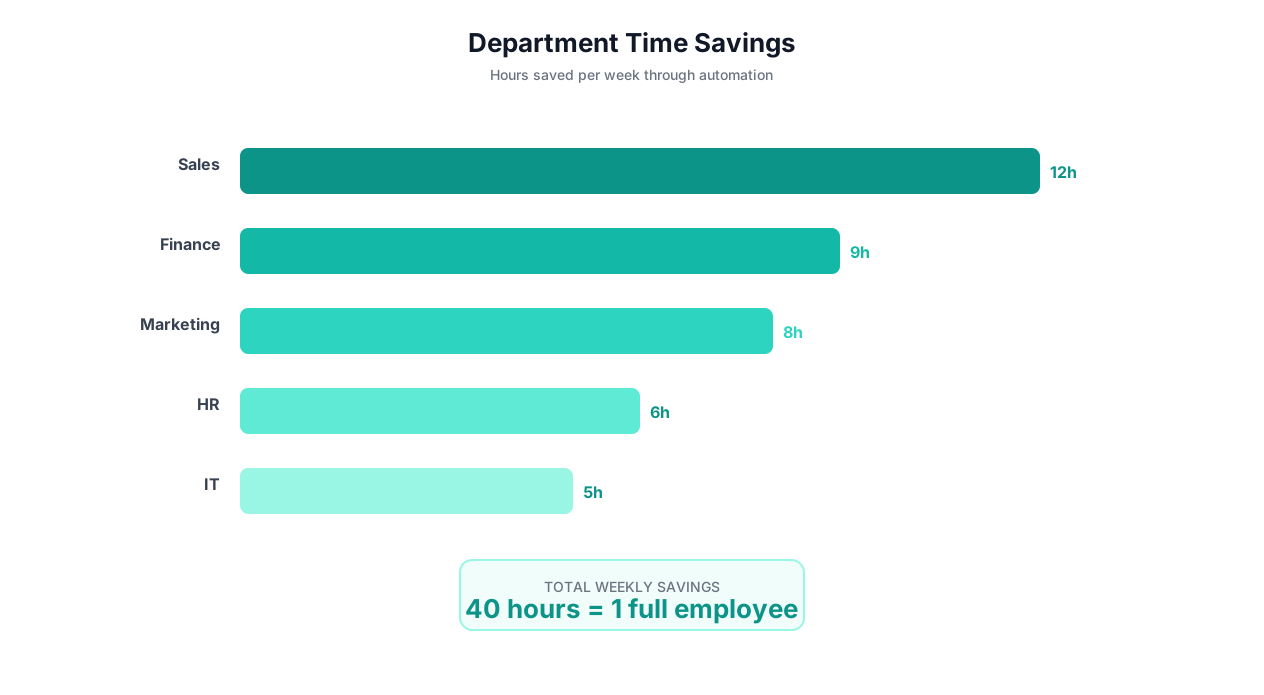
Impact: 8-15 hours saved per rep per week. Revenue per rep increases 25-40% because selling time doubles.
2. Marketing: Content Distribution, Competitive Monitoring, and Reporting
Marketing teams juggle 15+ platforms (ad networks, social media, email, CMS, analytics) and spend more time reporting on campaigns than running them. AI agents handle the distribution, monitoring, and reporting layers.
Automate: Multi-platform content posting, social media monitoring, SEO rank tracking, ad performance data aggregation, competitor content monitoring, and weekly performance report generation.
Impact: 10-20 hours saved per marketer per week. Campaign iteration speed increases 3x because data is available instantly instead of taking hours to compile.
3. Human Resources: Recruiting, Onboarding, and Compliance
HR teams manage high-volume, process-heavy workflows that are perfect for automation. Recruiting automation alone saves most HR teams 15+ hours per week.
Automate: Job posting across multiple boards, resume screening and initial qualification, interview scheduling, new hire onboarding workflows (account provisioning, document collection, training enrollment), and compliance document tracking.
Impact: 12-20 hours saved per HR professional per week. Time-to-hire decreases 40% because screening and scheduling happen automatically.
4. Finance and Accounting: Invoices, Reconciliation, and Reporting
Finance teams process the highest volume of structured documents in most organizations. Invoice processing and PDF data extraction are among the highest-ROI automations available.
Automate: Invoice data extraction and entry, purchase order matching, expense report processing, bank reconciliation, financial report generation, and vendor payment tracking.
Impact: 15-25 hours saved per accounting professional per week. Processing costs drop 70-85% while accuracy improves from 96-97% to 99.5%+.
📊 By the Numbers
The average accounts payable department processes 500 invoices per month at a cost of $15.96 per invoice (IOFM benchmark). AI automation reduces the cost to $2.18 per invoice — a savings of $6,890 per month for a 500-invoice operation.
5. Operations: Data Sync, Vendor Management, and Inventory
Operations teams are the connective tissue of the business, spending enormous time keeping systems in sync and managing vendor relationships. Cross-platform data sync eliminates the manual reconciliation that eats their days.
Automate: Multi-system data synchronization, vendor portal monitoring, inventory level tracking, supply chain status updates, order processing, and quality control data aggregation.
Impact: 10-18 hours saved per operations professional per week. Data consistency across systems goes from "mostly accurate with lag" to "real-time and synchronized."
6. Customer Success: Health Monitoring, Onboarding, and Retention
Customer success teams manage ongoing relationships across dozens or hundreds of accounts, constantly monitoring usage data, support tickets, and billing status to identify at-risk customers.
Automate: Customer health score calculation, usage decline alerts, proactive outreach workflows, QBR data compilation, renewal reminders, and customer feedback aggregation.
Impact: 8-12 hours saved per CSM per week. Churn rate decreases 15-25% because at-risk accounts are identified weeks earlier.
7. Legal: Contract Review, Compliance, and Document Management
Legal teams process high volumes of documents with strict accuracy requirements — a combination that makes them ideal for AI automation with human-in-the-loop review.
Automate: Contract clause extraction and comparison, compliance document tracking, trademark monitoring, regulatory change alerts, NDA processing, and legal research data compilation.
Impact: 6-12 hours saved per legal professional per week. Contract review time decreases 60% while coverage increases (every clause reviewed, not just sampled).
8. IT and DevOps: Monitoring, Reporting, and Incident Management
IT teams manage infrastructure monitoring, security alerts, and operational reporting across dozens of platforms and dashboards.
Automate: Multi-platform status monitoring, security alert triage, incident report compilation, license usage tracking, access review audits, and vendor SLA monitoring.
Impact: 8-15 hours saved per IT professional per week. Mean time to detect (MTTD) issues decreases 70% because monitoring is continuous and comprehensive.
| Department | Hours Saved/Person/Week | Avg. Hourly Cost | Annual Savings (per person) | First-Year ROI |
|---|---|---|---|---|
| Sales | 8-15 hrs | $55 | $22,880-42,900 | 900-1,800% |
| Marketing | 10-20 hrs | $50 | $26,000-52,000 | 1,100-2,100% |
| HR | 12-20 hrs | $45 | $28,080-46,800 | 1,200-1,900% |
| Finance | 15-25 hrs | $50 | $39,000-65,000 | 1,600-2,700% |
| Operations | 10-18 hrs | $45 | $23,400-42,120 | 1,000-1,700% |
| Customer Success | 8-12 hrs | $50 | $20,800-31,200 | 800-1,300% |
| Legal | 6-12 hrs | $75 | $23,400-46,800 | 900-1,900% |
| IT | 8-15 hrs | $60 | $24,960-46,800 | 1,000-1,900% |
ROI Calculator: Quantify Your Automation Savings by Department
The most common reason automation projects stall is lack of a clear business case. This calculator gives you concrete numbers to justify investment and prioritize departments.
The ROI Formula
For each department or team, calculate:
Annual Manual Cost = (People on team) x (Hours/week on repetitive tasks) x (52 weeks) x (Fully loaded hourly rate)
Annual Automation Cost = (Platform subscription) + (Setup time cost) + (Ongoing oversight time cost)
Annual Net Savings = Annual Manual Cost - Annual Automation Cost
ROI = (Annual Net Savings / Annual Automation Cost) x 100%
Example Calculations by Team Size
| Scenario | Team Size | Hrs/Person/Week Automated | Hourly Rate | Annual Manual Cost | Annual Platform Cost | Annual Net Savings | ROI |
|---|---|---|---|---|---|---|---|
| Solo marketer | 1 | 12 hrs | $50 | $31,200 | $588 (free tier+time) | $30,612 | 5,206% |
| Sales team | 5 | 10 hrs each | $55 | $143,000 | $3,588 | $139,412 | 3,885% |
| Finance dept | 3 | 18 hrs each | $50 | $140,400 | $3,588 | $136,812 | 3,813% |
| Ops team | 8 | 14 hrs each | $45 | $262,080 | $3,588 | $258,492 | 7,204% |
| Full company | 25 | 10 hrs avg | $50 | $650,000 | $3,588 | $646,412 | 18,014% |
💡 Key Insight
The hidden ROI multiplier: these calculations only count direct time savings. They do not include the value of faster turnaround (leads processed in minutes vs hours), higher accuracy (fewer costly errors), and improved employee satisfaction (lower turnover from eliminating tedious work). The true ROI is typically 2-3x the direct calculation.
Hidden Costs to Include
When building your business case, do not forget these often-overlooked costs of manual work:
| Hidden Cost | Description | Typical Impact |
|---|---|---|
| Error correction | Time and money spent fixing manual data entry errors | +15-25% of direct labor cost |
| Opportunity cost | Revenue lost because team was doing admin instead of selling/building | +50-200% of direct labor cost |
| Delay cost | Business impact of tasks completed hours or days later than possible | Variable but often significant |
| Turnover cost | Recruitment and training costs from employees leaving boring roles | $15,000-30,000 per departed employee |
| Scalability ceiling | Revenue limits because manual processes cannot scale with growth | 10-30% revenue constraint |
Case Studies: 3 Companies That Transformed Operations With AI Automation
These case studies show how different-sized companies in different industries implemented AI business automation, what challenges they faced, and the measured results after 90 days.
Case Study 1: E-Commerce Company (35 employees) — Operations and Finance
The problem: A direct-to-consumer e-commerce brand selling across Shopify, Amazon, and Walmart Marketplace was drowning in manual data reconciliation. Their operations manager spent 25 hours per week syncing inventory levels, processing returns, reconciling order data, and generating financial reports. Their accountant spent 20 hours per week on invoice processing and expense categorization.
What they automated:
- Cross-platform inventory sync (Shopify + Amazon + Walmart) using browser automation for marketplace portals
- Order data aggregation into a unified Google Sheet with daily reporting
- Invoice processing via PDF data extraction from email attachments
- Weekly financial reporting pulling data from Stripe, PayPal, and Amazon Seller Central
- Return processing alerts with automated status tracking
Results after 90 days:
| Metric | Before | After | Change |
|---|---|---|---|
| Hours/week on manual data work | 45 hrs | 6 hrs | -87% |
| Inventory discrepancies/month | 23 | 2 | -91% |
| Invoice processing cost per invoice | $14.50 | $1.80 | -88% |
| Time to generate weekly financial report | 4 hours | 3 minutes | -99% |
| Monthly platform cost | N/A | $299 | — |
| Monthly savings (labor) | — | $8,775 | — |
📊 By the Numbers
The e-commerce company's $299/month investment generated $8,775/month in labor savings — a 2,835% annual ROI. The operations manager, freed from data reconciliation, launched a new wholesale channel that generated $180,000 in its first quarter.
Case Study 2: B2B SaaS Company (120 employees) — Sales and Marketing
The problem: A mid-market SaaS company's sales team (12 reps) spent an average of 11 hours per rep per week on non-selling activities: CRM updates, lead research, competitive intelligence, and report generation. Marketing (6 people) spent 15 hours per person per week on multi-platform content distribution, performance reporting, and competitor monitoring.
What they automated:
- Lead enrichment from LinkedIn and company websites via browser automation
- CRM auto-update when deal stages change (syncing Salesforce with Outreach and Gong)
- Daily competitive intelligence reports from 20 competitor websites
- Multi-platform content distribution (LinkedIn, Twitter, email newsletter)
- Weekly sales and marketing performance dashboards
- Follow-up email drafting based on CRM deal context
Results after 90 days:
| Metric | Before | After | Change |
|---|---|---|---|
| Sales rep selling time | 36% of day | 68% of day | +89% |
| Leads researched per day | 15 per rep | 75 per rep (automated) | +400% |
| Time to competitive intel report | 8 hours/week | Automated daily | -100% |
| Marketing reporting time | 12 hours/week total | 30 minutes review | -96% |
| Revenue per rep (quarterly) | $185,000 | $248,000 | +34% |
Case Study 3: Professional Services Firm (280 employees) — HR and Legal
The problem: A consulting firm's HR team (8 people) managed a high-volume recruiting pipeline (200+ open positions at any time), employee onboarding, and compliance tracking. Legal (4 people) reviewed 150+ contracts per month, tracked regulatory changes, and managed NDA processing.
What they automated:
- Recruiting workflows: job posting across 6 boards, initial resume screening, interview scheduling
- New hire onboarding: account provisioning, document collection, training enrollment across 8 systems
- Contract clause extraction and comparison against standard templates
- Regulatory change monitoring across 12 government and industry websites
- NDA processing with auto-population from client database
Results after 90 days:
| Metric | Before | After | Change |
|---|---|---|---|
| Time-to-hire (avg) | 42 days | 26 days | -38% |
| HR hours on recruiting admin | 95 hrs/week | 22 hrs/week | -77% |
| Contract review time (per contract) | 2.5 hours | 25 minutes + review | -83% |
| Regulatory changes caught within 24 hrs | 60% | 98% | +63% |
| NDA processing time | 45 minutes | 4 minutes + approval | -91% |
⚠️ Important Note
Legal and HR automation should always include human review for final decisions. AI agents handle the data extraction, comparison, and routing — but hiring decisions, contract approvals, and compliance determinations require human judgment. Configure human-in-the-loop checkpoints for all decision-critical steps.
Build vs Buy: Should You Build Custom Automation or Use a Platform?
Every company considering AI automation faces this decision: build custom automation with internal engineers or buy a platform. The right answer depends on your resources, timeline, and use case complexity.
Build (Custom Development)
Pros: Maximum flexibility, full control over data, no vendor dependency, can optimize for specific high-volume workflows.
Cons: Requires engineering team (3-6 months to build basic platform), ongoing maintenance burden, slow iteration, high opportunity cost of engineering time.
Best for: Companies with dedicated automation engineering teams, extremely high-volume or specialized workflows, and strict data residency requirements that preclude cloud platforms.
Buy (AI Automation Platform)
Pros: Immediate deployment (minutes to hours), no engineering required, built-in integrations and browser automation, self-healing and learning, vendor handles maintenance and improvements.
Cons: Platform dependency, less flexibility for edge cases, subscription cost, data processed by third party.
Best for: Companies without dedicated automation engineers, teams that need results this week not this quarter, and organizations automating diverse tasks across many departments.
| Factor | Build Custom | Buy Platform (e.g., Autonoly) |
|---|---|---|
| Initial cost | $100,000-500,000 (engineering time) | $0-299/month |
| Time to first automation | 3-6 months | 5 minutes |
| Ongoing maintenance | 1-2 FTE engineers | Included in platform |
| Flexibility | Unlimited | High (with browser automation) |
| Browser automation | Must build/maintain | Built-in |
| AI learning/adaptation | Must build/maintain | Built-in |
| Scale to new workflows | Weeks per new workflow | Minutes per new workflow |
| Total 3-year cost (10 workflows) | $400,000-1,200,000 | $3,588-10,764 |
💡 Key Insight
The pragmatic approach: start with a platform for 80% of your automations, and build custom solutions only for the 20% with unique requirements that platforms cannot handle. Most companies never reach that 20% — the platform handles everything they need.
The Hybrid Approach
Many sophisticated organizations use both approaches. They use an AI automation platform like Autonoly for business process automation (lead routing, invoice processing, data sync, reporting) and build custom solutions for proprietary algorithms, high-frequency data processing, or workflows with strict regulatory requirements.
This hybrid approach captures 90%+ of the automation value at a fraction of the cost of building everything custom. The platform handles the standard business processes while engineering focuses on genuinely differentiating technology.
Implementation Roadmap: Your 30/60/90-Day AI Automation Plan
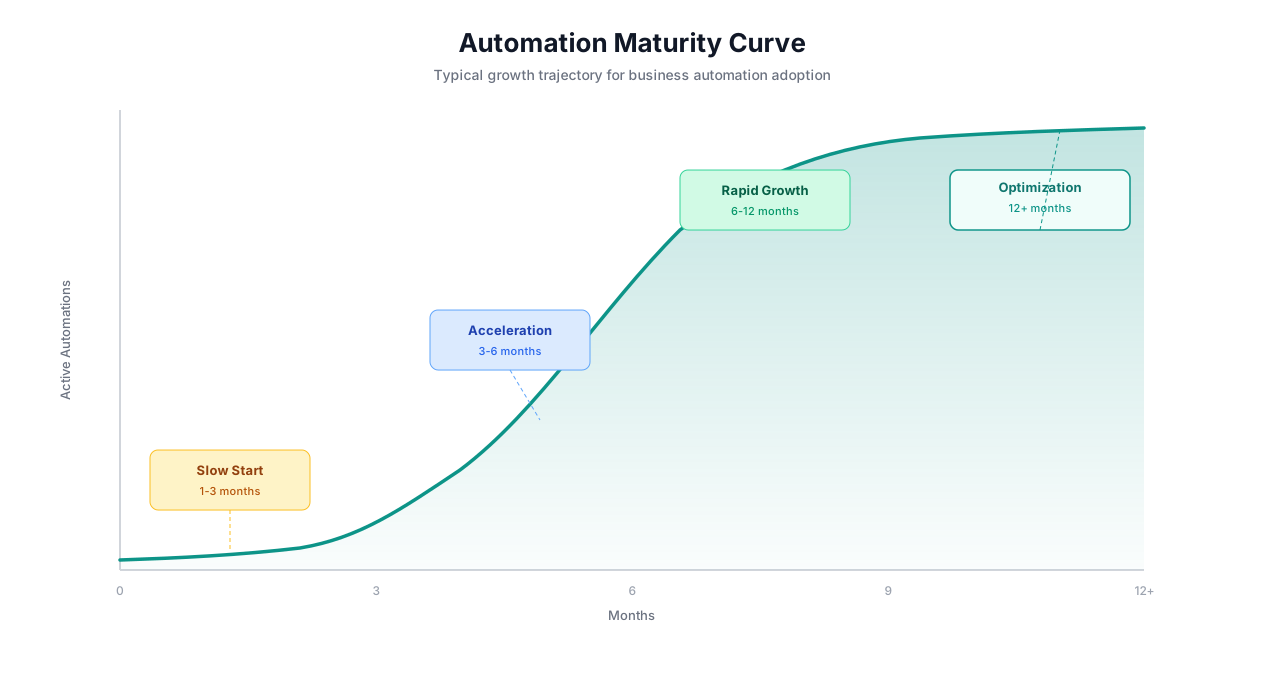
Rolling out AI automation across a business requires structure. Going too fast leads to poorly configured workflows. Going too slow means months of unnecessary manual work. This 30/60/90-day plan balances speed with thoroughness.
Days 1-30: Foundation (Quick Wins)
Goal: Deploy 3-5 high-impact automations, establish ROI proof, and build internal confidence.
Week 1: Audit and Prioritize
- Survey each department: "What tasks do you spend the most time on that follow a repeatable pattern?"
- Create a ranked list of automation candidates by estimated time savings
- Select the top 3-5 candidates that are high-impact and low-risk
- Set up the platform account and invite the first pilot users
Week 2-3: Build First Automations
- Build and deploy the top 3-5 automations using the AI agent chat
- Start with individual contributor workflows (not company-wide processes)
- Run each automation in monitored mode for 1 week before full deployment
- Recommended first automations by department:
| Department | Recommended First Automation | Expected Impact |
|---|---|---|
| Sales | Lead research and CRM enrichment | 5-8 hrs/person/week saved |
| Marketing | Competitor price/content monitoring | 3-5 hrs/week saved |
| Finance | Invoice PDF extraction to accounting system | 10-15 hrs/week saved |
| HR | Multi-board job posting | 3-5 hrs/posting saved |
| Operations | Cross-system data sync | 5-10 hrs/week saved |
Week 4: Measure and Report
- Calculate actual time savings from each automation
- Document before/after comparisons with specific numbers
- Present results to leadership with ROI calculation
- Gather user feedback on workflow accuracy and reliability
Days 31-60: Expansion (Scale Across Departments)
Goal: Deploy 10-15 additional automations across 3+ departments. Establish automation champions in each team.
- Identify 1-2 "automation champions" per department — people who will advocate for and help configure automations
- Build the next 10-15 highest-priority automations from your audit list
- Move from individual workflows to team-level processes (e.g., entire lead-to-opportunity pipeline, not just lead research)
- Set up cross-departmental automations (e.g., new customer in CRM triggers onboarding in HR, provisioning in IT, and welcome sequence in marketing)
- Configure learning optimization to improve reliability based on first month's data
⚠️ Important Note
Resist the temptation to automate everything at once. Each workflow needs a week of monitored execution to catch edge cases. Deploying 20 automations simultaneously and having 5 produce incorrect results damages organizational trust in automation. Steady, reliable expansion beats rapid, buggy deployment.
Days 61-90: Optimization (Compound Value)
Goal: Optimize existing automations, connect cross-departmental workflows, and establish automation as a core organizational capability.
- Review all active automations for accuracy, speed, and reliability improvements
- Build compound workflows that chain multiple departments (lead gen -> qualification -> CRM -> onboarding -> customer success)
- Set up executive dashboards showing automation impact across the organization
- Establish an automation request process so any team member can request new automations
- Calculate total organizational impact and update the business case for continued investment
| Phase | Automations Active | Departments | Weekly Hours Saved | Monthly Savings |
|---|---|---|---|---|
| Day 30 | 3-5 | 1-2 | 15-30 hrs | $3,000-6,000 |
| Day 60 | 15-20 | 3-4 | 60-100 hrs | $12,000-20,000 |
| Day 90 | 25-40 | 5-8 | 120-200 hrs | $24,000-40,000 |
Measuring Success: The 7 KPIs That Matter for Business Automation
Measuring automation success goes beyond counting hours saved. These seven KPIs give you a complete picture of automation impact across efficiency, quality, and business outcomes.
1. Hours Reclaimed Per Person Per Week
The most direct measure of automation impact. Track the actual hours saved by each person or team, measured by comparing pre-automation time logs to post-automation activity. Target: 10-20 hours per person per week within 90 days.
2. Error Rate Reduction
Manual processes have measurable error rates (typically 3-5% for data entry). Track error rates before and after automation. AI-powered automation typically reduces errors to 0.3-0.8%. For financial processes, this metric often has the highest dollar impact.
3. Task Completion Speed
How long does each process take from trigger to completion? A lead that used to take 4 hours to research, enrich, and route should take under 5 minutes with automation. Track median completion time for each automated process.
4. Cost Per Process Execution
Calculate the all-in cost per execution: platform fees + compute time + any human review time, divided by number of executions. Compare to the previous manual cost. Target: 80-95% cost reduction per execution.
| KPI | How to Measure | Good Target (90 days) | Great Target (180 days) |
|---|---|---|---|
| Hours reclaimed/person/week | Time tracking comparison | 10+ hours | 15+ hours |
| Error rate reduction | Error logs, QA audits | 70% reduction | 90% reduction |
| Task completion speed | Execution logs, SLA tracking | 80% faster | 95% faster |
| Cost per execution | Platform analytics + labor audit | 80% cheaper | 90% cheaper |
| Workflow reliability | Success rate in execution logs | 92%+ uptime | 97%+ uptime |
| Employee satisfaction | Quarterly survey | +20% on task satisfaction | +40% on task satisfaction |
| Revenue impact | Revenue per employee, pipeline velocity | +10% revenue/employee | +25% revenue/employee |
5. Workflow Reliability (Uptime)
What percentage of scheduled workflow executions complete successfully? Track this metric per workflow and in aggregate. AI-powered workflows with cross-session learning typically achieve 94-97% reliability, improving to 98%+ over time.
6. Employee Satisfaction Score
Survey employees quarterly on their satisfaction with repetitive task burden. Automation should make jobs more interesting — people should spend more time on strategic, creative work and less time on data entry and copy-paste. If satisfaction is not improving, the wrong tasks may be automated.
7. Revenue Impact
The ultimate measure. Are automated processes contributing to revenue growth? Track pipeline velocity (for sales automation), content output (for marketing automation), time-to-hire (for recruiting automation), and processing throughput (for operations automation). These operational metrics directly correlate with revenue impact.
💡 Key Insight
The most impactful metric is revenue per employee. Companies that implement comprehensive AI automation see revenue per employee increase 20-35% within the first year — because the same team handles significantly more volume without proportional headcount growth.
Getting Started: Your First Business Automation Today
You do not need to implement a 90-day plan to start saving time. You can have your first business automation running in the next 10 minutes. Here is how.
Step 1: Pick Your Highest-Pain Task
Ask yourself: "What is the task I dread doing every week because it is boring, repetitive, and time-consuming?" That is your first automation.
If you are not sure, here are the most common first automations by role:
| Your Role | Start With This Automation | Why |
|---|---|---|
| Sales rep | Lead research from LinkedIn to CRM | Highest time savings, immediate revenue impact |
| Marketer | Competitor monitoring to Google Sheets | Quick win, visible to leadership |
| Finance/AP | Invoice PDF extraction | Highest volume, quantifiable savings |
| HR recruiter | Multi-board job posting | Easy to set up, saves hours per posting |
| Operations | Cross-platform data sync | Eliminates recurring pain point |
| Customer success | Customer health dashboard compilation | Transforms reactive to proactive |
Step 2: Describe It in 2-3 Sentences
Open the AI agent chat and describe your task. Include the source (where data comes from), the action (what to do with it), and the destination (where results go).
Step 3: Test and Deploy
Review the generated workflow, run a test, verify the output, and deploy. Your first automation is live.
Step 4: Measure and Expand
After one week, calculate your actual time savings. Share the results with your team. Help a colleague automate their most painful task. Automation adoption is contagious — once one person saves 10 hours per week, everyone wants in.
For detailed guides on specific automation types, explore:
- How to automate any digital task with AI agents
- Automate repetitive tasks and save 20+ hours per week
- How to automate invoice processing
- Automate lead generation at scale
- No-code automation platform comparison
📊 By the Numbers
Companies that start with a single automation and expand systematically achieve 3.2x higher total savings than companies that try to deploy 20+ automations simultaneously. The key is building organizational trust through proven results, not overwhelming the team with change.
Frequently Asked Questions
Answers to common questions about AI business automation.
How much does AI business automation actually cost?
AI automation platforms like Autonoly range from free tiers to $299/month for teams. Compare this to enterprise RPA ($200,000-2,000,000 for implementation) or custom development ($100,000-500,000). Most businesses achieve ROI within the first week — the platform pays for itself immediately through time savings.
Which department should automate first?
Start with the department that has the highest volume of repetitive, structured tasks. For most companies, this is either Finance/Accounting (invoice processing, reconciliation) or Sales (lead research, CRM updates). These departments typically have the highest time savings and most quantifiable ROI.
How long does implementation take?
Individual automations deploy in 2-5 minutes with AI-powered platforms. A comprehensive departmental rollout takes 2-4 weeks including auditing, building, testing, and training. A full organizational deployment following the 30/60/90-day plan takes 3 months to reach maturity.
Do we need a dedicated automation team?
No. With AI-powered platforms, individual team members build their own automations. You may want to designate 1-2 "automation champions" per department to coordinate efforts and share best practices, but this is a part-time role (2-3 hours/week) rather than a dedicated position.
What if our tools don't have API integrations?
This is where AI agents differ from traditional automation platforms. AI agents use browser automation to interact with any website or application — including government portals, legacy systems, and internal tools without APIs. If a human can do it in a browser, an AI agent can automate it.