What is AI Agent Chat?
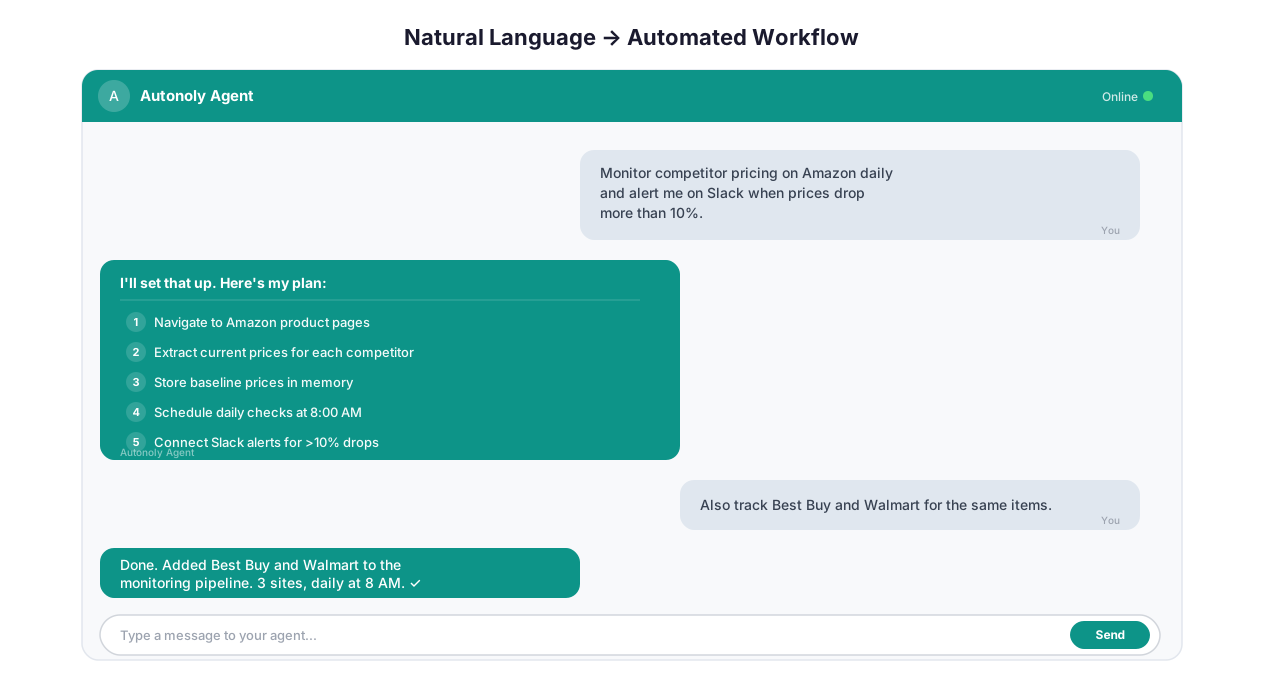
AI Agent Chat interface showing natural language task input and live browser execution
AI Agent Chat is what happens when you stop building automations and start describing them. You type "Go to LinkedIn Sales Navigator, search for CTOs at Series B fintech companies in New York, and export the first 50 results to Google Sheets" — and the agent does it. No flowcharts, no node wiring, no YAML configuration.
This is not a chatbot that generates code for you to copy-paste. The agent controls a real browser in real time. It clicks buttons, fills forms, waits for pages to load, handles popups, and extracts structured data. You watch the whole thing happen through a live browser feed.
The closest analogy: imagine hiring a freelancer on Upwork to do a data collection task, except they start immediately, cost a fraction of a cent per action, and never misread your Google Sheet column headers.
Why This Matters
Every automation tool in existence — Zapier, Make, n8n, custom Python scripts — forces you to translate a simple idea into the tool's language. "Check competitor prices daily" becomes a 15-node Zapier workflow with webhooks, HTTP requests, JSON parsing, and conditional logic. In Autonoly, it is one sentence. This is the promise of no-code automation taken to its logical conclusion: the interface is plain English.
The gap between "I know what I want" and "I have a working automation" has always been the real bottleneck. AI Agent Chat collapses that gap to zero for most tasks.
Who Should Use This
Operations people who currently solve problems with browser tabs and spreadsheets. Founders who waste Tuesday mornings copy-pasting data between SaaS tools. Analysts who write throwaway Python scripts that break when a website changes its class names. Marketing managers who file engineering tickets for what should be a 5-minute data pull.
If you have ever thought "I wish I could just tell someone to do this" — that is exactly what AI Agent Chat is.
How Natural Language Task Description Actually Works
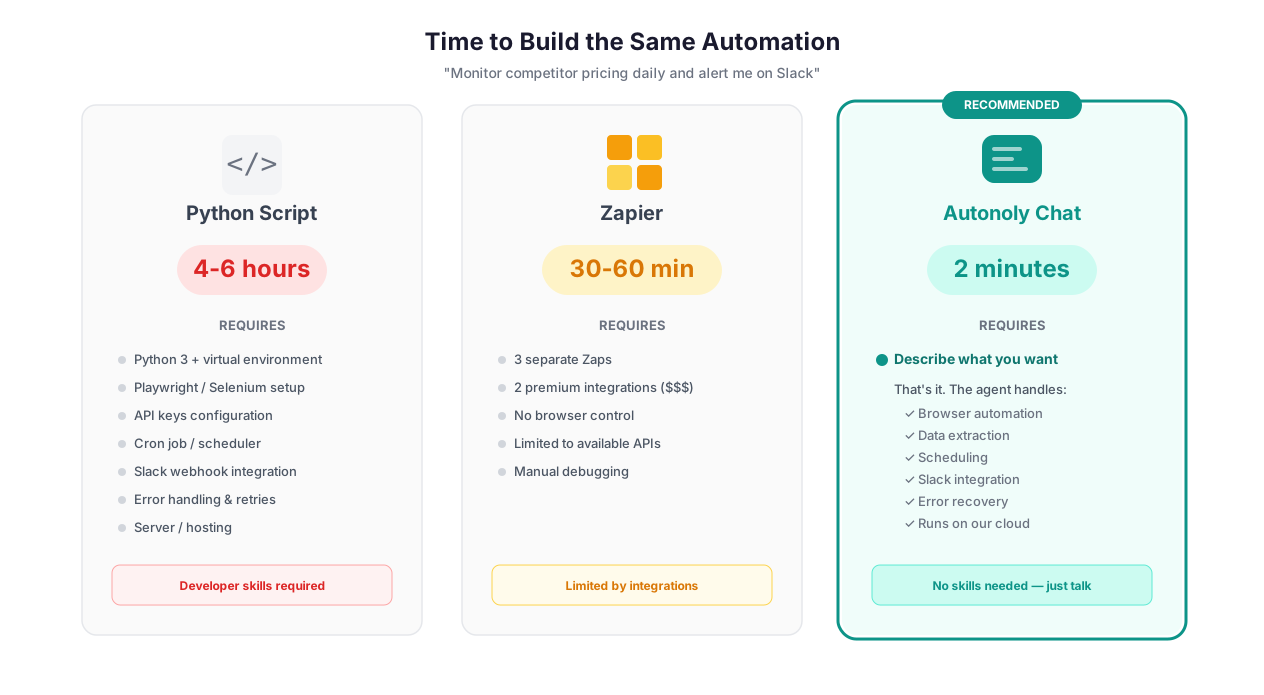
Comparison of natural language chat vs drag-and-drop builder vs Python scripting approaches
Here is what happens under the hood when you type a task description:
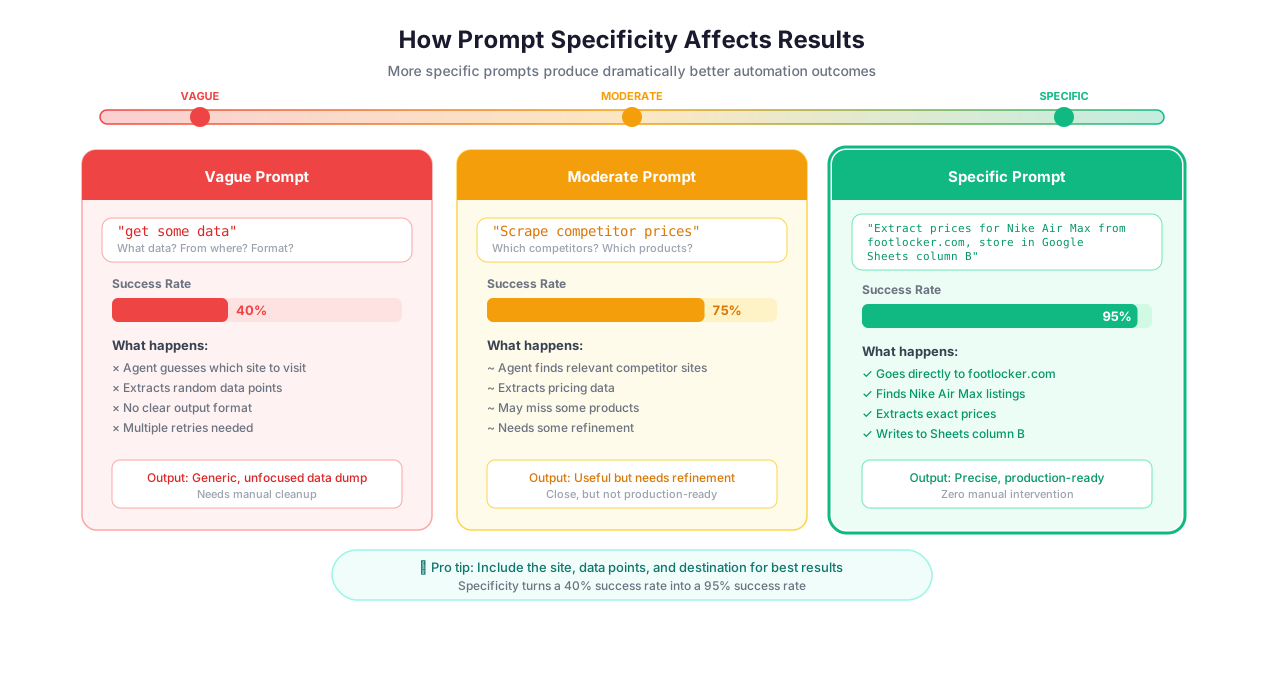
Step 1: Intent parsing. The agent breaks your sentence into a task graph — target website, actions to take, data to extract, where to deliver results. This is where specificity matters enormously. Compare these two prompts:
Vague: "Find CRM info" — The agent has no idea which CRMs, what kind of info, or where to look. It will ask clarifying questions, burning tokens before doing anything useful.
Specific: "Go to G2.com, search for 'CRM software', extract the name, rating, number of reviews, and pricing tier for the top 20 results, and save to a new Google Sheet called 'CRM Comparison Q1'" — The agent starts working immediately. Every field is defined. The destination is clear.
The difference in outcome is dramatic. Vague prompts produce 3-4 clarifying questions before any browser action. Specific prompts produce results in a single turn.
Step 2: Browser execution. The agent launches a real Chromium browser — not a headless simulator. It navigates to the target URL, waits for JavaScript to finish rendering (this matters more than people realize — most scraping failures happen because tools do not wait for dynamic content), and starts interacting with elements. You see everything through the live browser view.
Step 3: Adaptive problem-solving. This is where it gets interesting. The agent does not follow a rigid script. When it encounters a cookie consent popup, it dismisses it. When it hits a "Load More" button instead of pagination links, it clicks it. When a CAPTCHA appears, it attempts to solve it or falls back to AI Vision for visual analysis. This adaptive behavior — reasoning about an unfamiliar page state and choosing the next action — is powered by frontier large language models from providers like Anthropic, and it is what separates an AI agent from a macro recorder.
Step 4: Delivery. Results land where you specified — Google Sheets, CSV download, Notion database, Airtable, or just displayed in the chat.
The Prompt Engineering Nobody Talks About
Most people write prompts like they are texting a friend. That works for simple tasks, but for anything involving multiple steps or ambiguous websites, structured prompts produce dramatically better results.
Here is the anatomy of a good prompt:
"Go to [specific URL]. Navigate to [specific section]. For each [item type] on the page, extract [field 1], [field 2], [field 3]. Handle pagination by [clicking next / scrolling]. Save results to [destination] with columns named [column names]."
Bad prompt: "Scrape some data from Amazon."
Good prompt: "Go to amazon.com/bestsellers/electronics. Extract the product name, price, star rating, and number of reviews for the top 50 products. If a product has a 'See more' link, follow it and also grab the ASIN number. Save everything to Google Sheets."
The good prompt tells the agent exactly what "data" means (four specific fields plus a conditional fifth), exactly where to look (bestsellers in electronics, not just "Amazon"), and exactly where to put results. The agent executes this on the first try with no follow-up questions.
Multi-Turn Conversations: Refining Through Dialogue
Real tasks rarely go perfectly on the first message. Multi-turn conversation is where AI Agent Chat earns its keep.
Here is an actual workflow that happens constantly: you ask the agent to scrape a directory of law firms. The agent extracts names and phone numbers from the main listing. You notice it missed the practice areas listed on each firm's detail page. Instead of starting over, you say: "Go back and also click into each firm's detail page to grab their listed practice areas and founding year."
The agent rewinds to the listing, iterates through each entry, visits the detail page, extracts the additional fields, and merges them into the existing dataset. You did not re-describe the original task. The agent retained the context from the first exchange.
This is fundamentally different from Zapier, where changing the output of an automation means reconfiguring nodes. It is different from a Python script, where you would need to modify the extraction logic, re-run, and hope the website has not changed its DOM structure in the meantime.
When the agent gets it wrong: It happens. The agent misidentifies the "next page" button and starts clicking a footer link instead of the pagination control. You see this happening in the live browser view and send a correction: "That is the wrong button. The pagination is in the div with class 'search-results-pagination' at the bottom of the results list." The agent corrects immediately. The key insight is that corrections are cheap — a single message. Starting over is expensive.
When the agent cannot recover: Some tasks are genuinely too ambiguous for one description. "Analyze my competitors" gives the agent nothing to work with. Who are your competitors? What does "analyze" mean — pricing, features, reviews, traffic? Which websites? These require conversation, and the agent will ask. This is not a failure — it is the system working correctly by refusing to guess when it does not have enough information.
What Can You Actually Automate?
Let's get specific. These are the categories where AI Agent Chat performs reliably:
Data collection from any website. Product catalogs, job listings, real estate listings, government databases, academic papers, social media profiles, news articles. If the data is visible on a webpage, the agent can extract it. Pair with Data Extraction for structured output formats.
Lead generation and enrichment. Search company directories, extract contact information, cross-reference with LinkedIn or Crunchbase, and push enriched leads to your CRM or Airtable. A single prompt handles what normally requires a dedicated tool like Apollo or ZoomInfo.
Form filling and data entry. Government compliance portals, supplier onboarding forms, CRM data entry, expense reporting. The agent fills forms using data from your spreadsheet, handles dropdowns, date pickers, file uploads, and multi-step submission flows.
Monitoring and alerts. Check specific pages for changes — competitor pricing, product availability, regulatory filings, job postings — and trigger notifications via Slack or email when something changes.
Content research and summarization. Gather information from 10+ sources, use AI Content Generation to synthesize findings, and deliver a structured report. The entire pipeline runs from one chat description.
Browse the templates library for ready-made starting points that you can customize through conversation.
From Chat to Scheduled Workflow
Journey from typing a task description to deploying an automated scheduled workflow
A chat session is a prototype. A scheduled workflow is production.
Every completed chat session can be converted into a reusable workflow with one click. The system reverse-engineers your conversation — the successful navigation path, extraction patterns, data transformations, and delivery destinations — into a visual workflow in the Visual Workflow Builder.
This is where Autonoly pulls ahead of tools like ChatGPT or Claude that can help you plan an automation but cannot execute or schedule it. The chat-to-workflow pipeline means you go from "I wonder if this would work" to "this runs every Monday at 6 AM" in a single session.
From the converted workflow, you can:
Schedule runs — daily competitor price scraping, weekly job board monitoring, monthly SEC filing extraction
Add conditional logic — skip items that match certain criteria, branch based on extracted values, via Logic & Flow
Parameterize inputs — change the target URL, search query, or date range without rebuilding the workflow
Chain integrations — deliver results to Slack, Google Sheets, Notion, or 200+ other tools
A concrete example: I described a task to "go to Product Hunt, find today's top 10 launches, extract the product name, tagline, upvote count, and maker name, and save to Sheets." The session took 4 minutes. I converted it to a daily workflow. It has run 180+ times since then. Total setup time: 4 minutes.
Built-In Intelligence
The agent is not stateless. Through Cross-Session Learning, every interaction improves future performance:
Selector memory: The agent remembers which CSS selectors successfully targeted elements on specific websites. When Crunchbase changes its DOM structure, the agent falls back to AI Vision once, finds the new pattern, and remembers it for every future run.
Navigation shortcuts: If the fastest path to a website's search results is through the advanced search form (not the homepage search bar), the agent learns this and skips the slower route next time.
Site-specific quirks: Some websites require accepting cookies before any interaction. Some use infinite scroll instead of pagination. Some have aggressive rate limiting. The agent catalogs all of this per domain.
The practical result: your first automation on a new website takes 5 minutes. The tenth run on the same website takes 45 seconds. By week 4, the agent handles that site like a power user.
Budget Management
Each session consumes tokens — the currency of AI processing. You see usage in real time, receive alerts at 70% and 90% of your session budget, and the agent optimizes for completing the task within budget. If a task is more complex than the budget allows, the agent tells you upfront rather than failing halfway through. Check the pricing page for session budget details.
Getting Started
Sign up for a free account and type your first prompt. No credit card required. If you need ideas, browse the templates library or check the glossary for terminology.
Best Practices
These are hard-won lessons from running hundreds of chat sessions. Follow them and your success rate will be dramatically higher:
Front-load your specificity. The single biggest predictor of first-try success is how many specifics are in your initial prompt. Include the target URL (not just the website name), the exact fields you want extracted, the output format, and the destination. "Scrape TechCrunch" will produce questions. "Go to techcrunch.com/latest, extract the article title, author, publication date, and first paragraph for the 20 most recent articles, and save to a Google Sheet named 'TC Monitor'" will produce results.
Use mid-session guidance for corrections, not rewrites. When the agent picks the wrong element, send a targeted correction: "The price is in the span with class 'sale-price', not the original price." This costs 1-2 tokens. Starting a new session to re-describe the entire task costs the full session budget again. Think of corrections like pair programming — you are steering, not rebuilding. Mid-session corrections also improve Cross-Session Learning because the agent remembers which approach was wrong and which correction worked.
Preview before you scale. Always ask the agent to process 3-5 items first. Review the output. Confirm the fields are correct, the data is clean, and nothing is missing. Then say "looks good, continue with all results." This is the automation equivalent of running SELECT * LIMIT 5 before SELECT * on a million-row table. It catches schema mismatches, missing fields, and data quality issues before you burn through your token budget on 500 bad rows.
Convert to workflows immediately after success. The "Convert to Workflow" button captures the exact successful path — every navigation step, every selector, every extraction pattern. If you close the session without converting, you can rebuild from the chat history, but you lose the automatic data wiring between steps. This takes 30 seconds and saves hours if you ever need to run the task again.
Use chat for exploration, workflows for production. Chat is for figuring out how to automate something. Scheduled workflows are for running it reliably at scale. The workflow builder adds error handling, retry logic, and conditional branching that a single chat session cannot match. Move from chat to workflow as soon as you have a working approach. Read more in our AI workflow automation guide.
Describe the "why" for ambiguous tasks. When a task has multiple valid interpretations, adding context about why you need the data helps the agent make better decisions. "Extract product prices from this page (I am building a competitive pricing analysis)" tells the agent to prioritize accuracy over speed and to capture all pricing tiers, not just the headline price.
Security & Compliance
AI Agent Chat sessions run in isolated execution environments. Each session gets a fresh browser instance — no cookies, no localStorage, no cache from previous sessions. When a session ends, the execution environment is destroyed completely.
Login credentials entered during a chat session are stored in the encrypted credential vault. They never appear in chat logs, execution records, or session recordings. The live browser view streams the agent's activity but does not record or persist the video.
Chat conversations are stored in your workspace, accessible to members with appropriate permissions. Sessions can be individually deleted, and account deletion permanently removes all associated history. The AI models process your prompts in real time and do not retain your conversation data for training.
For teams logging into sensitive systems — banking portals, healthcare applications, HR platforms — the live browser view shows real-time activity but does not persist video. Credentials visible during authentication are protected by the same container isolation that applies to all Autonoly sessions. See the Security feature page for the full architecture.
Common Use Cases
Competitive Intelligence Pipeline
A product manager types: "Go to G2.com, search for 'project management software', extract the top 30 results with product name, G2 rating, number of reviews, pricing info, and the first three pros and cons from each product's review summary. Save to Google Sheets."
The agent navigates G2, handles the search, iterates through results, visits each product's review page, extracts structured data, and delivers a clean spreadsheet. Total time: 12 minutes. Doing this manually: 2-3 hours. Building a Zapier workflow to do this: not possible (Zapier has no web scraping capability). Writing a Python script with BeautifulSoup: 45 minutes of coding, plus debugging when G2's JavaScript-rendered content does not load in a headless browser.
The product manager converts the session to a monthly workflow. Every month, fresh competitive data arrives in the team's shared Sheet with zero effort. For more on agent-based research, see our guide on AI agent web scraping.
Multi-Source Data Aggregation
A data analyst needs to combine information from three different sources: customer reviews from Trustpilot, competitor pricing from a rival's website, and inventory availability from a supplier portal that requires authentication.
Rather than building three separate automations, they describe the entire pipeline in one message: "First, go to Trustpilot and extract the 20 most recent reviews for [product]. Then go to [competitor URL] and grab the current price and shipping time. Finally, log into [supplier portal] using my saved credentials and check the stock level for SKU [number]. Combine all three into a single Google Sheet with columns for review text, review date, rating, competitor price, shipping time, and stock level."
The agent handles multi-site navigation, authentication flows, and data merging in a single session. Read more about multi-source pipelines in our web scraping best practices guide.
Marketing Self-Service
A marketing manager who has never written a line of code needs weekly social media engagement data compiled from three platforms. Previously, this required filing a ticket with the analytics team, waiting 2-3 days, and receiving a PDF that was already stale.
Now they type: "Go to our Hootsuite dashboard, export last week's engagement metrics for all three social accounts, then go to Google Analytics and grab the top 10 landing pages by traffic, and combine everything into a single Sheet with separate tabs for social and web."
The agent collects the data across platforms and delivers the consolidated report. The manager converted this to a scheduled workflow that runs every Monday at 7 AM. Their weekly marketing standup now starts with fresh data instead of apologetic estimates. Our marketing automation guide has more examples of non-technical team self-service.
Exploratory Automation for Complex Sites
A compliance analyst needs data from the SEC EDGAR database — a government portal with a multi-step search flow, complex filters, dropdown menus that load dynamically, and results that span dozens of paginated pages.
Rather than trying to map this as a workflow upfront (which would require understanding the portal's DOM structure), they use AI Agent Chat to explore interactively. "Go to SEC EDGAR. Search for 10-K filings from technology companies filed in the last 6 months." The agent navigates the portal's arcane search interface. The analyst provides guidance: "Use the full-text search, not the company name search." "Set the filing type dropdown to 10-K, not 10-K/A." "The results are paginated — grab all pages."
Once the session produces clean results, one click converts it to a repeatable quarterly workflow. The analyst never needs to remember the portal's interface quirks again — the agent does.
When AI Agent Chat Is the Wrong Tool
Honesty matters. Here are situations where chat is not the best starting point:
Tasks requiring pixel-perfect timing — if you need to click a button within 200ms of a page event, build this in the Visual Workflow Builder with explicit wait conditions. Chat-based descriptions cannot express timing constraints precisely enough.
Workflows with complex conditional logic — "if the price is above X, do A; if it is between Y and Z, do B; otherwise do C and also check D" is better expressed as a visual workflow with branching logic. The chat agent can handle simple conditionals, but 5+ branches get unreliable.
Long-running bulk operations on 1,000+ items — chat sessions have token budgets. For massive extraction jobs, build and schedule a workflow designed for scale. Use chat to prototype the extraction on 10 items, then convert to a workflow for the full run.