Traditional RPA vs AI Agents: A Fundamental Architecture Difference
UiPath and Autonoly both automate digital tasks, but they represent fundamentally different generations of automation technology. Understanding the architectural difference is critical — it is not a matter of features or pricing, but of how each system thinks about and executes automation.
UiPath: The RPA Approach
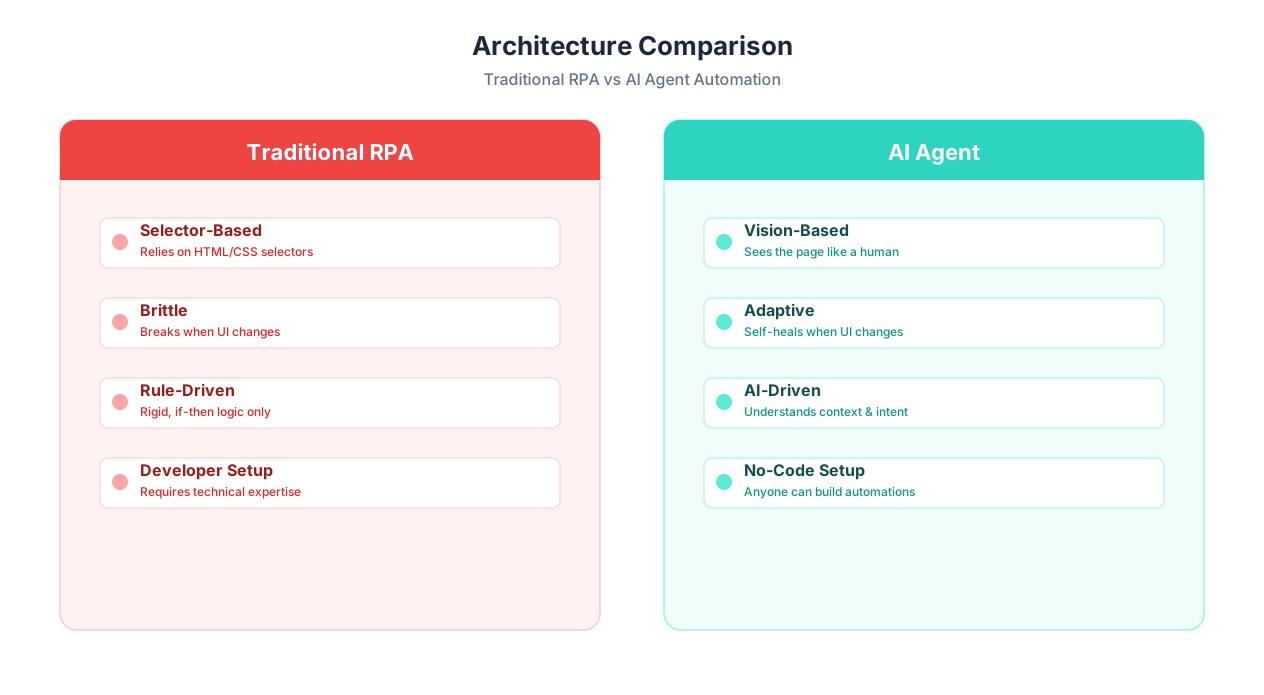
UiPath pioneered Robotic Process Automation (RPA) — software robots that mimic human interactions with desktop and web applications. An RPA bot follows a pre-programmed script: click this button at coordinates (450, 320), type this text into the field with ID "invoice-number", wait 2 seconds, click the Submit button with CSS selector "#btn-submit".
This script-based approach works by recording or manually coding every step the bot should take. The bot follows the script exactly, every time, with zero deviation. It does not understand what it is doing — it is executing a sequence of UI interactions, blind to context or meaning.
UiPath has been enormously successful with this approach. Founded in 2005, it has grown to a multi-billion-dollar company serving thousands of enterprises. Its platform includes Studio (development environment), Orchestrator (management and scheduling), and various robot types (attended, unattended, document understanding).
Autonoly: The AI Agent Approach
Autonoly uses AI agents — LLM-powered software that understands tasks semantically. Instead of following a script, an AI agent reads and comprehends web pages, reasons about how to achieve a goal, and adapts its approach when things change. You describe the outcome you want in plain English through the AI agent chat, and the agent figures out how to accomplish it.
The agent uses live browser control to interact with websites, but it does not rely on hard-coded selectors or pixel coordinates. It sees the page structure, understands the semantic meaning of elements ("this is a login form," "this is a search box," "this is the Submit button"), and interacts based on understanding rather than scripting.
The Architecture Difference in One Table
| Aspect | UiPath (Traditional RPA) | Autonoly (AI Agents) |
|---|---|---|
| Core technology | Script-based UI automation | LLM-powered semantic automation |
| How it "sees" a page | DOM selectors, element IDs, coordinates | Semantic understanding of page structure |
| How it handles changes | Breaks — requires developer to fix selectors | Adapts — LLM reasons about new layout |
| How workflows are created | Developers script in UiPath Studio | Users describe tasks in plain English |
| Who creates workflows | RPA developers/consultants | Anyone — no technical skills needed |
| Learning capability | None — runs same script every time | Cross-session learning — improves over time |
| Error handling | Pre-coded exception paths | AI reasons about unexpected situations |
💡 Key Insight
The difference between RPA and AI agents is analogous to the difference between a GPS that follows turn-by-turn directions and a human driver who understands where they are going. The GPS fails if a road is closed. The human driver finds an alternative route. AI agents bring that adaptability to automation.
This architectural difference has profound implications for reliability, maintenance, cost, and who can build automations. Let us examine each of these in detail.
The Brittleness Problem: Why RPA Bots Break Constantly
The single biggest pain point with traditional RPA is brittleness. RPA bots are built on selectors — CSS selectors, XPaths, element IDs, and sometimes pixel coordinates that identify specific UI elements on a page. When a website or application changes its layout, updates its CSS classes, reorganizes its DOM structure, or simply adds a new popup — the selectors break, and the bot fails.
How Often Do Websites Change?
More often than most people realize. A 2025 study by Testim found that:
- The average SaaS application pushes UI updates every 2-3 weeks
- E-commerce sites update layouts weekly or more frequently
- Government portals update quarterly (but changes are often dramatic when they happen)
- Internal enterprise applications update monthly during sprint cycles
Each UI update is an opportunity for selectors to break. And when selectors break, the RPA bot does not gracefully degrade — it fails completely, often partway through a process, potentially leaving data in an inconsistent state.
The Real Cost of Brittleness
The industry data on RPA maintenance is sobering:
| Metric | Industry Average | Source |
|---|---|---|
| RPA bots requiring monthly maintenance | 30-50% of deployed bots | Forrester Research, 2025 |
| Average time to fix a broken bot | 4-8 hours of developer time | UiPath Community surveys |
| Annual maintenance cost per bot | $5,000-$15,000 | Deloitte RPA study |
| RPA projects abandoned due to maintenance | 30-40% | EY Automation Survey |
| Enterprise RPA "bot farms" with 50%+ uptime issues | 1 in 3 enterprises | Gartner, 2025 |
📊 By the Numbers
A Gartner study found that organizations spend 30-40% of their total RPA budget on maintenance — fixing broken bots, updating selectors, and re-testing workflows after application changes. For a $500,000 annual RPA investment, that is $150,000-$200,000 per year just keeping existing bots running.
A Real-World Example of Brittleness
Consider a common scenario: an RPA bot that logs into a vendor portal, navigates to the invoices page, downloads new invoices, and extracts data.
The bot's script includes selectors like:
#username-field— the login username input.btn-primary.login-submit— the login buttona[href='/invoices']— the invoices navigation linktable.invoice-list tr td:nth-child(3)— the invoice amount column
When the vendor updates their portal (new design, new CSS framework, reorganized navigation), every one of these selectors can break simultaneously. The RPA developer must:
- Get notified the bot failed (often hours or days after the fact)
- Open UiPath Studio
- Navigate to the changed website
- Identify the new selectors
- Update the script
- Test the updated bot
- Redeploy to production
This process takes 4-8 hours of developer time per incident. Multiply by 30-50% of bots breaking monthly, across dozens or hundreds of bots in a large enterprise, and maintenance becomes a full-time job for multiple developers.
Why AI Agents Do Not Have This Problem
An AI agent does not use hard-coded selectors. When it navigates to the vendor portal and the layout has changed, it:
- Reads the page content and structure
- Identifies the login form based on semantic understanding ("this looks like a username field and a password field with a submit button")
- Logs in successfully despite the UI change
- Finds the invoices section by understanding navigation labels, not CSS selectors
- Extracts invoice data by understanding table structure and column headers
The agent's cross-session learning means it remembers how the site looked before, notices the change, and adapts — logging the adaptation for audit purposes.
⚠️ Important Note
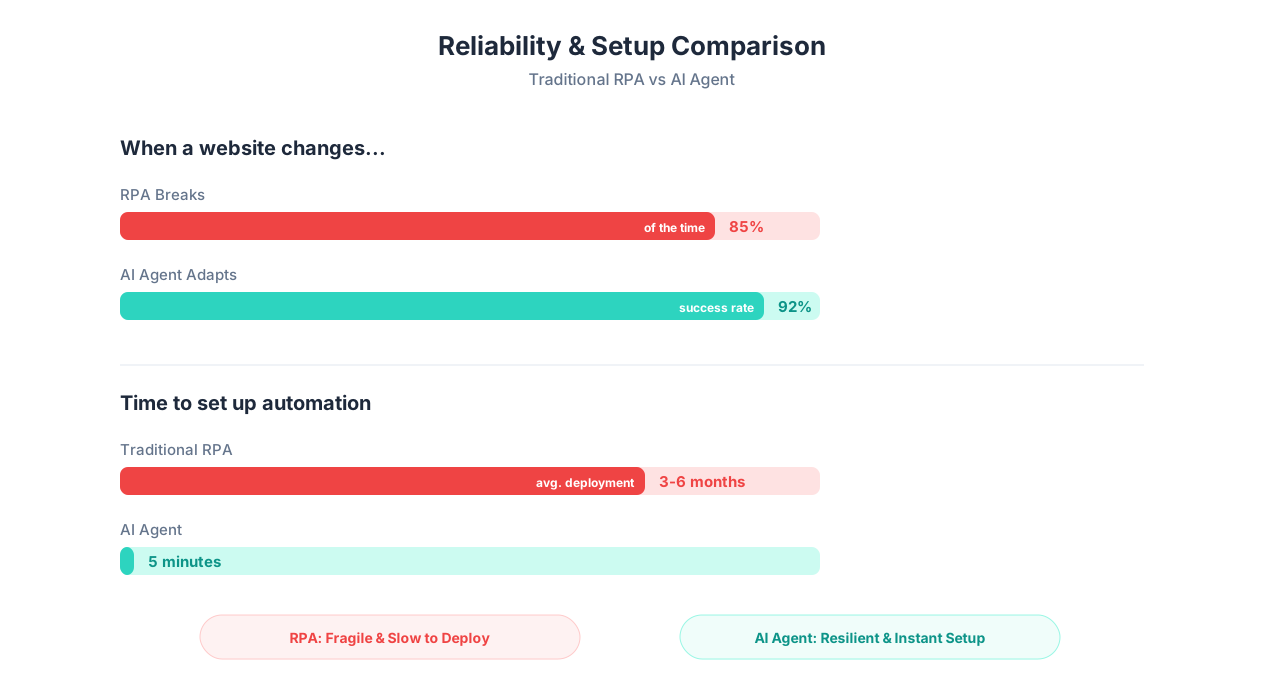
AI agents are not infallible. Major site redesigns (complete architectural changes) may still require human review. The advantage is not zero maintenance — it is dramatically reduced maintenance. Where an RPA bot breaks 30-50% of the time, AI agents maintain 90-95% uptime across the same conditions.
How AI Agents Adapt: The Self-Healing Advantage
The self-healing capability of AI agents is not marketing jargon — it is a concrete technical capability rooted in how large language models process visual and structural information. Here is how it works in practice.
Semantic Element Recognition
When an AI agent loads a web page, it does not just see a tree of DOM elements with CSS classes. It understands what those elements represent. A text input labeled "Email" next to a text input labeled "Password" with a button labeled "Sign In" is understood as a login form — regardless of the underlying HTML structure, CSS classes, or element IDs.
This semantic understanding means the agent can find the right elements even when:
- CSS classes change (from
.login-btnto.auth-submit-button) - Element IDs are removed or renamed
- The DOM structure is reorganized
- The page layout shifts from sidebar navigation to top navigation
- A new popup or modal appears that was not there before
Contextual Reasoning
AI agents reason about context. If the agent expects to see an "Invoices" link in the navigation and instead sees "Billing & Invoices," it understands these mean the same thing. If a "Download" button becomes a "Export PDF" link, the agent recognizes the functional equivalence.
This contextual reasoning extends to error handling. If the agent encounters an unexpected error message, a CAPTCHA, a session timeout, or a maintenance page, it reasons about the situation and responds appropriately — rather than blindly continuing a script that no longer makes sense.
Adaptation Tracking
When an AI agent adapts to a change, it logs what happened: "The invoices link moved from the sidebar to the top navigation bar. Adjusted navigation approach accordingly." This audit trail lets you understand what changed and verify the agent's adaptation was correct.
Reliability Comparison Over Time
The reliability difference between RPA and AI agents compounds over time. In the first week, both approaches work well — the website has not changed yet. Over months, as websites evolve, RPA reliability degrades while AI agent reliability remains stable.
| Time Period | RPA Bot Reliability | AI Agent Reliability | RPA Maintenance Events |
|---|---|---|---|
| Week 1 | 99% | 97% | 0 |
| Month 1 | 92% | 96% | 1-2 |
| Month 3 | 78% | 95% | 4-8 |
| Month 6 | 65% | 94% | 10-18 |
| Month 12 | 55% | 93% | 20-35 |
💡 Key Insight
Note that AI agents start with slightly lower reliability than RPA bots (97% vs 99% in week 1). This is because scripted bots are deterministic — when everything is exactly as expected, they execute flawlessly. AI agents introduce a small margin of variability due to LLM inference. The advantage of AI agents emerges over time, as websites inevitably change and RPA reliability degrades while AI agent reliability holds steady.
This reliability pattern explains a common frustration in enterprises with large RPA deployments: the first few bots work great, but as the bot count grows and time passes, the maintenance burden overwhelms the team. AI agents avoid this scaling trap because maintenance stays low regardless of how many agents are deployed or how much time passes.
Feature Comparison: Traditional RPA vs AI-Native Automation
Here is a comprehensive feature comparison between UiPath's traditional RPA platform and Autonoly's AI-native automation.
| Feature | UiPath | Autonoly | Winner |
|---|---|---|---|
| Workflow creation method | UiPath Studio (visual scripting IDE) | Plain English via AI agent chat | Autonoly (accessibility) |
| Technical skill required | High — dedicated RPA developers | None — describe tasks in natural language | Autonoly |
| Web automation | Yes — selector-based | Yes — AI semantic understanding | Autonoly (adaptive) |
| Desktop automation | Yes — strong desktop app support | Web/cloud-focused | UiPath |
| Self-healing | Limited — UiPath added basic AI selectors | Native — LLM-powered adaptation | Autonoly |
| Cross-session learning | No | Yes — agents improve over time | Autonoly |
| Document understanding | Yes — UiPath Document Understanding | Yes — AI-powered PDF extraction | UiPath (more mature) |
| Attended automation | Yes — triggers from user desktop | Yes — manual trigger from dashboard | UiPath (tighter desktop integration) |
| Unattended automation | Yes — via Orchestrator | Yes — cloud-based scheduled execution | Tie |
| Orchestration/scheduling | UiPath Orchestrator (enterprise-grade) | Built-in scheduling | UiPath (more mature) |
| Enterprise governance | Strong — audit trails, role-based access, compliance | Growing — audit logs, team roles | UiPath |
| Scalability | Proven at 1,000+ bot enterprise scale | Cloud-native, scales on demand | UiPath (proven at scale) |
| Integration breadth | SAP, Oracle, Citrix, mainframes, desktop apps | Any website + growing API library | UiPath (enterprise apps) |
| Live execution monitoring | Yes — via Orchestrator dashboards | Yes — live browser view | Autonoly (visual) |
| Community and ecosystem | Large — UiPath Academy, forums, partners | Growing | UiPath |
| AI/ML capabilities | Added via AI Center (bolted on) | Native — AI is the core architecture | Autonoly (native AI) |
📊 By the Numbers
UiPath has over 10,000 enterprise customers, 2+ million certified developers through UiPath Academy, and processes billions of automations annually. These are numbers that reflect a decade of enterprise deployment experience. Autonoly is a newer platform that trades that enterprise maturity for architectural advantages in AI-native design and accessibility.
Where UiPath Genuinely Excels
UiPath has real advantages that should not be dismissed:
- Desktop application automation: UiPath excels at automating desktop applications — SAP GUI, Oracle Forms, Citrix environments, legacy Windows applications. If your automation targets desktop software (not just web browsers), UiPath has capabilities Autonoly does not.
- Enterprise governance: UiPath Orchestrator provides enterprise-grade governance — audit trails, role-based access control, compliance reporting, centralized bot management. Large enterprises with regulatory requirements benefit from this mature governance layer.
- Proven at massive scale: UiPath has been deployed at companies running 1,000+ bots across global operations. This scale has been proven over years. For enterprises that need to automate thousands of processes across dozens of departments, UiPath's track record is unmatched.
- Partner ecosystem: Hundreds of system integrators (Deloitte, Accenture, EY, PwC) have UiPath practices. If you need implementation help, the partner ecosystem is vast.
Pricing: Enterprise Contracts vs Transparent SaaS
The pricing difference between UiPath and Autonoly is not just about cost — it reflects fundamentally different business models and target customers.
UiPath Pricing
UiPath uses enterprise pricing that typically involves:
- Per-robot licensing: Each bot (attended or unattended) requires a license
- Platform fees: Orchestrator, Studio, and other platform components have separate costs
- Implementation costs: Professional services for bot development, typically $50,000-$200,000 for initial deployment
- Annual contracts: 1-3 year commitments with annual renewal
- Maintenance costs: Ongoing developer time for bot maintenance (30-40% of initial investment annually)
Total first-year cost for a typical UiPath deployment:
| Component | Small Deployment (5 bots) | Medium Deployment (20 bots) | Large Deployment (100+ bots) |
|---|---|---|---|
| Platform licensing | $20,000-$40,000/year | $80,000-$150,000/year | $300,000-$600,000/year |
| Implementation (consultants) | $50,000-$100,000 | $150,000-$300,000 | $500,000-$1,000,000+ |
| Internal RPA developer(s) | $80,000-$120,000/year | $160,000-$360,000/year | $400,000-$1,000,000/year |
| Maintenance (30% of implementation) | $15,000-$30,000/year | $45,000-$90,000/year | $150,000-$300,000/year |
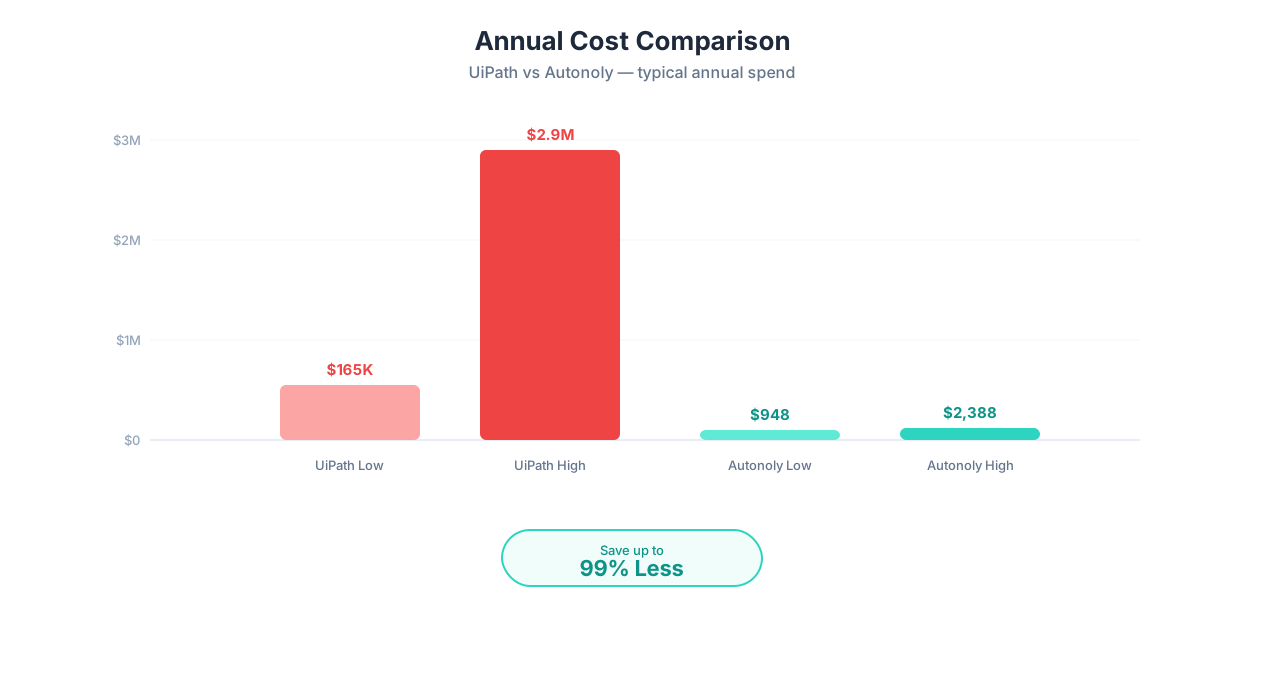
| Total First Year | $165,000-$290,000 | $435,000-$900,000 | $1,350,000-$2,900,000 |
Autonoly Pricing
Autonoly uses transparent SaaS pricing:
| Plan | Monthly Cost | Included |
|---|---|---|
| Free | $0 | Limited agent runs for testing |
| Starter | $49/month | 500 runs, unlimited workflows |
| Professional | $79/month | 2,000 runs, team features |
| Business | $299/month | 10,000 runs, advanced features, priority support |
| Enterprise | Custom | Custom runs, dedicated support, SLAs |
Total Cost of Ownership: 3-Year Comparison
| Factor | UiPath (20 automations) | Autonoly (20 automations) |
|---|---|---|
| Year 1 total | $435,000-$900,000 | $948-$3,588 |
| Year 2 total | $285,000-$600,000 | $948-$3,588 |
| Year 3 total | $285,000-$600,000 | $948-$3,588 |
| 3-Year TCO | $1,005,000-$2,100,000 | $2,844-$10,764 |
| Implementation time | 3-6 months | Same day |
| Internal staff required | 2-4 RPA developers | 0 (business users build) |
⚠️ Important Note
These pricing comparisons reflect different market segments. UiPath is an enterprise platform designed for large-scale deployments with enterprise-grade governance, compliance, and support. Comparing UiPath's enterprise pricing to Autonoly's SaaS pricing is like comparing a fleet of commercial trucks to a delivery van — both deliver things, but they serve different scales and requirements. The relevant question is whether your needs justify enterprise-scale investment.
Setup Time: Months vs Minutes
The time from "deciding to automate" to "automation running in production" differs dramatically between UiPath and Autonoly.
UiPath Implementation Timeline
A typical UiPath deployment follows this timeline:
| Phase | Duration | Activities |
|---|---|---|
| Discovery and assessment | 2-4 weeks | Process mapping, automation candidate identification, ROI analysis |
| Environment setup | 1-2 weeks | Install Studio, configure Orchestrator, set up infrastructure |
| Bot development | 2-8 weeks per bot | Developers script workflows in UiPath Studio |
| Testing and QA | 1-3 weeks per bot | Test all paths, error scenarios, edge cases |
| UAT and deployment | 1-2 weeks | User acceptance testing, production deployment |
| Hypercare | 2-4 weeks | Monitor, fix issues, stabilize |
| Total (first bot) | 8-24 weeks |
This is not a criticism — it is reality. Enterprise RPA requires careful process analysis, development, testing, and deployment. The extensive setup ensures bots are robust (at least initially) and compliant with enterprise policies.
Autonoly Implementation Timeline
| Phase | Duration | Activities |
|---|---|---|
| Account setup | 2 minutes | Sign up, verify email |
| Describe first task | 1-3 minutes | Type task description in AI agent chat |
| Review generated workflow | 2-5 minutes | Verify AI-built workflow matches intent |
| Test execution | 1-5 minutes | Run once, verify output |
| Deploy | 30 seconds | Set schedule, enable |
| Total (first automation) | 5-15 minutes |
💡 Key Insight
The setup time difference is not just about speed — it changes who can automate. UiPath requires RPA developers or consultants. Autonoly requires anyone who can describe a task in English. This democratization means the person who understands the process (the business user) is the same person who builds the automation — eliminating the requirements-gathering gap that causes many RPA projects to fail.
The Developer Dependency Problem
UiPath's developer dependency creates a bottleneck that most enterprises underestimate:
- Hiring: Experienced UiPath developers command $90,000-$140,000 salaries. Demand exceeds supply.
- Backlog: Business teams submit automation requests, but developer capacity limits how many get built. Average backlog: 6-12 months.
- Translation errors: Business users describe processes to developers, who translate them into scripts. Misunderstandings are common — "that is not what I meant" is a frequent refrain during UAT.
- Maintenance drain: Developers spend 30-40% of their time maintaining existing bots rather than building new ones.
Autonoly eliminates this bottleneck entirely. The person who knows the process describes it directly to the AI agent. No translation step, no developer backlog, no hiring challenge. A non-technical business user can go from idea to running automation in under 15 minutes.
Speed Comparison for Common Scenarios
| Scenario | UiPath Time to Production | Autonoly Time to Production |
|---|---|---|
| Scrape data from 5 websites | 2-4 weeks | 10 minutes |
| Automate invoice processing | 4-8 weeks | 15 minutes |
| Fill forms on 3 portals | 3-6 weeks | 10 minutes |
| Email report automation | 2-3 weeks | 5 minutes |
| Cross-platform data sync | 6-12 weeks | 20 minutes |
When Traditional RPA Still Makes Sense: UiPath's Strengths
Despite the advantages of AI agents, there are legitimate scenarios where traditional RPA — and UiPath specifically — remains the better choice. Here is an honest assessment.
1. Desktop Application Automation
If your automation targets desktop applications — SAP GUI, Oracle Forms, Citrix virtual desktops, mainframe terminals, thick-client Windows applications — UiPath has capabilities that browser-based AI agents do not. UiPath's desktop automation uses UI Automation framework, image recognition, and Citrix integration to interact with applications that have no web equivalent.
2. Extreme Compliance and Audit Requirements
Highly regulated industries (banking, healthcare, government) often require deterministic automation — where the exact same input always produces the exact same output, every step is logged, and behavior is 100% predictable. RPA's scripted nature provides this determinism. AI agents, by design, introduce variability (the LLM may take slightly different paths to the same goal), which some compliance frameworks do not accept.
3. Enterprise-Scale Bot Orchestration
If you are running 500+ automations across a global enterprise with dedicated RPA teams, UiPath Orchestrator provides enterprise-grade management: centralized scheduling, credential management, queue-based work distribution, SLA monitoring, and enterprise single sign-on. This orchestration layer is mature and proven at scale.
📊 By the Numbers
UiPath powers automation at 68 of the Fortune 100 companies. For enterprises that need proven, at-scale automation with full governance, compliance, and partner support ecosystem, UiPath's decade-long track record is a genuine competitive advantage that newer platforms cannot yet match.
4. Existing RPA Investment Is Working
If your organization has already invested in UiPath — trained developers, hundreds of running bots, established governance — and the bots are delivering value with acceptable maintenance overhead, there may be no compelling reason to switch. The cost of migration could outweigh the benefits, especially if your bot portfolio is stable.
5. High-Volume, Stable Processes
If you are processing 10,000 identical transactions per day through a stable enterprise application that rarely changes its UI (like an internal ERP system), RPA's deterministic, high-speed execution is well-suited. The brittleness problem is minimal when the target application is stable and controlled by your own IT team.
UiPath's Ideal Scenarios
| Scenario | Why UiPath Wins |
|---|---|
| SAP data entry at scale | Desktop automation + proven SAP integration |
| Citrix virtual desktop automation | Specialized Citrix extension |
| Regulated financial processing | Deterministic execution + audit compliance |
| 1,000+ bot enterprise deployment | Mature orchestration at scale |
| Mainframe terminal automation | Legacy system support |
When AI Agents Are Better: Autonoly's Sweet Spot
AI agent automation is the better choice in scenarios where RPA's limitations — brittleness, developer dependency, cost, and time to deploy — create more pain than its advantages justify.
1. Web-Based Processes That Change Frequently
If your target websites update regularly (most public websites do), AI agents' self-healing capability avoids the constant maintenance cycle. Web scraping, website monitoring, form filling on government or vendor portals — all of these are better handled by adaptive AI agents than brittle RPA scripts.
2. Small and Mid-Sized Businesses
UiPath's pricing model assumes enterprise budgets and dedicated RPA teams. For businesses with 10-500 employees, the $200,000+ first-year cost of an RPA deployment is unjustifiable. Autonoly's $49-299/month plans deliver automation capability without enterprise overhead. Read our small business automation guide for more.
3. Business Users Who Want to Automate Without Developers
The biggest barrier to automation is not technology — it is access. When business users need to submit a request to IT, wait months for developer availability, and hope the resulting bot matches their intent, automation stalls. Autonoly lets the person who does the work automate the work — directly, in minutes, with no technical intermediary. See our guide to automation without coding.
4. Quick Automation of Simple Tasks
Not every process justifies a 6-week RPA implementation. If you need to automate a 5-step workflow that saves 3 hours per week, spending 4-8 weeks and $50,000+ on an RPA bot is absurd. Autonoly handles this in 10 minutes for $49/month.
💡 Key Insight
The "long tail" of automation — dozens of small, 5-10 step processes that each save a few hours per week — is exactly where AI agents shine and RPA struggles. RPA's high per-bot cost and development time mean only high-volume processes justify the investment. AI agents make it economical to automate tasks that save as little as 1-2 hours per week, unlocking a much larger total time savings.
5. Automating Across External Websites
RPA was designed to automate internal enterprise applications. Automating across external websites — competitors, vendors, government portals, public data sources — introduces constant UI changes that break RPA scripts. AI agents are designed for this environment, handling competitor data extraction, Google Maps scraping, and lead generation across the open web.
6. Teams That Cannot Hire RPA Developers
The RPA developer talent market is tight. If hiring and retaining UiPath developers is impractical for your organization, AI agents eliminate the dependency entirely. No developers needed — business users describe tasks, AI builds workflows.
Autonoly's Ideal Scenarios
| Scenario | Why Autonoly Wins |
|---|---|
| Web scraping across 20+ sites | Self-healing + no maintenance |
| SMB automation ($49-299/mo budget) | 100-1,000x cheaper than RPA |
| Business user builds own automation | No developer required |
| Quick automation (5-15 min setup) | No multi-week implementation |
| Government/vendor portal automation | Adapts to portal UI changes |
| PDF invoice processing | AI extraction without enterprise licensing |
The Bottom Line
UiPath and Autonoly serve different markets and different needs. UiPath is a proven enterprise platform for large-scale, compliance-heavy automation of desktop and web applications. It requires significant investment but delivers at enterprise scale. Autonoly is an AI-native platform that makes automation accessible to anyone, at a fraction of the cost, with built-in adaptability that eliminates the maintenance nightmare of traditional RPA.
Choose UiPath when: you need desktop automation, have enterprise compliance requirements, are running 500+ bots, or have an established RPA team delivering value.
Choose Autonoly when: you are automating web-based processes, need fast time-to-value, want business users to build their own automations, or cannot justify enterprise RPA pricing for your scale.
For many organizations, the future may involve both: UiPath for stable, high-volume enterprise processes and AI agents for the web-facing, frequently-changing, smaller-scale automations that RPA struggles with.
For more comparisons, see our Zapier vs Make vs n8n vs Autonoly comparison, best AI agent platforms guide, guide to automating any digital task, and AI agent platform guide.
Frequently Asked Questions
Is Autonoly replacing UiPath?
Not directly. Autonoly serves a different market segment — primarily web-based automation for small to mid-sized businesses and teams that need fast, no-code setup. UiPath remains strong for enterprise-scale desktop automation with compliance requirements. Some organizations may use both for different automation types.
Can Autonoly automate desktop applications like UiPath?
No. Autonoly focuses on web-based automation through cloud browser agents. If you need to automate desktop applications (SAP GUI, Oracle Forms, Citrix), UiPath has capabilities that Autonoly does not offer.
How does UiPath's AI Center compare to Autonoly's AI agents?
UiPath's AI Center adds machine learning capabilities to traditional RPA workflows — document classification, text extraction, and predictive models. Autonoly's AI is fundamentally different: the entire automation is powered by LLM reasoning, from workflow creation to execution to error handling. UiPath bolted AI onto RPA; Autonoly built automation around AI.
What about UiPath's cloud offering?
UiPath has introduced cloud-based automation capabilities, narrowing the deployment gap. However, the core workflow creation still requires UiPath Studio and RPA developer skills. The fundamental differences — scripted vs AI-powered, developer-dependent vs natural language — remain regardless of deployment model.
Is AI agent automation reliable enough for business-critical processes?
For web-based processes, AI agents maintain 90-95% reliability over time (compared to 55-78% for RPA bots on frequently-changing websites). For the highest-stakes processes, configure human-in-the-loop review steps. For processes requiring 100% deterministic execution, traditional RPA may still be appropriate.
Can I migrate my UiPath bots to Autonoly?
There is no direct migration path from UiPath scripts to Autonoly. However, you can describe the same processes to Autonoly's AI agent and create equivalent automations in minutes rather than re-scripting them. Many teams start by building new automations on Autonoly while maintaining existing UiPath bots.