

Why Automate Open House Follow-Ups?
The hours after an open house are critical for converting visitors into serious buyers. Research consistently shows that agents who follow up within 24 hours have significantly higher engagement rates than those who wait days or forget entirely — a buyer-behavior pattern consistent with the home-buyer research published by the National Association of Realtors. A prompt follow-up demonstrates professionalism, keeps the property fresh in the visitor's mind, and positions you as the go-to agent for their home search. Yet after a busy Sunday of back-to-back open houses, sitting down to write individual emails to every visitor who signed in is the last thing most agents want to do.
The cost of delayed or forgotten follow-ups is substantial. Every open house visitor represents a potential buyer, seller lead, or referral source. When you fail to follow up within 24 hours, you lose momentum — the visitor has already started working with another agent, forgotten the details of your property, or shifted their attention to a competing listing. For teams running multiple open houses per weekend, the follow-up backlog can grow so large that some visitors never hear from you at all. That is revenue left on the table.
Automating follow-up emails with Google Sheets and Gmail solves this problem completely. Every visitor receives a timely, personalized email without you typing a single word. The system is professional, consistent, and never forgets a lead — even when you are managing five open houses in a single weekend. You maintain the personal touch that builds relationships while eliminating the manual labor that makes follow-up inconsistent.
This workflow is equally valuable for listing agents building buyer relationships, buyer's agents hosting open houses for their own listings, teams where multiple agents share open house duties, and brokerages that want to enforce consistent lead follow-up standards across all agents. The difference between a top-producing agent and an average one often comes down to systematic follow-up habits, and automation makes those habits effortless. Browse our templates library for ready-made open house follow-up sequences.
How the AI Agent Sends Follow-Ups
The process begins with your open house sign-in sheet in Google Sheets. Whether you use a tablet-based Google Form at the door or transcribe paper sign-in sheets afterward, the key data points are the same: visitor name, email address, phone number (optional), and any notes about their interest level or feedback. The agent reads new entries from the sign-in sheet and cross-references them against previously processed visitors to avoid sending duplicate emails.
For each new visitor, the Data Processing engine merges their information into your email template — inserting their name, the property address, key property highlights, and your call to action. The email template can include a thank-you for attending, a link to the full listing with photos, an invitation to schedule a private showing, information about upcoming price changes, or links to similar listings they might like. The agent sends each email through your connected Gmail account so it appears to come directly from you, maintaining the personal relationship that converts leads into clients.
The agent marks each processed row in your spreadsheet after sending the follow-up. On subsequent runs, it skips already-processed entries, ensuring no visitor ever receives the same follow-up email twice — even if the workflow runs multiple times per day. Use the AI Agent Chat to modify your email templates or adjust follow-up timing through natural conversation.
What Data You Get
Every follow-up cycle produces detailed tracking data in your spreadsheet:
Visitor Name — Who received the follow-up
Email Address — Contact information captured at the open house
Property — Which open house they attended
Interest Level — Hot, warm, or casual as noted on the sign-in sheet
Send Timestamp — When the follow-up was delivered
Delivery Status — Sent, failed, or skipped with reason
Follow-Up Stage — Which email in the sequence they have received
Over time, this data helps you identify patterns — which open houses generate the most engaged leads, which email templates get the best response rates, and which properties attract the most visitor interest.
Customizing Your Workflow
The Visual Workflow Builder lets you build sophisticated follow-up sequences, not just a single email. Set up a multi-touch campaign: a Day 1 thank-you email with property highlights and a private showing offer, a Day 3 follow-up with comparable listings they might also like, and a Day 7 check-in asking if they have questions about the property or neighborhood. Each email in the sequence can use Logic & Flow conditions to branch based on visitor behavior — skip automated follow-ups if someone replied, or use softer messaging for visitors marked as "just looking." Segment visitors by interest level so hot leads get a follow-up within hours while casual browsers receive a gentler touch the next morning.
Integration Options
For teams, send a summary to a Slack channel after each follow-up batch runs, including the number of emails sent and any visitors flagged as high-interest leads. Log all follow-up activity to Google Sheets for comprehensive lead tracking. Connect with Gmail to maintain personal sender identity on every email. Visit the Integrations page for the full list of supported destinations.
Use Cases
Listing agents sending personalized thank-you emails to every open house visitor the next morning
Buyer's agents nurturing leads with multi-day follow-up sequences after broker opens
Real estate teams standardizing follow-up processes across all agents to ensure no leads are missed
Luxury agents sending premium follow-up emails with virtual tour links and exclusive showing invitations
New construction sales following up with open house visitors about lot availability and customization options
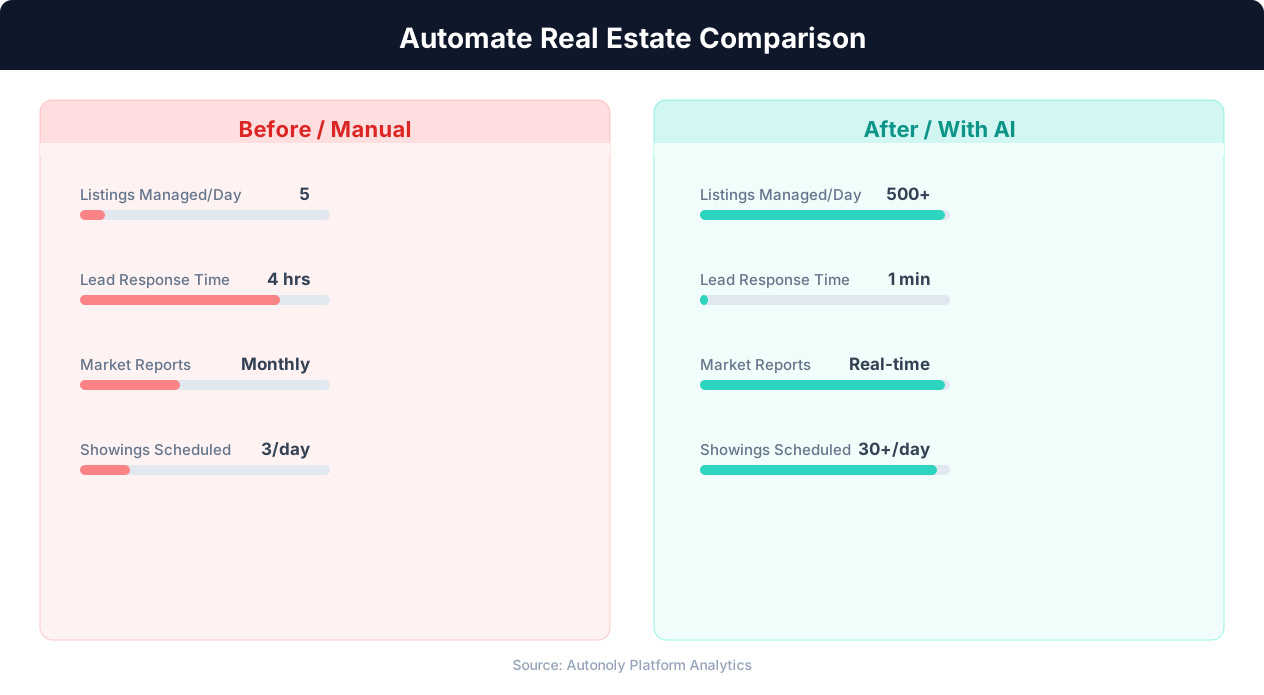
Lead response time for manual vs automated real estate workflows
Key Insight: Real estate agents using automation close 26% more deals by eliminating manual listing management and lead follow-up delays (NAR Technology Report).
How the AI Agent Does It
The agent reads new visitor entries from your Google Sheets sign-in sheet, filters out previously contacted visitors, and generates personalized follow-up emails using your template. Each email is sent through Gmail with your name as the sender. Send statuses and timestamps are logged back to the spreadsheet for tracking. The Data Processing engine handles visitor segmentation and template selection automatically based on interest level and property columns in your sign-in sheet.
Key Insight: Automated listing syndication saves agents 15+ hours per week on data entry while ensuring listings appear on all major portals within minutes (Inman Research).
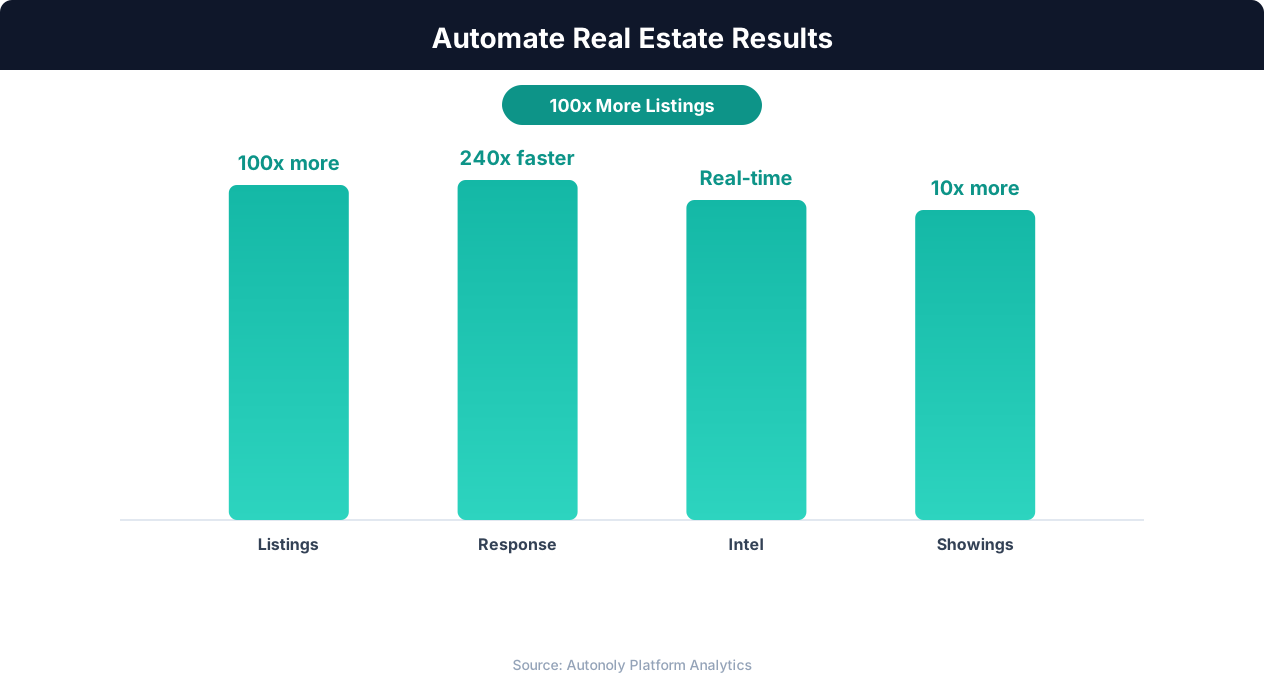
Deal closure rate improvements from real estate automation
Key Insight: Automated market analysis reports generate 5x more seller leads by positioning agents as local market experts with data-driven insights (Tom Ferry Research).
Scheduling and Automation
The follow-up workflow runs daily, checking your sign-in sheet for new entries each morning. Visitors from a Saturday or Sunday open house receive their follow-up first thing Monday morning — a professional touchpoint that keeps you top of mind. The Visual Workflow Builder also supports event-triggered runs, so the workflow can execute immediately after you finish updating the sign-in sheet rather than waiting for the next scheduled time. This is useful for weekday broker opens where you want follow-ups sent the same evening.
Add Logic & Flow conditions to route high-interest leads to immediate follow-up while batching casual visitors into the next morning's send. Chain multi-day sequences for sustained lead nurturing without manual effort. For agents hosting multiple open houses per week, a single sign-in sheet with a "Property" column handles all events. Check pricing to see how many automated runs are included in your plan.
Further Reading
Explore more about the tools and techniques used in this workflow: Real Estate Automation, Automate Email Reports, Email Campaigns, Ai Content.