

Why Automate Local Business Prospecting?
Local business prospecting is the foundation of sales for companies selling to small and medium businesses — marketing agencies, SaaS platforms, insurance brokers, payment processors, POS systems, commercial cleaning services, and hundreds of other B2B-to-SMB verticals. The challenge is that local business data is scattered across Google Maps, Yelp, Facebook, industry directories, and chamber of commerce sites. Building a comprehensive prospect list manually from these fragmented sources takes days.
Autonoly's Browser Automation automates multi-source local business discovery, extracting data from several platforms and consolidating it into a single, deduplicated Excel spreadsheet. This gives your sales team a territory-ready prospect list in minutes instead of days.
How the AI Agent Prospects Local Businesses
Autonoly's AI Agent Chat orchestrates a multi-source search strategy. The agent first searches Google Maps for businesses matching your criteria in the target area, extracting names, addresses, phone numbers, ratings, and review counts. Then it cross-references with Yelp to capture additional data points like price range, categories, and business hours. Finally, it checks industry-specific directories for specialized information.
The Data Extraction engine handles the unique challenges of each platform — Google Maps' dynamic map interface and lazy-loaded results, Yelp's paginated search results, and various directory formats. Because the agent uses a real browser, it sees exactly the same results a human researcher would see.
After extracting from multiple sources, a built-in deduplication step merges records by business name and address, selecting the most complete data for each field. The result is a single, enriched prospect list that combines the best data from every source.
What Data You Get
A multi-source local business export includes:
Business Name — Official business name
Address — Full physical address
Phone Number — Primary contact phone
Website — Company website URL
Google Rating — Google Maps star rating
Yelp Rating — Yelp star rating
Total Reviews — Combined review count across platforms
Category — Business type and subcategory
Business Hours — Operating schedule
Price Range — Cost indicator where available
When available, additional data includes owner names, email addresses, social media profiles, and years in business.
Customizing Your Prospecting
The Visual Workflow Builder turns local prospecting into a repeatable machine:
Territory mapping: Define your sales territories by zip code or radius and generate prospect lists for each territory
Quality scoring: Use Data Processing to score businesses by rating, review volume, and online presence — prioritizing prospects most likely to convert
Vertical targeting: Focus on specific business types (restaurants, dentists, HVAC contractors) with category-specific extraction
Enrichment: Chain additional steps using SSH & Terminal to append business owner LinkedIn profiles, email addresses, or technology stack data
Scheduling and Territory Management
Sales territories evolve as new businesses open and others close. Schedule monthly prospect list refreshes to keep your territory database current. The workflow identifies new businesses since the last run and flags closures, ensuring your team always works with accurate data.
For seasonal businesses or markets with high turnover, weekly refreshes provide more timely intelligence.
Exporting and Integrating
Local business data exports to your sales tools:
Excel (.xlsx) — Standard format for territory planning and CRM bulk import
[Google Sheets integration](/integrations/google-sheets) — Collaborative territory database for distributed sales teams
[Notion](/integrations/notion) — Build a CRM-like account database with notes and status tracking
[Airtable](/integrations/airtable) — Create visual territory maps and pipeline views
Explore our templates library for pre-built local prospecting workflows. Visit pricing for details. See our workflow automation glossary for concepts. The Integrations page covers all available destinations.
Use Cases
Marketing agencies build prospect lists of local businesses that lack online presence — ideal candidates for web design and SEO services. Payment processing sales teams identify restaurants and retail stores in target territories. Commercial insurance agents prospect businesses by category and size within their licensed areas. SaaS companies targeting SMBs build territory-specific lead lists based on business category and online presence indicators. Franchise development teams map existing businesses in a category to identify markets with room for a new franchise location.
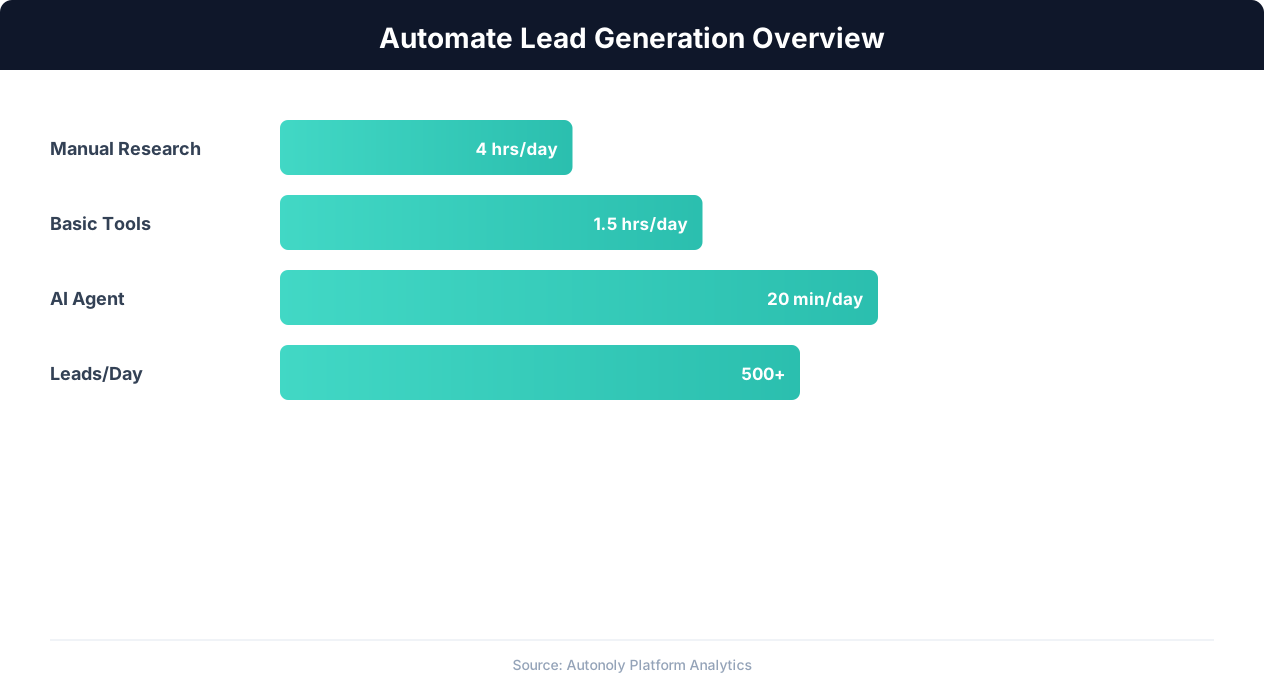
Lead generation automation funnel performance metrics
Key Insight: Lead response time drops from an average of 42 hours to under 5 minutes with automation, increasing contact rates by 900% (InsideSales.com).
How the AI Agent Handles This
The AI agent orchestrates a multi-source search strategy using Browser Automation, visiting Google Maps, Yelp, and industry directories in sequence within a single workflow. It handles each platform's unique interface — Google Maps' dynamic map and lazy-loaded results, Yelp's paginated search cards, and various directory formats — all without site-specific configuration, reading the fully rendered DOM of each page. After collecting data from every source, the Data Processing engine deduplicates records by matching business name and address, then merges fields to create the most complete profile possible for each business.
Multi-Source Deduplication
When the same business appears on Google Maps and Yelp with slightly different names or addresses, the agent uses fuzzy matching to identify duplicates and merge records intelligently, selecting the most complete data for each field. When the resulting list feeds outbound calls or email, aligning it with rules like the CAN-SPAM Act keeps your outreach compliant.
Key Insight: Automated multi-channel lead generation captures 3x more prospects by simultaneously monitoring LinkedIn, websites, directories, and industry databases (HubSpot Research).
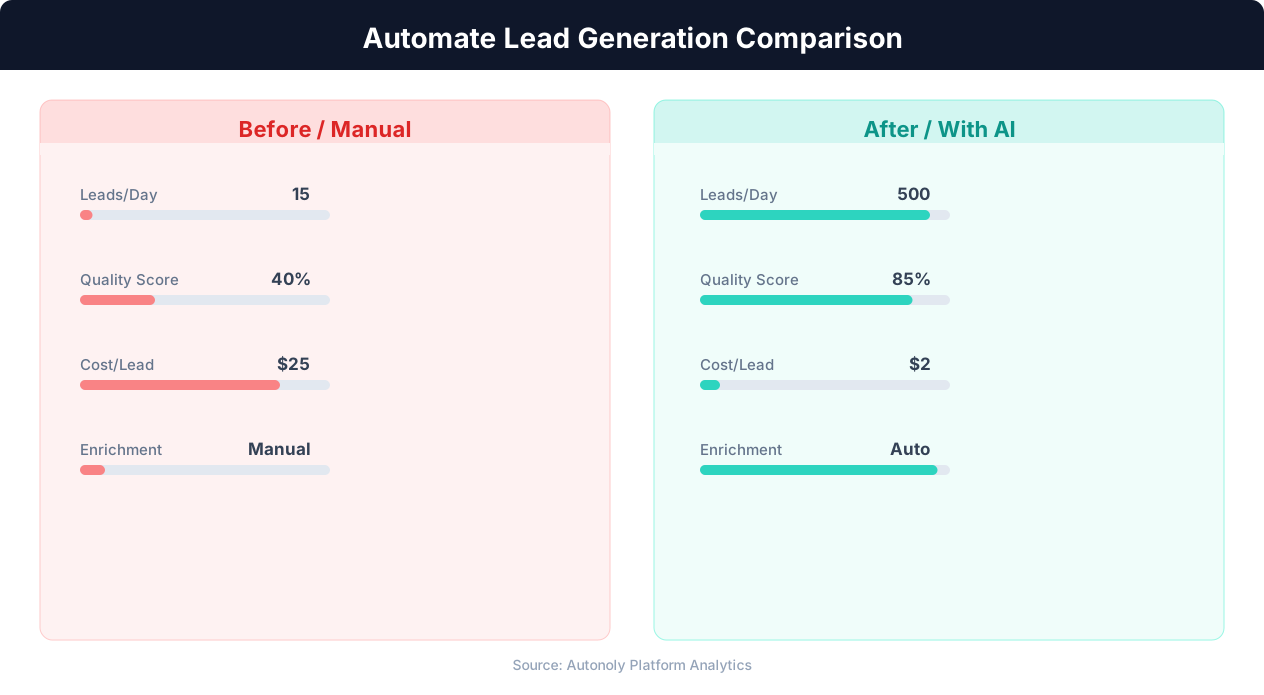
Cost per lead comparison between manual and automated methods
Key Insight: Companies using automated lead scoring see a 77% increase in lead conversion rates by focusing sales effort on the highest-potential prospects (Aberdeen Group).
Scheduling and Recurring Runs
Schedule monthly prospecting runs through the Visual Workflow Builder to keep your territory database current as new businesses open and existing ones close. Each run compares results against previous data to identify net-new businesses and flag closures. Use Logic & Flow to automatically score and prioritize leads based on review quality, online presence, and category fit. Route high-priority prospects directly to your CRM or outreach pipeline while archiving lower-priority leads for future campaigns. Explore our templates for pre-built local prospecting workflows tailored to common B2B-to-SMB verticals.
Further Reading
Explore more about the tools and techniques used in this workflow: Automate Lead Generation, Web Scraping Best Practices.