The Hidden Cost of Manual Employee Onboarding
Every time your company hires someone, the same ritual begins. An HR coordinator opens a browser tab for BambooHR and starts typing the new hire's legal name, Social Security number, address, emergency contacts, and employment details. Then they open another tab for Gusto or ADP and type much of the same information again for payroll. Then the benefits portal. Understanding what automation is and how business process automation streamlines hand-offs like these is the key to escaping the ritual. Then Google Workspace or Microsoft 365 for IT provisioning. Then Okta or Azure AD for single sign-on. Then the LMS for training enrollment. Then the background check portal. Then E-Verify.
By the time a single new hire is fully set up across all systems, the HR coordinator has entered the same core data set (name, date of birth, SSN, address, department, manager, start date, salary) anywhere from 8 to 15 times into different web applications. Each entry is a fresh opportunity for a typo, a transposed digit, or a copy-paste error. And each error creates a downstream problem: a wrong SSN in payroll means tax filings fail, a misspelled name in the benefits portal means insurance cards arrive wrong, a missing IT account means the employee cannot log in on their first day.
This is not a small-company problem that goes away with scale. In fact, it gets worse. Companies with 200-500 employees that hire 10-20 people per month can easily burn 40-160 hours per month on onboarding data entry alone. That is one to four full-time employees doing nothing but copying the same information between systems that do not talk to each other.
The Real Numbers
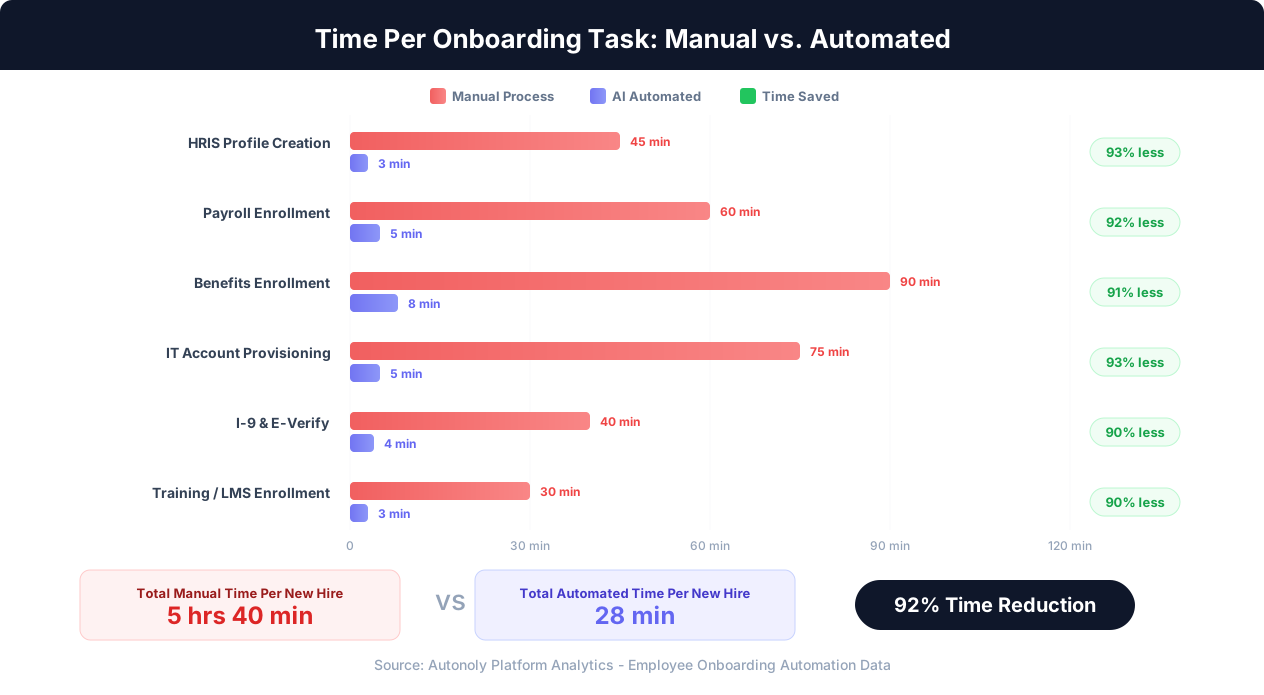
According to industry surveys, HR teams spend an average of 4-8 hours per new hire on system setup and data entry. For companies hiring 20 people per month, that is 80-160 hours of manual work, roughly equivalent to one full-time HR coordinator doing nothing else. The error rate on manual data entry across multiple systems runs 5-15%, and each error takes an additional 15-45 minutes to identify and correct.
The fundamental issue is that most HR systems were not built to work together. BambooHR, Workday, Gusto, ADP, Rippling, Paycom, Namely, and dozens of other HRIS and payroll platforms each have their own data model, their own required fields, and their own user interface. Some offer APIs, but those APIs rarely cover every field needed for onboarding, and connecting them requires developer resources that most HR departments do not have. Many smaller or industry-specific systems, like niche benefits brokers, state-specific compliance portals, or specialized training platforms, offer no API at all.
The result is that employee onboarding remains one of the most manually intensive, error-prone processes in modern business operations, despite every system involved being web-based and theoretically automatable. The gap between what is theoretically possible and what most companies actually do is enormous, and it is measured in wasted hours, frustrated HR teams, and new employees whose first impression of their new company is a series of access problems and data corrections.
The Onboarding Systems Landscape: What Needs to Be Connected
Before diving into automation strategies, it helps to understand exactly how many systems are involved in a typical employee onboarding process and what data flows between them. Most people outside HR dramatically underestimate the complexity.
Core HRIS (Human Resource Information System)
This is the system of record for employee data. Common platforms include BambooHR, Workday, UKG (Ultimate Kronos Group), Paylocity, and Rippling. The HRIS stores the canonical employee profile: legal name, preferred name, date of birth, SSN, address, phone number, personal email, work email, department, job title, manager, employment type (full-time, part-time, contractor), compensation, start date, and work location. Everything else downstream depends on this data being entered correctly first.
Payroll System
Sometimes integrated with the HRIS, but often separate. Gusto, ADP, Paychex, and Paycom are common standalone payroll platforms. Payroll needs employee data plus tax withholding elections (W-4), direct deposit bank information, pay schedule, overtime eligibility, and state-specific tax registrations. Getting payroll wrong has immediate, tangible consequences: people do not get paid correctly on their first paycheck, which is one of the fastest ways to lose a new hire's trust.
Benefits Enrollment
Health insurance, dental, vision, life insurance, disability, HSA/FSA, 401(k), and supplemental benefits are frequently managed through a separate benefits administration platform or broker portal. Common platforms include Ease (formerly EaseCentral), Employee Navigator, bswift, and carrier-specific portals. New hires typically have a 30-day enrollment window, and missing it means waiting until the next open enrollment period, which can leave an employee uninsured for months.

IT Provisioning
Creating accounts in Google Workspace or Microsoft 365, provisioning access through Okta or Azure AD, adding the employee to Slack or Teams, creating Jira/Asana/Linear accounts, setting up VPN access, and configuring role-based permissions across all tools. IT provisioning is often the bottleneck that prevents employees from being productive on Day 1. When done manually, the IT team needs a ticket from HR with the employee's details, then works through their own checklist of 10-20 systems. A two-day delay in IT provisioning means two days of an employee sitting at their desk unable to do their job.
Compliance and Verification
I-9 employment eligibility verification must be completed within three business days of the start date. E-Verify submission follows the I-9. Background check initiation and monitoring happens through platforms like Checkr, GoodHire, or Sterling. State-specific requirements add further complexity: some states require specific notices, training acknowledgments, or registrations. Non-compliance is not just an inconvenience; it carries significant financial penalties. I-9 violations can cost $252 to $2,507 per form for first offenses.
Training and Learning Management
New hires need to be enrolled in required training: workplace safety (OSHA), harassment prevention, data privacy (especially for roles handling PII or PHI), company-specific compliance, and role-specific onboarding courses. LMS platforms like Lessonly, Litmos, TalentLMS, and Docebo need the employee's profile created and courses assigned based on their role, department, and location.
Equipment and Facilities
Ordering laptops, monitors, and peripherals through procurement systems. Reserving desk assignments or shipping equipment for remote employees. Badge access provisioning for office buildings. While some of this happens through physical processes, much of it starts with web-based ordering systems and facility management platforms.
System Count Reality Check
A mid-size company with 200-500 employees typically touches 8-12 distinct web-based systems during onboarding. Enterprise companies with 1,000+ employees often involve 15-20+ systems. Each system has its own login, its own form fields, and its own quirks. This is why manual onboarding takes so long and why errors propagate across systems.
Why Traditional Integration Approaches Fall Short for Onboarding
If the problem is that systems do not talk to each other, the obvious solution seems to be connecting them through integrations. Companies have tried several approaches, and each has significant limitations that explain why manual onboarding persists even at well-funded, technology-forward organizations.
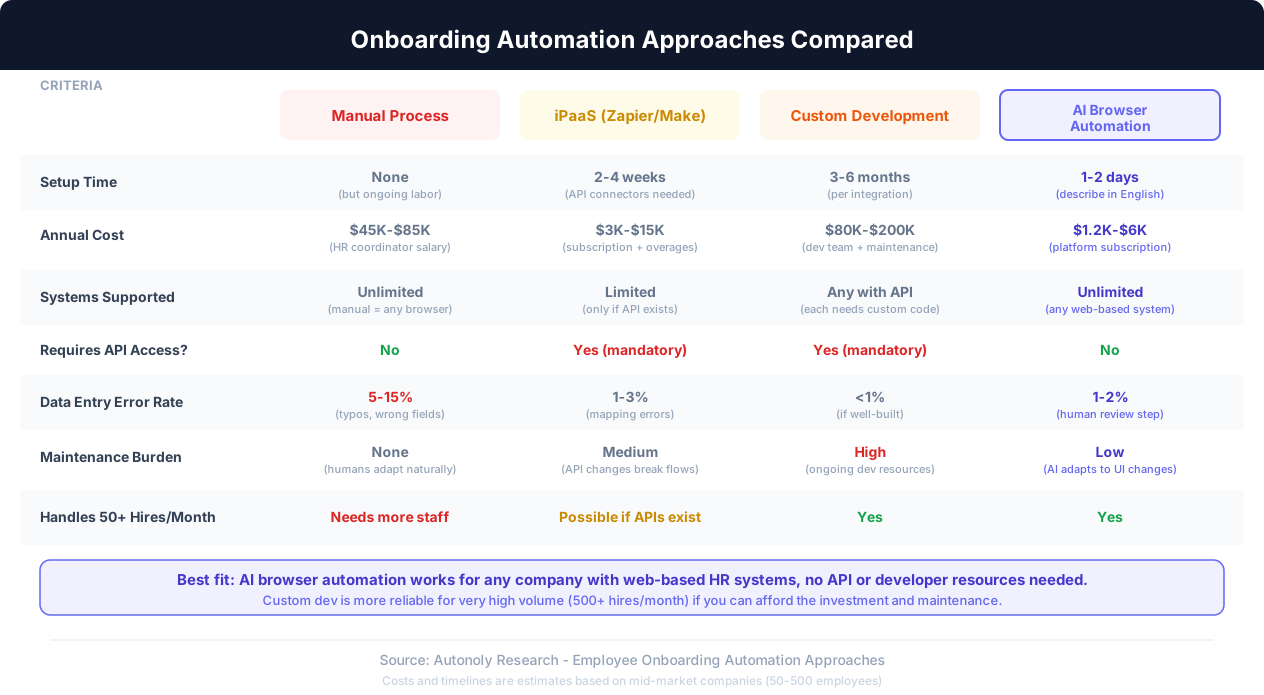
Native Integrations: The 30% Solution
Most HR platforms advertise integration directories with dozens or hundreds of partner applications. BambooHR connects to Gusto. Workday connects to Okta. ADP connects to various benefits providers. The problem is coverage. Native integrations typically handle the most common pairings but leave significant gaps. Your HRIS might sync employee data to payroll, but it probably does not automatically provision Google Workspace accounts, enroll employees in your specific benefits broker's portal, or initiate background checks on your preferred platform. Native integrations also tend to sync a limited subset of fields. The employee's name and email might flow through, but their direct deposit information, emergency contacts, and tax elections still need manual entry.
In practice, native integrations cover roughly 30-40% of the data flow in a typical onboarding process. The remaining 60-70% is still manual, which means the process feels almost as painful as having no integrations at all, because the human still needs to sit in front of each remaining system and enter data by hand.
iPaaS Platforms (Zapier, Make, Workato): The API Dependency
Integration-platform-as-a-service tools promise to connect any application to any other application through automated workflows. Zapier, Make (formerly Integromat), Workato, and Tray.io are the most popular options, though as we cover in what Zapier can't automate, their reliance on APIs leaves the hardest onboarding steps untouched. They work well for applications that have robust APIs with full CRUD (create, read, update, delete) access to employee data. The problem is that many HR and compliance systems have limited or no APIs.
Benefits broker portals are frequently custom or semi-custom web applications with no public API. State compliance portals (for tax registrations, unemployment insurance, workers' comp) are government websites with no API at all. Many LMS platforms have APIs that support reading course data but not creating user accounts or assigning courses. Background check platforms may have APIs, but they often require enterprise-tier subscriptions to access them. E-Verify is a government system with no third-party API access for most employers.
Even when APIs exist, they often do not expose every field needed for onboarding. A payroll API might let you create an employee record but not set up direct deposit or configure tax withholdings, because those involve sensitive financial data that the vendor restricts to their own interface for liability reasons.
Custom Development: The Budget Breaker
Large enterprises sometimes build custom onboarding orchestration systems that connect their specific stack through a combination of APIs, database integrations, and custom middleware. This approach can work well when completed, but it takes 3-6 months of development time per major integration, costs $80,000-$200,000+ in developer resources, and requires ongoing maintenance as vendor APIs change, systems get upgraded, and new tools get added to the stack. The maintenance burden alone is often unsustainable: every time one of your 10-15 connected systems updates their API, someone needs to debug and fix the integration.
For most mid-market companies, custom development is simply not economically viable. The cost of building and maintaining custom integrations exceeds the cost of the manual labor they replace, especially when HR systems change every few years as companies grow and evolve.
The Browser-Based Alternative
There is a fundamental insight that most integration approaches miss: every single one of these HR systems has a web interface. Humans onboard employees by clicking through web forms in a browser. The systems that lack APIs still have fully functional web UIs where data can be entered, verified, and submitted. This is where AI browser automation enters the picture. Instead of trying to connect systems through APIs that may not exist or may not expose the right data, browser automation interacts with each system the same way a human does: through the web interface. It fills forms, clicks buttons, reads confirmation screens, and moves to the next system. No API required. No custom development. No waiting for vendors to build integrations that may never come.
How AI Browser Automation Handles Employee Onboarding
AI browser automation for employee onboarding works by controlling a real cloud browser to interact with each HR system's web interface, just as a human HR coordinator would, but faster and without data entry errors. Here is how the process works in practice, from initial data capture through complete multi-system setup.
Step 1: Capture the Source Data
The process starts with a single source of truth for the new hire's information. This is typically a completed offer letter, an onboarding form, or a row in a spreadsheet. The data includes the new hire's legal name, preferred name, date of birth, Social Security number, home address, phone number, personal email, work email (if pre-assigned), department, job title, manager, start date, salary, employment type, and work location. With Autonoly's AI agent chat, you can describe the onboarding task in plain English: "Onboard Sarah Chen as a Senior Product Manager in the Engineering department, starting June 15, reporting to James Wu" along with the structured data, and the AI agent understands what needs to happen across each system.
Step 2: HRIS Profile Creation
The AI agent opens a cloud browser, navigates to your HRIS (BambooHR, Workday, etc.), logs in with stored credentials, and creates a new employee record. It fills every required field: personal information, employment details, organizational placement, compensation, and custom fields specific to your HRIS configuration. The agent reads back the created profile to verify that all data was entered correctly before moving to the next system. If the HRIS requires document uploads (like a signed offer letter or W-4), the agent handles that too.
Step 3: Payroll Enrollment
With the HRIS profile created, the agent navigates to the payroll system. It creates the employee's payroll profile, enters tax withholding information from the W-4, sets up the pay schedule, and configures any payroll-specific details like department cost codes or overtime eligibility. For direct deposit, the agent enters bank account information from the new hire's submitted forms. The agent verifies each entry against the source data to prevent the transposition errors that plague manual entry.
Step 4: Benefits Enrollment
The agent navigates to the benefits administration portal and initiates enrollment for the new hire. It enters the employee's demographic information, selects the appropriate plan options based on the new hire's elections (or defaults if elections have not been received yet), adds dependents and beneficiaries, and submits the enrollment. Benefits enrollment is often the most complex onboarding step because of the number of plan options and dependent data required, making it especially valuable to automate.
Step 5: IT Account Provisioning
The agent moves to Google Workspace Admin, Microsoft 365 Admin Center, or your identity provider (Okta, Azure AD). It creates the employee's account, sets up their email address, adds them to the appropriate organizational unit and security groups, assigns licenses, and configures role-based access. The agent can then provision accounts in downstream applications: Slack, Jira, Asana, Notion, or any other web-based tool your team uses. Using the visual workflow builder, you can define exactly which tools each department or role needs access to, and the automation follows that logic.
Step 6: Compliance Submissions
The agent handles I-9 Section 2 completion (after the employee has completed Section 1), submits to E-Verify if required, initiates background checks through your background screening provider, and completes any state-specific compliance forms. The agent tracks deadlines: it knows that I-9 Section 2 must be completed within three business days of the start date and can flag or escalate if the employee has not completed their portion in time.
Step 7: Training Enrollment
Finally, the agent logs into the LMS, creates the employee's learner profile, and assigns the required training courses based on their role, department, and location. It sets due dates, sends enrollment notifications, and can check back later to track completion status.
End-to-End Automation in Practice
The entire 7-step process runs as a single automated workflow. The HR coordinator triggers it with the new hire's data, and the AI agent works through each system sequentially, using the live browser control to interact with every web interface. Total automated execution time is typically 15-30 minutes, compared to 4-8 hours manually. The HR coordinator receives a completion report showing what was done in each system, with screenshots for verification.
Building Your Onboarding Automation Workflow Step by Step
Implementing onboarding automation is not an all-or-nothing proposition. The most successful implementations start with a subset of systems and expand incrementally. Here is a practical roadmap for building your onboarding automation, starting with the highest-impact, lowest-risk steps.
Phase 1: Map Your Current Process (Week 1)
Before automating anything, document exactly what your onboarding process looks like today. For each new hire, list every system you touch, the specific data you enter in each, the order of operations (some systems must be set up before others), and who is responsible for each step. This mapping almost always reveals surprises: steps that different people assume someone else is handling, systems that get skipped occasionally, and inconsistencies in which data gets entered where.
Create a simple spreadsheet with columns for: system name, URL, data fields entered, dependencies (which systems must be set up first), responsible person, average time per new hire, and common errors. This becomes your automation blueprint.
Phase 2: Start with HRIS and Payroll (Weeks 2-3)
The HRIS-to-payroll flow is the highest-impact starting point for most companies. These two systems share the most overlapping data (name, SSN, address, salary, tax elections), they are used for every single hire, and errors in these systems have the most immediate consequences (incorrect paychecks). Build your first automation workflow to take new hire data from your source document and create profiles in both the HRIS and payroll system.
Test this workflow thoroughly with real data (use your own information or a test employee account if your systems support it). Run the automation alongside manual entry for the first few hires: let the automation create the profiles, then have a human verify every field. This parallel-run period builds confidence and catches edge cases like special characters in names, international addresses, or unusual employment configurations.
Phase 3: Add IT Provisioning (Weeks 3-4)
IT provisioning is the second-highest impact area because delays here directly prevent new employees from working. Add Google Workspace or Microsoft 365 account creation to your workflow, followed by identity provider (Okta/Azure AD) setup and downstream application provisioning. IT provisioning is also one of the lowest-risk areas to automate because creating an account that is slightly wrong is easy to fix (rename it, adjust permissions) compared to a payroll error that might not surface until payday.
Phase 4: Benefits and Compliance (Weeks 4-6)
Benefits enrollment and compliance submissions involve the most sensitive data and have the strictest consequences for errors. Add these to your workflow after the HRIS, payroll, and IT provisioning steps are running reliably. Benefits automation is particularly valuable because the enrollment windows are time-sensitive: missing the 30-day window because someone forgot to complete enrollment is a genuinely bad outcome for the employee. Automating compliance submissions (I-9 verification, E-Verify, background checks) ensures that legally mandated deadlines are met consistently.
Phase 5: Training and Remaining Systems (Weeks 6-8)
Add LMS enrollment, equipment ordering, badge access provisioning, and any remaining industry-specific systems to your workflow. By this point, you have a complete end-to-end automation that handles the entire onboarding process from offer acceptance to Day 1 readiness.
Phase 6: Monitoring and Refinement (Ongoing)
Set up monitoring to track automation success rates, error rates, and completion times. The most common issues in the first month are: website UI changes that alter form field locations, new required fields added by vendors during platform updates, and edge cases you did not anticipate (international employees, part-time to full-time conversions, re-hires). Each issue typically takes 15-30 minutes to resolve once identified, and the automation becomes more robust with each fix.
Honest Expectation Setting
AI browser automation is not a magic switch that eliminates all human involvement overnight. Expect the first two weeks to involve active monitoring and occasional manual intervention as you tune the workflows. After the initial stabilization period, most workflows run at 90-95% automation, with human review needed only for unusual cases (international hires, executive-level employees with custom compensation structures, or employees requiring special access configurations). Complete hands-off automation at 100% is not realistic for a process with this many variables.
Security, Privacy, and Compliance Considerations
Employee onboarding involves some of the most sensitive personal data any business handles: Social Security numbers, bank account details, dates of birth, home addresses, and health information (for benefits enrollment). Any automation system that touches this data must meet stringent security and privacy requirements. This section addresses the concerns honestly, including the limitations.
Data Handling and Storage
AI browser automation for onboarding interacts with sensitive data in two ways: it reads source data (from your onboarding form, spreadsheet, or HRIS) and enters it into target systems through the browser. The critical question is where and how that data is stored during the process. In Autonoly's architecture, the browser runs in a cloud environment, and the data flows through the browser session just as it would during a human-operated session. Employee PII is used in transit to fill forms but does not need to be persistently stored in the automation platform itself. After the workflow completes, the automation retains completion logs (which systems were updated, success/failure status) but can be configured to not retain the underlying PII.
That said, you should evaluate any automation platform's data handling policies carefully. Key questions to ask: Where are the cloud browsers hosted (which region, which cloud provider)? Is data encrypted in transit and at rest? Does the platform retain any employee PII after the workflow completes? Who at the platform vendor has access to running browser sessions? Is the platform SOC 2 Type II certified?
Credential Management
Onboarding automation requires login credentials for each HR system. These credentials should be service accounts with the minimum permissions needed (not individual HR coordinators' personal accounts). Service accounts provide several advantages: access is not tied to a specific person (so it does not break when someone leaves), audit trails clearly distinguish automated actions from manual ones, and permissions can be scoped precisely to the actions the automation needs.
Store credentials in a secrets manager or the automation platform's encrypted credential vault, not in plaintext in workflow configurations. Rotate credentials on a regular schedule and immediately if any compromise is suspected. Enable multi-factor authentication on service accounts where possible, using app-based MFA that the automation can handle rather than SMS-based MFA that requires human intervention.
Access Controls and Audit Trails
Your onboarding automation should produce detailed audit logs: who triggered each workflow, when it ran, which systems were accessed, what data was entered, and whether each step succeeded or failed. These logs serve multiple purposes: compliance documentation (proving that I-9s were completed within the required timeframe), error investigation (tracing where a data mismatch originated), and access auditing (confirming that only authorized personnel triggered onboarding workflows).
Implement role-based access controls for the automation platform itself. Not everyone in HR should be able to trigger onboarding automation, modify workflows, or view logs containing PII. Separate permissions for workflow creation, workflow execution, and log review.
Regulatory Compliance
Different industries and jurisdictions impose specific requirements on how employee data is handled. Healthcare companies must comply with HIPAA for any health-related information. Financial services companies face additional scrutiny under SOX and GLBA. Companies with employees in the EU must comply with GDPR, which imposes strict requirements on data processing lawfulness, data minimization, and employee rights to access and deletion. California employees are protected by CCPA/CPRA.
Your automation workflow should incorporate these requirements directly. For GDPR compliance, ensure that the automation only processes employee data with a documented lawful basis, does not retain data longer than necessary, and supports data subject access requests. For I-9 compliance, the automation should track completion dates and flag cases where the three-day deadline is at risk.
Important Security Limitation
Browser automation operates within each system's existing security model. It uses normal browser sessions and is subject to the same session timeouts, access controls, and security policies as a human user. This means it inherits the security strengths of each system but also cannot bypass legitimate security controls. If a system requires manual approval from a specific person (like a benefits enrollment requiring manager sign-off), the automation can prepare and submit the enrollment but cannot bypass the approval step. Design your workflows around these human checkpoints rather than trying to eliminate them.
SOC 2 and Enterprise Security
If you are evaluating an automation platform for onboarding, SOC 2 Type II certification is the baseline expectation. This certification means the platform has been independently audited for security, availability, processing integrity, confidentiality, and privacy controls. Beyond SOC 2, look for: data residency options (keeping data in your geographic region), encryption standards (AES-256 at rest, TLS 1.2+ in transit), penetration testing frequency, incident response procedures, and subprocessor management policies.
ROI Analysis: Making the Business Case for Onboarding Automation
Building a business case for onboarding automation requires quantifying both the direct time savings and the indirect benefits that are harder to measure but often more impactful. Here is a framework for calculating ROI that you can adapt to your company's specific numbers.
Direct Time Savings
Start with your current state: how many hours does your HR team spend per new hire on system setup and data entry? If you have not measured this precisely, use 4-8 hours as a benchmark for mid-size companies, which is consistent with industry data. Multiply by your monthly hire volume and your fully loaded HR coordinator cost per hour (salary plus benefits plus overhead, typically $30-$50/hour for mid-market companies).
Example calculation for a company hiring 15 people per month with 6 hours of manual setup time per hire at $40/hour fully loaded:
Manual cost: 15 hires x 6 hours x $40/hour = $3,600/month or $43,200/year
With automation reducing setup time to 30 minutes of human review per hire:
Automated cost: 15 hires x 0.5 hours x $40/hour = $300/month or $3,600/year
Direct labor savings: $39,600/year
If your automation platform costs $100-$500/month, the ROI on direct time savings alone is 6-33x. Even at the most conservative estimates, onboarding automation pays for itself within the first month.
Error Reduction Value
Data entry errors in onboarding create real costs that most companies do not track. A wrong SSN in payroll requires a corrected W-2, amended tax filings, and potentially IRS correspondence. A benefits enrollment error can result in denied claims, employee dissatisfaction, and administrative time to re-enroll. An IT provisioning error wastes the new hire's time and the IT team's time to troubleshoot and fix.
If manual onboarding has a 5-15% error rate and each error takes 15-45 minutes to resolve (plus the intangible cost of employee frustration), the error correction costs are substantial. For 15 hires per month with a 10% error rate across 10 systems: that is 15 errors per month, each taking 30 minutes to fix, which is 7.5 hours per month or $3,600/year in labor alone, not counting the harder-to-quantify costs.
Compliance Risk Reduction
I-9 violations alone can cost $252 to $2,507 per form for first-time offenses, with penalties increasing for repeat violations. A company that consistently misses the three-day I-9 completion deadline due to onboarding backlogs faces cumulative financial exposure. Background check delays can also create liability if an employee starts working before a required check clears. Automation eliminates these timing risks by executing compliance steps immediately and tracking deadlines automatically.
New Hire Productivity Gains
This is often the largest ROI component but the hardest to quantify. When IT provisioning is delayed by one or two days because the IT team did not receive the onboarding request promptly, the new hire sits idle (or, worse, tries to work with borrowed credentials and shared accounts, creating security risks). If a new hire's fully loaded cost is $400/day and they lose one day of productivity due to onboarding delays, that is $400 per hire or $6,000/year for 15 monthly hires. Automation eliminates this delay by provisioning accounts before the start date.
Total ROI Example (15 hires/month, mid-market company)
Direct labor savings: $39,600/year. Error correction savings: $3,600/year. Compliance risk avoidance: $5,000-$20,000/year (estimated). New hire productivity gains: $6,000/year. Total annual value: $54,200-$69,200 against an automation platform cost of $1,200-$6,000/year. That is a 9-58x ROI depending on your specific numbers.
Qualitative Benefits
Beyond the numbers, onboarding automation delivers qualitative improvements that affect employee experience and HR team morale. New hires arrive on Day 1 with every system ready, every account active, and every enrollment complete. They start their first day doing real work instead of waiting for access or filling out the same form for the sixth time. This first impression matters: research consistently shows that structured, smooth onboarding processes significantly improve retention during the critical first 90 days.
For the HR team, automation eliminates the most tedious part of their job. HR coordinators who spend 60% of their time on manual data entry can redirect that time to employee engagement, culture building, training program development, and the human side of onboarding that no automation can replace: welcoming new employees, answering questions, and making them feel valued. Most HR professionals did not choose their career to be data entry clerks, and freeing them from that work improves retention within the HR team itself.
Common Pitfalls and How to Avoid Them
Onboarding automation is not without its challenges. Understanding the common pitfalls helps you avoid them and set realistic expectations for your implementation.
Pitfall 1: Trying to Automate Everything at Once
The most common failure mode is attempting to build a complete end-to-end workflow across all 10-15 systems simultaneously. This creates a fragile system where a failure in any one integration blocks the entire onboarding. Instead, build incrementally: start with two systems, get them running reliably, then add the next two. Each pair should work independently so that a failure in IT provisioning does not block payroll enrollment.
Pitfall 2: Ignoring Edge Cases in Employee Data
Standard onboarding workflows handle the common case well: a U.S.-based, full-time employee with a single first name, a standard address format, and standard benefits eligibility. But real-world employee data includes hyphenated names, suffixes (Jr., III), international addresses without zip codes, employees in states with unique tax requirements, employees who are ineligible for certain benefits (part-time workers, employees in a waiting period), and re-hires whose old records may still exist in some systems. Build explicit handling for these edge cases rather than discovering them when a workflow fails at 11 PM the night before someone's start date.
Pitfall 3: Not Maintaining a Human Review Step
Some companies, excited about automation, remove human oversight entirely. This is a mistake, especially for processes involving PII and financial data. The optimal model is automation with human verification: the AI agent does the data entry work, and a human reviews the results before moving to the next system or before the new hire's start date. This review takes 2-5 minutes per hire and catches the 1-2% of cases where the automation encountered something unexpected. As your confidence in the automation grows over months of reliable operation, you can reduce the review scope to spot-checking rather than reviewing every field.
Pitfall 4: Neglecting Credential and Access Management
Using a shared HR coordinator's personal credentials for automation is convenient but risky. When that person changes their password, the automation breaks. When that person leaves the company, the automation stops entirely. When something goes wrong, audit logs cannot distinguish between the person's actions and the automation's actions. Invest the time to set up dedicated service accounts with appropriate permissions from the start.
Pitfall 5: Not Planning for System Changes
HR platforms update their interfaces regularly. A benefits portal might redesign their enrollment form, adding new fields or rearranging existing ones. Your automation needs to be resilient to these changes. AI browser automation has an advantage here because the AI agent can often adapt to minor UI changes (a button that moved from the left side to the right side, a field that was renamed) without explicit reconfiguration. However, major redesigns may require workflow updates. Monitor your automation's success rate and investigate promptly when it drops, as this often signals a UI change on one of the connected systems.
Pitfall 6: Forgetting Offboarding
If you invest in automating onboarding, do not forget that offboarding is equally important and follows the same multi-system pattern in reverse. When an employee leaves, their accounts need to be deactivated across all systems, final payroll needs to be processed, benefits need to be terminated, equipment needs to be recovered, and access needs to be revoked promptly (this is a security imperative, not just housekeeping). The same automation infrastructure you build for onboarding can be adapted for offboarding, for automated welcome and onboarding email sequences, and other multi-step HR flows with relatively little additional work, and the security benefits of rapid, complete offboarding are significant.
When Automation Is Not the Right Answer
Be honest about when automation adds more complexity than it saves. If you hire fewer than 3-4 people per month, the setup and maintenance time for comprehensive onboarding automation may not pay off. If you are planning to change your HRIS or payroll system in the next 6 months, wait until after the migration to build automation against the new system. If your onboarding process itself is poorly defined (no consistent checklist, ad-hoc decisions about which systems to set up), fix the process before automating it. Automating a broken process just produces broken results faster.
Getting Started: Your First Onboarding Automation
If you have read this far and want to start automating your onboarding process, here is a concrete action plan for the first week.
Day 1: Document Your Current Process
Sit with your HR coordinator (or yourself, if you are the HR coordinator) during an actual onboarding and take detailed notes. Record every system accessed, every field filled in, every login used, and every minute spent. If you handle onboarding across multiple people (HR does HRIS and payroll, IT does provisioning, the manager does training enrollment), gather notes from all of them. Compile this into a single checklist with time estimates per step.
Day 2: Identify Your Starting Point
Review your checklist and identify the two systems that consume the most time and share the most overlapping data. For most companies, this is the HRIS-to-payroll connection or the HRIS-to-IT provisioning connection. This becomes your first automation workflow.
Day 3-4: Build Your First Workflow
Using Autonoly or your chosen automation platform, build a workflow that takes new hire data and creates profiles in your two selected systems. With Autonoly's AI agent, you describe the task in plain English: "Log into BambooHR, create a new employee with these details, then log into Gusto and create the same employee for payroll." The AI agent learns the form fields, navigation patterns, and submission steps for each system. You can watch the live browser as it works to verify everything looks correct.
Day 5: Test with Real Data
Run the workflow with a test case, ideally a real upcoming hire if timing allows, or your own data in a test/sandbox environment. Verify every field in both systems. Note any fields that were not filled correctly or any steps that the automation missed. Adjust the workflow to handle these issues.
Week 2 and Beyond: Parallel Run
For the next 3-5 hires, run the automation and then manually verify the results. This builds confidence and catches any edge cases specific to your data or system configuration. Once you have completed 5 hires without issues, you can reduce verification to spot-checking and begin adding additional systems to the workflow.
The Autonoly integrations page covers the full range of systems the platform can interact with, though the honest answer is that AI browser automation can work with any web-based system, including the niche, industry-specific, and government portals that no integration platform has pre-built connectors for.
Measuring Success
Track three metrics from the start: time per onboarding (should drop from hours to minutes), error rate (should drop from 5-15% to under 2%), and time-to-productivity (how quickly new hires have all their systems ready). Review these metrics monthly and use them to justify expanding automation to additional systems and processes.
Start Small, Prove Value, Then Expand
The companies that succeed with onboarding automation are the ones that start with a manageable scope, prove the value with real data, and expand based on results. The companies that struggle are the ones that try to automate everything on day one, set unrealistic expectations, or skip the human verification step. Be pragmatic, be patient during the first two weeks, and let the compounding time savings build your confidence and your business case for expanding automation to the rest of your HR operations.